This section explains the steps to add Anthropic models and configure the required access controls.
1
Navigate to Anthropic Models in AI Gateway
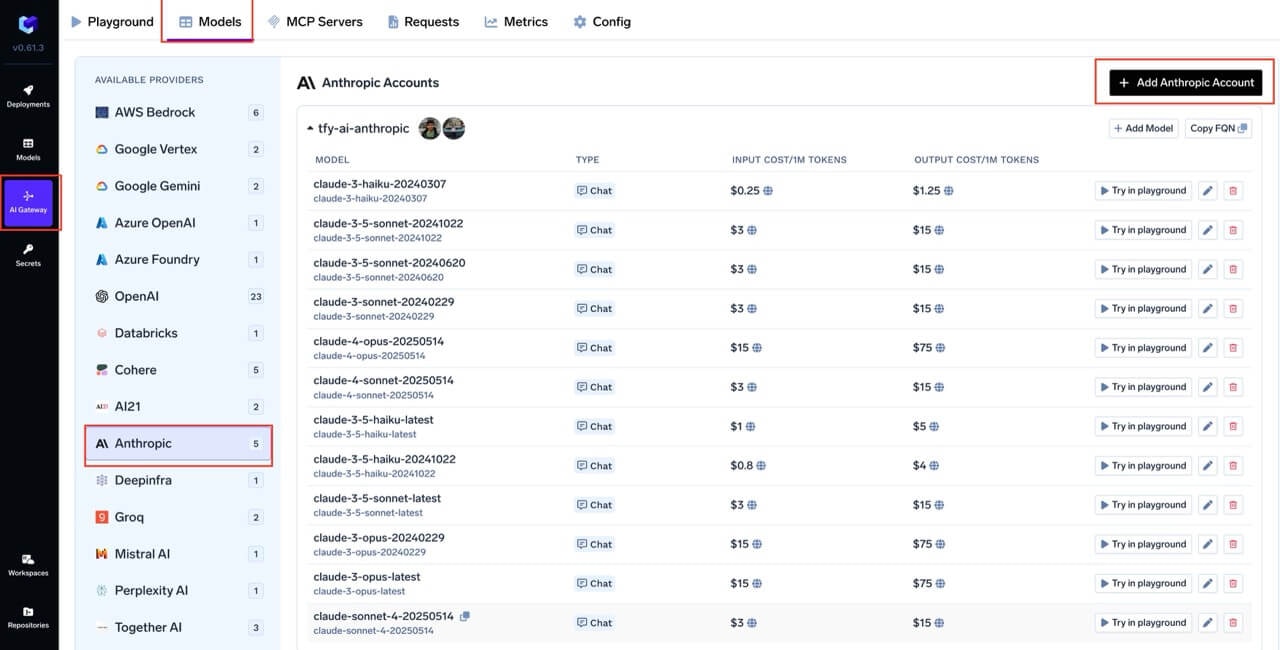
From the TrueFoundry dashboard, navigate to AI Gateway > Models and select Anthropic.
Navigate to Anthropic Models
2
Add Anthropic Account Details
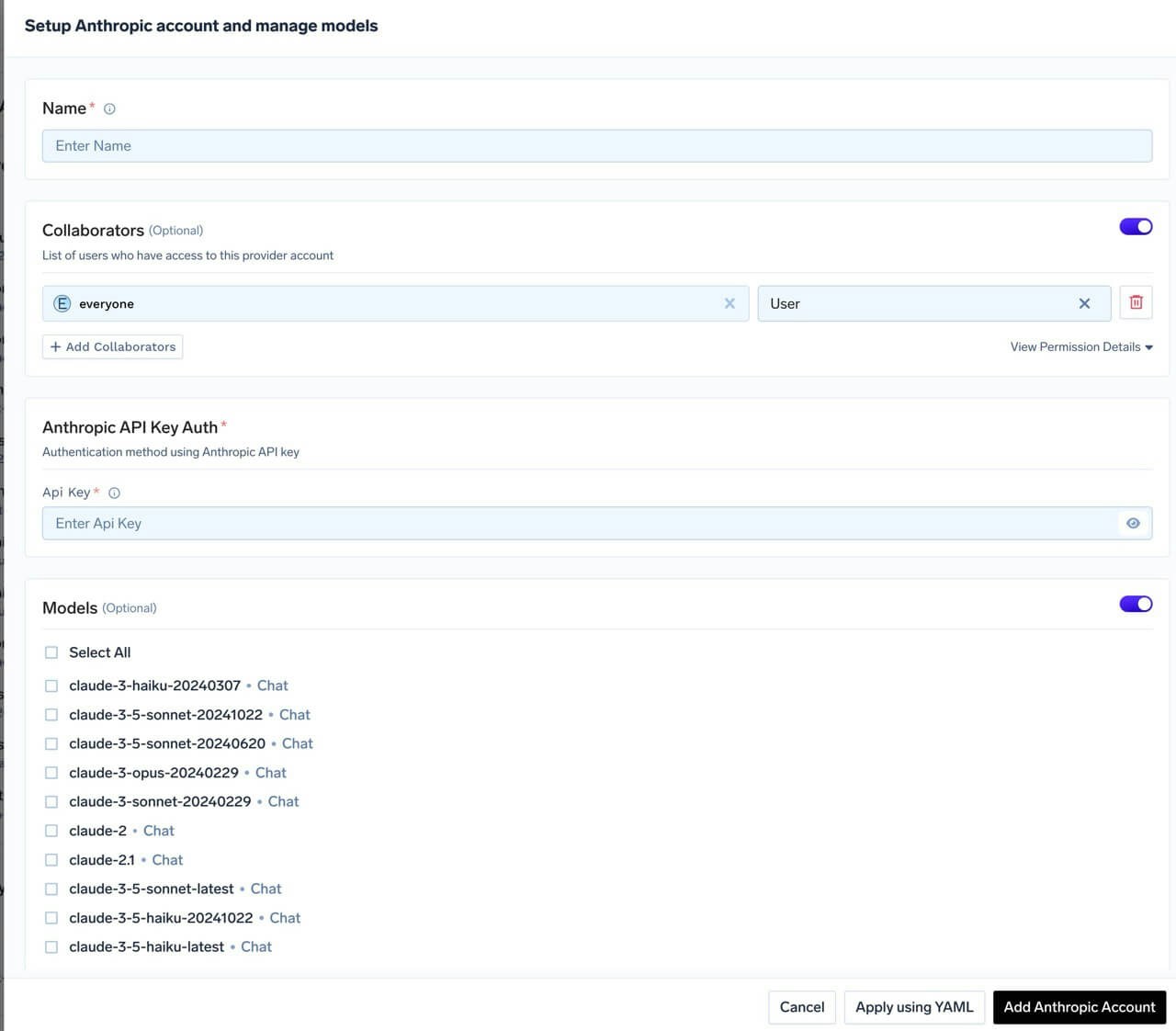
Click Add Anthropic Account. Give a unique name to your Anthropic account and complete the form with your Anthropic authentication details (API Key). Add collaborators to your account, this will give access to the account to other users/teams. Learn more about access control here. For Claude subscription passthrough (Team, Pro, Max — see Claude Code → Authentication by plan), leave the API key empty. Under advanced settings, you can optionally set a Base URL to route requests through a proxy. It must include the version path, for example https://my-proxy.example.com/v1. If unset, requests go to https://api.anthropic.com/v1.
Anthropic Model Account Form
3
Add Models
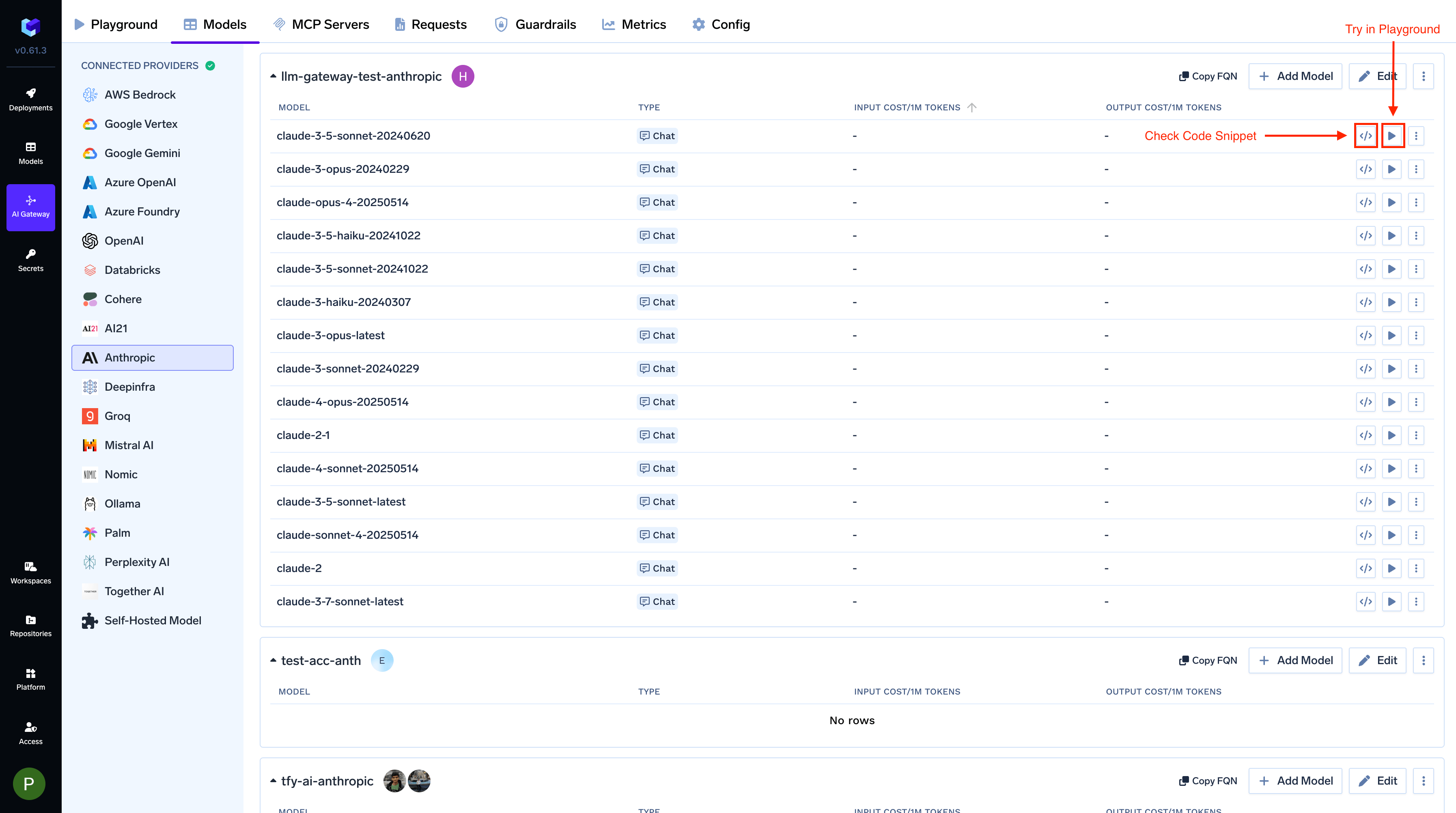
Select the model from the list. If you see the model you want to add in the list of checkboxes, we support public model cost for these models.
(Optional) If the model you are looking for is not present in the options, you can add it using + Add Model at the end of list (scroll down to see the option) by filling the form.
TrueFoundry AI Gateway supports all text and image models in Anthropic.The complete list of models supported by Bedrock can be found here.
After adding the models, you can perform inference using an Anthropic-compatible API via the Playground or by integrating with your own application.
For Anthropic streaming requests, AI Gateway supports fallback on overloaded_error before generation begins. The AI Gateway waits for the first non-empty stream chunk; if it receives an overloaded_error before that first chunk, it automatically falls back to the next configured model. Learn more in Anthropic Stream Overload Fallback.
To enable Anthropic beta features, send x-tfy-anthropic-beta with a comma-separated list of beta tokens. When this header is present, it replaces every other client beta source — including the anthropic-beta header and body anthropic_beta — and is not merged with them. The only override is a virtual model’s headers_override of x-tfy-anthropic-beta itself; setting anthropic-beta in the override does not replace it. See Header overrides.
Anthropic’s Messages API requires max_tokens. If your request omits it, the AI Gateway sends a default of 2048 tokens so the request does not fail. Responses longer than that are truncated with finish_reason: "length", so set max_tokens explicitly for long-form generations. See max_tokens defaults per provider.
Once your Anthropic model account is configured, the following API surfaces are available through the AI Gateway. The table below summarizes each endpoint alongside platform feature support (tracing, cost tracking).
The chat completions endpoint is the most widely used — it supports streaming, tools, multimodal input (images, PDF), structured JSON outputs, prompt caching and extended thinking.
Full provider capability matrix: Chat Completions API.
Python
from openai import OpenAIclient = OpenAI( api_key="your-truefoundry-api-key", base_url="{GATEWAY_BASE_URL}",)response = client.chat.completions.create( model="anthropic-main/claude-sonnet-4-20250514", messages=[ {"role": "user", "content": "What is TrueFoundry in one line?"}, ],)print(response.choices[0].message.content)
Streaming
Set stream=True to start streaming responses and iterate over delta chunks. You may defensively check that chunk.choices is non-empty and delta.content is not None.
Python
stream = client.chat.completions.create( model="openai-main/gpt-4o-mini", messages=[{"role": "user", "content": "Count from 1 to 5."}], stream=True,)for chunk in stream: if ( chunk.choices and len(chunk.choices) > 0 and chunk.choices[0].delta.content is not None ): print(chunk.choices[0].delta.content, end="", flush=True)
Function calling / tools
Advertise a tool, hand the model’s tool_calls back as a tool role message, then request the final response. Use tool_choice to force the model to call a specific tool when you need deterministic behaviour.
Claude 3+ models support image inputs via the image_url content part.The URL can be a public HTTP URL or an inline data:image/...;base64,... URI. For self-contained examples we recommend the inline form.
Python
image_url = ( "https://upload.wikimedia.org/wikipedia/commons/thumb/d/dd/Gfp-wisconsin-madison-the-nature-boardwalk.jpg/2560px-Gfp-wisconsin-madison-the-nature-boardwalk.jpg")response = client.chat.completions.create( model="anthropic-main/claude-sonnet-4-20250514", messages=[{ "role": "user", "content": [ {"type": "text", "text": "Describe this image in one sentence."}, {"type": "image_url", "image_url": {"url": image_url}}, ], }],)print(response.choices[0].message.content)
PDF document input
Claude models support PDF documents via the file content type with base64 encoding.
Python
import base64with open("sample.pdf", "rb") as f: pdf_b64 = base64.b64encode(f.read()).decode("ascii")response = client.chat.completions.create( model="anthropic-main/claude-sonnet-4-20250514", messages=[{ "role": "user", "content": [ {"type": "text", "text": "What text is in this PDF?"}, { "type": "file", "file": { "filename": "sample.pdf", "file_data": f"data:application/pdf;base64,{pdf_b64}", }, }, ], }],)print(response.choices[0].message.content)
Structured outputs (JSON schema)
Use response_format={"type": "json_schema", ...} to force the model to return data matching a JSON schema. Claude 4.5/4.6 models use native JSON schema support; older models use a tool-conversion fallback.
Anthropic does not support numeric constraint parameters (ge, le,minimum, maximum) in schemas. If you use Pydantic-generated schemas,
strip these constraints before passing them through.
Python
import jsonschema = { "name": "person", "schema": { "type": "object", "properties": { "name": {"type": "string"}, "age": {"type": "integer"}, "hobbies": {"type": "array", "items": {"type": "string"}}, }, "required": ["name", "age", "hobbies"], "additionalProperties": False, }, "strict": True,}response = client.chat.completions.create( model="anthropic-main/claude-sonnet-4-20250514", messages=[{"role": "user", "content": "Invent a fictional person with name, age, and three hobbies."}], response_format={"type": "json_schema", "json_schema": schema},)message = response.choices[0].messageif getattr(message, "refusal", None): print("model refused:", message.refusal)elif not message.content: print("model returned empty content")else: print(json.dumps(json.loads(message.content), indent=2))
Prompt caching
Anthropic requires explicitcache_control on content blocks you want cached (unlike OpenAI’s automatic caching). Cached tokens appear as cache_creation_input_tokens (first call) and cache_read_input_tokens (subsequent calls) in the usage response.
Minimum cacheable prefix: 1024 tokens for Claude Sonnet/Opus, 2048 tokens for Claude Haiku. Prompts shorter than this will accept the cache_control hint but won’t actually be cached.
Python
response = client.chat.completions.create( model="anthropic-main/claude-sonnet-4-20250514", messages=[ { "role": "system", "content": [ { "type": "text", "text": "<LONG_SYSTEM_PROMPT_OVER_1024_TOKENS>", "cache_control": {"type": "ephemeral", "ttl": "5m"}, }, ], }, {"role": "user", "content": "What should I check in a Helm chart review?"}, ],)usage = response.usageextra = getattr(usage, "model_extra", {}) or {}print("cache_creation:", extra.get("cache_creation_input_tokens", 0))print("cache_read :", extra.get("cache_read_input_tokens", 0))
Extended thinking (reasoning)
Claude Sonnet 3.7, Claude 4, and Claude 4.5 series models support extended thinking. Use the reasoning_effort parameter — the AI Gateway translates it into Anthropic’s native thinking parameter format.
The AI Gateway maps reasoning_effort to a thinking.budget_tokens ratio of the request’s max_tokens: none = 0%, low = 30%, medium = 60%, high = 90%.
The response includes reasoning_content (plain text) and thinking_blocks (structured blocks with cryptographic signatures required for multi-turn reasoning continuity).
Python
response = client.chat.completions.create( model="anthropic-main/claude-sonnet-4-20250514", messages=[{"role": "user", "content": "A bat and ball cost $1.10.The bat costs $1.00 more than the ball. How much is the ball?"}], reasoning_effort="high", max_tokens=8000,)msg = response.choices[0].messageprint("answer:", msg.content)print("reasoning:", getattr(msg, "reasoning_content", None))# thinking_blocks carry signatures for multi-turn continuityfor block in getattr(msg, "thinking_blocks", []) or []: print(" block:", block.get("type"), "signature:", block.get("signature", "")[:30])
Always echo thinking_blocks exactly as returned when continuing a conversation. Blocks with missing or modified signature fields are rejected by Anthropic.
Messages API
Anthropic’s native Messages API (/messages) is also exposed through the AI Gateway, letting you use the official anthropic Python SDK directly.
You get the same gateway features — routing, logging, rate-limiting, budget management — as with the OpenAI-compatible interface.
Full docs: Messages API, Native SDK Support
The AI Gateway accepts both Anthropic SDK auth patterns and translates
internally:
api_key=TFY_API_KEY - SDK sends the x-api-key header
auth_token=TFY_API_KEY — SDK sends the Authorization: Bearer header
Either works; the request body is identical. api_key is the idiomatic Anthropic SDK pattern - use it unless you have a reason to send a Bearer token.
Python
import osfrom anthropic import Anthropicclient = Anthropic( api_key="your-truefoundry-api-key", base_url="{GATEWAY_BASE_URL}",)message = client.messages.create( model="anthropic-main/claude-sonnet-4-20250514", max_tokens=256, # `system` is a top-level parameter in Anthropic's native API, not a message role. Pass it here — not inside `messages`. system="You answer in one short sentence.", messages=[ {"role": "user", "content": "What is TrueFoundry in one line?"} ],)print(message.content[0].text)print(message.usage)
Streaming
Use .messages.stream() and iterate over text_stream for incremental
output.
Python
with client.messages.stream( model="anthropic-main/claude-sonnet-4-20250514", max_tokens=256, messages=[{"role": "user", "content": "Count from 1 to 5, one per line."}],) as stream: for text in stream.text_stream: print(text, end="", flush=True)
Files API
Upload, list, retrieve, and delete files held by the AI Gateway. The AI Gateway translates the OpenAI-compatible Files API into Anthropic’s native Files API automatically.
Full docs: Files API.
The Files API requires the x-tfy-provider-name header on the client so the AI Gateway can route the request to the right Anthropic model account.
File content retrieval (files.content) only works for files created by skills or the code execution tool. User-uploaded files cannot be downloaded back — you can only list metadata and delete them.
Python
from openai import OpenAIfiles_client = OpenAI( api_key="your-truefoundry-api-key", base_url="{GATEWAY_BASE_URL}", default_headers={"x-tfy-provider-name": "anthropic-main"},)# Uploadwith open("document.txt", "rb") as f: uploaded = files_client.files.create(file=f, purpose="assistants")print(uploaded.id, uploaded.filename, uploaded.bytes)# List (slice client-side; the AI Gateway may not honour `limit`)listed = files_client.files.list()for f in listed.data[:5]: print(f.id, f.purpose, f.bytes)# Retrieve metadatameta = files_client.files.retrieve(uploaded.id)# Deletedeleted = files_client.files.delete(uploaded.id)print(deleted.deleted)
Was this page helpful?
Assistant
Responses are generated using AI and may contain mistakes.