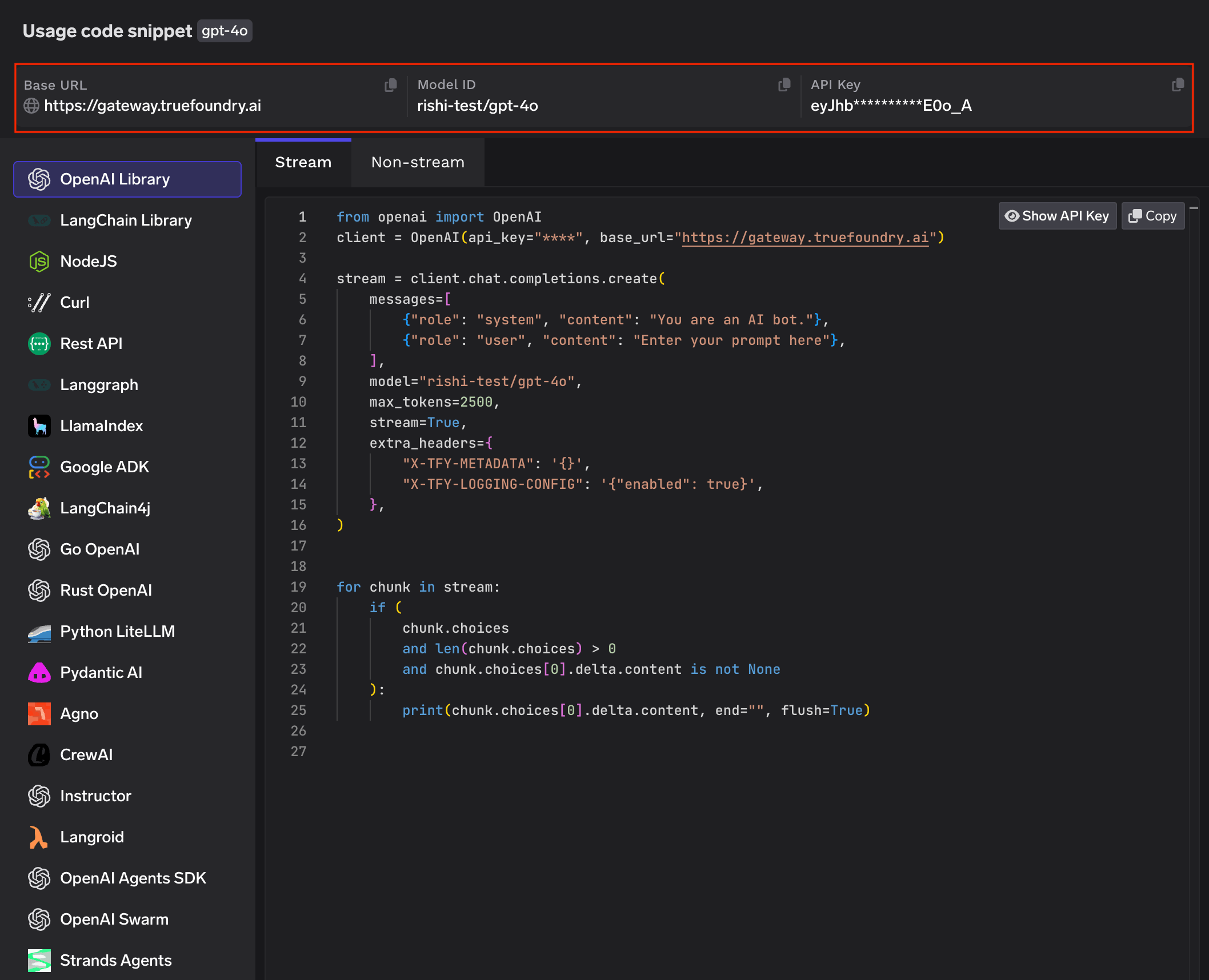
This section explains the steps to add OpenAI models and configure the required access controls.
1
Navigate to OpenAI Models in AI Gateway
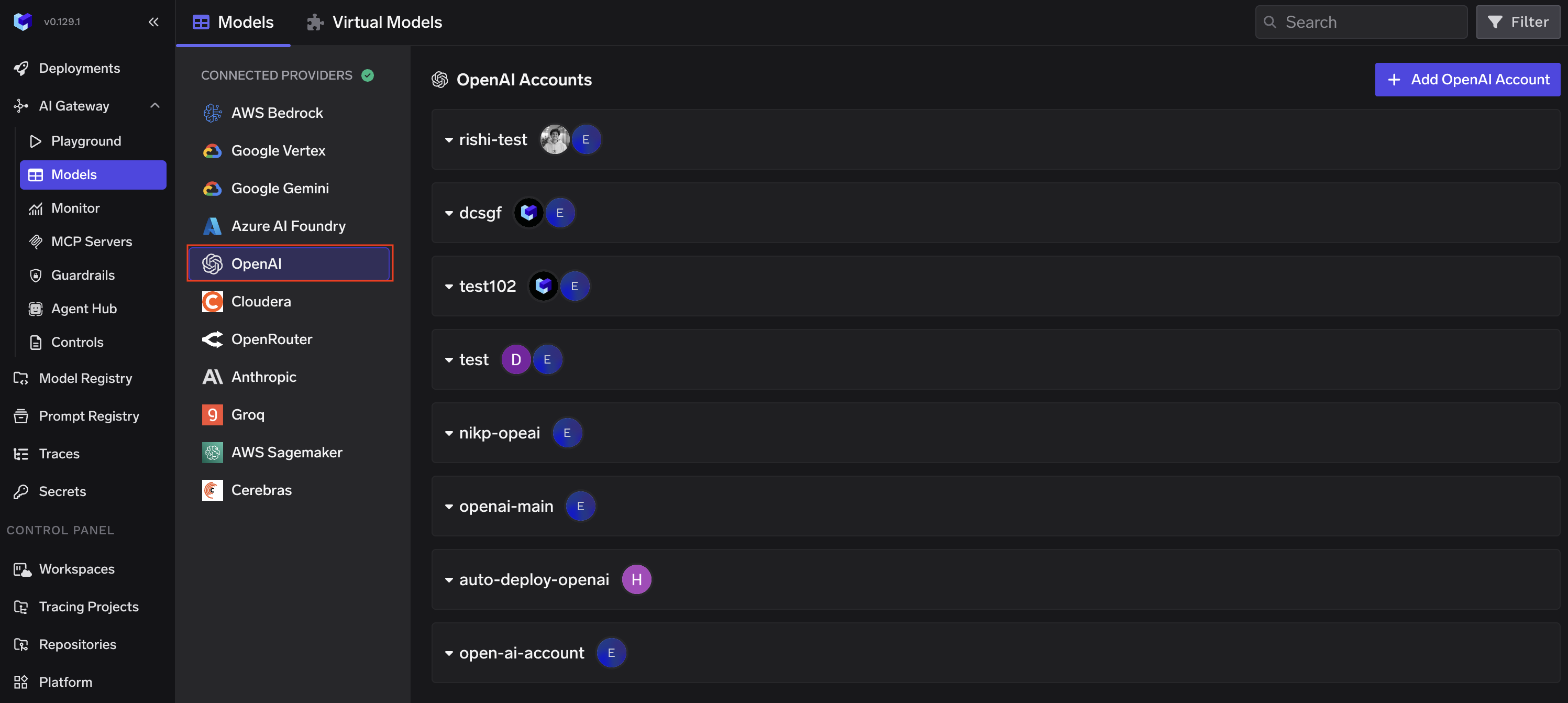
From the TrueFoundry dashboard, navigate to AI Gateway > Models and select OpenAI.
OpenAI Accounts page
2
Configure Account
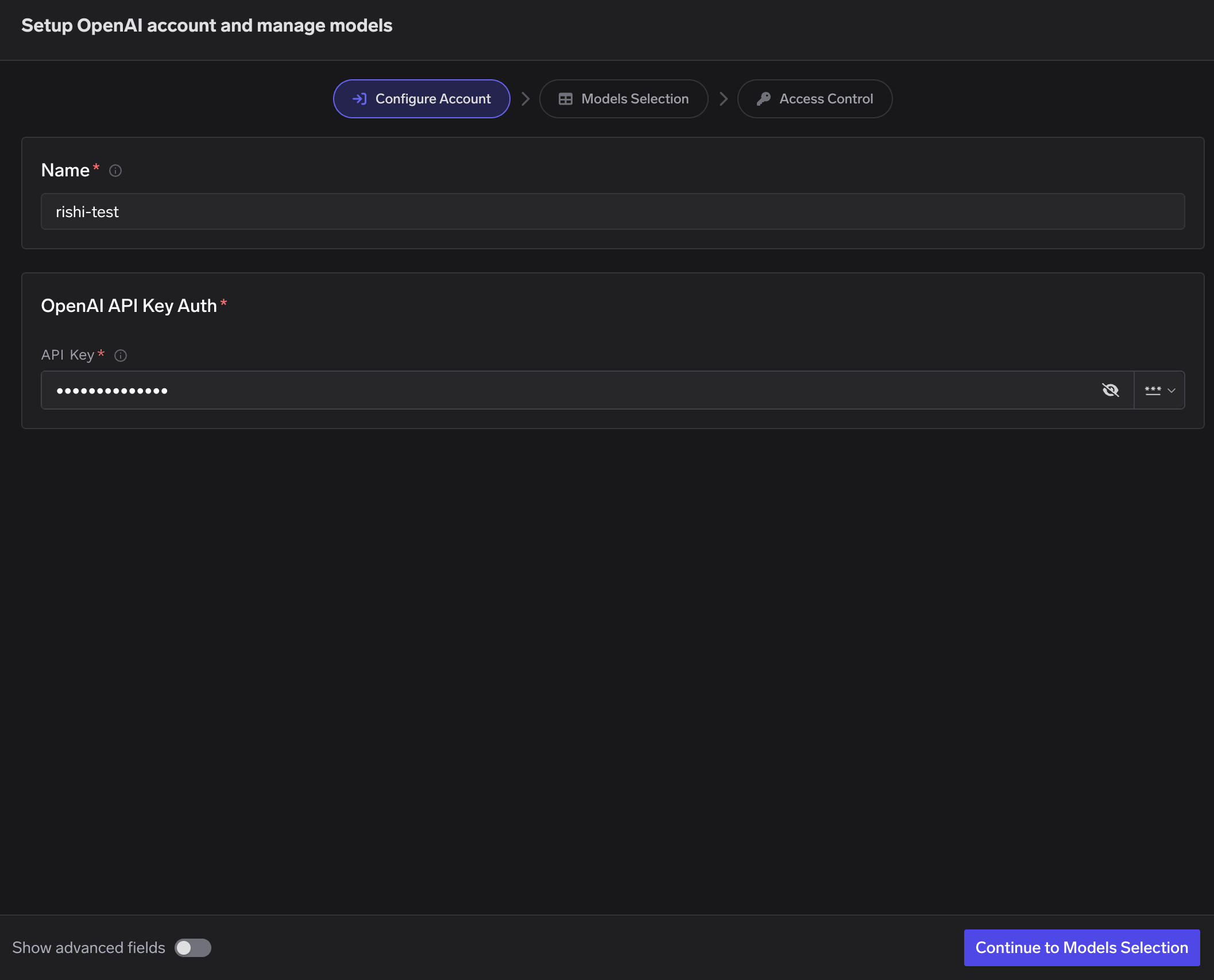
Click Add OpenAI Account. Give a unique name to your OpenAI account and provide your API Key.
Configure Account - enter name and API key
3
Select Models
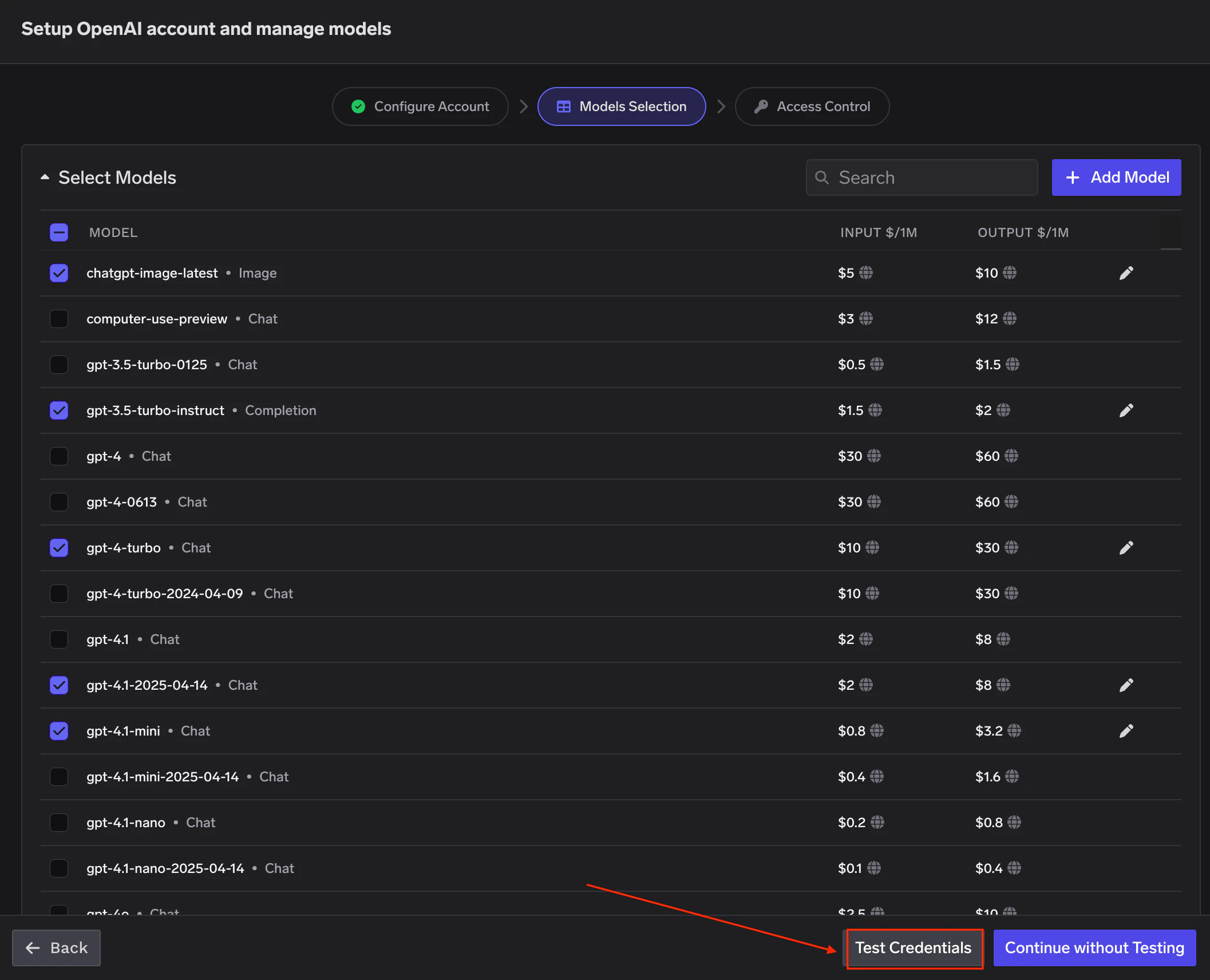
Select the models you want to enable from the list. Pricing per million tokens is shown for each model.
Click Test Credentials to verify your API key against the selected models before saving.
Models Selection - pick models and test credentials
If the model you are looking for is not listed, click + Add Model at the bottom to add it manually.
TrueFoundry AI Gateway supports all text and image models in OpenAI. The complete list of models supported by OpenAI can be found here.
For OpenAI Decisions models (for example gpt-6-luna), set Model Types to Decision. These models answer on /v1/decisions and /v1/systemone, not chat completions. See Decision.
4
Set Access Control
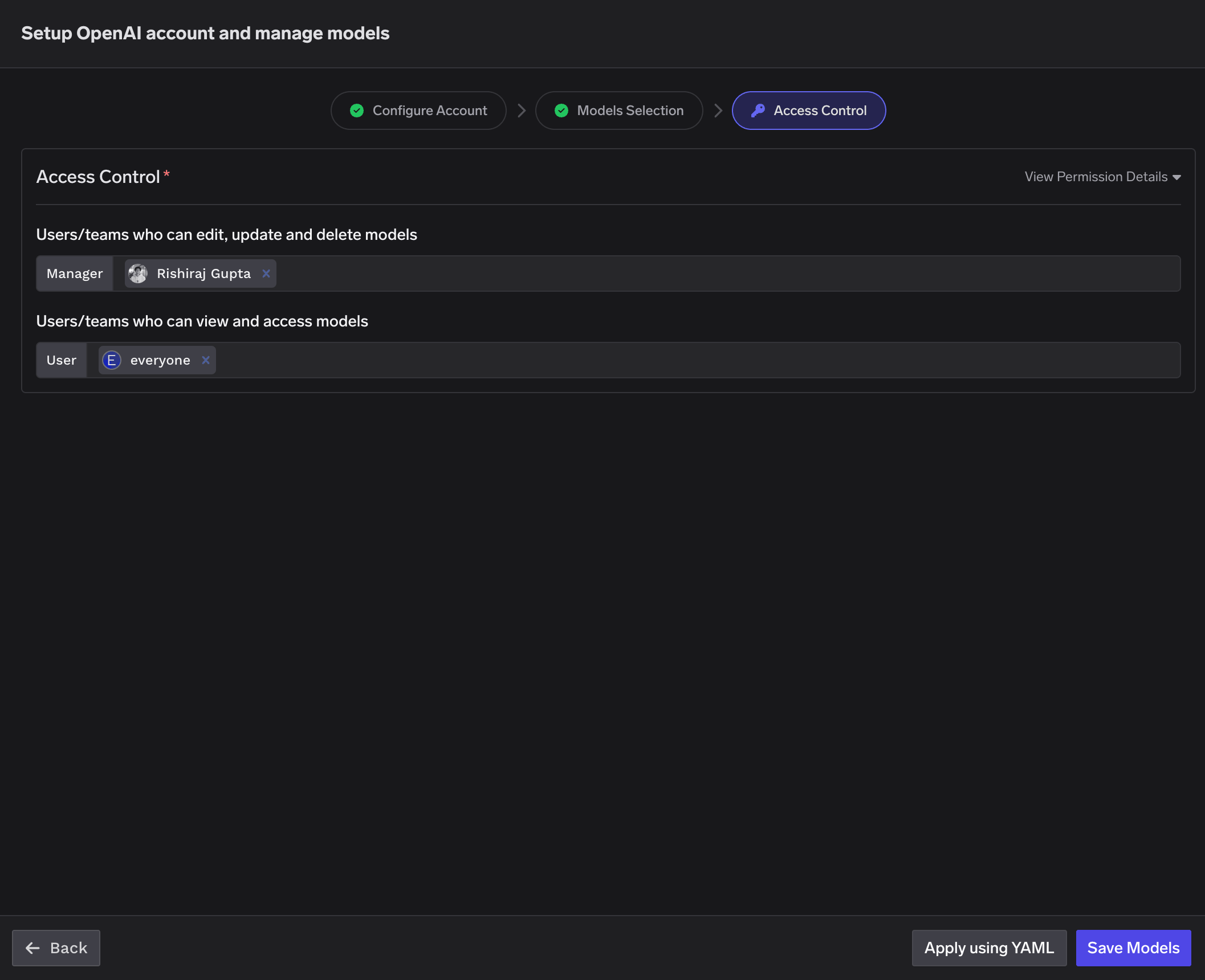
Configure who can manage and access the models in this model account. Learn more about access control here.
Access Control - configure manager and user permissions
Once your OpenAI model account is configured, the following API surfaces are available through the AI Gateway. The table below summarizes each endpoint alongside platform feature support (tracing, cost tracking).
The chat completions endpoint is the most widely used — it supports streaming, function calling, multimodal input (images, audio, PDF), structured JSON outputs, reasoning models, and prompt caching. Full provider capability matrix: Chat Completions API
Python
from openai import OpenAIclient = OpenAI( api_key="your-truefoundry-api-key", base_url="{GATEWAY_BASE_URL}",)response = client.chat.completions.create( model="openai-main/gpt-4o-mini", messages=[ {"role": "system", "content": "You answer in one short sentence."}, {"role": "user", "content": "What is TrueFoundry?"}, ],)print(response.choices[0].message.content)
Streaming
Set stream=True to start streaming responses and iterate over delta chunks. You may defensively check that chunk.choices is non-empty and delta.content is not None as some provider chunks (role deltas, finish markers) have no content.
Python
stream = client.chat.completions.create( model="openai-main/gpt-4o-mini", messages=[{"role": "user", "content": "Count from 1 to 5."}], stream=True,)for chunk in stream: if ( chunk.choices and len(chunk.choices) > 0 and chunk.choices[0].delta.content is not None ): print(chunk.choices[0].delta.content, end="", flush=True)
Request parameters
Request parameters like temperature, max_tokens, top_p, frequency_penalty, presence_penalty, and stop fine-tune generation behaviour.
Some models don’t support all parameters — e.g. temperature is not supported on o-series reasoning models.
Python
response = client.chat.completions.create(model="openai-main/gpt-4o-mini",messages=[ { "role": "system", "content": "You are a creative storyteller. Keep responses under two sentences. Never use the word 'delve'.", }, {"role": "user", "content": "Write about a robot learning to paint."},],temperature=0.9,max_tokens=100,top_p=0.95,frequency_penalty=0.5,presence_penalty=0.3,stop=["\n\n"],)print(response.choices[0].message.content)
Function calling / tools
Advertise a tool, hand the model’s tool_calls back as a tool role message, then request the final response. Use tool_choice to force the model to call a specific tool when you need deterministic behaviour, and defensively unwrap tool_calls since the model may still return content instead of a tool call on some prompts.
Python
import jsontools = [{ "type": "function", "function": { "name": "get_weather", "description": "Get the current weather for a city.", "parameters": { "type": "object", "properties": {"city": {"type": "string"}}, "required": ["city"], }, },}]messages = [{"role": "user", "content": "What's the weather in Bengaluru right now?"}]first = client.chat.completions.create( model="openai-main/gpt-4o-mini", messages=messages, tools=tools, tool_choice={"type": "function", "function": {"name": "get_weather"}},)assistant_msg = first.choices[0].messagetool_calls = assistant_msg.tool_calls or []if tool_calls: tool_call = tool_calls[0] messages.append(assistant_msg) messages.append({ "role": "tool", "tool_call_id": tool_call.id, "content": json.dumps({"city": "Bengaluru", "temp_c": 28, "summary": "partly cloudy"}), }) second = client.chat.completions.create( model="openai-main/gpt-4o-mini", messages=messages, ) print(second.choices[0].message.content)
Vision (multimodal input)
Send images as part of a message via the image_url content part. The URL can be a public HTTP URL or an inline data:image/...;base64,... URI.
Python
image_url = ( "https://upload.wikimedia.org/wikipedia/commons/thumb/d/dd/Gfp-wisconsin-madison-the-nature-boardwalk.jpg/2560px-Gfp-wisconsin-madison-the-nature-boardwalk.jpg")response = client.chat.completions.create( model="openai-main/gpt-4o-mini", messages=[{ "role": "user", "content": [ {"type": "text", "text": "Describe this image in one sentence."}, {"type": "image_url", "image_url": {"url": image_url}}, ], }],)print(response.choices[0].message.content)
PDF document input
Send PDF documents as part of a message via the file content type with base64 encoding.
Python
import base64with open("sample.pdf", "rb") as f: pdf_b64 = base64.b64encode(f.read()).decode("ascii")response = client.chat.completions.create( model="openai-main/gpt-4o-mini", messages=[{ "role": "user", "content": [ {"type": "text", "text": "What text is in this PDF?"}, { "type": "file", "file": { "filename": "sample.pdf", "file_data": f"data:application/pdf;base64,{pdf_b64}", }, }, ], }],)print(response.choices[0].message.content)
Response format (structured outputs)
Control the output format with response_format. Two modes:
JSON object — {"type": "json_object"} — valid JSON, no schema. Include “respond in JSON” in the prompt.
JSON schema — {"type": "json_schema", ...} — strict schema conformance. Set all properties in required.
Reasoning models (o3, o4-mini, etc.) expose a separate pool of reasoning tokens that show up in response.usage. Some request parameters like temperature are not supported on these models.
Python
response = client.chat.completions.create( model="openai-main/o4-mini", messages=[{"role": "user", "content": "A bat and ball cost $1.10. The bat costs $1.00 more than the ball. How much is the ball?"}],)print(response.choices[0].message.content)print(response.usage) # includes reasoning_tokens
Prompt caching
OpenAI supports automatic prompt caching for gpt-4o and newer models. Pass an optional prompt_cache_key parameter to improve cache hit rates when requests share common prefixes. Cached tokens appear in usage.prompt_tokens_details.cached_tokens.
Python
response = client.chat.completions.create( model="openai-main/gpt-4o-mini", messages=[ {"role": "system", "content": "You are a senior cloud architect..."}, {"role": "user", "content": "What should I check in a Helm chart review?"}, ], prompt_cache_key="my-cache-key",)cached = getattr( getattr(response.usage, "prompt_tokens_details", None), "cached_tokens", 0,)print(f"prompt_tokens={response.usage.prompt_tokens} cached_tokens={cached}")
Embeddings
The embeddings endpoint accepts a single string or a list of strings and returns dense vectors suitable for semantic search, clustering, or RAG. Full docs: Embed API.
Python
response = client.embeddings.create( model="openai-main/text-embedding-3-small", input=[ "TrueFoundry is an AI platform.", "TrueFoundry helps teams deploy LLMs.", ],)print(len(response.data), "vectors of dim", len(response.data[0].embedding))
Supported models: text-embedding-3-small, text-embedding-3-large, text-embedding-ada-002. See the OpenAI embeddings guide for dimension and pricing details.
Responses API
OpenAI’s Responses API is a stateful alternative to chat completions that manages conversation state on the server and supports retrieve, delete, and multimodal inputs. Full docs: Responses API.
The Responses API requires the x-tfy-provider-name header. Set it on default_headers when you construct the client — the AI Gateway uses it to route the request to the right OpenAI model account.
Python
from openai import OpenAIclient = OpenAI( api_key="your-truefoundry-api-key", base_url="{GATEWAY_BASE_URL}", default_headers={"x-tfy-provider-name": "openai-main"},)created = client.responses.create( model="openai-main/gpt-4o-mini", input=[{"role": "user", "content": "Give me a two-word tagline."}],)print(created.id, created.output_text)# Retrieve by idfetched = client.responses.retrieve(created.id)
Image Generation
Generate images with DALL·E 2/3 or GPT-Image via client.images.generate. The response contains either b64_json or url depending on the model and request parameters — handle both. Full docs: Image Generation.
Python
from openai import OpenAIimport base64client = OpenAI( api_key="your-truefoundry-api-key", base_url="{GATEWAY_BASE_URL}")response = client.images.generate( model="openai-main/gpt-image-1", prompt="A minimalist isometric illustration of a cloud with a lightning bolt.", size="1024x1024", n=1,)item = response.data[0]if getattr(item, "b64_json", None): image_bytes = base64.b64decode(item.b64_json)else: import requests image_bytes = requests.get(item.url, timeout=60).contentwith open("generated.png", "wb") as f: f.write(image_bytes)
Edit an existing image with a text prompt via client.images.edit. Same models as image generation, with size constraints: gpt-image-1 accepts PNG/WebP/JPG up to 50 MB and up to 16 input images, while dall-e-2 requires a single square PNG ≤ 4 MB. Full docs: Image Edit.
Python
from openai import OpenAIimport base64client = OpenAI( api_key="your-truefoundry-api-key", base_url="{GATEWAY_BASE_URL}")with open("generated.png", "rb") as image_file: response = client.images.edit( model="openai-main/gpt-image-1", image=image_file, prompt="Add a bright yellow sun in the top-right corner.", size="1024x1024", n=1, )item = response.data[0]if getattr(item, "b64_json", None): edited_bytes = base64.b64decode(item.b64_json)else: import requests edited_bytes = requests.get(item.url, timeout=60).contentwith open("edited.png", "wb") as f: f.write(edited_bytes)
Image Variation
Legacy endpoint — dall-e-2 has been deprecated by OpenAI. The create_variation endpoint only supported dall-e-2, which is no longer available.
Calls to this endpoint may fail post removal. Use images.edit with gpt-image-1 and a variation-style prompt instead (see below).
Legacy: create_variation (dall-e-2 only — deprecated)The original variation API accepted an image and returned creative variations. It required a square PNG ≤ 4 MB and only worked with dall-e-2.
Full docs: Image Variation.
Python
from openai import OpenAIclient = OpenAI( api_key="your-truefoundry-api-key", base_url="{GATEWAY_BASE_URL}")# Legacy — dall-e-2 is deprecated, request may fail post removaltry: with open("generated.png", "rb") as image_file: response = client.images.create_variation( model="openai-main/dall-e-2", image=image_file, size="1024x1024", n=1, ) item = response.data[0] # Same b64_json / url handling as image generation aboveexcept Exception as exc: print(f"image variation skipped: {type(exc).__name__}: {exc}")
Modern: images.edit with variation prompt (gpt-image-1)The recommended replacement is to use images.edit with a variation-style prompt. This works with current models and produces similar results.
Python
import base64with open("generated.png", "rb") as image_file: response = client.images.edit( model="openai-main/gpt-image-1", image=image_file, prompt="Create a subtle variation of this image. Keep the overall composition similar but introduce small creative differences in color and detail.", size="1024x1024", n=1, )item = response.data[0]if getattr(item, "b64_json", None): image_bytes = base64.b64decode(item.b64_json)else: import requests image_bytes = requests.get(item.url, timeout=60).contentwith open("variation.png", "wb") as f: f.write(image_bytes)
Text-to-Speech
Stream spoken audio from text with OpenAI’s TTS models. Use with_streaming_response.create(...) to stream the response body directly to a file or an AsyncIterator. Full docs: Text-to-Speech.
Python
from openai import OpenAIclient = OpenAI( api_key="your-truefoundry-api-key", base_url="{GATEWAY_BASE_URL}")with client.audio.speech.with_streaming_response.create( model="openai-main/gpt-4o-mini-tts", voice="alloy", input="Hello from TrueFoundry.",) as response: response.stream_to_file("out.mp3")
Supported models: gpt-4o-mini-tts, tts-1, tts-1-hd. Supported voices include alloy, echo, fable, onyx, nova, shimmer. See the OpenAI TTS guide for the full list of voices and audio formats.
Speech-to-Text
Transcribe audio files via client.audio.transcriptions.create. Full docs: Audio Transcription.
Python
from openai import OpenAIclient = OpenAI( api_key="your-truefoundry-api-key", base_url="{GATEWAY_BASE_URL}")with open("input.mp3", "rb") as audio_file: transcript = client.audio.transcriptions.create( model="openai-main/whisper-1", file=audio_file, )print(transcript.text)
Translates audio in any source language to English text via client.audio.translations.create. Same whisper-1 model as transcription; the response is always English. Full docs: Audio Translation.
TrueFoundry gates each model entry by capability. A whisper-1 entry registered with transcription only will refuse audio_translation requests with a 400 (audio_translation is not supported for the model). Re-add whisper-1 on the model account with the translation capability enabled to allow this endpoint.
The example below generates a short French TTS sample inline and translates it back to English so the demo is self-contained — text ↔ translated text round-trip with no external audio file.
Python
from openai import OpenAIclient = OpenAI( api_key="your-truefoundry-api-key", base_url="{GATEWAY_BASE_URL}")with open("/path/to/audio.mp3", "rb") as audio_file: response = client.audio.transcriptions.create( model="openai-main/whisper-1", # truefoundry model name file=audio_file, )print(response)
Batch API
Process large volumes of requests asynchronously with lower cost and higher throughput than sync inference. The flow is: upload JSONL → create batch → poll for completion → download results. Full docs: Batch Predictions.
The Batch API requires the x-tfy-provider-name header on the client. Also, the model field inside each JSONL request line must be the bare OpenAI model name (e.g. gpt-4o-mini) — not the TrueFoundry-prefixed one. Routing is handled by the header, not the body.
Python
from openai import OpenAIimport jsonclient = OpenAI( api_key="your-truefoundry-api-key", base_url="{GATEWAY_BASE_URL}", default_headers={"x-tfy-provider-name": "openai-main"},)# 1. Write JSONL inputwith open("batch_input.jsonl", "w") as f: for i, prompt in enumerate(["Say hi in French.", "Say hi in Japanese."]): f.write(json.dumps({ "custom_id": f"req-{i}", "method": "POST", "url": "/v1/chat/completions", "body": { "model": "gpt-4o-mini", # bare name — NOT openai-main/gpt-4o-mini "messages": [{"role": "user", "content": prompt}], }, }) + "\n")# 2. Uploadwith open("batch_input.jsonl", "rb") as f: uploaded = client.files.create(file=f, purpose="batch")# 3. Create batchbatch = client.batches.create( input_file_id=uploaded.id, endpoint="/v1/chat/completions", completion_window="24h",)# 4. Poll until completedimport timewhile batch.status not in {"completed", "failed", "expired", "cancelled"}: time.sleep(10) batch = client.batches.retrieve(batch.id)# 5. Download resultsif batch.status == "completed": raw = client.files.content(batch.output_file_id).read() text = raw.decode("utf-8").strip() print(text)
Files API
Upload, list, retrieve, and delete files held by the AI Gateway (used by Batch and Fine-tuning). Full docs: Files API.
The Files API requires the x-tfy-provider-name header on the client.
Python
from openai import OpenAIclient = OpenAI( api_key="your-truefoundry-api-key", base_url="{GATEWAY_BASE_URL}", default_headers={"x-tfy-provider-name": "openai-main"},)# Listlisted = client.files.list(limit=5)for f in listed.data: print(f.id, f.purpose, f.bytes)# Retrieve metadatameta = client.files.retrieve("file-abc123")# Deletedeleted = client.files.delete("file-abc123")print(deleted.deleted)
Moderation
Identify policy-violating content via client.moderations.create. Routes through the regular client (no x-tfy-provider-name header needed). Full docs: Moderation API.
Python
from openai import OpenAIclient = OpenAI( api_key="your-truefoundry-api-key", base_url="{GATEWAY_BASE_URL}")moderation = client.moderations.create( model="openai-main/omni-moderation-latest", input="I want to help my community thrive.",)result = moderation.results[0]print("flagged:", result.flagged)print("triggered:", [k for k, v in result.categories.model_dump().items() if v])
Supported models: omni-moderation-latest (multi-modal — text + image, recommended) and text-moderation-latest (legacy, text-only).
Fine-tuning
Submit a fine-tuning job for a chat model. The full lifecycle is: upload a JSONL training file → create job → poll → use the resulting model ID. Full docs: Finetune API.
The Fine-tuning API requires the x-tfy-provider-name header on the client. The model field passed to fine_tuning.jobs.create must be the bare upstream OpenAI model name (e.g. gpt-4o-mini-2024-07-18) — not the AI Gateway-prefixed one.
Python
from openai import OpenAIclient = OpenAI( api_key=os.environ["TFY_API_KEY"], base_url=os.environ["TFY_GATEWAY_BASE_URL"], default_headers={"x-tfy-provider-name": "openai-main"},)# 1. Upload training file (minimum 10 examples)with open("training.jsonl", "rb") as f: training_file = client.files.create(file=f, purpose="fine-tune")# 2. Submit the jobjob = client.fine_tuning.jobs.create( training_file=training_file.id, model="gpt-4o-mini-2024-07-18", # bare model name)print(job.id, job.status)# 3. Polljob = client.fine_tuning.jobs.retrieve(job.id)# 4. (or cancel)client.fine_tuning.jobs.cancel(job.id)
Fine-tuning takes minutes to hours and incurs real charges on your upstream OpenAI account. For training file format and full lifecycle, see the Fine-tuning docs.
Realtime API
OpenAI’s Realtime API streams full-duplex audio (and text) over a WebSocket, enabling low-latency voice interactions. On TrueFoundry, the realtime endpoint lives at:
The host is the bare gateway host — no /api/llm suffix.
The OpenAI provider-account name is encoded in the URL path, not in the model name. The model passed to client.realtime.connect(model=...) is the bare upstream OpenAI name (e.g. gpt-4o-realtime-preview).
The recommended client is AsyncOpenAI from openai[realtime], which handles the WebSocket framing and event schema for you. Full docs: Realtime API.For browser WebRTC, mint an ephemeral client secret through the Proxy API and connect the browser directly to OpenAI — see OpenAI Realtime with WebRTC. Live WebRTC media is not proxied through the gateway.
Python
import asyncioimport osfrom urllib.parse import urlparsefrom openai import AsyncOpenAIgateway_host = urlparse(os.environ["TFY_GATEWAY_BASE_URL"]).netlocws_base_url = f"wss://{gateway_host}/live/openai-main"async def main(): client = AsyncOpenAI( api_key=os.environ["TFY_API_KEY"], websocket_base_url=ws_base_url, ) async with client.realtime.connect(model="gpt-4o-realtime-preview") as connection: await connection.session.update(session={ "type": "realtime", "output_modalities": ["text"], "instructions": "You reply in one short sentence.", }) await connection.conversation.item.create(item={ "type": "message", "role": "user", "content": [{"type": "input_text", "text": "Say hello in one line."}], }) await connection.response.create() async for event in connection: if event.type == "response.output_text.delta": print(event.delta, end="", flush=True) elif event.type == "response.done": print() breakasyncio.run(main())
For full-duplex audio (mic input + speaker output), use output_modalities: ["audio"], add an audio.input.turn_detection block, and stream PCM chunks through connection.input_audio_buffer.append. See the OpenAI realtime audio reference for a complete sounddevice-based example — it works against the AI Gateway unchanged, just point websocket_base_url at wss://{host}/live/openai-main.
Local audio hardware is required for mic/speaker I/O. Jupyter kernels running over SSH won’t have access to the host’s audio devices — run the audio example locally.
Decision (OpenAI Decisions)
OpenAI decision models answer typed predicate, choice, and score questions about text or images and return probabilities instead of generated text. Add the model with Model Types set to Decision (for example gpt-6-luna). Decision models bill input tokens only, so set the output cost to 0.Call POST /v1/decisions with OpenAI’s input + questions list, or POST /v1/systemone with a System One body — the AI Gateway translates. Image parts (input_image) work only on this provider. Full docs: Decisions API.
Python
import osimport requestsgateway_base_url = os.environ["GATEWAY_BASE_URL"].rstrip("/")response = requests.post( f"{gateway_base_url}/v1/decisions", headers={"Authorization": f"Bearer {os.environ['TFY_API_KEY']}"}, json={ "model": "openai-main/gpt-6-luna", "input": "I was charged twice for order #4411 and want a refund.", "questions": [ { "type": "predicate", "name": "is_refund_request", "instructions": "Is the customer asking for a refund?", } ], }, timeout=60,)response.raise_for_status()print(response.json()["answers"][0]["probability"])
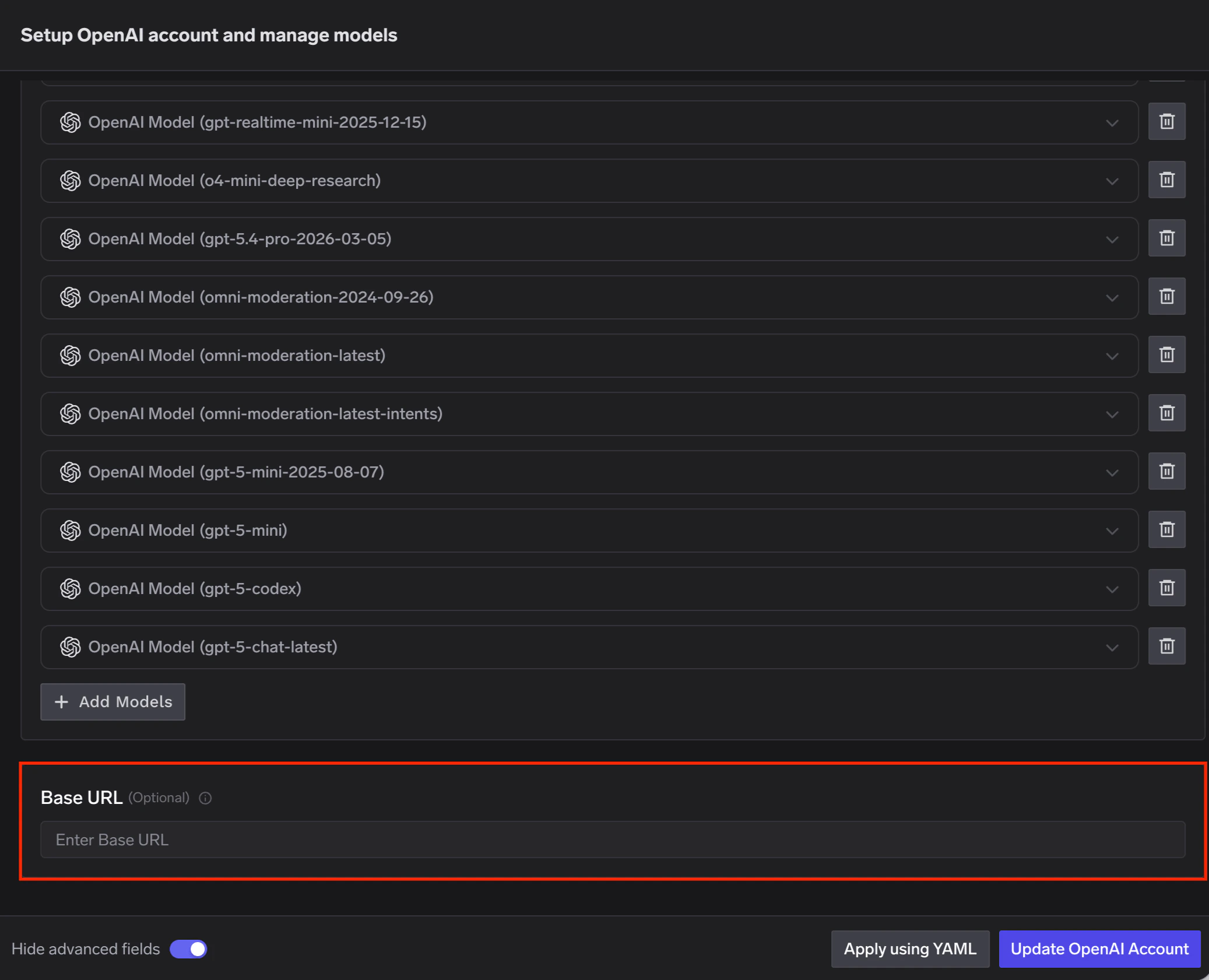
OpenAI offers data residency controls that let you configure the region where your data is stored and, in some regions, processed. When data residency is enabled on your OpenAI account, you must use a region-specific domain prefix for API requests instead of the default api.openai.com.When adding an OpenAI account in TrueFoundry AI Gateway, set the Base URL to the appropriate regional endpoint for your OpenAI project.
Enable Advanced Fields to Set Base URL
Region
Domain Prefix
Base URL
US
us.api.openai.com (required)
https://us.api.openai.com/v1
Europe (EEA + Switzerland)
eu.api.openai.com (required)
https://eu.api.openai.com/v1
Australia
au.api.openai.com (optional)
https://au.api.openai.com/v1
Canada
ca.api.openai.com (optional)
https://ca.api.openai.com/v1
Japan
jp.api.openai.com (optional)
https://jp.api.openai.com/v1
India
in.api.openai.com (optional)
https://in.api.openai.com/v1
Singapore
sg.api.openai.com (optional)
https://sg.api.openai.com/v1
South Korea
kr.api.openai.com (optional)
https://kr.api.openai.com/v1
United Kingdom
gb.api.openai.com (required)
https://gb.api.openai.com/v1
United Arab Emirates
ae.api.openai.com (required)
https://ae.api.openai.com/v1
Regions marked as (required) must use the regional domain prefix for all requests. Regions marked as (optional) can use the prefix to improve latency, but it is not mandatory.
Non-US regions require approval for Modified Abuse Monitoring or Zero Data Retention on your OpenAI account. For full details on data residency, supported models, and endpoint limitations, refer to the OpenAI data controls documentation.
Was this page helpful?
Assistant
Responses are generated using AI and may contain mistakes.