

How It Works
TrueFoundry follows a split-plane architecture. The control plane is the orchestration layer where you manage and monitor deployments — it can be TrueFoundry-hosted SaaS or self-hosted in your VPC. The compute plane is one or more Kubernetes clusters in your own environment where your workloads actually run. Your code, models, and data never leave your infrastructure.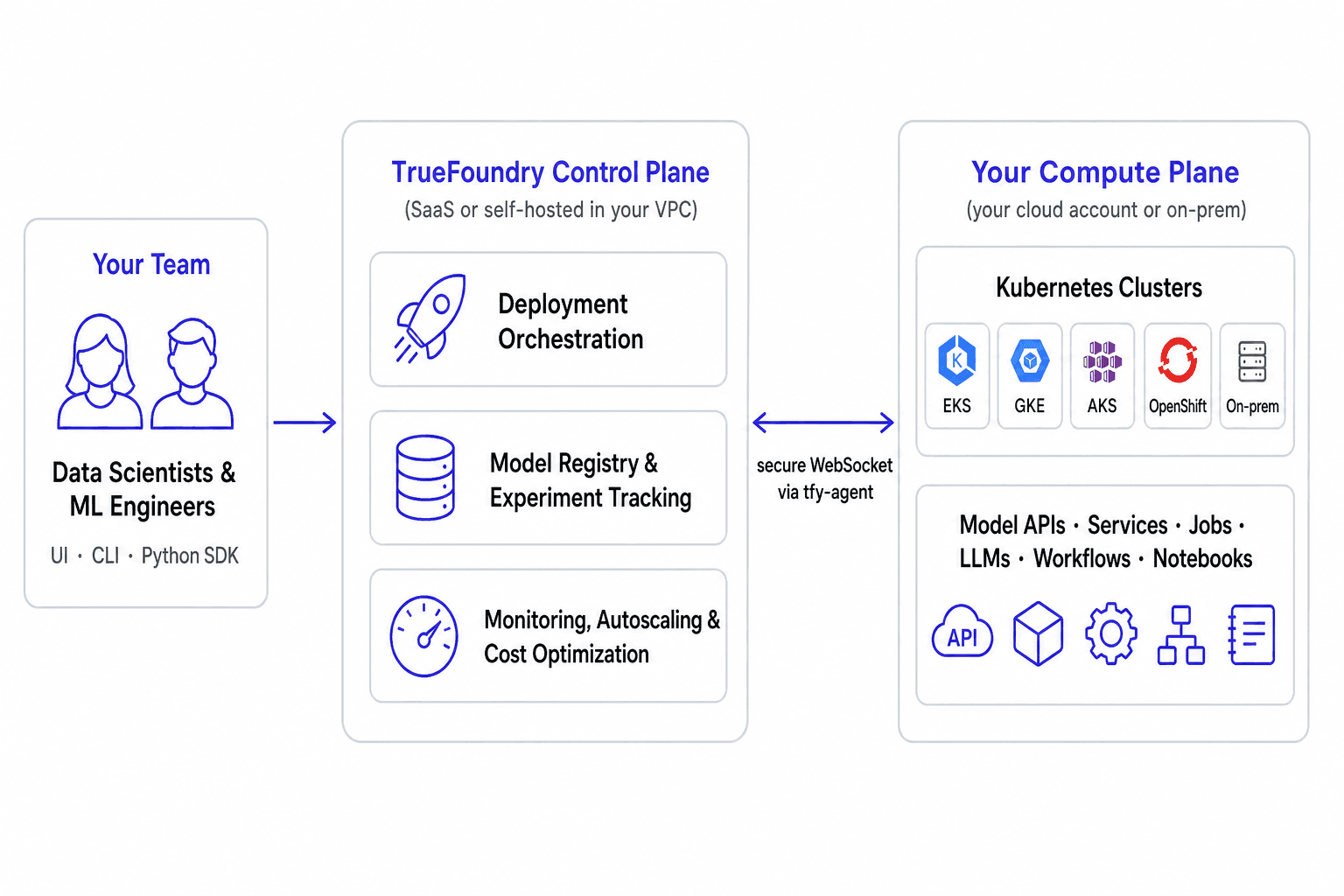
TrueFoundry AI Deployment architecture: the control plane orchestrates workloads on Kubernetes clusters in your own infrastructure
tfy-agent) runs in each compute plane cluster and connects outbound to the control plane over a secure WebSocket, receiving deployment instructions and streaming back the state of your workloads. See TrueFoundry Architecture for the full picture.
Bring Your Own Compute
AI Deployment requires you to bring your own compute. TrueFoundry does not sell or resell GPUs or CPUs — the compute plane always runs in your environment:- Your cloud account: AWS EKS, Google Cloud GKE, or Azure AKS clusters. TrueFoundry can provision a new cluster for you using OpenTofu/Terraform, or attach to an existing one.
- On-prem or other clouds: any standard Kubernetes or OpenShift cluster, including on-prem GPU clusters and neoclouds.
When Should You Use AI Deployment?
AI Deployment is the right fit when you need to run AI workloads on infrastructure you control:- Self-host open-source or fine-tuned LLMs on your own GPUs instead of (or alongside) calling provider APIs, for cost, latency, or data privacy reasons.
- Serve classical ML models as APIs — scikit-learn, XGBoost, PyTorch, TensorFlow, or any framework — with autoscaling and monitoring built in.
- Run training jobs and pipelines on schedules or on demand, including distributed and GPU workloads.
- Give your team self-serve infrastructure — notebooks, SSH servers, and deployment workflows on shared clusters, with access control and cost visibility for platform teams.
- Optimize compute costs with autoscaling, scale-to-zero, spot instances, and fractional GPUs.
What You Can Deploy
Model APIs
Deploy models from the registry or Hugging Face as real-time APIs.
Services
Deploy web services and APIs from your code or Docker images.
Jobs
Run training and batch jobs manually or on a schedule.
LLMs
Deploy open-source LLMs from the model catalogue on your GPUs.
LLM Fine-tuning
Fine-tune LLMs on your own data and compute.
Workflows
Orchestrate multi-step ML pipelines with Python.
Async Services
Queue-backed services for long-running inference.
Notebooks & SSH
Jupyter notebooks and SSH servers on cluster compute.
MCP Servers
Deploy MCP servers from code or npx/uvx packages.
Volumes
Persistent storage for models, datasets, and caches.
Experiment Tracking
Track runs, metrics, artifacts, and models.
Helm & Manifests
Deploy Helm charts and raw Kubernetes manifests.
Next Steps
- Understand the core abstractions — clusters, workspaces, repositories, and environments — in Key Concepts.
- Set up a compute plane cluster by following Deploy Compute Plane.
- Install and authenticate the CLI using Setup For CLI.
- Deploy your first workload with the service deployment guide or the model deployment guide.