

What is Patronus AI?
Patronus AI is a research lab developing training data and simulated environments for frontier AI. Its work spans reinforcement learning environments and digital world models for agents operating in software.Key Features of This Integration
- Advanced AI Evaluation: State-of-the-art evaluation models designed to detect hallucinations, assess context relevance, and evaluate answer correctness across RAG systems and AI agents with industry-leading accuracy.
- Comprehensive Security & Safety Checks: Built-in evaluators for prompt injection detection, sensitive data leakage (PII), toxicity detection, bias assessment, and OWASP risk identification to ensure your AI systems remain secure and compliant.
- Production-Ready Evaluators: Access real-time evaluation with fast API response times (as low as 100ms) and support for both off-the-shelf evaluators and custom evaluators tailored to your specific use cases like brand alignment and tone of voice.
Adding Patronus AI Integration
To add Patronus AI to your TrueFoundry setup, follow these steps: Fill in the Guardrails Group Form- Name: Enter a name for your guardrails group.
- Collaborators: Add collaborators who will have access to this group.
- Patronus Config:
- Name: Enter a name for the Patronus configuration.
- Target: The type of request to use for the Patronus Guardrail (e.g.,
Response,Prompt). - Evaluators: Configure the evaluators to use for the Patronus Guardrail.
- Evaluators Type: Select the evaluator type (e.g.,
Judgefor evaluation models). - Criteria: Select the evaluation criteria from the dropdown (e.g., hallucination detection, toxicity, PII leakage).
- You can add multiple evaluators by clicking “Add Evaluators” to combine different evaluation criteria.
- Evaluators Type: Select the evaluator type (e.g.,
- Patronus Authentication Data:
- API Key: The API key for Patronus AI authentication.
This key is required to authenticate requests to Patronus AI services. You can obtain it from the Patronus AI dashboard by navigating to your account settings and selecting the API Keys section. Ensure you keep this key secure, as it grants access to your Patronus AI evaluation services.
- API Key: The API key for Patronus AI authentication.
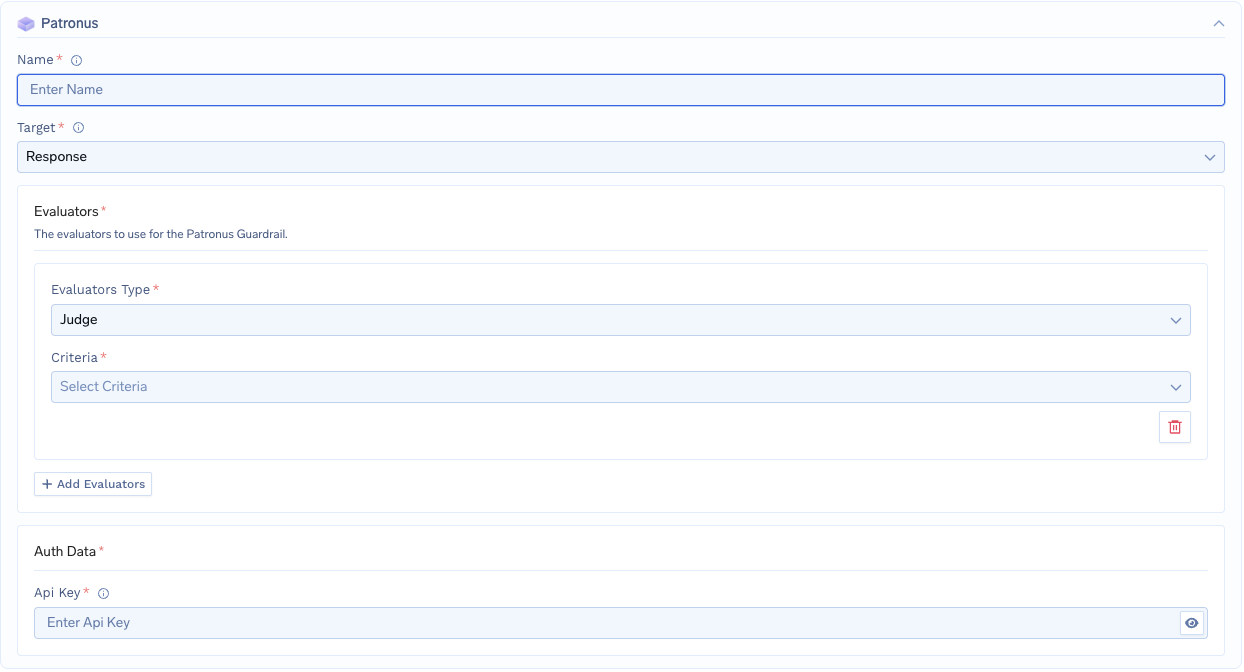
Fill in the Patronus AI Form
Response Structure
The Patronus AI API returns a response with the following structure:Example Response: Prompt Injection Detected
Example Response: Prompt Injection Detected
This is an example response from Patronus AI, where a prompt injection attack is detected. This will be blocked and a 400 error will be returned.
Validation Logic
TrueFoundry uses the Patronus AI response to determine content safety and compliance:- If
data.results[].evaluation_result.passisfalse, the request will be blocked and a 400 error is returned. - If
data.results[].evaluation_result.passistrue, the request will be allowed to proceed.