Verra managed AI governance on TrueFoundry AI Gateway via a deployable FastAPI wrapper.
Deploy the integrations/verraFastAPI wrapper on any public HTTPS host — TrueFoundry, Docker, Render, ECS, Cloud Run, or on-prem. The AI Gateway calls it at llm_input / llm_output via the Custom Guardrail contract; the wrapper forwards traffic to Verra and returns verdict JSON on HTTP 200.
Verra is a managed AI governance product for regulated industries (healthcare, finance, insurance). Every request gets scanned by Verra’s detection pipeline — prompt injection, jailbreak, PII, secrets, exfiltration, policy violations — and recorded in a SOC 2 / HIPAA / EU AI Act compliant audit trail.This integration is a FastAPI proxy. It forwards every TF guardrail request to api.helloverra.com/v1/truefoundry/* authenticated with your Verra API key. Detection runs in Verra’s backend; the wrapper translates the TF contract so you can deploy it inside your own infrastructure.
If you don’t want to deploy a wrapper at all, you can point the AI Gateway directly at https://api.helloverra.com/v1/truefoundry/* with your Verra bearer in Custom Bearer Auth.
Receipts appear in your Verra dashboard at app.helloverra.com/admin/receipts tagged event_type='truefoundry_guardrail', with the TF user mapped to end_user_id and TF metadata namespaced under findings.truefoundry.*.The wrapper always returns HTTP 200 and signals the policy decision in the JSON body. Infrastructure failures return HTTP 5xx. See Custom guardrail response contract.
Blocks secrets and policy violations in the model response
/redact-output
Mutate
Response
Masks PII and secrets in the model response
GET / and GET /health — open health checks. GET /debug/loaded-config — bearer-gated diagnostics.All POST routes expect Authorization: Bearer <WRAPPER_API_KEY>.
VERRA_KEY — your Verra TrueFoundry integration token. Email support@helloverra.com to request one.
WRAPPER_API_KEY — a random string you generate; the AI Gateway sends it as Authorization: Bearer … when calling the wrapper. Independent from VERRA_KEY.
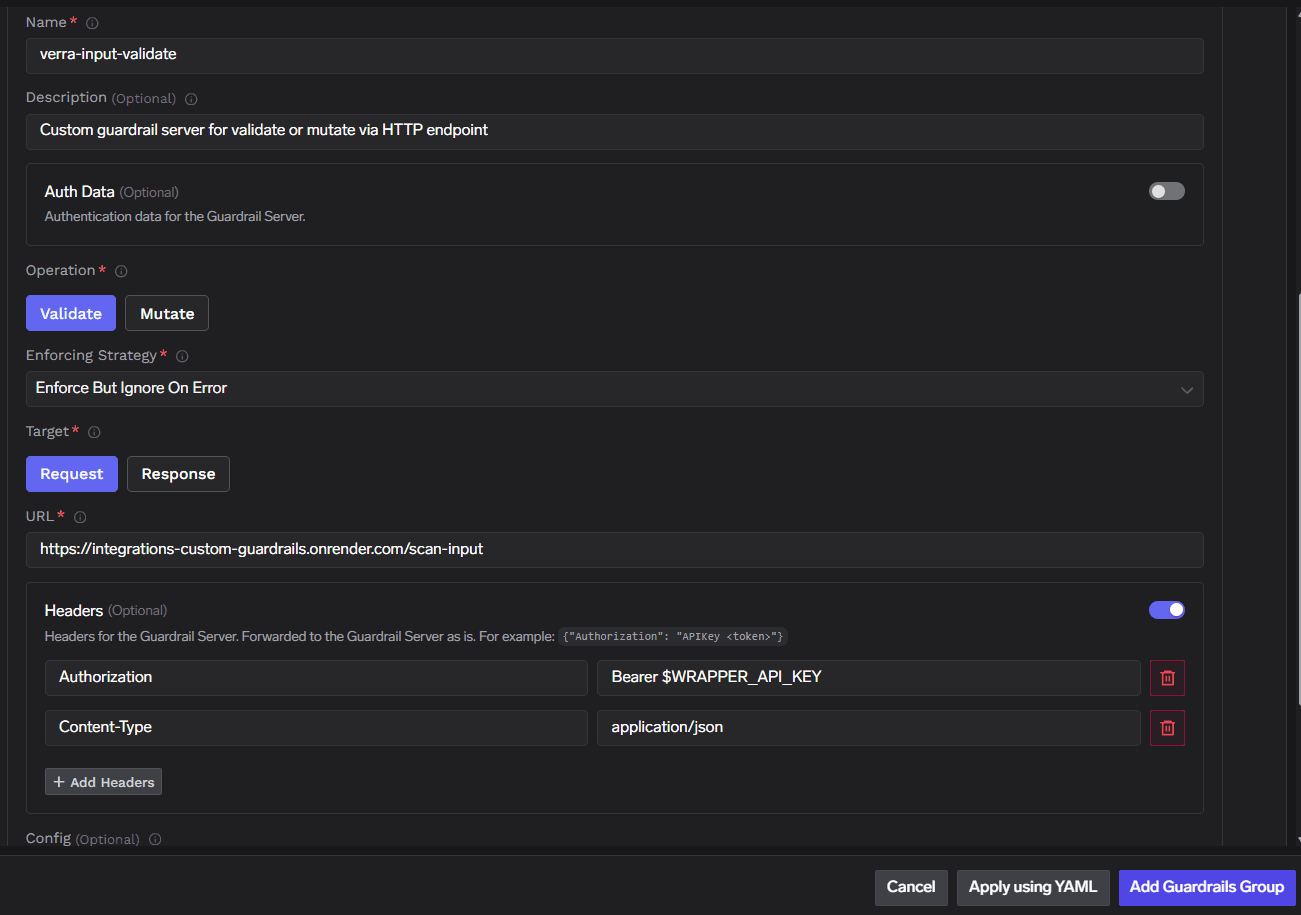
Public HTTPS URL for the deployed wrapper (any host the AI Gateway can reach).
Generate WRAPPER_API_KEY with python -c "import secrets; print(secrets.token_urlsafe(32))". The AI Gateway will send this value as Authorization: Bearer … when calling the wrapper.
Docker or any cloud host:Build and run the container on ECS, Cloud Run, Kubernetes, Render, or any platform with a public HTTPS URL. Put TLS in front of the service; the AI Gateway must reach paths such as https://<host>/scan-input.
Deploy on TrueFoundry (optional)
Set TFY_WORKSPACE_FQN, TFY_PUBLIC_HOST, TFY_PUBLIC_PATH, and secret FQNs in .env. Create secrets verra-key and wrapper-api-key under group verra-guardrails-tfy in Platform → Secrets, then:
The config field the AI Gateway passes to the wrapper is forwarded to Verra unchanged. Recognized keys (all optional; redact rails default both to true):
The Authorization: Bearer … value the AI Gateway sends doesn’t match the wrapper’s WRAPPER_API_KEY env var. Three places must agree:
The secret or env var on the deployed wrapper.
The Custom Guardrail Config’s Headers or Auth Data → Custom Bearer Auth field value.
Any platform secret FQN referenced at deploy time.
If the dashboard value drifts from the deployed secret, re-paste the current value into the guardrail config.
Gateway allows despite verdict: false
The wrapper signals rail decisions via {"verdict": false} on HTTP 200. If the AI Gateway returns a normal completion when the wrapper reported a block, your tenant gateway may not be honoring the verdict field. Confirm by curling the wrapper directly — if you get 200 + {"verdict": false} but the AI Gateway still returns a completion, the AI Gateway is the issue.Workaround: switch the Custom Guardrail Configs’ Enforcing Strategy to Enforce. See Enforcing Strategy.
PII or secrets pass through unmasked
You likely registered only validate rails. Add /redact-input and /redact-output as Mutate configs and attach them to your model or per-request selectors.
Verra backend unreachable (5xx)
Check wrapper logs for upstream errors to api.helloverra.com. Verify VERRA_KEY is valid and not expired. With Enforce But Ignore On Error, transient outages pass through; use Enforce for fail-closed behavior.