

What is Fiddler?
Fiddler Guardrails delivers enterprise-grade protection for LLM applications by moderating prompts and responses in real time. It mitigates risks such as hallucinations, toxicity, safety violations, prompt injections, and jailbreaks using proprietary task-optimized Trust Models.Key Features of Fiddler
- Ultra-Low Latency: Delivers moderation in under 100 ms for seamless real-time user experiences
- Built for Scale: Reliably processes over 5 million requests per day with enterprise-grade performance.
- Optimized Efficiency: Task-specific Trust Models ensure high accuracy while minimizing compute costs.
Adding Fiddler Integration
To add Fiddler to your TrueFoundry setup, follow these steps: Fill in the Guardrails Group Form- Name: Enter a name for your guardrails group.
- Collaborators: Add collaborators who will have access to this group.
- Fiddler Config:
- Name: Enter a name for the Fiddler configuration.
- Threshold (Optional): Enter a threshold value.
- Guard Type: Select the type of guard from the available options:
- Fiddler-Safety: Identifies harmful, sensitive, or jailbreaking content in the inputs of your generative application.
- Fiddler-Response-Faithfulness: Detects hallucination by evaluating responses of your generative application for their factual consistency with source context.
- Auth Data
- API Key: Enter your Fiddler API key in this field. You can get one from here.
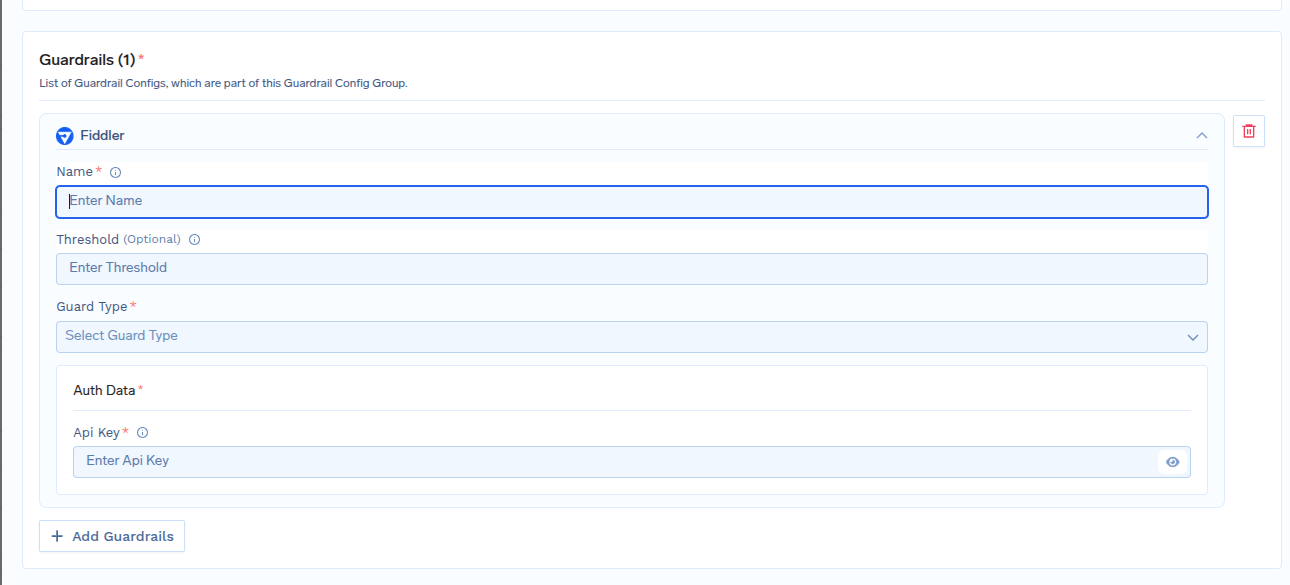
Fiddler Integrations Form
Response Structure
The Fiddler API returns a response with the following structure:Example Response: Fiddler-Safety Results
Example Response: Fiddler-Safety Results
This is an example response from fiddler, showing Fiddler-Safety results with category flagging and scores.
Example Response: Fiddler-Response-Faithfulness Results
Example Response: Fiddler-Response-Faithfulness Results
This is an example response from fiddler, showing Fiddler-Response-Faithfulness results with scores.
Validation Logic
TrueFoundry uses the Fiddler response to determine content safety and compliance:- For
Fiddler-Safetyif any category scores is above threshold it means content violates the configured guardrails and request will be rejected. - Category scores are evaluated against configured thresholds, with scores of 1 indicating policy violations in
Fiddler-Safety. - For
Fiddler-Response-Faithfulness1 means the response is faithful according to the context provided. - Default threshold for
"Fiddler-Safety"is0.7and"Fiddler-Response-Faithfulness"is0.5.