

simple, medium, or complex — and routes it to the target you configured for that tier. Your application keeps calling one virtual model name; the AI Gateway decides which model actually serves each request.
Unlike the other routing strategies, the routing decision depends on what is in the request, not on weights, priorities, or measured latency.
Requirements and availability
Complexity-based routing is generally available — it is offered to every tenant in the console with no flag to request or enable. Note that this makes the routing type available to select; it does not change the default, which is still weight-based routing when you create a virtual model. The virtual model must also meet these conditions, or it is rejected when you save it:- Model types must be limited to
chat,completion, andresponses. Embedding, image, audio, rerank, and moderation are not supported. - Each target serves exactly one tier, and the same model cannot appear under two tiers.
- Every tier must have at least one model.
simple,medium, andcomplexeach need a target — leaving any tier empty is not valid. - The classifier model must be a catalog chat model for LLM classification, or a catalog
decisionmodel in a TypeSafe account for Jev classification. Neither classifier can be a virtual model.
How a request is routed
Filter targets by metadata
metadata_match, non-matching targets are dropped before anything else happens. Classification and escalation only ever consider the remaining targets.Check the conversation pin
Classify the request
simple, medium, or complex. If the conversation was previously pinned higher, it stays at that higher tier. A conversation already pinned to complex skips classification.Build the target chain
Send the request, falling forward on failure
Update the conversation pin
Complexity tiers
There are exactly three tiers, ordered from cheapest to most capable.Classification strategies
Three strategies are available. The heuristic classifier is the default and costs nothing; the LLM classifier is more accurate on ambiguous prompts but adds a model call to each classified turn. Jev classification uses a TypeSafe decision model with a built-in tier rubric. A turn whose conversation is already pinned tocomplex skips classification because it cannot move any higher.
What text gets classified
All three strategies look at the same two pieces of text, extracted from the request body:- The last user message — the current turn.
- The last system or developer message — for context. This includes the top-level
systemfield on Anthropic/messagesrequests and the top-levelinstructionsfield on/responsesrequests.
Heuristic classification (default)
The heuristic classifier reads the prompt text, looks for a fixed set of signals, and picks a tier. It needs no configuration — this is what you get if you do not setclassification_strategy at all.
What the heuristic looks for
What the heuristic looks for
complex, whatever the other signals say.Empty prompts. A request with no classifiable text is treated as simple.The signals and keyword lists are fixed and cannot be customised. If they don’t match how difficulty shows up in your traffic, use the LLM classifier instead.Worked examples
Worked examples
LLM classification
The AI Gateway classifies the request by calling a fast chat model you nominate. Use this when the heuristic’s keyword-based view is too coarse for your traffic — for example domain-specific prompts where difficulty is not signalled by vocabulary.fallback_strategy is required whenever classification_strategy.type is llm-classifier. The console pre-fills it with the heuristic fallback, so this only affects configs written by hand or through the API — omitting the key there is rejected with must have required property 'fallback_strategy'.{"type": "heuristic"} reproduces the behaviour that used to apply implicitly, so add it to existing configs to keep them working unchanged. classification_strategy itself remains optional and still defaults to the heuristic strategy.How the classifier call works
How the classifier call works
- The classifier is sent the request’s system context and user text, along with a short instruction block describing the three tiers (or your optional
instructionsoverride). - Its reply is constrained to a JSON schema (
{"tier": "simple" | "medium" | "complex"}) and capped at 256 output tokens. Models that ignore the schema and answer in prose still work — the AI Gateway extracts the first tier word it finds. - The call is abandoned after
timeout_ms(default2000), and the fallback strategy applies.
Jev decision classification
Use TypeSafe’s Jev decision model to classify request complexity with a built-in tier rubric. First add a native TypeSafe model account and a model with Model Types set to Decision. Reference that model by its catalog FQN, such asmy-typesafe-account/jev.
/v1/systemone internally with the extracted user text in state.request and system context, when present, in state.context. It builds one choice question named tier, with simple, medium, and complex as the options, and uses answers.tier.choice to select the tier. You do not write question JSON or supply classifier instructions; the Jev rubric is fixed.
timeout_ms must be a positive integer. On timeout, error, non-2xx response, or an unusable tier, the configured fallback strategy applies. Conversation pinning and target escalation work the same way as with the other classifiers.
decision. A Jev model accessed through OpenRouter or Custom Endpoints cannot be used as this classifier. The virtual model serving your application still declares chat, completion, or responses; decision describes the classifier model.Fallback when the classifier fails
If the classifier times out, errors, returns a non-2xx status, or returns nothing usable, the configured fallback strategy decides the tier. These runtime classifier failures do not fail the request. Invalid classifier configuration, such as an unresolved model or the wrong provider account, is rejected separately; see Validation errors.fallback_strategy objects apply to decision-classifier; keep model set to your TypeSafe catalog model and change the strategy type accordingly. The field is required for both model-backed strategies, and the console pre-fills Heuristic Fallback.
Use heuristic to keep a content-aware decision during an outage, or static to send everything to one known tier. default_tier: complex preserves answer quality at higher spend; default_tier: simple does the opposite.
Escalation and fallback
Auto Routing does not just pick one target. It builds a fully ordered chain, so a request still gets served when the tier it classified into has no usable target. For a request classified into tierT, the order is:
- Targets in tier
T, in the order you declared them. - Targets in higher tiers, working upward one tier at a time.
- Targets in lower tiers, working downward one tier at a time.
simple is attempted on simple, then medium, then complex. A request classified as complex is attempted on complex, then medium, then simple. A request fails only after every target has been tried.
Each target in the chain uses its own retry_config, fallback_status_codes, and fallback_candidate settings — these behave exactly as they do for the other routing strategies.
Conversation pinning
Auto Routing automatically keeps a multi-turn conversation on a consistent tier and target. You do not configuresticky_routing, add a conversation header, or choose a TTL on the virtual model.
The pin behaves like a ratchet:
- The first turn is classified normally. After a target responds successfully, its tier and target are recorded.
- Each later user turn is classified again.
- If the new turn is harder, the conversation moves up to the higher tier and the pin is updated after a successful response.
- If the new turn is easier, the existing higher tier wins. A short follow-up such as “thanks” therefore cannot move an active conversation back to a cheaper model.
- Once a conversation reaches
complex, later turns skip classification because no higher tier exists.
/completions, and /responses with a string input — have no conversation to follow, so they are classified individually every time.Benchmark results
We benchmarked Auto Routing against sending every request to a single top-tier model (Claude Opus 5), over the same prompts. Cost is computed from the tokens each request actually used at list prices, and quality retained is the router’s pass rate divided by the baseline’s. Every answer is graded deterministically; generated code is run against unit tests, and math and multiple-choice are matched to answer keys.Configure in the dashboard
Auto Routing is configured on a virtual model, alongside the other routing strategies. See Create a virtual model for the full walkthrough.Create the virtual model and choose Complexity
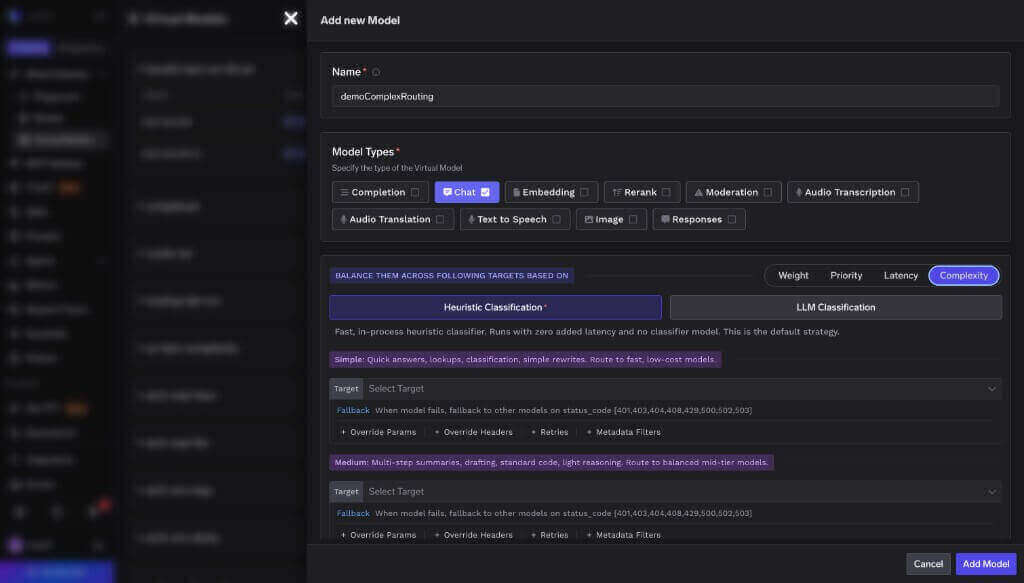
Creating a virtual model with Complexity selected as the routing type
Pick a classification strategy
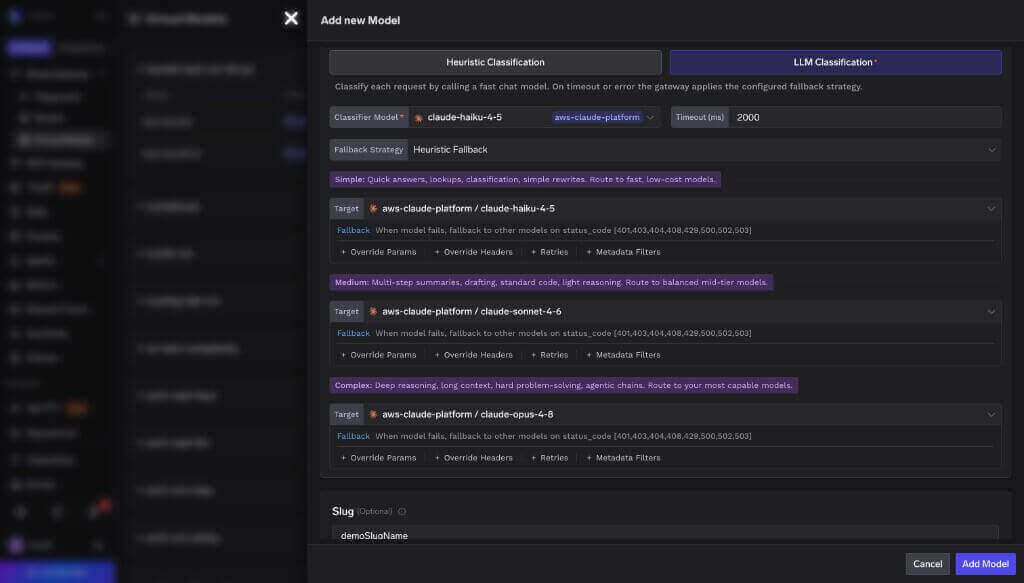
LLM Classification with a small, fast model as the classifier
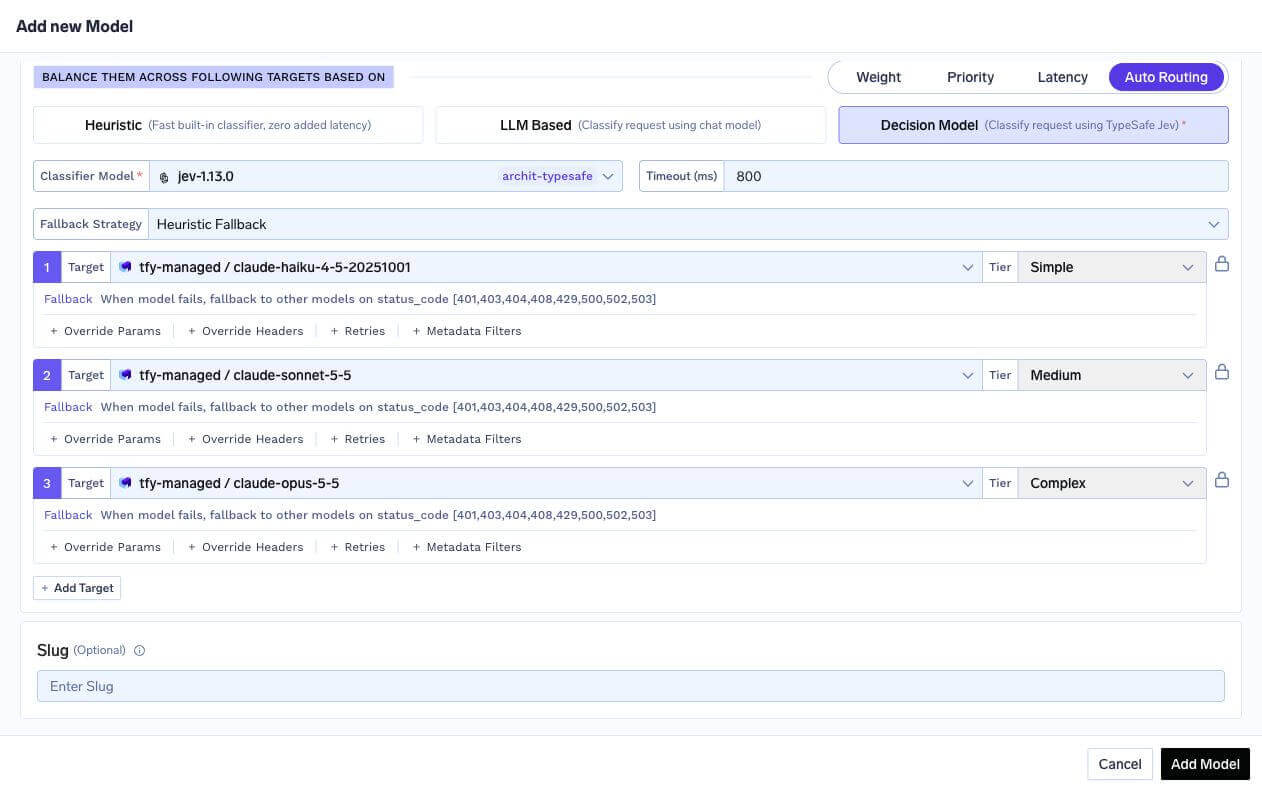
TypeSafe Jev classifier with an 800 ms timeout, heuristic fallback, and a target for each complexity tier
Set a target for each tier
simple, medium, and complex must have at least one model.Each target carries its own Fallback status codes, plus optional Retries, Override Params, Override Headers, and Metadata Filters — all behaving as they do for the other routing strategies.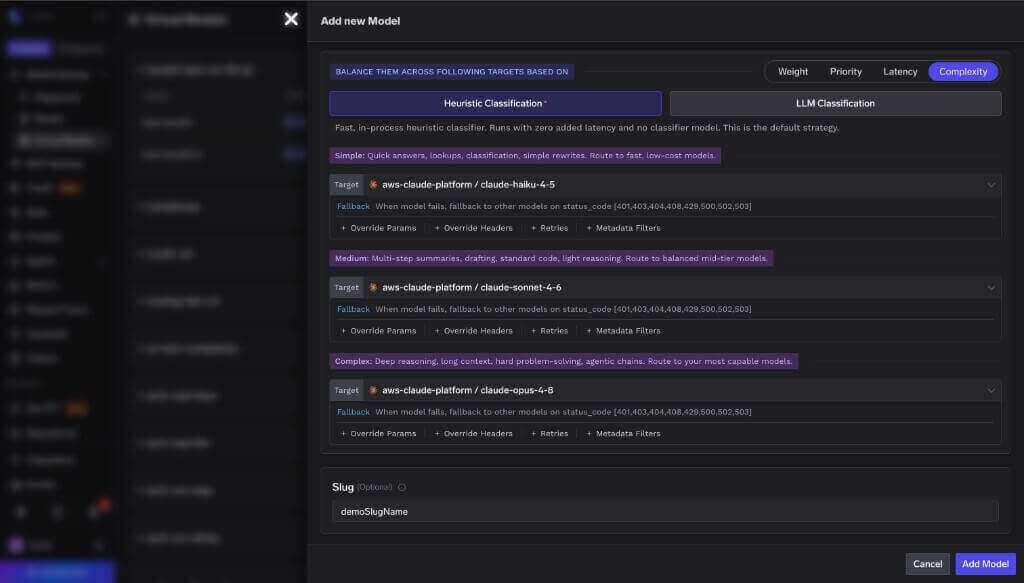
A target for each tier, from lowest to highest cost
Configuration reference
Examples
Cost-optimised three-tier chat model
Cost-optimised three-tier chat model
LLM classifier with a conservative static fallback
LLM classifier with a conservative static fallback
complex tier if that classifier is ever unavailable — quality never regresses, spend rises only during the outage.Per-tier resilience with retries and a second complex target
Per-tier resilience with retries and a second complex target
Cheaper prompts per tier
Cheaper prompts per tier
Observability
Which tier served the request?
Every response carries anx-tfy-applied-rules header. For Auto Routing it includes a complexity block with the tier that was served and how the tier was decided, plus the full ordered chain in routing_model_order:
cause tells you which mechanism produced the tier:
reason on each entry in routing_model_order tells you why that target is in that position:
x-tfy-resolved-model response header.
The Metrics Overview Cost savings column also estimates how much Auto Routing saved versus the complex tier baseline. See Cost Savings.
Metrics
Every routing decision increments a counter, so you can see your tier mix and how often escalation happens.decided_tier— the tier assigned to the current turn before target fallback. For acomplexpin that skips classification, this remainscomplex.resolved_tier— the tier of the first target actually attempted.
cause. A session_pin means the conversation deliberately stayed on a higher tier than the current turn’s classification. Another cause means the classified tier had no eligible target and routing escalated to another tier. A persistent non-pin gap is a signal that a tier’s targets are ineligible (rate-limited, over-budget, or filtered) or misconfigured. See Prometheus and Grafana integration for scraping setup.
Traces and logs
- Each LLM classifier call produces a
ComplexityBasedRouting: LLMClassifierspan, with the classifier’s own chat-completion span nested beneath it — so classifier latency is visible separately from the served model’s latency. - Each Jev classifier call produces a
ComplexityBasedRouting: DecisionClassifierspan, with the System One request nested beneath it. The classifier span recordscomplexity_tierand the returnedcomplexity_confidence, when present. - The request span carries
tfy.complexity.tierandtfy.complexity.cause. - The gateway logs each decision with the tier, the cause, the signals that matched, and the resolved model — useful for checking why a given request landed on the tier it did.
Validation errors
These configurations are rejected when you save the virtual model, with a400:
FAQ
How much can I actually save?
How much can I actually save?
complex tier baseline — see Cost Savings. You can also break ai_gateway_complexity_routing_decisions_total down by resolved_tier to see what share of traffic landed on each tier, and compare per-model cost in Model Metrics.Can I use Auto Routing in the tenant-level Routing Config YAML?
Can I use Auto Routing in the tenant-level Routing Config YAML?
Can I use it for embeddings, images, or audio?
Can I use it for embeddings, images, or audio?
Can I customise how the heuristic classifies requests?
Can I customise how the heuristic classifies requests?
Do LLM and Jev classifier calls show up in my usage and cost?
Do LLM and Jev classifier calls show up in my usage and cost?
timeout_ms tight. A conversation already pinned to complex does not make another classifier call.What happens if the classifier is down?
What happens if the classifier is down?
fallback_strategy decides the tier — the built-in heuristic by default, or a fixed default_tier if you chose static.Can I configure only two tiers, like simple and complex?
Can I configure only two tiers, like simple and complex?
simple, medium, and complex.What if the tier a request classified into has no usable target?
What if the tier a request classified into has no usable target?
decided_tier and resolved_tier separately so you can spot it.Can a conversation change models mid-conversation?
Can a conversation change models mid-conversation?
Do unhealthy-target cooldowns apply?
Do unhealthy-target cooldowns apply?
Does it work with streaming?
Does it work with streaming?
Does it work with the Anthropic Messages API and the Responses API?
Does it work with the Anthropic Messages API and the Responses API?
chat virtual model serves both /chat/completions and /messages, and a responses virtual model serves /responses. In both cases the top-level system prompt (system and instructions respectively) is included as classification context, and multi-turn conversations are pinned the same way.Next steps
- Virtual Models overview — the other routing strategies, per-target options, and health detection.
- Create a virtual model — step-by-step setup.
- Analytics — compare cost and latency per target once traffic is flowing.