Configure custom metadata and HTTP headers for authentication, observability, retries, and timeouts in the AI Gateway.
The AI Gateway uses HTTP headers to control authentication, request routing, retries, and metadata tagging. This page covers custom metadata and the available request and response headers.
You can tag requests with custom metadata using the X-TFY-METADATA header. Metadata is a JSON object where both keys and values must be strings, with a maximum value length of 128 characters.
from openai import OpenAIUSE_STREAM = Trueclient = OpenAI(api_key="your_truefoundry_api_key", base_url="https://gateway.truefoundry.ai")stream = client.chat.completions.create( messages=[ {"role": "system", "content": "You are an AI bot."}, {"role": "user", "content": "Enter your prompt here"}, ], model="openai-main/gpt-4", stream=USE_STREAM, extra_headers={ "X-TFY-METADATA": '{"application":"booking-bot", "environment":"staging", "customer_id":"123456"}', })if USE_STREAM: for chunk in stream: if ( chunk.choices and len(chunk.choices) > 0 and chunk.choices[0].delta.content is not None ): print(chunk.choices[0].delta.content, end="")else: print(stream.choices[0].message.content)
const OpenAI = require('openai');const openai = new OpenAI({ apiKey: 'your_truefoundry_api_key', baseURL: 'https://gateway.truefoundry.ai', defaultHeaders: { "X-TFY-METADATA": '{"application":"booking-bot", "environment":"staging", "customer_id":"123456"}', },});async function main() { try { const stream = await openai.chat.completions.create({ model: 'openai-main/gpt-4', messages: [ { role: 'system', content: 'You are an AI bot.' }, { role: 'user', content: 'Enter your prompt here' } ], stream: true }); for await (const chunk of stream) { if (chunk.choices[0]?.delta?.content) { process.stdout.write(chunk.choices[0].delta.content); } } } catch (error) { console.error('An error occurred:', error.message); }}main();
In addition to sending metadata explicitly via the X-TFY-METADATA header, TrueFoundry can automatically inject metadata into requests based on your access configuration. This ensures consistent tagging without requiring changes to client code.
Virtual account tags
When you assign tags to a virtual account, those tags are automatically added as metadata to every request authenticated with that account’s token. This lets you tag all traffic from a specific application or service without modifying any client code.For example, if a virtual account has tags {"application": "booking-bot", "environment": "prod"}, every request made with that account’s token will carry those metadata keys — enabling filtering, cost attribution, and routing based on those values.
Team tags via PATs
When a Personal Access Token (PAT) is associated with a team, and that team has tags configured, those team tags are automatically injected as metadata into every request made with that PAT. This provides automatic team-level attribution for all API usage.For example, if a PAT is linked to the “ML Platform” team which has tags {"cost_center": "eng-ml", "department": "engineering"}, every request through that PAT will include those metadata keys. Admins can mandate team selection for PATs to ensure every PAT is associated with a team.
Combine automatic metadata injection with the Metadata Validation guardrail to enforce that every request carries the metadata your organization requires — whether injected automatically or sent by the client.
Filter request logs and build custom metrics dashboards grouped by metadata keys
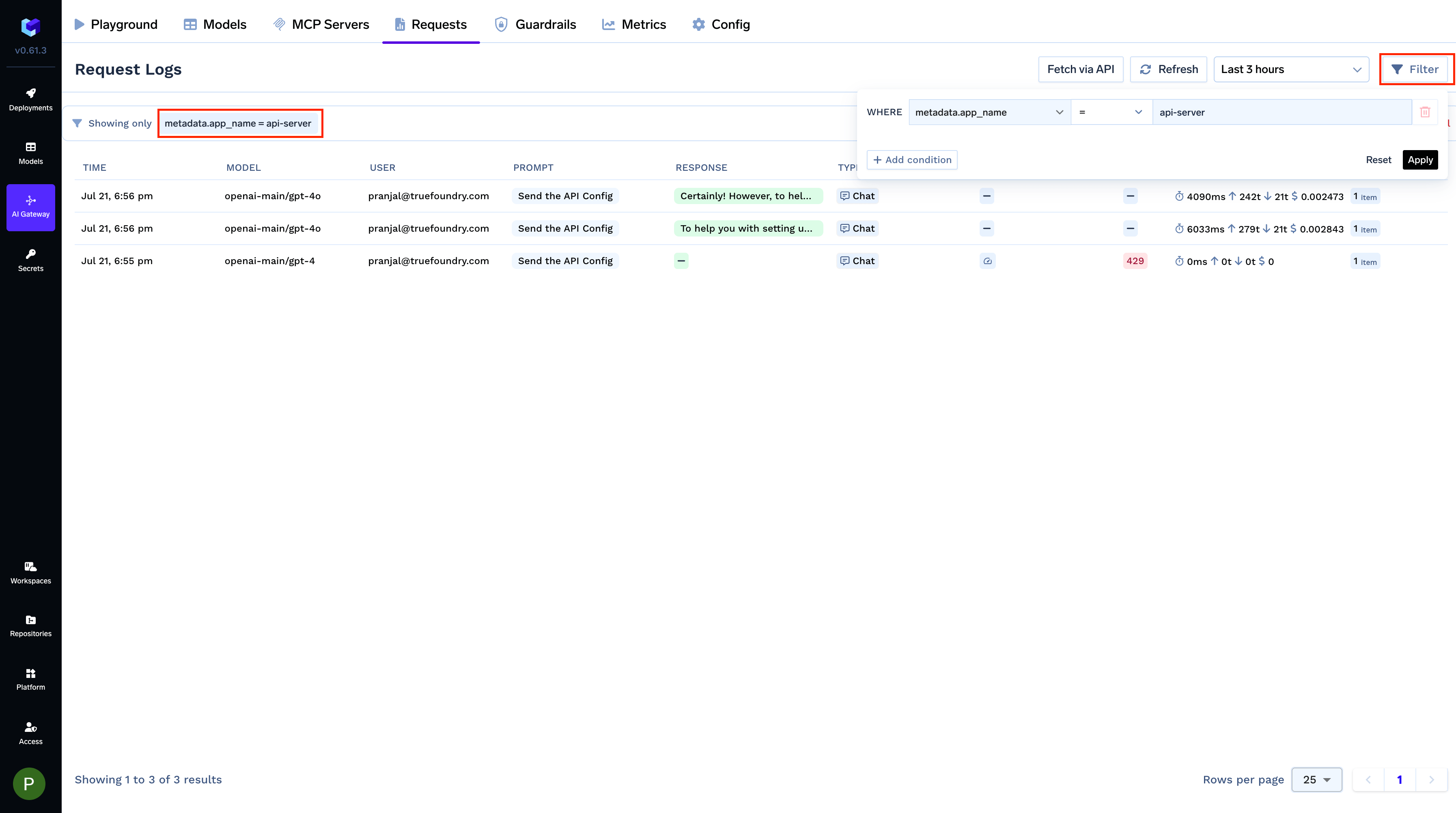
Tag every request with attributes like application, environment, or customer_id and slice your observability data by them.Filter LogsFilter your request logs using one or more metadata keys to isolate specific requests. This is useful for debugging or analyzing usage patterns for a particular feature, environment, or user.
Filtering requests using custom Metadata Keys
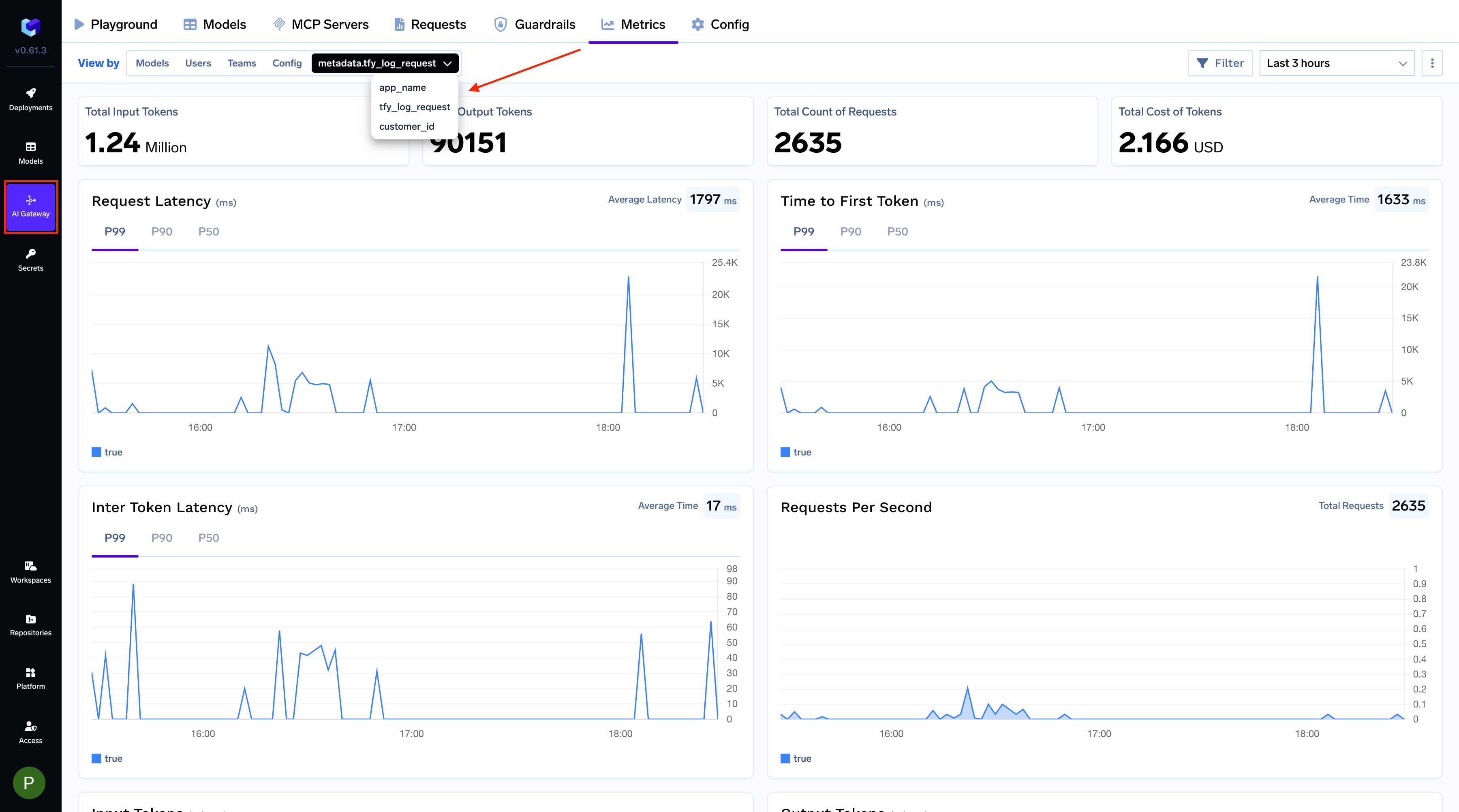
Create Custom MetricsGroup metrics by metadata keys to create custom visualizations. For example, monitor cost and usage per customer by grouping with a customer_id key.
Grouping metrics by a custom 'customer_id' metadata key
Selectively apply rate limits, fallbacks, and load balancing per metadata value
Use metadata in the when block of gateway configurations to target specific applications, environments, or customers — without changing client code. For example, to rate limit requests from the dev environment:
Your TrueFoundry API key (PAT or VAT) as a bearer token. See Authentication.
Authorization: Bearer TFY_API_KEY
x-tfy-metadata
Stringified JSON where both keys and values must be strings. Used for request routing and metrics filtering. See Custom Metadata above.
x-tfy-metadata: {"custom_field":"value"}
x-tfy-provider-name
Routes requests to the correct model account. Required for File API and Batch API. For the Responses API it is optional on POST /responses when model is <provider-account>/<model-name>, and required for retrieve, delete, and list input items.
x-tfy-provider-name: openai
x-tfy-strict-openai
Boolean flag to enable strict OpenAI compatibility. Set to false to access Claude thinking/reasoning tokens — see Reasoning Models.
x-tfy-strict-openai: true
x-tfy-request-timeout
Number in milliseconds specifying the maximum time to wait for a response from a single model. If fallbacks or retries are configured, the timeout is applied per model request (i.e., each attempt, including fallbacks, will have its own timeout). See Virtual Models — Retries and fallbacks.
x-tfy-request-timeout: 60000
x-tfy-ttft-timeout-ms
Number in milliseconds specifying the maximum time to wait for the first token in a streaming response (time-to-first-token). If no token is received within this window, the request is considered timed out and the AI Gateway returns 408. For virtual models, the AI Gateway falls back to the next model on 408 even if 408 is not included in the fallback status codes. See First Chunk Gate.
x-tfy-ttft-timeout-ms: 30000
x-tfy-retry-config
Stringified JSON that configures retries for failed requests: attempts (maximum retry attempts), onStatusCodes (HTTP status codes to retry on), and an optional useRetryAfterHeader (honor the provider’s retry wait). See Virtual Models — Retries and fallbacks.
Identifier that groups related requests into one conversation. Must be 2 to 64 characters of letters, digits, - or _. It is recorded on the request trace and passed to guardrails and agents that use a conversation ID.
x-tfy-conversation-id: support-chat-123
x-tfy-request-id
Your own identifier for the request. It is recorded as an attribute on the request trace so you can correlate gateway logs with your system.
x-tfy-request-id: req-7f3a9c
x-tfy-disable-web-search
Set to true to stop the gateway from adding web search to a Chat Completions request. Currently applies to Perplexity AI.
x-tfy-disable-web-search: true
x-tfy-logging-config
Enable or disable logging for a specific request. See Request Logging for details.
x-tfy-logging-config: {"enabled": true}
x-tfy-forward-provider-response-headers
Set to true to receive the model provider’s response headers on error responses, prefixed with ai-providers- (for example ai-providers-retry-after). Defaults to false. See Model provider headers on error responses.
x-tfy-forward-provider-response-headers: true
x-tfy-cache-control
Stringified JSON (type, and an optional Anthropic-style ttl such as 5m, 1h, or 2d) that opts the request into provider prompt caching without editing the request body. See Prompt Caching. Distinct from x-tfy-cache-config, which controls the AI Gateway’s own response cache.
x-tfy-cache-control: {"type":"ephemeral"}
x-tfy-openai-use-responses-api
Boolean flag that opts a Chat Completions request into being served through the provider’s Responses API upstream, so reasoning is reachable on OpenAI and Azure OpenAI without editing the request body. See Reasoning on OpenAI and Azure OpenAI.
x-tfy-openai-use-responses-api: true
x-tfy-reset-thinking-on-switch
Set to true or 1 so that when a Responses follow-up replays stamped thinking whose origin is not on the new virtual model, the AI Gateway drops non-portable reasoning (and chat thinking_blocks) and continues unpinned instead of returning 409. Applies to stamp-only pins (for example Codex with store: false); encoded previous_response_id pins still return 409. See OpenAI Codex CLI.
x-tfy-reset-thinking-on-switch: true
x-tfy-guardrails
Stringified JSON selecting which guardrails run on this request, with llm_input_guardrails and llm_output_guardrails each taking a list of group/guardrail-name entries. See X-TFY-GUARDRAILS Header Format.
Narrows how much of the conversation guardrails evaluate: all (default) checks the full history, last checks only the most recent message, and a positive integer checks the last N messages. Use a last-N window when one request appends several turns at once, as in an agent loop. Does not apply to MCP tool pre/post guardrails, which always scan the full arguments or result. See Guardrails FAQ.
x-tfy-guardrails-scope: 10
x-tfy-mcp-headers
Stringified JSON to pass custom headers to MCP servers. Flat for an MCP server; nested by source server name for a virtual MCP server. See MCP Gateway.
JSON array of request header names to copy onto the upstream provider call. The named headers must also be sent on the same request. Use this for provider-specific headers the AI Gateway does not set itself.
The final TrueFoundry model ID used to process the request (may differ from the requested model due to load balancing or fallbacks). See Virtual Models.
x-tfy-applied-configurations
Dictionary of applied configurations including load balancing, fallback, model config, applied guardrails, and rate limiting
server-timing
For non-streaming requests only. Contains timing information for different processing stages including middlewares, guardrails, and model calls. See Server-Timing Breakdown below.
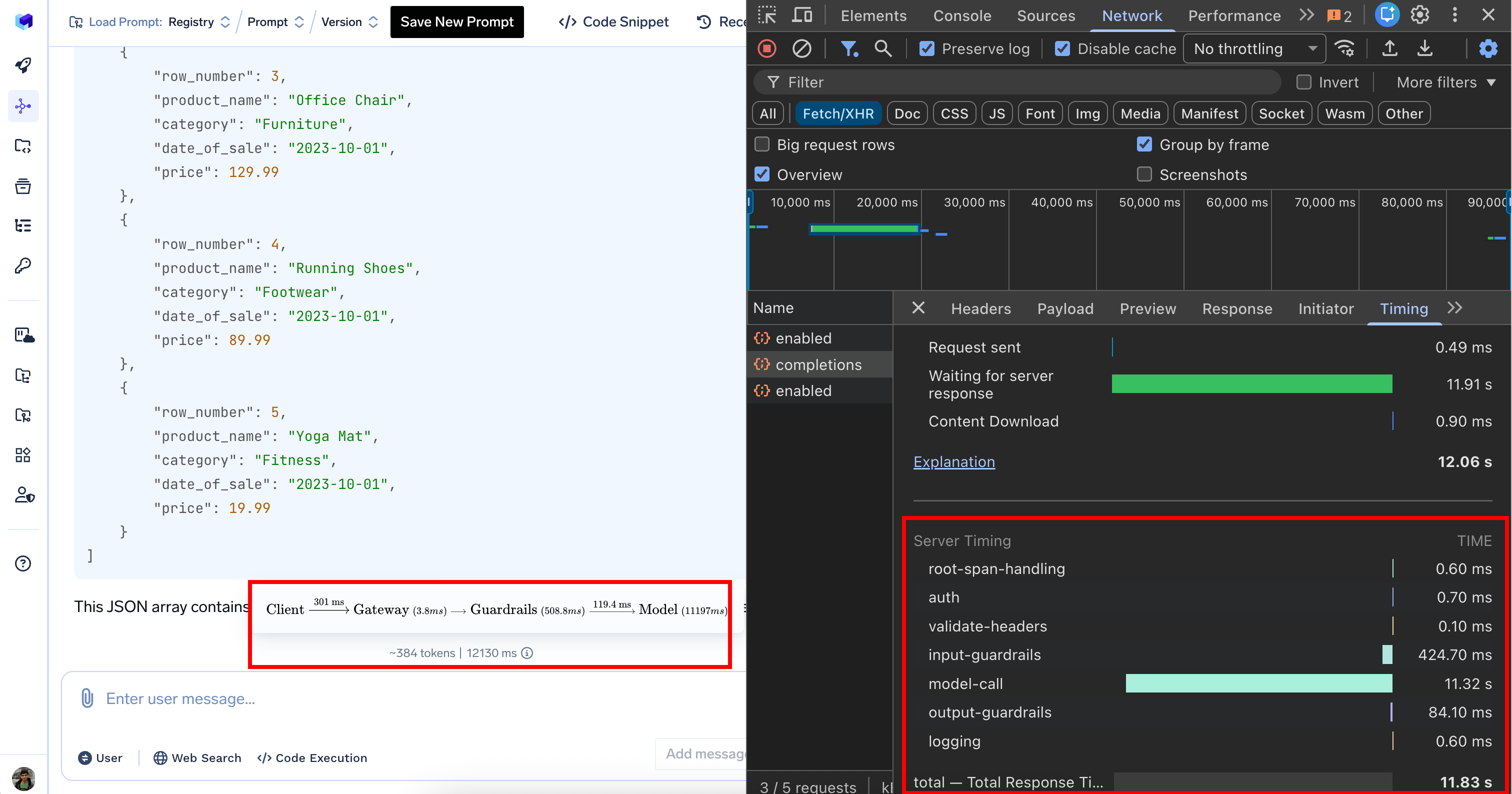
When inspecting network requests in your browser’s developer tools, the server-timing header provides a detailed performance breakdown:
Processing Stage
Duration
Description
Authentication
0.9 ms
Authenticating User
Input guardrails
0.7 ms
Input validation and content filtering
Model call
1350 ms
AI model response generation (bulk of the time)
Output guardrails
722.3 ms
Output validation and filtering
Logging
1.1 ms
Logging request
Total
2080 ms
Complete request processing time (2.08 seconds)
Metrics like load balancing (0 ms), rate limiting (0 ms), and cost budget (0 ms) show zero duration because these configs weren’t triggered for this particular request.
Server-timing header in browser developer tools
Was this page helpful?
Assistant
Responses are generated using AI and may contain mistakes.