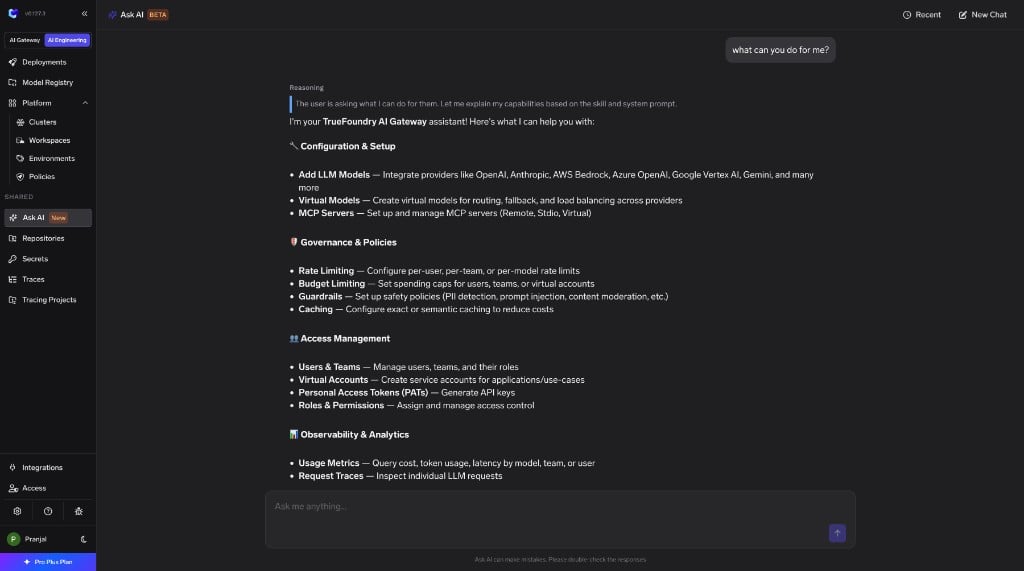
We recommend Ask TFY in the product for most workflows. It runs the same tools as the MCP server, plus capabilities that aren’t available when you connect from an external tool:
Higher accuracy, lower cost
Skills, MCP servers are constantly kept up-to-date and includes additional context like TrueFoundry docs. The agent is tuned to use fewer tokens, lower cost and provide better insights.
Charts and visualizations
Ask TFY renders charts and visualizations inline, so usage, cost, and observability answers come back as graphs instead of raw text.
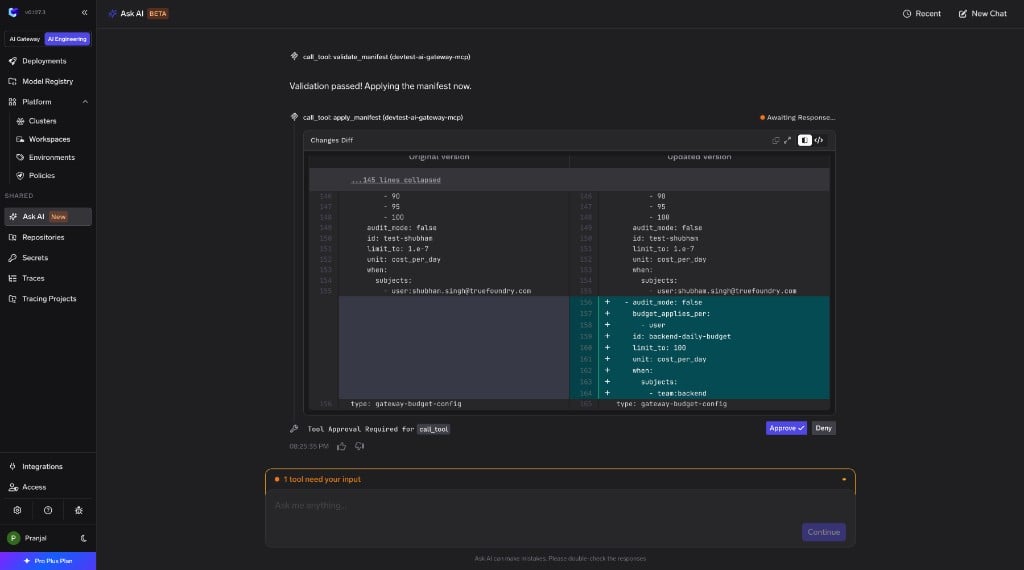
Built-in approval flows
Ask TFY recognizes write actions, shows you a diff of what will change, and asks for approval before applying it. Connecting from another tool gives you the raw tools without this safety layer.
Connect Claude, Cursor, or another tool when you want TrueFoundry operations inside the editor or assistant you already use, or need to combine them with other MCP servers in a single session.
TrueFoundry provides an MCP server and a set of skills that you can plug into Claude, Cursor, Codex, or any tool that speaks MCP. The MCP server exposes platform operations as tools the agent can call; skills give it tested, step-by-step procedures for common workflows.
The MCP server is available starting v0.155.
Connecting the MCP server directly gives you the raw tools without the diff previews, approval flows, or inline visualizations available in Ask TFY.
The TrueFoundry MCP server runs at https://<CONTROL_PLANE_URL>/<tenant>/mcp with Streamable HTTP transport. Add this URL to your MCP client and sign in with TrueFoundry, or register that same URL on the MCP Gateway and connect through the gateway. You do not need to create or configure an API key.All actions run as the authenticated user and follow the same RBAC as the dashboard and CLI.Replace <CONTROL_PLANE_URL> with your control plane host and <tenant> with your TrueFoundry tenant name.
Sign in directly
OAuth via MCP Gateway
1
Add the TrueFoundry MCP server
Cursor
Claude Code
Claude Desktop
Other clients
Add the server to .cursor/mcp.json (project) or ~/.cursor/mcp.json (global):
claude mcp add --transport http truefoundry \
  https://<CONTROL_PLANE_URL>/<tenant>/mcp
Go to Settings > Connectors > Add custom connector and set the URL to:
https://<CONTROL_PLANE_URL>/<tenant>/mcp
Add the following Streamable HTTP server URL to any OAuth-compatible MCP client:
https://<CONTROL_PLANE_URL>/<tenant>/mcp
2
Sign in with TrueFoundry
Your MCP client opens TrueFoundry in your browser. Sign in and approve the connection. The client completes the remaining setup automatically.
3
Start using the server
Ask your client in natural language, for example: “Using TrueFoundry, list the model accounts I can access.”
To sign in with TrueFoundry from your IDE, register the MCP server on the MCP Gateway first. The gateway handles OAuth inbound auth and forwards your token to the control plane using Token Passthrough.
1
Register the server in MCP Gateway
In MCP Gateway, click Add Server > Connect any Remote MCP Server. Set:
Name:truefoundry-mcp (or any unique name)
URL:https://<CONTROL_PLANE_URL>/<tenant>/mcp
Auth Data:Token Passthrough — forwards the user’s existing auth token directly to the MCP server
Register the TrueFoundry MCP server with Token Passthrough auth
2
Connect from your IDE
Open the server’s How To Use tab and copy the AI Gateway URL — it looks like https://<gateway>/<tenant>/mcp/<server-name>/server. Use that URL (not the control plane MCP URL) in your IDE config.Your IDE opens a browser to Sign in with TrueFoundry on first connect. Because the server uses Token Passthrough, the gateway forwards your TrueFoundry token to the control plane MCP server automatically.For step-by-step IDE instructions, see Connect MCP Servers from Your IDE.
claude mcp add --transport http truefoundry \
  https://<gateway>/<tenant>/mcp/truefoundry-mcp/server
Go to Settings > Connectors > Add custom connector and set the URL to the AI Gateway URL from the How To Use tab. Claude prompts you to sign in with TrueFoundry.
Every tool carries an MCP annotation: readOnlyHint: true tools only read data and are safe to call without confirmation, while destructiveHint: true tools create, update, or delete a resource and should be confirmed by a human.
Full tool reference
Category
Tool
Read / Write
Description
Resource management
apply_manifest
Write
Apply a manifest to create or update a resource.
Resource management
delete_manifest
Write
Delete a resource identified by the provided manifest.
Resource management
validate_manifest
Read
Validate a manifest object against the schema for the given type.
Resource management
get_manifest_json_schema
Read
Get the JSON schema for the specified manifest type.
AI Gateway
generate_multi_lang_code_snippets
Read
Generate code snippets for calling an AI Gateway model.
AI Gateway
gateway_execute_sql
Read
Query AI Gateway observability data using SQL.
AI Gateway
get_gateway_config
Read
Get the AI Gateway configuration for a given type.
AI Gateway
get_budget_usage
Read
Get the current budget usage for every budget rule configured in the tenant.
AI Gateway
list_data_routing_destinations
Read
List data routing destination names for the current tenant.
AI Gateway
list_mcp_servers
Read
List MCP servers for the current tenant.
AI Gateway
get_mcp_server
Read
Get a single MCP server by its ID.
AI Gateway
delete_mcp_server
Write
Permanently delete an MCP server by ID.
AI Gateway
list_mcp_server_tools
Read
List the tools available on a given MCP server.
AI Gateway
list_mcp_catalogue
Read
Returns the TFY-managed MCP server catalogue and the MCP integrations catalogue.
AI Gateway
get_mcp_server_oauth_config
Read
Get the OAuth authorization server configuration for an MCP server URL.
Provider accounts
list_providers
Read
List all provider types along with their supported integrations, models, and model types.
Provider accounts
list_provider_accounts
Read
List provider accounts the caller can read.
Provider accounts
get_provider_account
Read
Get a single provider account by its ID.
Secrets
list_secrets
Read
List secrets the caller has access to.
Secrets
delete_secret
Write
Delete a secret and all its versions permanently.
Secrets
list_secret_groups
Read
List secret groups along with associated secrets. Secret values are not included.
Secrets
get_secret_group
Read
Get a secret group by ID.
Secrets
list_secret_active_deployments
Read
Get active deployments associated with the given secret IDs.
Secrets
get_secret_deployments
Read
List active deployments that reference a specific secret.
Identity and user management
get_me
Read
Returns the identity and role information of the currently authenticated user or service account.
Identity and user management
list_users
Read
List users in the current tenant.
Identity and user management
get_user
Read
Get a single user by their ID.
Identity and user management
delete_user
Write
Permanently delete a user by ID.
Identity and user management
check_user_registration
Read
Check whether a user with the given email is registered in the current tenant.
Teams
list_teams_for_user
Read
List teams accessible to the current user.
Teams
get_team
Read
Get a single team by its ID.
Teams
list_team_members
Read
List users who are members of a team.
Teams
list_team_managers
Read
List users who hold the team-manager role on a team.
Teams
get_team_permissions
Read
Get all role bindings associated with a team.
Teams
delete_team
Write
Permanently delete a team.
Roles and access control
list_roles
Read
List roles for the current tenant.
Roles and access control
delete_role
Write
Permanently delete a role.
Roles and access control
get_actions_for_resource_type
Read
Get all permission actions available for a given resource type.
Virtual accounts and tokens
list_virtual_accounts
Read
List virtual accounts accessible to the current user.
Virtual accounts and tokens
get_virtual_account
Read
Get a single virtual account by its ID.
Virtual accounts and tokens
check_virtual_account_exists
Read
Check whether a virtual account with the given name exists.
Virtual accounts and tokens
delete_virtual_account
Write
Permanently delete a virtual account.
Virtual accounts and tokens
list_personal_access_tokens
Read
List personal access tokens created by the current user.
Virtual accounts and tokens
create_personal_access_token
Write
Create a new personal access token for the current user.
Virtual accounts and tokens
check_personal_access_token_exists
Read
Check whether a personal access token with the given name exists.
Skills give the agent tested, step-by-step procedures for TrueFoundry operations — the right field values, ordering, edge cases, and validations. They follow the open Agent Skills standard and work in any tool that supports skills, including Cursor, Claude Code, Codex, and TrueFoundry’s Agent Harness.
Skill
What it helps you do
Gateway
Set up models, model accounts, virtual models with routing and failover