


September 21, 2026
|
5 min read


Published: September 21, 2026
.png)
Blazingly fast way to build, track and deploy your models!
Role-based access control puts a named layer between people and permissions. You do not grant Priya the ability to read a secret group. You define a role called Secret Group Viewer containing that permission, and assign Priya to it.
Three pieces make up the role based access control model:
The value is indirection. When security decides viewers should no longer see secret values, they edit one role and every viewer changes at once. NIST formalized this model decades ago, which is why every cloud console has a roles page.
The weakness is also the indirection. Roles are static sets. If a permission should apply only from a corporate IP, or only to records in the requester’s own region, plain RBAC cannot express it. Teams respond by minting more roles: analyst-eu, analyst-eu-readonly, analyst-eu-readonly-prod. This is role explosion, the most cited reason people go looking at ABAC.
Attribute based access control removes the named bundle. Instead of asking what role a subject holds, it evaluates a policy expression at request time over four categories of attribute:
A policy reads something like: allow read when subject.department == resource.owning_team and resource.classification != "restricted" and env.network == "corp". NIST SP 800-162 is the canonical write-up; in practice ABAC ships as a policy language such as XACML, Rego, or Cedar behind an authorization service.
ABAC is genuinely more expressive. One well-written rule can replace a hundred roles, and it handles relationships RBAC cannot state at all: “the doctor assigned to this patient.”
That expressiveness is bought with something. Policies are code: they need review, tests, versioning, and a way to reason about how rules interact. And the question an auditor asks first — who can read this data? — stops having a lookup answer. You have to enumerate every subject and evaluate the policy against each. Some engines ship reverse-query tooling for this reason; most deployments do not use it.
One thing the table hides: ABAC has a prerequisite, trustworthy attributes. A policy keyed off resource.data_region is only as good as the tagging discipline that populates that field. Most organizations that try ABAC find they have an untagged-data problem before they have an authorization problem. And the two models are not exclusive — the common production shape is RBAC as the backbone with a few attribute conditions on top.
Treating role explosion as a reason to switch models. Role explosion is usually a scoping bug, not a model failure. If you have analyst-team-a, analyst-team-b, and analyst-team-c, you do not need attributes — you need one analyst role bound separately to each team’s resources. Most of the pain blamed on RBAC comes from granting tenant-wide when the binding belonged on a single resource.
Buying expressiveness you cannot audit. ABAC lets you write a rule your compliance team cannot read. That trade is sometimes worth it, never by accident. Before adopting a policy engine, ask who will answer the access-review questionnaire next quarter, and how.
Forgetting that grants combine. A subject can hold access directly and inherit it through a team, and removing one does not remove the other. It gets worse when a policy engine is layered on top, because two systems can then grant independently.
Permissioning the human and ignoring the agent. Every control on the human side is decorative if the agent they built runs on a shared service token with tenant-wide access.
An AI agent is a non-human subject whose effective authority is not fixed. It might read a public repository in one turn and touch a customer record in the next. It acts for different people at different times. Its inputs can be adversarial — a poisoned issue body can steer it toward a tool it should not call. And unlike a human, it does not pause to wonder whether an action is wise.
Write that as a requirement and it reads exactly like an ABAC brief: allow this tool call when the acting user has upstream access to the target, the tool is not destructive, and the request did not originate from untrusted content. Three attributes, one rule. So why does almost nothing ship that way?
Because the attributes are not reliably available at decision time. “Did this request originate from untrusted content” is not a field, it is a research problem. “Does the acting user have upstream access” is knowable — but the cheapest correct way to know is to call the upstream system with that user’s own credentials and let it answer, rather than mirror its permission model into your policy engine and hope the copy stays fresh.
The auditability cost also lands hardest exactly where agents live. Agent permissions are what security review asks about most sharply, and “the policy evaluates to allow under these conditions” is a far worse answer than a table saying this agent holds MCP Server User on these three servers.
So: agents need narrower access than humans and more inspectable access than humans. ABAC delivers the first and undermines the second. Hence the shipping pattern — RBAC with tight resource scoping, plus a few contextual gates where context genuinely matters.
TrueFoundry implements RBAC with resource-scoped role bindings. It is not an ABAC policy engine, and it is worth being plain about that. The model answers one question: who can do what, and where?
Assigning a role to a subject for a resource creates a role binding. Access is managed independently of the resource’s configuration, so you can change who has access without redeploying anything.
Grants are made from the resource itself — open its three-dot menu and select Access Control:

Then choose one or more subjects and a role. The drawer lists the actions each role includes, so you see what you are granting before you grant it:
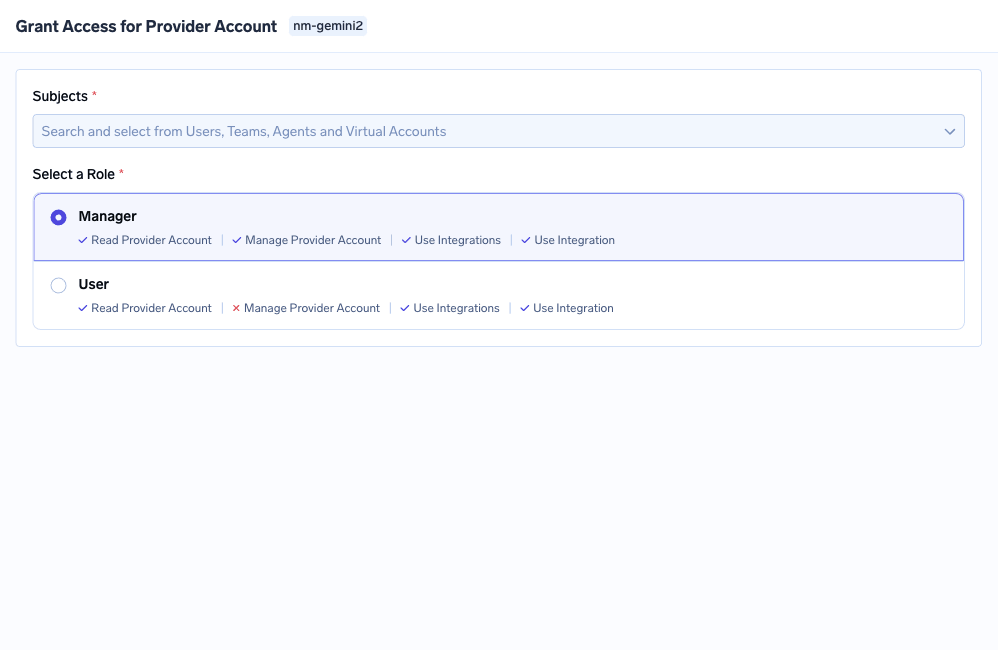
The roles offered depend on the resource type: Manager and User on a model provider account; MCP Server Manager, MCP Server User, and MCP Server Approver on an MCP server; Agent Manager and Agent Access on an agent. Clusters, workspaces, and secret groups each have their own admin, member, and viewer tiers.
Roles operate at three scopes, and keeping them straight is most of the skill:
Admin and Read-Only Member cannot be edited. Member can — the baseline every user gets, which by default includes only cluster:ReadCluster, environment:ListEnvironments, settings:ListSettings, user:ListUsers, repository:CreateRepository, secret-group:CreateSecretGroup, and agent:CreateAgent. It reaches no individual model, MCP server, or workspace — those come from resource bindings or team membership.
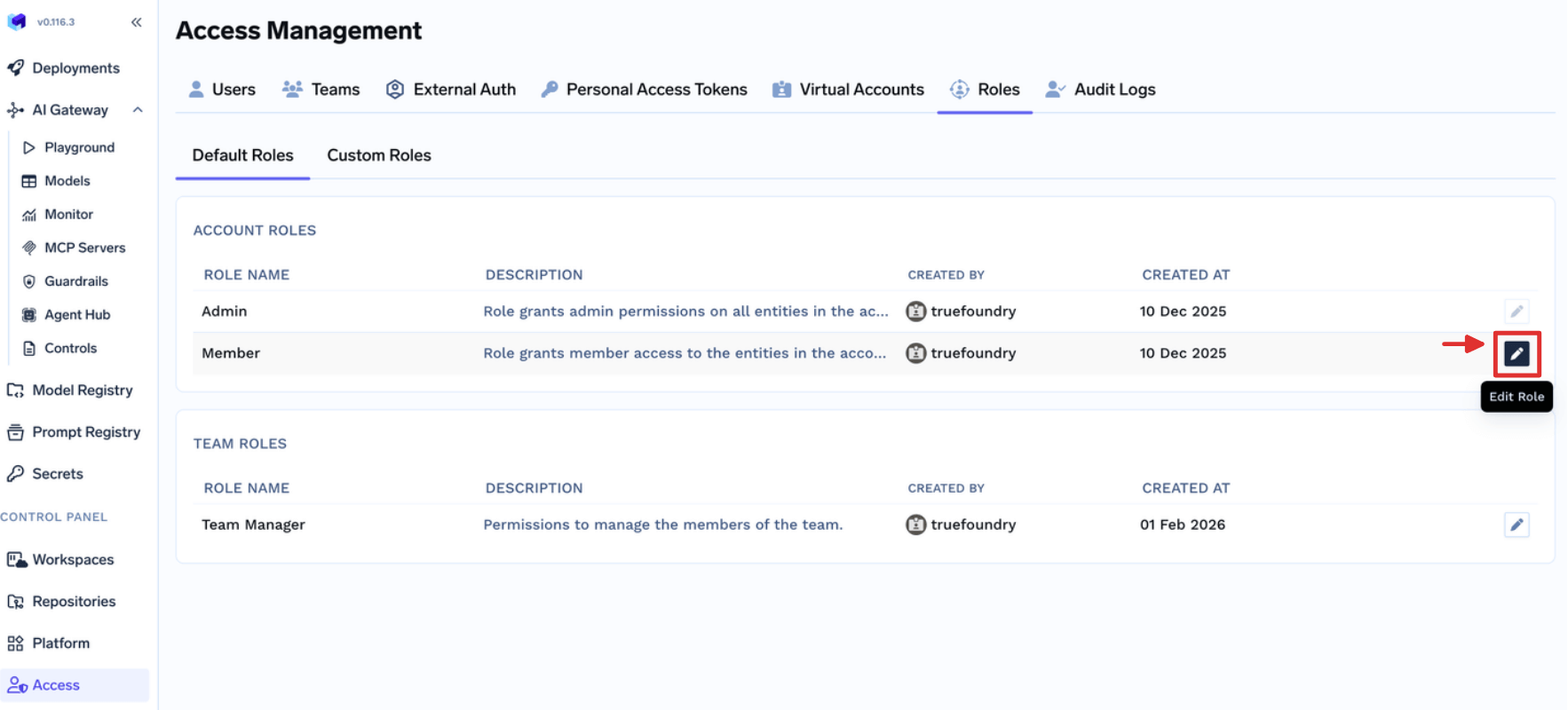
Team roles are the closest thing here to an attribute condition, and the resemblance is instructive. Team Member carries virtual-account:ReadVirtualAccount, scoped to Virtual Accounts owned by teams the user actually belongs to. The permission is identical for everyone; the set of objects it reaches differs per person.
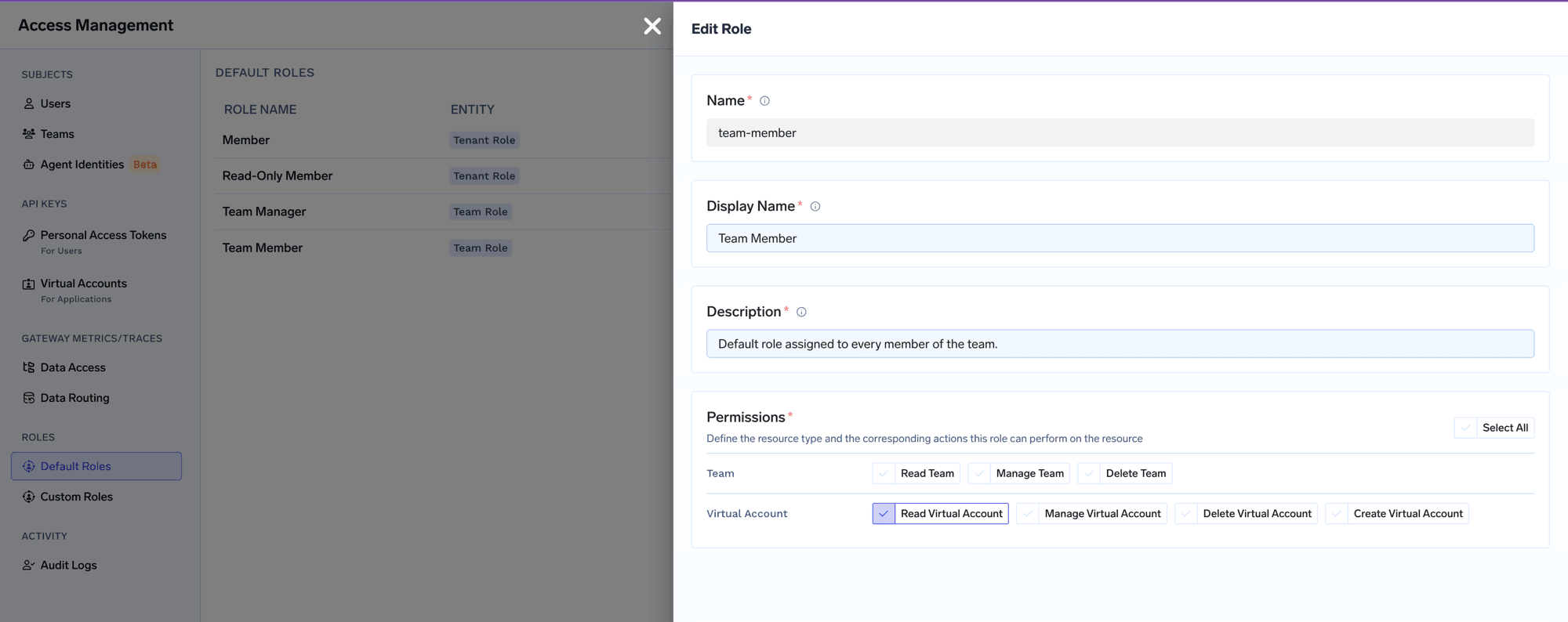
That is ownership scoping, not ABAC: no policy expression, no attribute evaluation, just a fixed relationship between a team and what it owns. It covers the common case that pushes people toward attributes, and stays readable.
When the built-in tenant roles are too broad or too narrow, build your own from the permission catalog. Every permission follows a resource:Action shape, grouped by resource type:
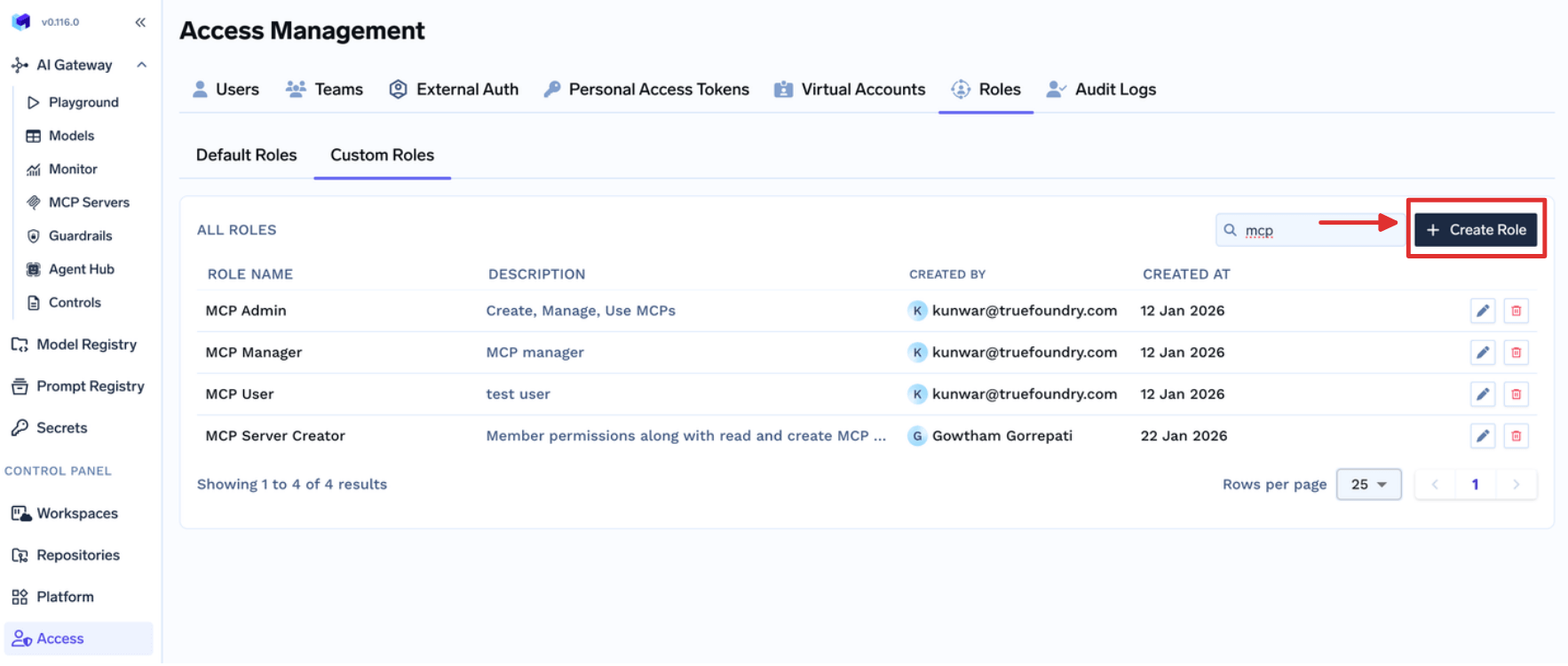
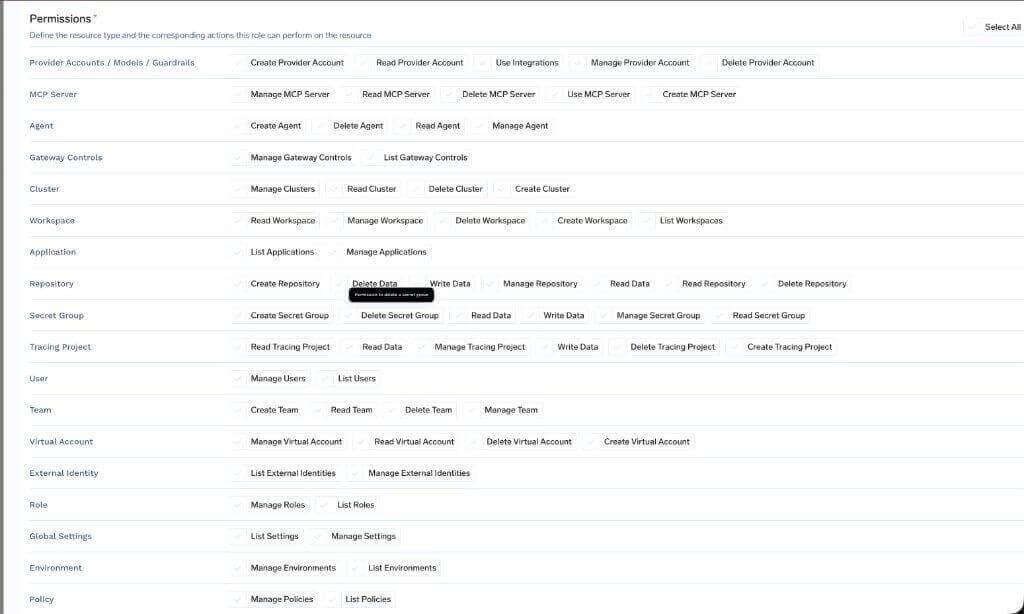
One rule governs when to use this: custom-role permissions apply across all resources of the selected type. A custom role with mcp-server:ReadMcpServer reaches every MCP server, not a chosen few. For one resource, use that resource’s Access Control page instead. Getting this backwards is how a role meant for a single server quietly becomes tenant-wide read access.
TrueFoundry adds context sensitivity in four places. None are attribute policies, and each is inspectable:
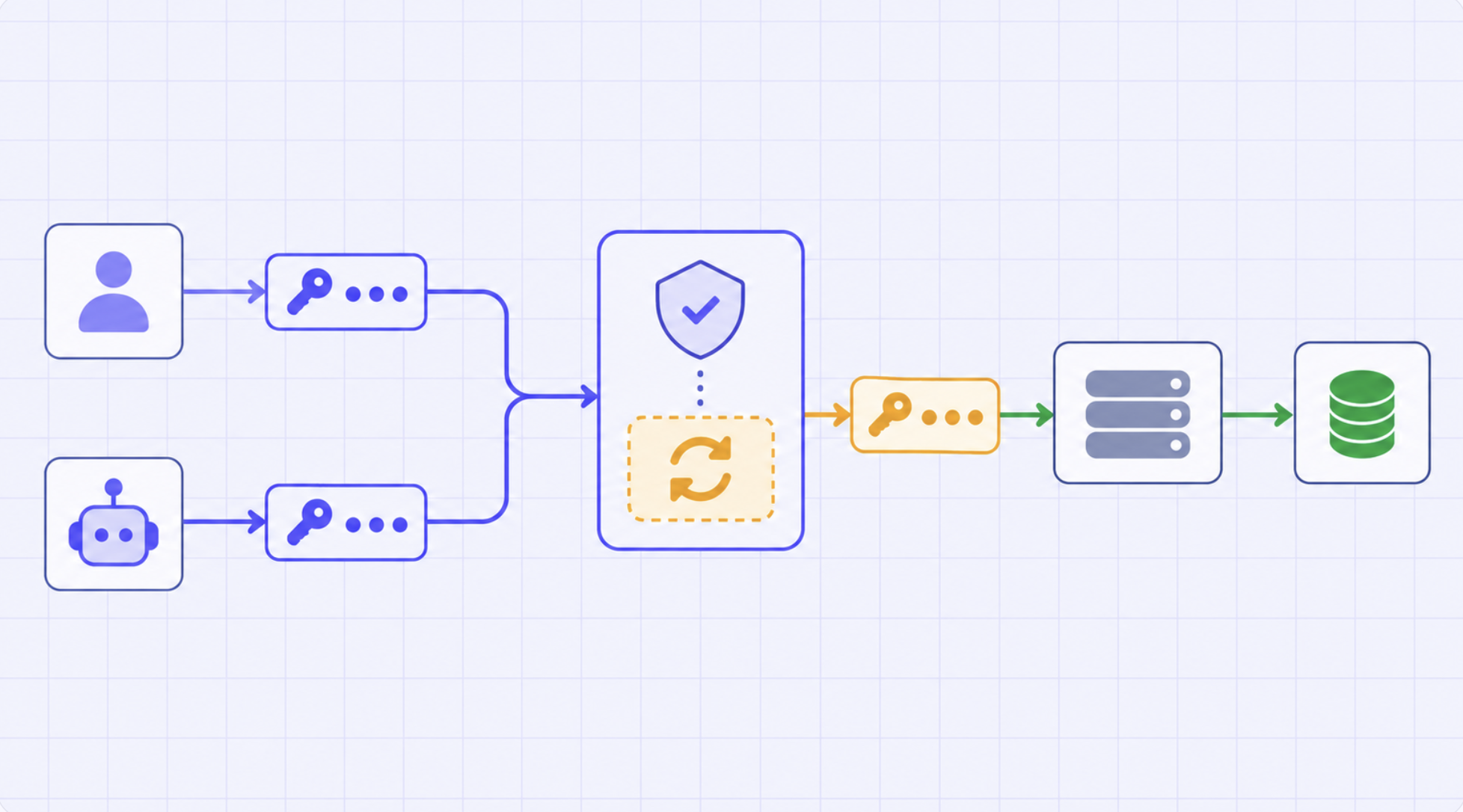
The second does most of the work people expect from ABAC. When an agent calls a tool for a specific user over per-user OAuth, the upstream service evaluates that user’s real permissions. You did not model GitHub’s repository ACLs in a policy engine; you delegated to the system that owns them, and that copy cannot go stale. The MCP access control model builds directly on this.
One limit: Virtual Account tokens give every request identical access. They suit service-to-service calls and are wrong wherever per-user permissions matter.
Two real scenarios from the docs show the model working from opposite directions.
Give an auditor read-only access. Assign Read-Only Member from Access > Users. It is a built-in tenant role, provides read-only access across supported resource types, and cannot be edited — which is the point, because an audit role that can be quietly widened is not an audit role. For a group of auditors, assign it to a team so future joiners inherit it. If the auditor should see only selected resources, skip the tenant role entirely and grant the viewer or access role on each resource.
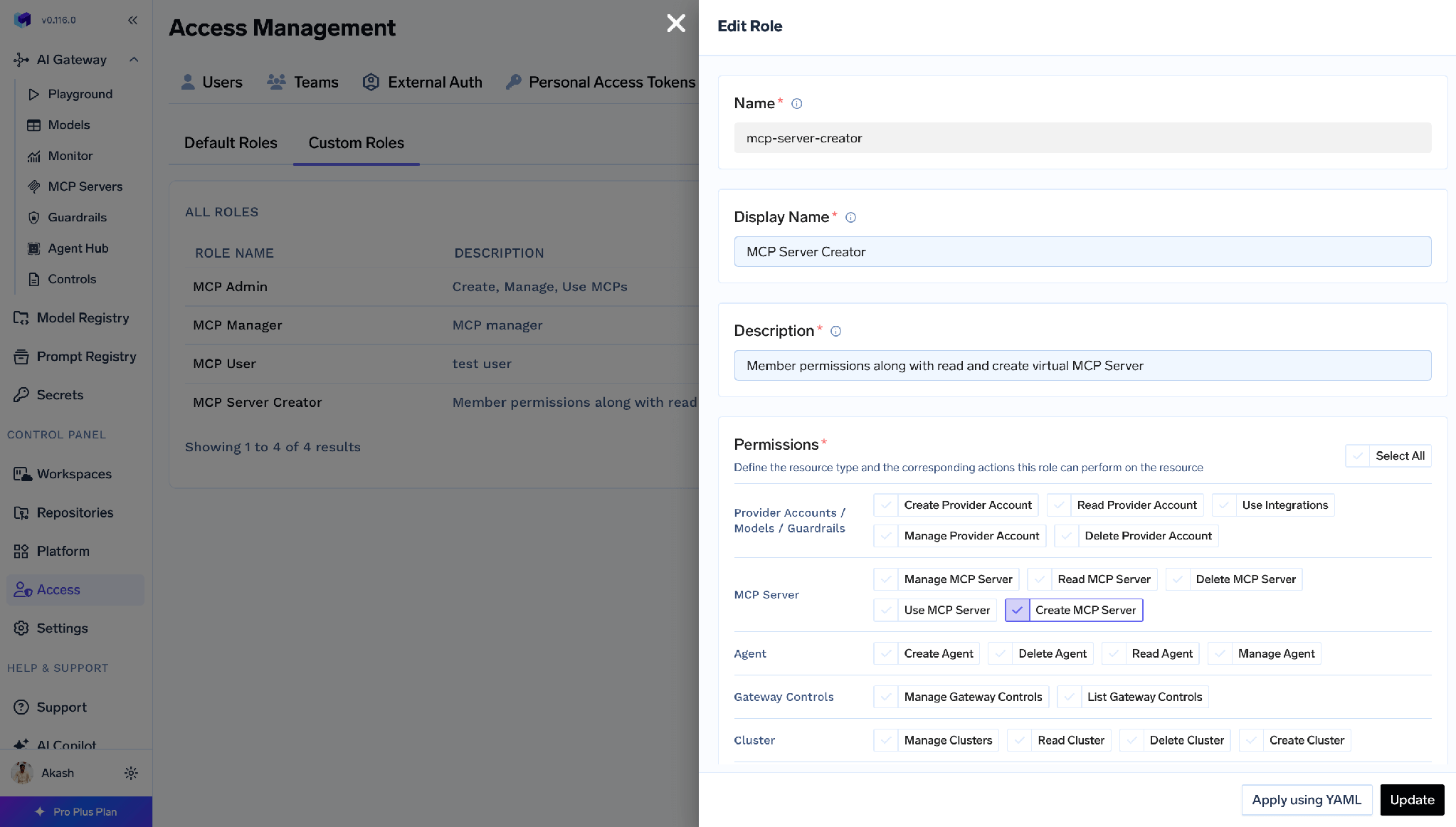
Let people create MCP servers without making them Admin. The instinct is to hand out Admin, because creating a server needs a permission Member lacks. Instead, create a custom role containing exactly mcp-server:CreateMcpServer:
Then assign it from Access > Users or Access > Teams:
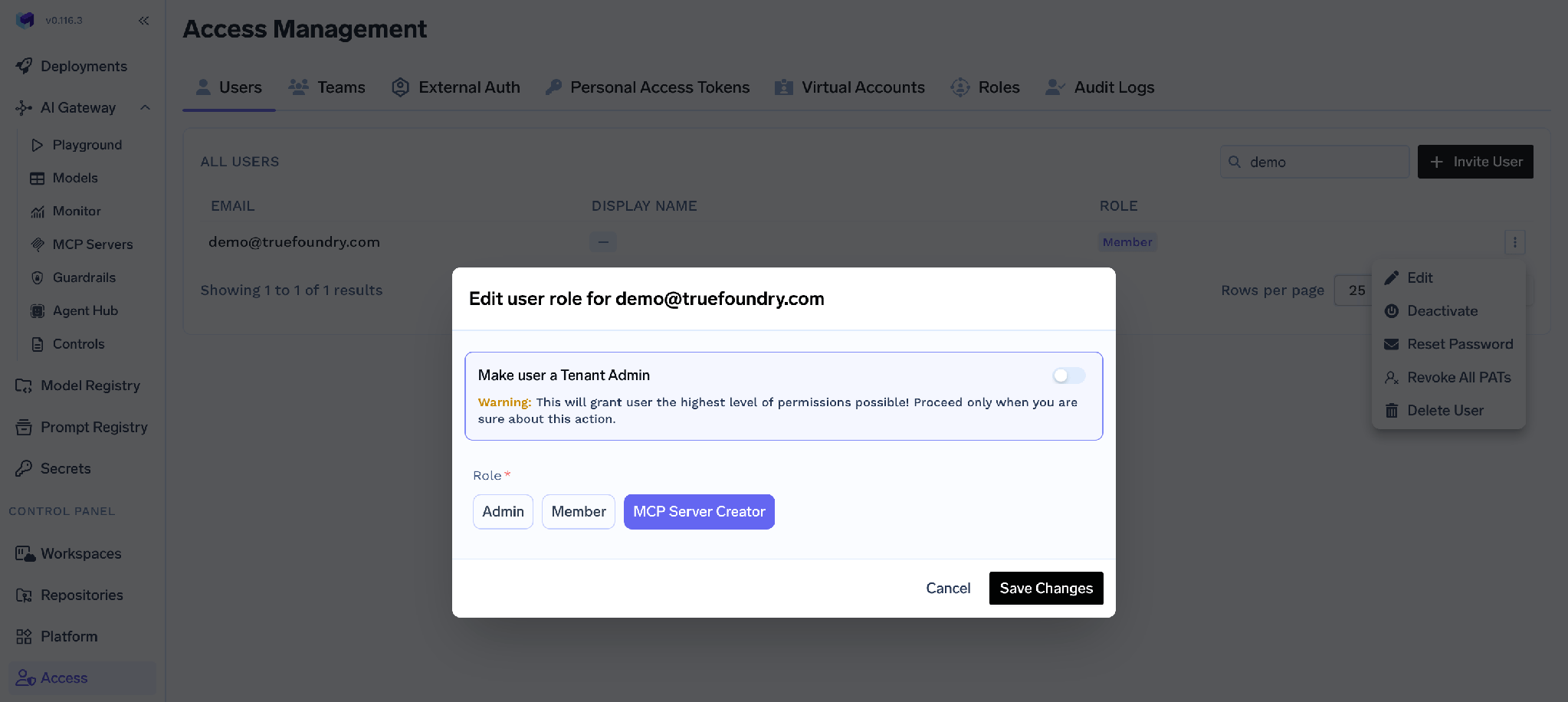
The behaviour is the interesting part. Create MCP Server lets someone create a new server. It does not grant access to existing ones. After creating a server, the owner grants themselves MCP Server Manager from that server’s own Access Control page.
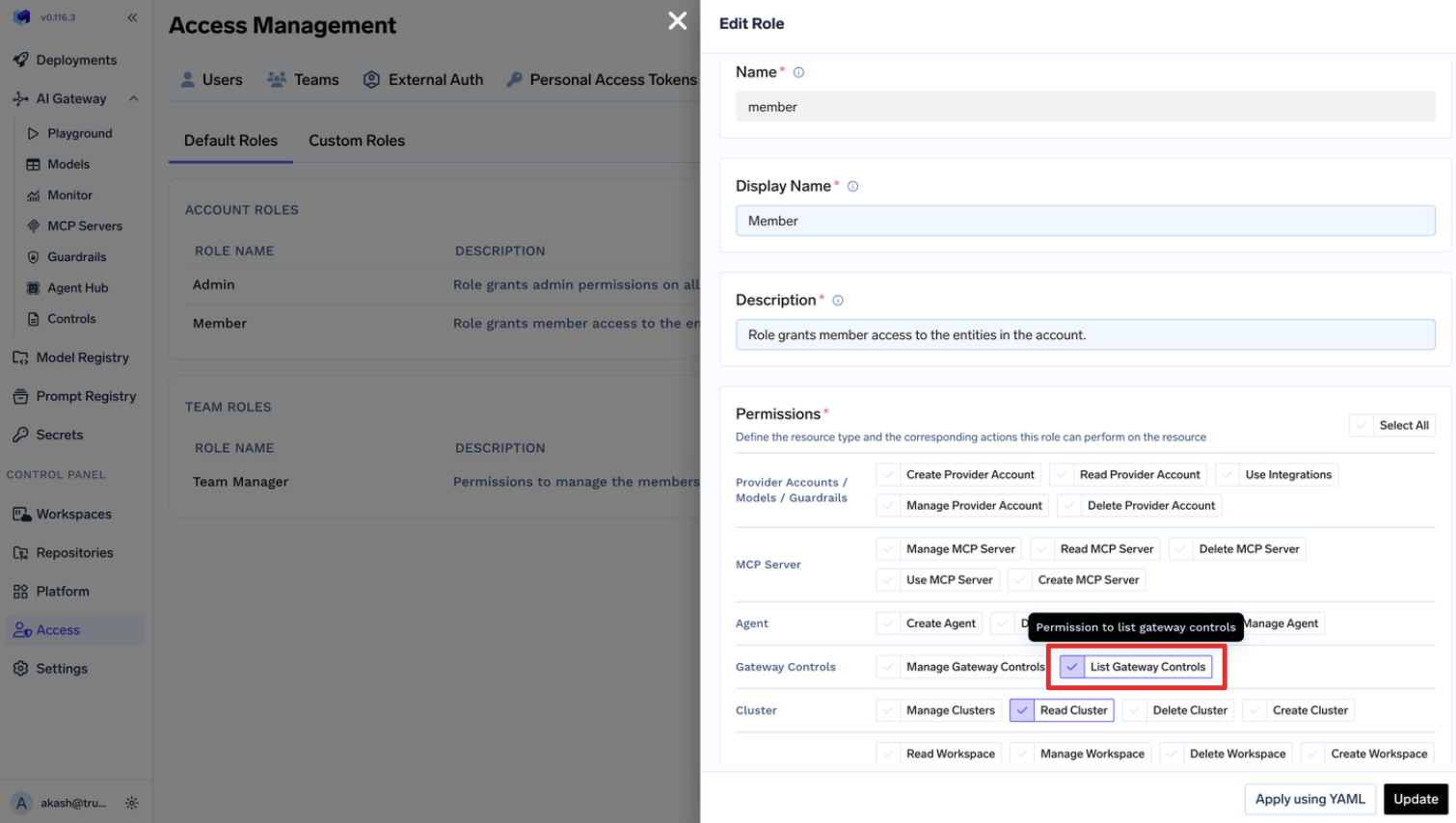
Creation authority and access authority are separate, and neither leaks into the other. An ABAC policy could express the same thing, in a rule you would have to read carefully to be sure of. Here it is two rows in two tables. The pattern scales down too: to let everyone see gateway controls without Admin, edit Member and add gateway-controls:ListGatewayControls.
Grants combine, and removing one does not remove the other. A subject can receive access directly and through team membership. When investigating why someone still sees something, check both the direct bindings and everything inherited from their teams. This is the first place to look, every time.
Editing a team default role changes it for every team. Team Member and Team Manager are edited under Access > Default Roles, and the edit is global. Adding virtual-account:ManageVirtualAccount so one team can retrieve tokens grants it to members of every team. Each person stays limited to their own teams, but the capability spreads everywhere.
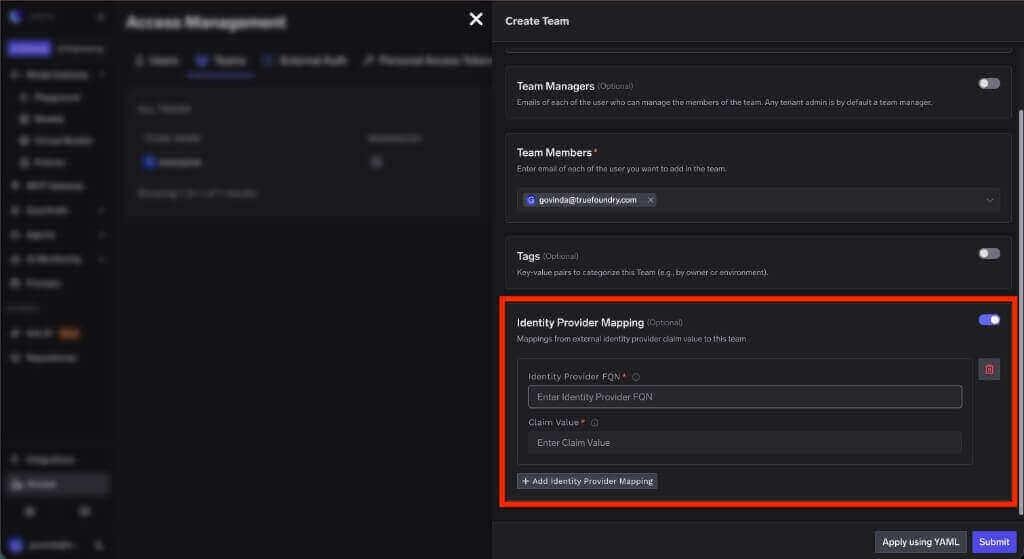
Tenant roles combine with team tenant roles. A user holds one directly assigned tenant role. If they also belong to a team carrying a tenant role, their effective permissions are the union of both — so a user’s real authority is not visible on their user record alone. Teams can be created manually, provisioned from your IdP over SCIM, or applied with tfy apply on a team YAML, and an IdP claim value can map straight to a team.
The RBAC vs ABAC debate usually ends in a shrug. It should not. ABAC is right when access genuinely depends on runtime context you can measure and trust, and when you have somewhere to put policy code and someone to own it. For everything else, RBAC with properly scoped bindings does the job and leaves behind something a human can read.
AI agents feel like they break that rule, and they do change what good looks like — tighter scoping than humans get, per-user credentials rather than shared tokens, a human gate on the operations that cause damage. None of that needs a policy engine — only roles bound to individual resources instead of the whole tenant, and a few well-chosen checks at execution time.
That is what TrueFoundry implements, and calling it RBAC rather than something grander is the point. When your next access review asks what this agent can reach, the answer should be a list, not a proof.
TrueFoundry AI Gateway delivers ~3–4 ms latency, handles 350+ RPS on 1 vCPU, scales horizontally with ease, and is production-ready, while LiteLLM suffers from high latency, struggles beyond moderate RPS, lacks built-in scaling, and is best for light or prototype workloads.




RBAC grants permissions to named roles and assigns subjects to those roles, so a decision is a lookup against the subject’s role bindings. ABAC evaluates a policy at request time over attributes of the subject, resource, action, and environment, so a decision is a computation. RBAC is easier to audit; ABAC is more expressive. The difference bites when someone asks who can access a resource: RBAC answers from a table, ABAC requires evaluating the policy.
On paper, yes — an agent’s appropriate authority varies with which tool it calls, which data it touches, and who it acts for. In practice most teams ship RBAC with resource-scoped bindings, because the attributes an agent policy would need are either unavailable at decision time or better answered by delegating to the upstream system through per-user credentials. The auditability loss also lands hardest on agents, which is what security review scrutinises most.
Yes, and it is the most common real deployment. Roles form the backbone and a few conditions apply where warranted. TrueFoundry’s version is RBAC role bindings plus four gates: per-resource scoping, per-user OAuth so upstream permissions apply, per-tool enable and disable, and human approval on sensitive tool calls. That is deliberately not a policy engine.
Yes. TrueFoundry runs in your VPC, on-prem, air-gapped, or hybrid, so prompts and responses never leave your domain even as you route across many providers.
Yes. It includes an MCP Gateway, an Agent Gateway, and an MCP & Agents Registry with tool-level access control. Agents on LangGraph, CrewAI, AutoGen, or a custom framework can all be governed centrally.
Yes. The gateway is OpenTelemetry-compliant and plugs into Grafana, Datadog, Prometheus, or your preferred stack. It traces every request from prompt to tool and model execution, so you get unified logging without ripping out what you already run.



The latest news, articles, and resources sent to your inbox
.png)
.png)
.png)
.png)
.png)
.png)
.png)
.png)


