November 14, 2026
|
5 min read



Blazingly fast way to build, track and deploy your models!
Vercel’s platform, especially its AI SDK and one-click deploy-on-push workflow makes it easy for frontend teams to get AI demos up and running in minutes. The Vercel AI SDK is a free, open-source toolkit that lets teams ship AI features quickly.
However, Vercel’s pricing was originally designed for static sites and short-lived web functions. Once an app’s AI workload becomes long-running, for example, streaming multi-step agent responses or heavy RAG pipelines, the Vercel AI pricing model changes dramatically.
Instead of fixed monthly rates, you start paying by the millisecond of serverless execution time and gigabytes of data transferred. In practice, teams find their predictable $20/month bills spike wildly as chatbots and agents hit Vercel’s resource limits.
This guide breaks down how Vercel AI pricing works, what hidden fees AI workloads incur, and why engineering teams eventually migrate to private cloud platforms like TrueFoundry to avoid these costs.
Vercel now uses a hybrid model combining user seats with usage quotas and overage charges. In plain terms: hobbyist use is free, but professional usage costs grow with your team size and compute needs. Below is a summary of each tier and its implications for AI applications.
The Hobby plan is designed for personal projects and is free. Vercel’s terms restrict it to personal, non-commercial use, so it is not the right choice for a business application. It includes features such as a global CDN, 1 million CDN requests per month, 100 GB of fast data transfer, and Fluid Compute.
The function-duration limit is not universally 60 seconds. With Fluid Compute enabled, supported Node.js and Python functions on Hobby can run for up to 300 seconds (5 minutes). The older 60-second maximum applies to functions that do not use Fluid Compute. If a function exceeds its configured duration, it can return a 504 timeout error.
For AI applications, that means Hobby can work for prototypes and short requests, but you should test your actual workload against its duration and usage limits. Long-running agent tasks, document processing, and multi-step workflows may need a different execution strategy or plan.
The Pro plan starts at $20 per month, with a $20 monthly usage credit and free viewer seats. Additional developer seats cost $20 per month each. Rather than relying on a single fixed compute allowance, Pro combines the included credit with usage-based pricing for resources such as compute and function invocations.
For Fluid Compute, billing separates active CPU time from provisioned memory time. CPU charges apply while code is executing; memory charges continue while the function instance remains active, including when it is waiting for an external service such as an AI model or database. That distinction matters for AI applications: a request that spends a long time waiting on an API may use little active CPU but still incur memory costs.
Pro functions using Fluid Compute have a default duration of 300 seconds and can run longer when configured. As of June 2026, supported Node.js and Python functions can run for up to 30 minutes on Pro and Enterprise with Fluid Compute; durations above 800 seconds are in beta.
Pro can support production AI applications, but costs depend on the number of developer seats and actual resource consumption. Before launch, estimate compute and data-transfer usage, monitor the usage dashboard, and configure spend controls. Avoid treating a single usage example or a flat per-request estimate as a reliable forecast for every AI workload.
The Enterprise plan uses custom pricing based on an organization’s requirements. Vercel positions it for teams that need advanced security, performance, observability, support, and platform-level service commitments. Its published features include SCIM directory sync, managed WAF rulesets, multi-region compute and failover, and a 99.99% SLA.
Enterprise also offers more flexibility for scaling workloads. Supported Node.js and Python functions can run for up to 30 minutes with Fluid Compute, subject to the applicable configuration and beta limitations. However, longer execution does not mean unlimited or free compute: costs and usage terms depend on the Enterprise agreement.
For organizations deploying AI applications at scale, evaluate Enterprise based on the controls, support, regional requirements, and service commitments you actually need. Since pricing is custom, request a quote from Vercel rather than relying on an assumed annual starting price.
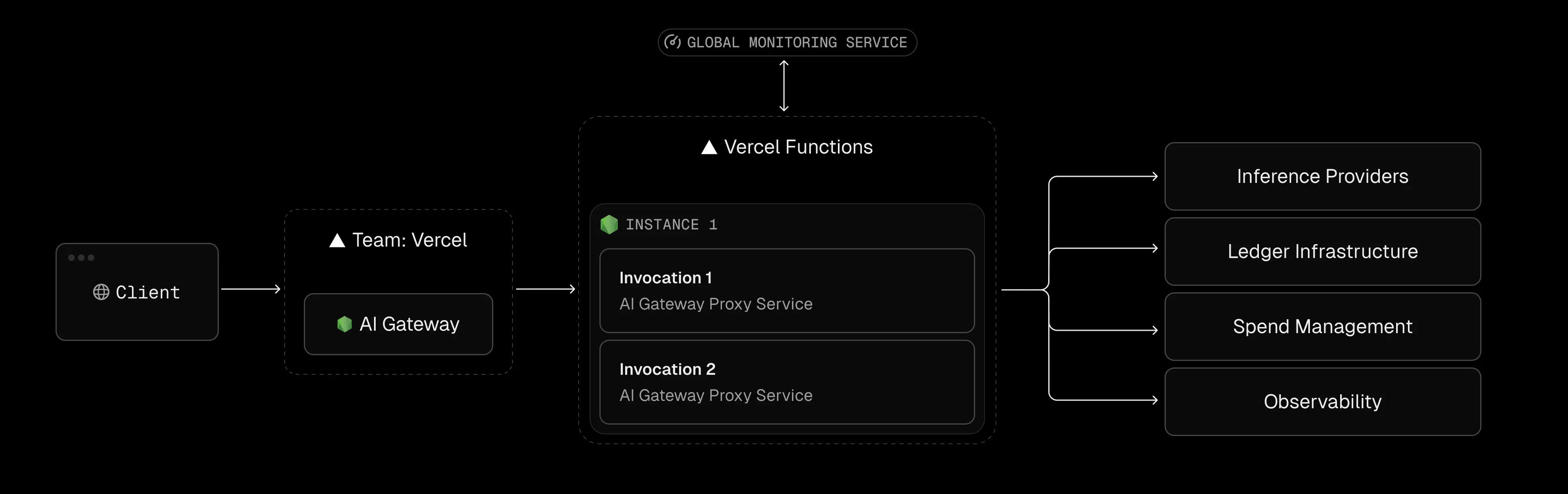
Vercel AI Gateway gives you one API to access AI models from different providers. To estimate your costs, separate model usage from the cost of hosting your application. Your total spend can include AI tokens, Vercel compute, and data transfer.
Vercel AI Gateway offers a free starting point, with $5 in monthly credits available to eligible team accounts after their first request. Once those credits are exhausted, additional usage may require purchasing credits.
AI Gateway covers eligible model requests and provides features for routing requests and monitoring usage. It does not cover all the costs of running your application. Vercel Functions, compute, memory, and data transfer may be billed separately under your Vercel plan.
AI Gateway costs depend on the model you select and the number of input and output tokens processed. Longer prompts, larger context windows, and longer generated responses can increase token usage. Your bill depends on the selected model's rates and the applicable billing arrangement.
Different AI models have different prices, even when they perform similar tasks. AI Gateway lets you compare models and route requests through a unified API. Vercel states that it charges provider list prices without adding a token markup.
Your application may incur separate charges for function execution, provisioned memory, and data transfer. These costs depend on your plan, region, configuration, and traffic. For example, an application that keeps functions running during long AI responses may use more billable memory time.
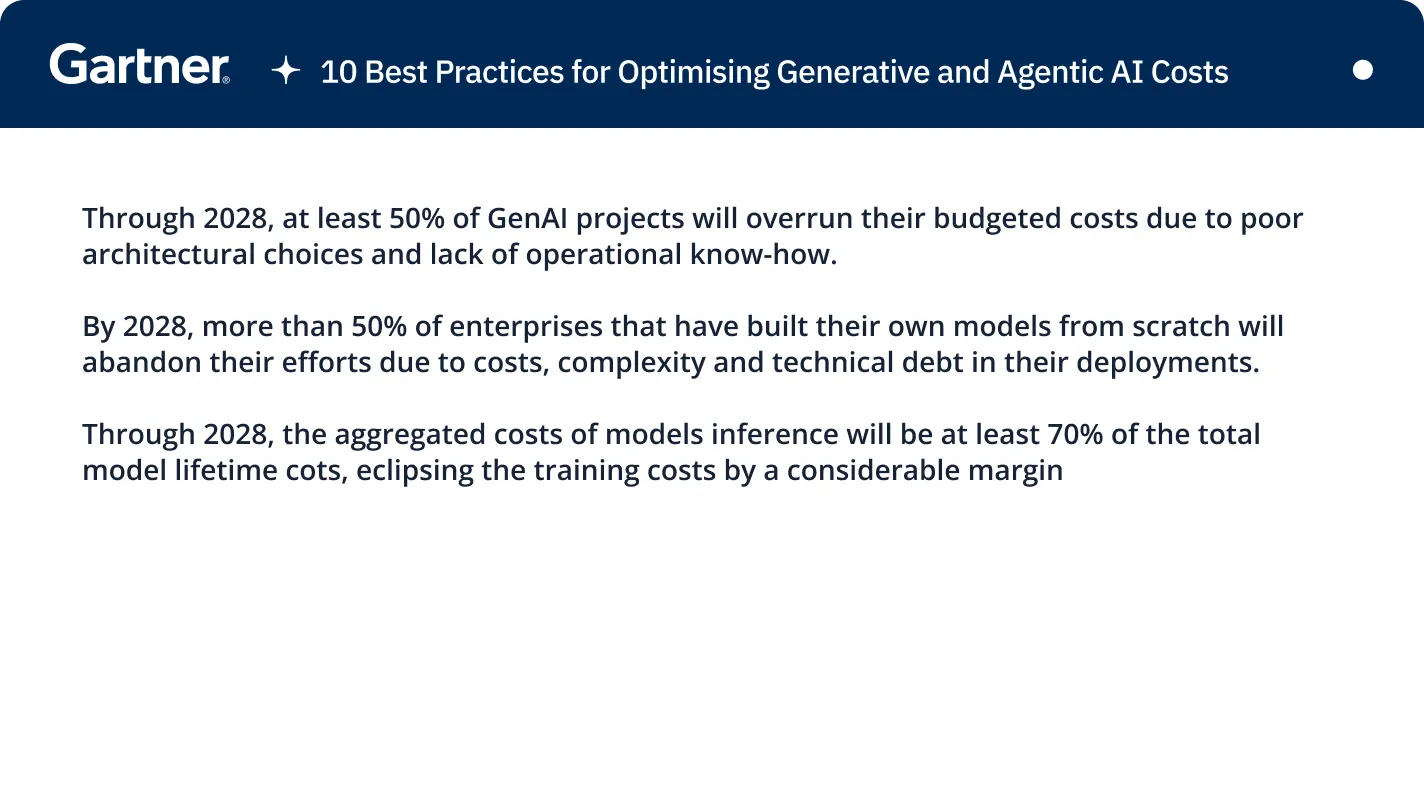
Vercel pricing is designed around deploying and scaling web applications, but AI workloads can have different resource demands. Streaming responses, repeated model calls, retrieval-augmented generation (RAG), and concurrent agent tasks can all affect your bill. The main cost drivers to watch are function execution, memory usage, data transfer, and concurrency limits.
Vercel’s billing model depends on how your functions run. With Fluid Compute, CPU and memory are billed separately. CPU charges apply while code is actively executing, while provisioned memory time can continue to accrue as a function waits for an external service or streams a response. This distinction matters for AI applications, where a function may spend much of its time waiting for an LLM to generate tokens.
For example, consider a chat application that streams an LLM response to a browser. A response lasting 60 seconds does not automatically cost the same as 60 seconds of continuous CPU processing. However, the function can continue consuming billable memory resources while the stream remains open. At scale, long-running streams and many simultaneous requests can increase resource consumption.
The exact cost depends on the function’s memory allocation, active CPU usage, region, and applicable billing rates. Rather than applying a fixed cost per response, estimate expenses using your workload’s actual execution and memory usage, then monitor consumption in Vercel’s dashboard.
The lesson: Streaming is not inherently too expensive for serverless hosting, but long-running requests and high concurrency deserve careful cost monitoring.
AI applications often use retrieval-augmented generation (RAG) to retrieve documents, search databases, and pass relevant information to a model. These workflows can increase data-transfer costs, particularly when large files or datasets move frequently between services.
Vercel includes a monthly data-transfer allowance on its paid plans, with additional usage billed according to the applicable rate and transfer category. Pro includes 1 TB of Fast Data Transfer. However, overage rates vary by region, so check the official Vercel pricing page before estimating costs.
It is also important to distinguish between different types of data transfer. Sending responses from Vercel to users, fetching data from an origin, and transferring files through services such as Vercel Blob may be billed differently. Fetching a document into a function does not automatically count as outbound Fast Data Transfer.
For example, retrieving a 100 MB document ten times moves approximately 1 GB of data in total. Whether that creates a bandwidth charge depends on the transfer path and applicable allowances.
If your RAG pipeline processes hundreds of gigabytes each month, review where your documents, vector database, and model endpoints are hosted. Keeping services close together and avoiding unnecessary transfers can help control costs.
Vercel Functions scale automatically, but concurrency is not unlimited. Vercel documents support for up to 30,000 concurrent executions on Pro and 100,000 or more on Enterprise. It also documents a burst limit of 1,000 concurrent executions per 10 seconds, per region. Check the concurrency scaling documentation for current limits and applicable conditions.
These limits matter for AI applications because a request can remain open while waiting for model output. If many users start long-running streams at once, concurrent executions can accumulate even when CPU usage is relatively low.
When a function exceeds applicable limits, requests may be throttled and return errors such as 503 FUNCTION_THROTTLED. The precise behavior depends on the limit reached; requests are not necessarily queued automatically.
For teams building AI chat services or agent workflows, load-test realistic traffic patterns before launch. Monitor concurrency and function errors, and consider whether long-running jobs should run in a separate worker system. Moving suitable background tasks off request-serving functions can help prevent bursts of AI activity from affecting the rest of your application.

A common misconception is that using the Vercel AI SDK forces you onto Vercel’s infrastructure. In reality, the AI SDK is just a toolkit (open-source, free) for building AI features in Next.js/TypeScript.
You can use the SDK to route to any LLM provider, including self-hosted models, which is an important consideration when comparing Vercel AI Gateway vs OpenRouter for provider flexibility and cost control. There is no requirement to run your code on Vercel’s servers. In fact, most parts of the SDK (UI components, providers, client libraries) work anywhere. For example, a team could containerize their Next.js app with the AI SDK and deploy it on Kubernetes (EKS/GKE) or any cloud VM. The code doesn’t “know” it’s off Vercel.
Why teams get stuck:
Usually for convenience. Vercel’s hosting integrates tightly with the SDK – you commit code, and Vercel builds, deploys, and even provides a built-in AI Gateway tab. Many teams hit “Deploy to Vercel” by default.
The trade-off is that convenience hides the serverless cost model. Engineers may happily prototype with Vercel, unaware that every model call is being billed at Vercel’s (often higher) serverless rates, until the bill arrives.
As Vercel-powered AI projects grow, several operational pain points emerge alongside Vercel AI pricing issues:
Even on paid plans, Vercel enforces strict execution limits. By default, HTTP functions on Pro time out after 5 minutes (configurable up to 13 minutes with “Fluid Compute”). On Hobby, it’s only 60 seconds.
In practice, any AI agent or research workflow that runs for more than a few minutes will be killed. For example, a multi-step agent that needs 10–15 minutes to query databases, summarize documents, and emit a report will reliably exceed the limit and fail.
Teams report frequent 504 errors in their AI tasks once they exceed these caps. In contrast, on your own cloud infrastructure, you can allow functions or containers to run indefinitely (or at least for hours) as needed.
Vercel’s edge middleware (like Next.js Edge Functions) can improve performance, but it comes with lock-in.
In practice, teams sometimes build critical logic into Edge Functions for speed, only to find migrating away from Vercel becomes a major rewrite.
Currently, Vercel has no native GPU instances for AI workloads. This means any model inference or embeddings work that needs acceleration must happen off-platform.
Teams often end up hosting GPT-style models or vector search on AWS/GCP/Render/Azure with GPUs, then calling them from Vercel functions. This split setup adds latency (every call hops to an external service) and operational complexity.
By contrast, an infrastructure built on Kubernetes (like TrueFoundry) can run CPU-only web code and GPU inference side by side in the same cluster, eliminating that fragmentation.
Despite these caveats, Vercel is not a bad choice for some AI scenarios. Its strengths shine when:
In summary: Vercel AI pricing works well for front-end apps that use AI lightly, or for teams that value time-to-market above all else. The break-even point comes when AI workloads become “real” parts of the application, not just novelty demos.
As AI features become central to the product, many teams hit a tipping point and seek alternatives. TrueFoundry positions itself as a solution that offers the ease of serverless with the economics of raw cloud. Below is a comparison of key factors for AI workloads:
What does this mean in practice? Many teams find that their monthly bills on Vercel grow disproportionately compared to their actual compute. In one real-world example, a service consumed ~1,276 GB-hr on Vercel (incurring ~$2000/yr) but only ~101 GB-hr on raw AWS Lambda (free tier) for the same load. Simply put, equivalent AI workloads can run far cheaper on self-managed cloud infrastructure. With TrueFoundry, your bill is basically “vanilla” cloud compute (EC2, GKE nodes, etc.) plus a platform fee, instead of the multiplier that serverless imposes.

TrueFoundry offers a hybrid approach: you keep the developer-friendly model of serverless (automatic scaling, simple APIs) but run on your own cloud account. Key aspects include:
TrueFoundry lets you deploy Next.js (and any other app) as standard Docker services on Kubernetes (EKS, GKE, or AKS) in your own cloud account. As one blog explains, “TrueFoundry makes it really easy to deploy applications on Kubernetes clusters in your own cloud provider account.” Under the hood, your Next.js endpoints run in pods/nodes you control.
This means you are billed at raw cloud rates for CPU and memory, with no hidden serverless premium. An idle WebSocket or open stream still consumes RAM on the node, but that RAM is priced at a fraction of what a serverless GB-hr costs.
Since you manage the Kubernetes nodes, you control function timeouts and lifetimes. You can run long-lived pods or jobs for minutes or hours as needed. TrueFoundry doesn’t impose a 5- or 15-minute cutoff – your infrastructure does.
Complex agent pipelines and research tasks simply run to completion (subject only to the normal pod max life, if any). This eliminates the common Vercel pain point of mid-stream 504 errors. If an AI agent needs 20 minutes to finish, it can on TrueFoundry; on Vercel it would’ve failed at 5 minutes.
A major advantage of TrueFoundry for AI is built-in GPU support. Because it’s Kubernetes under the hood, you can attach GPU node pools and schedule inference workloads alongside your web services. This means your front-end APIs and your heavy ML inference can run in the same cluster (reducing latency and data transfer). In fact, TrueFoundry’s cloud-native architecture explicitly “allows us to have access to the different hardware provided by different cloud providers, especially in case of GPUs”.
In practice, this means you can run LLM inference or embed generation on GPU-accelerated nodes without leaving the platform. There’s no need to wire together a separate GPU service (and pay for inter-region traffic).
Vercel remains an excellent platform for frontend delivery. But as soon as AI computes form the backend, the economics change. The key takeaway: avoid paying Vercel’s duration-based premium for heavy AI tasks.
Unlike simple HTTP traffic, AI backends often run far longer per request and move lots of data. Under Vercel AI pricing model, that means paying for every second of compute and every gigabyte out. By contrast, with TrueFoundry you pay for raw nodes and seconds of uptime – the same cost model you’d see if you ran a container on EC2 or GKE.
The end result is smoother scaling costs. Teams find that their monthly spend grows linearly with actual compute used, not with each millisecond of function time. In many cases, what cost them hundreds on Vercel per month can be done for tens on their own cloud.
If your team is facing spiraling Vercel bills or constantly fighting timeouts, it’s worth considering an infrastructure shift. TrueFoundry is designed to let you keep the productivity of serverless (easy deployments, scaling) while removing its penalties.
A quick demo can show how moving your AI workload to TrueFoundry can slash costs without sacrificing velocity.
TrueFoundry AI Gateway delivers ~3–4 ms latency, handles 350+ RPS on 1 vCPU, scales horizontally with ease, and is production-ready, while LiteLLM suffers from high latency, struggles beyond moderate RPS, lacks built-in scaling, and is best for light or prototype workloads.

Vercel AI Gateway provides a unified interface for accessing multiple AI models through one API. It supports model selection, usage monitoring, and provider management, helping developers integrate LLMs without building separate integrations for every provider.
Vercel AI Gateway offers access without a separate gateway subscription fee. Model usage is billed according to the applicable provider rates and billing options. Function compute, bandwidth, and other Vercel platform charges are separate.
Vercel’s Hobby plan is free for personal projects. Pro starts at $20 per month, plus additional developer seats and usage charges where applicable. Enterprise pricing is custom. Your total cost depends on team size, compute, bandwidth, and other resources.
The $20 Vercel plan refers to Pro, which starts at $20 per month and includes team collaboration features and usage allowances. Additional developer seats and usage beyond included credits may increase your bill, depending on your deployment and resource consumption.
Yes. Vercel AI Gateway lets you access models from multiple providers through a unified API. This simplifies switching between models and managing usage. Availability, capabilities, and pricing depend on the selected model and provider.
Vercel AI workloads are subject to function-duration, memory, concurrency, and data-transfer limits. Fluid Compute changes how CPU and memory are billed. Vercel is not a general-purpose GPU hosting platform, so GPU-heavy inference typically requires external infrastructure.
Pro suits professional teams that need collaboration features and usage-based scaling. Enterprise targets organizations requiring advanced security, support, and contractual service commitments. Pricing is custom for Enterprise, so compare the specific features and usage terms in your proposal.



The latest news, articles, and resources sent to your inbox