Blank white background with no objects or features visible.

Hello, EMEA! TrueFoundry is growing our footprint across Europe, the Middle East, and Africa. Read more. →

How to Host Helm Charts on GitHub Pages and Publish Them on Artifact Hub (2026 Guide)

By TrueFoundry

Updated: November 13, 2026

Published: February 13, 2024

‍

⚡ TL;DR
  • What you'll build: a free, public Helm chart repository on GitHub Pages, listed on Artifact Hub.
  • How: a GitHub Actions workflow runs chart-releaser on every push. No personal access token needed.
  • Time: about 20 minutes.
  • Also covered: the Verified Publisher badge, OCI registries vs GitHub Pages, and fixes for common errors.

You can host a Helm chart repository for free on GitHub Pages. A GitHub Actions workflow runs chart-releaser on every push: it packages each chart version as a GitHub release and publishes an index.yaml file to a gh-pages branch. That file is all Helm needs to treat a static site as a chart repository. Artifact Hub then reads the same URL and makes your charts searchable.

We publish TrueFoundry's own public charts this way, and the setup takes about 20 minutes. This guide walks through it end to end, updated for 2026: current action versions, the built-in GITHUB_TOKEN instead of a personal access token, and when an OCI registry is the better choice.

What you need before you start

  • A GitHub account and a public repository (GitHub Pages is public on free plans)
  • Helm installed locally (Helm 3.8+ or Helm 4)
  • A test cluster such as minikube or kind, to install the chart at the end

Key terms in one minute

  • Helm chart: a package of templated Kubernetes manifests. You install it with different values per cluster or environment instead of copying YAML around.
  • Chart repository: any web server that serves an index.yaml plus the packaged .tgz charts. GitHub Pages can do this for free.
  • GitHub Pages: GitHub's static hosting, served at <username>.github.io/<repo>.
  • Artifact Hub: a CNCF catalog where people discover charts. It doesn't host your charts; it indexes the repository URL you register.

Step 1: Create a chart and push it to GitHub

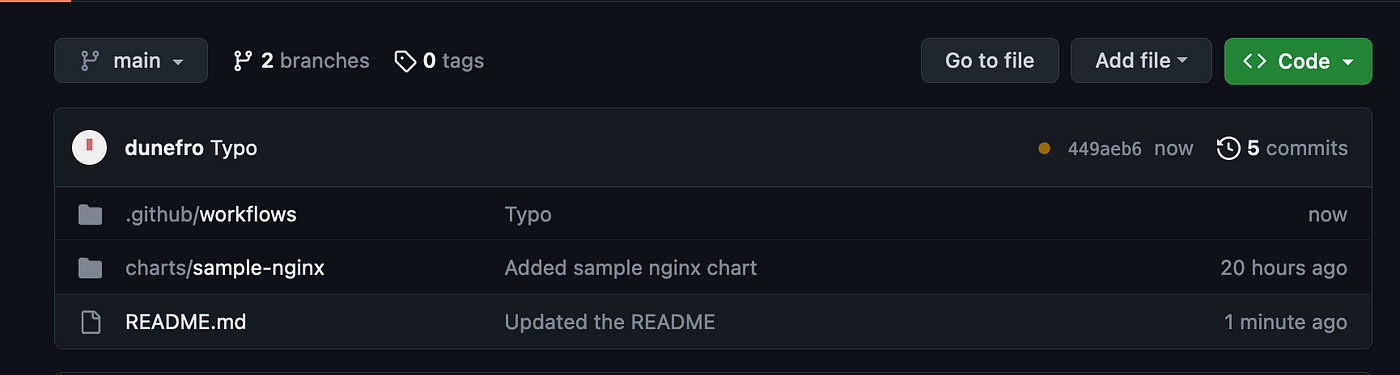
Create a sample chart, or use your own. Put every chart inside a charts/ folder at the root of the repository, which is where chart-releaser looks by default. Then push it to the main branch.

helm create sample-nginx

# Repo layout: charts live in a charts/ folder at the root
$ tree .
.
├── README.md
└── charts
    └── sample-nginx
        ├── Chart.yaml
        ├── values.yaml
        └── templates
            ├── deployment.yaml
            ├── service.yaml
            └── ...

Step 2: Create the gh-pages branch and turn on GitHub Pages

chart-releaser publishes index.yaml to a branch called gh-pages. Create it as an empty branch so it holds only your repository index:

# Create an empty gh-pages branch with no history
git checkout --orphan gh-pages
git rm -rf .
echo "# Helm charts" > README.md
git add README.md
git commit -m "Initialize gh-pages"
git push origin gh-pages
git checkout main

Then go to your repository's Settings → Pages. Under Build and deployment, set the source to Deploy from a branch, pick gh-pages and the / (root) folder, and save. After a minute or two, GitHub shows the site URL. That URL is your chart repository.

GitHub repository Settings with Pages in the left panel

Step 3: Add the release workflow

Create .github/workflows/release.yaml on the main branch with this content. It's the setup the official Helm docs recommend:

# .github/workflows/release.yaml
name: Release Charts

on:
  push:
    branches:
      - main

jobs:
  release:
    permissions:
      contents: write   # lets the job create releases and push to gh-pages
    runs-on: ubuntu-latest
    steps:
      - name: Checkout
        uses: actions/checkout@v4
        with:
          fetch-depth: 0

      - name: Configure Git
        run: |
          git config user.name "$GITHUB_ACTOR"
          git config user.email "$GITHUB_ACTOR@users.noreply.github.com"

      - name: Run chart-releaser
        uses: helm/chart-releaser-action@v1.7.0
        env:
          CR_TOKEN: "${{ secrets.GITHUB_TOKEN }}"

What each part does:

  • on: push to main runs the workflow every time you merge a change.
  • permissions: contents: write lets the built-in GITHUB_TOKEN create releases and push to gh-pages. You don't need a personal access token or a repository secret.
  • fetch-depth: 0 pulls the full git history so chart-releaser can tell which charts changed.
  • chart-releaser-action packages any chart whose version changed, creates a GitHub release for it, and updates index.yaml on gh-pages. Its runner already has Helm, so there's no separate setup step.

If the workflow fails with a 403 error, check Settings → Actions → General → Workflow permissions. Some organizations default the token to read-only.

Publishing the chart is the easy part. Running it everywhere isn't.

TrueFoundry deploys any Helm chart, from a Helm repo, an OCI registry or Git, to all your clusters from one dashboard, with version history and secrets built in. No kubectl required.

See it with your charts → Book a 20-min demo

Step 4: Release your first version and check it

Push to main (any change works for the first release). Open the Actions tab to watch the run. When it finishes, three things should be true:

GitHub Actions workflow running after a push to main
  1. A new release such as sample-nginx-0.1.0 appears on the repository's Releases page.
  2. The gh-pages branch now contains an index.yaml file.
  3. A second workflow, pages build and deployment, runs automatically and publishes that file at https://<username>.github.io/<repo>/index.yaml.

For every new release after this, bump version in Chart.yaml. chart-releaser skips any chart whose version already has a release.

Step 5: Install the chart from your new repository

Now test it the way your users will:

# Add your new repository (use your own GitHub Pages URL)
helm repo add sample-charts https://<your-username>.github.io/<your-repo>/
helm repo update

# Confirm the chart is listed
helm search repo sample-charts

# Install it into a test cluster (minikube or kind)
helm install test-nginx sample-charts/sample-nginx
kubectl get pods

If the pod reaches Running, your repository works. If you plan to deploy charts like this across many clusters, our guide to setting up GitOps shows how to keep those releases in sync.

Step 6: List the repository on Artifact Hub

Artifact Hub is where people discover charts, alongside projects like Argo CD, Grafana and Prometheus. To add yours:

  1. Sign in at artifacthub.io and open Control Panel from your profile menu.
  2. Click Add repository, choose Helm charts as the kind, and paste your GitHub Pages URL.
  3. Save. Artifact Hub reads your index.yaml and lists the charts it finds.
Adding a Helm chart repository in the Artifact Hub control panel

Step 7: Get the Verified Publisher badge

The Verified Publisher badge tells users the charts really come from you. To get it, prove you control the repository by adding a metadata file:

Artifact Hub Verified Publisher badge on a Helm chart repository
  1. Copy the repository ID from your repository in the Artifact Hub control panel.
  2. Add a file named artifacthub-repo.yml to the root of the gh-pages branch:
# artifacthub-repo.yml (root of the gh-pages branch)
repositoryID: <paste-the-repository-id-from-artifact-hub>
owners:              # optional, used to claim ownership
  - name: <your-name>
    email: <the-email-on-your-artifact-hub-account>

Artifact Hub picks up the file on its next check and adds the badge.

GitHub Pages or an OCI registry: which should you use?

Since Helm 3.8, charts can also live in OCI registries such as GitHub Container Registry (GHCR), right next to your container images. Both approaches work with Artifact Hub. Use GitHub Pages for public, open-source charts you want people to find easily. Use an OCI registry if you need private charts or already run a container registry.

GitHub Pages (classic repo)OCI registry (e.g. GHCR)
How users installhelm repo add then helm installhelm install oci://... with no repo add
Private chartsNo, Pages sites are public on free plansYes, with registry permissions
Setup effortOne workflow plus a gh-pages branchhelm package plus helm push in CI
Artifact Hub listingSupportedSupported
Best forPublic, open-source charts that should be easy to discoverTeams already using a container registry, or private charts

To publish to GHCR instead, package and push in your workflow: helm package charts/sample-nginx then helm push sample-nginx-0.1.0.tgz oci://ghcr.io/<org>/charts.

We ship our own charts this exact way

TrueFoundry's public charts, including the control plane, LLM gateway and monitoring stack, are served from GitHub Pages at truefoundry.github.io/infra-charts. That's how enterprises install the TrueFoundry AI Gateway inside their own Kubernetes clusters.

See it running in your cluster →

Troubleshooting common errors

  • 404 on index.yaml: Pages isn't serving gh-pages yet. Check the Pages settings and give the deployment a few minutes.
  • Workflow runs but releases nothing: the chart version didn't change. Bump version in Chart.yaml.
  • 403 when the workflow pushes: the job lacks contents: write, or the organization restricts workflow permissions.
  • Charts missing on Artifact Hub: make sure the URL you registered returns index.yaml, then look for processing errors in the control panel.

The bottom line

GitHub Pages plus chart-releaser is still the fastest free way to publish public Helm charts: one workflow file, one branch, and every version bump releases itself. Add Artifact Hub and the Verified Publisher badge so people can find and trust your charts. When you need private charts, move to an OCI registry. Helm and Artifact Hub support both.

For platform teams

Run AI infrastructure on your own Kubernetes

TrueFoundry installs with Helm into your cloud or on-prem cluster and gives you one control plane for models, MCP tools and agents. We'll prove it on your workloads in a 3-week pilot.

Frequently asked questions

Can I host private Helm charts on GitHub Pages?

Not on a free plan. GitHub Pages sites are public, so anyone with the URL can download your charts. For private charts, push them to an OCI registry such as GitHub Container Registry and control access with registry permissions.

Do I need a personal access token for chart-releaser?

No. The built-in GITHUB_TOKEN works as long as the workflow has contents: write permission. Older guides, including an earlier version of this one, used a personal access token, which adds a secret you have to rotate.

Why didn't my new chart version get released?

chart-releaser only releases a chart when its version in Chart.yaml changes. Bump the version, push to main, and the workflow will package and publish it.

Does this work with Helm 4?

Yes. Classic chart repositories served from GitHub Pages work with both Helm 3 and Helm 4, and so do OCI registries.

How long does Artifact Hub take to show my chart?

Artifact Hub checks registered repositories periodically, so a new repository or chart version can take a little while to appear. Check the repository in your Artifact Hub control panel for processing errors if it doesn't show up.

Try now.

One gateway for all your models, MCP servers, and agents. No credit card needed.

Start free
Table of Contents

One Gateway for Every LLM, Agent and MCP Server

Book a 30-min with our AI expert

Book a Demo

The fastest way to build, govern and scale your AI

Book Demo
Summarize with
ChatGPT logo by OpenAI
Perplexity AI logo
Blurry red snowflake on white background, symmetrical frosty design with soft edges and abstract shape.

Discover More

November 5, 2025
|
5 min read

Data Residency in the Age of Agentic AI: How AI Gateways Enable Sovereign Scale and Compliance

August 27, 2025
|
5 min read

Mapping the On-Prem AI Market: From Chips to Control Planes

August 27, 2025
|
5 min read

AI Gateways: From Outage Panic to Enterprise Backbone

Secure AI Gateway with MCP: Enterprise-Ready Protection
July 4, 2025
|
5 min read

Secure AI Gateway with Centralized MCP for Enterprises

November 14, 2026
|
5 min read

Claude Managed Agents vs LangChain Deep Agents: Which Agent Harness Should You Choose?

TrueForge
November 13, 2026
|
5 min read

Claude Managed Agents vs TrueForge: Which Agent Harness Should Enterprise Teams Run in 2026

TrueForge
 What is an LLM Gateway
November 13, 2026
|
5 min read

What Is an LLM Gateway? How It Works, What to Look For, and When You Need One

Engineering and Product
November 13, 2026
|
5 min read

How to Host Helm Charts on GitHub Pages and Publish Them on Artifact Hub (2026 Guide)

Engineering and Product
No items found.

Recent Blogs

Black left pointing arrow symbol on white background, directional indicator.
Take a quick product tour
Start Product Tour
Product Tour