September 18, 2026
|
5 min read


Blazingly fast way to build, track and deploy your models!
Choosing a model and connecting it to tools can get an AI agent working. Getting that agent ready for production is a different challenge.
You need a reliable execution loop, a secure environment for running code, approval gates for sensitive actions, and traces that show what happened during each run. These capabilities sit in a layer called the agent harness. And once you're building agents at scale, you have to decide whether to build this layer yourself or use a managed solution.
Here’s an example: Sofia, a platform engineer, inherited three teams' worth of agents and a request to make them production-ready.
Each team had built its own runtime. One wrote an orchestration loop in Python, another wrapped an agent framework, and the third called a model directly from a cron job. API keys were stored in agent configurations and committed to repositories. Approval processes varied between teams, and two had no reliable way to trace an agent's actions.
The agents weren't necessarily missing better models or more tools. They were missing a common runtime to execute tasks, manage credentials, enforce approvals, and track what happened. Sofia needed an agent harness.
This is a common challenge once the initial demo works. Building an agent is one problem; operating it reliably and securely is another. Without a shared harness, every team ends up rebuilding the same capabilities, often with different gaps in security and observability. In this post, we'll explain what an agent harness does, which capabilities make it production-ready, and what to consider when deciding whether to build your own or adopt a managed harness.
An agent harness is the runtime layer around a large language model (LLM) that turns it from a text generator into an agent that can execute tasks. It manages the execution loop: the model decides what to do, the harness calls the required tool, observes the result, and feeds that result back to the model. The loop continues until the task is complete or a configured limit is reached.
The harness also handles the components needed to run agents reliably, including tool execution, memory, context management, security controls, human approval, and observability.
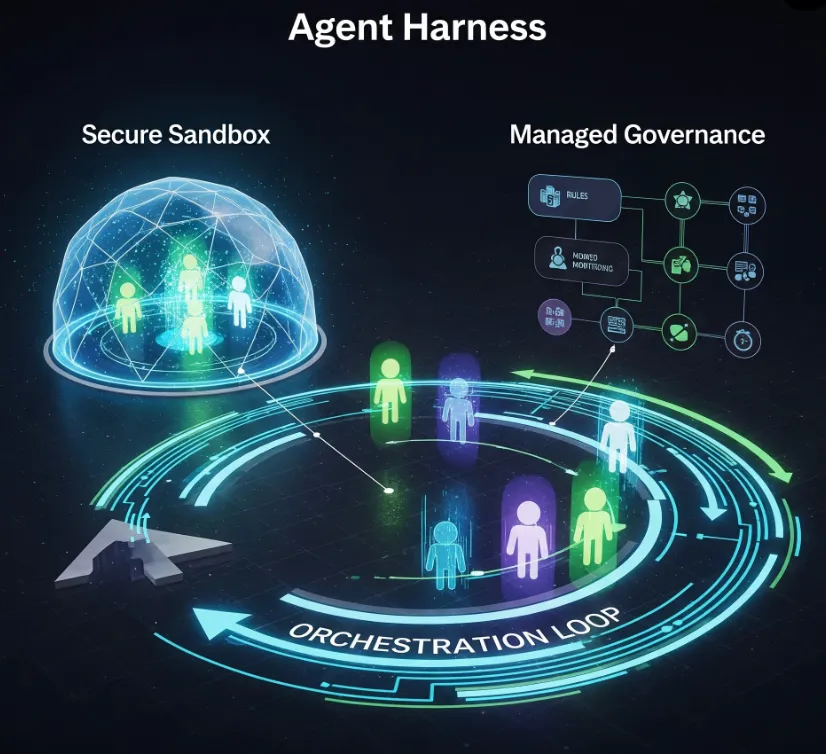
Think of the harness as the infrastructure that keeps an agent's work on track. The model provides the reasoning, and tools provide external capabilities. The harness connects them, manages execution, and enforces the boundaries that make the workflow usable in production.
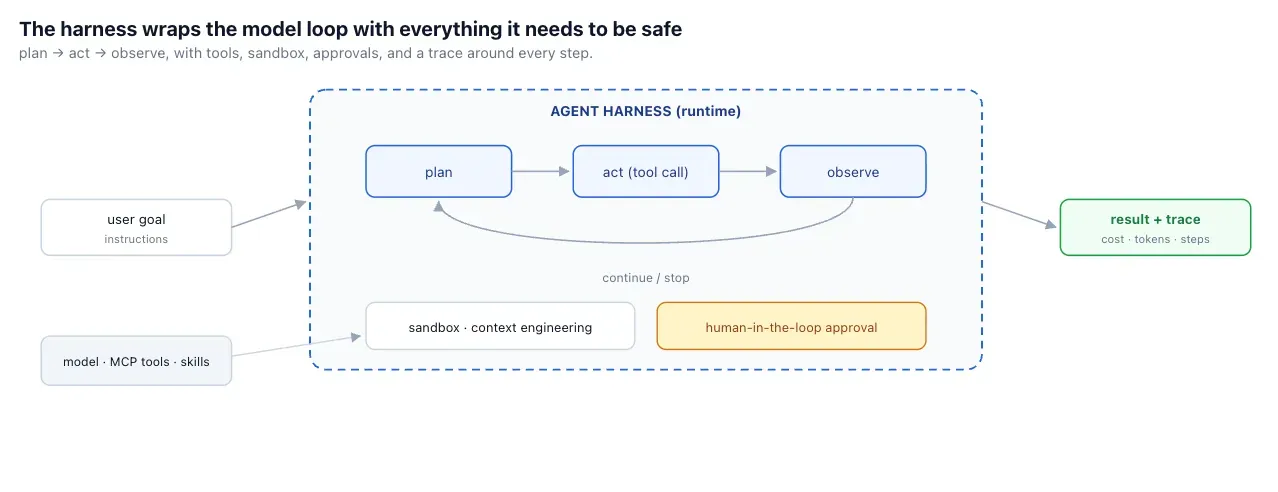
An agent harness coordinates the steps between receiving a task and producing a result. Here’s how it works:
For example, a coding agent asked to fix a bug might inspect a repository, run tests, modify a file, and rerun the tests. The agent harness coordinates these actions and controls how the agent accesses the code and execution environment.
An agent harness brings together several components that would otherwise need to be implemented and maintained separately.
These components help teams move beyond simple model calls to agents that can perform multi-step work. However, a harness does not automatically make an agent secure or reliable. Its effectiveness depends on how its permissions, runtime controls, and execution policies are configured.
An agent harness, agent framework, and agent runtime play different roles in building and running AI agents.
A framework provides the tools to build an agent, a harness manages how it carries out tasks, and a runtime provides the environment where it runs.
An agent harness manages how an AI agent carries out a task. It coordinates model calls, tool execution, and the processing of results until the task is complete. It can also manage permissions, retries, execution limits, and logging to keep the agent's actions controlled and observable.
An agent framework provides the components developers need to build AI agents. These include model integrations, tool-calling interfaces, and workflow orchestration. For example, LangGraph helps developers define how an agent moves between tasks and tools. The harness manages the execution process, although some frameworks provide both capabilities.
An agent runtime provides the environment where an AI agent executes its tasks. It manages computing resources, process isolation, and deployment. For example, when a coding agent needs to run a test, the harness coordinates the action, while the runtime provides the environment in which the test runs.
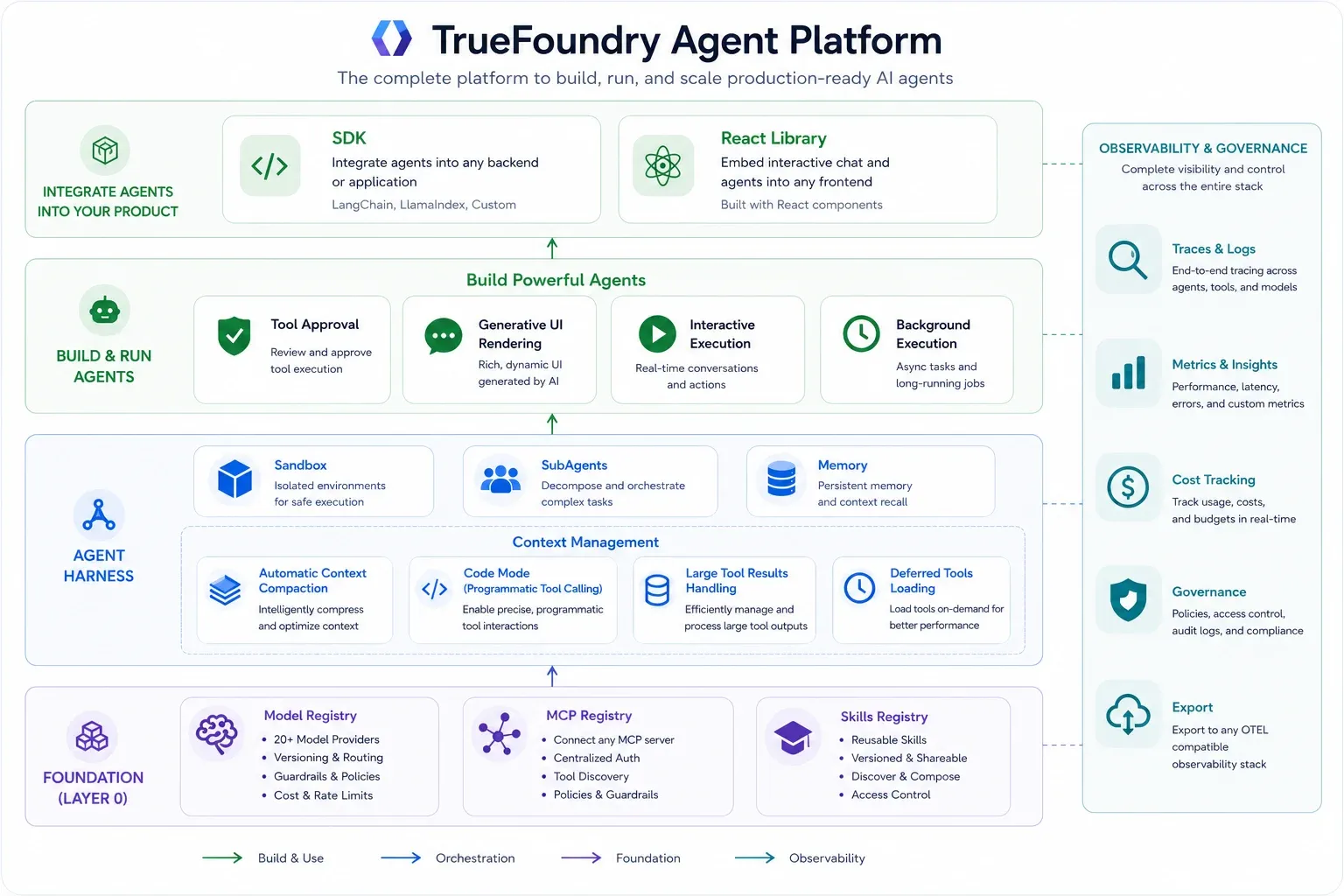
The harness is the capstone of the control-plane story this series has been telling. The AI Gateway governs model traffic; the MCP Gateway governs tool traffic; the Agent Gateway governs agent-to-agent traffic; the Skills Registry governs reusable, versioned skills; and the harness is the runtime that ties them together into a managed agent, running in the same plane so orchestration, governance, and observability stay in one system rather than scattered across layers.
That co-location is the reason the harness can keep credentials out of definitions, gate destructive tools once, and trace a run end-to-end: it's not bolting governance onto an agent runtime after the fact; it's running the agent runtime inside the governance plane that was already there. For Sofia, that's the difference between standardizing three teams onto one governed runtime and continuing to babysit three bespoke ones.
TrueFoundry isn't the only managed harness, and the alternatives are good. Anthropic's Claude Managed Agents and LangChain's LangSmith Managed Deep Agents are both strong hosted runtimes, and for many teams they're an excellent fit. The useful way to compare them isn't a scoreboard; it's a difference in design philosophy, and which philosophy fits depends on your situation.
As documented at the time of writing, many managed-cloud runtimes lean pro-code and API-first: you define agents, sessions, and environments through an SDK or REST API, register credentials per agent or workspace (vault IDs, header arrays), set tool-approval policies per agent, and run in the provider's managed cloud.
That's a clean, tightly integrated model — especially if you're already standardized on one model provider or one orchestration framework, and your team is comfortable defining agents in code. TrueFoundry's philosophy is different: a no-code builder first (with the same definition available via SDK and REST), credentials centralized in the gateway control plane rather than registered per agent, destructive-tool approval flagged once org-wide, model access governed with RBAC and budgets across any provider, and deployment available as SaaS, self-hosted, or on-prem. The trade is integration simplicity within one ecosystem versus centralized governance across many.
Building your own agent harness gives you control over tool execution, context management, permissions, and workflows. But your team must also build and maintain retries, failure handling, security controls, and observability.
A managed harness provides many of these capabilities out of the box, reducing infrastructure work so your team can focus on agent logic. Building makes sense when you need specialized behavior and can maintain it. A managed option is often better when you want to deploy faster and reduce operational overhead.
Here's the uncomfortable arithmetic of agentic AI: the model is a few lines of API call, the tools are a registry away, and the harness is the rest of the system. The orchestration loop with its stopping conditions, the sandbox with its lifecycle, the credential handling, the approval gates, the per-step tracing and cost accounting — that's where the engineering months go, and almost none of it is specific to your use case. It's undifferentiated heavy lifting, rebuilt every time a team starts an agent from scratch.
That's the trap Sofia's three teams fell into independently. Each spent real effort on runtime plumbing instead of on the agent's actual job, and each produced a different, partial version with its own gaps — the committed API key, the missing approval gate, the absent trace. Buying the harness (or adopting a managed one) is the decision to stop rebuilding the plumbing and standardize it once, so teams spend their effort on instructions, tools, and skills — the parts that are actually theirs.
TrueFoundry's Agent Harness is a managed harness built on top of the AI Gateway and MCP Gateway. The builder's mental model is deliberately small: you choose a model, connect MCP servers, add skills, and write instructions.
TrueFoundry provides the rest as managed capabilities — orchestration, sandbox lifecycle, tool execution, approval flows, governance, and observability — while teams still own the agent's instructions, tools, policies, and deployment posture. There's a no-code builder in the console for non-developers and a Python SDK and REST API for the same agent definition, so the path from "pick a model" to "working agent" is short, and the same definition can be driven from code.
An agent defined declaratively — model, tools, skills, instructions (illustrative)
name: refund-assistant
model: claude-sonnet-4-6          # a name, not a key — credentials live in the gateway
mcp_servers:
  - zendesk                       # governed tools, referenced by name
  - payments
skills:
  - refund-policy@v4              # versioned SKILL.md from the Skills Registry
instructions: |
  Resolve refund requests within policy. Confirm any refund over $100 with the user.
Notice what's not in that definition: any secret. The model is a name, the MCP servers are names, the skill is a versioned reference. That absence is the whole point of the next section, and it's the difference between an agent definition you can safely commit to a repo and one you can't.
The single most consequential design choice in a harness is where credentials live. The tempting answer — paste the provider key and the tool tokens into the agent definition — is exactly what put Sofia's keys in a repo. It doesn't scale (every agent and every user re-registers secrets), it doesn't rotate cleanly (a key change touches every definition), and it doesn't stay secure (secrets spread to wherever definitions are stored).
TrueFoundry's harness takes the other path: no API keys or credentials are ever pasted into agent definitions. Provider credentials live in the AI Gateway, and agents reference model names while RBAC, budgets, and guardrails are enforced at the gateway.
MCP authentication — OAuth tokens, API keys — lives in the MCP Gateway, which handles credential injection, token refresh, and per-user delegation, so users authenticate inline and the agent calls tools by name. Skills are published in the Skills Registry with versioning and RBAC, so agents pick from a governed catalog. Platform teams configure access once; agent builders never handle secrets.
An agent harness needs more than a loop that sends requests to a model and executes tool calls. To run reliably in production, it must manage context, control tool execution, handle failures, and know when to ask for human input. TrueFoundry's harness brings these capabilities together to address common problems that arise when agents handle real tasks.
Long-running agents can fill their context windows with tool results, conversation history, and intermediate outputs. Context engineering helps keep that information manageable. TrueFoundry's harness supports subagents to isolate subtasks, code mode to process data programmatically, large-result offloading to prevent oversized tool outputs from overwhelming the context window, and compaction for longer runs. This complements gateway-side session management covered in our context engineering guide.
A sandbox gives an agent a controlled environment to run code, handle files, and execute tasks without directly exposing the host or sensitive systems. This is especially important for coding agents and workflows that process untrusted inputs. The harness also needs to manage tool calls and their results so the agent can continue working within defined limits.
Some tool calls should not execute without explicit approval. Human-in-the-loop controls let the harness pause a run until an authorized person approves a sensitive action. TrueFoundry can flag destructive tools centrally at the MCP Gateway, so the approval requirement applies to every agent that uses those tools instead of relying on each agent builder to configure it correctly.
Production agents need to handle failed tool calls, retries, execution limits, and interruptions without losing track of the task. Run tracing also helps teams understand what happened at each step and investigate failures. These controls are particularly important when a task involves several tools or takes a long time to complete.
Agents sometimes need more than a text response to complete a task. The harness can support interactions in which an agent asks the user for clarification or presents choices before continuing. Generative UI takes this further by allowing the agent to stream structured content, such as cards, tables, and charts, that the client can render. This makes it easier for users to review information and respond while a task is in progress.
Each capability addresses a specific failure mode. The table below shows how they contribute to a production-ready agent harness.
session = harness.sessions.create(
    agent="refund-assistant",
    input="Refund order #8842, $240"
)

for event in session.stream():
    if event.type == "tool_call":
        log(event.tool, event.args)
    elif event.type == "approval_required":
        decision = ask_human(event)
        session.respond(event.id, decision)
    elif event.type == "final":
        return event.output
In this example, the harness streams run events, logs tool calls, and pauses when a tool requires approval. The code is illustrative; the exact event names and API methods depend on the implementation.
The approval gate deserves particular attention because it determines when an agent can act independently. Instead of asking every agent builder to configure approval for every sensitive action, platform teams can flag destructive tools centrally.
Illustrative policy configured at the MCP Gatewaytools: payments.issue_refund: destructive: true approval: require_user payments.read_balance: destructive: falseHere, issuing a refund requires approval, while reading a balance does not. Centralizing this policy helps apply the same rule across agents that use the tool.
However, requiring approval is only part of the control. A useful policy should specify which tools require approval, who can approve, whether approval applies to an individual call or an entire session, what information the approver sees, and how long the approval remains valid. For example, a refund request should show the amount and recipient before approval. Without that context, a person cannot make an informed decision.
By enforcing these rules at the platform level, an agent harness helps teams maintain consistent controls as they build and deploy more agents.
Two of Sofia's three teams couldn't reconstruct what an agent did on a given run, which is the observability gap this whole series keeps returning to — now at the agent level. A harness has to emit an end-to-end trace per run: every LLM call, tool call, sandbox execution, and subagent, with cost, tokens, and latency attributed per step. Without that, a misbehaving agent is a black box, and the only signal you get is the bill or the complaint.
What the trace carries matters as much as that it exists. A useful per-step record ties together the run and step identity, the model and tool involved, the approval decision, the sandbox session, and the cost, tokens, and latency of the step — enough to reconstruct, attribute, and cost any run after the fact:
An illustrative per-step trace record (shape is gateway-specific)
{ "agent.run_id": "run_abc123", "agent.name": "refund-assistant", "agent.step.type": "tool_call", "agent.step.name": "payments.issue_refund", "model": "claude-sonnet-4-6", "mcp.server": "payments", "approval.required": true, "approval.status": "approved", "sandbox.session_id": "sbx_7f1c", "tokens.input": 1842, "tokens.output": 391, "latency_ms": 2200, "cost_usd": 0.0142}A run is then just the ordered set of these records under one run_id — which is what turns "the agent did something expensive" into "step 4 called issue_refund after an approved gate, costing this much."
Because TrueFoundry's harness runs on the same gateway plane as model and MCP traffic, it inherits the AI Gateway's analytics, request logs, OpenTelemetry export, and Prometheus and Grafana integration — one pane of glass across model, MCP, and agent traffic rather than three disconnected dashboards.
Sign up to see TrueFoundry in action.
TrueFoundry AI Gateway delivers ~3–4 ms latency, handles 350+ RPS on 1 vCPU, scales horizontally with ease, and is production-ready, while LiteLLM suffers from high latency, struggles beyond moderate RPS, lacks built-in scaling, and is best for light or prototype workloads.

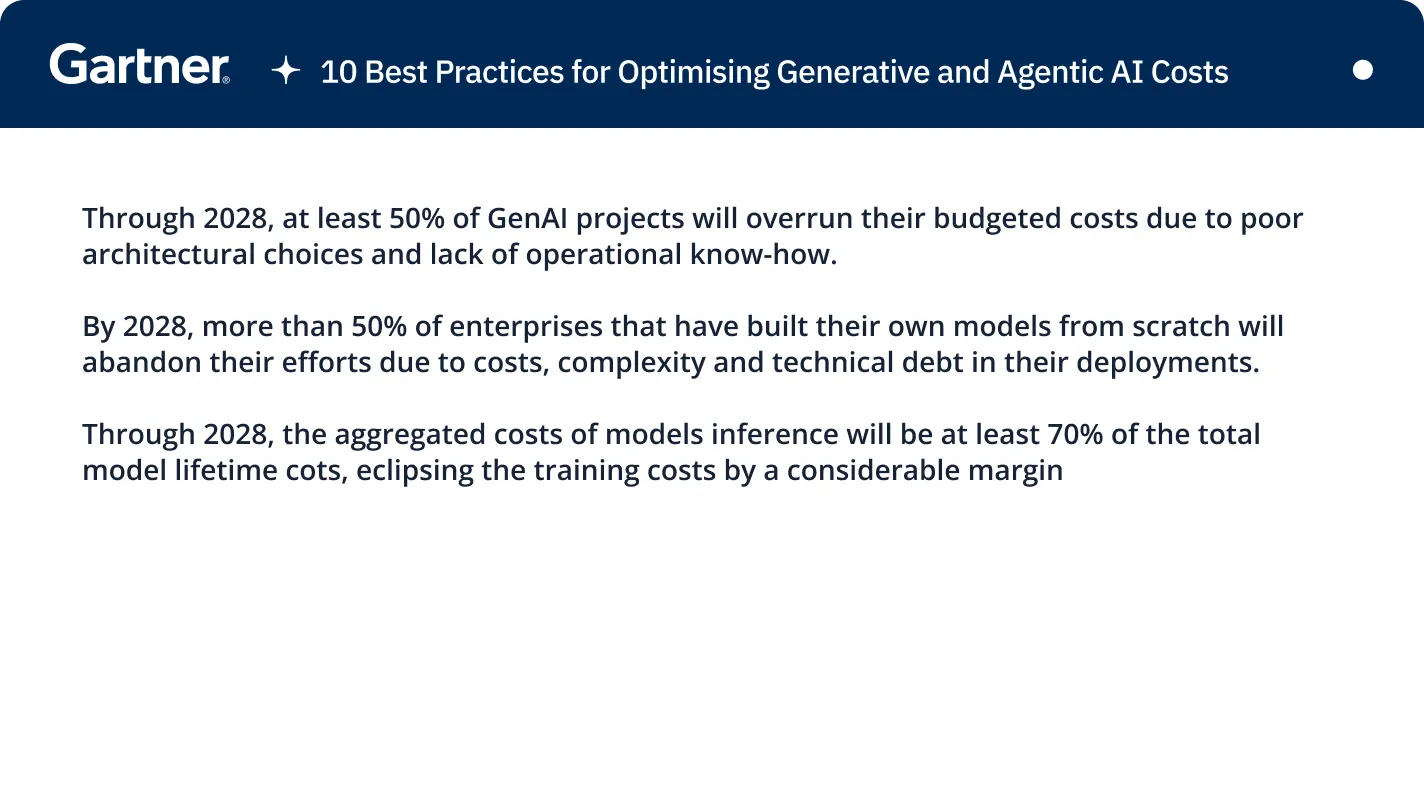
Gateway session management handles conversation and session state flowing through the gateway. Harness context engineering operates inside the agent loop, using subagents, code mode, large-result offloading, and compaction to manage context during long-running tasks.



The latest news, articles, and resources sent to your inbox