> ## Documentation Index
> Fetch the complete documentation index at: https://www.truefoundry.com/llms.txt
> Use this file to discover all available pages before exploring further.
# TFY Agent
> Learn how the TFY Agent connects compute-plane clusters to the TrueFoundry control plane via secure WebSocket.
TFY Agent is a lightweight agent that runs on the compute plane cluster and connects the cluster to the control plane. It allows the control plane to deploy applications (Service, Job, SSH Server, etc.) and track their status.
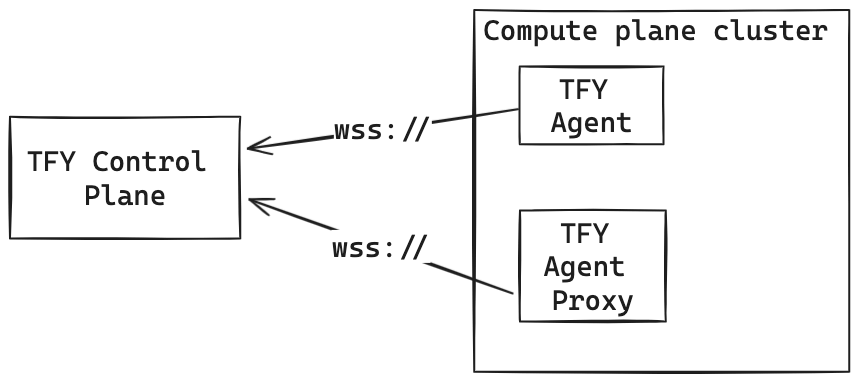
TFY Agent **does not** require an ingress/endpoint (Load balancer Service or Node Port) in your cluster. It initiates secure WebSocket connections to the control plane, which uses these connections for all activities. This allows your compute-plane cluster to be private and still be accessible from the control plane via the tfy-agent.
## Architecture
TFY Agent consists of two parts both of which run independently and use a secure WebSocket connection to connect to the control plane.
1. **TFY Agent**: This streams the state of the compute plane cluster to the control plane. This state includes [but is not limited to](https://github.com/truefoundry/infra-charts/blob/main/charts/tfy-agent/templates/tfy-agent-clusterrole.yaml) the status of Nodes, Pods, Argo Applications, etc., in the cluster.
2. **TFY Agent Proxy**: TFY Agent Proxy enables the control plane to access the compute plane cluster's Kubernetes API server and create namespace (Workspace) and deploy applications to the compute plane cluster.
 ### Installation and Configuration
TFY Agent is installed in the cluster using the [tfy-agent helm chart](https://github.com/truefoundry/infra-charts/tree/main/charts/tfy-agent). This chart is automatically installed using the scripts when you setup the compute plane. Both the agent and agent-proxy use [Kubernetes RBAC objects](https://kubernetes.io/docs/reference/access-authn-authz/rbac/) to define the access to the underlying Kubernetes cluster.
1. **tfy-agent**: The tfy-agent runs informers to stream Kubernetes resource changes and sends it to the control plane. To run informers, the TFY Agent must be able to list and watch those [resource types](https://github.com/truefoundry/infra-charts/blob/main/charts/tfy-agent/templates/tfy-agent-clusterrole.yaml) across [all the namespaces](https://github.com/truefoundry/infra-charts/blob/main/charts/tfy-agent/templates/tfy-agent-clusterrolebinding.yaml) in the cluster.
By default, the tfy-agent listens to all the namespaces with the permissions listed in this [file](https://github.com/truefoundry/infra-charts/blob/main/charts/tfy-agent/templates/tfy-agent-clusterrole.yaml). **TFY Agent** only listens to resources and never makes any write actions on the cluster.
2. **tfy-agent-proxy:** The TFY Agent Proxy enables the control plane to access and create resources on the compute cluster.
By default, the tfy-agent-proxy has all the permissions listed in this [file](https://github.com/truefoundry/infra-charts/blob/main/charts/tfy-agent/templates/tfy-agent-proxy-clusterrole.yaml). The default set of values provide complete access to the cluster - including the permissions to create/edit/delete resources on the cluster. We set up [cluster-wide access](https://github.com/truefoundry/infra-charts/blob/main/charts/tfy-agent/templates/tfy-agent-proxy-clusterrolebinding-ns.yaml) for these namespaced resources.
### Customize TFY Agent Installation
The tfy-agent helm chart allows customizing the values to reduce the permissions on the cluster for tfy-agent and tfy-agent-proxy.
To restrict access to certain namespaces only, you can make the following changes:
1. **Restrict tfy-agent and tfy-agent-proxy to only grant access to certain namespaces:**
This can be done by setting the `config.allowedNamespaces` field in the values file in the helm chart.
```yaml lines theme={"dark"}
config:
tenantName: your-tenant-name
controlPlaneURL: your-controlplane-url
clusterTokenSecret: your-cluster-token-secret
allowedNamespaces:
- tfy-agent
- argocd
- your-namespace
```
For tfy-agent,we still apply the [cluster role](https://github.com/truefoundry/infra-charts/blob/main/charts/tfy-agent/templates/tfy-agent-clusterrole.yaml) to listen to all the resources across all namespaces, but the tfy agent will filter out any resource that is not part of the allowed namespaces. This is because Kubernetes informers do not allow to watch resources across only a few namespaces.
For tfy-agent-proxy, we [setup role binding](https://github.com/truefoundry/infra-charts/blob/main/charts/tfy-agent/templates/tfy-agent-proxy-rolebinding-ns.yaml) only for the allowed namespaces.
2. **Enable strict mode for tfy-agent-proxy to provide it only the permissions it needs to function correctly.**
The minimum set of permissions required for the tfy-agent-proxy are listed [here](https://github.com/truefoundry/infra-charts/blob/main/charts/tfy-agent/templates/tfy-agent-proxy-clusterrole-cs.yaml#L18-L47).
To enforce the minimum set of permissions instead of complete access, you can set the `tfyAgentProxy.clusterRole.strictMode` field to `true` on the helm chart.
```yaml lines theme={"dark"}
config:
tenantName: your-tenant-name
controlPlaneURL: your-controlplane-url
clusterTokenSecret: your-cluster-token-secret
tfyAgentProxy:
clusterRole:
strictMode: true
```
If you give a list of allowed namespaces using the `config.allowedNamespaces` field, we will always run on strict mode, regardless of the value of the `tfyAgentProxy.clusterRole.strictMode` field.
In strict mode, we allow the control plane to create namespaces (Workspace) in the cluster. But if you give a list of allowed namespaces using the `config.allowedNamespaces` field, the control plane [will not be allowed](https://github.com/truefoundry/infra-charts/blob/main/charts/tfy-agent/templates/tfy-agent-proxy-clusterrole-cs.yaml) to create new namespaces.
If you are already using Istio in your cluster, Truefoundry can automatically read the Istio gateway configuration from the cluster and expose the corresponding domains in the service deployment form. This way developers don't need to be aware of which Istio gateway to choose and the platform takes care of it.
However, this assumes that both the gateways point to mutually exclusive domains - for e.g. gateway1 points to \*.domain1.com and gateway2 points to \*.domain2.com. If that is not the case, for e.g. gateway1 points to example.domain1.com and gateway2 points to \*.domain1.com, then you will need to specify which gateway to use in case user chooses a domain like example.domain1.com for their service.
In this case, you can specify the tiebreaker gateway in the tfy-agent helm chart. The tie-breaker gateway is chosen in case a domain matches to more than one gateway configured in the cluster.
```yaml lines theme={"dark"}
tfyAgent:
extraEnvVars:
- name: ISTIO_GATEWAY_TIE_BREAKER
value: istio-system/
```
### Installation and Configuration
TFY Agent is installed in the cluster using the [tfy-agent helm chart](https://github.com/truefoundry/infra-charts/tree/main/charts/tfy-agent). This chart is automatically installed using the scripts when you setup the compute plane. Both the agent and agent-proxy use [Kubernetes RBAC objects](https://kubernetes.io/docs/reference/access-authn-authz/rbac/) to define the access to the underlying Kubernetes cluster.
1. **tfy-agent**: The tfy-agent runs informers to stream Kubernetes resource changes and sends it to the control plane. To run informers, the TFY Agent must be able to list and watch those [resource types](https://github.com/truefoundry/infra-charts/blob/main/charts/tfy-agent/templates/tfy-agent-clusterrole.yaml) across [all the namespaces](https://github.com/truefoundry/infra-charts/blob/main/charts/tfy-agent/templates/tfy-agent-clusterrolebinding.yaml) in the cluster.
By default, the tfy-agent listens to all the namespaces with the permissions listed in this [file](https://github.com/truefoundry/infra-charts/blob/main/charts/tfy-agent/templates/tfy-agent-clusterrole.yaml). **TFY Agent** only listens to resources and never makes any write actions on the cluster.
2. **tfy-agent-proxy:** The TFY Agent Proxy enables the control plane to access and create resources on the compute cluster.
By default, the tfy-agent-proxy has all the permissions listed in this [file](https://github.com/truefoundry/infra-charts/blob/main/charts/tfy-agent/templates/tfy-agent-proxy-clusterrole.yaml). The default set of values provide complete access to the cluster - including the permissions to create/edit/delete resources on the cluster. We set up [cluster-wide access](https://github.com/truefoundry/infra-charts/blob/main/charts/tfy-agent/templates/tfy-agent-proxy-clusterrolebinding-ns.yaml) for these namespaced resources.
### Customize TFY Agent Installation
The tfy-agent helm chart allows customizing the values to reduce the permissions on the cluster for tfy-agent and tfy-agent-proxy.
To restrict access to certain namespaces only, you can make the following changes:
1. **Restrict tfy-agent and tfy-agent-proxy to only grant access to certain namespaces:**
This can be done by setting the `config.allowedNamespaces` field in the values file in the helm chart.
```yaml lines theme={"dark"}
config:
tenantName: your-tenant-name
controlPlaneURL: your-controlplane-url
clusterTokenSecret: your-cluster-token-secret
allowedNamespaces:
- tfy-agent
- argocd
- your-namespace
```
For tfy-agent,we still apply the [cluster role](https://github.com/truefoundry/infra-charts/blob/main/charts/tfy-agent/templates/tfy-agent-clusterrole.yaml) to listen to all the resources across all namespaces, but the tfy agent will filter out any resource that is not part of the allowed namespaces. This is because Kubernetes informers do not allow to watch resources across only a few namespaces.
For tfy-agent-proxy, we [setup role binding](https://github.com/truefoundry/infra-charts/blob/main/charts/tfy-agent/templates/tfy-agent-proxy-rolebinding-ns.yaml) only for the allowed namespaces.
2. **Enable strict mode for tfy-agent-proxy to provide it only the permissions it needs to function correctly.**
The minimum set of permissions required for the tfy-agent-proxy are listed [here](https://github.com/truefoundry/infra-charts/blob/main/charts/tfy-agent/templates/tfy-agent-proxy-clusterrole-cs.yaml#L18-L47).
To enforce the minimum set of permissions instead of complete access, you can set the `tfyAgentProxy.clusterRole.strictMode` field to `true` on the helm chart.
```yaml lines theme={"dark"}
config:
tenantName: your-tenant-name
controlPlaneURL: your-controlplane-url
clusterTokenSecret: your-cluster-token-secret
tfyAgentProxy:
clusterRole:
strictMode: true
```
If you give a list of allowed namespaces using the `config.allowedNamespaces` field, we will always run on strict mode, regardless of the value of the `tfyAgentProxy.clusterRole.strictMode` field.
In strict mode, we allow the control plane to create namespaces (Workspace) in the cluster. But if you give a list of allowed namespaces using the `config.allowedNamespaces` field, the control plane [will not be allowed](https://github.com/truefoundry/infra-charts/blob/main/charts/tfy-agent/templates/tfy-agent-proxy-clusterrole-cs.yaml) to create new namespaces.
If you are already using Istio in your cluster, Truefoundry can automatically read the Istio gateway configuration from the cluster and expose the corresponding domains in the service deployment form. This way developers don't need to be aware of which Istio gateway to choose and the platform takes care of it.
However, this assumes that both the gateways point to mutually exclusive domains - for e.g. gateway1 points to \*.domain1.com and gateway2 points to \*.domain2.com. If that is not the case, for e.g. gateway1 points to example.domain1.com and gateway2 points to \*.domain1.com, then you will need to specify which gateway to use in case user chooses a domain like example.domain1.com for their service.
In this case, you can specify the tiebreaker gateway in the tfy-agent helm chart. The tie-breaker gateway is chosen in case a domain matches to more than one gateway configured in the cluster.
```yaml lines theme={"dark"}
tfyAgent:
extraEnvVars:
- name: ISTIO_GATEWAY_TIE_BREAKER
value: istio-system/
```