> ## Documentation Index
> Fetch the complete documentation index at: https://www.truefoundry.com/llms.txt
> Use this file to discover all available pages before exploring further.
# Task Config
> Configure task settings including environment variables, resources, volume mounts, and service accounts for workflows.
Each task takes a task\_config parameter which is used to define the config like resource the task execution will require, the python version, libraries, apt packages, cuda version, etc. for the task.
### Things you can define in task config
* **env**: you can pass the environment variables as `env` in task config, where `env` is a dictionary of key-value pairs.
* **service\_account**: you can pass the service\_account name in the task config which is necessary to save the input and output data of the task.
* **resources**: You can define the resource to allocate to each of the tasks, where you can define the cpu limit, storage limit, memory limit, GPU types, etc. You can refer to [this](/docs/resources-cpu-memory-storage) article for more information on each.
* **mounts**: You can attach volume mounts such as volume mounts, string mounts or secret mounts. You can learn more about mounts and how to use them in workflow in [this](/docs/attaching-mounts) guide.
### Types of task config
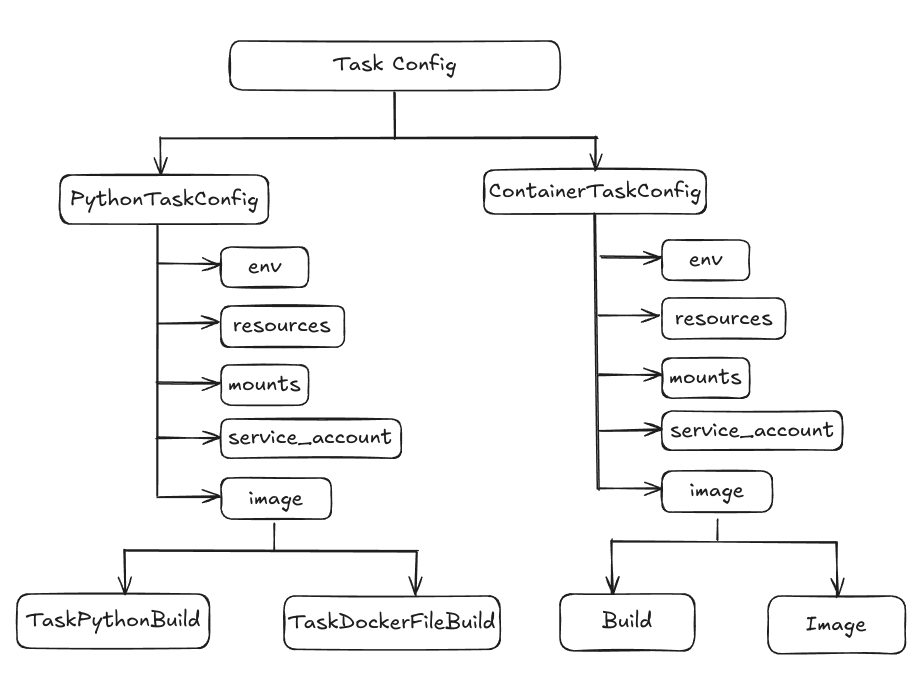 * There are two types of task config PythonTaskConfig and ContainerTaskConfig.
* **PythonTaskConfig**: This task config can be passed in the normal python task in the task decorator. You can define the environment variables, [Resources](/docs/resources-cpu-memory-storage), service account, and the image spec in PythonTaskConfig. The image spec can be of two types TaskPythonBuild and TaskDockerFileBuild.
* **TaskPythonBuild** is used when you do not have a Dockerfile and you want to build an image where you want to specify the pip packages, apt packages or requirements file path in the build spec, then TaskPythonBuild is used.
* **TaskDockerFileBuild** is used when you already have a Dockerfile and you just want to build then you use TaskDockerFileBuild.
* **ContainerTaskConfig**: This task config can be used when you already have a docker image and you want to use that as a task in the workflow directly or you have code uploaded on GitHub or the remote source. There you have a docker file which you want to use as a task in the workflow.
```python Python lines theme={"dark"}
from truefoundry.deploy import Image, NvidiaGPU, Resources
from truefoundry.workflow import (
ContainerTask,
ContainerTaskConfig,
ExecutionConfig,
FlyteDirectory,
PythonTaskConfig,
TaskPythonBuild,
conditional,
map_task,
task,
workflow,
)
# Python task config example
task_config = PythonTaskConfig(
image=TaskPythonBuild(
python_version="3.9",
pip_packages=["truefoundry[workflow]"],
),
resources=Resources(cpu_request=0.5, cpu_limit=0.5),
service_account="",
)
#container task config example
echo = ContainerTask(
name="echo",
task_config=ContainerTaskConfig(
image=Image(
image_uri="bash:4.1",
command=["echo", "hello"],
),
service_account="",
),
)
...
```
***
* There are two types of task config PythonTaskConfig and ContainerTaskConfig.
* **PythonTaskConfig**: This task config can be passed in the normal python task in the task decorator. You can define the environment variables, [Resources](/docs/resources-cpu-memory-storage), service account, and the image spec in PythonTaskConfig. The image spec can be of two types TaskPythonBuild and TaskDockerFileBuild.
* **TaskPythonBuild** is used when you do not have a Dockerfile and you want to build an image where you want to specify the pip packages, apt packages or requirements file path in the build spec, then TaskPythonBuild is used.
* **TaskDockerFileBuild** is used when you already have a Dockerfile and you just want to build then you use TaskDockerFileBuild.
* **ContainerTaskConfig**: This task config can be used when you already have a docker image and you want to use that as a task in the workflow directly or you have code uploaded on GitHub or the remote source. There you have a docker file which you want to use as a task in the workflow.
```python Python lines theme={"dark"}
from truefoundry.deploy import Image, NvidiaGPU, Resources
from truefoundry.workflow import (
ContainerTask,
ContainerTaskConfig,
ExecutionConfig,
FlyteDirectory,
PythonTaskConfig,
TaskPythonBuild,
conditional,
map_task,
task,
workflow,
)
# Python task config example
task_config = PythonTaskConfig(
image=TaskPythonBuild(
python_version="3.9",
pip_packages=["truefoundry[workflow]"],
),
resources=Resources(cpu_request=0.5, cpu_limit=0.5),
service_account="",
)
#container task config example
echo = ContainerTask(
name="echo",
task_config=ContainerTaskConfig(
image=Image(
image_uri="bash:4.1",
command=["echo", "hello"],
),
service_account="",
),
)
...
```
***