> ## Documentation Index
> Fetch the complete documentation index at: https://www.truefoundry.com/llms.txt
> Use this file to discover all available pages before exploring further.
# Slack
> Set up a Slack Bot integration with TrueFoundry to receive deployment alerts and platform notifications.
To receive alerts and notifications in TrueFoundry, you need to set up notification integrations for Slack Bot. This guide walks you through adding Slack Bot notification integration, describing each field in the forms, and providing helpful links for setup.
## Slack Bot Notification Integration
To add a Slack Bot notification integration:
1. **Go to the Integrations page** in the TrueFoundry UI.
2. **Click on 'Add Integration Provider'.**
3. **Select 'Slack' as the provider type.**
4. **Choose 'Slack Bot Token Integration'** in the integrations section.
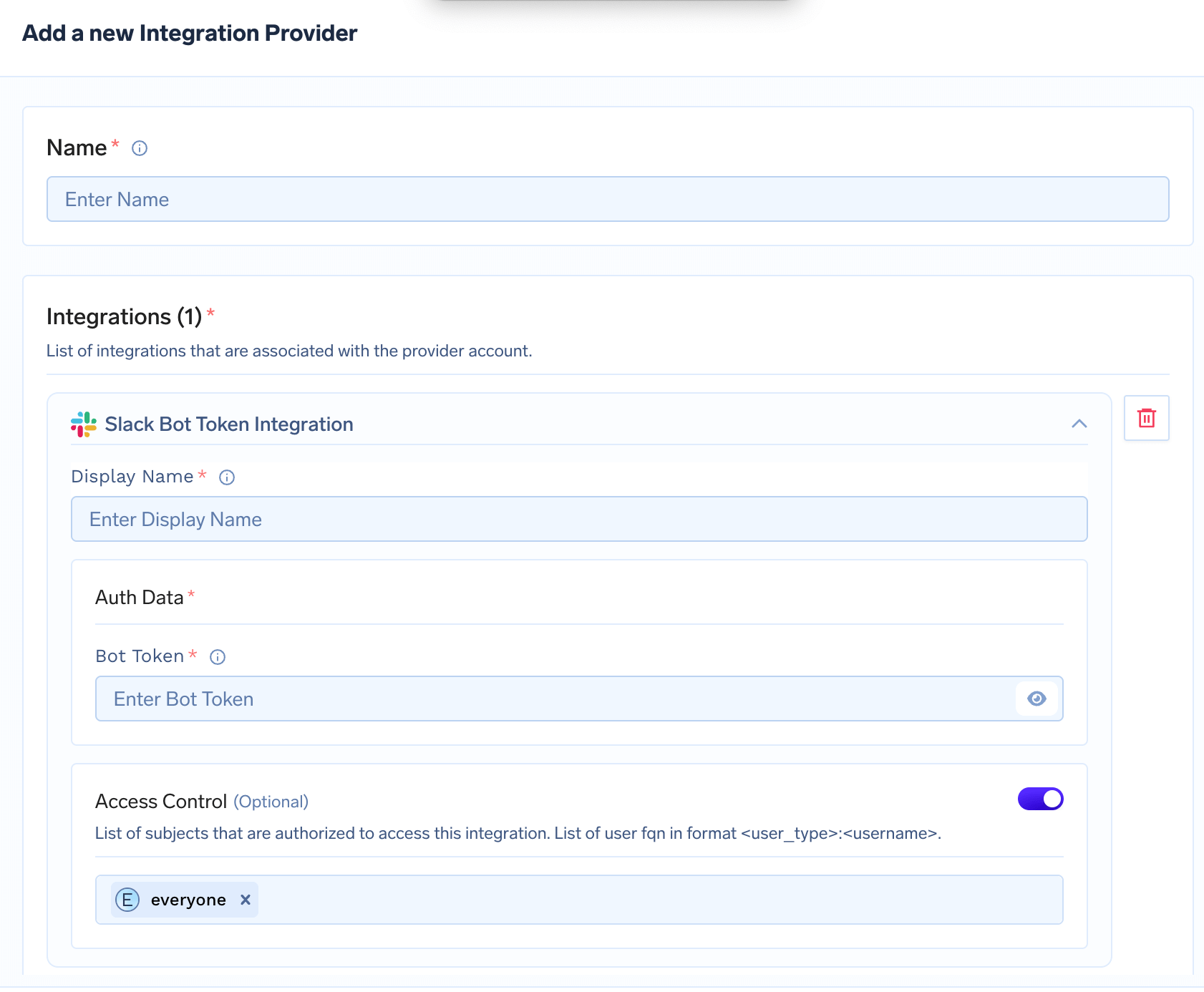
5. **Fill out the form fields as shown below:**
 ### Field Descriptions
* **Name**: A unique name for this integration provider (e.g., "Slack Alerts Bot").
* **Display Name**: The display name for this Slack bot integration (e.g., "Critical Alerts Bot").
* **Bot Token**: The OAuth token for your Slack bot. This is required for the bot to send messages to channels.
* **Access Control (Optional)**: List of users or groups allowed to use this integration. By default, set to `everyone`.
> **How to create a Slack Bot Token:**
>
> 1. Go to the [Slack API: Your Apps](https://api.slack.com/apps) page.
> 2. Click "Create New App" and follow the prompts.
> 3. Add the `chat:write` and `chat:write.public` scopes under "OAuth & Permissions".
> 4. Install the app to your workspace and copy the Bot User OAuth Token (starts with `xoxb-`).
> 5. For more details, see the [Slack Bot User OAuth Access Tokens documentation](https://api.slack.com/authentication/basics).
## Final Steps
* After filling all required fields, click **Add Integration Provider** to save your integration.
* You can now use these integrations as notification channels when setting up alerts for your applications.
***
With these integrations in place, you can receive real-time alerts via Slack for all your TrueFoundry applications!
### Field Descriptions
* **Name**: A unique name for this integration provider (e.g., "Slack Alerts Bot").
* **Display Name**: The display name for this Slack bot integration (e.g., "Critical Alerts Bot").
* **Bot Token**: The OAuth token for your Slack bot. This is required for the bot to send messages to channels.
* **Access Control (Optional)**: List of users or groups allowed to use this integration. By default, set to `everyone`.
> **How to create a Slack Bot Token:**
>
> 1. Go to the [Slack API: Your Apps](https://api.slack.com/apps) page.
> 2. Click "Create New App" and follow the prompts.
> 3. Add the `chat:write` and `chat:write.public` scopes under "OAuth & Permissions".
> 4. Install the app to your workspace and copy the Bot User OAuth Token (starts with `xoxb-`).
> 5. For more details, see the [Slack Bot User OAuth Access Tokens documentation](https://api.slack.com/authentication/basics).
## Final Steps
* After filling all required fields, click **Add Integration Provider** to save your integration.
* You can now use these integrations as notification channels when setting up alerts for your applications.
***
With these integrations in place, you can receive real-time alerts via Slack for all your TrueFoundry applications!