> ## Documentation Index
> Fetch the complete documentation index at: https://www.truefoundry.com/llms.txt
> Use this file to discover all available pages before exploring further.
# Setup GitOps
> Enable GitOps with TrueFoundry—store deployment configuration in Git and sync with a single CLI command.
GitOps keeps your infrastructure and application configuration in Git as the source of truth. TrueFoundry gives you first-class GitOps support so you can enable it in minutes with GitHub Actions or Bitbucket Pipelines.
### Why GitOps?
Using Git as the single source of truth gives you version history and auditability (who changed what, when), safe rollbacks by reverting commits, and consistent environments—CI applies only what's in the repo, reducing drift and manual errors.
## Our approach to GitOps
TrueFoundry's GitOps approach closely follows the principles established by Kubernetes GitOps tools like ArgoCD and Flux. Instead of inventing a new configuration language or workflow, TrueFoundry treats your YAML manifests as the single, declarative snapshot of platform state—stored in Git and applied as-is via the TrueFoundry CLI. This eliminates drift, reduces manual steps, and lets you manage everything through familiar workflows.
The main benefits of this approach are:
* **No new DSL to learn** — You don't need to learn Terraform or a custom spec. We use plain YAML that matches how you already think about resources.
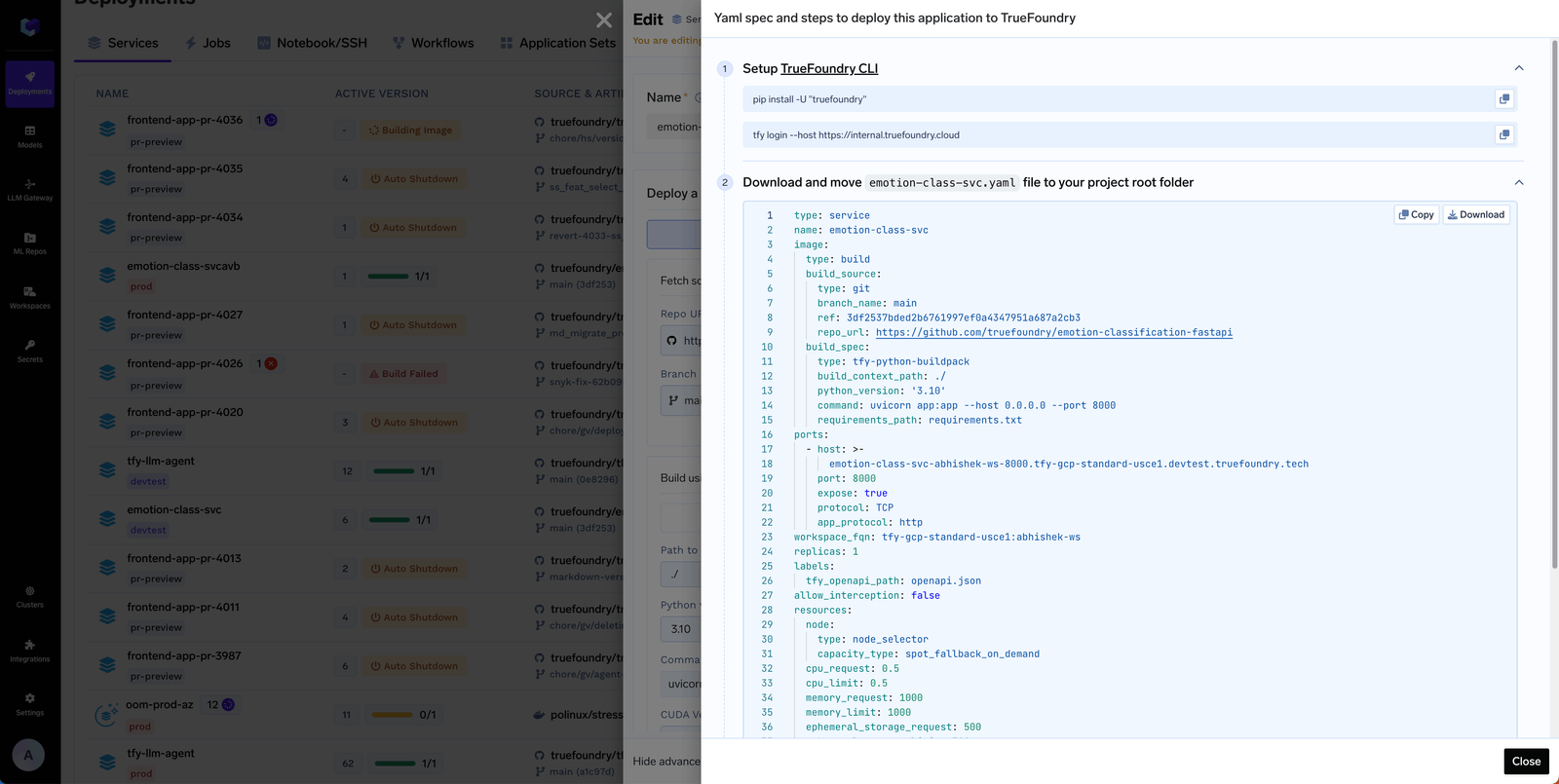
* **Generate from the UI, paste into Git** — Create or edit resources in the TrueFoundry UI, then use **Edit → Apply using YAML** to copy the YAML and paste it into your Git repository. Your Git repo then reflects the full state of resources in TrueFoundry.
* **One command in CI** — The entire workflow is: change YAML in Git, and in CI run **`tfy apply -d truefoundry`**. That single command validates and applies (or dry-runs) everything. No complex pipelines or per-resource scripting.
So: **Git is the source of truth**, and **`tfy apply`** is the only command you need to sync that state to TrueFoundry. For a full reference on all `tfy apply` flags and modes (dry run, diff, directory mode, sync mode, and more), see [Using CLI to Deploy Resources with tfy apply](/docs/using-tfy-apply).
If you need **Terraform support** for infrastructure-as-code, we'd love to help. Reach out to us and we can work with you or explore adding Terraform support.
## Organizing the Git repository
Each resource in Truefoundry can be expressed in a YAML file. You can put the YAML files for all the resources in a Git repository. We provide a sample repository ([https://github.com/truefoundry/truefoundry-gitops-sample-repository](https://github.com/truefoundry/truefoundry-gitops-sample-repository)) that you can use as a template for your own Git repository. Key points to note in this repository are:
* All manifests live under **`truefoundry/`**
* CI runs **`tfy apply -d truefoundry`** on that folder. You only need to include the folders that match what you use on the platform.
The key directories in the truefoundry folder are:
### Key Folders in the GitOps Repository
Below is a summary table of the main folders you'll see in the [sample GitOps repo](https://github.com/truefoundry/truefoundry-gitops-sample-repository), what each one contains, and which module (product area) they are related to.
| Folder ([link](https://github.com/truefoundry/truefoundry-gitops-sample-repository/tree/main/truefoundry)) | Description | What it Contains | Related Module(s) |
| -------------------------------------------------------------------------------------------------------------------------- | ------------------------------- | ------------------------------------------------------------------------------------------ | ------------------------------------ |
| [access/](https://github.com/truefoundry/truefoundry-gitops-sample-repository/tree/main/truefoundry/access/) | Access control configuration | Teams, external identities, SSO providers, roles, and virtual accounts | Shared (Applies to all) |
| [ai-gateway/](https://github.com/truefoundry/truefoundry-gitops-sample-repository/tree/main/truefoundry/ai-gateway/) | AI Gateway configuration | Models, guardrails, MCP servers, routing/controls, gateway options | AI Gateway |
| [integrations/](https://github.com/truefoundry/truefoundry-gitops-sample-repository/tree/main/truefoundry/integrations/) | Third-party integration configs | Provider and integration definitions (AWS, GCP, Azure, etc.) | Shared (Applies to all) |
| [ai-deployment/](https://github.com/truefoundry/truefoundry-gitops-sample-repository/tree/main/truefoundry/ai-deployment/) | ML & Application deployments | Applications (jobs/services), workspaces, clusters, environments, model registry, policies | Deployment/ML Platform |
| [repositories/](https://github.com/truefoundry/truefoundry-gitops-sample-repository/tree/main/truefoundry/repositories/) | Artifact/ML Repo configurations | ML repositories, artifact tracking, experiment tracking setup | AI Deployment, Prompts in AI Gateway |
If you are using AI Gateway only, you can ignore the `ai-deployment/` folder.
The entire set of files in the sample repository are as follows:
```yaml expandable theme={"dark"}
truefoundry/
├── access/
│ ├── externalauth/
│ │ ├── identities/
│ │ │ └── customer1.yaml
│ │ └── identityproviders/
│ │ └── custom-oidc.yaml
│ ├── roles/
│ │ └── custom.yaml
│ ├── teams/
│ │ ├── backend.yaml
│ │ └── frontend.yaml
│ └── virtualaccounts/
│ └── virtualaccount1.yaml
├── ai-deployment/
│ ├── clusters/
│ │ ├── cluster1/
│ │ │ ├── cluster1.yaml
│ │ │ └── workspaces/
│ │ │ └── workspace1/
│ │ │ ├── workspace1.yaml
│ │ │ └── applications/
│ │ │ └── app1.yaml
│ │ └── cluster2/
│ │ ├── cluster2.yaml
│ │ └── workspaces/
│ │ ├── applications/
│ │ │ └── sample-app.yaml
│ │ └── workspace1.yaml
│ ├── environments/
│ │ ├── devlopment.yaml
│ │ └── production.yaml
│ ├── modelregistry/
│ │ └── custom-model1.yaml
│ └── polices/
│ ├── mutate-policy.yaml
│ └── validate-policy.yaml
├── ai-gateway/
│ ├── agent/
│ │ └── github-agent.yaml
│ ├── controls/
│ │ ├── budget.yaml
│ │ ├── data-access.yaml
│ │ ├── gateway-data-routing-config.yaml
│ │ ├── guardrails-control.yaml
│ │ ├── rate-limiting-config.yaml
│ │ └── routing-config.yaml
│ ├── guardrails/
│ │ ├── azure-guardrails.yaml
│ │ ├── bedrock-guardrails.yaml
│ │ ├── openai-guardrail.yaml
│ │ └── palo-alto-guardrails.yaml
│ ├── mcp-servers/
│ │ ├── figma-mcp.yaml
│ │ ├── github-mcp.yaml
│ │ ├── mcp1.yaml
│ │ └── notion-mcp.yaml
│ └── models/
│ ├── anthropic-model.yaml
│ ├── bedrock-model.yaml
│ ├── gemini-model.yaml
│ └── openai-model.yaml
├── integrations/
│ └── custom.yaml
└── repositories/
└── ml-agent.yaml
```
Naming and conventions are documented in the [sample README](https://github.com/truefoundry/truefoundry-gitops-sample-repository/blob/main/README.md). To add or update resources from the UI: use **Edit → Apply using YAML** to copy the YAML, then paste it into the right file under **`truefoundry/`** in your repo.
 ## Setup CI/CD
Your CI/CD pipeline syncs Git with TrueFoundry by running **`tfy apply`**. The [sample repository](https://github.com/truefoundry/truefoundry-gitops-sample-repository) includes ready-to-use CI configs for **GitHub Actions** ([`.github/workflows/`](https://github.com/truefoundry/truefoundry-gitops-sample-repository/tree/main/.github/workflows)) and **Bitbucket Pipelines** ([`bitbucket-pipelines.yml`](https://github.com/truefoundry/truefoundry-gitops-sample-repository/blob/main/bitbucket-pipelines.yml)) — copy them into your repo to get started immediately.
Every pipeline follows the same three steps:
Install the CLI in your pipeline (and optionally locally to test before pushing):
```bash theme={"dark"}
pip install -U "truefoundry"
```
For local login and authentication (browser or API key), see [Setup For CLI](/docs/setup-cli).
GitOps with **`tfy apply`** requires **TrueFoundry CLI version 0.14.2 or greater**. Check your version with `tfy version` and upgrade if needed.
In CI, set these two environment variables (no interactive login needed):
* **`TFY_HOST`** — your TrueFoundry host (e.g. `https://myorg.truefoundry.cloud`)
* **`TFY_API_KEY`** — API key from **Access > Personal Access Tokens** (or a [Virtual Account token](/docs/generating-truefoundry-api-keys#virtual-account-tokens-vats) for production)
**`tfy apply`** works on a **directory** and all YAML specs under it. Point it at your GitOps root — `tfy apply -d truefoundry` — so CI validates and applies the whole tree in one step.
| When | Command |
| ----------------------------------------------- | ------------------------------------------------------------------------------------- |
| **Pull request** (validate only, do not apply) | `tfy apply -d truefoundry --dry-run --show-diff --diffs-only --sync --ref ` |
| **Default branch** (e.g. after merge to `main`) | `tfy apply -d truefoundry --diffs-only --sync --ref "HEAD^"` |
* **``** is the commit you're comparing against (e.g. the PR base branch commit, or `origin/main`).
* **`--diffs-only`** applies or dry-runs only what changed, keeping runs fast and safe.
* **`--sync`** deletes resources from TrueFoundry for YAML files that are deleted in git based on the git diff.
### CI/CD examples
Below are ready-made configs for GitHub Actions and Bitbucket, a Jenkins example, and a general guide for any other CI/CD system.
The [sample repository](https://github.com/truefoundry/truefoundry-gitops-sample-repository) includes workflows under [`.github/workflows/`](https://github.com/truefoundry/truefoundry-gitops-sample-repository/tree/main/.github/workflows). Copy that folder into your repo (or fork the sample). Two workflows:
**dry\_run\_on\_pr.yaml** — on **pull request open/update**:
1. Validates YAML and that filenames match the resource **`name`** where applicable.
2. Runs **`tfy apply --dry-run`** on **`truefoundry/`** with **`--diffs-only`**, **`--sync`** and **`--ref`** against the PR base so nothing is applied.
**apply\_on\_merge.yaml** — on push to the **default branch** (e.g. **`main`**):
* Runs **`tfy apply`** on **`truefoundry/`** with **`--diffs-only`**, **`--sync`** vs the previous commit: new and updated manifests are applied; resources removed from Git are removed from the platform.
Set repository secrets **`TFY_HOST`** and **`TFY_API_KEY`** as described in the [sample README](https://github.com/truefoundry/truefoundry-gitops-sample-repository/tree/main).
Config: [`bitbucket-pipelines.yml`](https://github.com/truefoundry/truefoundry-gitops-sample-repository/blob/main/bitbucket-pipelines.yml) in the sample repo.
* **Pull requests**: `tfy apply -d truefoundry --dry-run --show-diff --diffs-only --sync --ref "${BITBUCKET_PR_DESTINATION_COMMIT}"`
* **Branch `main`**: `tfy apply -d truefoundry --diffs-only --sync --ref "HEAD^"`
The sample removes `bitbucket-pipelines.yml` before apply so that file is not treated as a TrueFoundry manifest.
Configure secured variables **`TFY_HOST`** and **`TFY_API_KEY`**. See the [sample repo](https://github.com/truefoundry/truefoundry-gitops-sample-repository/tree/main) for details.
Use a Jenkinsfile that installs the CLI, binds credentials, and runs **`tfy apply`**. Store **`TFY_HOST`** and **`TFY_API_KEY`** in Jenkins credentials.
**Pull requests (dry-run):** use the PR base as **`REF`** (e.g. `origin/${CHANGE_TARGET}`):
```groovy theme={"dark"}
stage('GitOps dry-run') {
environment {
REF = "origin/${CHANGE_TARGET}"
TFY_HOST = credentials('tfy-host')
TFY_API_KEY = credentials('tfy-api-key')
}
steps {
sh 'pip install -U "truefoundry"'
sh 'tfy apply -d truefoundry --dry-run --show-diff --diffs-only --sync --ref "${REF}"'
}
}
```
**Default branch (apply):** after merge to main:
```groovy theme={"dark"}
stage('GitOps apply') {
environment {
TFY_HOST = credentials('tfy-host')
TFY_API_KEY = credentials('tfy-api-key')
}
steps {
sh 'pip install -U "truefoundry"'
sh 'tfy apply -d truefoundry --diffs-only --sync --ref "HEAD^"'
}
}
```
Adjust **`REF`** based on how your SCM plugin exposes the PR base commit.
Any CI/CD system that can run shell commands works with TrueFoundry GitOps (GitLab CI, CircleCI, Azure Pipelines, Tekton, etc.). Follow the same three steps described above:
1. **Install the CLI** — `pip install -U "truefoundry"` (version >= 0.14.2)
2. **Set `TFY_HOST` and `TFY_API_KEY`** as environment variables
3. **Run `tfy apply`** — dry-run on PRs, apply on the default branch (see the [command table above](#setup-ci/cd))
Keep pipeline config files (e.g. **Jenkinsfile**, **.gitlab-ci.yml**) outside the **`truefoundry/`** directory so they are not interpreted as TrueFoundry manifests.
## Setup CI/CD
Your CI/CD pipeline syncs Git with TrueFoundry by running **`tfy apply`**. The [sample repository](https://github.com/truefoundry/truefoundry-gitops-sample-repository) includes ready-to-use CI configs for **GitHub Actions** ([`.github/workflows/`](https://github.com/truefoundry/truefoundry-gitops-sample-repository/tree/main/.github/workflows)) and **Bitbucket Pipelines** ([`bitbucket-pipelines.yml`](https://github.com/truefoundry/truefoundry-gitops-sample-repository/blob/main/bitbucket-pipelines.yml)) — copy them into your repo to get started immediately.
Every pipeline follows the same three steps:
Install the CLI in your pipeline (and optionally locally to test before pushing):
```bash theme={"dark"}
pip install -U "truefoundry"
```
For local login and authentication (browser or API key), see [Setup For CLI](/docs/setup-cli).
GitOps with **`tfy apply`** requires **TrueFoundry CLI version 0.14.2 or greater**. Check your version with `tfy version` and upgrade if needed.
In CI, set these two environment variables (no interactive login needed):
* **`TFY_HOST`** — your TrueFoundry host (e.g. `https://myorg.truefoundry.cloud`)
* **`TFY_API_KEY`** — API key from **Access > Personal Access Tokens** (or a [Virtual Account token](/docs/generating-truefoundry-api-keys#virtual-account-tokens-vats) for production)
**`tfy apply`** works on a **directory** and all YAML specs under it. Point it at your GitOps root — `tfy apply -d truefoundry` — so CI validates and applies the whole tree in one step.
| When | Command |
| ----------------------------------------------- | ------------------------------------------------------------------------------------- |
| **Pull request** (validate only, do not apply) | `tfy apply -d truefoundry --dry-run --show-diff --diffs-only --sync --ref ` |
| **Default branch** (e.g. after merge to `main`) | `tfy apply -d truefoundry --diffs-only --sync --ref "HEAD^"` |
* **``** is the commit you're comparing against (e.g. the PR base branch commit, or `origin/main`).
* **`--diffs-only`** applies or dry-runs only what changed, keeping runs fast and safe.
* **`--sync`** deletes resources from TrueFoundry for YAML files that are deleted in git based on the git diff.
### CI/CD examples
Below are ready-made configs for GitHub Actions and Bitbucket, a Jenkins example, and a general guide for any other CI/CD system.
The [sample repository](https://github.com/truefoundry/truefoundry-gitops-sample-repository) includes workflows under [`.github/workflows/`](https://github.com/truefoundry/truefoundry-gitops-sample-repository/tree/main/.github/workflows). Copy that folder into your repo (or fork the sample). Two workflows:
**dry\_run\_on\_pr.yaml** — on **pull request open/update**:
1. Validates YAML and that filenames match the resource **`name`** where applicable.
2. Runs **`tfy apply --dry-run`** on **`truefoundry/`** with **`--diffs-only`**, **`--sync`** and **`--ref`** against the PR base so nothing is applied.
**apply\_on\_merge.yaml** — on push to the **default branch** (e.g. **`main`**):
* Runs **`tfy apply`** on **`truefoundry/`** with **`--diffs-only`**, **`--sync`** vs the previous commit: new and updated manifests are applied; resources removed from Git are removed from the platform.
Set repository secrets **`TFY_HOST`** and **`TFY_API_KEY`** as described in the [sample README](https://github.com/truefoundry/truefoundry-gitops-sample-repository/tree/main).
Config: [`bitbucket-pipelines.yml`](https://github.com/truefoundry/truefoundry-gitops-sample-repository/blob/main/bitbucket-pipelines.yml) in the sample repo.
* **Pull requests**: `tfy apply -d truefoundry --dry-run --show-diff --diffs-only --sync --ref "${BITBUCKET_PR_DESTINATION_COMMIT}"`
* **Branch `main`**: `tfy apply -d truefoundry --diffs-only --sync --ref "HEAD^"`
The sample removes `bitbucket-pipelines.yml` before apply so that file is not treated as a TrueFoundry manifest.
Configure secured variables **`TFY_HOST`** and **`TFY_API_KEY`**. See the [sample repo](https://github.com/truefoundry/truefoundry-gitops-sample-repository/tree/main) for details.
Use a Jenkinsfile that installs the CLI, binds credentials, and runs **`tfy apply`**. Store **`TFY_HOST`** and **`TFY_API_KEY`** in Jenkins credentials.
**Pull requests (dry-run):** use the PR base as **`REF`** (e.g. `origin/${CHANGE_TARGET}`):
```groovy theme={"dark"}
stage('GitOps dry-run') {
environment {
REF = "origin/${CHANGE_TARGET}"
TFY_HOST = credentials('tfy-host')
TFY_API_KEY = credentials('tfy-api-key')
}
steps {
sh 'pip install -U "truefoundry"'
sh 'tfy apply -d truefoundry --dry-run --show-diff --diffs-only --sync --ref "${REF}"'
}
}
```
**Default branch (apply):** after merge to main:
```groovy theme={"dark"}
stage('GitOps apply') {
environment {
TFY_HOST = credentials('tfy-host')
TFY_API_KEY = credentials('tfy-api-key')
}
steps {
sh 'pip install -U "truefoundry"'
sh 'tfy apply -d truefoundry --diffs-only --sync --ref "HEAD^"'
}
}
```
Adjust **`REF`** based on how your SCM plugin exposes the PR base commit.
Any CI/CD system that can run shell commands works with TrueFoundry GitOps (GitLab CI, CircleCI, Azure Pipelines, Tekton, etc.). Follow the same three steps described above:
1. **Install the CLI** — `pip install -U "truefoundry"` (version >= 0.14.2)
2. **Set `TFY_HOST` and `TFY_API_KEY`** as environment variables
3. **Run `tfy apply`** — dry-run on PRs, apply on the default branch (see the [command table above](#setup-ci/cd))
Keep pipeline config files (e.g. **Jenkinsfile**, **.gitlab-ci.yml**) outside the **`truefoundry/`** directory so they are not interpreted as TrueFoundry manifests.