> ## Documentation Index
> Fetch the complete documentation index at: https://www.truefoundry.com/llms.txt
> Use this file to discover all available pages before exploring further.
# Recovering a Failed Workflow Execution
> Resume a failed workflow execution from the exact step where it failed.
The workflow recovery feature allows you to resume a failed workflow execution from the exact step or task where it failed, rather than restarting the entire workflow from scratch.
This is particularly useful when:
* A workflow fails due to transient issues (network timeouts, temporary resource unavailability)
* You want to avoid re-running expensive or time-consuming tasks that already completed successfully
* You need to conserve compute resources by not repeating completed work
When you recover a workflow execution, TrueFoundry automatically identifies
the failed task and resumes execution from that point. All previously
completed tasks retain their outputs and are not re-executed.
## How to Recover a Failed Workflow Execution
### Recover from UI
Navigate to the execution details page of the failed workflow execution. There are two ways to recover from the UI:
* **Recover Workflow button** — On the **Graph** tab, click the **Recover Workflow** button located on the right side of the tab bar.
* **Retry from failed node** — Hover over the failed node in the graph to open its tooltip. Click the **Retry** button in the tooltip to recover the workflow directly from that node.
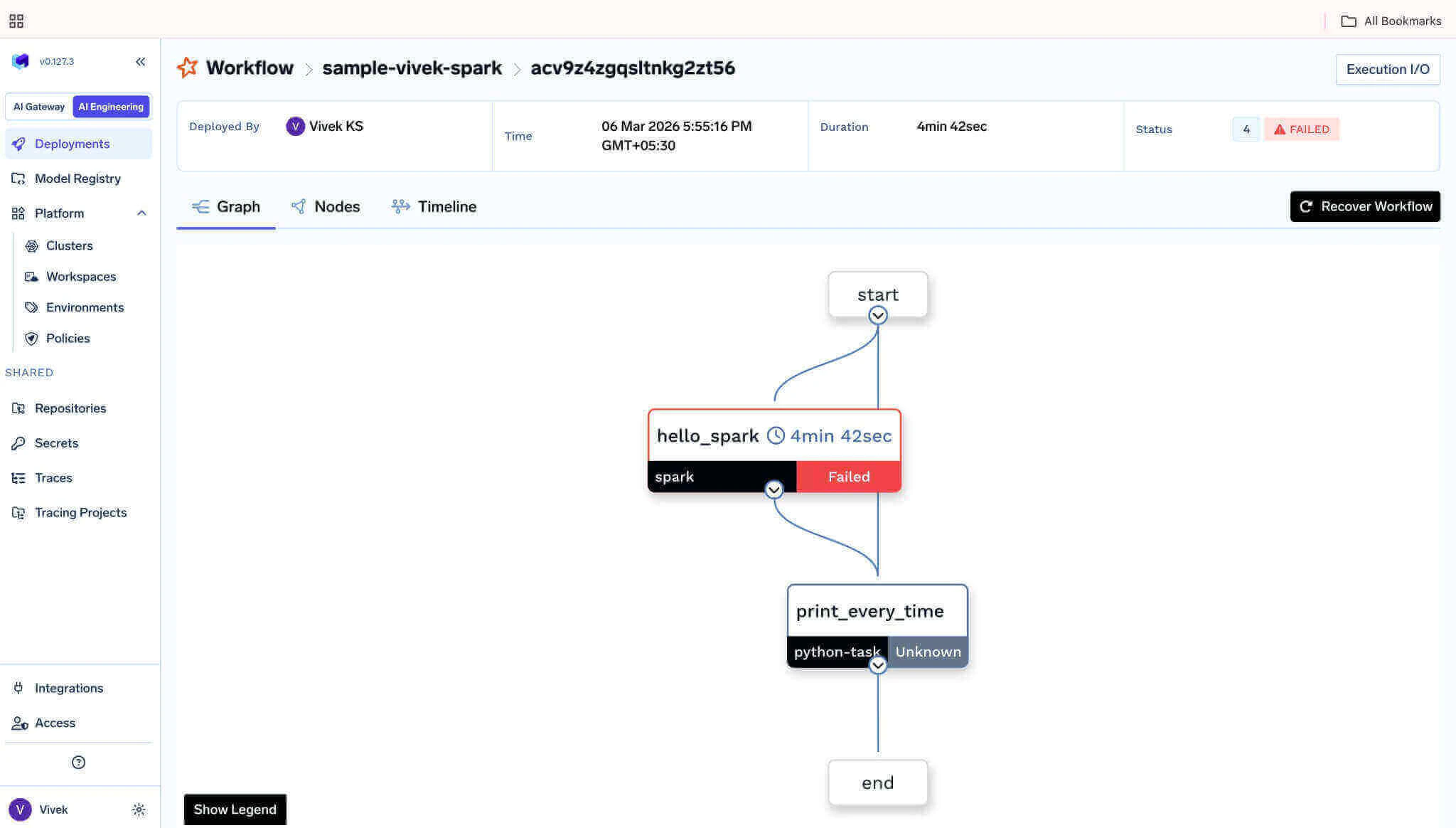 Both options will create a new execution that resumes from the failed task, reusing the outputs of all previously succeeded tasks.
### Using the REST API
To recover a failed workflow execution, you need:
* The **Application ID** of the application/workflow
* The **Execution ID** of the failed execution
You can find both of these in the TrueFoundry UI on the workflow execution details page.
Both options will create a new execution that resumes from the failed task, reusing the outputs of all previously succeeded tasks.
### Using the REST API
To recover a failed workflow execution, you need:
* The **Application ID** of the application/workflow
* The **Execution ID** of the failed execution
You can find both of these in the TrueFoundry UI on the workflow execution details page.
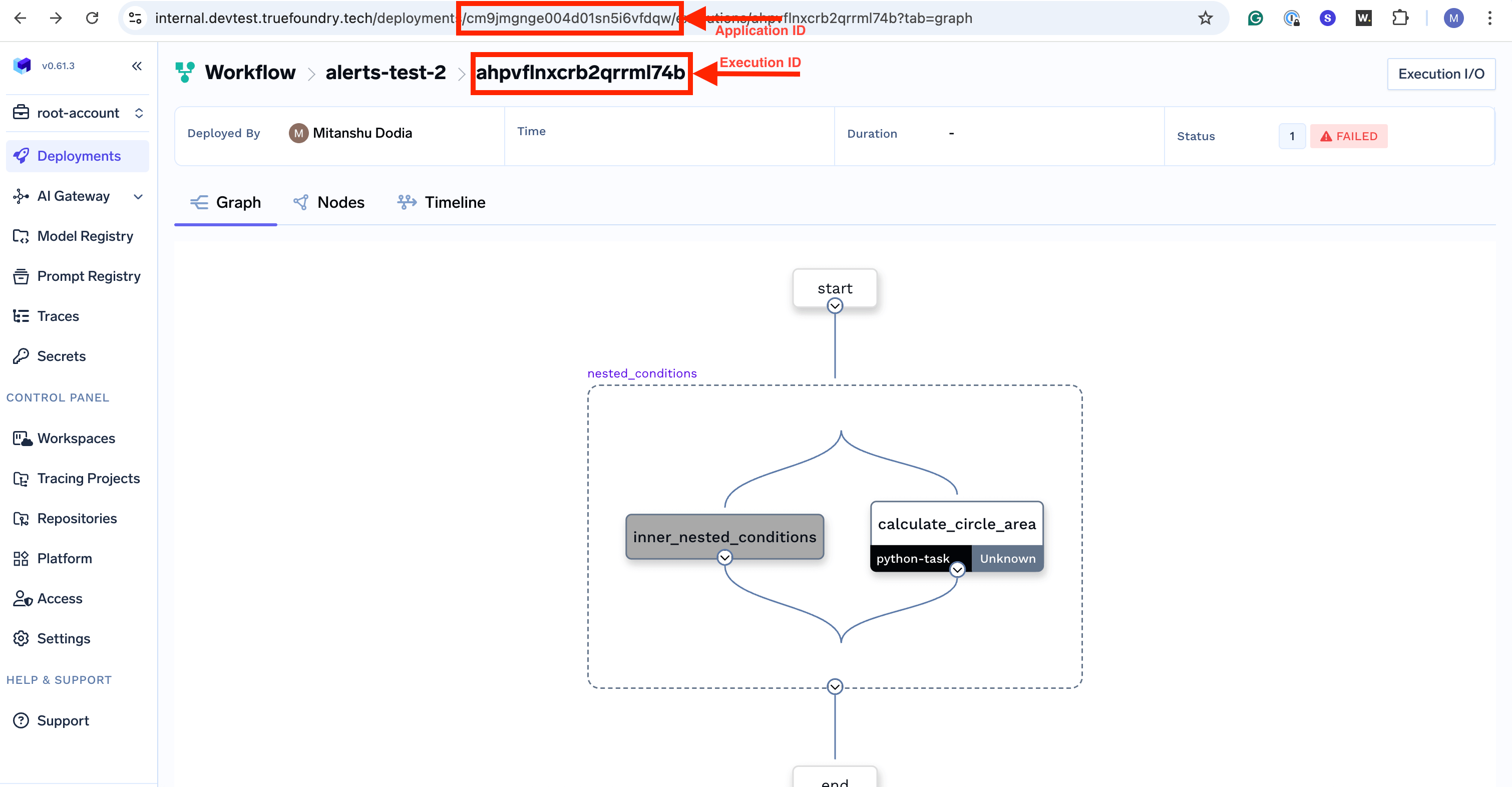 You can recover a failed workflow execution by making a POST request to the recover endpoint:
```bash cURL theme={"dark"}
curl -X 'POST' \
'https:///api/svc/v1/workflow//executions//recover' \
-H 'accept: */*' \
-H 'Authorization: Bearer ' \
-d ''
```
```python Python (requests) theme={"dark"}
import requests
TRUEFOUNDRY_URL = "https://"
APPLICATION_ID = ""
EXECUTION_ID = ""
API_TOKEN = ""
url = f"{TRUEFOUNDRY_URL}/api/svc/v1/workflow/{APPLICATION_ID}/executions/{EXECUTION_ID}/recover"
headers = {
"accept": "*/*",
"Authorization": f"Bearer {API_TOKEN}"
}
response = requests.post(url, headers=headers)
if response.status_code == 200:
print("Workflow execution recovery initiated successfully")
print(response.json())
else:
print(f"Failed to recover workflow execution: {response.status_code}")
print(response.text)
```
### API Parameters
| Parameter | Type | Description |
| ---------------- | ------ | ------------------------------------------------------------------------------------------------------- |
| `application-id` | string | The unique identifier of the application. Found in the application/workflow details page URL. |
| `execution-id` | string | The unique identifier of the failed execution you want to recover. Found in the execution details page. |
### Authentication
The API requires a valid TrueFoundry API token passed in the `Authorization` header as a Bearer token. You can generate an API token from the TrueFoundry UI under your account settings. For more information, see [API Keys](/docs/generating-truefoundry-api-keys).
## Example: Recovering a Failed Workflow
Let's say you have a workflow with three tasks where `task_2` failed:
```python theme={"dark"}
from truefoundry.workflow import (
PythonTaskConfig,
TaskPythonBuild,
task,
workflow,
)
task_config = PythonTaskConfig(
image=TaskPythonBuild(
pip_packages=["truefoundry[workflow]==0.9.1"],
),
)
@task(task_config=task_config)
def task_1(data: str) -> str:
print("Task 1: Processing data")
return f"processed_{data}"
@task(task_config=task_config)
def task_2(data: str) -> str:
print("Task 2: Transforming data")
# This task might fail due to external API issues
result = call_external_api(data)
return result
@task(task_config=task_config)
def task_3(data: str) -> str:
print("Task 3: Finalizing")
return f"final_{data}"
@workflow
def my_data_pipeline(input_data: str) -> str:
step1 = task_1(data=input_data)
step2 = task_2(data=step1)
step3 = task_3(data=step2)
return step3
```
If `task_2` fails after `task_1` completes successfully, you can recover the execution:
```bash theme={"dark"}
curl -X 'POST' \
'https://your-truefoundry-url.com/api/svc/v1/workflow/your-workflow-id/executions/failed-execution-id/recover' \
-H 'accept: */*' \
-H 'Authorization: Bearer your-api-token' \
-d ''
```
When recovered:
* `task_1` will **not** be re-executed (its output is preserved)
* `task_2` will be re-executed from the beginning
* `task_3` will execute after `task_2` completes successfully
The recover operation can only be performed on failed executions. Attempting
to recover a successful or running execution will result in an error.
You can recover a failed workflow execution by making a POST request to the recover endpoint:
```bash cURL theme={"dark"}
curl -X 'POST' \
'https:///api/svc/v1/workflow//executions//recover' \
-H 'accept: */*' \
-H 'Authorization: Bearer ' \
-d ''
```
```python Python (requests) theme={"dark"}
import requests
TRUEFOUNDRY_URL = "https://"
APPLICATION_ID = ""
EXECUTION_ID = ""
API_TOKEN = ""
url = f"{TRUEFOUNDRY_URL}/api/svc/v1/workflow/{APPLICATION_ID}/executions/{EXECUTION_ID}/recover"
headers = {
"accept": "*/*",
"Authorization": f"Bearer {API_TOKEN}"
}
response = requests.post(url, headers=headers)
if response.status_code == 200:
print("Workflow execution recovery initiated successfully")
print(response.json())
else:
print(f"Failed to recover workflow execution: {response.status_code}")
print(response.text)
```
### API Parameters
| Parameter | Type | Description |
| ---------------- | ------ | ------------------------------------------------------------------------------------------------------- |
| `application-id` | string | The unique identifier of the application. Found in the application/workflow details page URL. |
| `execution-id` | string | The unique identifier of the failed execution you want to recover. Found in the execution details page. |
### Authentication
The API requires a valid TrueFoundry API token passed in the `Authorization` header as a Bearer token. You can generate an API token from the TrueFoundry UI under your account settings. For more information, see [API Keys](/docs/generating-truefoundry-api-keys).
## Example: Recovering a Failed Workflow
Let's say you have a workflow with three tasks where `task_2` failed:
```python theme={"dark"}
from truefoundry.workflow import (
PythonTaskConfig,
TaskPythonBuild,
task,
workflow,
)
task_config = PythonTaskConfig(
image=TaskPythonBuild(
pip_packages=["truefoundry[workflow]==0.9.1"],
),
)
@task(task_config=task_config)
def task_1(data: str) -> str:
print("Task 1: Processing data")
return f"processed_{data}"
@task(task_config=task_config)
def task_2(data: str) -> str:
print("Task 2: Transforming data")
# This task might fail due to external API issues
result = call_external_api(data)
return result
@task(task_config=task_config)
def task_3(data: str) -> str:
print("Task 3: Finalizing")
return f"final_{data}"
@workflow
def my_data_pipeline(input_data: str) -> str:
step1 = task_1(data=input_data)
step2 = task_2(data=step1)
step3 = task_3(data=step2)
return step3
```
If `task_2` fails after `task_1` completes successfully, you can recover the execution:
```bash theme={"dark"}
curl -X 'POST' \
'https://your-truefoundry-url.com/api/svc/v1/workflow/your-workflow-id/executions/failed-execution-id/recover' \
-H 'accept: */*' \
-H 'Authorization: Bearer your-api-token' \
-d ''
```
When recovered:
* `task_1` will **not** be re-executed (its output is preserved)
* `task_2` will be re-executed from the beginning
* `task_3` will execute after `task_2` completes successfully
The recover operation can only be performed on failed executions. Attempting
to recover a successful or running execution will result in an error.