> ## Documentation Index
> Fetch the complete documentation index at: https://www.truefoundry.com/llms.txt
> Use this file to discover all available pages before exploring further.
# Manage User Roles & Permissions
> Configure resource-level and tenant-level roles for users, teams, and virtual accounts in TrueFoundry.
TrueFoundry access control works at two levels:
1. **Resource-level roles** — assigned directly on a specific resource (cluster, workspace, model, MCP server, etc.) as collaborators. These roles control what a user, team, or virtual account can do on that particular resource.
2. **Tenant-level roles** — assigned globally to a user or team within the tenant. These roles define what actions the identity can perform across all resources of that type in the tenant.
## Resource-level roles (collaborators)
When you add a user, team, or virtual account as a collaborator on a resource, you pick a role that scopes their access to that resource only. Common resource-level roles include:
| Resource type | Available roles |
| ------------------------ | --------------------------------------------------------------------------------- |
| Cluster | Cluster Admin, Cluster Member, Cluster Viewer |
| Workspace | Workspace Admin, Workspace Member, Workspace Viewer |
| Model / Provider Account | Manager, User |
| MCP Server | MCP Server Manager, MCP Server User |
| Agent | Agent Manager, Agent Access |
| Repository | Repository Manager, Repository Viewer |
| Secret Group | Secret Group Admin, Secret Group Editor, Secret Group Viewer, Secret Group Access |
You assign these roles directly on the resource through the **Collaborators** section when editing a resource. No custom role creation is needed.
## Tenant-level roles
Tenant-level roles apply across the entire tenant and are configured under **Access > Roles**. They control tenant-wide actions such as creating new resources, managing users, configuring settings, or listing all resources of a type.
Tenant-level roles can be assigned to **users** or **teams**. When assigned to a team, every member of that team inherits the role's permissions.
 ### Assign a role to a user
Every user in the tenant has exactly one tenant-level role. By default, TrueFoundry ships with two roles:
* **Admin** — Full control over the tenant, including users, teams, clusters, workspaces, models, MCP servers, and all other resources. **Usually only a few admins per organization.**
* **Member** — General platform user. By default, members do not have access to any resources and must be granted access explicitly through resource collaborators or team membership.
You can also create [custom roles](#managing-custom-roles) when the default roles are too broad or too narrow.
#### Assign a role from the UI
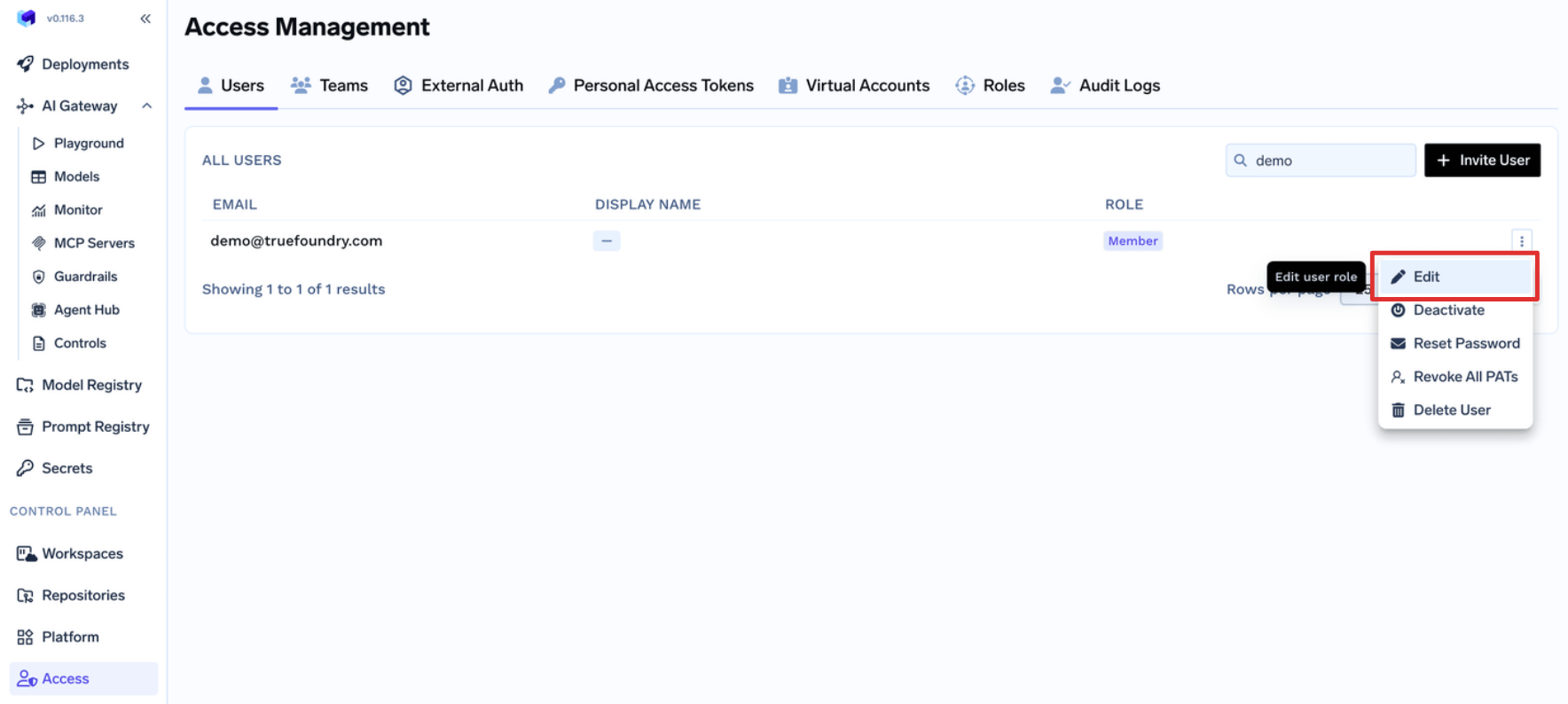
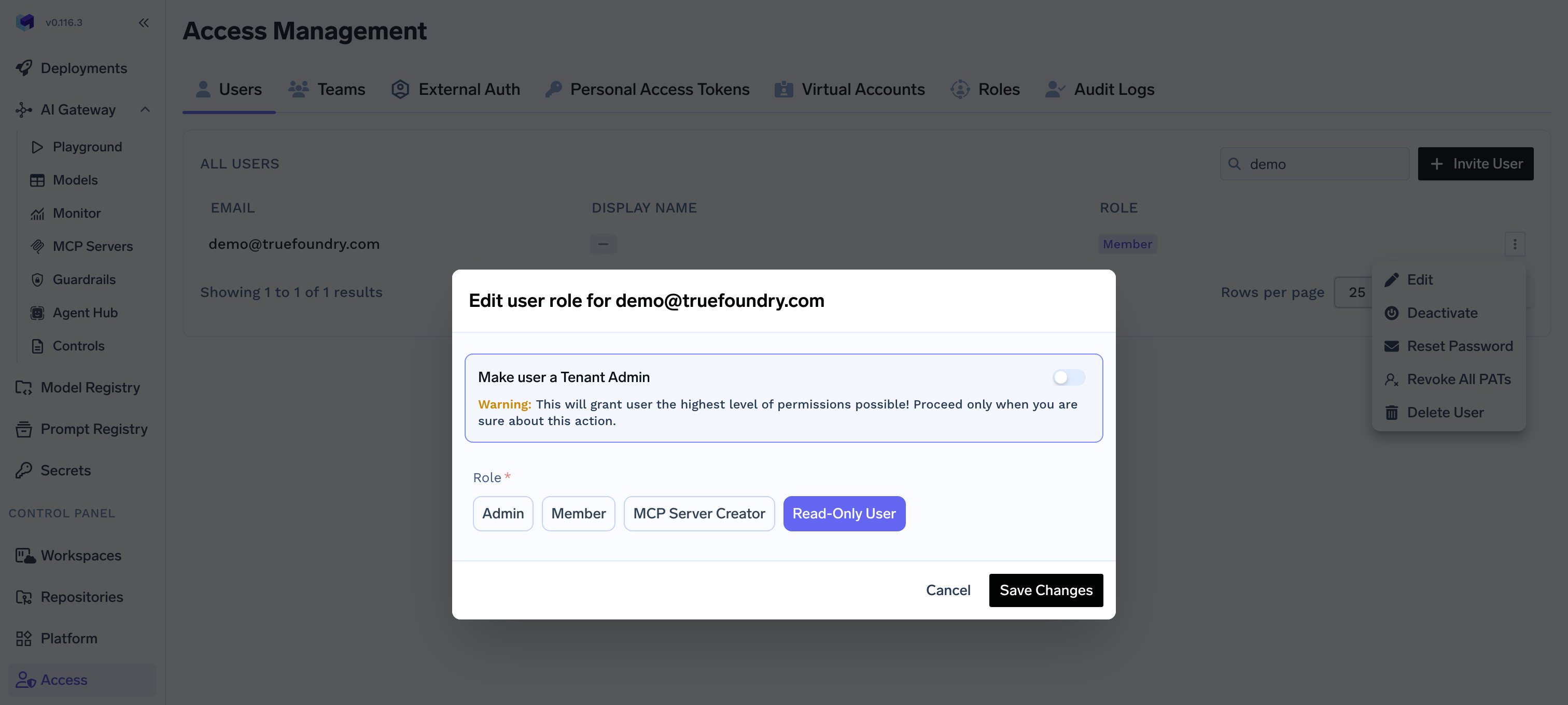
Navigate to **Access > Users**, select a user, and pick the role from the **Edit User** dialog.
#### Assign a role through team membership
If a user is also a member of a team that has a tenant-level role assigned, the user's effective permissions are the **union** of their direct role and every role inherited from their teams. This is the recommended way to manage roles for groups of users — assign the role once on the team and add or remove members as needed.
For SCIM-managed organizations, IdP groups synced as TrueFoundry teams can be granted tenant-level roles directly inside TrueFoundry. See [Provision teams via SCIM](/docs/platform/team-management#provision-teams-via-scim).
If a user's role is updated manually (for example, promoted to Admin), the manual assignment takes precedence and is preserved even if their team memberships change.
### Available platform permissions
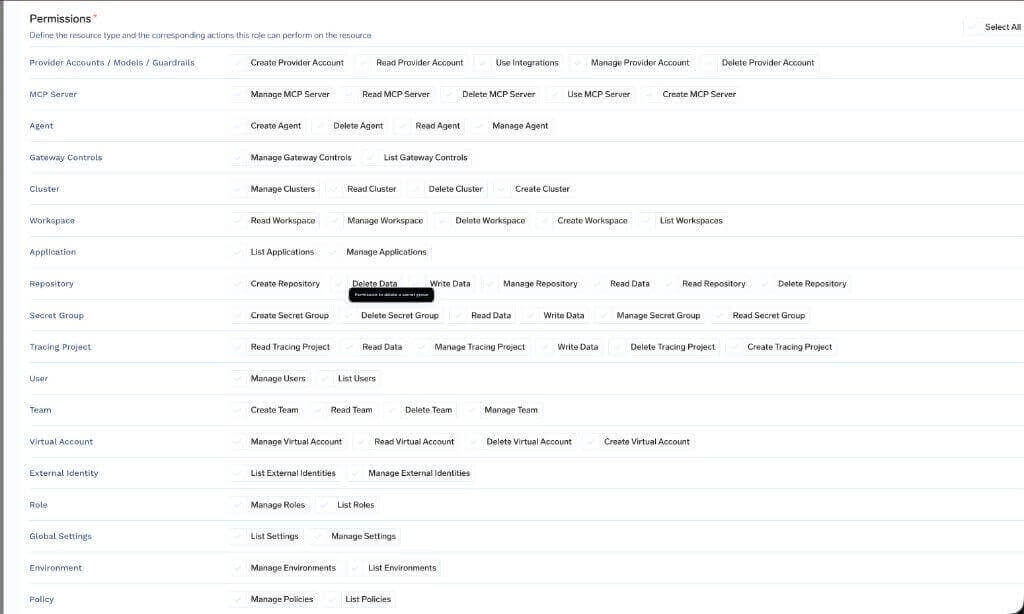
The catalog below lists every permission that exists in the TrueFoundry platform. These are the building blocks you compose into a custom tenant-level role.
#### AI Gateway
| Permission | Permission key | Description |
| :---------------------- | :--------------------------------------- | :---------------------------------------------------------- |
| Create Provider Account | `provider-account:CreateProviderAccount` | Allows creation of new provider accounts |
| Delete Provider Account | `provider-account:DeleteProviderAccount` | Allows deleting existing provider accounts |
| Manage Provider Account | `provider-account:ManageProviderAccount` | Allows updating provider account configuration |
| Read Provider Account | `provider-account:ReadProviderAccount` | Allows viewing provider account details |
| Use Integrations | `provider-account:UseIntegrations` | Allows using integrations associated with provider accounts |
| Permission | Permission key | Description |
| :---------------- | :--------------------------- | :--------------------------------------- |
| Create MCP Server | `mcp-server:CreateMcpServer` | Allows creation of new MCP servers |
| Delete MCP Server | `mcp-server:DeleteMcpServer` | Allows deleting existing MCP servers |
| Manage MCP Server | `mcp-server:ManageMcpServer` | Allows updating MCP server configuration |
| Read MCP Server | `mcp-server:ReadMcpServer` | Allows viewing MCP server details |
| Use MCP Server | `mcp-server:UseMcpServer` | Allows using MCP server for operations |
| Permission | Permission key | Description |
| :------------ | :------------------ | :------------------------------ |
| Create Agent | `agent:CreateAgent` | Allows creation of new Agents |
| Delete Agents | `agent:DeleteAgent` | Allows deleting existing Agents |
| Manage Agents | `agent:ManageAgent` | Allows updating Agents |
| Read Agents | `agent:ReadAgent` | Allows viewing Agents details |
| Permission | Permission key | Description |
| :---------------------- | :--------------------------------------- | :------------------------------------------------------- |
| List Gateway Controls | `gateway-controls:ListGatewayControls` | Allows listing and viewing gateway controls |
| Manage Gateway Controls | `gateway-controls:ManageGatewayControls` | Allows creating, updating, and deleting gateway controls |
#### AI Engineering
| Permission | Permission key | Description |
| :-------------- | :----------------------- | :----------------------------------------------- |
| Create Cluster | `cluster:CreateCluster` | Allows creation of new clusters |
| Delete Cluster | `cluster:DeleteCluster` | Allows deleting existing clusters |
| Manage Clusters | `cluster:ManageClusters` | Allows updating and configuring cluster settings |
| Read Cluster | `cluster:ReadCluster` | Allows viewing cluster details and configuration |
| Permission | Permission key | Description |
| :--------------- | :-------------------------- | :---------------------------------------- |
| Create Workspace | `workspace:CreateWorkspace` | Allows creation of new workspaces |
| Delete Workspace | `workspace:DeleteWorkspace` | Allows deleting existing workspaces |
| Manage Workspace | `workspace:ManageWorkspace` | Allows updating workspace configuration |
| Read Workspace | `workspace:ReadWorkspace` | Allows viewing workspace details |
| List Workspaces | `workspace:ListWorkspaces` | Allows listing and viewing all workspaces |
| Permission | Permission key | Description |
| :------------------ | :------------------------------- | :--------------------------------------------------- |
| List Applications | `application:ListApplications` | Allows listing and viewing applications |
| Manage Applications | `application:ManageApplications` | Allows creating, updating, and deleting applications |
| Permission | Permission key | Description |
| :------------------ | :------------------------------- | :--------------------------------------------------- |
| List Environments | `environment:ListEnvironments` | Allows listing and viewing environments |
| Manage Environments | `environment:ManageEnvironments` | Allows creating, updating, and deleting environments |
| Permission | Permission key | Description |
| :-------------- | :---------------------- | :----------------------------------------------- |
| List Policies | `policy:ListPolicies` | Allows listing and viewing policies |
| Manage Policies | `policy:ManagePolicies` | Allows creating, updating, and deleting policies |
#### Common
| Permission | Permission key | Description |
| :----------- | :----------------- | :-------------------------------------------- |
| List Roles | `role:ListRoles` | Allows listing and viewing roles |
| Manage Roles | `role:ManageRoles` | Allows creating, updating, and deleting roles |
| Permission | Permission key | Description |
| :---------- | :------------------ | :----------------------------------------------------------- |
| Assign Role | `tenant:AssignRole` | Allows assigning roles to users, teams, and virtual accounts |
| Permission | Description |
| :---------- | :----------------------------------------------------------- |
| Assign Role | Allows assigning roles to users, teams, and virtual accounts |
| Permission | Permission key | Description |
| :----------- | :----------------- | :-------------------------------------------- |
| List Users | `user:ListUsers` | Allows listing and viewing users |
| Manage Users | `user:ManageUsers` | Allows creating, updating, and deleting users |
| Permission | Permission key | Description |
| :---------- | :---------------- | :--------------------------------------------- |
| Create Team | `team:CreateTeam` | Allows creation of new teams |
| Delete Team | `team:DeleteTeam` | Allows deleting existing teams |
| Manage Team | `team:ManageTeam` | Allows updating team configuration and members |
| Read Team | `team:ReadTeam` | Allows viewing team details and members |
| Permission | Permission key | Description |
| :--------------------- | :------------------------------------- | :------------------------------------------------------- |
| Create Virtual Account | `virtual-account:CreateVirtualAccount` | Allows creation of new virtual accounts |
| Read Virtual Account | `virtual-account:ReadVirtualAccount` | Allows viewing virtual account details |
| Manage Virtual Account | `virtual-account:ManageVirtualAccount` | Allows updating virtual account configuration and tokens |
| Delete Virtual Account | `virtual-account:DeleteVirtualAccount` | Allows deleting existing virtual accounts |
| Permission | Permission key | Description |
| :------------------------ | :------------------------------------------- | :--------------------------------------------------------- |
| List Identity Providers | `external-identity:ListExternalIdentities` | Allows listing and viewing identity provider settings |
| Manage Identity Providers | `external-identity:ManageExternalIdentities` | Allows creating, updating, and deleting identity providers |
| Permission | Permission key | Description |
| :---------------------- | :--------------------------------------- | :---------------------------------------------------------- |
| Create Provider Account | `provider-account:CreateProviderAccount` | Allows creation of new provider accounts |
| Delete Provider Account | `provider-account:DeleteProviderAccount` | Allows deleting existing provider accounts |
| Manage Provider Account | `provider-account:ManageProviderAccount` | Allows updating provider account configuration |
| Read Provider Account | `provider-account:ReadProviderAccount` | Allows viewing provider account details |
| Use Integrations | `provider-account:UseIntegrations` | Allows using integrations associated with provider accounts |
| Permission | Permission key | Description |
| :---------------- | :---------------------------- | :--------------------------------------- |
| Create Repository | `repository:CreateRepository` | Allows creation of new repositories |
| Delete Data | `repository:DeleteData` | Allows deleting data within repositories |
| Delete Repository | `repository:DeleteRepository` | Allows deleting existing repositories |
| Manage Repository | `repository:ManageRepository` | Allows updating repository configuration |
| Read Data | `repository:ReadData` | Allows reading data from repositories |
| Read Repository | `repository:ReadRepository` | Allows viewing repository details |
| Write Data | `repository:WriteData` | Allows writing data to repositories |
| Permission | Permission key | Description |
| :------------------ | :------------------------------- | :----------------------------------------- |
| Create Secret Group | `secret-group:CreateSecretGroup` | Allows creation of new secret groups |
| Delete Secret Group | `secret-group:DeleteSecretGroup` | Allows deleting existing secret groups |
| Manage Secret Group | `secret-group:ManageSecretGroup` | Allows updating secret group configuration |
| Read Data | `secret-group:ReadData` | Allows reading secret values |
| Read Secret Group | `secret-group:ReadSecretGroup` | Allows viewing secret group details |
| Write Data | `secret-group:WriteData` | Allows writing or updating secret values |
| Permission | Permission key | Description |
| :-------------- | :------------------------ | :------------------------------------------- |
| List Settings | `settings:ListSettings` | Allows listing and viewing platform settings |
| Manage Settings | `settings:ManageSettings` | Allows updating platform settings |
## Managing Default Roles
TrueFoundry allows customizing default roles for giving flexibility to Admins to decide. For example, we can update the Default team manager role to allow them manage their virtual accounts on their own.
### Assign a role to a user
Every user in the tenant has exactly one tenant-level role. By default, TrueFoundry ships with two roles:
* **Admin** — Full control over the tenant, including users, teams, clusters, workspaces, models, MCP servers, and all other resources. **Usually only a few admins per organization.**
* **Member** — General platform user. By default, members do not have access to any resources and must be granted access explicitly through resource collaborators or team membership.
You can also create [custom roles](#managing-custom-roles) when the default roles are too broad or too narrow.
#### Assign a role from the UI
Navigate to **Access > Users**, select a user, and pick the role from the **Edit User** dialog.
#### Assign a role through team membership
If a user is also a member of a team that has a tenant-level role assigned, the user's effective permissions are the **union** of their direct role and every role inherited from their teams. This is the recommended way to manage roles for groups of users — assign the role once on the team and add or remove members as needed.
For SCIM-managed organizations, IdP groups synced as TrueFoundry teams can be granted tenant-level roles directly inside TrueFoundry. See [Provision teams via SCIM](/docs/platform/team-management#provision-teams-via-scim).
If a user's role is updated manually (for example, promoted to Admin), the manual assignment takes precedence and is preserved even if their team memberships change.
### Available platform permissions
The catalog below lists every permission that exists in the TrueFoundry platform. These are the building blocks you compose into a custom tenant-level role.
#### AI Gateway
| Permission | Permission key | Description |
| :---------------------- | :--------------------------------------- | :---------------------------------------------------------- |
| Create Provider Account | `provider-account:CreateProviderAccount` | Allows creation of new provider accounts |
| Delete Provider Account | `provider-account:DeleteProviderAccount` | Allows deleting existing provider accounts |
| Manage Provider Account | `provider-account:ManageProviderAccount` | Allows updating provider account configuration |
| Read Provider Account | `provider-account:ReadProviderAccount` | Allows viewing provider account details |
| Use Integrations | `provider-account:UseIntegrations` | Allows using integrations associated with provider accounts |
| Permission | Permission key | Description |
| :---------------- | :--------------------------- | :--------------------------------------- |
| Create MCP Server | `mcp-server:CreateMcpServer` | Allows creation of new MCP servers |
| Delete MCP Server | `mcp-server:DeleteMcpServer` | Allows deleting existing MCP servers |
| Manage MCP Server | `mcp-server:ManageMcpServer` | Allows updating MCP server configuration |
| Read MCP Server | `mcp-server:ReadMcpServer` | Allows viewing MCP server details |
| Use MCP Server | `mcp-server:UseMcpServer` | Allows using MCP server for operations |
| Permission | Permission key | Description |
| :------------ | :------------------ | :------------------------------ |
| Create Agent | `agent:CreateAgent` | Allows creation of new Agents |
| Delete Agents | `agent:DeleteAgent` | Allows deleting existing Agents |
| Manage Agents | `agent:ManageAgent` | Allows updating Agents |
| Read Agents | `agent:ReadAgent` | Allows viewing Agents details |
| Permission | Permission key | Description |
| :---------------------- | :--------------------------------------- | :------------------------------------------------------- |
| List Gateway Controls | `gateway-controls:ListGatewayControls` | Allows listing and viewing gateway controls |
| Manage Gateway Controls | `gateway-controls:ManageGatewayControls` | Allows creating, updating, and deleting gateway controls |
#### AI Engineering
| Permission | Permission key | Description |
| :-------------- | :----------------------- | :----------------------------------------------- |
| Create Cluster | `cluster:CreateCluster` | Allows creation of new clusters |
| Delete Cluster | `cluster:DeleteCluster` | Allows deleting existing clusters |
| Manage Clusters | `cluster:ManageClusters` | Allows updating and configuring cluster settings |
| Read Cluster | `cluster:ReadCluster` | Allows viewing cluster details and configuration |
| Permission | Permission key | Description |
| :--------------- | :-------------------------- | :---------------------------------------- |
| Create Workspace | `workspace:CreateWorkspace` | Allows creation of new workspaces |
| Delete Workspace | `workspace:DeleteWorkspace` | Allows deleting existing workspaces |
| Manage Workspace | `workspace:ManageWorkspace` | Allows updating workspace configuration |
| Read Workspace | `workspace:ReadWorkspace` | Allows viewing workspace details |
| List Workspaces | `workspace:ListWorkspaces` | Allows listing and viewing all workspaces |
| Permission | Permission key | Description |
| :------------------ | :------------------------------- | :--------------------------------------------------- |
| List Applications | `application:ListApplications` | Allows listing and viewing applications |
| Manage Applications | `application:ManageApplications` | Allows creating, updating, and deleting applications |
| Permission | Permission key | Description |
| :------------------ | :------------------------------- | :--------------------------------------------------- |
| List Environments | `environment:ListEnvironments` | Allows listing and viewing environments |
| Manage Environments | `environment:ManageEnvironments` | Allows creating, updating, and deleting environments |
| Permission | Permission key | Description |
| :-------------- | :---------------------- | :----------------------------------------------- |
| List Policies | `policy:ListPolicies` | Allows listing and viewing policies |
| Manage Policies | `policy:ManagePolicies` | Allows creating, updating, and deleting policies |
#### Common
| Permission | Permission key | Description |
| :----------- | :----------------- | :-------------------------------------------- |
| List Roles | `role:ListRoles` | Allows listing and viewing roles |
| Manage Roles | `role:ManageRoles` | Allows creating, updating, and deleting roles |
| Permission | Permission key | Description |
| :---------- | :------------------ | :----------------------------------------------------------- |
| Assign Role | `tenant:AssignRole` | Allows assigning roles to users, teams, and virtual accounts |
| Permission | Description |
| :---------- | :----------------------------------------------------------- |
| Assign Role | Allows assigning roles to users, teams, and virtual accounts |
| Permission | Permission key | Description |
| :----------- | :----------------- | :-------------------------------------------- |
| List Users | `user:ListUsers` | Allows listing and viewing users |
| Manage Users | `user:ManageUsers` | Allows creating, updating, and deleting users |
| Permission | Permission key | Description |
| :---------- | :---------------- | :--------------------------------------------- |
| Create Team | `team:CreateTeam` | Allows creation of new teams |
| Delete Team | `team:DeleteTeam` | Allows deleting existing teams |
| Manage Team | `team:ManageTeam` | Allows updating team configuration and members |
| Read Team | `team:ReadTeam` | Allows viewing team details and members |
| Permission | Permission key | Description |
| :--------------------- | :------------------------------------- | :------------------------------------------------------- |
| Create Virtual Account | `virtual-account:CreateVirtualAccount` | Allows creation of new virtual accounts |
| Read Virtual Account | `virtual-account:ReadVirtualAccount` | Allows viewing virtual account details |
| Manage Virtual Account | `virtual-account:ManageVirtualAccount` | Allows updating virtual account configuration and tokens |
| Delete Virtual Account | `virtual-account:DeleteVirtualAccount` | Allows deleting existing virtual accounts |
| Permission | Permission key | Description |
| :------------------------ | :------------------------------------------- | :--------------------------------------------------------- |
| List Identity Providers | `external-identity:ListExternalIdentities` | Allows listing and viewing identity provider settings |
| Manage Identity Providers | `external-identity:ManageExternalIdentities` | Allows creating, updating, and deleting identity providers |
| Permission | Permission key | Description |
| :---------------------- | :--------------------------------------- | :---------------------------------------------------------- |
| Create Provider Account | `provider-account:CreateProviderAccount` | Allows creation of new provider accounts |
| Delete Provider Account | `provider-account:DeleteProviderAccount` | Allows deleting existing provider accounts |
| Manage Provider Account | `provider-account:ManageProviderAccount` | Allows updating provider account configuration |
| Read Provider Account | `provider-account:ReadProviderAccount` | Allows viewing provider account details |
| Use Integrations | `provider-account:UseIntegrations` | Allows using integrations associated with provider accounts |
| Permission | Permission key | Description |
| :---------------- | :---------------------------- | :--------------------------------------- |
| Create Repository | `repository:CreateRepository` | Allows creation of new repositories |
| Delete Data | `repository:DeleteData` | Allows deleting data within repositories |
| Delete Repository | `repository:DeleteRepository` | Allows deleting existing repositories |
| Manage Repository | `repository:ManageRepository` | Allows updating repository configuration |
| Read Data | `repository:ReadData` | Allows reading data from repositories |
| Read Repository | `repository:ReadRepository` | Allows viewing repository details |
| Write Data | `repository:WriteData` | Allows writing data to repositories |
| Permission | Permission key | Description |
| :------------------ | :------------------------------- | :----------------------------------------- |
| Create Secret Group | `secret-group:CreateSecretGroup` | Allows creation of new secret groups |
| Delete Secret Group | `secret-group:DeleteSecretGroup` | Allows deleting existing secret groups |
| Manage Secret Group | `secret-group:ManageSecretGroup` | Allows updating secret group configuration |
| Read Data | `secret-group:ReadData` | Allows reading secret values |
| Read Secret Group | `secret-group:ReadSecretGroup` | Allows viewing secret group details |
| Write Data | `secret-group:WriteData` | Allows writing or updating secret values |
| Permission | Permission key | Description |
| :-------------- | :------------------------ | :------------------------------------------- |
| List Settings | `settings:ListSettings` | Allows listing and viewing platform settings |
| Manage Settings | `settings:ManageSettings` | Allows updating platform settings |
## Managing Default Roles
TrueFoundry allows customizing default roles for giving flexibility to Admins to decide. For example, we can update the Default team manager role to allow them manage their virtual accounts on their own.
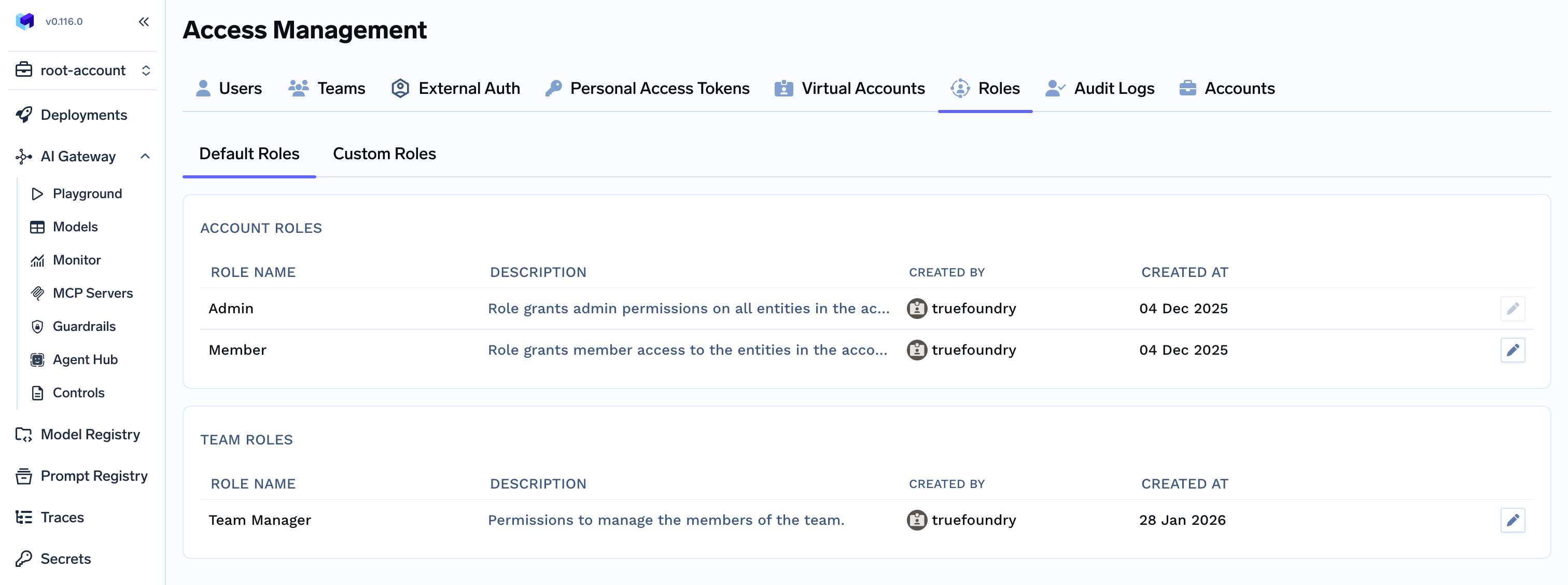 Updating permissions for `Admin` role is not allowed and by default contains
all the permissions.
## Managing Custom Roles
Custom roles let you define a specific set of tenant-level permissions and assign them to users or teams. This is useful when the default Admin and Member roles are too broad or too narrow for a particular group.
Navigate to `Access > Roles > Custom Roles`. Click on `Create Role`.
Updating permissions for `Admin` role is not allowed and by default contains
all the permissions.
## Managing Custom Roles
Custom roles let you define a specific set of tenant-level permissions and assign them to users or teams. This is useful when the default Admin and Member roles are too broad or too narrow for a particular group.
Navigate to `Access > Roles > Custom Roles`. Click on `Create Role`.
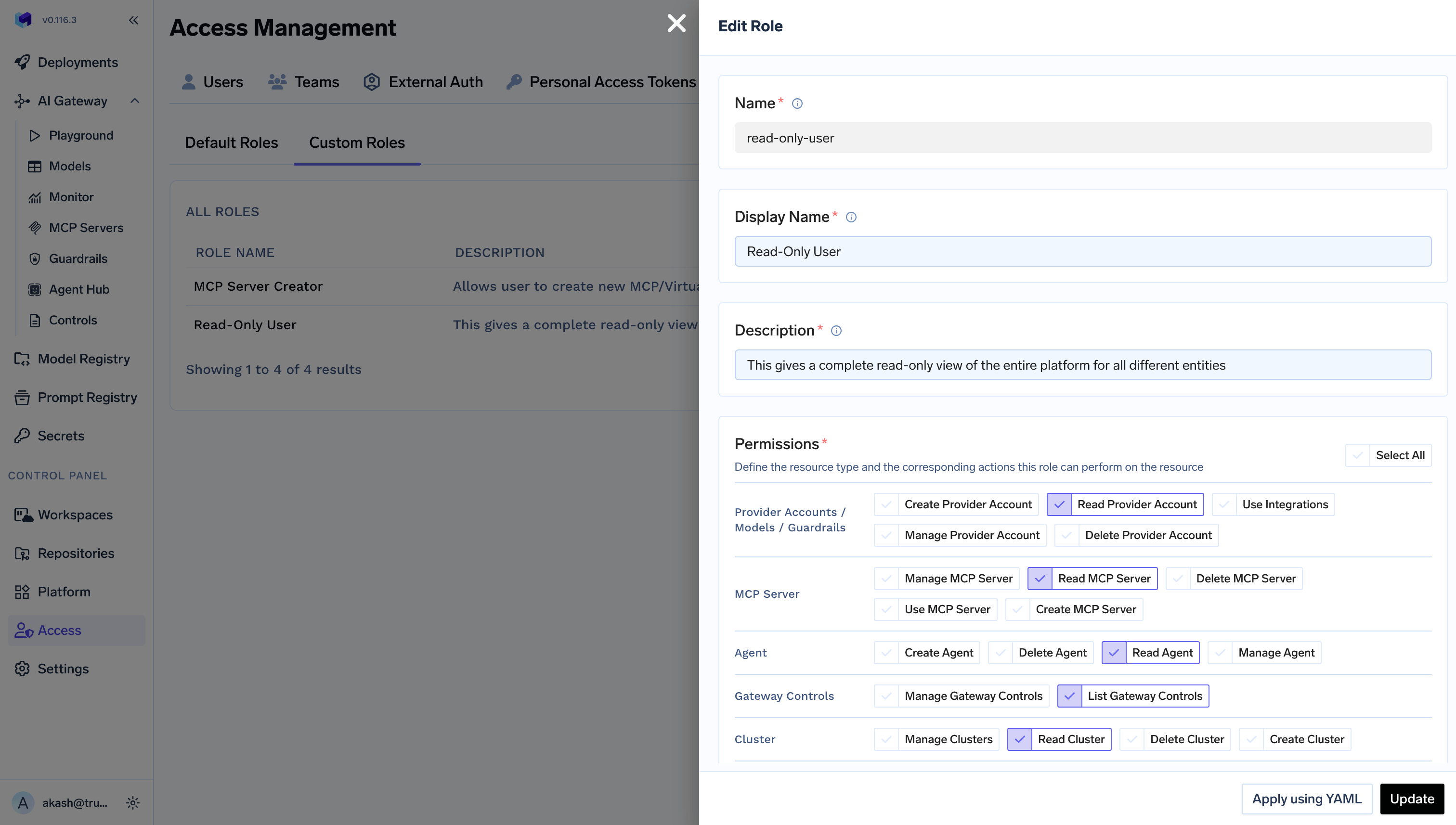
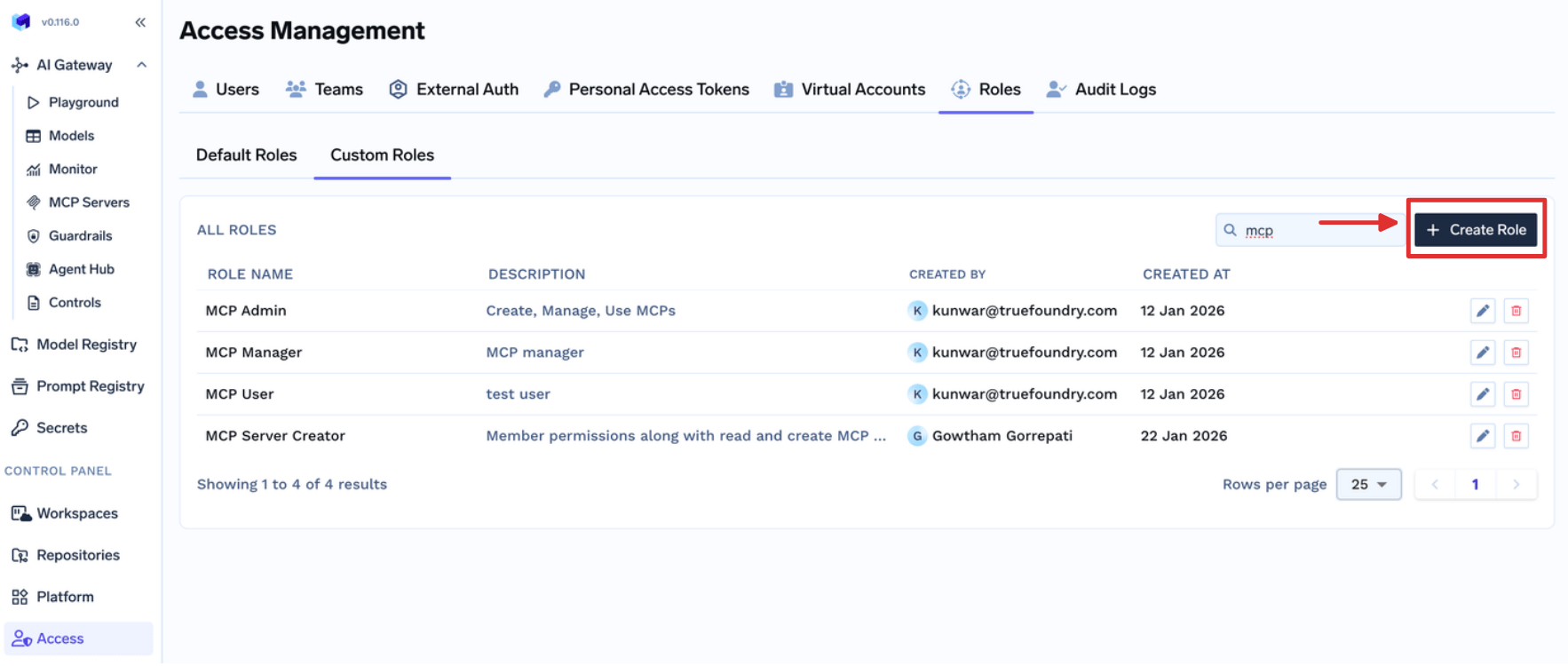 A unique name to identify this role. Should follow the format as Alphanumeric
characters and hyphens.
A user-friendly readable display name for this Role.
A breif description about this role and its permissions.
Permissions for the role. Refer to [Available platform permissions](/docs/platform/manage-user-roles-and-permissions#available-platform-permissions) to understand these permissions.
* Permissions are applied to all the resources in the tenant.
* Provider Account should be used to give permissions for Models, Guardrails, and Integrations.
A unique name to identify this role. Should follow the format as Alphanumeric
characters and hyphens.
A user-friendly readable display name for this Role.
A breif description about this role and its permissions.
Permissions for the role. Refer to [Available platform permissions](/docs/platform/manage-user-roles-and-permissions#available-platform-permissions) to understand these permissions.
* Permissions are applied to all the resources in the tenant.
* Provider Account should be used to give permissions for Models, Guardrails, and Integrations.
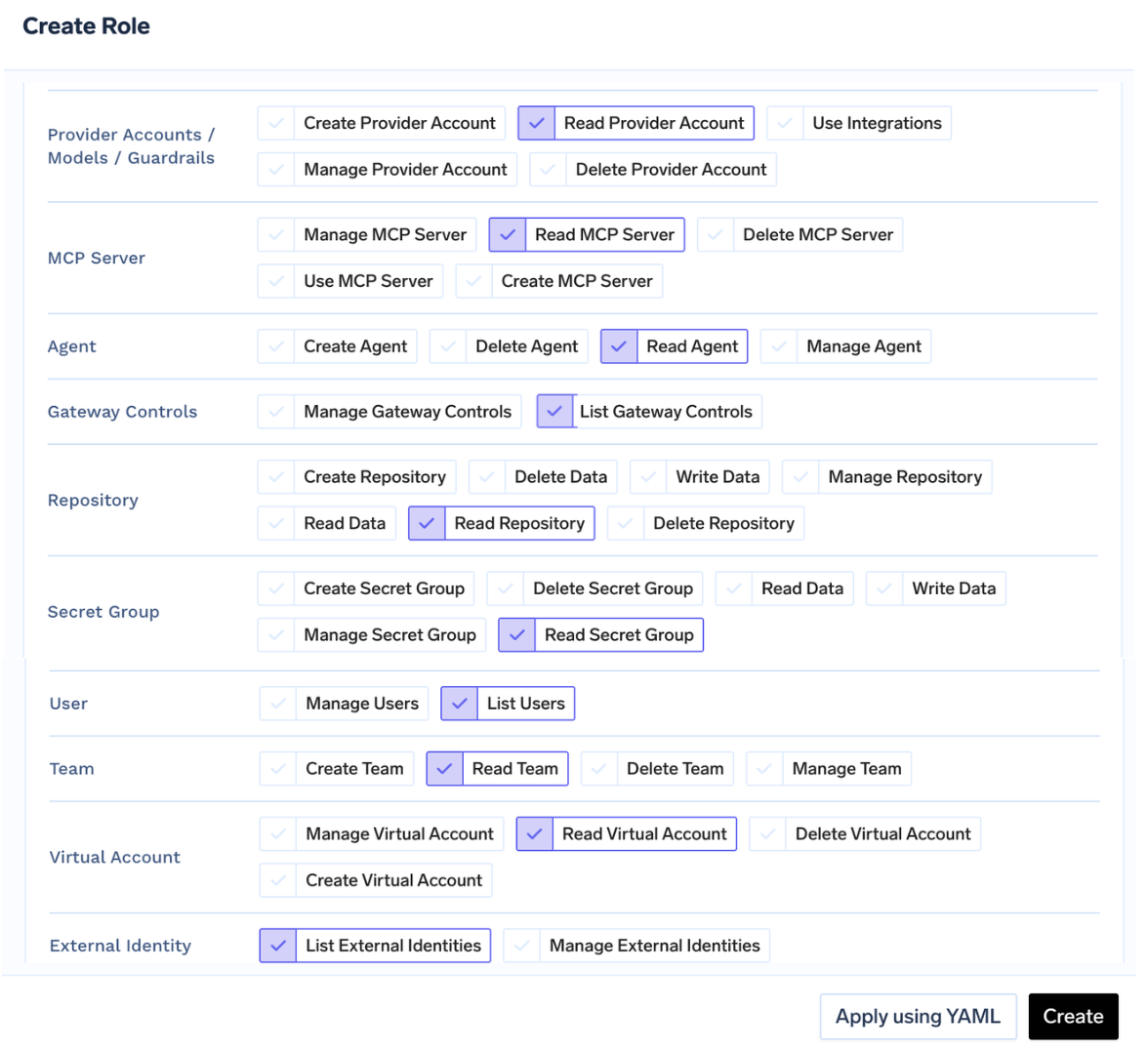 **Assign to a user:** Navigate to `Access > Users`. Select the user, click `Edit User`, select the role, and save.
 **Assign to a team:** Navigate to `Access > Teams`. Select the team, click `Edit Team`, select the role, and save. Every member of the team inherits the permissions from that role.
A user can be assigned only one tenant-level role directly. If the user is also a member of a team with a role, the effective permissions are the union of both.
## FAQ
You can achieve this by updating the default role for `Team Manager` to allow them to create or manage their `Virtual Account`.
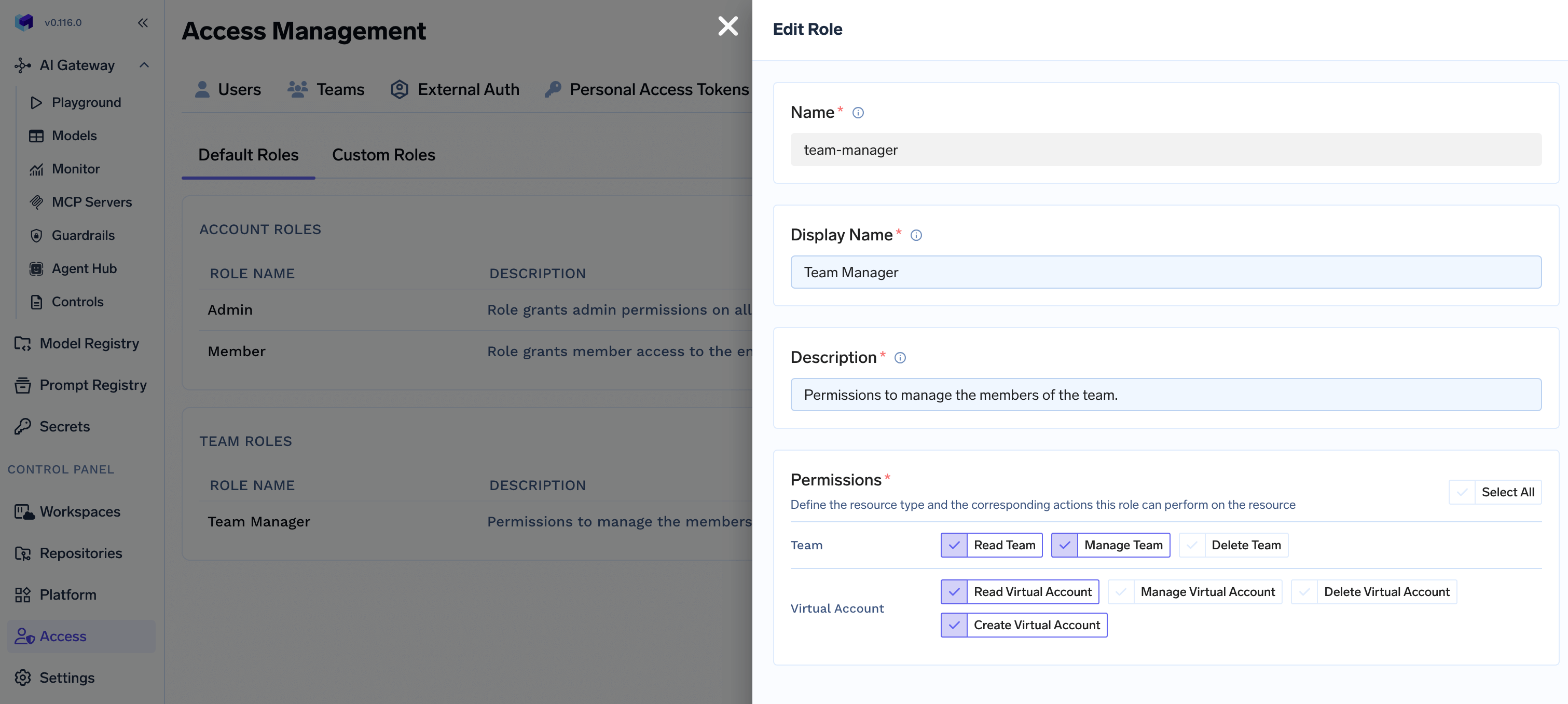
Navigate to `Access > Roles > Default Roles` and click on `Edit` button for the default `Team Manager` role.
**Assign to a team:** Navigate to `Access > Teams`. Select the team, click `Edit Team`, select the role, and save. Every member of the team inherits the permissions from that role.
A user can be assigned only one tenant-level role directly. If the user is also a member of a team with a role, the effective permissions are the union of both.
## FAQ
You can achieve this by updating the default role for `Team Manager` to allow them to create or manage their `Virtual Account`.
Navigate to `Access > Roles > Default Roles` and click on `Edit` button for the default `Team Manager` role.
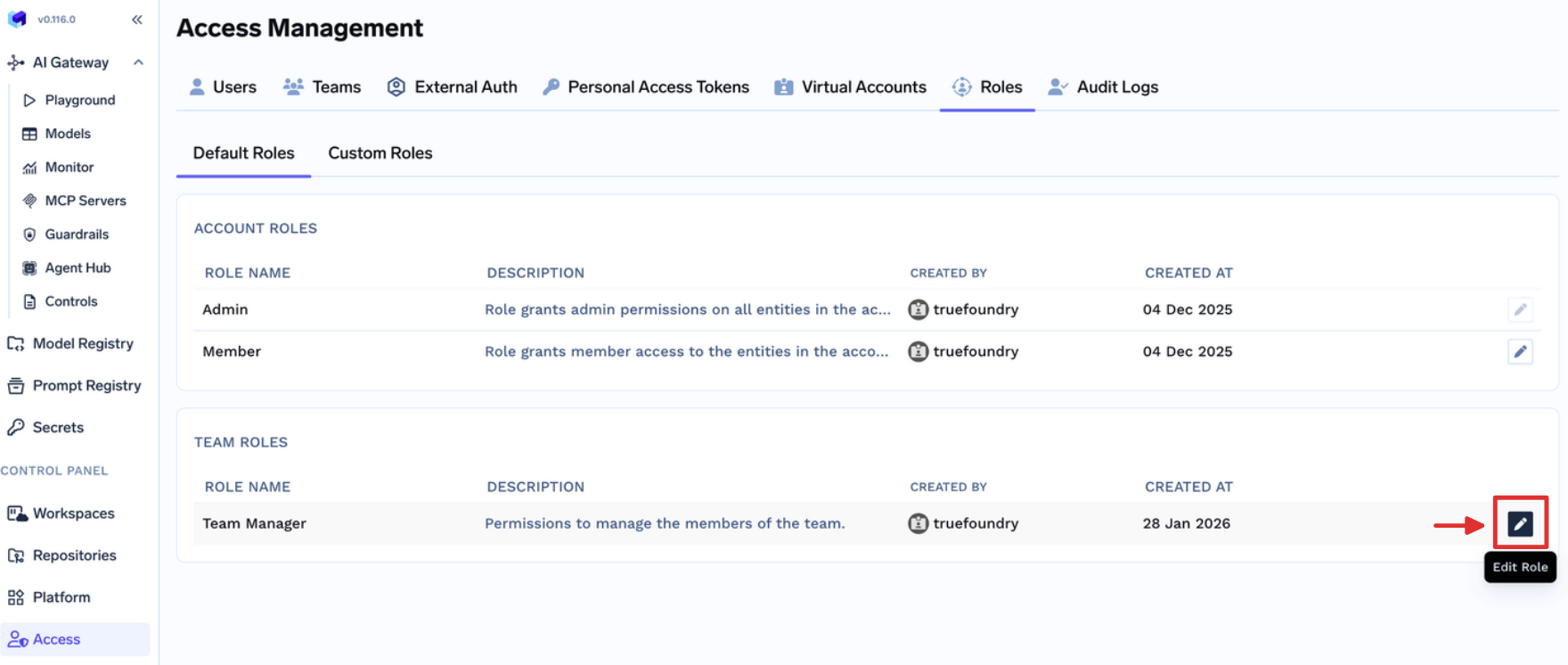 Update the permissions based on your requirements.
* **Read Virtual Account**: If you
want to allow Team Managers view Virtual Accounts owned by their teams.
* **Create Virtual Account**: If you
want to allow Team Managers create new Virtual Accounts owned by their teams.
* **Manage Virtual Account**: If you
want to allow Team Managers update Virtual Accounts owned by their teams. This also includes permission to get the token.
* **Delete Virtual Account**: If you
want to allow Team Managers delete Virtual Accounts owned by their teams.
Update the permissions based on your requirements.
* **Read Virtual Account**: If you
want to allow Team Managers view Virtual Accounts owned by their teams.
* **Create Virtual Account**: If you
want to allow Team Managers create new Virtual Accounts owned by their teams.
* **Manage Virtual Account**: If you
want to allow Team Managers update Virtual Accounts owned by their teams. This also includes permission to get the token.
* **Delete Virtual Account**: If you
want to allow Team Managers delete Virtual Accounts owned by their teams.
 These permissions apply to all the Team Managers in the Account irrespective
of their Teams.
Team Managers should now be able to view, create, manage or delete Virtual Account owned by their Team based on the permissions given.
These permissions apply to all the Team Managers in the Account irrespective
of their Teams.
Team Managers should now be able to view, create, manage or delete Virtual Account owned by their Team based on the permissions given.
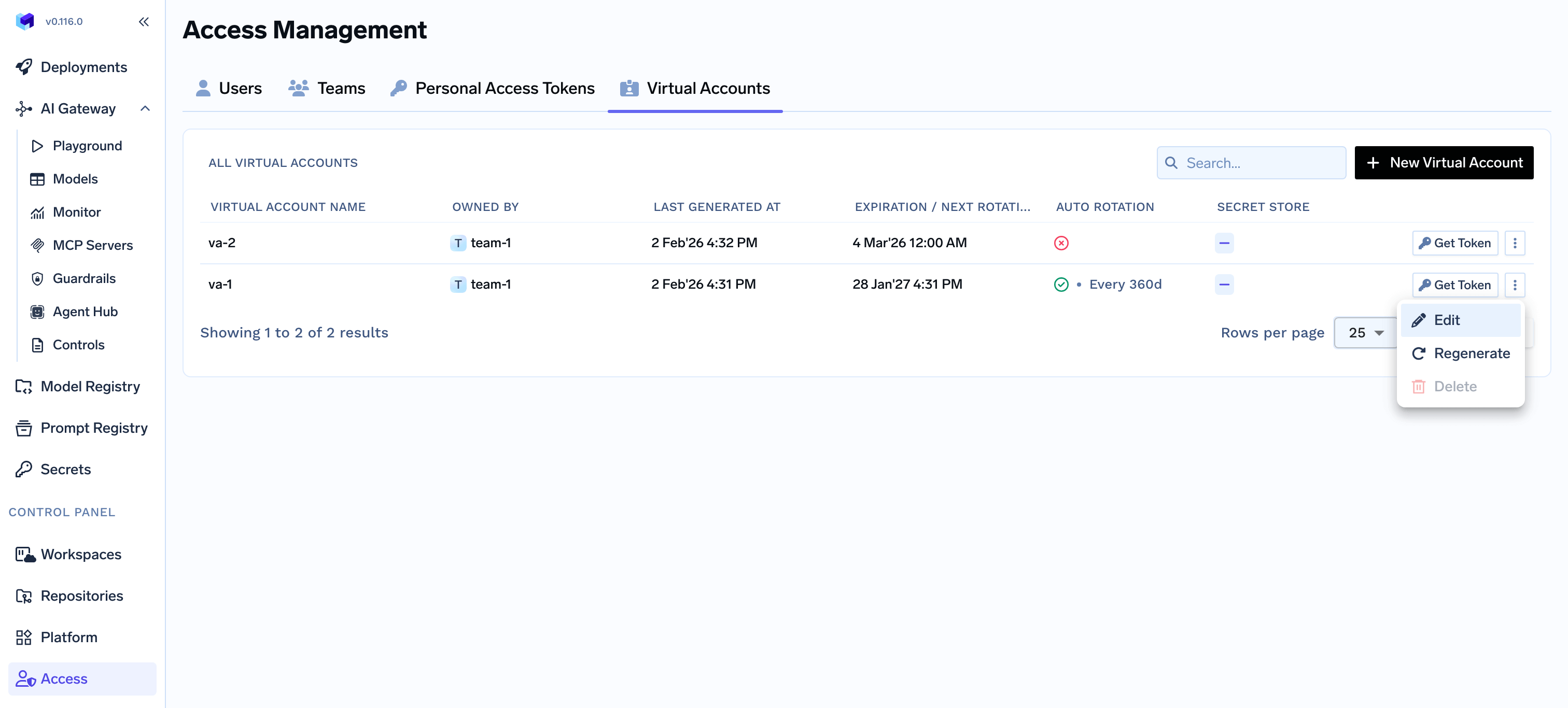 You can achieve this by assigning a custom role to those `Users` to allow them to create or manage their `Virtual MCP Servers`.
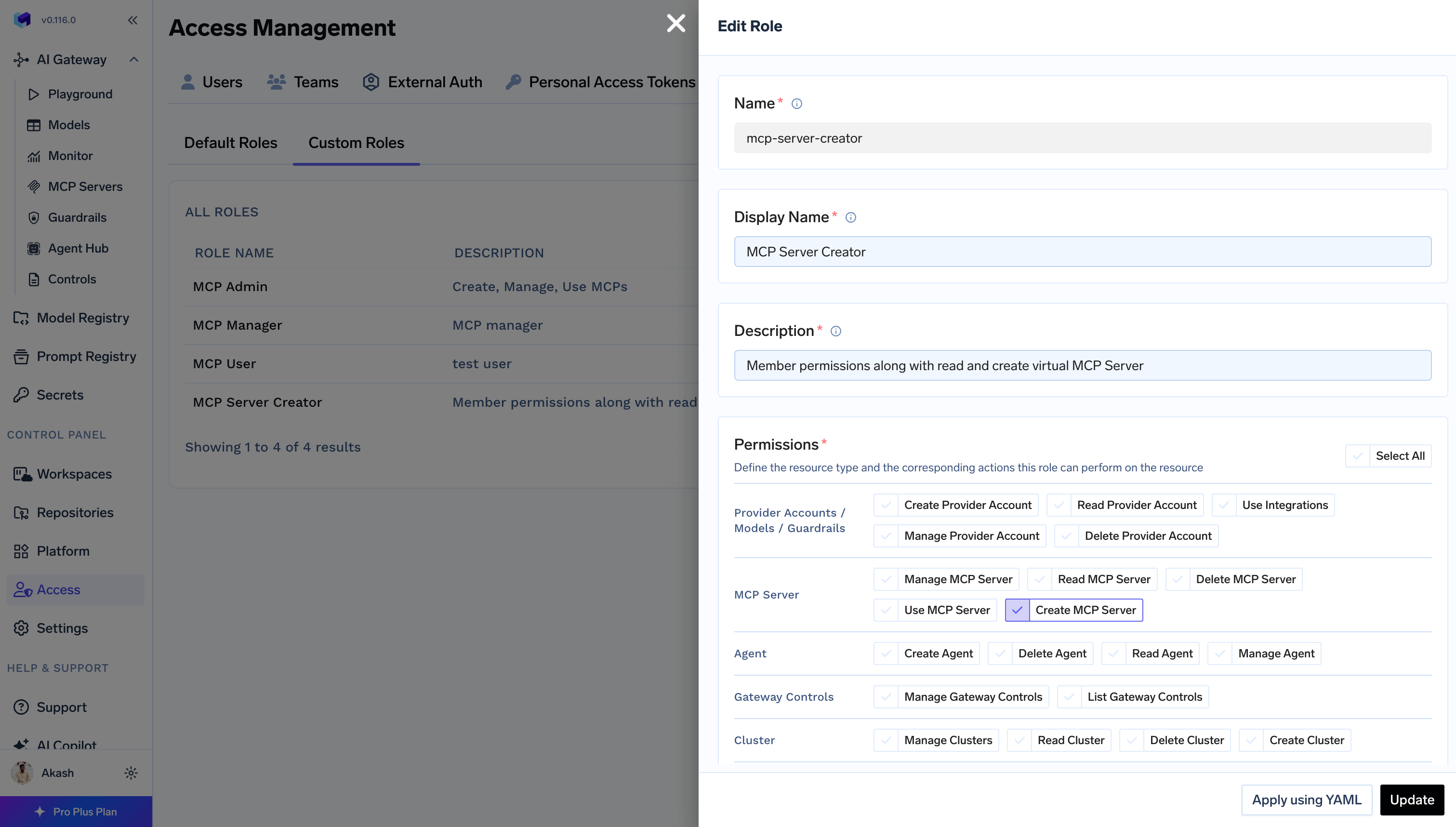
Navigate to `Access > Roles > Custom Roles` and click on `Create Role` button.
Fill the form with required details and add `Create MCP Server` permission to allow just create a new MCP/Virtual MCP Server.
You can achieve this by assigning a custom role to those `Users` to allow them to create or manage their `Virtual MCP Servers`.
Navigate to `Access > Roles > Custom Roles` and click on `Create Role` button.
Fill the form with required details and add `Create MCP Server` permission to allow just create a new MCP/Virtual MCP Server.
 This only allows the Users to create a new MCP Server. They cannot view or
update any existing MCP Server in the Account through this permission. User
can add themself as `MCP Server Manager` using collaborator to update and
access the MCP Server while creating it first time.
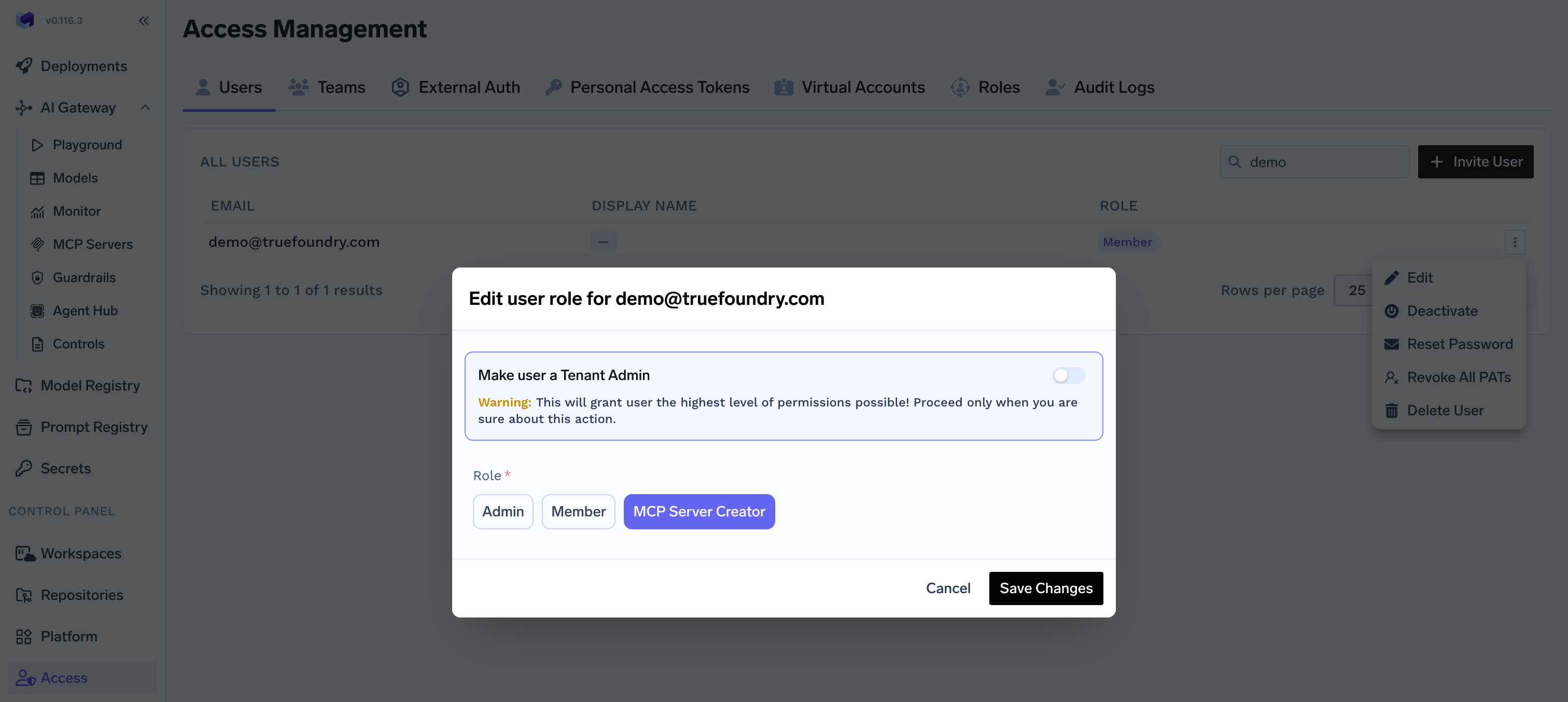
Navigate to `Access > Users` and click `Edit` for users to allow creating MCP Servers. Assign the created `Role`.
This only allows the Users to create a new MCP Server. They cannot view or
update any existing MCP Server in the Account through this permission. User
can add themself as `MCP Server Manager` using collaborator to update and
access the MCP Server while creating it first time.
Navigate to `Access > Users` and click `Edit` for users to allow creating MCP Servers. Assign the created `Role`.
 You can achieve this by editing the default `Member` role to allow them to view `Gateway Controls`.
Navigate to `Access > Roles > Default Roles` and click on `Edit` button on `Member` role.
You can achieve this by editing the default `Member` role to allow them to view `Gateway Controls`.
Navigate to `Access > Roles > Default Roles` and click on `Edit` button on `Member` role.
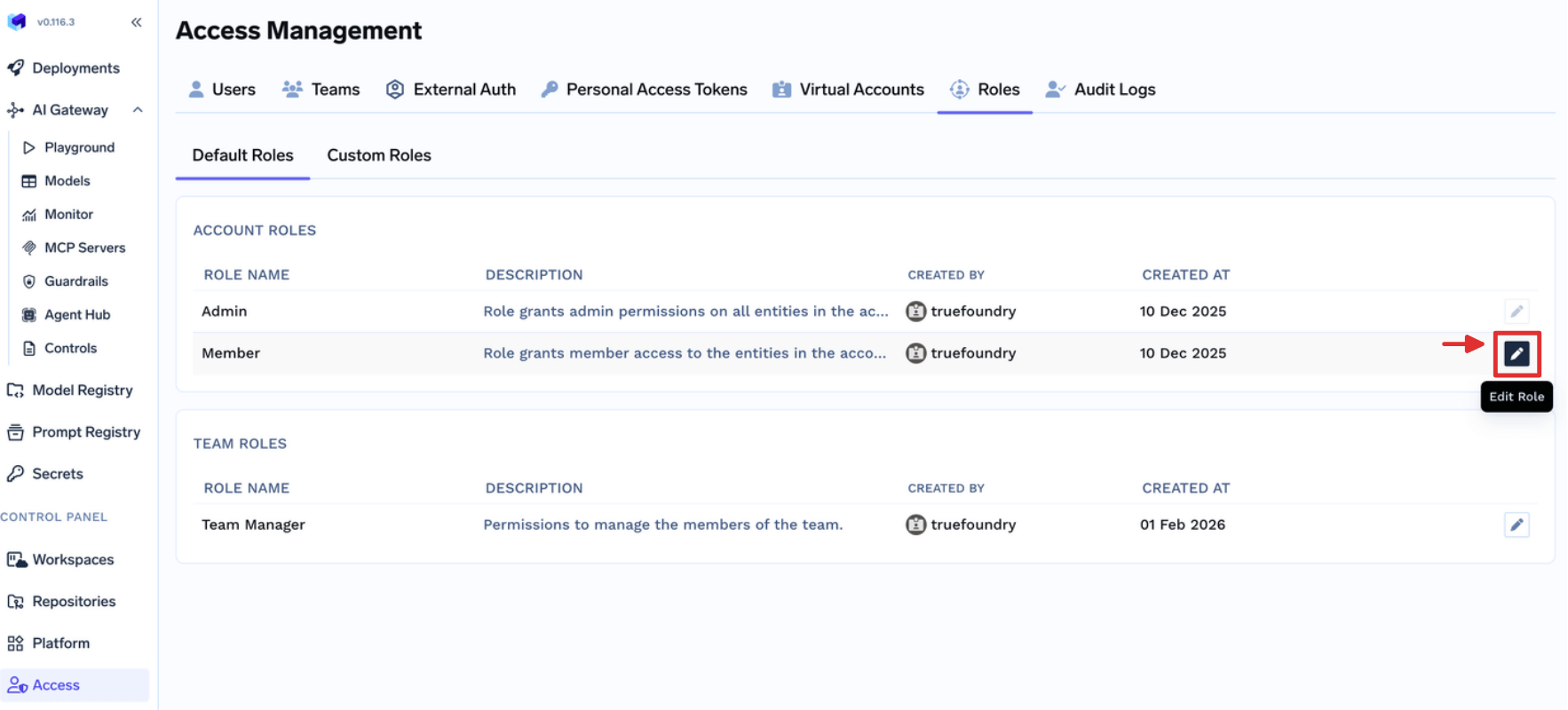 Update the permissions to add `List Gateway Controls` and click `Update` to allow all the Users in the Account view all the Gateway Configs.
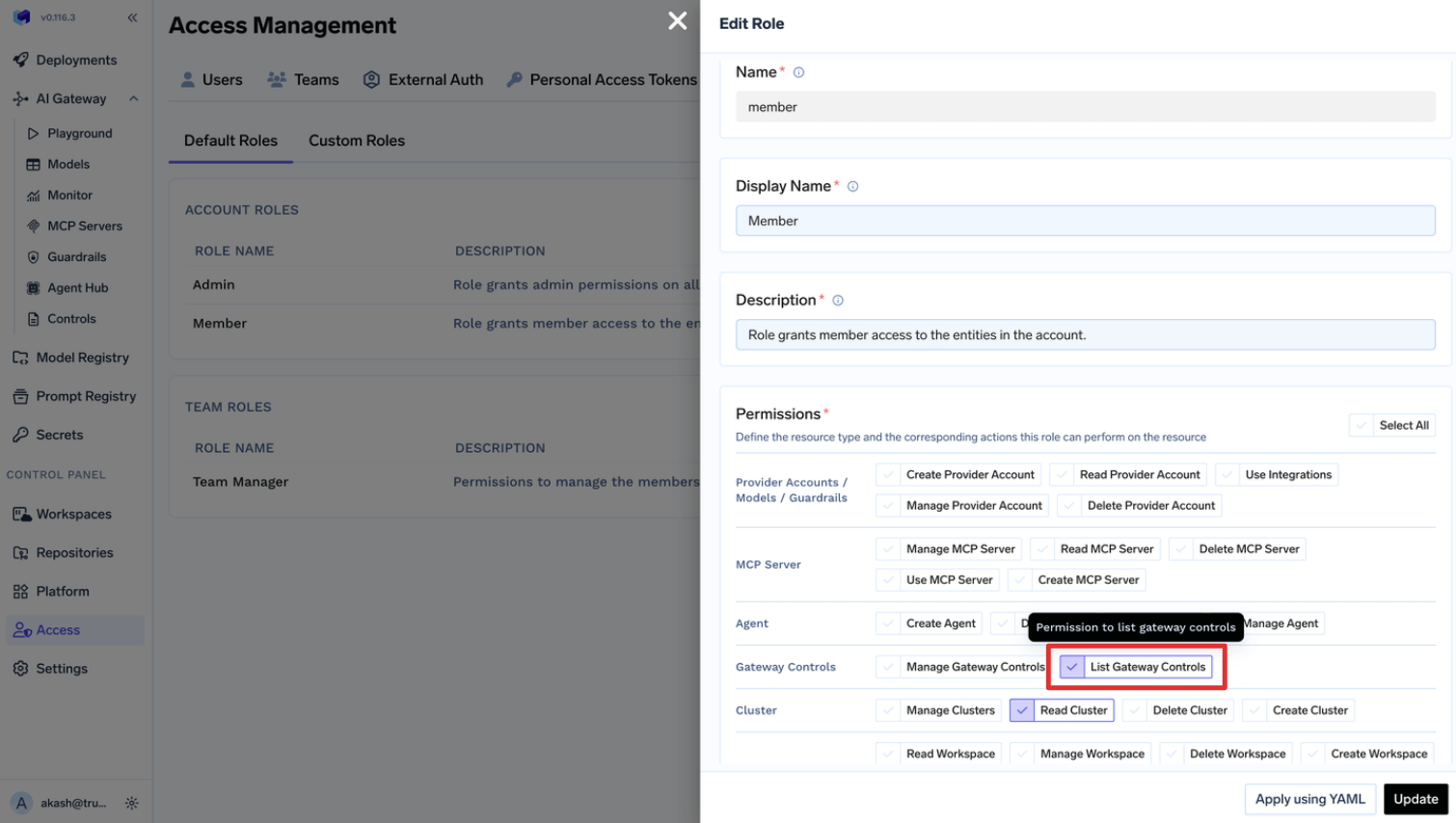 This allows all the Users access to view all the Gateway Controls by default.
Default `Member` role comes with following permissions:
* settings:ListSettings
* repository:CreateRepository
* secret-group:CreateSecretGroup
* user:ListUsers
***
This allows all the Users access to view all the Gateway Controls by default.
Default `Member` role comes with following permissions:
* settings:ListSettings
* repository:CreateRepository
* secret-group:CreateSecretGroup
* user:ListUsers
***