> ## Documentation Index
> Fetch the complete documentation index at: https://www.truefoundry.com/llms.txt
> Use this file to discover all available pages before exploring further.
# Identity Providers
> Configure external JWT identity providers and map tokens to TrueFoundry users, teams, or virtual accounts.
Identity Providers let TrueFoundry validate JWT tokens issued by your organization's IdP, such as Okta, Azure AD, or another OIDC-compatible provider. After validation, TrueFoundry resolves the token to a TrueFoundry user or virtual account and uses that resolved identity for RBAC.
Identity Providers are available starting from **v0.143**. They replace the legacy [External Identity](/docs/external-identity) flow. If you previously configured external identities, see the [Identity and Access Revamp announcement](/docs/change-announcements/identity-and-access-revamp-v0.143) for migration steps.
## When to use Identity Providers
Use Identity Providers when an external application, service, gateway client, or end user already has a JWT from your IdP and needs to access TrueFoundry APIs, AI Gateway, MCP Gateway, models, or MCP servers without first generating a TrueFoundry token.
Common use cases include:
1. Service-to-service authentication where an application presents an IdP-issued JWT.
2. B2B or partner access where users authenticate with their own organization's IdP.
3. Per-user gateway access where TrueFoundry should preserve the upstream user's identity from the JWT.
## How token resolution works
1. The user or application authenticates with your IdP and receives a JWT.
2. The caller sends the JWT to TrueFoundry as a Bearer token.
3. TrueFoundry validates the token signature using the configured JWKS URI.
4. TrueFoundry validates the issuer and allowed audience values, if configured.
5. TrueFoundry resolves the token to either a virtual account or a TrueFoundry user.
6. RBAC is evaluated using the resolved TrueFoundry identity.
TrueFoundry never handles the user's IdP credentials. Your IdP remains the source of truth for authentication.
## What Identity Providers can and cannot do
Identity Providers are used for validating externally issued JWTs and resolving them to TrueFoundry identities for API and gateway access. They are not a replacement for SSO or user provisioning.
| Capability | Supported? | Behavior |
| -------------------------------------- | ---------- | ------------------------------------------------------------------------------------------------------------------------------------------------------------------------------------------------------------ |
| Validate JWT signatures using JWKS | Yes | TrueFoundry fetches public keys from the configured JWKS URI and verifies incoming JWT signatures. |
| Validate issuer and audience | Yes | Tokens are rejected if the `iss` or `aud` values do not match the configured provider. |
| Resolve a token to a virtual account | Yes | The configured name claim must match an identity provider mapping on an existing virtual account. |
| Resolve a token to a TrueFoundry user | Yes | The configured email claim must match an existing user in the tenant. |
| Map a resolved user to a team | Yes | The configured team claim must match an identity provider mapping on an existing team. |
| Create a missing TrueFoundry user | No | If the email claim does not match an existing user, the token is not resolved to a user. Use [Manage Users](/docs/platform/user-management#user-provisioning) to create users through SCIM, JIT, or invites. |
| Create a missing team | No | If the team claim does not match an existing team mapping, TrueFoundry does not create the team. Create the team first and configure its identity provider mapping. |
| Log users into the TrueFoundry UI | No | Use [SSO](/docs/sso) for interactive user login. |
| Sync or deactivate users from your IdP | No | Use SCIM provisioning for user lifecycle sync and deprovisioning. |
## Configure an Identity Provider
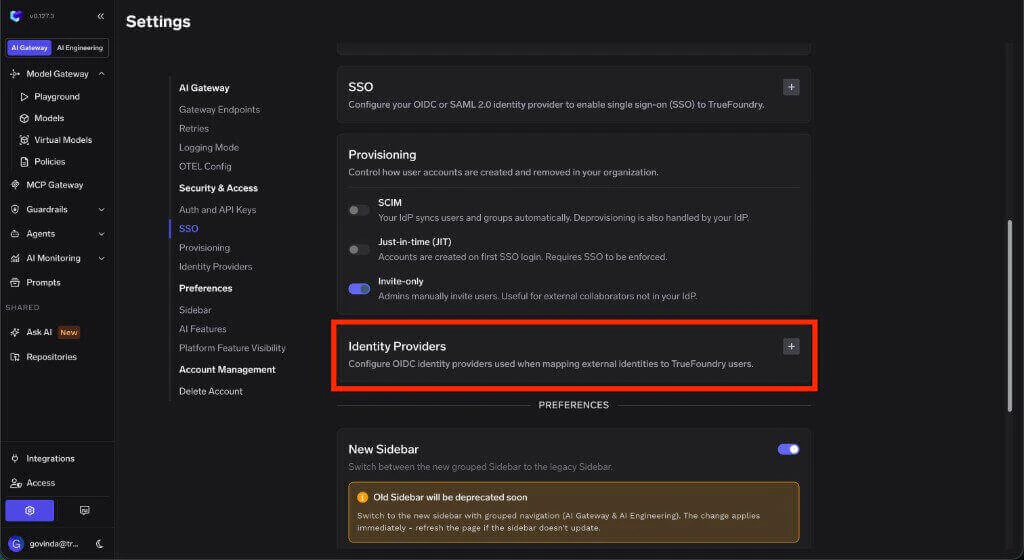
Go to **Settings > Security & Access > Identity Providers** and click **Add Identity Provider**.
 ### Identity Provider fields
Enable or disable this Identity Provider. Other settings on the form only take effect when this is enabled.
A unique identifier for this Identity Provider configuration. Use lowercase letters, numbers, and hyphens only. The name must be 3-32 characters, start with a lowercase letter, and end with a lowercase letter or number.
Example: `my-okta-provider`
The OIDC issuer URL. This must exactly match the `iss` claim in JWT tokens issued by your provider.
Example: `https://accounts.example.com`
One or more audience values that must be present in the JWT `aud` claim. Tokens with an audience that is not listed here are rejected.
The public HTTPS endpoint exposing your provider's JSON Web Key Set (JWKS). TrueFoundry fetches public keys from this endpoint to verify JWT signatures. Make sure the endpoint is reachable from the TrueFoundry control plane.
Example: `https://accounts.example.com/.well-known/jwks.json`
## Resolve tokens to TrueFoundry identities
The **Resolve Token To** section controls how validated JWTs are mapped to TrueFoundry identities.
If both virtual account and user resolution are configured, virtual account resolution takes precedence.
### Resolve to a virtual account
Use this when the JWT represents a machine user, application, shared external identity, or service-to-service caller.
The JWT claim whose value identifies the virtual account mapping.
Common examples: `sub`, `client_id`
Optional claim used to distinguish individual external users within a shared virtual account. Configure this when one virtual account represents multiple external users and you want each token to resolve to a distinct user slug.
After configuring the provider, add the provider mapping on the virtual account. See [Identity provider mappings for virtual accounts](/docs/platform/virtual-account-management#identity-provider-mappings).
### Resolve to a TrueFoundry user
Use this when the JWT represents a human user who should map to an existing TrueFoundry user account.
The JWT claim containing the user's email address. TrueFoundry uses this value to match an existing TrueFoundry user.
Common example: `email`
The JWT claim containing the user's team or group value. TrueFoundry uses this value with team-level identity provider mappings to assign the resolved user to the matching team.
Common examples: `groups`, `team`
After configuring the provider, add the provider mapping on each target team. See [Identity provider mappings for teams](/docs/platform/team-management#identity-provider-mappings).
## Advanced claim overrides
The JWT claim to use for email mapping. Defaults to `email` if not set.
The JWT claim to use as the unique identifier for the subject. Defaults to `sub` if not set.
## Examples
```yaml theme={"dark"}
name: my-okta-provider
config:
type: jwt
issuer: https://example.okta.com
audiences:
- api://truefoundry
jwks_uri: https://example.okta.com/oauth2/v1/keys
resolve_to:
virtual_account:
enabled: true
name_claim: client_id
```
```yaml theme={"dark"}
name: my-azure-provider
config:
type: jwt
issuer: https://login.microsoftonline.com//v2.0
audiences:
-
jwks_uri: https://login.microsoftonline.com//discovery/v2.0/keys
resolve_to:
user:
enabled: true
email_claim: email
team_claim: groups
```
## Troubleshooting
Verify that the JWKS URI is correct and reachable from the TrueFoundry control plane. Also check that the token's `iss` claim matches the configured issuer and that the token's `aud` claim matches one of the allowed audiences.
Check that the provider is configured to resolve to a virtual account, then verify that the JWT claim configured as the name claim matches the claim value configured on the target virtual account.
Check that the provider is configured to resolve to a TrueFoundry user, then verify that the JWT team claim matches the claim value configured on the target team.
If both user and virtual account resolution are configured, virtual account resolution takes precedence. Disable virtual account resolution if the same tokens should resolve directly to TrueFoundry users.
### Identity Provider fields
Enable or disable this Identity Provider. Other settings on the form only take effect when this is enabled.
A unique identifier for this Identity Provider configuration. Use lowercase letters, numbers, and hyphens only. The name must be 3-32 characters, start with a lowercase letter, and end with a lowercase letter or number.
Example: `my-okta-provider`
The OIDC issuer URL. This must exactly match the `iss` claim in JWT tokens issued by your provider.
Example: `https://accounts.example.com`
One or more audience values that must be present in the JWT `aud` claim. Tokens with an audience that is not listed here are rejected.
The public HTTPS endpoint exposing your provider's JSON Web Key Set (JWKS). TrueFoundry fetches public keys from this endpoint to verify JWT signatures. Make sure the endpoint is reachable from the TrueFoundry control plane.
Example: `https://accounts.example.com/.well-known/jwks.json`
## Resolve tokens to TrueFoundry identities
The **Resolve Token To** section controls how validated JWTs are mapped to TrueFoundry identities.
If both virtual account and user resolution are configured, virtual account resolution takes precedence.
### Resolve to a virtual account
Use this when the JWT represents a machine user, application, shared external identity, or service-to-service caller.
The JWT claim whose value identifies the virtual account mapping.
Common examples: `sub`, `client_id`
Optional claim used to distinguish individual external users within a shared virtual account. Configure this when one virtual account represents multiple external users and you want each token to resolve to a distinct user slug.
After configuring the provider, add the provider mapping on the virtual account. See [Identity provider mappings for virtual accounts](/docs/platform/virtual-account-management#identity-provider-mappings).
### Resolve to a TrueFoundry user
Use this when the JWT represents a human user who should map to an existing TrueFoundry user account.
The JWT claim containing the user's email address. TrueFoundry uses this value to match an existing TrueFoundry user.
Common example: `email`
The JWT claim containing the user's team or group value. TrueFoundry uses this value with team-level identity provider mappings to assign the resolved user to the matching team.
Common examples: `groups`, `team`
After configuring the provider, add the provider mapping on each target team. See [Identity provider mappings for teams](/docs/platform/team-management#identity-provider-mappings).
## Advanced claim overrides
The JWT claim to use for email mapping. Defaults to `email` if not set.
The JWT claim to use as the unique identifier for the subject. Defaults to `sub` if not set.
## Examples
```yaml theme={"dark"}
name: my-okta-provider
config:
type: jwt
issuer: https://example.okta.com
audiences:
- api://truefoundry
jwks_uri: https://example.okta.com/oauth2/v1/keys
resolve_to:
virtual_account:
enabled: true
name_claim: client_id
```
```yaml theme={"dark"}
name: my-azure-provider
config:
type: jwt
issuer: https://login.microsoftonline.com//v2.0
audiences:
-
jwks_uri: https://login.microsoftonline.com//discovery/v2.0/keys
resolve_to:
user:
enabled: true
email_claim: email
team_claim: groups
```
## Troubleshooting
Verify that the JWKS URI is correct and reachable from the TrueFoundry control plane. Also check that the token's `iss` claim matches the configured issuer and that the token's `aud` claim matches one of the allowed audiences.
Check that the provider is configured to resolve to a virtual account, then verify that the JWT claim configured as the name claim matches the claim value configured on the target virtual account.
Check that the provider is configured to resolve to a TrueFoundry user, then verify that the JWT team claim matches the claim value configured on the target team.
If both user and virtual account resolution are configured, virtual account resolution takes precedence. Disable virtual account resolution if the same tokens should resolve directly to TrueFoundry users.