> ## Documentation Index
> Fetch the complete documentation index at: https://www.truefoundry.com/llms.txt
> Use this file to discover all available pages before exploring further.
# Scikit Learn / XGBoost
> Deploying Scikit Learn and XGBoost models with FastAPI or PyTriton
TrueFoundry can autogenerate the inference code for SkLearn and XGBoost models. In case you have already written the inference code for these models, you
can deploy the FastAPI/Flask code as it is to TrueFoundry. This guide will go into how to log the models, generate the inference code and deploy the code
to get the model endpoint.
TrueFoundry can generate inference code in two frameworks:
1. **FastAPI**: This is simple to understand and use. This works quite well in case your traffic is not very high (less than 20 requests/second>)
2. **Triton**: This is more performant model server and is suitable for high traffic use cases. It comes with batching support which helps provide higher
througput.
It also generates the requirements.txt, Dockerfile and a README file that will help you get started with the deployment.
This approach gives you the flexibility to change the inference code to add custom business logic and makes it easier to test the code locally. You can
also push the code to your git repository.
**Live Demo**
You can view a XGBoost example deployed with PyTriton [here](https://platform.live-demo.truefoundry.cloud/deployments/cm4rdtxq2030s01tshgvxcjm5?tab=pods).
## Log the model in the model registry
You will need to [setup CLI](https://docs.truefoundry.com/docs/setup-cli) before executing the following steps.
```python Scikit Learn {28-49} lines theme={"dark"}
from truefoundry.ml import get_client, SklearnFramework, sklearn_infer_schema
import joblib
import numpy ass np
from sklearn.pipeline import make_pipeline
from sklearn.preprocessing import StandardScaler
from sklearn.svm import SVC
# Define training data
X = np.array([[-1, -1], [-2, -1], [1, 1], [2, 1]])
y = np.array([1, 1, 2, 2])
# Create and train the model
clf = make_pipeline(StandardScaler(), SVC(gamma="auto"))
model = clf.fit(X, y)
# Save the model
joblib.dump(clf, "sklearn-pipeline.joblib")
# Initialize the TrueFoundry client
client = get_client()
# Infer model schema
model_schema = sklearn_infer_schema(
model_input=X, model=model, infer_method_name="predict"
)
# Log the model
model_version = client.log_model(
ml_repo="my-classification-project",
name="my-sklearn-model",
model_file_or_folder="sklearn-pipeline.joblib",
# To make the model deployable and generate the inference script,
# model file, and schema(with the method name) are required.
framework=SklearnFramework(
model_filepath="sklearn-pipeline.joblib",
model_schema=model_schema,
),
# Auto-captures the current environment details (e.g., python_version, pip_packages)
# based on the framework. If you want to override, you can add this block:
# environment=ModelVersionEnvironment(
# python_version="3.10",
# pip_packages=[
# "joblib==1.4.2",
# "numpy==1.26.4",
# "pandas==2.2.3",
# "scikit-learn==1.6.1",
# ],
# ),
)
# Output the model's Fully Qualified Name (FQN)
print(f"Model version logged successfully: {model_version.fqn}")
```
```python XGBoost {28-38} lines theme={"dark"}
from truefoundry.ml import get_client, XGBoostFramework, xgboost_infer_schema
import joblib
import os
import numpy as np
from xgboost import XGBClassifier
X = np.array([[-1, -1], [-2, -1], [1, 1], [2, 1]])
y = np.array([0, 0, 1, 1])
clf = XGBClassifier()
clf.fit(X, y)
name = "my-xgboost-model"
LOCAL_MODEL_DIR = f"{name}/"
model_file_name = "xgboost-model.joblib"
model_file_path = f"{name}/{model_file_name}"
os.makedirs(LOCAL_MODEL_DIR, exist_ok=True)
joblib.dump(clf, model_file_path)
client = get_client()
model = joblib.load(model_file_path)
model_schema = xgboost_infer_schema(
model_input=X, model=model,
)
model_version = client.log_model(
ml_repo="project-classification",
name="my-xgboost-model",
description="A simple xgboost model",
model_file_or_folder=model_file_path,
framework=XGBoostFramework(
model_filepath=model_file_name,
serialization_format="joblib",
model_schema=model_schema,
),
)
```
### Generate the inference code
* Locate the model you want to deploy in the model registry and click the **Deploy** button.
 Select a **workspace** for deployment, and copy the command.
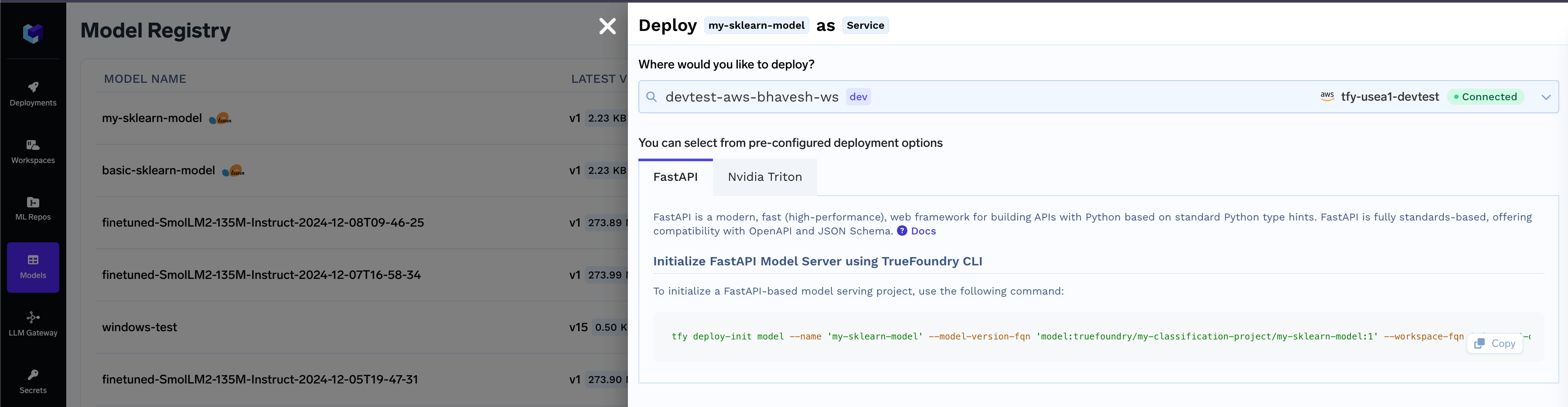 * Execute the command in your terminal to generate the model deployment package.
```shell Shell lines theme={"dark"}
❯ tfy deploy-init model --name 'my-sklearn-model-1' --model-version-fqn 'model:truefoundry/my-classification-project/my-sklearn-model-1:1' --workspace-fqn 'tfy-usea1-devtest:deb-ws' --model-server 'fastapi'
...
Generating application code for 'model:truefoundry/my-classification-project/my-sklearn-model-1:1'
Model Server code initialized successfully!
Code Location: /work/model-deployment/my-sklearn-model-1
Next Steps:
- Navigate to the model server directory:
cd /work/model-deployment/my-sklearn-model-1
- Refer to the README file in the directory for further instructions.
❯ cd /work/model-deployment/my-sklearn-model-1
❯ ls
README.md deploy.py infer.py requirements.txt server.py
```
* Follow the instructions present on the`README.md` to deploy the code and get an endpoint for the model.
## Common Issues and FAQ
The deploy button will not show up if some of the metadata required to deploy the model is missing. This can happen if:
* Model framework is not SkLearn or XGBoost or Transformers
* Model filename is not found
* Model schema not found
* Serialization format not found
In this case, you can download the model, add the required missing metadata and log it into a new version which you can then deploy. Here's a code snippet to do this:
```python lines theme={"dark"}
from truefoundry.ml import get_client, ModelVersionEnvironment, XGBoostFramework, xgboost_infer_schema
import joblib
import numpy as np
# Replace with your model version FQN
model_version_fqn = "model:truefoundry/project-classification/my-xgboost-model:1"
client = get_client()
model_version = client.get_model_version_by_fqn(model_version_fqn)
model_version.download(path=".")
# Replace with your model file path
model_file_path = "./xgboost-model.joblib"
model = joblib.load(model_file_path)
# Update the model input example as per your model
X = np.array([[-1, -1], [-2, -1], [1, 1], [2, 1]])
model_schema = xgboost_infer_schema(model_input=X, model=model)
# To make the model deployable and generate the inference script, model file, and schema(with the method name) are required.
model_version.framework = XGBoostFramework(
model_filepath="xgboost-model.joblib",
serialization_format="joblib",
model_schema=model_schema,
)
model_version.environment = ModelVersionEnvironment(
python_version="3.11",
pip_packages=[
"joblib==1.4.2",
"numpy==1.26.4",
"pandas==2.1.4",
"xgboost==2.1.3",
],
)
model_version.update()
```
The Triton deployment depends on the nvidia-pytriton library ([https://pypi.org/project/nvidia-pytriton/](https://pypi.org/project/nvidia-pytriton/)) which supports `Python versions >=3.8 and <=3.12`. If you need to use a version outside this range, consider using FastAPI as an alternative framework for serving the model.
The nvidia-pytriton library specifies in its pyproject.toml file that it does not support numpy versions \< 2.0. This limitation has been confirmed through practical experience. If you need to use a version outside this range, consider using FastAPI as an alternative framework for serving the model.
* Execute the command in your terminal to generate the model deployment package.
```shell Shell lines theme={"dark"}
❯ tfy deploy-init model --name 'my-sklearn-model-1' --model-version-fqn 'model:truefoundry/my-classification-project/my-sklearn-model-1:1' --workspace-fqn 'tfy-usea1-devtest:deb-ws' --model-server 'fastapi'
...
Generating application code for 'model:truefoundry/my-classification-project/my-sklearn-model-1:1'
Model Server code initialized successfully!
Code Location: /work/model-deployment/my-sklearn-model-1
Next Steps:
- Navigate to the model server directory:
cd /work/model-deployment/my-sklearn-model-1
- Refer to the README file in the directory for further instructions.
❯ cd /work/model-deployment/my-sklearn-model-1
❯ ls
README.md deploy.py infer.py requirements.txt server.py
```
* Follow the instructions present on the`README.md` to deploy the code and get an endpoint for the model.
## Common Issues and FAQ
The deploy button will not show up if some of the metadata required to deploy the model is missing. This can happen if:
* Model framework is not SkLearn or XGBoost or Transformers
* Model filename is not found
* Model schema not found
* Serialization format not found
In this case, you can download the model, add the required missing metadata and log it into a new version which you can then deploy. Here's a code snippet to do this:
```python lines theme={"dark"}
from truefoundry.ml import get_client, ModelVersionEnvironment, XGBoostFramework, xgboost_infer_schema
import joblib
import numpy as np
# Replace with your model version FQN
model_version_fqn = "model:truefoundry/project-classification/my-xgboost-model:1"
client = get_client()
model_version = client.get_model_version_by_fqn(model_version_fqn)
model_version.download(path=".")
# Replace with your model file path
model_file_path = "./xgboost-model.joblib"
model = joblib.load(model_file_path)
# Update the model input example as per your model
X = np.array([[-1, -1], [-2, -1], [1, 1], [2, 1]])
model_schema = xgboost_infer_schema(model_input=X, model=model)
# To make the model deployable and generate the inference script, model file, and schema(with the method name) are required.
model_version.framework = XGBoostFramework(
model_filepath="xgboost-model.joblib",
serialization_format="joblib",
model_schema=model_schema,
)
model_version.environment = ModelVersionEnvironment(
python_version="3.11",
pip_packages=[
"joblib==1.4.2",
"numpy==1.26.4",
"pandas==2.1.4",
"xgboost==2.1.3",
],
)
model_version.update()
```
The Triton deployment depends on the nvidia-pytriton library ([https://pypi.org/project/nvidia-pytriton/](https://pypi.org/project/nvidia-pytriton/)) which supports `Python versions >=3.8 and <=3.12`. If you need to use a version outside this range, consider using FastAPI as an alternative framework for serving the model.
The nvidia-pytriton library specifies in its pyproject.toml file that it does not support numpy versions \< 2.0. This limitation has been confirmed through practical experience. If you need to use a version outside this range, consider using FastAPI as an alternative framework for serving the model.