> ## Documentation Index
> Fetch the complete documentation index at: https://www.truefoundry.com/llms.txt
> Use this file to discover all available pages before exploring further.
# FastAPI
> Deploy a scikit-learn iris classification model as a FastAPI service on TrueFoundry step by step.
[FastAPI](https://fastapi.tiangolo.com/) is a modern, fast (high-performance), web framework for building APIs with Python.
Serving a model with FastAPI is the easiest way to deploy a model. We basically wrap our inference function in a FastAPI app.
Here we will work with a very simple scikit-learn iris classification model. You can find the FastAPI code for this model [here](https://github.com/truefoundry/getting-started-examples/tree/main/deploy-model-with-fastapi).
**Live Demo**
You can view this example deployed [here](https://platform.live-demo.truefoundry.cloud/deployments/cm4qm5p0k8p8001rm24utckn0?tab=pods).
They key files are:
* `iris_classifier.joblib`: The model file
* `server.py`: The main FastAPI code that loads the model and provides a REST api to serve the model.
* `requirements.txt`: Contains the dependencies.
### How to write the inference function in FastAPI
Here's an explanation of the code in `server.py`
```python server.py {9-23} lines theme={"dark"}
import os
from contextlib import asynccontextmanager
from typing import Dict
import joblib
import pandas as pd
from fastapi import FastAPI
def _get_model_dir():
if "MODEL_DIR" not in os.environ:
raise Exception(
"MODEL_DIR environment variable is not set. Please set it to the directory containing the model."
)
return os.environ["MODEL_DIR"]
model = None
MODEL_PATH = os.path.join(_get_model_dir(), "iris_classifier.joblib")
def load_model():
_model = joblib.load(MODEL_PATH)
return _model
# Here we are loading the model in global variable model using
# FastAPI's lifespan context manager (https://fastapi.tiangolo.com/advanced/events/#lifespan-events).
# This makes sure we load the model before server is ready to serve requests.
@asynccontextmanager
async def lifespan(app: FastAPI):
global model
model = load_model()
yield
app = FastAPI(lifespan=lifespan, root_path=os.getenv("TFY_SERVICE_ROOT_PATH", ""))
# Add a health check endpoint which will be used for readiness and liveness
# probe in the deployment
@app.get("/health")
async def health() -> Dict[str, bool]:
return {"healthy": True}
# This is the main prediction endpoint that is used to serve the model
@app.post("/predict")
def predict(
sepal_length: float, sepal_width: float, petal_length: float, petal_width: float
):
global model
class_names = ["setosa", "versicolor", "virginica"]
data = dict(
sepal_length=sepal_length,
sepal_width=sepal_width,
petal_length=petal_length,
petal_width=petal_width,
)
prediction = model.predict_proba(pd.DataFrame([data]))[0]
predictions = []
for label, confidence in zip(class_names, prediction):
predictions.append({"label": label, "score": confidence})
return {"predictions": predictions}
```
A few key things to note in the code above:
**Load the file from the path specified in the `MODEL_DIR` environment variable**
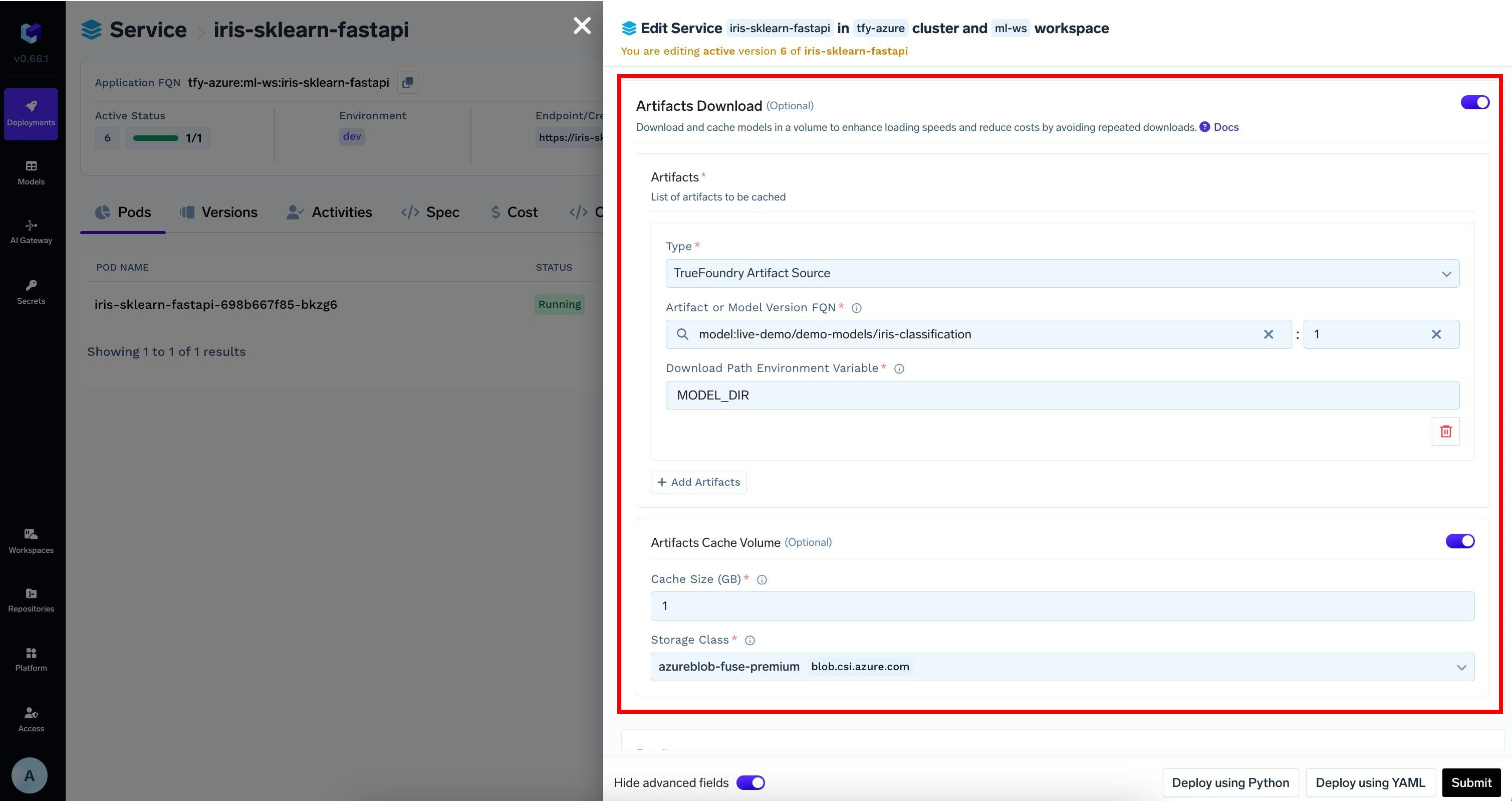
We are using an environment variable `MODEL_DIR` to read the model path. This is useful when we want to load a model from a different path that can be downloaded and cached separately. See [Cache Models and Artifacts](/docs/download-and-cache-models#download-and-cache-models-through-the-user-interface) guide for more details.
**`async def` vs `def`**
FastAPI is designed to be an async web framework. This means that the server can handle multiple requests concurrently.
When using `async def`, it is the developer's responsibility to make sure the function is not blocking the event loop.
However, most ML Inferences are compute bound and block the event loop. Use `def` instead of `async def` for inference functions.
Generally, if you are not sure just use `def`. FastAPI (mainly [`Startlette`](https://www.starlette.io/) which is the foundation of FastAPI) automatically runs the sync functions in a thread pool to not block the event loop.
### Running the server locally
```shell Shell gunicorn lines theme={"dark"}
export MODEL_DIR="$(pwd)"
gunicorn -k uvicorn.workers.UvicornWorker --bind 0.0.0.0:8000 server:app
```
We'll see something like this:
```
INFO: Started server process [53896]
INFO: Waiting for application startup.
INFO: Application startup complete.
INFO: Uvicorn running on http://0.0.0.0:8000 (Press CTRL+C to quit)
```
We can open the browser and navigate to `http://localhost:8000/docs` to try out our API.
## Deploying with TrueFoundry
To deploy the model, we need to package both the model file and the code. To do this, we can follow the steps below:
Logging the model to the registry is not mandatory to deploy the model, but is **highly recommended**. You can follow the guide [here](/docs/model-registry) to log the model to the registry.
Once you have tested your code locally, we highly recommend pushing the code a Git repository. This allows you to version control the code and also makes the deployment process much easier. However, if you don't have access to a Git repository, or the Git repositories are not integrated with Truefoundry, you can directly deploy from local laptop.
You can follow the guide [here](/docs/deploy-first-service) to deploy your code. A few key things to note:
**Binding to `0.0.0.0` in command**
Please make sure you put `--bind 0.0.0.0:8000` in the command. By default, `gunicorn` binds to `127.0.0.1`. To make it accessible from outside the environment, we need to bind to `0.0.0.0`.
The port number in the ports section should match the port your model server will listen on.
E.g. In this case `gunicorn` is being told to bind on `8000` in `command`, hence we use `8000` in `ports`
If you logged the model to the registry in Step 1, TrueFoundry can automatically download the model at the path specified in the `MODEL_DIR` environment variable to the deployed service.
To enable this, you can modify the deployment configuration as follows:
 Once the deployment goes through, you can view the deployment, the pods, logs, metrics and events to debug any issues.
## FAQ
The best way is to start with something high - like 1 CPU, 2 GB RAM. Once the service is up, you can see the resource usage from the metrics section and then adjust the resources accordingly.
We usually recommend to use 1 Gunicorn worker and instead use replicas field to scale the number of containers. This has several benefits:
* Stable CPU and Memory usage across replicas
* Even distribution of requests across replicas
* Higher availability and fault tolerance
We can also go ahead with 2 workers and 2 CPU (1 for each worker), but higher number of workers is not usually recommended, unless you are sure that is needed.
FastAPI / Starlette uses asyncio to handle requests concurrently. [Starlette's ThreadPool](https://www.starlette.io/threadpool/) count is set to `40` by default.
While this is useful to run many requests concurrently, ML Inference is compute bound, if our resources are not well tuned, we might get CPU Throttling or OOM.
This should be done only after careful consideration.
Don't set this to too low. These threads are also used for FastAPI's internal co-routines.
We can tune the number of threads like so:
```python lines theme={"dark"}
import anyio.to_thread
limiter = anyio.to_thread.current_default_thread_limiter()
limiter.total_tokens = 10
```
Generally when working with ML Inference and FastAPI, avoid using `gevent` or `eventlet` as they are not compatible with asyncio.
Several machine learning libraries also use ThreadPools and ProcessPools which can cause issues with `gevent` or `eventlet`.
Yes, you can deploy the same service using Flask + Gunicorn. However, we generally recommend using FastAPI as it is more modern and has better support for asyncio. In case you are using Flask:
* Use Gunicorn as the application server
* Use Gunicorn's `sync` worker class (it is the default worker class) instead of `gevent` or `eventlet`
* Use Gunicorn's `--workers` argument to increase parallelism per container.
* Although, don't set this to too high. We generally recommend setting it to `2` so that health check and inference can run concurrently. For scaling beyond that, use Service `replicas`.
Once the deployment goes through, you can view the deployment, the pods, logs, metrics and events to debug any issues.
## FAQ
The best way is to start with something high - like 1 CPU, 2 GB RAM. Once the service is up, you can see the resource usage from the metrics section and then adjust the resources accordingly.
We usually recommend to use 1 Gunicorn worker and instead use replicas field to scale the number of containers. This has several benefits:
* Stable CPU and Memory usage across replicas
* Even distribution of requests across replicas
* Higher availability and fault tolerance
We can also go ahead with 2 workers and 2 CPU (1 for each worker), but higher number of workers is not usually recommended, unless you are sure that is needed.
FastAPI / Starlette uses asyncio to handle requests concurrently. [Starlette's ThreadPool](https://www.starlette.io/threadpool/) count is set to `40` by default.
While this is useful to run many requests concurrently, ML Inference is compute bound, if our resources are not well tuned, we might get CPU Throttling or OOM.
This should be done only after careful consideration.
Don't set this to too low. These threads are also used for FastAPI's internal co-routines.
We can tune the number of threads like so:
```python lines theme={"dark"}
import anyio.to_thread
limiter = anyio.to_thread.current_default_thread_limiter()
limiter.total_tokens = 10
```
Generally when working with ML Inference and FastAPI, avoid using `gevent` or `eventlet` as they are not compatible with asyncio.
Several machine learning libraries also use ThreadPools and ProcessPools which can cause issues with `gevent` or `eventlet`.
Yes, you can deploy the same service using Flask + Gunicorn. However, we generally recommend using FastAPI as it is more modern and has better support for asyncio. In case you are using Flask:
* Use Gunicorn as the application server
* Use Gunicorn's `sync` worker class (it is the default worker class) instead of `gevent` or `eventlet`
* Use Gunicorn's `--workers` argument to increase parallelism per container.
* Although, don't set this to too high. We generally recommend setting it to `2` so that health check and inference can run concurrently. For scaling beyond that, use Service `replicas`.