> ## Documentation Index
> Fetch the complete documentation index at: https://www.truefoundry.com/llms.txt
> Use this file to discover all available pages before exploring further.
# Models and Model Versions
> Uploading files and directories as Models. Downloading models to disk.
Model comprises of model file/folder and some metadata. Each Model can have multiple versions. In essence they are just [Artifacts](/docs/log-artifacts) with special type `model`
## Upload Model Version
You can automatically save and version model files/folder using the[`log_model`](/docs/truefoundry-ml-reference/runs#function-log-model) method.
The basic usage looks like follows
```python Python lines theme={"dark"}
from truefoundry.ml import get_client
client = get_client()
model_version = client.log_model(
ml_repo="name-of-the-ml-repo",
name="name-for-the-model",
model_file_or_folder="path/to/model/file/or/folder/on/disk",
framework=
)
```
**Framework Agnostic**
Any file or folder can be saved as model by passing it in `model_file_or_folder` and `framework` can be set to `None`.
### Framework Specific Models
This is an example of storing an `sklearn` model. To log a model we start a run and then give our model a `name` and pass in the model saved on disk and the `framework` instance.
```python Scikit-Learn lines theme={"dark"}
from truefoundry.ml import get_client, SklearnFramework, infer_signature
import joblib
import numpy as np
from sklearn.pipeline import make_pipeline
from sklearn.preprocessing import StandardScaler
from sklearn.svm import SVC
X = np.array([[-1, -1], [-2, -1], [1, 1], [2, 1]])
y = np.array([1, 1, 2, 2])
clf = make_pipeline(StandardScaler(), SVC(gamma='auto'))
clf.fit(X, y)
joblib.dump(clf, "sklearn-pipeline.joblib")
client = get_client()
client.create_ml_repo( # This is only required once
name="my-classification-project",
# This controls which bucket is used.
# You can get this from Integrations > Blob Storage.
storage_integration_fqn=''
)
model_version = client.log_model(
ml_repo="my-classification-project",
name="my-sklearn-model",
description="A simple sklearn pipeline",
model_file_or_folder="sklearn-pipeline.joblib",
framework=SklearnFramework(),
metadata={"accuracy": 0.99, "f1": 0.80},
)
print(model_version.fqn)
```
```python Huggingface Transformers lines theme={"dark"}
import os
import shutil
from truefoundry.ml import get_client, TransformersFramework
from huggingface_hub import snapshot_download
MODEL_ID = "HuggingFaceTB/SmolLM2-135M" # Model Id from huggingface hub
PIPELINE_TAG = "text-generation" # Task the model is trained for
LOCAL_PATH = "./transformers-model" # Path for local download
snapshot_download(
MODEL_ID,
revision=None,
cache_dir=None,
local_dir=LOCAL_PATH,
ignore_patterns=["*.h5", "*.ot", "pytorch_model*.bin"],
local_dir_use_symlinks=False,
)
if os.path.exists(os.path.join(LOCAL_PATH, '.cache')):
shutil.rmtree(os.path.join(LOCAL_PATH, '.cache'))
ML_REPO = "my-llm-project" # ML Repo to upload to
MODEL_NAME = "smollm2-135m" # Model Name to upload as
client = get_client()
model_version = client.log_model(
ml_repo=ML_REPO,
name=MODEL_NAME,
model_file_or_folder=LOCAL_PATH,
framework=TransformersFramework(
pipeline_tag=PIPELINE_TAG
),
)
print(model_version.fqn)
```
This will create a new model `my-sklearn-model` under the ml\_repo and the first version `v1` for `my-sklearn-model`.
Once created the model version files are immutable, only fields like description, framework, metadata can be updated using CLI or UI.
Once created, a model version has a `fqn` (fully qualified name) which can be used to retrieve the model later - E.g. `model:truefoundry/my-classification-project/my-sklearn-model:1`
Any subsequent calls to[`log_model`](/docs/truefoundry-ml-reference/runs#function-log-model) with the same `name` would create a new version of this model - `v2`, `v3` and so on.
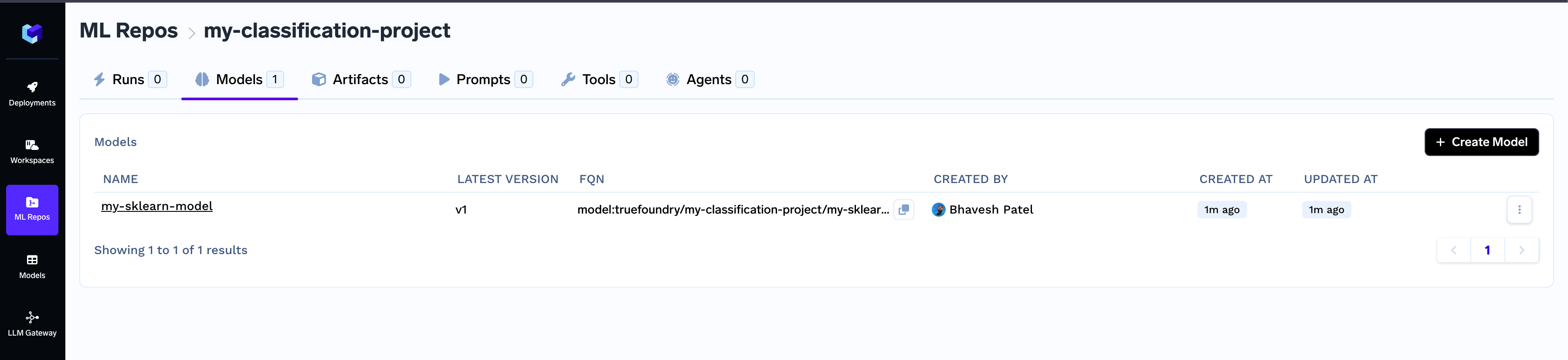
The logged model can be found in the dashboard in the `Models` tab under your ml\_repo.
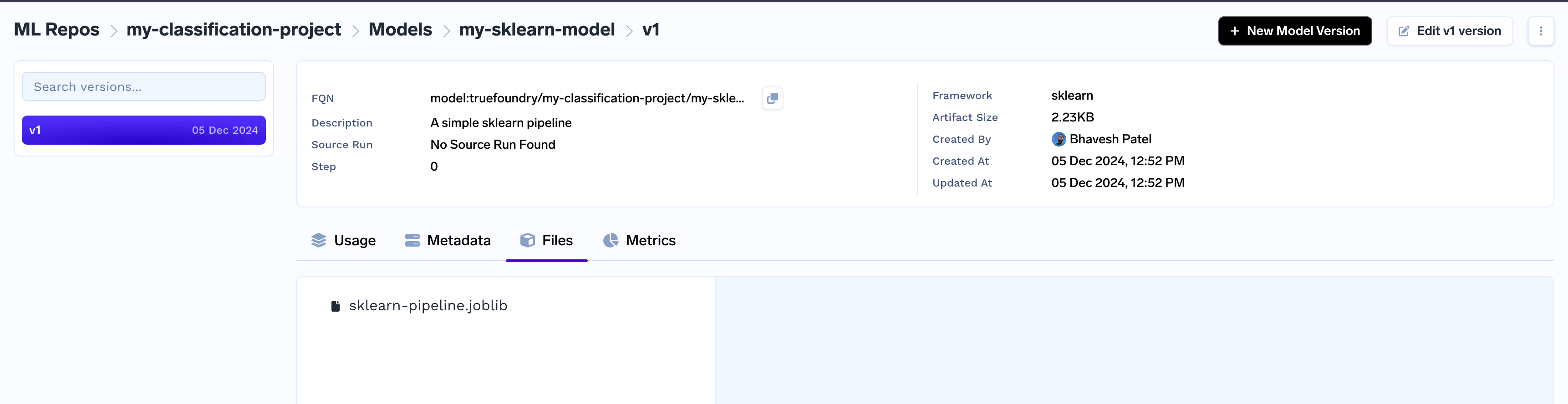
 You can view the details of each model version from there on.
 ## Get Model Version and Download
You can first get the model using the `fqn` and then download the logged model using the `fqn` and then use the[`download()`](/docs/models#function-download) function. From here on you can access the files at `download_info.download_dir`
```python Scikit-Learn lines theme={"dark"}
import os
import tempfile
import joblib
from truefoundry.ml import get_client
client = get_client()
model_version = client.get_model_version_by_fqn(
fqn="model:truefoundry/my-classification-project/my-sklearn-model:1"
)
# Download the model to disk
temp = tempfile.TemporaryDirectory()
download_info = model_version.download(path=temp.name)
print(download_info.model_dir)
# Deserialize and Load
model = joblib.load(
os.path.join(download_info.model_dir, "sklearn-pipeline.joblib")
)
```
```python Huggingface Transformers lines theme={"dark"}
import torch
from transformers import pipeline
from truefoundry.ml import get_client
client = get_client()
model_version = client.get_model_version_by_fqn(
fqn="model:truefoundry/my-llm-project/my-transformers-model:1"
)
# Download the model to disk
temp = tempfile.TemporaryDirectory()
download_info = model_version.download(path=temp.name)
print(download_info.model_dir)
# Deserialize and Load
pln = pipeline("text-generation", model=download_info.model_dir, torch_dtype=torch.float16)s
```
## FAQs
#### What are the frameworks supported by the `log_model` method?
Following framework classes are available in `truefoundry.ml`
* `FastAIFramework`
* `GluonFramework`
* `H2OFramework`
* `KerasFramework`
* `LightGBMFramework`
* `ONNXFramework`
* `PaddleFramework`
* `PyTorchFramework`
* `SklearnFramework`
* `SpaCyFramework`
* `StatsModelsFramework`
* `TensorFlowFramework`
* `TransformersFramework`
* `XGBoostFramework`
## Update Model Version
You may want to update fields like description, framework, metadata on an existing model version.\
You can do so with the `.update()` call on the Model Version instance. E.g.
```python Python lines theme={"dark"}
from truefoundry.ml import get_client, SklearnFramework
client = get_client()
model_version = client.get_model_version_by_fqn(
"model:truefoundry/my-classification-project/my-sklearn-model:1"
)
model_version.description = "This is my updated description"
model_version.metadata = {"accuracy": 0.98, "f1": 0.85}
model_version.framework = SklearnFramework(
model_filepath="sklearn-pipeline.joblib",
serialization_format="joblib"
)
# Updates the model fields for existing model version.
model_version.update()
```
***
## Get Model Version and Download
You can first get the model using the `fqn` and then download the logged model using the `fqn` and then use the[`download()`](/docs/models#function-download) function. From here on you can access the files at `download_info.download_dir`
```python Scikit-Learn lines theme={"dark"}
import os
import tempfile
import joblib
from truefoundry.ml import get_client
client = get_client()
model_version = client.get_model_version_by_fqn(
fqn="model:truefoundry/my-classification-project/my-sklearn-model:1"
)
# Download the model to disk
temp = tempfile.TemporaryDirectory()
download_info = model_version.download(path=temp.name)
print(download_info.model_dir)
# Deserialize and Load
model = joblib.load(
os.path.join(download_info.model_dir, "sklearn-pipeline.joblib")
)
```
```python Huggingface Transformers lines theme={"dark"}
import torch
from transformers import pipeline
from truefoundry.ml import get_client
client = get_client()
model_version = client.get_model_version_by_fqn(
fqn="model:truefoundry/my-llm-project/my-transformers-model:1"
)
# Download the model to disk
temp = tempfile.TemporaryDirectory()
download_info = model_version.download(path=temp.name)
print(download_info.model_dir)
# Deserialize and Load
pln = pipeline("text-generation", model=download_info.model_dir, torch_dtype=torch.float16)s
```
## FAQs
#### What are the frameworks supported by the `log_model` method?
Following framework classes are available in `truefoundry.ml`
* `FastAIFramework`
* `GluonFramework`
* `H2OFramework`
* `KerasFramework`
* `LightGBMFramework`
* `ONNXFramework`
* `PaddleFramework`
* `PyTorchFramework`
* `SklearnFramework`
* `SpaCyFramework`
* `StatsModelsFramework`
* `TensorFlowFramework`
* `TransformersFramework`
* `XGBoostFramework`
## Update Model Version
You may want to update fields like description, framework, metadata on an existing model version.\
You can do so with the `.update()` call on the Model Version instance. E.g.
```python Python lines theme={"dark"}
from truefoundry.ml import get_client, SklearnFramework
client = get_client()
model_version = client.get_model_version_by_fqn(
"model:truefoundry/my-classification-project/my-sklearn-model:1"
)
model_version.description = "This is my updated description"
model_version.metadata = {"accuracy": 0.98, "f1": 0.85}
model_version.framework = SklearnFramework(
model_filepath="sklearn-pipeline.joblib",
serialization_format="joblib"
)
# Updates the model fields for existing model version.
model_version.update()
```
***