> ## Documentation Index
> Fetch the complete documentation index at: https://www.truefoundry.com/llms.txt
> Use this file to discover all available pages before exploring further.
# Kustomize Support
> Use Kustomize to patch or add Kubernetes resources to your TrueFoundry deployment configurations.
TrueFoundry allows you to tweak the most common parameters of the deployment through the service spec. However, there might be situations in which you might want to override some fields that are not exposed in the TrueFoundry Service spec. You can then use [Kustomize](https://kubernetes.io/docs/tasks/manage-kubernetes-objects/kustomization/#composing-and-customizing-resources) to add, patch or delete the Kubernetes resources that TrueFoundry deploys on the cluster.
[Kustomize](https://kustomize.io/) enables you to
* Patch the rendered Kubernetes resources generated by the TrueFoundry Application. E.g. Adding extra annotations for Prometheus / Datadog
* Add extra Kubernetes resources along with your TrueFoundry Application. E.g. Adding extra ConfigMap, Secret, Istio VirtualService, etc
Truefoundry doesn't allow you to use Kustomize to create cluster level resources like `ClusterRole`, `ClusterRoleBinding` or non-namespace scoped resources like `EnvoyFilter` and `WasmPlugin`. You can create these resources only if you are cluster admin for the cluster, else the deployment will fail. This prevents the scenario where a user who has access to a certain workspace can create cluster level resources and impact other workloads in the cluster.
## Using Kustomize for your application
You can add patches and resources using the `kustomize` field in the service deployment form.
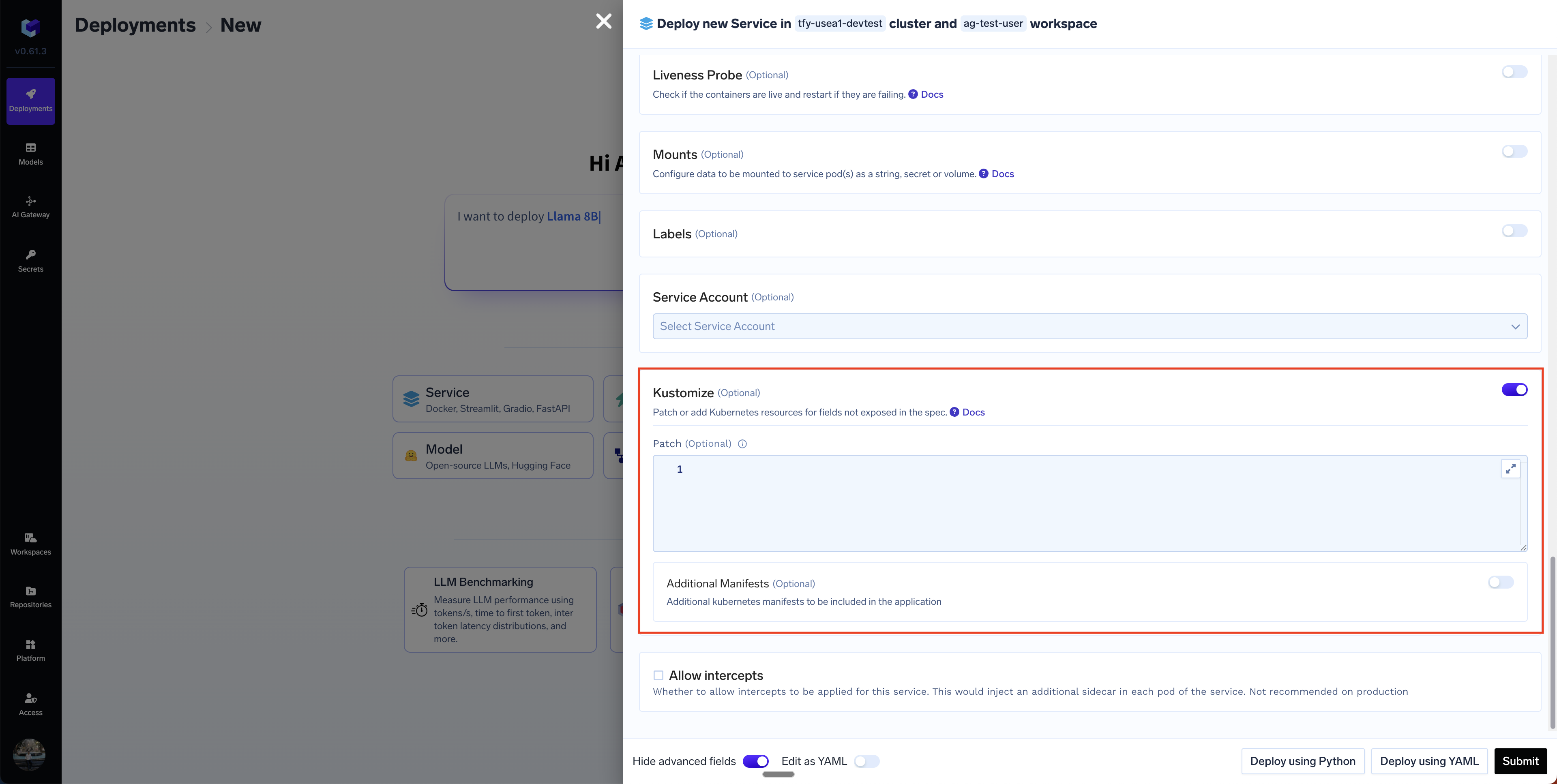 There are two sections:
1. **Patch**: We define an array of patches to be applied to the rendered Kubernetes resources generated by the TrueFoundry Application. For e.g. this Kustomize patch adds Prometheus scraping annotations to the pod template metadata of a Deployment named "my-service". Specifically, it configures Prometheus to scrape metrics from port 8000 by setting prometheus.io/port to "8000" and enabling scraping with prometheus.io/scrape set to "true".
```yaml lines theme={"dark"}
patches:
- target:
group: apps
version: v1
kind: Deployment
name: my-service
patch: |
apiVersion: apps/v1
kind: Deployment
metadata:
name: my-service
spec:
template:
metadata:
annotations:
prometheus.io/port: "8000"
prometheus.io/scrape: "true"
```
2. **Additional Manifest**: This section allows you to add new Kubernetes resources to the deployment. The example below adds a new ConfigMap to the deployment.
```yaml lines theme={"dark"}
apiVersion: v1
kind: ConfigMap
metadata:
name: my-simple-config
namespace: default
data:
greeting: "Hello from ConfigMap!"
color: "blue"
```
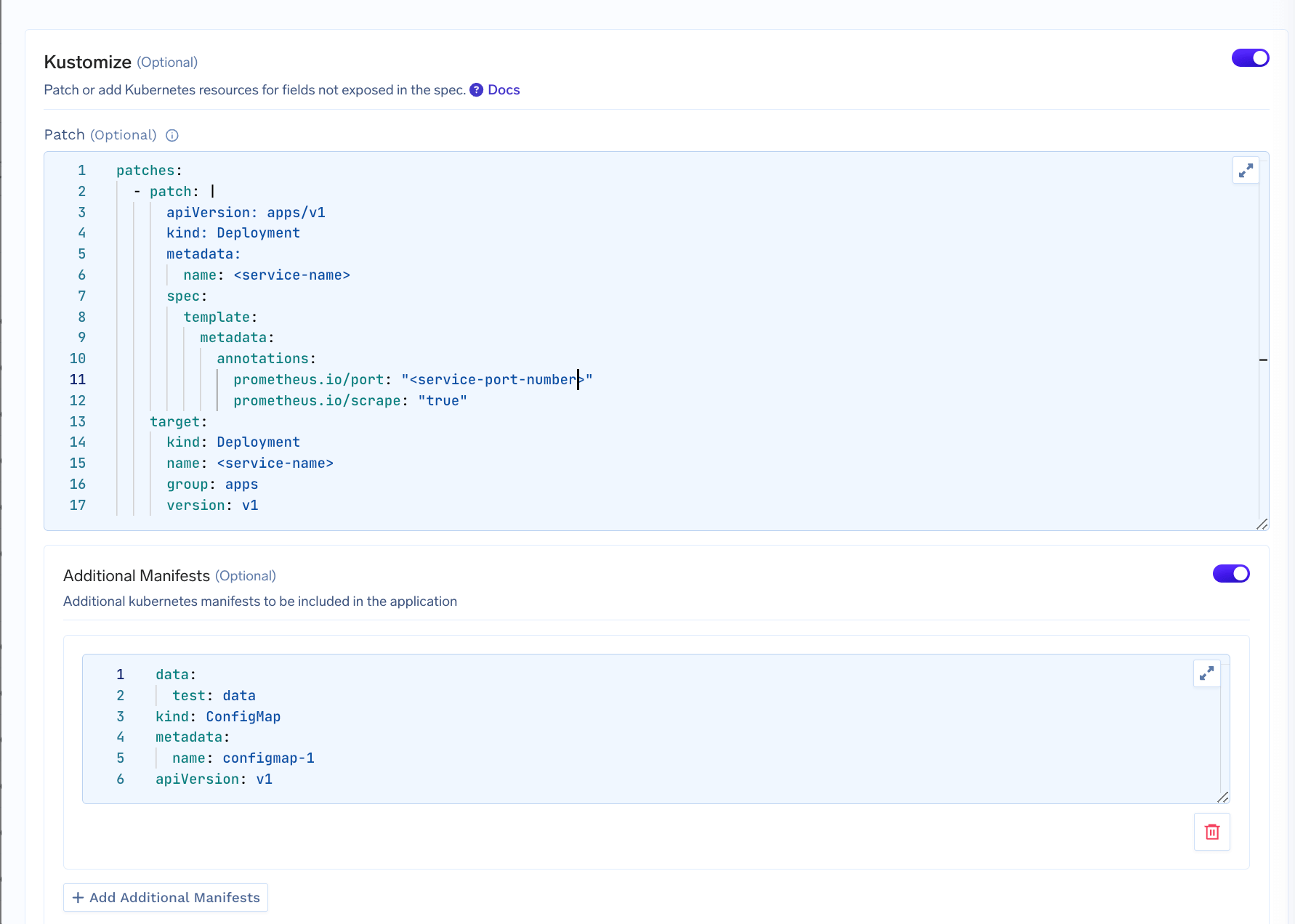
This is how it looks after filling up the Kustomize section:
There are two sections:
1. **Patch**: We define an array of patches to be applied to the rendered Kubernetes resources generated by the TrueFoundry Application. For e.g. this Kustomize patch adds Prometheus scraping annotations to the pod template metadata of a Deployment named "my-service". Specifically, it configures Prometheus to scrape metrics from port 8000 by setting prometheus.io/port to "8000" and enabling scraping with prometheus.io/scrape set to "true".
```yaml lines theme={"dark"}
patches:
- target:
group: apps
version: v1
kind: Deployment
name: my-service
patch: |
apiVersion: apps/v1
kind: Deployment
metadata:
name: my-service
spec:
template:
metadata:
annotations:
prometheus.io/port: "8000"
prometheus.io/scrape: "true"
```
2. **Additional Manifest**: This section allows you to add new Kubernetes resources to the deployment. The example below adds a new ConfigMap to the deployment.
```yaml lines theme={"dark"}
apiVersion: v1
kind: ConfigMap
metadata:
name: my-simple-config
namespace: default
data:
greeting: "Hello from ConfigMap!"
color: "blue"
```
This is how it looks after filling up the Kustomize section:
 Once you deploy the application, you can view the generated Kubernetes resources in the `Application Spec` Tab and then selecting `Applied K8s Manifest`
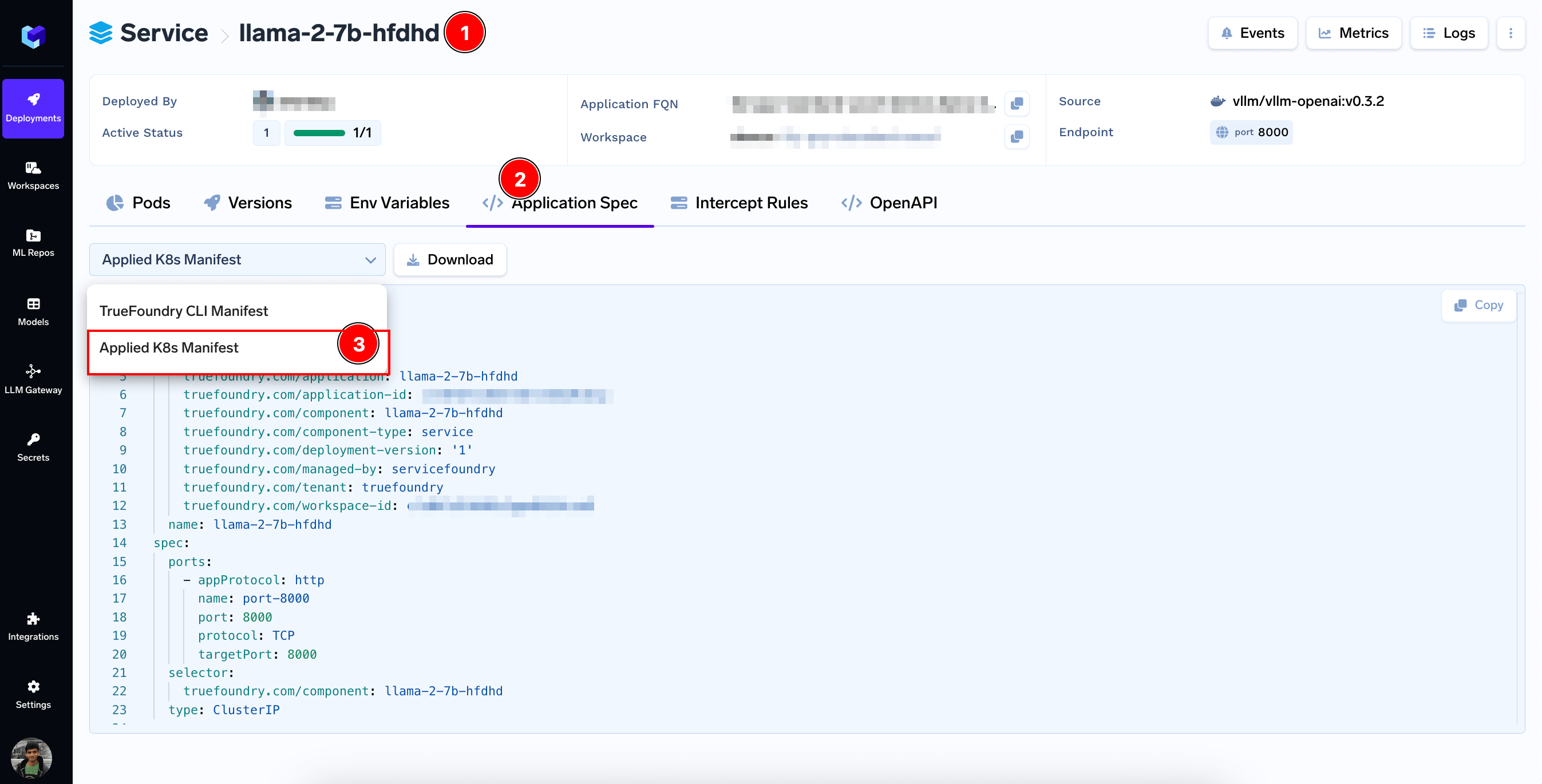 This should reflect the kustomized resources after your Kustomize patches and additions are applied.
### Commonly Used Kustomize Patches
Here are some commonly used Kustomize patches that you can use to customize your application:
Enter this in the `Patch` section:
```yaml lines theme={"dark"}
patches:
- patch: |
apiVersion: apps/v1
kind: Deployment
metadata:
name:
annotations:
prometheus.io/scrape: "true"
prometheus.io/port:
target:
kind: Deployment
name:
```
Enter the Keda ScaledObject spec in the `Additional Manifest` section:
```yaml lines theme={"dark"}
apiVersion: keda.sh/v1alpha1
kind: ScaledObject
metadata:
name:
namespace: default
spec:
scaleTargetRef:
name: # Replace with your deployment name
triggers:
- type: memory
metadata:
# You can use either "Utilization" or "AverageValue"
type: Utilization
value: "70" # Scale when average memory usage is above 70%
# Or, if using AverageValue:
# value: "2Gi" # Scale when average memory usage is 2Gi
minReplicaCount: 1
maxReplicaCount: 10
```
To add any custom autoscaling like based on queue length, you can checkout [Keda documentation](https://keda.sh/docs/2.17/scalers/) to get
the ScaledObject spec.
Enter this in the `Patch` section:
```yaml lines theme={"dark"}
patches:
- patch: |
apiVersion: apps/v1
kind: Deployment
metadata:
name:
spec:
template:
spec:
containers:
- name: sidecar
image: busybox
command: ["sleep", "3600"]
target:
kind: Deployment
name:
```
Enter this in the `Patch` section:
```yaml lines theme={"dark"}
patches:
- patch: |
apiVersion: apps/v1
kind: Deployment
metadata:
name:
spec:
template:
spec:
securityContext:
fsGroup: 1001210000
seLinuxOptions:
level: s0:c35,c10
seccompProfile:
type: RuntimeDefault
containers:
- name:
securityContext:
allowPrivilegeEscalation: false
readOnlyRootFilesystem: true
capabilities:
drop:
- ALL
runAsNonRoot: true
runAsUser: 1001210000
target:
kind: Deployment
name:
```
Enter this in the `Patch` section:
```yaml lines theme={"dark"}
patches:
- patch: |
apiVersion: apps/v1
kind: Deployment
metadata:
name:
spec:
template:
spec:
tolerations:
- key: ""
operator: "Equal"
value: ""
effect: "NoSchedule"
target:
group: apps
kind: Deployment
name:
version:
```
This should reflect the kustomized resources after your Kustomize patches and additions are applied.
### Commonly Used Kustomize Patches
Here are some commonly used Kustomize patches that you can use to customize your application:
Enter this in the `Patch` section:
```yaml lines theme={"dark"}
patches:
- patch: |
apiVersion: apps/v1
kind: Deployment
metadata:
name:
annotations:
prometheus.io/scrape: "true"
prometheus.io/port:
target:
kind: Deployment
name:
```
Enter the Keda ScaledObject spec in the `Additional Manifest` section:
```yaml lines theme={"dark"}
apiVersion: keda.sh/v1alpha1
kind: ScaledObject
metadata:
name:
namespace: default
spec:
scaleTargetRef:
name: # Replace with your deployment name
triggers:
- type: memory
metadata:
# You can use either "Utilization" or "AverageValue"
type: Utilization
value: "70" # Scale when average memory usage is above 70%
# Or, if using AverageValue:
# value: "2Gi" # Scale when average memory usage is 2Gi
minReplicaCount: 1
maxReplicaCount: 10
```
To add any custom autoscaling like based on queue length, you can checkout [Keda documentation](https://keda.sh/docs/2.17/scalers/) to get
the ScaledObject spec.
Enter this in the `Patch` section:
```yaml lines theme={"dark"}
patches:
- patch: |
apiVersion: apps/v1
kind: Deployment
metadata:
name:
spec:
template:
spec:
containers:
- name: sidecar
image: busybox
command: ["sleep", "3600"]
target:
kind: Deployment
name:
```
Enter this in the `Patch` section:
```yaml lines theme={"dark"}
patches:
- patch: |
apiVersion: apps/v1
kind: Deployment
metadata:
name:
spec:
template:
spec:
securityContext:
fsGroup: 1001210000
seLinuxOptions:
level: s0:c35,c10
seccompProfile:
type: RuntimeDefault
containers:
- name:
securityContext:
allowPrivilegeEscalation: false
readOnlyRootFilesystem: true
capabilities:
drop:
- ALL
runAsNonRoot: true
runAsUser: 1001210000
target:
kind: Deployment
name:
```
Enter this in the `Patch` section:
```yaml lines theme={"dark"}
patches:
- patch: |
apiVersion: apps/v1
kind: Deployment
metadata:
name:
spec:
template:
spec:
tolerations:
- key: ""
operator: "Equal"
value: ""
effect: "NoSchedule"
target:
group: apps
kind: Deployment
name:
version:
```