> ## Documentation Index
> Fetch the complete documentation index at: https://www.truefoundry.com/llms.txt
> Use this file to discover all available pages before exploring further.
# Ingress Controller Configuration
> Configure an ingress controller other than Istio with custom ingress class names and TLS certificate settings.
TrueFoundry uses Istio as the default ingress controller in the compute-plane cluster. If you choose to use a different ingress controller, make sure to update the corresponding configuration in the cluster form.
Navigate to the **Platform > Clusters** tab, select the cluster you wish to configure, and click the **edit** icon.
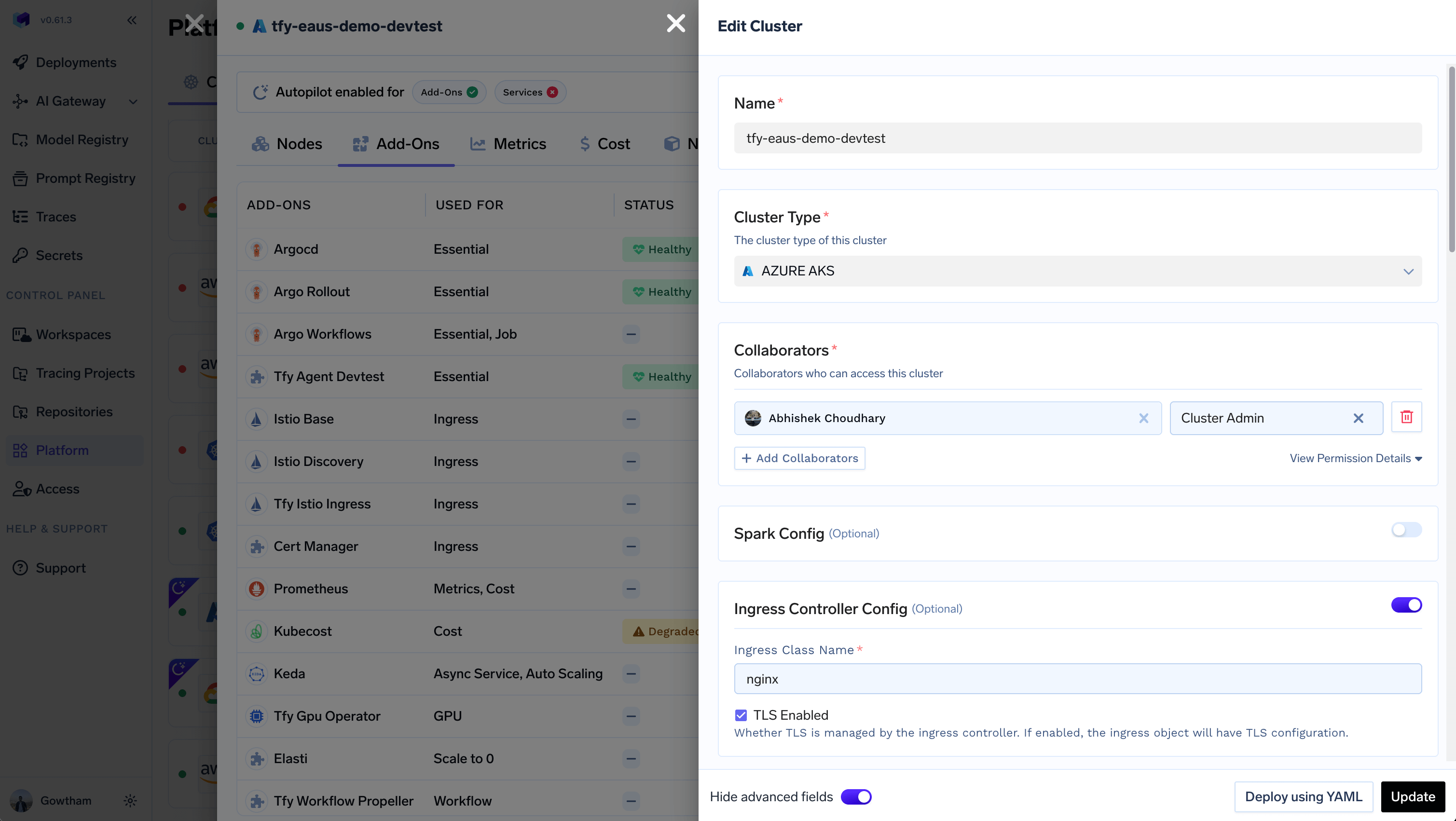 Provide the following configuration details:
* **Ingress Class Name**: Identifies which ingress controller is responsible for handling a specific ingress resource. Example: `nginx`
* **TLS Enabled** (Optional): Indicates if TLS termination is managed by the ingress controller. When enabled, the generated ingress object will include `TLS` configuration for the specified host(s).
***
Provide the following configuration details:
* **Ingress Class Name**: Identifies which ingress controller is responsible for handling a specific ingress resource. Example: `nginx`
* **TLS Enabled** (Optional): Indicates if TLS termination is managed by the ingress controller. When enabled, the generated ingress object will include `TLS` configuration for the specified host(s).
***