> ## Documentation Index
> Fetch the complete documentation index at: https://www.truefoundry.com/llms.txt
> Use this file to discover all available pages before exploring further.

# Deploy Kubernetes Manifests

> Learn how to deploy Kubernetes manifests directly through TrueFoundry's web interface with a complete example.

TrueFoundry allows you to deploy Kubernetes manifests directly through the web interface, making it easy to deploy any Kubernetes application without needing to use kubectl or other command-line tools.

<Info>
  This feature is perfect for deploying existing Kubernetes applications, custom
  operators, or any workload that's defined as Kubernetes YAML manifests.
</Info>

## Prerequisites

* Access to a TrueFoundry workspace
* A connected cluster (AWS, GCP, Azure, or on-premises)
* Kubernetes manifests in YAML format

## Step-by-Step Deployment Guide

<Steps>
  <Step title="Navigate to Deployments">
    Log in to your TrueFoundry dashboard and click on **Deployments** in the
    left sidebar, then click **New** to create a new deployment.

    <img src="https://mintcdn.com/truefoundry/WsXGoMBEEqYmepmC/images/new_deployment_button.png?fit=max&auto=format&n=WsXGoMBEEqYmepmC&q=85&s=6ca438319dda9b0df29e2af73fdd105a" alt="TrueFoundry Deployments page showing the New button" width="2696" height="232" data-path="images/new_deployment_button.png" />
  </Step>

  <Step title="Select Helm">
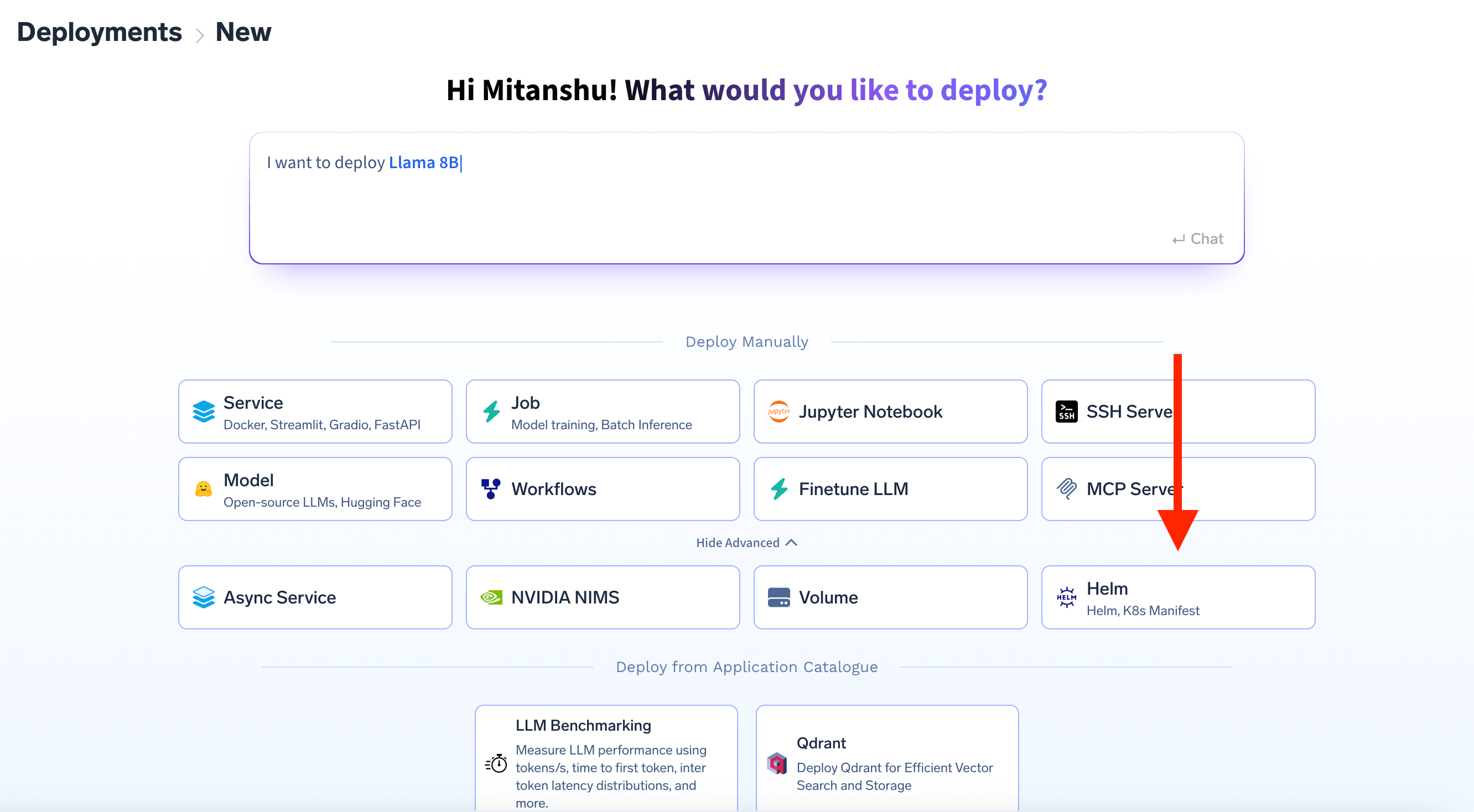
    In the application type page, click on show advanced and select Helm.

    <img src="https://mintcdn.com/truefoundry/2McLD1HKh8epqCAW/images/helm_deployment_option.png?fit=max&auto=format&n=2McLD1HKh8epqCAW&q=85&s=37208e979da68e774c555e9f4ba5e395" alt="Deploy new Helm modal showing Helm option selected" width="2664" height="1468" data-path="images/helm_deployment_option.png" />
  </Step>

  <Step title="Select K8s Manifest">
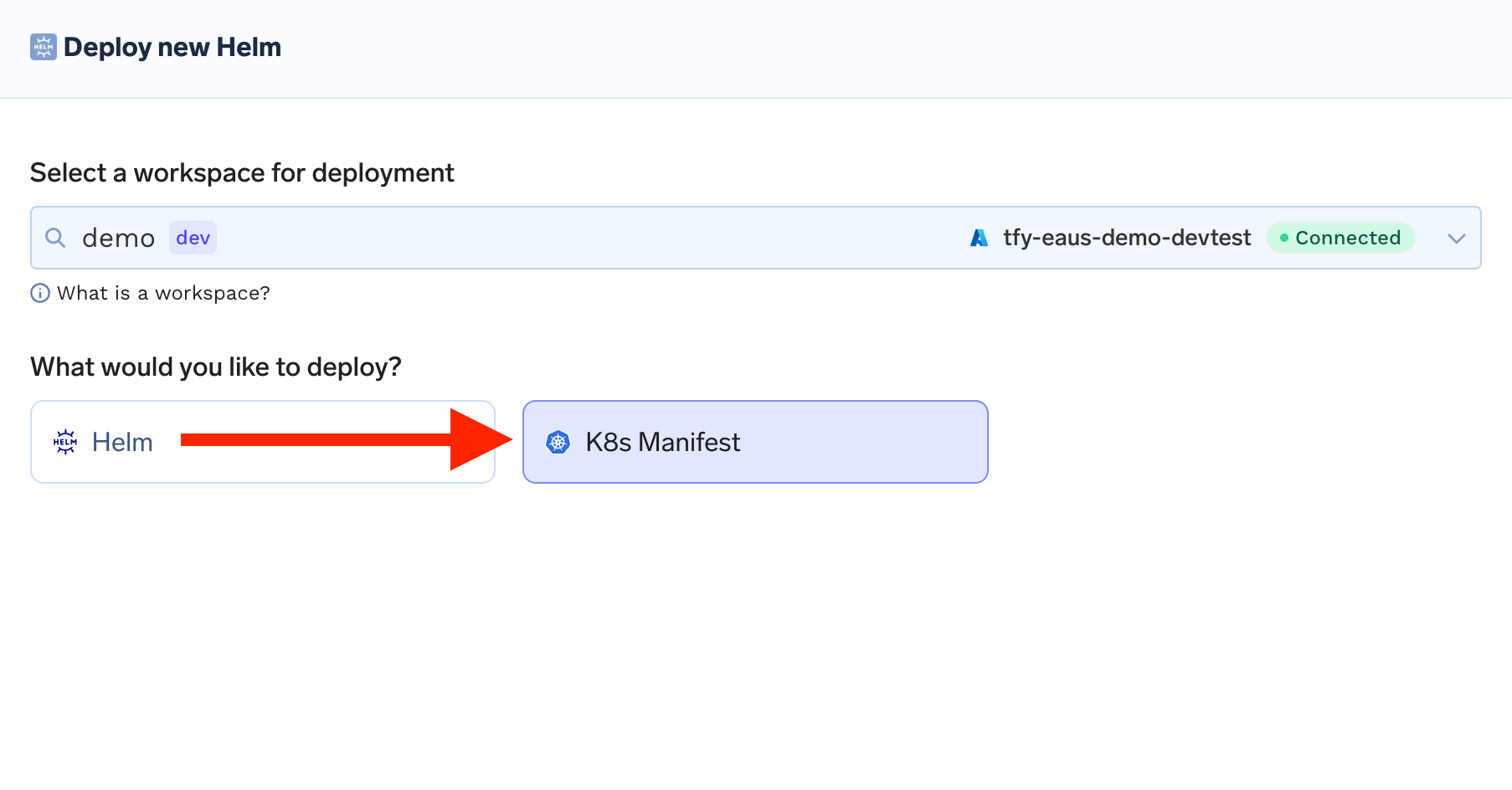
    In the "Deploy new Helm" modal: - Select your workspace from the dropdown -
    Choose **K8s Manifest** instead of Helm chart - Click **Next**

    <img src="https://mintcdn.com/truefoundry/2McLD1HKh8epqCAW/images/k8s_manifest_option.png?fit=max&auto=format&n=2McLD1HKh8epqCAW&q=85&s=6a6b185f74acdcd35ce95d4cab87ed58" alt="Deploy new Helm modal showing K8s Manifest option selected" width="1806" height="944" data-path="images/k8s_manifest_option.png" />
  </Step>

  <Step title="Configure Your Deployment">
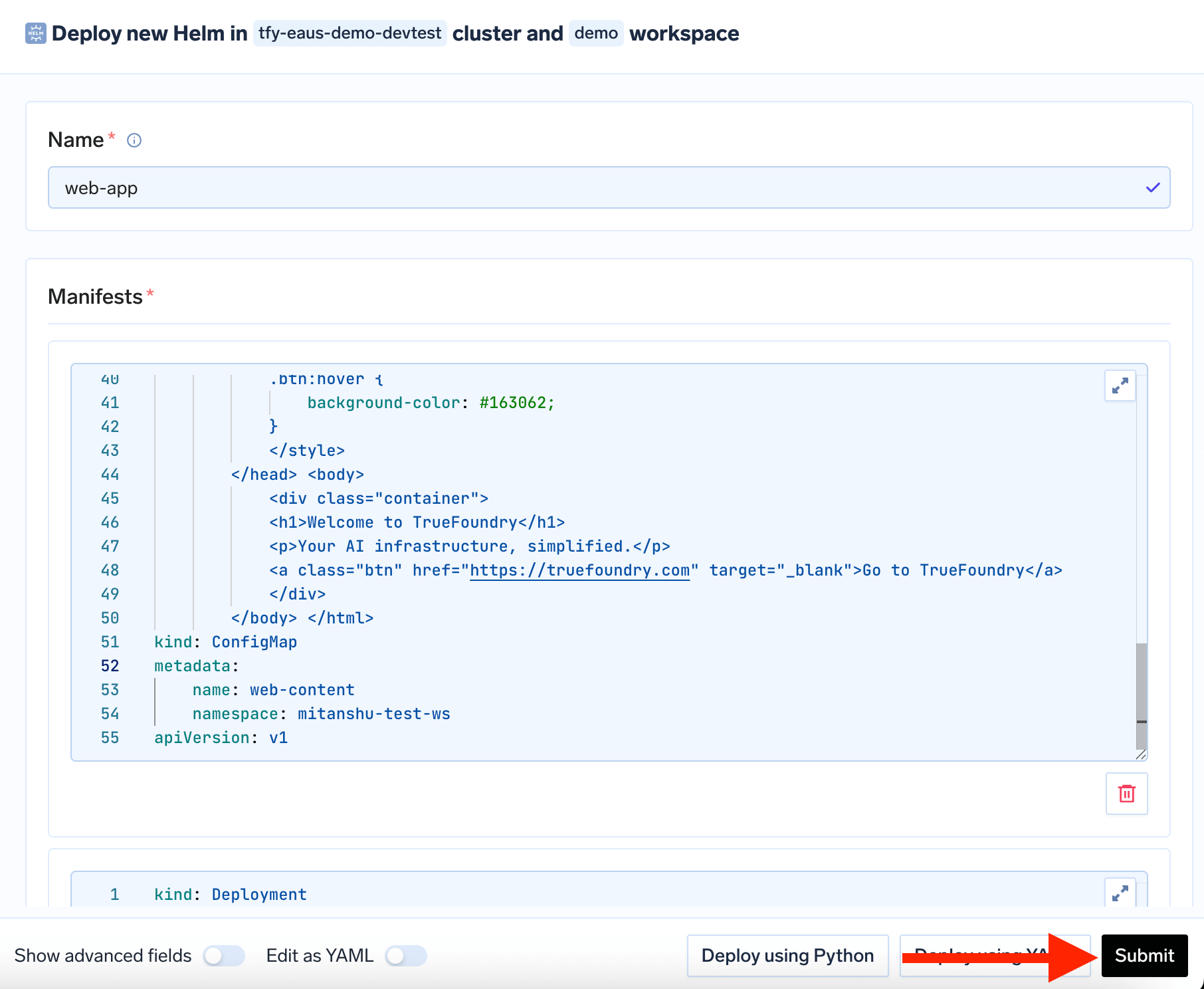
    Enter a name for your deployment (e.g., `web-app`) and add your Kubernetes
    manifest in the Manifests section - Click **Submit** to deploy

    <img src="https://mintcdn.com/truefoundry/GY_e2L_Jzw4lYNaq/images/submittin_manifest.png?fit=max&auto=format&n=GY_e2L_Jzw4lYNaq&q=85&s=82daaf29d9609433aba505872ef6ac42" alt="K8s manifest configuration page with YAML editor" width="1812" height="1488" data-path="images/submittin_manifest.png" />
  </Step>

  <Step title="Monitor Deployment">
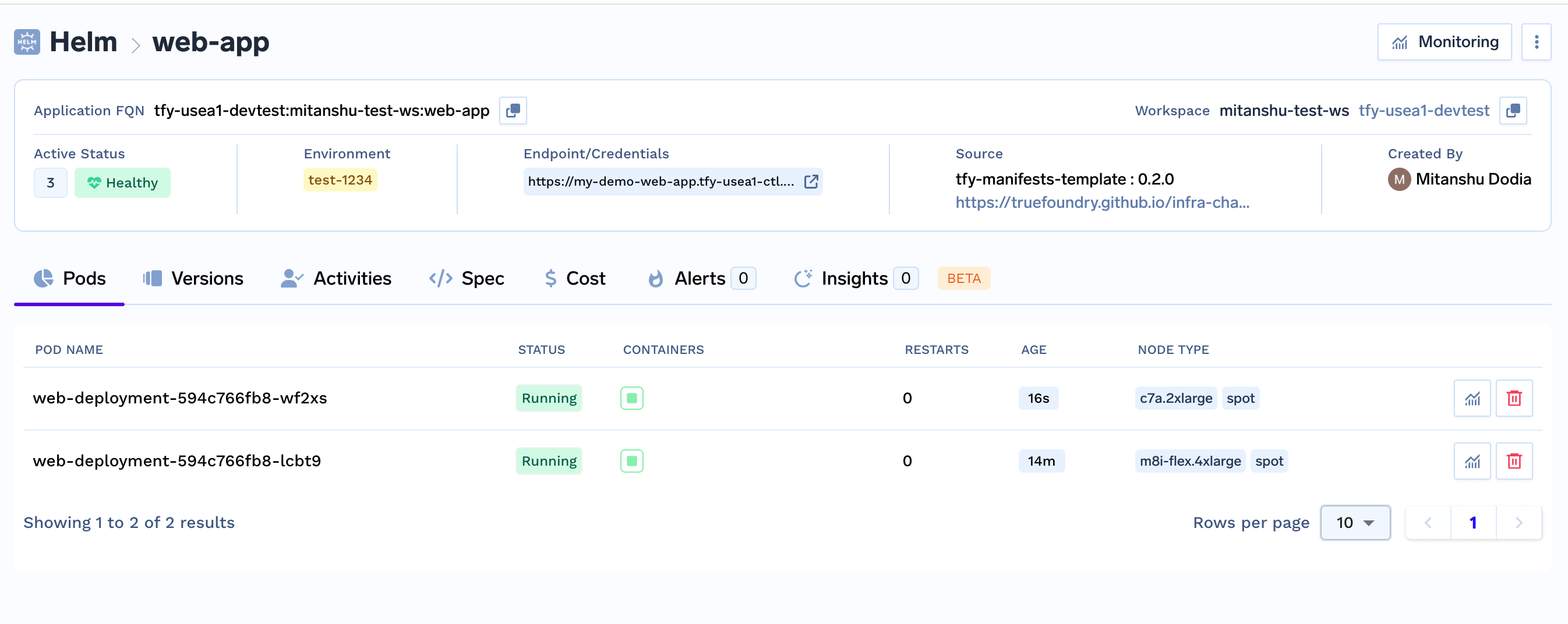
    Monitor the deployment status in the helm deployments list and view logs by
    clicking on your deployment.

    <img src="https://mintcdn.com/truefoundry/ApJo7EmVUw-vTRA-/images/web_app_helm_deployment.png?fit=max&auto=format&n=ApJo7EmVUw-vTRA-&q=85&s=82bca63ecce320ef3b51201405829849" alt="Deployment status page showing successful deployment" width="2692" height="1072" data-path="images/web_app_helm_deployment.png" />
  </Step>
</Steps>

## Complete Example: Web Application with Virtual Service

Here's a comprehensive example that deploys a web application with proper configuration, secrets, and routing:

<AccordionGroup>
  <Accordion title="1. Namespace" icon="folder">
    ```yaml lines theme={"dark"}
    apiVersion: v1
    kind: Namespace
    metadata:
      name: demo
    ```
  </Accordion>

  <Accordion title="2. ConfigMap (HTML Content)" icon="file">
    ```yaml lines theme={"dark"}
    apiVersion: v1
    kind: ConfigMap
    metadata:
      name: web-content
      namespace: demo
    data:
      index.html: |
        <!DOCTYPE html>
        <html lang="en">
        <head>
          <meta charset="UTF-8">
          <title>Welcome to TrueFoundry</title>
          <style>
            body {
              font-family: Arial, sans-serif;
              text-align: center;
              margin-top: 15%;
              background-color: #f0f4f8;
              color: #1f3c88;
            }
            .container {
              display: inline-block;
              background: white;
              padding: 2rem;
              border-radius: 8px;
              box-shadow: 0 2px 10px rgba(0,0,0,0.1);
            }
            h1 {
              margin-bottom: 1rem;
              font-size: 2.5rem;
            }
            p {
              margin-bottom: 1.5rem;
              font-size: 1.2rem;
            }
            .btn {
              display: inline-block;
              padding: 0.75rem 1.5rem;
              font-size: 1rem;
              color: white;
              background-color: #1f3c88;
              border: none;
              border-radius: 4px;
              text-decoration: none;
              cursor: pointer;
            }
            .btn:hover {
              background-color: #163062;
            }
          </style>
        </head>
        <body>
          <div class="container">
            <h1>Welcome to TrueFoundry</h1>
            <p>Your AI infrastructure, simplified.</p>
            <a class="btn" href="https://truefoundry.com" target="_blank">Go to TrueFoundry</a>
          </div>
        </body>
        </html>
    ```
  </Accordion>

  <Accordion title="3. Deployment (Nginx)" icon="server">
    ```yaml lines theme={"dark"}
    apiVersion: apps/v1
    kind: Deployment
    metadata:
      name: welcome-deployment
      namespace: demo
    spec:
      replicas: 2
      selector:
        matchLabels:
          app: welcome-web
      template:
        metadata:
          labels:
            app: welcome-web
        spec:
          containers:
            - name: nginx
              image: nginx:1.25
              ports:
                - containerPort: 80
              volumeMounts:
                - name: html-volume
                  mountPath: /usr/share/nginx/html
          volumes:
            - name: html-volume
              configMap:
                name: web-content
                items:
                  - key: index.html
                    path: index.html
    ```
  </Accordion>

  <Accordion title="4. Service (Internal)" icon="link">
    ```yaml lines theme={"dark"}
    apiVersion: v1
    kind: Service
    metadata:
      name: welcome-service
      namespace: demo
    spec:
      selector:
        app: welcome-web
      ports:
        - port: 80
          targetPort: 80
    ```
  </Accordion>

  <Accordion title="5. Gateway (External Access)" icon="globe">
    ```yaml lines theme={"dark"}
    apiVersion: networking.istio.io/v1beta1
    kind: Gateway
    metadata:
      name: welcome-gateway
      namespace: demo
    spec:
      selector:
        istio: ingressgateway
      servers:
        - port:
            number: 80
            name: http-welcome
            protocol: HTTP
          hosts:
            - "welcome.truefoundry.local"
    ```
  </Accordion>

  <Accordion title="6. VirtualService (Routing)" icon="route">
    ```yaml lines theme={"dark"}
    apiVersion: networking.istio.io/v1beta1
    kind: VirtualService
    metadata:
      name: welcome-virtualservice
      namespace: demo
    spec:
      hosts:
        - "welcome.truefoundry.local"
      gateways:
        - welcome-gateway
      http:
        - match:
            - uri:
                prefix: /
          route:
            - destination:
                host: welcome-service
                port:
                  number: 80
    ```
  </Accordion>

  <Accordion title="Complete Manifest (All-in-One)" icon="copy">
    Copy this complete YAML to deploy everything at once:

    ```yaml lines theme={"dark"}
    # Namespace
    apiVersion: v1
    kind: Namespace
    metadata:
      name: demo
    ---
    # ConfigMap: custom HTML page with welcome message & button
    apiVersion: v1
    kind: ConfigMap
    metadata:
      name: web-content
      namespace: demo
    data:
      index.html: |
        <!DOCTYPE html>
        <html lang="en">
        <head>
          <meta charset="UTF-8">
          <title>Welcome to TrueFoundry</title>
          <style>
            body {
              font-family: Arial, sans-serif;
              text-align: center;
              margin-top: 15%;
              background-color: #f0f4f8;
              color: #1f3c88;
            }
            .container {
              display: inline-block;
              background: white;
              padding: 2rem;
              border-radius: 8px;
              box-shadow: 0 2px 10px rgba(0,0,0,0.1);
            }
            h1 {
              margin-bottom: 1rem;
              font-size: 2.5rem;
            }
            p {
              margin-bottom: 1.5rem;
              font-size: 1.2rem;
            }
            .btn {
              display: inline-block;
              padding: 0.75rem 1.5rem;
              font-size: 1rem;
              color: white;
              background-color: #1f3c88;
              border: none;
              border-radius: 4px;
              text-decoration: none;
              cursor: pointer;
            }
            .btn:hover {
              background-color: #163062;
            }
          </style>
        </head>
        <body>
          <div class="container">
            <h1>Welcome to TrueFoundry</h1>
            <p>Your AI infrastructure, simplified.</p>
            <a class="btn" href="https://truefoundry.com" target="_blank">Go to TrueFoundry</a>
          </div>
        </body>
        </html>
    ---
    # Deployment: Nginx serving the welcome page
    apiVersion: apps/v1
    kind: Deployment
    metadata:
      name: welcome-deployment
      namespace: demo
    spec:
      replicas: 2
      selector:
        matchLabels:
          app: welcome-web
      template:
        metadata:
          labels:
            app: welcome-web
        spec:
          containers:
            - name: nginx
              image: nginx:1.25
              ports:
                - containerPort: 80
              volumeMounts:
                - name: html-volume
                  mountPath: /usr/share/nginx/html
          volumes:
            - name: html-volume
              configMap:
                name: web-content
                items:
                  - key: index.html
                    path: index.html
    ---
    # Service: expose Nginx internally
    apiVersion: v1
    kind: Service
    metadata:
      name: welcome-service
      namespace: demo
    spec:
      selector:
        app: welcome-web
      ports:
        - port: 80
          targetPort: 80
    ---
    # Istio Gateway: entry point for external traffic
    apiVersion: networking.istio.io/v1beta1
    kind: Gateway
    metadata:
      name: welcome-gateway
      namespace: demo
    spec:
      selector:
        istio: ingressgateway
      servers:
        - port:
            number: 80
            name: http-welcome
            protocol: HTTP
          hosts:
            - "welcome.truefoundry.local"
    ---
    # VirtualService: route traffic to Nginx
    apiVersion: networking.istio.io/v1beta1
    kind: VirtualService
    metadata:
      name: welcome-virtualservice
      namespace: demo
    spec:
      hosts:
        - "welcome.truefoundry.local"
      gateways:
        - welcome-gateway
      http:
        - match:
            - uri:
                prefix: /
          route:
            - destination:
                host: welcome-service
                port:
                  number: 80
    ```
  </Accordion>
</AccordionGroup>

## TrueFoundry Integration Features

### TrueFoundry Secrets Integration

You can reference TrueFoundry secrets directly in your Kubernetes manifests. Truefoundry secrets are supported only in manifest block that too only for kubernetes secret manifest which are using `stringData` field to store the secret.

**How to use TrueFoundry secrets in your manifests:**

```yaml lines theme={"dark"}
apiVersion: v1
kind: Secret
metadata:
  name: api-key-secrets
type: Opaque
stringData:
  api-key: tfy-secret://truefoundry:api-key-secrets:api-key
```