> ## Documentation Index
> Fetch the complete documentation index at: https://www.truefoundry.com/llms.txt
> Use this file to discover all available pages before exploring further.
# Creating Your First Workflow
> Step-by-step guide for creating your first workflow, explaining configuration, best practices, and real-world usage on TrueFoundry.
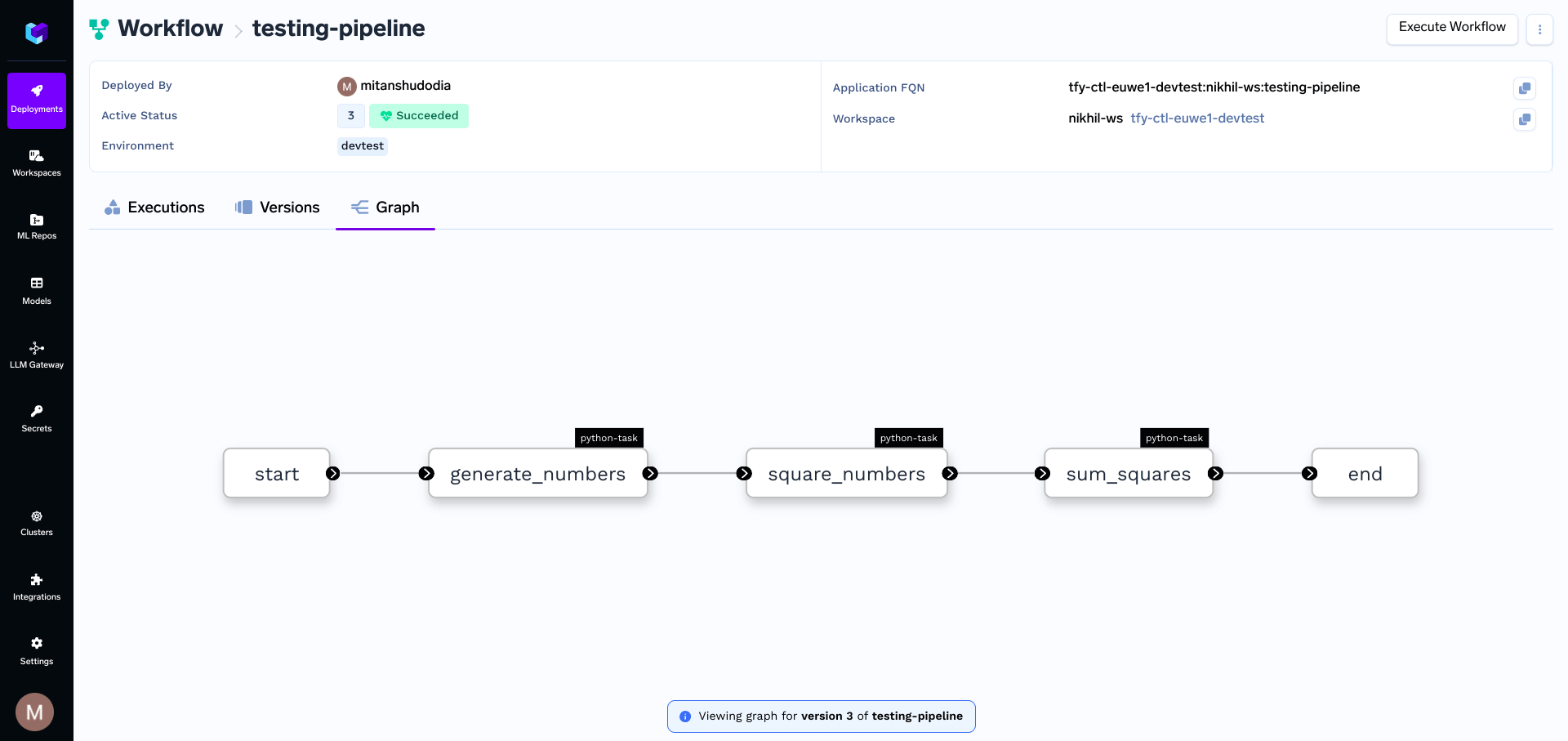
In this guide we will create a simple workflow to return the sum of the square of all the elements in the list. following are the tasks we will be creating in the workflow
1. Generate a list of numbers.
2. Calculate the square of each number in the list.
3. Sum the squared numbers.
## Prerequisites
Before you proceed with the guide, make sure you have the following:
* **TrueFoundry CLI**: Set up and configure the TrueFoundry CLI tool on your local machine by following the [Setup for CLI](/docs/setup-cli) guide.
`truefoundry[workflow]` package is only available on Python ≥ 3.9, ≤ 3.12
* **Workspace**: To deploy your workflow, you'll need a workspace. If you don't have one, you can create it using this guide: [Creating a Workspace](/docs/key-concepts#creating-a-workspace) or seek assistance from your cluster administrator.
## Creating the Workflow
Create a `workflow.py` where we will write the code for our workflow and place in the project root folder. (With other dependent files and requirements.txt)
### `workflow.py`
```python workflow.py lines theme={"dark"}
from truefoundry.workflow import task, workflow, PythonTaskConfig, TaskPythonBuild
from truefoundry.deploy import Resources
cpu_task_config = PythonTaskConfig(
# `TaskPythonBuild` helps specify the details of your Python Code.
# These details will be used to templatize a DockerFile to build your Docker Image
image=TaskPythonBuild(
python_version="3.9",
# Pip packages to install.`truefoundry[workflow]` is a mandatory dependency
pip_packages=["truefoundry[workflow]==0.4.8"],
# Optionally pass the path to requirements.txt
# requirements_path="requirements.txt"
),
resources=Resources(cpu_request=0.5)
)
# Task 1: Generate a list of numbers
@task(task_config=cpu_task_config)
def generate_numbers(n: int) -> list[int]:
return list(range(1, n + 1))
# Task 2: Calculate the square of each number in the list
@task(task_config=cpu_task_config)
def square_numbers(numbers: list[int]) -> list[int]:
return [x**2 for x in numbers]
# Task 3: Sum the squared numbers
@task(task_config=cpu_task_config)
def sum_squares(squared_numbers: list[int]) -> int:
return sum(squared_numbers)
# Workflow: Orchestrate the tasks
@workflow
def simple_pipeline(n: int) -> int:
numbers = generate_numbers(n=n)
squared_numbers = square_numbers(numbers=numbers)
result = sum_squares(squared_numbers=squared_numbers)
return result
# Runs the pipeline locally
if __name__ == "__main__":
result = simple_pipeline(n=5)
print(f"The sum of squares from 1 to 5 is: {result}")
```
### ⚠️Your workflow function should not contain any code or business logic, only defined tasks can be called in the workflow function and nothing else, else the workflow execution might fail.
You can also have [map tasks](/docs/creating-a-map-task) and [conditional tasks](/docs/conditional-task) in your workflow. You can also run [raw containers](/docs/container-task) as tasks.
Now run the below command in the terminal to deploy your workflow, replace `` with the [workspace fqn](/docs/key-concepts#getting-workspace-fqn) which you can find on the UI.
```shell Shell lines theme={"dark"}
tfy deploy workflow \
--name my-workflow-name \
--file workflow.py \
--workspace_fqn "Paste your workspace FQN here"
```
## View your deployed workflow
* You can view the deployed workflow by going to the workflow tab on dashboard.
 ***
***