> ## Documentation Index
> Fetch the complete documentation index at: https://www.truefoundry.com/llms.txt
> Use this file to discover all available pages before exploring further.
# Creating A Map Task
> Step-by-step guide for creating a map task, explaining configuration, best practices, and real-world usage on TrueFoundry.
A Map Task is a specialized task that enables the parallel execution of a single task across multiple inputs. It allows you to apply a task to each element of an input collection (like a list or array) and execute them in parallel. This is particularly useful when you need to perform the same operation on a large dataset or a collection of items, and you want to distribute the workload across multiple tasks
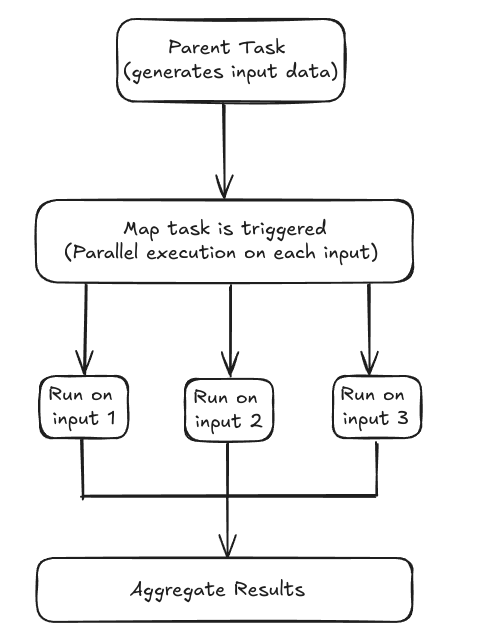 Here’s a simple example of how you might define and use a map task. Create a file name `workflow.py `and place it in your project directory.
```python Python lines theme={"dark"}
from functools import partial
from truefoundry.workflow import task, workflow, map_task, PythonTaskConfig, TaskPythonBuild
task_config = PythonTaskConfig(image=TaskPythonBuild(
python_version="3.11",
pip_packages=["truefoundry[workflow]==0.4.8"],
)
)
@task(task_config=task_config)
def square(x: int) -> int:
return x * x
@workflow
def my_map_workflow(numbers: list[int]) -> list[int]:
square_task = partial(square)
squared_array = map_task(square_task)(x=numbers)
print(f"Square of {numbers} is {squared_array}")
return squared_array
```
Now run the below command in the terminal to deploy your workflow, replace `` with the [workspace fqn](/docs/key-concepts#getting-workspace-fqn) which you can find on the UI.
```python Shell lines theme={"dark"}
tfy deploy workflow \
--name map-task-test \
--file workflow.py \
--workspace_fqn "Paste your workspace FQN here"
```
In this example:
* square: This is a simple task that squares a given integer.
* map\_task: The map\_task function is used to apply the square task to each element of the numbers list.
* my\_map\_workflow: This workflow demonstrates how to use the map task to process a list of numbers in parallel.
## Map task on ui
## Examples of using map tasks with different types of inputs
### Map task with a single input
This is the most basic type of map task where you want to do an operation with just a single input for example in this task we are just returning the square of the input number
```python Python lines theme={"dark"}
@task(task_config=task_config)
def square_numbers(number: int)->int:
return number*number
```
Now to call this task in workflow, check the below syntax
```python Python lines theme={"dark"}
@workflow
def square_workflow_number(numbers: List[int] = [1, 2, 3, 4, 5]) -> List[int]:
return map_task(square_numbers)(number=numbers)
```
### Map task with multiple inputs
Now lets say you want to pass multiple inputs which are constants and a list as an input to map tasks, so to accomplish this you can use a partial function from functools library, lets see it in the example.
```python Python lines theme={"dark"}
@task(task_config=task_config)
def multiplier_function(number: int, multiplier: int) -> int:
return number * multiplier
```
Now we will import partial from functools and define the map task in the workflow function
```python Python lines theme={"dark"}
from functools import partial
@workflow
def map_workflow_with_multipl_input(numbers: List[int] = [1, 2, 3], multiplier: int = 3) -> List[int]:
partial_function = partial(multiplier_function, multiplier=multiplier)
map_task = map_task(partial_function)(number=numbers)
return map_tasks
```
You can provide multiple input arguments in a partial function.
### Note
It is important to remember that you cannot use list as an input to partial task
you can also pass various lists as input to the map task function, let's see an example.
```python Python lines theme={"dark"}
@task(task_config=task_config)
def multiply_numbers(num1: int, num2: int, multiplier: int) -> int:
return num1 * num2 * multiplier
```
In the above example, we have two lists of numbers and we want to multiply the numbers at the same position and multiply them with multipler, lets check the workflow function for the same
```python Python lines theme={"dark"}
from functools import partial
@workflow
def map_workflow_with_multiple_lists(numbers1: List[int], numbers2: List[int], multiplier: int) -> List[int]:
partial_func = partial(multiply_numbers, multiplier=multiplier)
return map_task(partial_func)(num1=numbers1, num2=numbers2)
```
### Warning
Please not that the length of all the lists should be same while passing muliple list as input in map function.
### Setting up the concurrency limit
You can set the concurrency limit for the map tasks, so that it limits the number of map tasks that can run in parallel to the specified batch size, for example if you set concurrency as `3`, then only `3` map task will run at a given interval of time and the next `3` map task will run only when first 3 task are completed, so it runs in a batch of `n` numbers of mapped tasks.
If the concurrency is not set then the workflow runs as many task concurrently as possible.\
You can set the concurrency using the below syntax:
```python Python lines theme={"dark"}
from functools import partial
@workflow
def map_workflow_with_multiple_lists(numbers1: List[int], numbers2: List[int], multiplier: int) -> List[int]:
partial_func = partial(multiply_numbers, multiplier=multiplier)
return map_task(partial_func, concurrency=3)(num1=numbers1, num2=numbers2)
```
In the above example the concurrency is set to `3`, so a batch of `3` map task will run at a given period of time.
***
Here’s a simple example of how you might define and use a map task. Create a file name `workflow.py `and place it in your project directory.
```python Python lines theme={"dark"}
from functools import partial
from truefoundry.workflow import task, workflow, map_task, PythonTaskConfig, TaskPythonBuild
task_config = PythonTaskConfig(image=TaskPythonBuild(
python_version="3.11",
pip_packages=["truefoundry[workflow]==0.4.8"],
)
)
@task(task_config=task_config)
def square(x: int) -> int:
return x * x
@workflow
def my_map_workflow(numbers: list[int]) -> list[int]:
square_task = partial(square)
squared_array = map_task(square_task)(x=numbers)
print(f"Square of {numbers} is {squared_array}")
return squared_array
```
Now run the below command in the terminal to deploy your workflow, replace `` with the [workspace fqn](/docs/key-concepts#getting-workspace-fqn) which you can find on the UI.
```python Shell lines theme={"dark"}
tfy deploy workflow \
--name map-task-test \
--file workflow.py \
--workspace_fqn "Paste your workspace FQN here"
```
In this example:
* square: This is a simple task that squares a given integer.
* map\_task: The map\_task function is used to apply the square task to each element of the numbers list.
* my\_map\_workflow: This workflow demonstrates how to use the map task to process a list of numbers in parallel.
## Map task on ui
## Examples of using map tasks with different types of inputs
### Map task with a single input
This is the most basic type of map task where you want to do an operation with just a single input for example in this task we are just returning the square of the input number
```python Python lines theme={"dark"}
@task(task_config=task_config)
def square_numbers(number: int)->int:
return number*number
```
Now to call this task in workflow, check the below syntax
```python Python lines theme={"dark"}
@workflow
def square_workflow_number(numbers: List[int] = [1, 2, 3, 4, 5]) -> List[int]:
return map_task(square_numbers)(number=numbers)
```
### Map task with multiple inputs
Now lets say you want to pass multiple inputs which are constants and a list as an input to map tasks, so to accomplish this you can use a partial function from functools library, lets see it in the example.
```python Python lines theme={"dark"}
@task(task_config=task_config)
def multiplier_function(number: int, multiplier: int) -> int:
return number * multiplier
```
Now we will import partial from functools and define the map task in the workflow function
```python Python lines theme={"dark"}
from functools import partial
@workflow
def map_workflow_with_multipl_input(numbers: List[int] = [1, 2, 3], multiplier: int = 3) -> List[int]:
partial_function = partial(multiplier_function, multiplier=multiplier)
map_task = map_task(partial_function)(number=numbers)
return map_tasks
```
You can provide multiple input arguments in a partial function.
### Note
It is important to remember that you cannot use list as an input to partial task
you can also pass various lists as input to the map task function, let's see an example.
```python Python lines theme={"dark"}
@task(task_config=task_config)
def multiply_numbers(num1: int, num2: int, multiplier: int) -> int:
return num1 * num2 * multiplier
```
In the above example, we have two lists of numbers and we want to multiply the numbers at the same position and multiply them with multipler, lets check the workflow function for the same
```python Python lines theme={"dark"}
from functools import partial
@workflow
def map_workflow_with_multiple_lists(numbers1: List[int], numbers2: List[int], multiplier: int) -> List[int]:
partial_func = partial(multiply_numbers, multiplier=multiplier)
return map_task(partial_func)(num1=numbers1, num2=numbers2)
```
### Warning
Please not that the length of all the lists should be same while passing muliple list as input in map function.
### Setting up the concurrency limit
You can set the concurrency limit for the map tasks, so that it limits the number of map tasks that can run in parallel to the specified batch size, for example if you set concurrency as `3`, then only `3` map task will run at a given interval of time and the next `3` map task will run only when first 3 task are completed, so it runs in a batch of `n` numbers of mapped tasks.
If the concurrency is not set then the workflow runs as many task concurrently as possible.\
You can set the concurrency using the below syntax:
```python Python lines theme={"dark"}
from functools import partial
@workflow
def map_workflow_with_multiple_lists(numbers1: List[int], numbers2: List[int], multiplier: int) -> List[int]:
partial_func = partial(multiply_numbers, multiplier=multiplier)
return map_task(partial_func, concurrency=3)(num1=numbers1, num2=numbers2)
```
In the above example the concurrency is set to `3`, so a batch of `3` map task will run at a given period of time.
***