> ## Documentation Index
> Fetch the complete documentation index at: https://www.truefoundry.com/llms.txt
> Use this file to discover all available pages before exploring further.
# Virtual Models
> Route requests across multiple model providers with load balancing, failover, and retries using a single model name
A **virtual model** is a named entry in TrueFoundry AI Gateway that your application calls like any other model (for example `my-group/production-chat`). Behind that name, you configure **one routing strategy** and **one or more real target models** (for example `azure/gpt-4o` and `openai/gpt-4o`). The gateway handles load balancing, health-aware routing, retries, and fallbacks automatically so you do not hard-code provider details in every service.
Virtual models only apply to **synchronous** API calls (chat completions, completions, embeddings, responses, rerank, image/audio, etc.). The [Batch API](/docs/ai-gateway/batch-predictions-with-truefoundry-llm-gateway) (`/batches`) does **not** support virtual models — batch jobs run on a single provider asynchronously, so the gateway has no opportunity to fall back to another target if a request inside the batch fails. Send batch requests directly to a real catalog model (for example `openai-main/gpt-4o`).
```mermaid theme={"dark"}
flowchart LR
App[Your application] --> VM["model: my-group/production-chat"]
VM --> GW[AI Gateway]
GW --> T1["azure/gpt-4o"]
GW --> T2["openai/gpt-4o"]
GW --> T3["anthropic/claude-3"]
```
## Why route across multiple targets?
Production LLM traffic benefits when the gateway can choose or fail over among more than one backend. Common drivers:
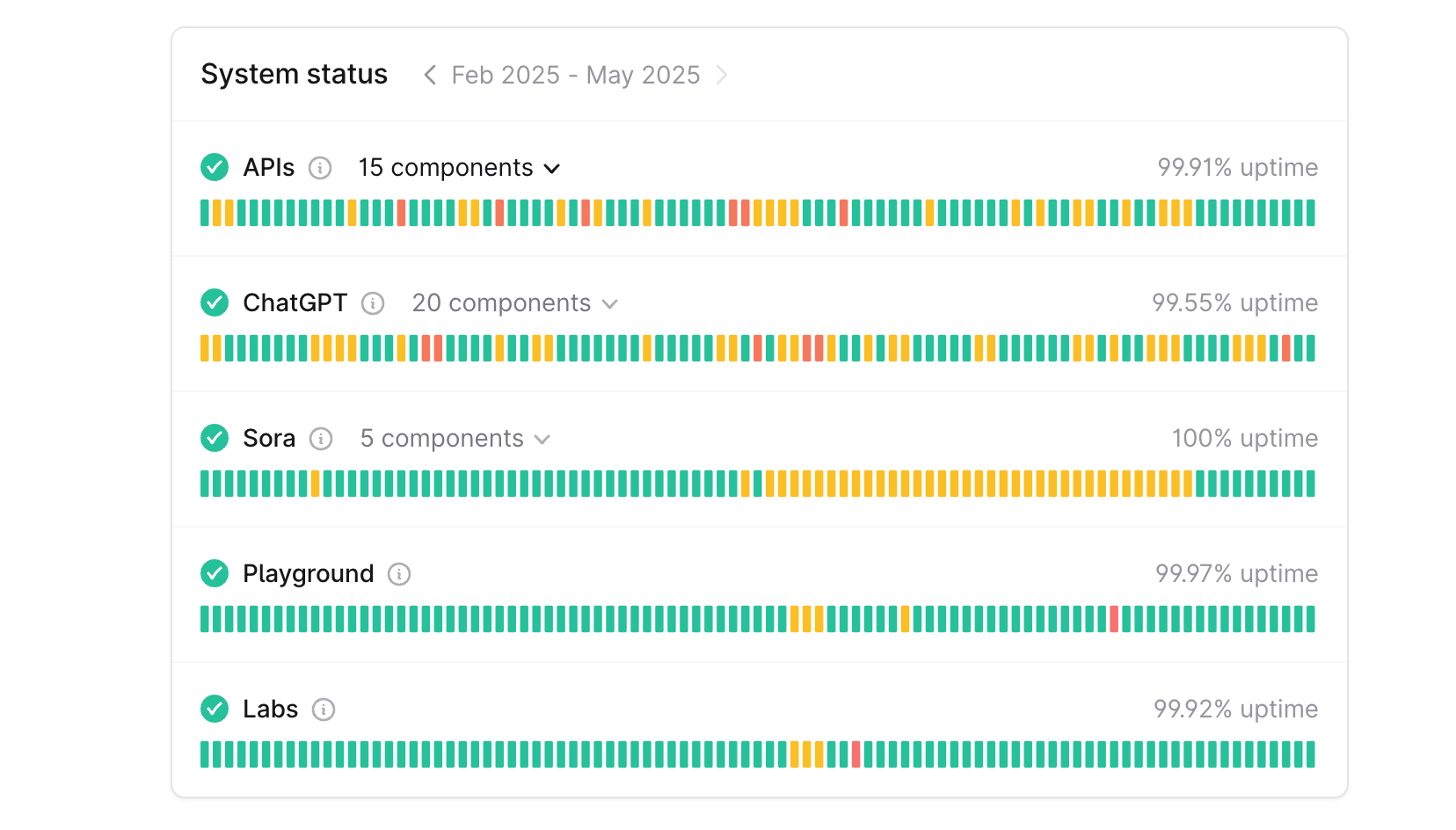
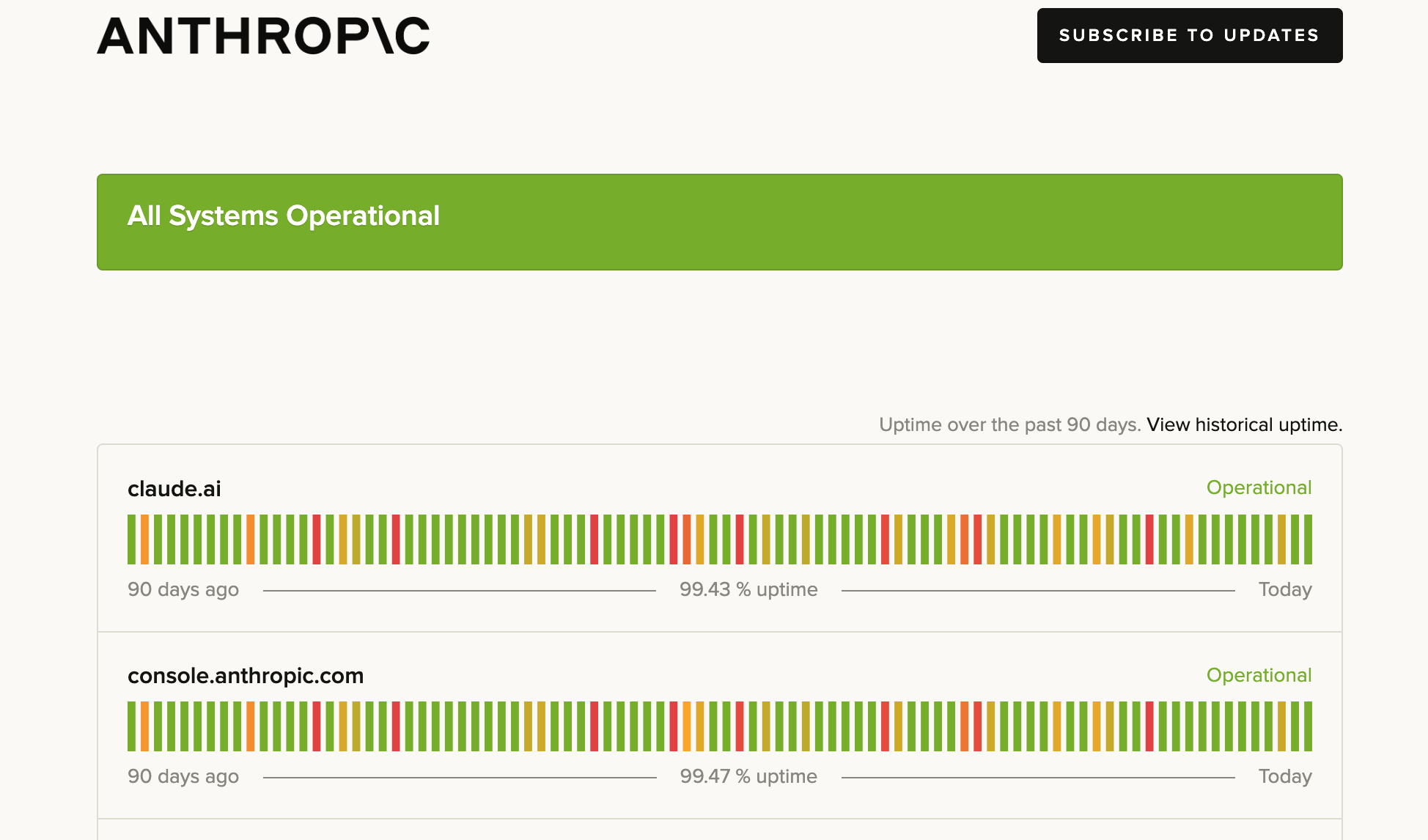
Model providers experience outages and downtimes. For e.g. here's a screenshot of OpenAI's and Anthropic's status page from Feb to May 2025.
To avoid the downtime of your applications when models go down, a lot of organizations use multiple model providers and configure load balancing to route to the healthy model in case one of the models goes down, hence avoiding any downtime of their applications for their users.
Latency and performance varies on time, region, model and provider. Here's a graph of the latency variance of a few models over a course of a month.
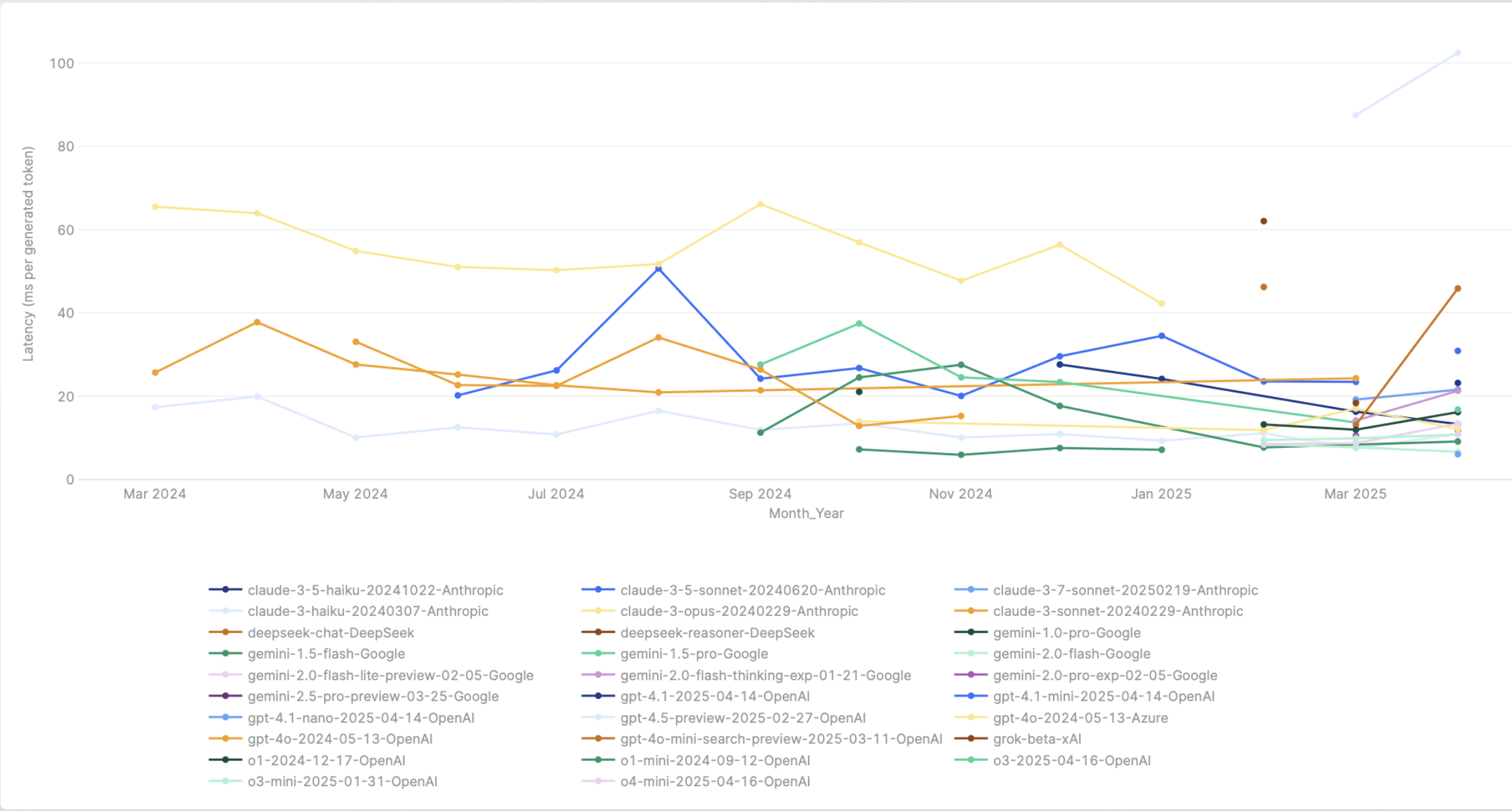 We want to be able to route dynamically to the model with the lowest latency at any point in time.
A lot of the LLM providers enforce strict rate limits on API usage. Here's a screenshot of Azure OpenAI's rate limits:
We want to be able to route dynamically to the model with the lowest latency at any point in time.
A lot of the LLM providers enforce strict rate limits on API usage. Here's a screenshot of Azure OpenAI's rate limits:
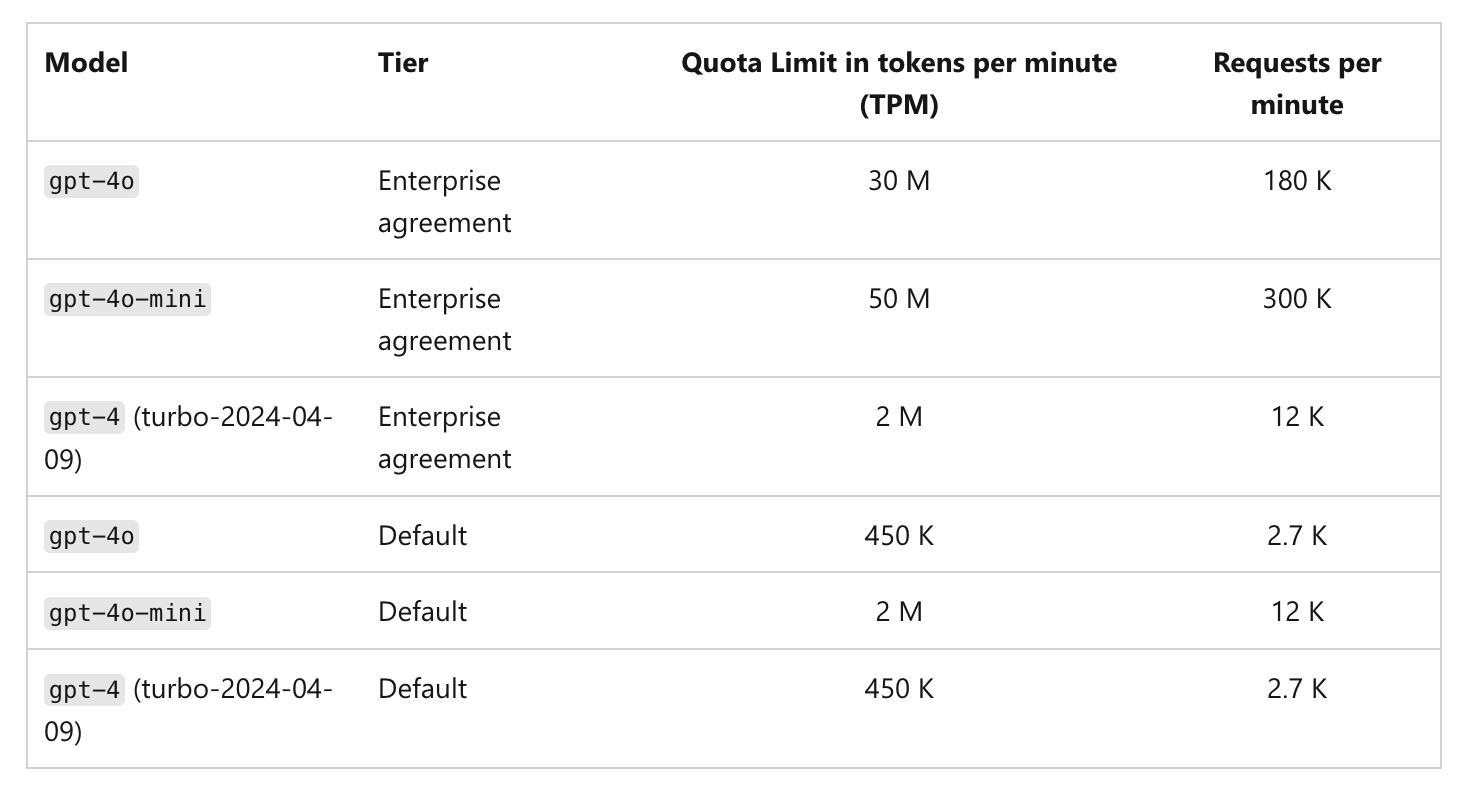 When these limits are exceeded, requests begin to fail and we want to be able to route to other models to keep our application running.
Testing new models or updates in production carries significant risks. Dynamic load balancing can be used to route a small percentage of traffic to the new model and monitor the performance before routing all the traffic to the new model.
## Why virtual models?
* **Stable API surface** — Your apps pass one model identifier; you change targets, weights, or providers in the gateway without redeploying clients.
* **Resilience** — Retries and fallback status codes route around rate limits and transient errors across targets.
* **Governance** — Virtual model provider groups support [collaborator roles](/docs/ai-gateway/gateway-access-control) so teams can **use** or **manage** routing separately.
## Supported API types
A virtual model is configured with one or more **model types** (set under **Model types** when you create it). The model type controls which API operations the virtual model can serve — and every target in the virtual model must support the operation you call.
The gateway supports the following model types, each callable on the matching OpenAI-compatible endpoint:
| Model type | Endpoint(s) | Description |
| --------------------- | --------------------------------------------------------------------------- | ------------------------------------------------------------------------------------- |
| `chat` | `POST /chat/completions`, `POST /messages` | Chat completions and the Anthropic [Messages API](/docs/ai-gateway/messages-overview) |
| `responses` | `POST /responses` | OpenAI [Responses API](/docs/ai-gateway/responses-api) |
| `completion` | `POST /completions` | Legacy text completions |
| `embedding` | `POST /embeddings` | Text embeddings |
| `rerank` | `POST /v2/rerank` | Document [reranking](/docs/ai-gateway/rerank) |
| `moderation` | `POST /moderations` | Content [moderation](/docs/ai-gateway/moderation) |
| `image` | `POST /images/generations`, `POST /images/edits`, `POST /images/variations` | Image generation, edits, and variations |
| `text_to_speech` | `POST /audio/speech` | [Text-to-speech](/docs/ai-gateway/text-to-speech) |
| `audio_transcription` | `POST /audio/transcriptions` | Speech-to-text |
| `audio_translation` | `POST /audio/translations` | [Audio translation](/docs/ai-gateway/audio-translation) |
\*\*`messages` can be served by a virtual model with `chat`.
A single virtual model can enable **multiple** model types (for example `chat` and `embedding`), as long as every target supports each operation you intend to call.
## Routing strategies
When you create a virtual model, you choose **one** of three routing strategies. Each strategy uses the same list of targets; the difference is how the gateway picks among healthy targets for each request.
| Strategy | How it works | Best for |
| --------------------------------------------- | ---------------------------------------------------------------------------------------------------------------------------------------------------- | --------------------------------------------------------------------------- |
| [**Weight-based**](#weight-based-routing) | Distributes traffic by assigned weights (e.g. 80/20). Also supports [sticky routing](#sticky-routing-weight-based-only) to pin sessions to a target. | Canary rollouts, fixed capacity splits, A/B allocation |
| [**Priority-based**](#priority-based-routing) | Routes to the highest-priority healthy target (0 = highest). Falls back to the next on failure. Supports [SLA cutoff](#sla-cutoff). | Primary + backup topologies, cost optimization |
| [**Latency-based**](#latency-based-routing) | Per-caller deterministic selection weighted by recent latency, sticky for 10-minute windows. No weights needed. | Performance chasing across regions or providers with prompt-cache stability |
### Weight-based routing
You assign a weight to each target. The gateway distributes incoming requests in proportion to those weights. For example, 90% to `azure/gpt-4o` and 10% to `openai/gpt-4o`.
#### Sticky routing (weight-based only)
Sticky routing pins requests that share the same session key to the same target model for a configurable time window (`ttl_seconds`). Within that window, every request carrying the same session identifier is routed to the same model. When the window expires, the session is re-evaluated and may land on a different model. Useful for multi-turn conversations, prompt cache efficiency, and consistent user experience.
Add a `sticky_routing` block inside your weight-based routing configuration. Two fields are required: `ttl_seconds` and at least one entry in `session_identifiers`.
```yaml theme={"dark"}
routing_config:
type: weight-based-routing
sticky_routing:
ttl_seconds: 3600
session_identifiers:
- key: x-user-id
source: headers
load_balance_targets:
- target: provider-a/model-a
weight: 70
fallback_candidate: true
- target: provider-b/model-b
weight: 30
fallback_candidate: true
```
When these limits are exceeded, requests begin to fail and we want to be able to route to other models to keep our application running.
Testing new models or updates in production carries significant risks. Dynamic load balancing can be used to route a small percentage of traffic to the new model and monitor the performance before routing all the traffic to the new model.
## Why virtual models?
* **Stable API surface** — Your apps pass one model identifier; you change targets, weights, or providers in the gateway without redeploying clients.
* **Resilience** — Retries and fallback status codes route around rate limits and transient errors across targets.
* **Governance** — Virtual model provider groups support [collaborator roles](/docs/ai-gateway/gateway-access-control) so teams can **use** or **manage** routing separately.
## Supported API types
A virtual model is configured with one or more **model types** (set under **Model types** when you create it). The model type controls which API operations the virtual model can serve — and every target in the virtual model must support the operation you call.
The gateway supports the following model types, each callable on the matching OpenAI-compatible endpoint:
| Model type | Endpoint(s) | Description |
| --------------------- | --------------------------------------------------------------------------- | ------------------------------------------------------------------------------------- |
| `chat` | `POST /chat/completions`, `POST /messages` | Chat completions and the Anthropic [Messages API](/docs/ai-gateway/messages-overview) |
| `responses` | `POST /responses` | OpenAI [Responses API](/docs/ai-gateway/responses-api) |
| `completion` | `POST /completions` | Legacy text completions |
| `embedding` | `POST /embeddings` | Text embeddings |
| `rerank` | `POST /v2/rerank` | Document [reranking](/docs/ai-gateway/rerank) |
| `moderation` | `POST /moderations` | Content [moderation](/docs/ai-gateway/moderation) |
| `image` | `POST /images/generations`, `POST /images/edits`, `POST /images/variations` | Image generation, edits, and variations |
| `text_to_speech` | `POST /audio/speech` | [Text-to-speech](/docs/ai-gateway/text-to-speech) |
| `audio_transcription` | `POST /audio/transcriptions` | Speech-to-text |
| `audio_translation` | `POST /audio/translations` | [Audio translation](/docs/ai-gateway/audio-translation) |
\*\*`messages` can be served by a virtual model with `chat`.
A single virtual model can enable **multiple** model types (for example `chat` and `embedding`), as long as every target supports each operation you intend to call.
## Routing strategies
When you create a virtual model, you choose **one** of three routing strategies. Each strategy uses the same list of targets; the difference is how the gateway picks among healthy targets for each request.
| Strategy | How it works | Best for |
| --------------------------------------------- | ---------------------------------------------------------------------------------------------------------------------------------------------------- | --------------------------------------------------------------------------- |
| [**Weight-based**](#weight-based-routing) | Distributes traffic by assigned weights (e.g. 80/20). Also supports [sticky routing](#sticky-routing-weight-based-only) to pin sessions to a target. | Canary rollouts, fixed capacity splits, A/B allocation |
| [**Priority-based**](#priority-based-routing) | Routes to the highest-priority healthy target (0 = highest). Falls back to the next on failure. Supports [SLA cutoff](#sla-cutoff). | Primary + backup topologies, cost optimization |
| [**Latency-based**](#latency-based-routing) | Per-caller deterministic selection weighted by recent latency, sticky for 10-minute windows. No weights needed. | Performance chasing across regions or providers with prompt-cache stability |
### Weight-based routing
You assign a weight to each target. The gateway distributes incoming requests in proportion to those weights. For example, 90% to `azure/gpt-4o` and 10% to `openai/gpt-4o`.
#### Sticky routing (weight-based only)
Sticky routing pins requests that share the same session key to the same target model for a configurable time window (`ttl_seconds`). Within that window, every request carrying the same session identifier is routed to the same model. When the window expires, the session is re-evaluated and may land on a different model. Useful for multi-turn conversations, prompt cache efficiency, and consistent user experience.
Add a `sticky_routing` block inside your weight-based routing configuration. Two fields are required: `ttl_seconds` and at least one entry in `session_identifiers`.
```yaml theme={"dark"}
routing_config:
type: weight-based-routing
sticky_routing:
ttl_seconds: 3600
session_identifiers:
- key: x-user-id
source: headers
load_balance_targets:
- target: provider-a/model-a
weight: 70
fallback_candidate: true
- target: provider-b/model-b
weight: 30
fallback_candidate: true
```
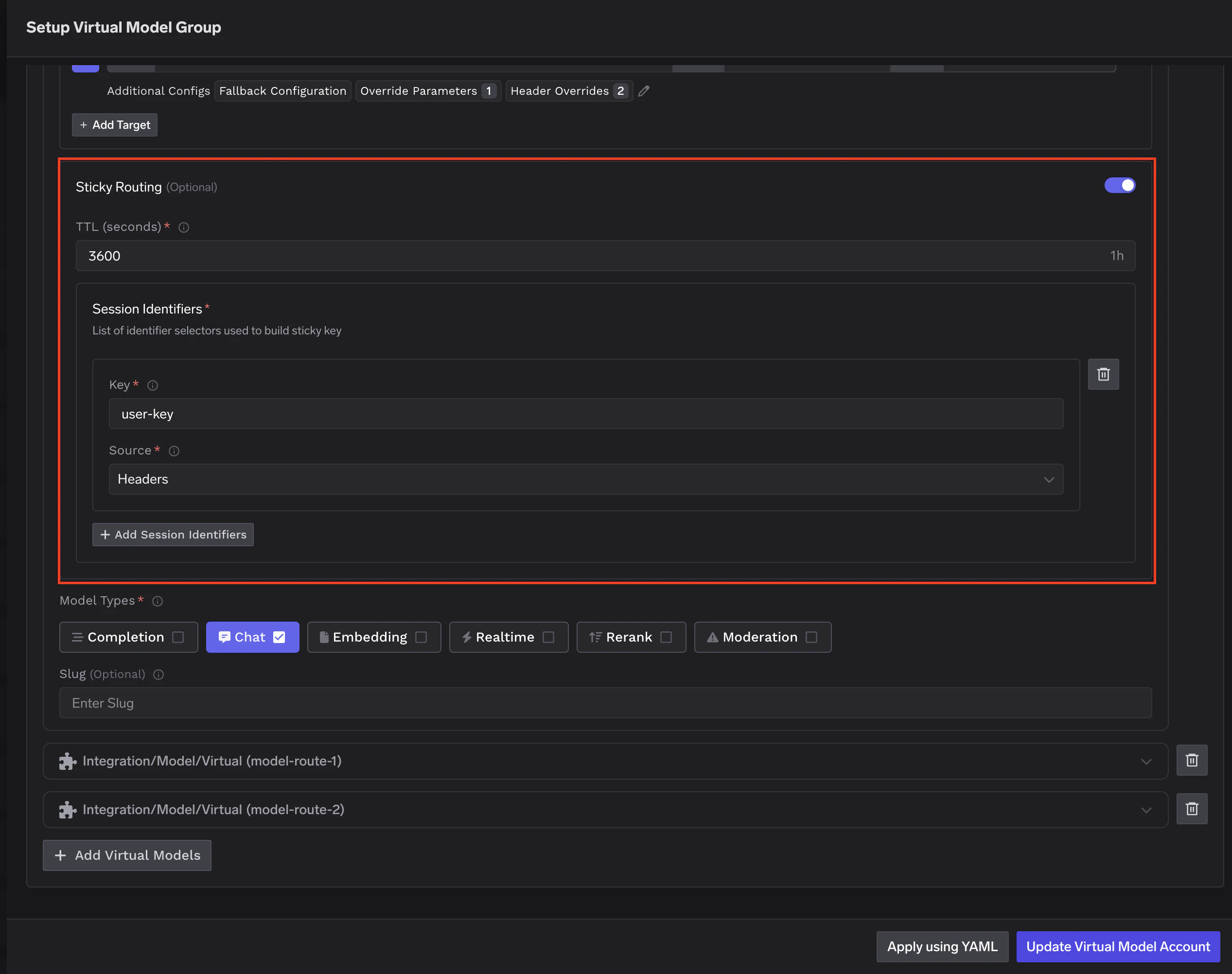 **Session identifiers** tell the gateway which fields to read from the request to identify a session. All configured identifiers are combined into a single session key — you can mix headers and metadata fields.
* **`key`** — The header or metadata field name to read.
* **`source`** — `headers` to read from HTTP request headers, or `metadata` to read from request metadata.
```yaml theme={"dark"}
# Pin by a combination of user and conversation
session_identifiers:
- key: x-user-id
source: headers
- key: x-conversation-id
source: headers
# Pin using request metadata
session_identifiers:
- key: tenant-id
source: metadata
- key: user-id
source: metadata
```
If a configured identifier is missing from the request, it contributes an empty string to the session key. All requests missing that field will be treated as the same session. Make sure your clients always send the identifier fields you configure.
**TTL window:** `ttl_seconds` defines how long a session stays pinned. For chatbots, `3600` (1 hour) is a common starting point. For longer workflows, consider `86400` (24 hours).
**Fallback during a sticky session:** If the pinned model fails, the remaining healthy targets are tried in sequence (this fallback order is **not weight-based**). Only targets with `fallback_candidate: true` are eligible. After a successful fallback, subsequent requests for that session in the same TTL window are routed to the working target — not back to the one that failed.
### Priority-based routing
Each target has a priority number. The gateway routes to the highest priority target (**0 is highest**) that is healthy. If that target fails or is unavailable, the gateway falls back to the next.
Priority-based routing supports **SLA cutoff** to automatically mark models as unhealthy when they breach performance thresholds. You can configure either or both of:
* **Time Per Output Token (TPOT)** threshold per target using `sla_cutoff.time_per_output_token_ms`
* **Time To First Token (TTFT)** threshold per target using `sla_cutoff.time_to_first_token_ms`
How the check works:
* The gateway monitors the rolling average of each configured metric over a **3-minute window** (up to 10 samples, minimum 3 required)
* For TTFT, only streaming requests record a sample — non-streaming requests are skipped from the TTFT average
* For TPOT, only requests with at least **30 output tokens** count as valid samples — shorter responses are excluded because their per-token latency is dominated by TTFT rather than steady-state generation speed
* If either metric exceeds its threshold, the target is marked unhealthy and moved to the end of the list
* Recovery is automatic when metrics improve or older data ages out
SLA cutoff is only available for priority-based routing, not weight-based or latency-based.
### Latency-based routing
You do not set weights. The gateway picks a target for each caller **deterministically**, and keeps the same target for the duration of a short time window. This gives every caller stable behaviour for prompt-cache reuse and reduces routing variance for agents and long conversations. Across many independent callers, traffic distributes in inverse proportion to each target's measured latency — faster targets get a larger share of overall traffic, but every healthy target still receives some.
**Stickiness is built-in.** Latency-based routing is automatically sticky-per-caller-per-epoch — you do **not** need to add a `sticky_routing` block to enable this. The behaviour applies as soon as you choose `latency-based-routing` as the rule type.
The selector runs three steps on every request:
1. **Measure each target's recent latency.** For each target, the gateway looks at recent successful requests over the **last 20 minutes** and computes the **Time Per Output Token (TPOT)** — total response time divided by the number of output tokens. TPOT folds time-to-first-token and inter-token latency into a single, output-length-independent number. Targets that don't have recent samples are treated as average so they aren't penalised before they've had a chance to be measured.
2. **Pick a target per caller, sticky for the epoch.** Selection is based on the caller's identity and the current **10-minute epoch**. Lower-latency targets (lower TPOT) are more likely to be picked, but every healthy target retains some share. Because the selection inputs are stable for the duration of an epoch, the **same caller routes to the same target for up to 10 minutes** — this is the sticky part of the algorithm, and is what gives you prompt-cache reuse and lower routing variance within a session.
3. **Order the remaining targets for fallback.** Lower-latency targets come first in the fallback chain. If the primary target fails or returns a fallback-status-code response, the gateway tries the next target in the chain.
When the epoch rolls over (every 10 minutes), the same caller may be routed to a different target — so the assignment is stable for long enough to benefit caching, but not so long that the routing decision becomes stale.
## Configuration structure
The following YAML shows the complete shape of a virtual model's routing configuration with all available fields. In the dashboard UI, the same fields are set through the form editor.
```yaml YAML theme={"dark"}
routing_config:
type: weight-based-routing | latency-based-routing | priority-based-routing
# Sticky routing (weight-based only)
sticky_routing:
ttl_seconds: integer # how long a session stays pinned (seconds)
session_identifiers:
- key: string # header or metadata field name
source: headers | metadata # where to read the session key from
load_balance_targets:
- target: string # model identifier in the gateway (e.g. azure/gpt-4o)
# Routing strategy fields (mutually exclusive)
weight: integer # 0–100, sum to 100 (weight-based only)
priority: integer # lower = higher priority (priority-based only)
# Retry configuration
retry_config:
attempts: integer # retries on the SAME target; default: 0
delay: integer # ms between retries; default: 100
on_status_codes: string[] # codes that trigger retry; default: ["429","500","502","503"]
# Fallback configuration
fallback_status_codes: string[] # codes that trigger trying a DIFFERENT target
# default: ["401","403","404","408","429","500","502","503"]
fallback_candidate: boolean # eligible to receive fallback traffic from other targets?
# default: true
# SLA cutoff (priority-based only). Configure either or both fields.
sla_cutoff:
time_per_output_token_ms: integer # TPOT threshold; target marked unhealthy when exceeded
time_to_first_token_ms: integer # TTFT threshold; target marked unhealthy when exceeded
# (averaged across streaming requests only)
# Metadata-based target filtering
metadata_match: # key-value pairs that must match resolved request metadata
key1: value1 # all pairs must match (AND logic)
key2: value2
# Header overrides
headers_override:
set: # headers to add or overwrite on the outgoing request
header-name: header-value
remove: # headers to strip from the outgoing request
- header-name
# Override parameters
override_params:
temperature: number # per-target temperature override
max_tokens: integer # per-target max_tokens override
prompt_version_fqn: string # per-target prompt version for hydration
```
### Key fields
**`type`** — The routing strategy for this virtual model:
* **`weight-based-routing`** — Distribute traffic by assigned weights that sum to 100.
* **`latency-based-routing`** — Per-caller deterministic selection weighted by recent latency, sticky for 10-minute windows so the same caller stays on the same target within that window. No weights needed.
* **`priority-based-routing`** — Route to the highest priority (lowest number) healthy target, falling back to the next on failure.
**`load_balance_targets`** — The list of real models eligible for routing. Each target and its configuration options are described in detail in the [Per-target configuration](#per-target-configuration) section below.
## Per-target configuration
Regardless of which routing strategy you choose, each target in the virtual model supports several options that control what happens when a request is routed to that target.
### Retries and fallbacks
Each target can define how the gateway should handle failures before giving up or moving to another target:
* **Retry configuration** — Number of attempts, delay between retries, and which status codes trigger a retry on the **same** target. Defaults: 0 attempts, 100 ms delay, retry on `429`, `500`, `502`, `503`.
* **Fallback status codes** — Which status codes cause the gateway to stop retrying this target and try a **different** target instead. Default: `401`, `403`, `404`, `408`, `429`, `500`, `502`, `503`.
* **Fallback candidate** — Whether this target is eligible to receive traffic when **another** target fails. Default: `true`. Set to `false` when you want a target to be used only as a primary and never receive fallback traffic from other targets.
```yaml theme={"dark"}
routing_config:
type: priority-based-routing
load_balance_targets:
- target: azure/gpt-4o
priority: 0
retry_config:
attempts: 3
delay: 200
on_status_codes: ["429", "500", "503"]
fallback_status_codes: ["429", "500", "502", "503"]
fallback_candidate: true
- target: openai/gpt-4o
priority: 1
retry_config:
attempts: 2
delay: 100
fallback_status_codes: ["429"]
fallback_candidate: true
- target: anthropic/claude-sonnet
priority: 2
fallback_candidate: false # only used as primary, never receives fallback traffic
```
In this configuration:
* A request first goes to `azure/gpt-4o` (priority 0). If it returns `429`, the gateway retries up to 3 times with 200 ms delay. If retries are exhausted or a fallback status code is returned, it falls back to the next target.
* `openai/gpt-4o` (priority 1) is tried next with its own retry config.
* `anthropic/claude-sonnet` (priority 2) has `fallback_candidate: false`, so it is **never** tried as a fallback for the other two targets — it is only used when it is itself the highest-priority healthy target.
### Header overrides
You can inject or remove HTTP headers on a per-target basis, applied just before the request is sent to that model. This is useful when a specific target requires headers that the others don't — for example, a region identifier, a deployment ID, or an API version header expected by one provider but not the rest.
Add a `headers_override` block to any target in your `load_balance_targets` list:
```yaml theme={"dark"}
routing_config:
type: weight-based-routing
load_balance_targets:
- target: provider-a/model-a
weight: 80
headers_override:
set:
x-region: us-east-1
remove:
- x-internal-debug
- target: provider-b/model-b
weight: 20
headers_override:
set:
x-region: eu-west-1
```
**Session identifiers** tell the gateway which fields to read from the request to identify a session. All configured identifiers are combined into a single session key — you can mix headers and metadata fields.
* **`key`** — The header or metadata field name to read.
* **`source`** — `headers` to read from HTTP request headers, or `metadata` to read from request metadata.
```yaml theme={"dark"}
# Pin by a combination of user and conversation
session_identifiers:
- key: x-user-id
source: headers
- key: x-conversation-id
source: headers
# Pin using request metadata
session_identifiers:
- key: tenant-id
source: metadata
- key: user-id
source: metadata
```
If a configured identifier is missing from the request, it contributes an empty string to the session key. All requests missing that field will be treated as the same session. Make sure your clients always send the identifier fields you configure.
**TTL window:** `ttl_seconds` defines how long a session stays pinned. For chatbots, `3600` (1 hour) is a common starting point. For longer workflows, consider `86400` (24 hours).
**Fallback during a sticky session:** If the pinned model fails, the remaining healthy targets are tried in sequence (this fallback order is **not weight-based**). Only targets with `fallback_candidate: true` are eligible. After a successful fallback, subsequent requests for that session in the same TTL window are routed to the working target — not back to the one that failed.
### Priority-based routing
Each target has a priority number. The gateway routes to the highest priority target (**0 is highest**) that is healthy. If that target fails or is unavailable, the gateway falls back to the next.
Priority-based routing supports **SLA cutoff** to automatically mark models as unhealthy when they breach performance thresholds. You can configure either or both of:
* **Time Per Output Token (TPOT)** threshold per target using `sla_cutoff.time_per_output_token_ms`
* **Time To First Token (TTFT)** threshold per target using `sla_cutoff.time_to_first_token_ms`
How the check works:
* The gateway monitors the rolling average of each configured metric over a **3-minute window** (up to 10 samples, minimum 3 required)
* For TTFT, only streaming requests record a sample — non-streaming requests are skipped from the TTFT average
* For TPOT, only requests with at least **30 output tokens** count as valid samples — shorter responses are excluded because their per-token latency is dominated by TTFT rather than steady-state generation speed
* If either metric exceeds its threshold, the target is marked unhealthy and moved to the end of the list
* Recovery is automatic when metrics improve or older data ages out
SLA cutoff is only available for priority-based routing, not weight-based or latency-based.
### Latency-based routing
You do not set weights. The gateway picks a target for each caller **deterministically**, and keeps the same target for the duration of a short time window. This gives every caller stable behaviour for prompt-cache reuse and reduces routing variance for agents and long conversations. Across many independent callers, traffic distributes in inverse proportion to each target's measured latency — faster targets get a larger share of overall traffic, but every healthy target still receives some.
**Stickiness is built-in.** Latency-based routing is automatically sticky-per-caller-per-epoch — you do **not** need to add a `sticky_routing` block to enable this. The behaviour applies as soon as you choose `latency-based-routing` as the rule type.
The selector runs three steps on every request:
1. **Measure each target's recent latency.** For each target, the gateway looks at recent successful requests over the **last 20 minutes** and computes the **Time Per Output Token (TPOT)** — total response time divided by the number of output tokens. TPOT folds time-to-first-token and inter-token latency into a single, output-length-independent number. Targets that don't have recent samples are treated as average so they aren't penalised before they've had a chance to be measured.
2. **Pick a target per caller, sticky for the epoch.** Selection is based on the caller's identity and the current **10-minute epoch**. Lower-latency targets (lower TPOT) are more likely to be picked, but every healthy target retains some share. Because the selection inputs are stable for the duration of an epoch, the **same caller routes to the same target for up to 10 minutes** — this is the sticky part of the algorithm, and is what gives you prompt-cache reuse and lower routing variance within a session.
3. **Order the remaining targets for fallback.** Lower-latency targets come first in the fallback chain. If the primary target fails or returns a fallback-status-code response, the gateway tries the next target in the chain.
When the epoch rolls over (every 10 minutes), the same caller may be routed to a different target — so the assignment is stable for long enough to benefit caching, but not so long that the routing decision becomes stale.
## Configuration structure
The following YAML shows the complete shape of a virtual model's routing configuration with all available fields. In the dashboard UI, the same fields are set through the form editor.
```yaml YAML theme={"dark"}
routing_config:
type: weight-based-routing | latency-based-routing | priority-based-routing
# Sticky routing (weight-based only)
sticky_routing:
ttl_seconds: integer # how long a session stays pinned (seconds)
session_identifiers:
- key: string # header or metadata field name
source: headers | metadata # where to read the session key from
load_balance_targets:
- target: string # model identifier in the gateway (e.g. azure/gpt-4o)
# Routing strategy fields (mutually exclusive)
weight: integer # 0–100, sum to 100 (weight-based only)
priority: integer # lower = higher priority (priority-based only)
# Retry configuration
retry_config:
attempts: integer # retries on the SAME target; default: 0
delay: integer # ms between retries; default: 100
on_status_codes: string[] # codes that trigger retry; default: ["429","500","502","503"]
# Fallback configuration
fallback_status_codes: string[] # codes that trigger trying a DIFFERENT target
# default: ["401","403","404","408","429","500","502","503"]
fallback_candidate: boolean # eligible to receive fallback traffic from other targets?
# default: true
# SLA cutoff (priority-based only). Configure either or both fields.
sla_cutoff:
time_per_output_token_ms: integer # TPOT threshold; target marked unhealthy when exceeded
time_to_first_token_ms: integer # TTFT threshold; target marked unhealthy when exceeded
# (averaged across streaming requests only)
# Metadata-based target filtering
metadata_match: # key-value pairs that must match resolved request metadata
key1: value1 # all pairs must match (AND logic)
key2: value2
# Header overrides
headers_override:
set: # headers to add or overwrite on the outgoing request
header-name: header-value
remove: # headers to strip from the outgoing request
- header-name
# Override parameters
override_params:
temperature: number # per-target temperature override
max_tokens: integer # per-target max_tokens override
prompt_version_fqn: string # per-target prompt version for hydration
```
### Key fields
**`type`** — The routing strategy for this virtual model:
* **`weight-based-routing`** — Distribute traffic by assigned weights that sum to 100.
* **`latency-based-routing`** — Per-caller deterministic selection weighted by recent latency, sticky for 10-minute windows so the same caller stays on the same target within that window. No weights needed.
* **`priority-based-routing`** — Route to the highest priority (lowest number) healthy target, falling back to the next on failure.
**`load_balance_targets`** — The list of real models eligible for routing. Each target and its configuration options are described in detail in the [Per-target configuration](#per-target-configuration) section below.
## Per-target configuration
Regardless of which routing strategy you choose, each target in the virtual model supports several options that control what happens when a request is routed to that target.
### Retries and fallbacks
Each target can define how the gateway should handle failures before giving up or moving to another target:
* **Retry configuration** — Number of attempts, delay between retries, and which status codes trigger a retry on the **same** target. Defaults: 0 attempts, 100 ms delay, retry on `429`, `500`, `502`, `503`.
* **Fallback status codes** — Which status codes cause the gateway to stop retrying this target and try a **different** target instead. Default: `401`, `403`, `404`, `408`, `429`, `500`, `502`, `503`.
* **Fallback candidate** — Whether this target is eligible to receive traffic when **another** target fails. Default: `true`. Set to `false` when you want a target to be used only as a primary and never receive fallback traffic from other targets.
```yaml theme={"dark"}
routing_config:
type: priority-based-routing
load_balance_targets:
- target: azure/gpt-4o
priority: 0
retry_config:
attempts: 3
delay: 200
on_status_codes: ["429", "500", "503"]
fallback_status_codes: ["429", "500", "502", "503"]
fallback_candidate: true
- target: openai/gpt-4o
priority: 1
retry_config:
attempts: 2
delay: 100
fallback_status_codes: ["429"]
fallback_candidate: true
- target: anthropic/claude-sonnet
priority: 2
fallback_candidate: false # only used as primary, never receives fallback traffic
```
In this configuration:
* A request first goes to `azure/gpt-4o` (priority 0). If it returns `429`, the gateway retries up to 3 times with 200 ms delay. If retries are exhausted or a fallback status code is returned, it falls back to the next target.
* `openai/gpt-4o` (priority 1) is tried next with its own retry config.
* `anthropic/claude-sonnet` (priority 2) has `fallback_candidate: false`, so it is **never** tried as a fallback for the other two targets — it is only used when it is itself the highest-priority healthy target.
### Header overrides
You can inject or remove HTTP headers on a per-target basis, applied just before the request is sent to that model. This is useful when a specific target requires headers that the others don't — for example, a region identifier, a deployment ID, or an API version header expected by one provider but not the rest.
Add a `headers_override` block to any target in your `load_balance_targets` list:
```yaml theme={"dark"}
routing_config:
type: weight-based-routing
load_balance_targets:
- target: provider-a/model-a
weight: 80
headers_override:
set:
x-region: us-east-1
remove:
- x-internal-debug
- target: provider-b/model-b
weight: 20
headers_override:
set:
x-region: eu-west-1
```
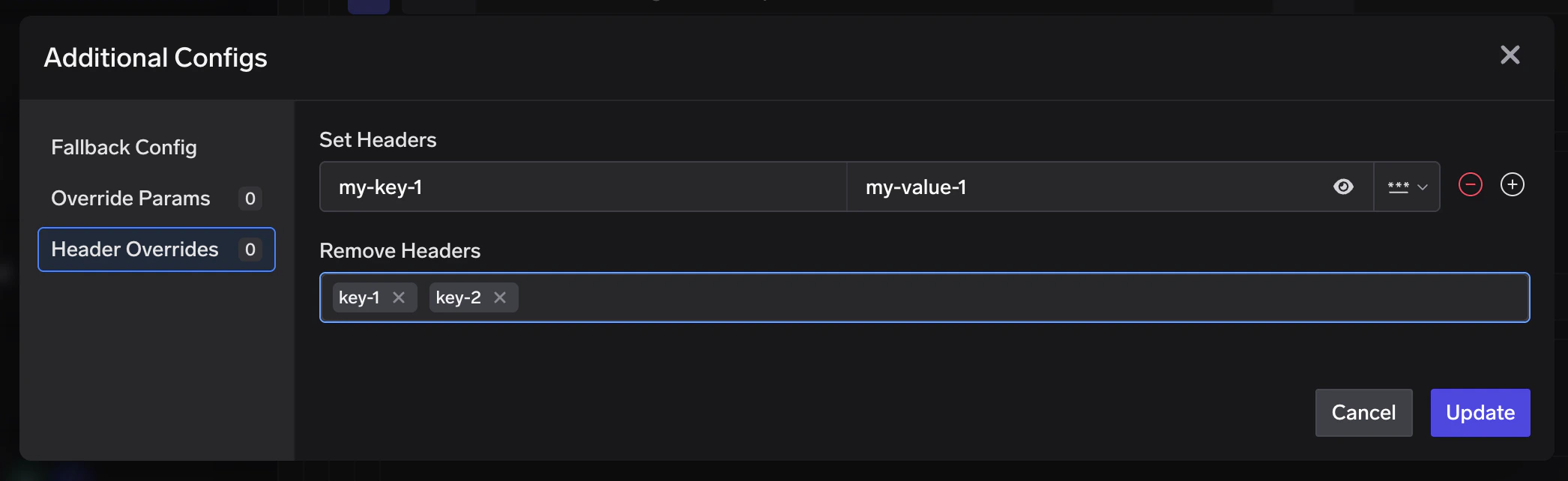 * **`set`** — Key-value pairs of headers to add or overwrite on the outgoing request.
* **`remove`** — List of header keys to strip from the outgoing request.
Header keys are **case-insensitive** — `X-Custom-Auth` and `x-custom-auth` refer to the same header. The gateway normalises all keys to lowercase before applying overrides. Header overrides are applied **last**, after parameter overrides, so they reflect the final outgoing headers sent to the provider.
### Metadata-based target filtering
You can constrain a target to only receive traffic when request metadata matches specific key-value pairs using `metadata_match`.
The gateway evaluates **resolved metadata** (not just raw request headers). Metadata can come from:
* **Request metadata header** — `x-tfy-metadata` (JSON object with string keys and values)
* **Virtual account tags** — when using a virtual account, its tags are included in metadata
* **Default gateway metadata** — configured at gateway level (commonly used in self-hosted setups)
* **SaaS gateway location metadata** — `tfy_gateway_region` and `tfy_gateway_zone` are automatically added by the SaaS gateway based on which region handled the request
For the full list of SaaS gateway location metadata keys and their values, see [Metadata Keys](/docs/ai-gateway/globally-distributed-saas#metadata-keys).
When the same key appears in multiple sources, precedence is:
1. request metadata
2. default gateway metadata (overrides request value for overlapping keys)
3. virtual account tags (highest precedence)
For each target:
* If `metadata_match` is not set (or empty), that target always stays eligible.
* If `metadata_match` is set, **all** configured pairs must match exactly (`AND` semantics).
* Filtering happens before load-balancing order and sticky routing are computed, so only matching targets participate in routing for that request.
```yaml theme={"dark"}
routing_config:
type: weight-based-routing
load_balance_targets:
- target: azure/gpt-4o
weight: 70
metadata_match:
region: us
tier: enterprise
- target: openai/gpt-4o
weight: 30
```
For a request with:
```http theme={"dark"}
x-tfy-metadata: {"region":"us","tier":"enterprise"}
```
both targets are eligible. For:
```http theme={"dark"}
x-tfy-metadata: {"region":"eu","tier":"enterprise"}
```
only `openai/gpt-4o` remains eligible because the first target does not match.
On the [SaaS gateway](/docs/ai-gateway/globally-distributed-saas), every request is automatically tagged with `tfy_gateway_region` and `tfy_gateway_zone` based on which gateway handled it. You can use `metadata_match` to route traffic from specific regions to region-appropriate model deployments — without the client needing to send any metadata.
```yaml theme={"dark"}
routing_config:
type: priority-based-routing
load_balance_targets:
# US gateway traffic → Azure US East deployment
- target: azure-us/gpt-4o
priority: 0
metadata_match:
tfy_gateway_region: US
# EU gateway traffic → Azure EU West deployment
- target: azure-eu/gpt-4o
priority: 0
metadata_match:
tfy_gateway_region: EU
# India gateway traffic → Azure India deployment
- target: azure-in/gpt-4o
priority: 0
metadata_match:
tfy_gateway_region: IN
# Catch-all fallback for any other region
- target: openai/gpt-4o
priority: 1
```
In this setup:
* A user in the US hits `gateway.truefoundry.ai`, which routes to the nearest US gateway. The gateway automatically sets `tfy_gateway_region: US` in resolved metadata, so the request matches `azure-us/gpt-4o`.
* A user in Europe hits the nearest EU gateway (`tfy_gateway_region: EU`), matching `azure-eu/gpt-4o`.
* A user in India hits the nearest India gateway (`tfy_gateway_region: IN`), matching `azure-in/gpt-4o`.
* Users from any other region (e.g. Australia, South America) don't match any `metadata_match` rule, so they fall through to `openai/gpt-4o` (priority 1) which has no `metadata_match` and acts as the default.
You can also filter by zone for finer-grained control:
```yaml theme={"dark"}
metadata_match:
tfy_gateway_zone: SFO # only match traffic from the San Francisco gateway
```
If no target matches the request metadata, the gateway returns `404` with an error indicating that none of the configured targets matched `metadata_match` conditions. Always include at least one target without `metadata_match` as a catch-all, or ensure your metadata rules cover all possible values.
### Model-specific prompt overrides
When a virtual model sends traffic to targets from different model families, you may need different prompt versions per provider. Configure `prompt_version_fqn` in override parameters on each target. When a request is routed to a target, the gateway uses that target's prompt version for hydration.
This is useful when:
* Different models require different prompt formats or structures
* You want to optimize prompts for specific model capabilities
* You need to maintain model-specific prompt versions behind one virtual model name
```yaml theme={"dark"}
routing_config:
type: weight-based-routing
load_balance_targets:
- target: openai/gpt-4o
weight: 70
override_params:
prompt_version_fqn: chat_prompt:internal/my-app/gpt4-optimized-prompt:1
- target: anthropic/claude-sonnet
weight: 30
override_params:
prompt_version_fqn: chat_prompt:internal/my-app/claude-optimized-prompt:1
```
`prompt_version_fqn` override does not work with agents (when using MCP/tools). It is supported for standard chat completion requests.
## Unhealthy target detection
All the routing strategies described above only consider **healthy** targets when deciding where to send a request. The gateway continuously monitors every target and automatically marks targets as unhealthy when they start failing or breaching performance thresholds. This section explains how that health tracking works.
When a target is marked unhealthy, healthy targets are always tried first. Unhealthy targets are moved to the end of the list and only used as a last resort if all healthy targets fail. Recovery is automatic once errors age out of the evaluation window.
The gateway tracks error responses for each target and marks a target unhealthy when failures cross a threshold in a recent time window.
* Error responses considered: `5xx`, `429`, `401`, and `403`
* Default failure threshold: `2` or more failures
* Default evaluation window: last `2` minutes (rolling window)
* Recovery: automatic, once failures age out of the window
For priority-based routing, you can also configure per-target latency thresholds via `sla_cutoff`:
* `time_per_output_token_ms` — average TPOT over a 3-minute rolling window (only requests with at least **30 output tokens** are counted; shorter responses are excluded as their per-token latency is dominated by TTFT rather than steady-state generation speed)
* `time_to_first_token_ms` — average TTFT over a 3-minute rolling window (streaming requests only)
If either configured metric exceeds its threshold (with at least 3 samples in the window), the target is marked unhealthy. See [SLA cutoff](#sla-cutoff) above.
## FAQ
Yes. Updates apply to new requests immediately; in-flight requests keep their current routing.
The gateway returns the actual model used in the `x-tfy-resolved-model` [response header](/docs/ai-gateway/headers#response-headers). This may differ from the virtual model you requested due to load balancing or fallbacks. You can also view per-target traffic, success rates, and latency in the AI Gateway dashboard.
Yes, if you enable multiple model types on the virtual model. The supported model types are `chat`, `responses`, `completion`, `embedding`, `rerank`, `moderation`, `image`, and the audio types — `text_to_speech`, `audio_transcription` (STT), and `audio_translation`. Every target must support the operation you call. See [Supported API types](#supported-api-types) for the full endpoint mapping.
No. Virtual models are designed for **synchronous** requests where the gateway can observe the first attempt and, if it fails, retry or fall back to another target. The Batch API (`/batches`) is asynchronous — requests inside a batch are processed by a single provider hours later, so there is no live response for the gateway to act on, and no opportunity to fail over.
Use a real catalog model identifier (e.g. `openai-main/gpt-4o`) when creating batch jobs. For synchronous traffic that needs resilience across providers, virtual models are the right tool.
After retries and fallbacks are exhausted, the request fails with an error. Add enough fallback candidates for critical paths.
No. Allowing virtual models as targets could lead to recursive or deeply nested routing chains that are hard to reason about and debug. To keep routing predictable, targets must be real catalog models. If you need to split traffic further, create separate virtual models and have your client choose between them.
Explicit `sticky_routing` configuration isn't supported for latency-based or priority-based routing — and it's typically not needed.
* **Priority-based routing** sends every request to the highest-priority healthy target, so a session naturally stays on the same target until that target becomes unhealthy.
* **Latency-based routing** is **inherently sticky-per-caller-per-epoch**: the target is picked deterministically from a hash of the caller's identity and the current 10-minute epoch, so the same caller stays on the same target for up to 10 minutes at a time. This gives you prompt-cache benefits and consistent behaviour for agents and long conversations without any extra configuration.
* **Weight-based routing** is the one strategy that deliberately spreads traffic across targets on every request — so `sticky_routing` exists there for cases where you want to override that and pin a session to a single target.
No — only within the configured `ttl_seconds` window. Once the window expires, the session is re-evaluated and may land on a different model. Size `ttl_seconds` to match your typical session duration.
Yes. Every gateway pod uses the same configuration and the same time-based window, so all pods independently arrive at the same assignment for the same session. When a fallback occurs mid-window, the update is propagated across all pods automatically.
Header overrides are strictly **per-target** — they only apply when a request is dispatched to that specific target. Other targets in the same virtual model are not affected.
`metadata_match` uses **all-keys-must-match** logic for a target. If you configure multiple keys, every key-value pair must match request metadata exactly for that target to be eligible.
Targets without `metadata_match` remain eligible for all requests and act as a default path. Targets with `metadata_match` are included only when their conditions match.
Metadata filtering runs first. Sticky routing and fallback then operate only within the filtered target set for that request.
## Next steps
Ready to set up a virtual model? See [Create a virtual model](/docs/ai-gateway/virtual-model-advanced) for the step-by-step walkthrough and common configuration patterns.
* **`set`** — Key-value pairs of headers to add or overwrite on the outgoing request.
* **`remove`** — List of header keys to strip from the outgoing request.
Header keys are **case-insensitive** — `X-Custom-Auth` and `x-custom-auth` refer to the same header. The gateway normalises all keys to lowercase before applying overrides. Header overrides are applied **last**, after parameter overrides, so they reflect the final outgoing headers sent to the provider.
### Metadata-based target filtering
You can constrain a target to only receive traffic when request metadata matches specific key-value pairs using `metadata_match`.
The gateway evaluates **resolved metadata** (not just raw request headers). Metadata can come from:
* **Request metadata header** — `x-tfy-metadata` (JSON object with string keys and values)
* **Virtual account tags** — when using a virtual account, its tags are included in metadata
* **Default gateway metadata** — configured at gateway level (commonly used in self-hosted setups)
* **SaaS gateway location metadata** — `tfy_gateway_region` and `tfy_gateway_zone` are automatically added by the SaaS gateway based on which region handled the request
For the full list of SaaS gateway location metadata keys and their values, see [Metadata Keys](/docs/ai-gateway/globally-distributed-saas#metadata-keys).
When the same key appears in multiple sources, precedence is:
1. request metadata
2. default gateway metadata (overrides request value for overlapping keys)
3. virtual account tags (highest precedence)
For each target:
* If `metadata_match` is not set (or empty), that target always stays eligible.
* If `metadata_match` is set, **all** configured pairs must match exactly (`AND` semantics).
* Filtering happens before load-balancing order and sticky routing are computed, so only matching targets participate in routing for that request.
```yaml theme={"dark"}
routing_config:
type: weight-based-routing
load_balance_targets:
- target: azure/gpt-4o
weight: 70
metadata_match:
region: us
tier: enterprise
- target: openai/gpt-4o
weight: 30
```
For a request with:
```http theme={"dark"}
x-tfy-metadata: {"region":"us","tier":"enterprise"}
```
both targets are eligible. For:
```http theme={"dark"}
x-tfy-metadata: {"region":"eu","tier":"enterprise"}
```
only `openai/gpt-4o` remains eligible because the first target does not match.
On the [SaaS gateway](/docs/ai-gateway/globally-distributed-saas), every request is automatically tagged with `tfy_gateway_region` and `tfy_gateway_zone` based on which gateway handled it. You can use `metadata_match` to route traffic from specific regions to region-appropriate model deployments — without the client needing to send any metadata.
```yaml theme={"dark"}
routing_config:
type: priority-based-routing
load_balance_targets:
# US gateway traffic → Azure US East deployment
- target: azure-us/gpt-4o
priority: 0
metadata_match:
tfy_gateway_region: US
# EU gateway traffic → Azure EU West deployment
- target: azure-eu/gpt-4o
priority: 0
metadata_match:
tfy_gateway_region: EU
# India gateway traffic → Azure India deployment
- target: azure-in/gpt-4o
priority: 0
metadata_match:
tfy_gateway_region: IN
# Catch-all fallback for any other region
- target: openai/gpt-4o
priority: 1
```
In this setup:
* A user in the US hits `gateway.truefoundry.ai`, which routes to the nearest US gateway. The gateway automatically sets `tfy_gateway_region: US` in resolved metadata, so the request matches `azure-us/gpt-4o`.
* A user in Europe hits the nearest EU gateway (`tfy_gateway_region: EU`), matching `azure-eu/gpt-4o`.
* A user in India hits the nearest India gateway (`tfy_gateway_region: IN`), matching `azure-in/gpt-4o`.
* Users from any other region (e.g. Australia, South America) don't match any `metadata_match` rule, so they fall through to `openai/gpt-4o` (priority 1) which has no `metadata_match` and acts as the default.
You can also filter by zone for finer-grained control:
```yaml theme={"dark"}
metadata_match:
tfy_gateway_zone: SFO # only match traffic from the San Francisco gateway
```
If no target matches the request metadata, the gateway returns `404` with an error indicating that none of the configured targets matched `metadata_match` conditions. Always include at least one target without `metadata_match` as a catch-all, or ensure your metadata rules cover all possible values.
### Model-specific prompt overrides
When a virtual model sends traffic to targets from different model families, you may need different prompt versions per provider. Configure `prompt_version_fqn` in override parameters on each target. When a request is routed to a target, the gateway uses that target's prompt version for hydration.
This is useful when:
* Different models require different prompt formats or structures
* You want to optimize prompts for specific model capabilities
* You need to maintain model-specific prompt versions behind one virtual model name
```yaml theme={"dark"}
routing_config:
type: weight-based-routing
load_balance_targets:
- target: openai/gpt-4o
weight: 70
override_params:
prompt_version_fqn: chat_prompt:internal/my-app/gpt4-optimized-prompt:1
- target: anthropic/claude-sonnet
weight: 30
override_params:
prompt_version_fqn: chat_prompt:internal/my-app/claude-optimized-prompt:1
```
`prompt_version_fqn` override does not work with agents (when using MCP/tools). It is supported for standard chat completion requests.
## Unhealthy target detection
All the routing strategies described above only consider **healthy** targets when deciding where to send a request. The gateway continuously monitors every target and automatically marks targets as unhealthy when they start failing or breaching performance thresholds. This section explains how that health tracking works.
When a target is marked unhealthy, healthy targets are always tried first. Unhealthy targets are moved to the end of the list and only used as a last resort if all healthy targets fail. Recovery is automatic once errors age out of the evaluation window.
The gateway tracks error responses for each target and marks a target unhealthy when failures cross a threshold in a recent time window.
* Error responses considered: `5xx`, `429`, `401`, and `403`
* Default failure threshold: `2` or more failures
* Default evaluation window: last `2` minutes (rolling window)
* Recovery: automatic, once failures age out of the window
For priority-based routing, you can also configure per-target latency thresholds via `sla_cutoff`:
* `time_per_output_token_ms` — average TPOT over a 3-minute rolling window (only requests with at least **30 output tokens** are counted; shorter responses are excluded as their per-token latency is dominated by TTFT rather than steady-state generation speed)
* `time_to_first_token_ms` — average TTFT over a 3-minute rolling window (streaming requests only)
If either configured metric exceeds its threshold (with at least 3 samples in the window), the target is marked unhealthy. See [SLA cutoff](#sla-cutoff) above.
## FAQ
Yes. Updates apply to new requests immediately; in-flight requests keep their current routing.
The gateway returns the actual model used in the `x-tfy-resolved-model` [response header](/docs/ai-gateway/headers#response-headers). This may differ from the virtual model you requested due to load balancing or fallbacks. You can also view per-target traffic, success rates, and latency in the AI Gateway dashboard.
Yes, if you enable multiple model types on the virtual model. The supported model types are `chat`, `responses`, `completion`, `embedding`, `rerank`, `moderation`, `image`, and the audio types — `text_to_speech`, `audio_transcription` (STT), and `audio_translation`. Every target must support the operation you call. See [Supported API types](#supported-api-types) for the full endpoint mapping.
No. Virtual models are designed for **synchronous** requests where the gateway can observe the first attempt and, if it fails, retry or fall back to another target. The Batch API (`/batches`) is asynchronous — requests inside a batch are processed by a single provider hours later, so there is no live response for the gateway to act on, and no opportunity to fail over.
Use a real catalog model identifier (e.g. `openai-main/gpt-4o`) when creating batch jobs. For synchronous traffic that needs resilience across providers, virtual models are the right tool.
After retries and fallbacks are exhausted, the request fails with an error. Add enough fallback candidates for critical paths.
No. Allowing virtual models as targets could lead to recursive or deeply nested routing chains that are hard to reason about and debug. To keep routing predictable, targets must be real catalog models. If you need to split traffic further, create separate virtual models and have your client choose between them.
Explicit `sticky_routing` configuration isn't supported for latency-based or priority-based routing — and it's typically not needed.
* **Priority-based routing** sends every request to the highest-priority healthy target, so a session naturally stays on the same target until that target becomes unhealthy.
* **Latency-based routing** is **inherently sticky-per-caller-per-epoch**: the target is picked deterministically from a hash of the caller's identity and the current 10-minute epoch, so the same caller stays on the same target for up to 10 minutes at a time. This gives you prompt-cache benefits and consistent behaviour for agents and long conversations without any extra configuration.
* **Weight-based routing** is the one strategy that deliberately spreads traffic across targets on every request — so `sticky_routing` exists there for cases where you want to override that and pin a session to a single target.
No — only within the configured `ttl_seconds` window. Once the window expires, the session is re-evaluated and may land on a different model. Size `ttl_seconds` to match your typical session duration.
Yes. Every gateway pod uses the same configuration and the same time-based window, so all pods independently arrive at the same assignment for the same session. When a fallback occurs mid-window, the update is propagated across all pods automatically.
Header overrides are strictly **per-target** — they only apply when a request is dispatched to that specific target. Other targets in the same virtual model are not affected.
`metadata_match` uses **all-keys-must-match** logic for a target. If you configure multiple keys, every key-value pair must match request metadata exactly for that target to be eligible.
Targets without `metadata_match` remain eligible for all requests and act as a default path. Targets with `metadata_match` are included only when their conditions match.
Metadata filtering runs first. Sticky routing and fallback then operate only within the filtered target set for that request.
## Next steps
Ready to set up a virtual model? See [Create a virtual model](/docs/ai-gateway/virtual-model-advanced) for the step-by-step walkthrough and common configuration patterns.