> ## Documentation Index
> Fetch the complete documentation index at: https://www.truefoundry.com/llms.txt
> Use this file to discover all available pages before exploring further.
# Create a Virtual Model
> Step-by-step guide to creating virtual models, configuring targets, and using them in your application.
This page walks through creating a virtual model in the TrueFoundry dashboard and using it from your application. For an overview of routing strategies, health detection, and advanced features like sticky routing, see the [Virtual Models overview](/docs/ai-gateway/virtual-model).
## Create a virtual model
From the TrueFoundry dashboard, go to **AI Gateway** → **Models** → **Virtual Model**.
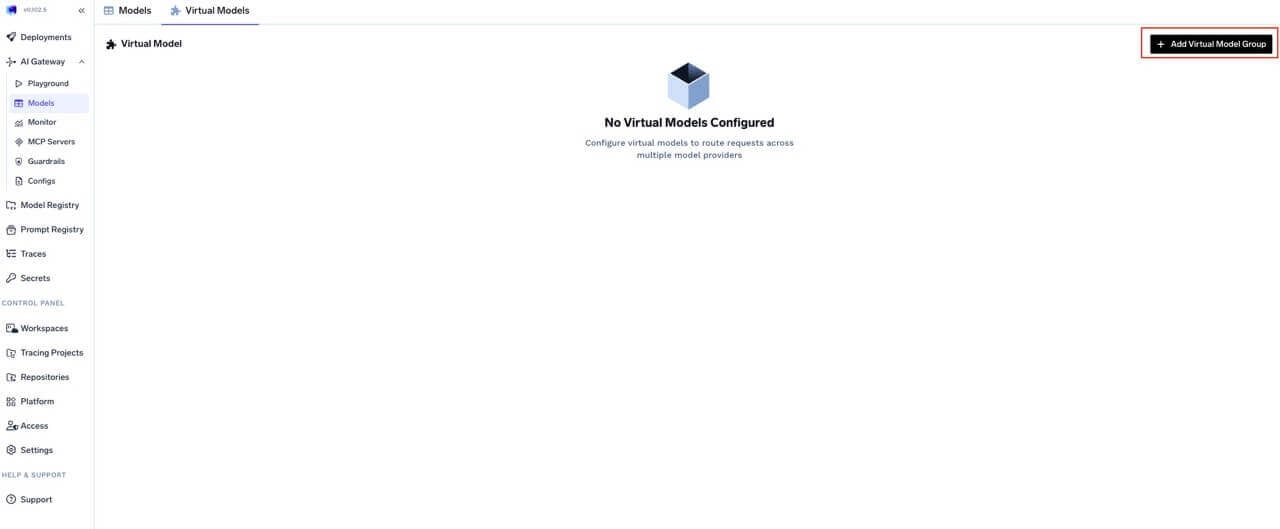 Virtual models live inside **Virtual Model Provider Groups**. You can add models to an existing group or create a new group when you start.
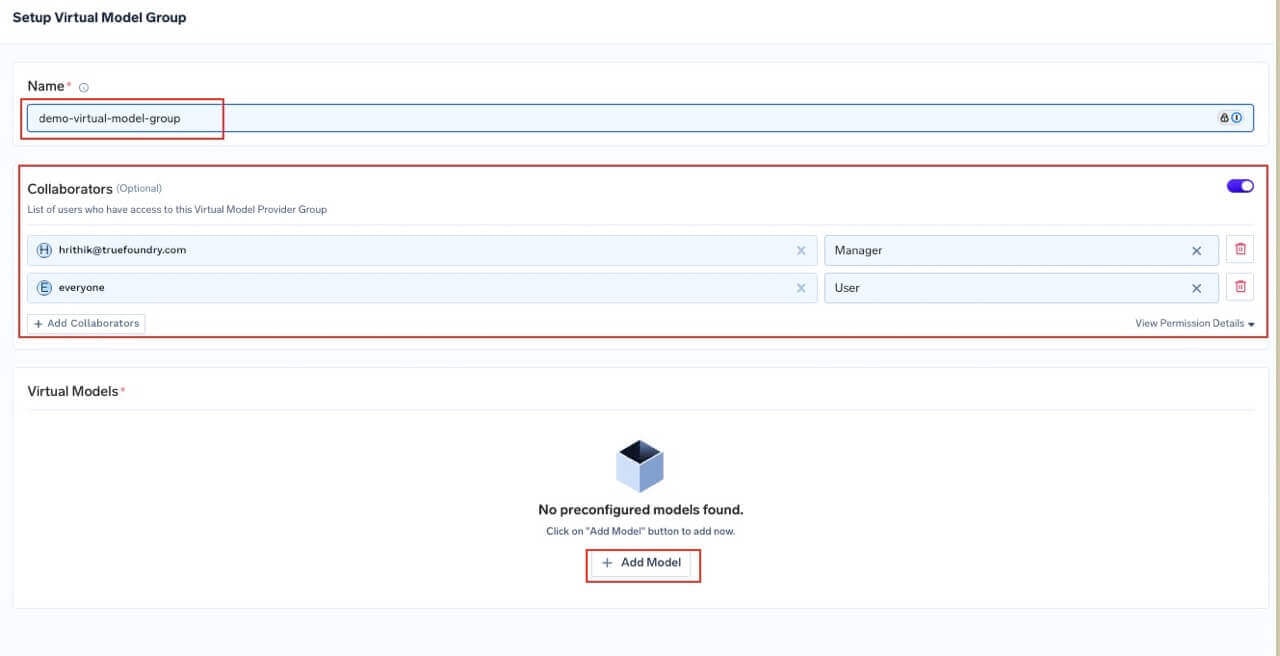
Give the group a unique name (3–64 characters, alphanumeric and hyphens, cannot start with a number). Configure collaborators:
* **User** — May call the virtual models in this group for inference.
* **Manager** — May change virtual model configuration.
Virtual models live inside **Virtual Model Provider Groups**. You can add models to an existing group or create a new group when you start.
Give the group a unique name (3–64 characters, alphanumeric and hyphens, cannot start with a number). Configure collaborators:
* **User** — May call the virtual models in this group for inference.
* **Manager** — May change virtual model configuration.
 See [Gateway access control](/docs/ai-gateway/gateway-access-control) for details.
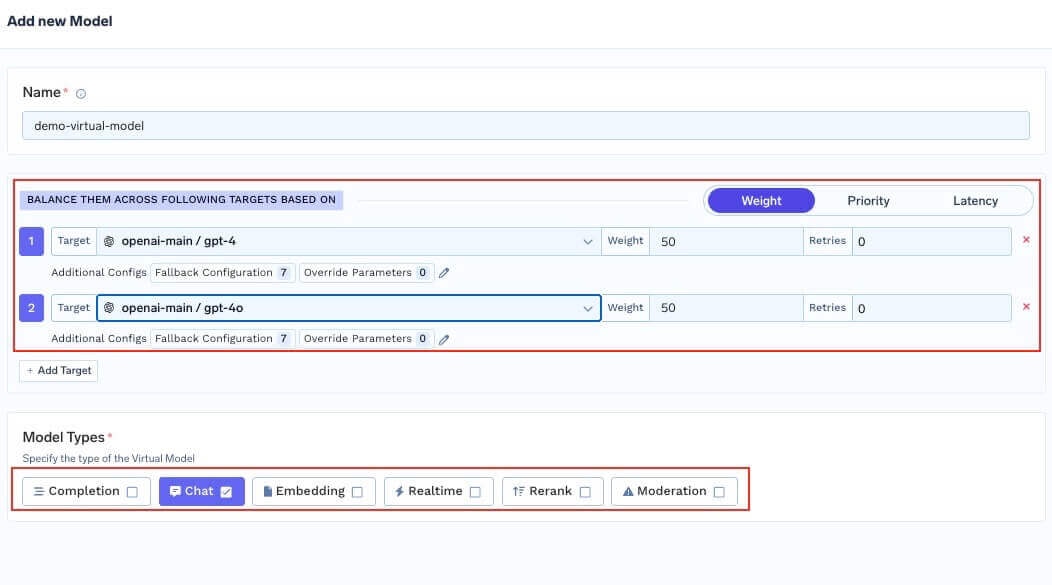
For each virtual model in the group, set:
* **Name** — Identifier used in the full path `group-name/virtual-model-name` (for example `gpt-4-production`).
* **Model types** — Operation kinds this virtual model supports — chat, completion, embedding, rerank, moderation, and the audio types (text to speech, audio transcription, audio translation). All targets must support the operation you invoke.
* **Routing strategy** — Choose one of three strategies:
| Strategy | When to use |
| ------------------ | ------------------------------------------------------------------------------------ |
| **Weight-based** | Canaries, fixed capacity splits, A/B allocation. Assign weights that sum to 100. |
| **Latency-based** | Automatic performance chasing. No weights needed — the AI Gateway picks the fastest. |
| **Priority-based** | Primary + backup topologies. Assign priority numbers (0 = highest). |
For how each strategy works, see the [overview](/docs/ai-gateway/virtual-model#routing-strategies).
* **Target models** — For each target, configure:
| Field | Description |
| ------------------------- | ------------------------------------------------------------------------------------------------------------------------------------------------------------------------------------------------------------------------------------------------------------------------------ |
| **Target** | A real model from the catalog (not another virtual model). |
| **Weight** | Traffic share (weight-based only). Weights across targets should sum to 100. |
| **Priority** | Priority level (priority-based only). Lower number = higher priority. |
| **Retry config** | Attempts, delay (ms), and status codes that trigger retries. Defaults: 0 attempts, 100 ms delay, retry on `429`, `500`, `502`, `503`. |
| **SLA cutoff** | Priority-based only. Per-target latency thresholds (`time_per_output_token_ms`, `time_to_first_token_ms`); a target is marked unhealthy when either configured metric is breached over a 3-minute rolling window. See [SLA cutoff](/docs/ai-gateway/virtual-model#sla-cutoff). |
| **Fallback status codes** | HTTP codes that cause fallback to another target. Defaults: `401`, `403`, `404`, `408`, `429`, `500`, `502`, `503`. |
| **Fallback candidate** | Whether this target may receive traffic when another target fails. Default: `true`. |
| **Override parameters** | Per-target request parameters like `temperature`, `max_tokens`, or `prompt_version_fqn` for [model-specific prompts](/docs/ai-gateway/virtual-model#model-specific-prompt-overrides). |
| **Header overrides** | Inject or remove HTTP headers for this target only. Use `set` to add/overwrite headers and `remove` to strip them. See [header overrides](/docs/ai-gateway/virtual-model#header-overrides). |
`prompt_version_fqn` override does not apply when using agents with MCP/tools; it is supported for standard chat completion requests.
* **Slug** (optional) — Short global alias for this virtual model. See [Slugs](#virtual-model-slugs).
See [Gateway access control](/docs/ai-gateway/gateway-access-control) for details.
For each virtual model in the group, set:
* **Name** — Identifier used in the full path `group-name/virtual-model-name` (for example `gpt-4-production`).
* **Model types** — Operation kinds this virtual model supports — chat, completion, embedding, rerank, moderation, and the audio types (text to speech, audio transcription, audio translation). All targets must support the operation you invoke.
* **Routing strategy** — Choose one of three strategies:
| Strategy | When to use |
| ------------------ | ------------------------------------------------------------------------------------ |
| **Weight-based** | Canaries, fixed capacity splits, A/B allocation. Assign weights that sum to 100. |
| **Latency-based** | Automatic performance chasing. No weights needed — the AI Gateway picks the fastest. |
| **Priority-based** | Primary + backup topologies. Assign priority numbers (0 = highest). |
For how each strategy works, see the [overview](/docs/ai-gateway/virtual-model#routing-strategies).
* **Target models** — For each target, configure:
| Field | Description |
| ------------------------- | ------------------------------------------------------------------------------------------------------------------------------------------------------------------------------------------------------------------------------------------------------------------------------ |
| **Target** | A real model from the catalog (not another virtual model). |
| **Weight** | Traffic share (weight-based only). Weights across targets should sum to 100. |
| **Priority** | Priority level (priority-based only). Lower number = higher priority. |
| **Retry config** | Attempts, delay (ms), and status codes that trigger retries. Defaults: 0 attempts, 100 ms delay, retry on `429`, `500`, `502`, `503`. |
| **SLA cutoff** | Priority-based only. Per-target latency thresholds (`time_per_output_token_ms`, `time_to_first_token_ms`); a target is marked unhealthy when either configured metric is breached over a 3-minute rolling window. See [SLA cutoff](/docs/ai-gateway/virtual-model#sla-cutoff). |
| **Fallback status codes** | HTTP codes that cause fallback to another target. Defaults: `401`, `403`, `404`, `408`, `429`, `500`, `502`, `503`. |
| **Fallback candidate** | Whether this target may receive traffic when another target fails. Default: `true`. |
| **Override parameters** | Per-target request parameters like `temperature`, `max_tokens`, or `prompt_version_fqn` for [model-specific prompts](/docs/ai-gateway/virtual-model#model-specific-prompt-overrides). |
| **Header overrides** | Inject or remove HTTP headers for this target only. Use `set` to add/overwrite headers and `remove` to strip them. See [header overrides](/docs/ai-gateway/virtual-model#header-overrides). |
`prompt_version_fqn` override does not apply when using agents with MCP/tools; it is supported for standard chat completion requests.
* **Slug** (optional) — Short global alias for this virtual model. See [Slugs](#virtual-model-slugs).
 Configure the slug in the Virtual Model Provider Group settings. Slugs must be **unique across all virtual models in the tenant**.
## Common patterns
The following YAML sketches show the `routing_config` shape used inside a virtual model. In the dashboard, the same fields are set in the UI.
```yaml theme={"dark"}
routing_config:
type: priority-based-routing
load_balance_targets:
- target: azure/gpt4
priority: 0
fallback_status_codes: ["429"]
- target: openai/gpt4
priority: 1
fallback_status_codes: ["429"]
- target: anthropic/claude-3-opus
priority: 2
```
```yaml theme={"dark"}
routing_config:
type: weight-based-routing
load_balance_targets:
- target: azure/gpt4-v1
weight: 90
- target: azure/gpt4-v2
weight: 10
```
```yaml theme={"dark"}
routing_config:
type: priority-based-routing
load_balance_targets:
- target: onprem/llama
priority: 0
fallback_status_codes: ["429", "500", "502", "503"]
- target: bedrock/llama
priority: 1
retry_config:
attempts: 2
delay: 100
```
Route speech-to-text traffic to a primary provider and fall back to a second provider on failure. Set the virtual model's **Model types** to `audio_transcription` so it can be called on `POST /audio/transcriptions`. The same shape works for `text_to_speech` and `audio_translation` — just swap the targets and model type.
```yaml theme={"dark"}
routing_config:
type: priority-based-routing
load_balance_targets:
- target: openai-main/gpt-4o-transcribe
priority: 0
fallback_status_codes: ["429", "500", "502", "503"]
- target: azure-openai-main/your-whisper-deployment
priority: 1
```
Call the virtual model from your application the same way you'd call any STT model — pass the virtual model's full path as `model`:
```python theme={"dark"}
from openai import OpenAI
client = OpenAI(api_key="your-tfy-api-key", base_url="{GATEWAY_BASE_URL}")
with open("/path/to/audio.mp3", "rb") as audio_file:
response = client.audio.transcriptions.create(
model="my-audio-group/transcribe-prod", # virtual model
file=audio_file,
)
print(response)
```
```yaml theme={"dark"}
routing_config:
type: latency-based-routing
load_balance_targets:
- target: azure/gpt4
retry_config:
attempts: 1
- target: openai/gpt4
retry_config:
attempts: 1
```
```yaml theme={"dark"}
routing_config:
type: weight-based-routing
load_balance_targets:
- target: openai/gpt4
weight: 70
override_params:
prompt_version_fqn: chat_prompt:internal/my-app/gpt4-optimized-prompt:1
- target: anthropic/claude-3-opus
weight: 30
override_params:
prompt_version_fqn: chat_prompt:internal/my-app/claude-optimized-prompt:1
```
```yaml theme={"dark"}
routing_config:
type: weight-based-routing
sticky_routing:
ttl_seconds: 3600
session_identifiers:
- key: x-user-id
source: headers
- key: x-conversation-id
source: headers
load_balance_targets:
- target: provider-a/model-a
weight: 70
fallback_candidate: true
- target: provider-b/model-b
weight: 30
fallback_candidate: true
```
Route to region-specific model deployments based on which SaaS gateway handled the request. The AI Gateway automatically adds `tfy_gateway_region` and `tfy_gateway_zone` to request metadata — no client changes needed.
```yaml theme={"dark"}
routing_config:
type: priority-based-routing
load_balance_targets:
- target: azure-us/gpt-4o
priority: 0
metadata_match:
tfy_gateway_region: US
- target: azure-eu/gpt-4o
priority: 0
metadata_match:
tfy_gateway_region: EU
- target: openai/gpt-4o
priority: 1
```
US gateway traffic goes to the Azure US deployment, EU traffic to Azure EU, and everything else falls back to OpenAI. See [Metadata Keys](/docs/ai-gateway/globally-distributed-saas#metadata-keys) for all available region and zone values.
Inject or remove headers on specific targets — useful when one provider needs extra headers the others don't.
```yaml theme={"dark"}
routing_config:
type: weight-based-routing
load_balance_targets:
- target: azure/gpt-4o
weight: 80
headers_override:
set:
x-deployment-id: gpt4o-eastus
api-version: "2024-06-01"
remove:
- x-internal-trace
- target: openai/gpt-4o
weight: 20
```
Route enterprise-tier traffic to a dedicated deployment while standard traffic uses a shared pool.
```yaml theme={"dark"}
routing_config:
type: weight-based-routing
load_balance_targets:
- target: azure-dedicated/gpt-4o
weight: 100
metadata_match:
tier: enterprise
- target: openai/gpt-4o
weight: 60
- target: azure-shared/gpt-4o
weight: 40
```
Requests with `x-tfy-metadata: {"tier":"enterprise"}` go exclusively to the dedicated Azure deployment. All other requests are split 60/40 between OpenAI and the shared Azure deployment.
Full configuration using priority-based routing with SLA thresholds, custom retries, and controlled fallback eligibility.
```yaml theme={"dark"}
routing_config:
type: priority-based-routing
load_balance_targets:
- target: azure/gpt-4o
priority: 0
sla_cutoff:
time_per_output_token_ms: 50 # mark unhealthy if avg TPOT exceeds 50 ms
time_to_first_token_ms: 3000 # mark unhealthy if avg TTFT exceeds 3000 ms
retry_config:
attempts: 3
delay: 200
on_status_codes: ["429", "500", "503"]
fallback_status_codes: ["429", "500", "502", "503"]
fallback_candidate: true
- target: openai/gpt-4o
priority: 1
retry_config:
attempts: 2
delay: 100
fallback_candidate: true
- target: anthropic/claude-sonnet
priority: 2
fallback_candidate: false
```
### Environment- or segment-specific routing
Use **different virtual model names** per environment or segment (for example `booking-app/gpt-prod` vs `booking-app/gpt-dev`) and have your client pass the appropriate `model`. You can still send metadata and headers for observability, rate limits, and other gateway features; routing for a given virtual model name is always defined on that virtual model.
SaaS gateway metadata keys (`tfy_gateway_region`, `tfy_gateway_zone`) are available in request metadata and can be used for metadata-driven virtual model routing rules. See [Metadata Keys](/docs/ai-gateway/globally-distributed-saas#metadata-keys) for all available values and [metadata-based target filtering](/docs/ai-gateway/virtual-model#metadata-based-target-filtering) for worked examples.
## Use a virtual model from your application
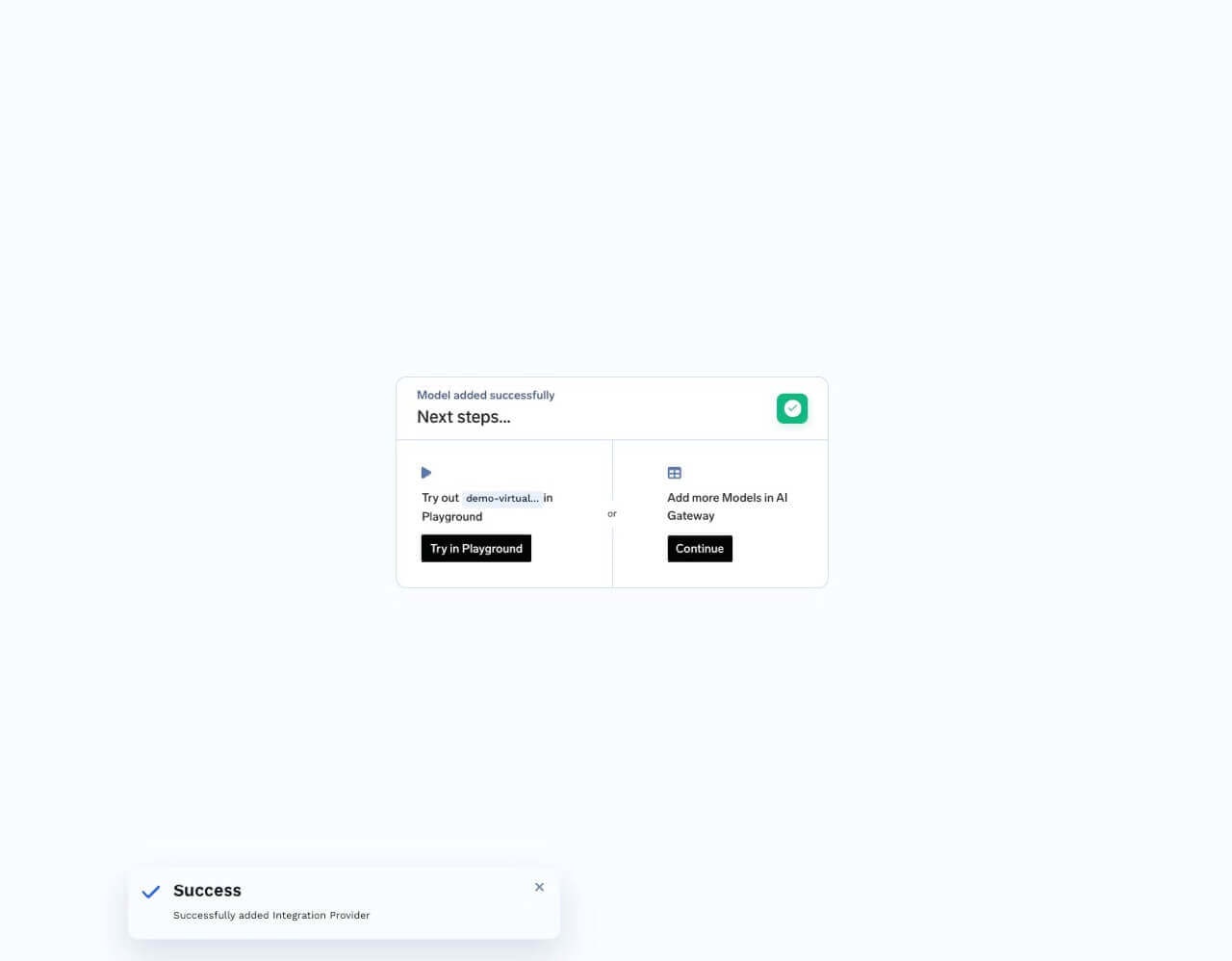
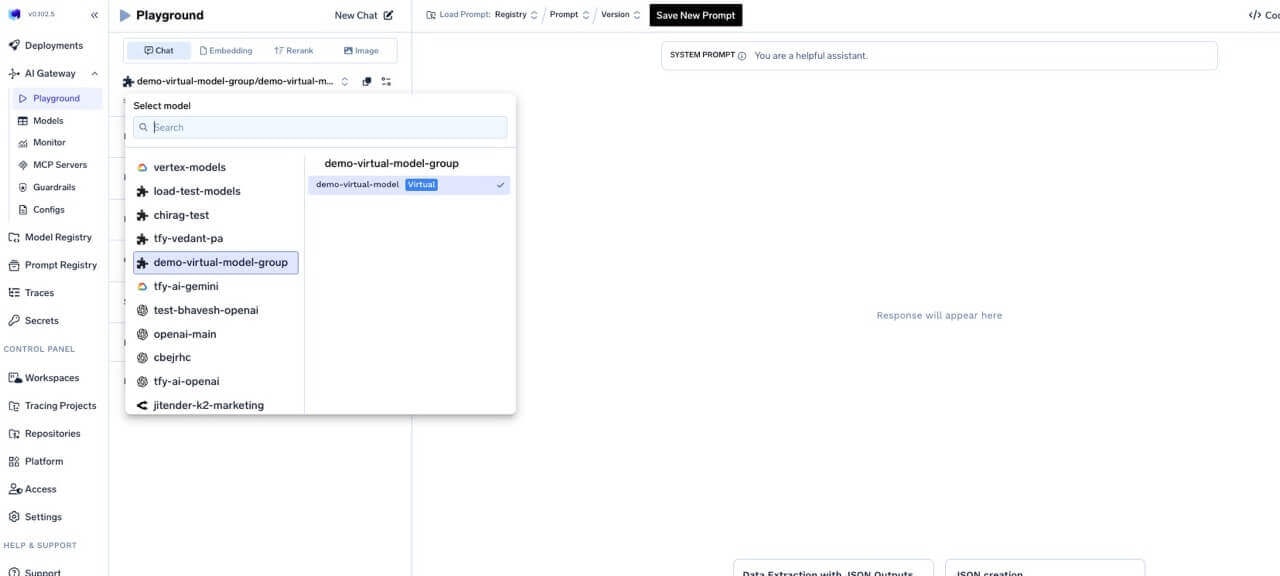
Once created, use the full path **`virtual-model-group-name/virtual-model-name`** as the `model` value in API requests — it works like any other model in the AI Gateway.
### Try in the Playground
* Click **Try in playground** on the virtual model row after creation, or
* Open the Playground and pick the virtual model from the model dropdown.
Configure the slug in the Virtual Model Provider Group settings. Slugs must be **unique across all virtual models in the tenant**.
## Common patterns
The following YAML sketches show the `routing_config` shape used inside a virtual model. In the dashboard, the same fields are set in the UI.
```yaml theme={"dark"}
routing_config:
type: priority-based-routing
load_balance_targets:
- target: azure/gpt4
priority: 0
fallback_status_codes: ["429"]
- target: openai/gpt4
priority: 1
fallback_status_codes: ["429"]
- target: anthropic/claude-3-opus
priority: 2
```
```yaml theme={"dark"}
routing_config:
type: weight-based-routing
load_balance_targets:
- target: azure/gpt4-v1
weight: 90
- target: azure/gpt4-v2
weight: 10
```
```yaml theme={"dark"}
routing_config:
type: priority-based-routing
load_balance_targets:
- target: onprem/llama
priority: 0
fallback_status_codes: ["429", "500", "502", "503"]
- target: bedrock/llama
priority: 1
retry_config:
attempts: 2
delay: 100
```
Route speech-to-text traffic to a primary provider and fall back to a second provider on failure. Set the virtual model's **Model types** to `audio_transcription` so it can be called on `POST /audio/transcriptions`. The same shape works for `text_to_speech` and `audio_translation` — just swap the targets and model type.
```yaml theme={"dark"}
routing_config:
type: priority-based-routing
load_balance_targets:
- target: openai-main/gpt-4o-transcribe
priority: 0
fallback_status_codes: ["429", "500", "502", "503"]
- target: azure-openai-main/your-whisper-deployment
priority: 1
```
Call the virtual model from your application the same way you'd call any STT model — pass the virtual model's full path as `model`:
```python theme={"dark"}
from openai import OpenAI
client = OpenAI(api_key="your-tfy-api-key", base_url="{GATEWAY_BASE_URL}")
with open("/path/to/audio.mp3", "rb") as audio_file:
response = client.audio.transcriptions.create(
model="my-audio-group/transcribe-prod", # virtual model
file=audio_file,
)
print(response)
```
```yaml theme={"dark"}
routing_config:
type: latency-based-routing
load_balance_targets:
- target: azure/gpt4
retry_config:
attempts: 1
- target: openai/gpt4
retry_config:
attempts: 1
```
```yaml theme={"dark"}
routing_config:
type: weight-based-routing
load_balance_targets:
- target: openai/gpt4
weight: 70
override_params:
prompt_version_fqn: chat_prompt:internal/my-app/gpt4-optimized-prompt:1
- target: anthropic/claude-3-opus
weight: 30
override_params:
prompt_version_fqn: chat_prompt:internal/my-app/claude-optimized-prompt:1
```
```yaml theme={"dark"}
routing_config:
type: weight-based-routing
sticky_routing:
ttl_seconds: 3600
session_identifiers:
- key: x-user-id
source: headers
- key: x-conversation-id
source: headers
load_balance_targets:
- target: provider-a/model-a
weight: 70
fallback_candidate: true
- target: provider-b/model-b
weight: 30
fallback_candidate: true
```
Route to region-specific model deployments based on which SaaS gateway handled the request. The AI Gateway automatically adds `tfy_gateway_region` and `tfy_gateway_zone` to request metadata — no client changes needed.
```yaml theme={"dark"}
routing_config:
type: priority-based-routing
load_balance_targets:
- target: azure-us/gpt-4o
priority: 0
metadata_match:
tfy_gateway_region: US
- target: azure-eu/gpt-4o
priority: 0
metadata_match:
tfy_gateway_region: EU
- target: openai/gpt-4o
priority: 1
```
US gateway traffic goes to the Azure US deployment, EU traffic to Azure EU, and everything else falls back to OpenAI. See [Metadata Keys](/docs/ai-gateway/globally-distributed-saas#metadata-keys) for all available region and zone values.
Inject or remove headers on specific targets — useful when one provider needs extra headers the others don't.
```yaml theme={"dark"}
routing_config:
type: weight-based-routing
load_balance_targets:
- target: azure/gpt-4o
weight: 80
headers_override:
set:
x-deployment-id: gpt4o-eastus
api-version: "2024-06-01"
remove:
- x-internal-trace
- target: openai/gpt-4o
weight: 20
```
Route enterprise-tier traffic to a dedicated deployment while standard traffic uses a shared pool.
```yaml theme={"dark"}
routing_config:
type: weight-based-routing
load_balance_targets:
- target: azure-dedicated/gpt-4o
weight: 100
metadata_match:
tier: enterprise
- target: openai/gpt-4o
weight: 60
- target: azure-shared/gpt-4o
weight: 40
```
Requests with `x-tfy-metadata: {"tier":"enterprise"}` go exclusively to the dedicated Azure deployment. All other requests are split 60/40 between OpenAI and the shared Azure deployment.
Full configuration using priority-based routing with SLA thresholds, custom retries, and controlled fallback eligibility.
```yaml theme={"dark"}
routing_config:
type: priority-based-routing
load_balance_targets:
- target: azure/gpt-4o
priority: 0
sla_cutoff:
time_per_output_token_ms: 50 # mark unhealthy if avg TPOT exceeds 50 ms
time_to_first_token_ms: 3000 # mark unhealthy if avg TTFT exceeds 3000 ms
retry_config:
attempts: 3
delay: 200
on_status_codes: ["429", "500", "503"]
fallback_status_codes: ["429", "500", "502", "503"]
fallback_candidate: true
- target: openai/gpt-4o
priority: 1
retry_config:
attempts: 2
delay: 100
fallback_candidate: true
- target: anthropic/claude-sonnet
priority: 2
fallback_candidate: false
```
### Environment- or segment-specific routing
Use **different virtual model names** per environment or segment (for example `booking-app/gpt-prod` vs `booking-app/gpt-dev`) and have your client pass the appropriate `model`. You can still send metadata and headers for observability, rate limits, and other gateway features; routing for a given virtual model name is always defined on that virtual model.
SaaS gateway metadata keys (`tfy_gateway_region`, `tfy_gateway_zone`) are available in request metadata and can be used for metadata-driven virtual model routing rules. See [Metadata Keys](/docs/ai-gateway/globally-distributed-saas#metadata-keys) for all available values and [metadata-based target filtering](/docs/ai-gateway/virtual-model#metadata-based-target-filtering) for worked examples.
## Use a virtual model from your application
Once created, use the full path **`virtual-model-group-name/virtual-model-name`** as the `model` value in API requests — it works like any other model in the AI Gateway.
### Try in the Playground
* Click **Try in playground** on the virtual model row after creation, or
* Open the Playground and pick the virtual model from the model dropdown.
 ## Virtual model slugs
Slugs are optional short names that refer to a single virtual model. They are unique **across the tenant**. You can use either the slug or the full `group/model` path in requests.
## Virtual model slugs
Slugs are optional short names that refer to a single virtual model. They are unique **across the tenant**. You can use either the slug or the full `group/model` path in requests.
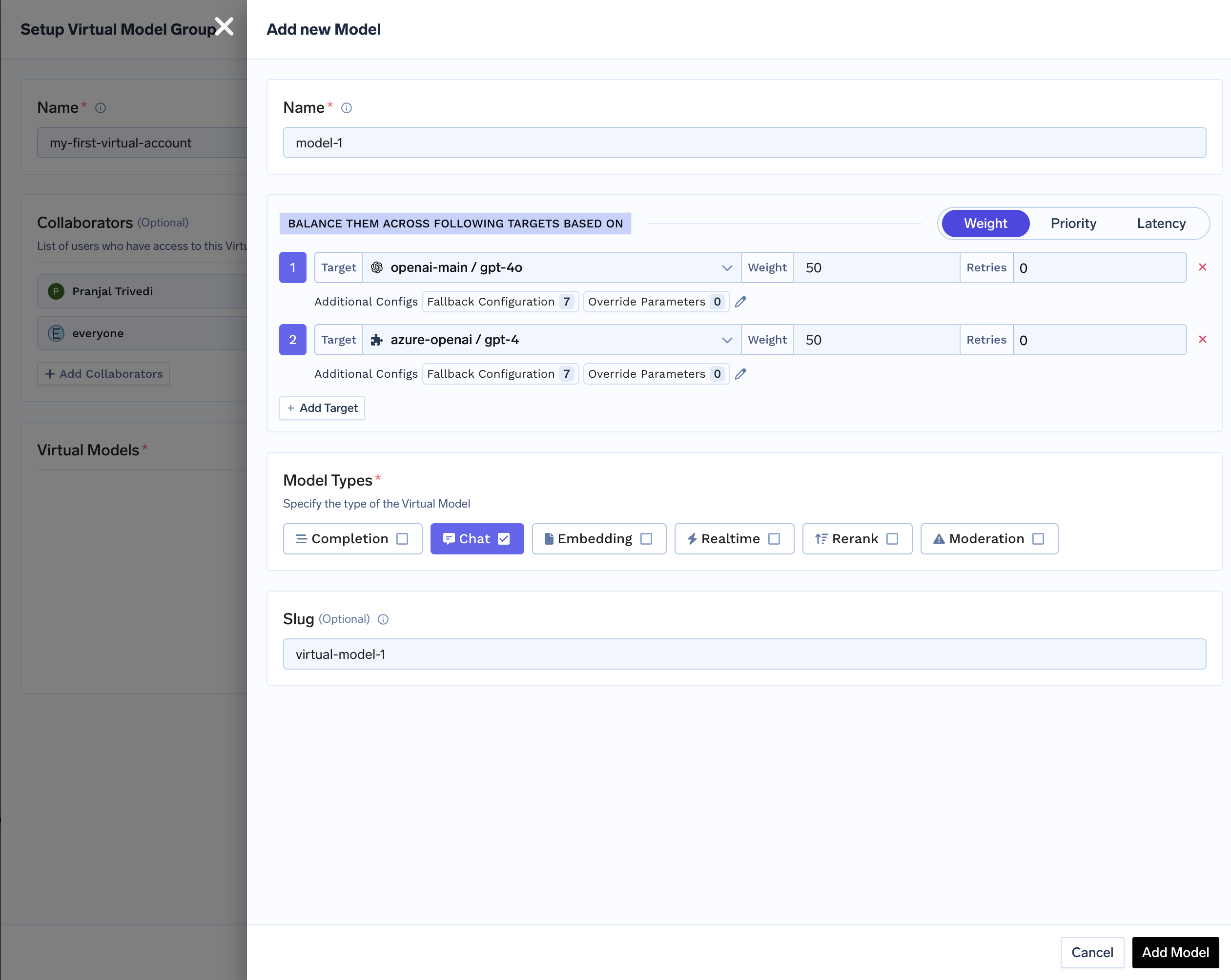 If the virtual model is `my-first-virtual-account/model-1` with slug `virtual-model-1`, both bodies are valid:
```json theme={"dark"}
{
"model": "my-first-virtual-account/model-1",
"messages": []
}
```
```json theme={"dark"}
{
"model": "virtual-model-1",
"messages": []
}
```
If the virtual model is `my-first-virtual-account/model-1` with slug `virtual-model-1`, both bodies are valid:
```json theme={"dark"}
{
"model": "my-first-virtual-account/model-1",
"messages": []
}
```
```json theme={"dark"}
{
"model": "virtual-model-1",
"messages": []
}
```