> ## Documentation Index
> Fetch the complete documentation index at: https://www.truefoundry.com/llms.txt
> Use this file to discover all available pages before exploring further.
# Splunk Observability Cloud
> Learn how to export LLM Gateway traces to Splunk Observability Cloud using OpenTelemetry integration.
This guide provides instructions for integrating [Splunk Observability Cloud](https://www.splunk.com/en_us/products/observability-cloud.html) with the TrueFoundry AI Gateway to export OpenTelemetry traces.
## What is Splunk Observability Cloud?
Splunk Observability Cloud is Splunk's SaaS platform for full-stack observability, including APM and distributed tracing. Sending gateway traces there lets you analyze latency, errors, and dependencies for LLM and tool calls alongside the rest of your stack.
### Key capabilities
* **[APM & distributed tracing](https://docs.splunk.com/Observability/apm/intro-to-apm.html)**: Explore end-to-end traces, service maps, and span details in Trace Analyzer
* **[OpenTelemetry ingestion](https://docs.splunk.com/Observability/gdi/opentelemetry/opentelemetry.html)**: Ingest OTLP traces over HTTP using realm-specific ingest URLs and access tokens
## Prerequisites
Before integrating Splunk Observability Cloud with TrueFoundry, ensure you have:
1. **TrueFoundry account**: Create a [TrueFoundry account](https://www.truefoundry.com/register) and follow our [Gateway Quick Start Guide](https://docs.truefoundry.com/gateway/quick-start)
2. **Splunk Observability Cloud org**: Access to an org on [Splunk Observability Cloud](https://login.signalfx.com/)
3. **Access token**: An org token (or equivalent) with permission to send trace data, used as the `X-SF-Token` header (created under **Settings → Organization Settings → Access Tokens** in the Splunk Observability UI)
The TrueFoundry **OTEL Config** export sends **traces only** for the AI
Gateway. It does not export OTEL metrics from this screen.
## Realm and OTLP traces URL
Splunk routes OTLP ingestion by **realm** (for example **us1** or **eu0**). Your ingest hostname must match the realm for your org. In the URL template below, replace `REALM` with your Splunk realm (for example `us1`):
```
https://ingest.REALM.observability.splunkcloud.com/v2/trace/otlp
```
Example for the `us1` realm:
```
https://ingest.us1.observability.splunkcloud.com/v2/trace/otlp
```
You can confirm your realm from your Splunk Observability Cloud URL or org documentation.
## Integration steps
TrueFoundry AI Gateway supports exporting OpenTelemetry traces to Splunk over OTLP/HTTP so you can monitor LLM gateway traffic in Splunk APM.
1. Log in to [Splunk Observability Cloud](https://login.signalfx.com/).
2. Open **Settings** (gear) → **Organization Settings** → **Access Tokens**.
3. Create a token with **Ingest** authorization (or a role that includes trace ingest), copy it, and store it securely — you will use it as `X-SF-Token` in TrueFoundry.
If ingest fails with auth errors, verify the token is active, not expired, and scoped for the same org as your realm.
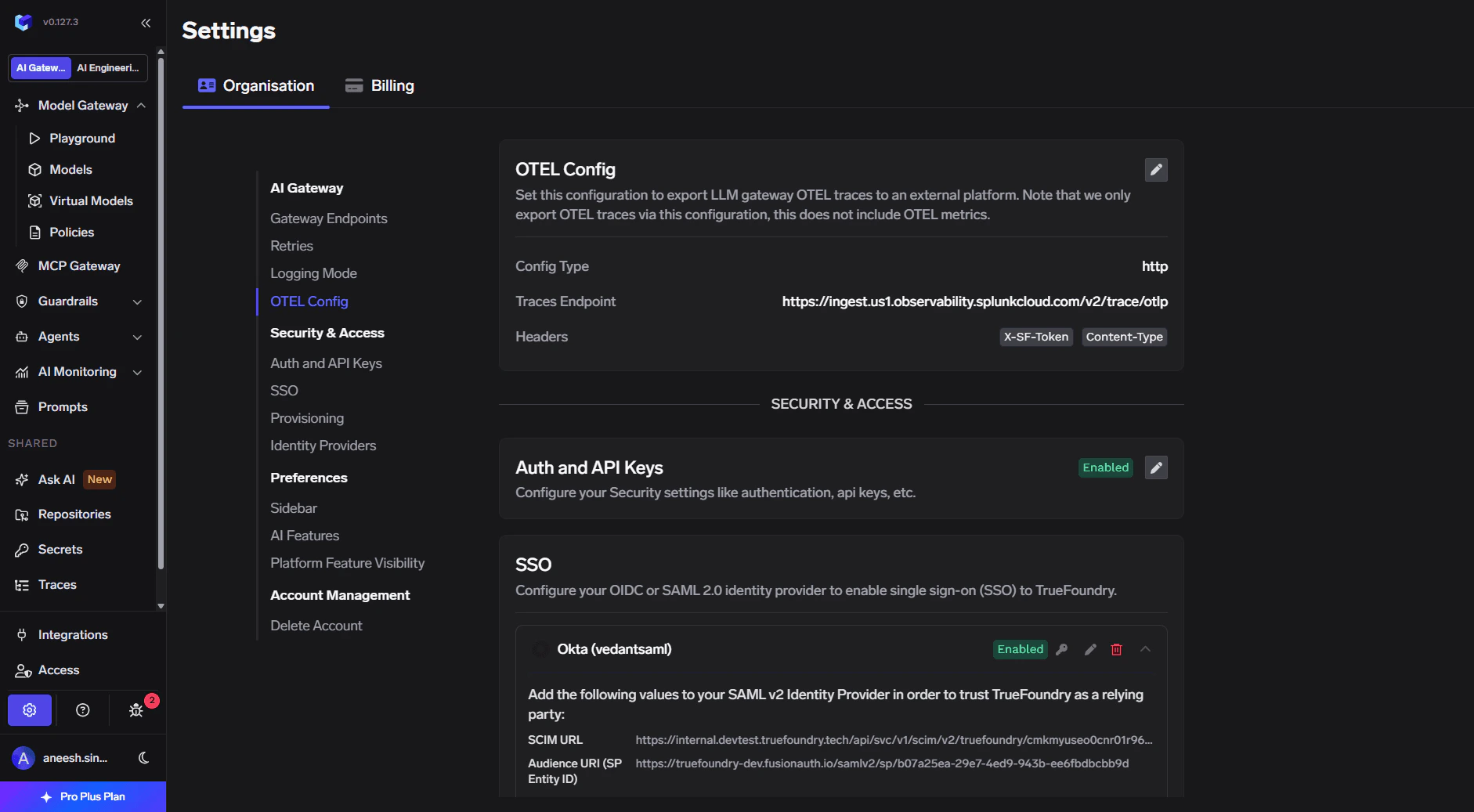
1. In the TrueFoundry dashboard go to **Settings** → **Organisation** → **AI Gateway** → **OTEL Config**.
2. Click the edit (pencil) control on the OTEL card.
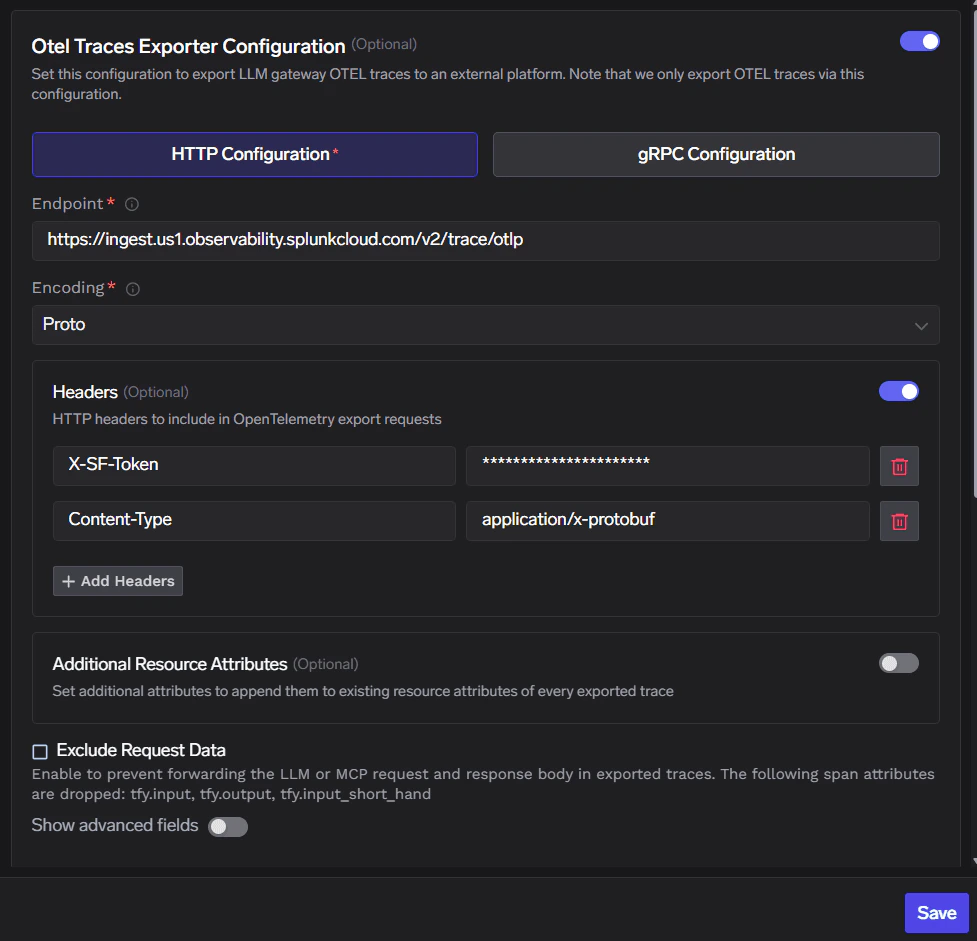
3. Enable **Otel Traces Exporter Configuration**.
4. Select **HTTP Configuration**.
5. Set **Endpoint** to your Splunk OTLP URL (see [Realm and OTLP traces URL](#realm-and-otlp-traces-url)).
6. Set **Encoding** to **Proto**.
 Enable **Headers** and add:
| Header | Value |
| -------------- | ---------------------------- |
| `X-SF-Token` | The access token from Step 1 |
| `Content-Type` | `application/x-protobuf` |
Click **Save** to apply the configuration.
Enable **Headers** and add:
| Header | Value |
| -------------- | ---------------------------- |
| `X-SF-Token` | The access token from Step 1 |
| `Content-Type` | `application/x-protobuf` |
Click **Save** to apply the configuration.
 1. Send a few requests through the TrueFoundry AI Gateway.
2. In TrueFoundry, open **Monitor** to confirm gateway traffic is flowing.
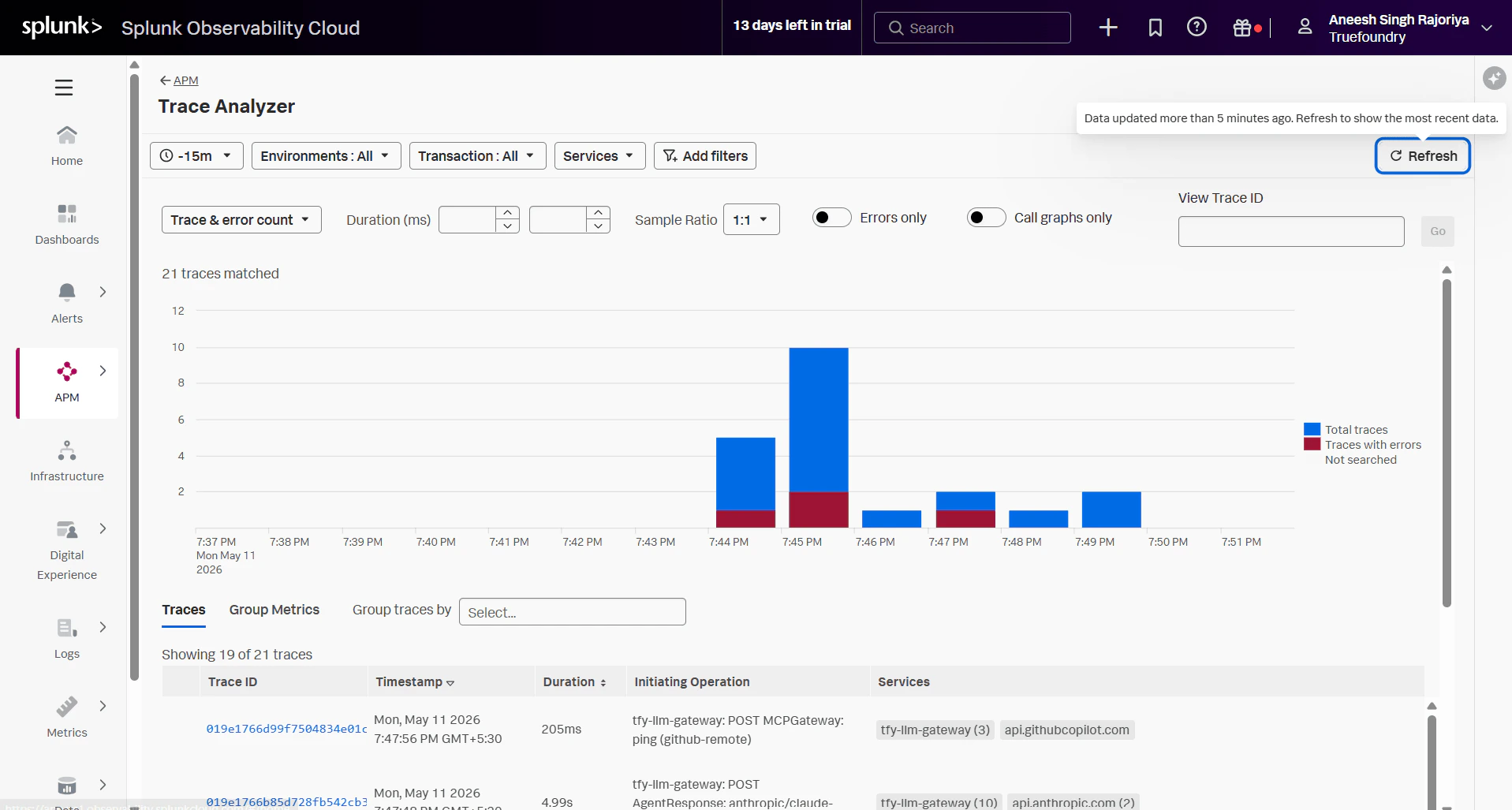
3. In Splunk Observability Cloud, go to **APM** → **Trace Analyzer** (or your trace explorer) and filter to a recent time range. You should see traces involving `tfy-llm-gateway` and related downstream spans.
1. Send a few requests through the TrueFoundry AI Gateway.
2. In TrueFoundry, open **Monitor** to confirm gateway traffic is flowing.
3. In Splunk Observability Cloud, go to **APM** → **Trace Analyzer** (or your trace explorer) and filter to a recent time range. You should see traces involving `tfy-llm-gateway` and related downstream spans.
 ## Configuration summary
| Setting | Value |
| ------------------- | ------------------------------------------------------------------------------------- |
| **Traces endpoint** | `https://ingest.REALM.observability.splunkcloud.com/v2/trace/otlp` (replace `REALM`) |
| **Protocol** | HTTP (OTLP) |
| **Encoding** | Proto |
| **Headers** | `X-SF-Token` set to your access token; `Content-Type` set to `application/x-protobuf` |
## Configuration summary
| Setting | Value |
| ------------------- | ------------------------------------------------------------------------------------- |
| **Traces endpoint** | `https://ingest.REALM.observability.splunkcloud.com/v2/trace/otlp` (replace `REALM`) |
| **Protocol** | HTTP (OTLP) |
| **Encoding** | Proto |
| **Headers** | `X-SF-Token` set to your access token; `Content-Type` set to `application/x-protobuf` |