> ## Documentation Index
> Fetch the complete documentation index at: https://www.truefoundry.com/llms.txt
> Use this file to discover all available pages before exploring further.
# Smallest AI
> Add and configure Smallest AI (Waves) models in TrueFoundry's AI Gateway
### Adding Models
Add Smallest AI models to the AI Gateway and set up access in three steps.
In the TrueFoundry dashboard, go to **AI Gateway** → **Models** and select **Smallest AI**.
 Click **Add Smallest AI Account**. Enter a unique account name and your Smallest AI **API Key**. Optionally add collaborators so other users or teams can use this account. See [Gateway access control](/docs/ai-gateway/gateway-access-control) for details.
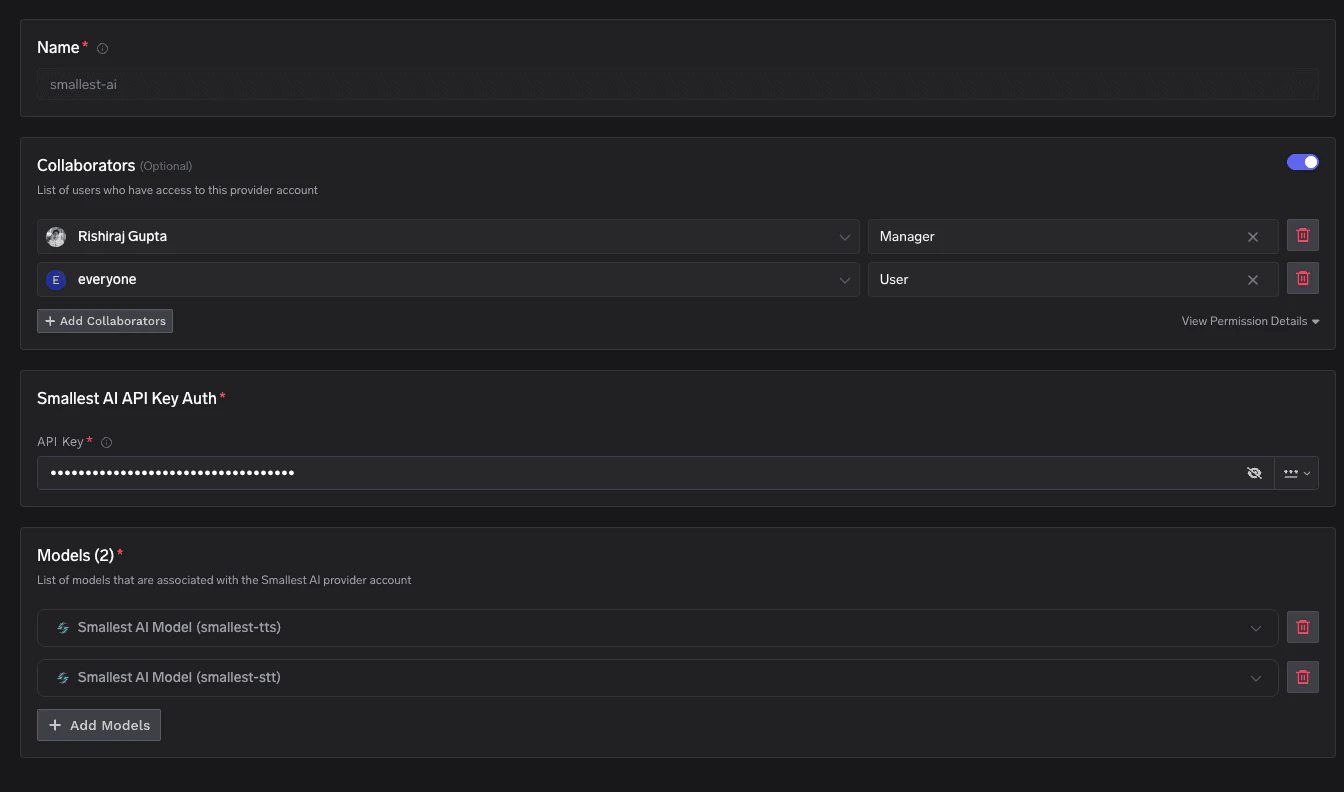 Click **+ Add Model** and fill in the **Display name**, **Model ID**, and **Model type** (Text to Speech or Audio Transcription).
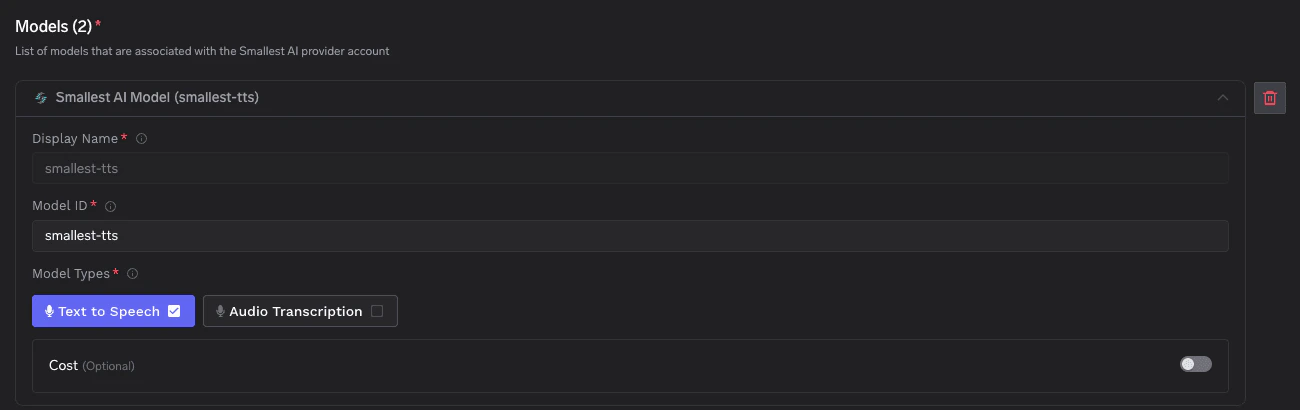 For Smallest AI, the **Model ID** and **Display name** must be identical (e.g. `smallest-tts`, `smallest-stt`).
### Inference
Once models are added, use the **Smallest AI native HTTP API** to call TTS and STT endpoints through the gateway. Requests are proxied to Smallest AI's Waves API under your provider account path.
### Supported APIs
Once your Smallest AI provider account is configured, the following API surfaces are available through the gateway. The table below summarizes each endpoint alongside platform feature support (tracing, cost tracking).
Legend:
* **✅** Supported by Provider and Truefoundry
* Supported by Provider, but not by Truefoundry
* Provider does not support this feature
| API | Endpoint | Tracing | Cost Tracking |
| --------------------------------- | ------------------------------------------------------------- | ------- | ----------------------------------------------------------- |
| [Text-to-Speech](#text-to-speech) | `/tts/{providerAccountName}/waves/v1/smallest-tts/get_speech` | **✅** | |
| [Speech-to-Text](#speech-to-text) | `/stt/{providerAccountName}/waves/v1/smallest-stt/get_text` | **✅** | |
Convert text into audio using Smallest AI's Waves TTS API. The gateway forwards your request to `waves/v1/smallest-tts/get_speech` under your provider account and streams back the raw audio bytes. Full docs: [Text-to-Speech](/docs/ai-gateway/text-to-speech).
**Before you start:** Replace `{GATEWAY_BASE_URL}` with your gateway base URL ([how to find it](/docs/ai-gateway/quick-start#gateway-base-url)) and `{smallestAiProviderAccountName}` with the display name of your Smallest AI provider account.
```python Python lines theme={"dark"}
import requests
TFY_API_KEY = "your-truefoundry-api-key"
BASE_URL = "{GATEWAY_BASE_URL}/tts/{smallestAiProviderAccountName}"
response = requests.post(
f"{BASE_URL}/waves/v1/smallest-tts/get_speech",
headers={
"Authorization": f"Bearer {TFY_API_KEY}",
"Content-Type": "application/json",
},
json={
"text": "Modern problems require modern solutions.",
"voice_id": "magnus",
"sample_rate": 24000,
"speed": 1.0,
"language": "en",
"output_format": "wav",
},
)
with open("output.wav", "wb") as f:
f.write(response.content)
print(f"Saved output.wav ({len(response.content):,} bytes)")
```
For the full list of voices, supported sample rates, languages, and output formats, refer to the [Smallest AI Waves TTS reference](https://waves-docs.smallest.ai/).
Transcribe audio with Smallest AI's Waves STT API. The gateway forwards your request to `waves/v1/smallest-stt/get_text` under your provider account. You can pass a remote audio URL via the JSON body. Full docs: [Speech-to-Text](/docs/ai-gateway/audio-transcription).
```python Python lines theme={"dark"}
import requests
TFY_API_KEY = "your-truefoundry-api-key"
BASE_URL = "{GATEWAY_BASE_URL}/stt/{smallestAiProviderAccountName}"
response = requests.post(
f"{BASE_URL}/waves/v1/smallest-stt/get_text",
params={"language": "en"},
headers={
"Authorization": f"Bearer {TFY_API_KEY}",
"Content-Type": "application/json",
},
json={
"url": "https://github.com/smallest-inc/cookbook/raw/main/speech-to-text/getting-started/samples/audio.wav",
},
timeout=120,
)
result = response.json()
print(result["transcription"])
```
Smallest AI returns a JSON object containing the `transcription` field. Refer to the [Smallest AI Waves STT reference](https://waves-docs.smallest.ai/) for additional parameters and supported languages.
**Cost tracking:** Smallest AI usage is **not** metered by the gateway. Tracing and request logging continue to work as with any other provider — see [Metrics Dashboard](/docs/ai-gateway/analytics).
For Smallest AI, the **Model ID** and **Display name** must be identical (e.g. `smallest-tts`, `smallest-stt`).
### Inference
Once models are added, use the **Smallest AI native HTTP API** to call TTS and STT endpoints through the gateway. Requests are proxied to Smallest AI's Waves API under your provider account path.
### Supported APIs
Once your Smallest AI provider account is configured, the following API surfaces are available through the gateway. The table below summarizes each endpoint alongside platform feature support (tracing, cost tracking).
Legend:
* **✅** Supported by Provider and Truefoundry
* Supported by Provider, but not by Truefoundry
* Provider does not support this feature
| API | Endpoint | Tracing | Cost Tracking |
| --------------------------------- | ------------------------------------------------------------- | ------- | ----------------------------------------------------------- |
| [Text-to-Speech](#text-to-speech) | `/tts/{providerAccountName}/waves/v1/smallest-tts/get_speech` | **✅** | |
| [Speech-to-Text](#speech-to-text) | `/stt/{providerAccountName}/waves/v1/smallest-stt/get_text` | **✅** | |
Convert text into audio using Smallest AI's Waves TTS API. The gateway forwards your request to `waves/v1/smallest-tts/get_speech` under your provider account and streams back the raw audio bytes. Full docs: [Text-to-Speech](/docs/ai-gateway/text-to-speech).
**Before you start:** Replace `{GATEWAY_BASE_URL}` with your gateway base URL ([how to find it](/docs/ai-gateway/quick-start#gateway-base-url)) and `{smallestAiProviderAccountName}` with the display name of your Smallest AI provider account.
```python Python lines theme={"dark"}
import requests
TFY_API_KEY = "your-truefoundry-api-key"
BASE_URL = "{GATEWAY_BASE_URL}/tts/{smallestAiProviderAccountName}"
response = requests.post(
f"{BASE_URL}/waves/v1/smallest-tts/get_speech",
headers={
"Authorization": f"Bearer {TFY_API_KEY}",
"Content-Type": "application/json",
},
json={
"text": "Modern problems require modern solutions.",
"voice_id": "magnus",
"sample_rate": 24000,
"speed": 1.0,
"language": "en",
"output_format": "wav",
},
)
with open("output.wav", "wb") as f:
f.write(response.content)
print(f"Saved output.wav ({len(response.content):,} bytes)")
```
For the full list of voices, supported sample rates, languages, and output formats, refer to the [Smallest AI Waves TTS reference](https://waves-docs.smallest.ai/).
Transcribe audio with Smallest AI's Waves STT API. The gateway forwards your request to `waves/v1/smallest-stt/get_text` under your provider account. You can pass a remote audio URL via the JSON body. Full docs: [Speech-to-Text](/docs/ai-gateway/audio-transcription).
```python Python lines theme={"dark"}
import requests
TFY_API_KEY = "your-truefoundry-api-key"
BASE_URL = "{GATEWAY_BASE_URL}/stt/{smallestAiProviderAccountName}"
response = requests.post(
f"{BASE_URL}/waves/v1/smallest-stt/get_text",
params={"language": "en"},
headers={
"Authorization": f"Bearer {TFY_API_KEY}",
"Content-Type": "application/json",
},
json={
"url": "https://github.com/smallest-inc/cookbook/raw/main/speech-to-text/getting-started/samples/audio.wav",
},
timeout=120,
)
result = response.json()
print(result["transcription"])
```
Smallest AI returns a JSON object containing the `transcription` field. Refer to the [Smallest AI Waves STT reference](https://waves-docs.smallest.ai/) for additional parameters and supported languages.
**Cost tracking:** Smallest AI usage is **not** metered by the gateway. Tracing and request logging continue to work as with any other provider — see [Metrics Dashboard](/docs/ai-gateway/analytics).