> ## Documentation Index
> Fetch the complete documentation index at: https://www.truefoundry.com/llms.txt
> Use this file to discover all available pages before exploring further.
# Overview
> Catalog of reusable, versioned Agent Skills you publish once and use across TrueFoundry Agents, Claude Code, and Cursor.
A **Skill** is a reusable bundle of instructions that teaches an agent how to do a specific task — querying a database, triaging an alert, drafting release notes. Once authored, the same skill can power a TrueFoundry Agent, your local Claude Code session, or Cursor without rewriting the procedure for each surface.
Here's a small skill that teaches an agent how to query a company's analytics warehouse:
```markdown SKILL.md theme={"dark"}
---
name: analytics-helper
description: How to query the analytics warehouse. Use when the user asks for sales, usage, or cost numbers.
---
# Analytics Helper Skill
## Querying Tables
To run a query against the warehouse:
1. Use the `query.py` script in this skill's `scripts/` directory.
2. Look up table schemas in `references/sales-tables.md` and `references/customer-tables.md`.
3. Always cap results at 1000 rows unless the user asks for a full export.
## Common Aggregations
For revenue questions, group by `month_start` and sum `gross_revenue`. For active-user counts, use `COUNT(DISTINCT user_id)` over the last rolling 30 days.
```
When a user asks *"how much revenue did we make in October?"*, the agent reads this skill, follows the steps, and uses the bundled scripts and reference files to answer — instead of guessing the schema from scratch.
## How to Write a Skill
Every skill is a directory rooted at a `SKILL.md` file. `SKILL.md` itself has two parts:
* **YAML frontmatter** with `name` and `description` — the only text the agent sees about your skill upfront. Keep the `description` action-oriented ("Use when…") so the model picks the right skill at the right time.
* **A Markdown body** — the procedure the agent follows once it picks your skill.
Multi-asset skills add supporting files (references, scripts, assets) next to `SKILL.md`. The model can read these on demand once the skill is in scope:
```text theme={"dark"}
analytics-helper/
├── SKILL.md
├── references/
│ ├── sales-tables.md
│ └── customer-tables.md
└── scripts/
└── query.py
```
| Field | Rules |
| ------------- | ------------------------------------------------------------------------------------------------------------------------------------------------- |
| `name` | 1–64 characters. Lowercase letters, digits, hyphens. Cannot start/end with hyphen. Cannot contain `anthropic` or `claude`. Unique per Repository. |
| `description` | 1–1024 characters. Short, action-oriented — this is the only text the agent sees about the skill upfront. |
The full `SKILL.md` (frontmatter + body) is capped at **20 KB / 20,000 characters**.
For canonical authoring guides, best practices, and a community catalog of existing skills, see Anthropic's references:
Anthropic's reference for the Skill format — `SKILL.md` structure, supporting files, and progressive disclosure.
Anthropic's guidelines for writing skills that the model picks up reliably and follows accurately.
Long-form PDF guide from Anthropic covering skill design, structure, and operational patterns end-to-end.
Community catalog of open-source Skills you can adapt and publish into your own Skills Registry.
## TrueFoundry Skills Registry
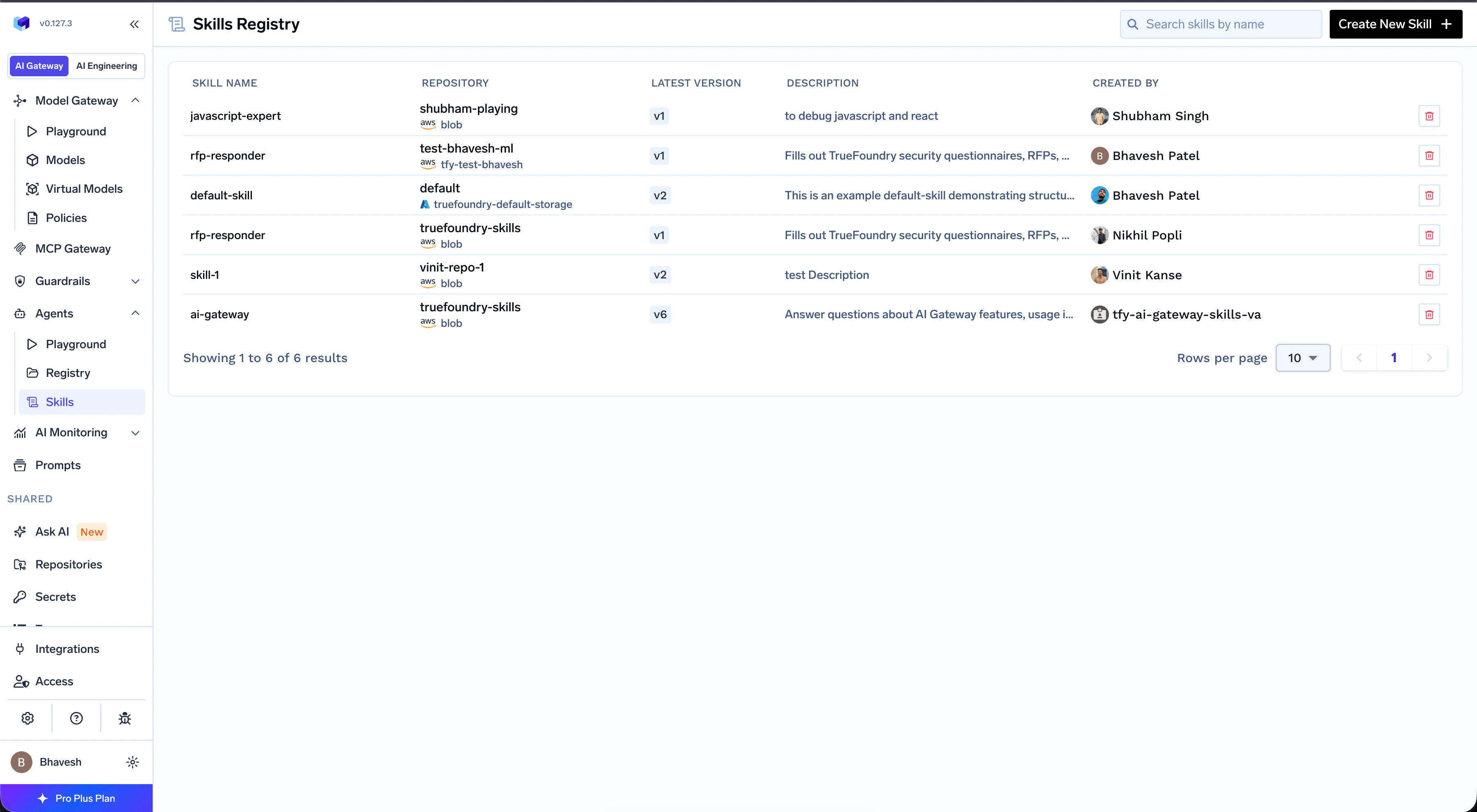
Authoring a `SKILL.md` is the easy part. Operating skills across teams — keeping versions consistent, controlling who can use them, knowing what's deployed where — is the hard part. The **Skills Registry** is the single place every Skill in your organization is published, versioned, and discovered.
Every Skill lives inside a **Repository** — TrueFoundry's container for related artifacts, similar to a Git repo. A Repository can hold a mix of Skills, [Prompts](/docs/ai-gateway/prompt-management), and Models, and carries its own RBAC, versioning, and audit log. A Skill automatically inherits the access controls and version history of its parent Repository — no extra configuration per skill.
To control who can discover, edit, or use a Skill, manage access on the parent Repository. See [Repositories](/docs/platform/repositories) for the shared repository concept, storage backing, and access control.
That gives you two concrete advantages over passing `SKILL.md` files around manually:
A single shared catalog across teams. Browse, search, and pin existing skills instead of re-authoring the same `SKILL.md` in three different repos.
Repositories carry RBAC, versioning, and audit logs — and every Skill inside one inherits them automatically. Same model you already use for Prompts and Models.
 ## Next Steps
Publish your first skill from the UI, CLI, or GitOps — and use it in TrueFoundry Agents, Claude Code, or Cursor.
Attach skills to an agent from the Playground, pin versions, and configure preload behavior.
## Next Steps
Publish your first skill from the UI, CLI, or GitOps — and use it in TrueFoundry Agents, Claude Code, or Cursor.
Attach skills to an agent from the Playground, pin versions, and configure preload behavior.