> ## Documentation Index
> Fetch the complete documentation index at: https://www.truefoundry.com/llms.txt
> Use this file to discover all available pages before exploring further.
# Create, Manage, and Use Skills
> Publish a Skill to the Skills Registry from the UI, CLI, or GitOps, then use it in TrueFoundry Agents, Claude Code, or Cursor.
Author your skill once, publish a versioned bundle to the **Skills Registry**, and re-use it across surfaces. Pick the publish path that matches your workflow:
| Path | Use when |
| ------------------------------- | ---------------------------------------------------------------------------------------------------------------------------------- |
| **From UI** | Single-file `SKILL.md`. Quickest, no CLI setup needed. |
| **`tfy upload skill`** *(CLI)* | Multi-file skills (supporting `references/`, `scripts/`, `assets/`) — one-shot imperative upload. Works on a dev machine or in CI. |
| **`tfy apply`** *(CLI, GitOps)* | Multi-file skills defined declaratively as a YAML manifest — best fit for GitOps where the skill lives alongside its source. |
UI uploads currently support a **single `SKILL.md` file only**. Multi-file support from the UI is on the roadmap — for now, if your skill ships supporting files (`references/`, `scripts/`, `assets/`), use one of the two CLI paths below.
All three paths produce the same artifact: a versioned Skill stored under a **Repository** and addressable by its FQN (e.g. `agent-skill:my-tenant/my-skills/analytics-helper:1`). Repository access controls who can discover, edit, and use the Skill.
Skills do not have separate per-skill permissions. Manage access on the parent Repository instead. See [Repositories](/docs/platform/repositories) for the shared repository concept, storage backing, and access control.
## Prerequisites
* A **Repository** with at least one storage integration configured. The skill bundle is stored in this repository's blob storage. See [Repositories](/docs/platform/repositories) for the concept and [Create a repository](/docs/ml-repo-quickstart#create-a-ml-repo) for setup.
* **For the CLI / GitOps paths** — the TrueFoundry CLI installed and authenticated. See [CLI Setup](/docs/setup-cli).
## Publish
The UI flow is the fastest way to publish a single-file skill. The Gateway uses the `SKILL.md` content you author here as the entire skill bundle.
The UI flow currently supports a **single `SKILL.md` only** — supporting files are not uploaded. Multi-file support from the UI is on the roadmap. If your skill needs `references/`, `scripts/`, or `assets/`, use the **`tfy upload skill`** or **`tfy apply`** tab instead.
Navigate to **Agents → Skills** in the left sidebar and click **Create New Skill → Create from UI**.
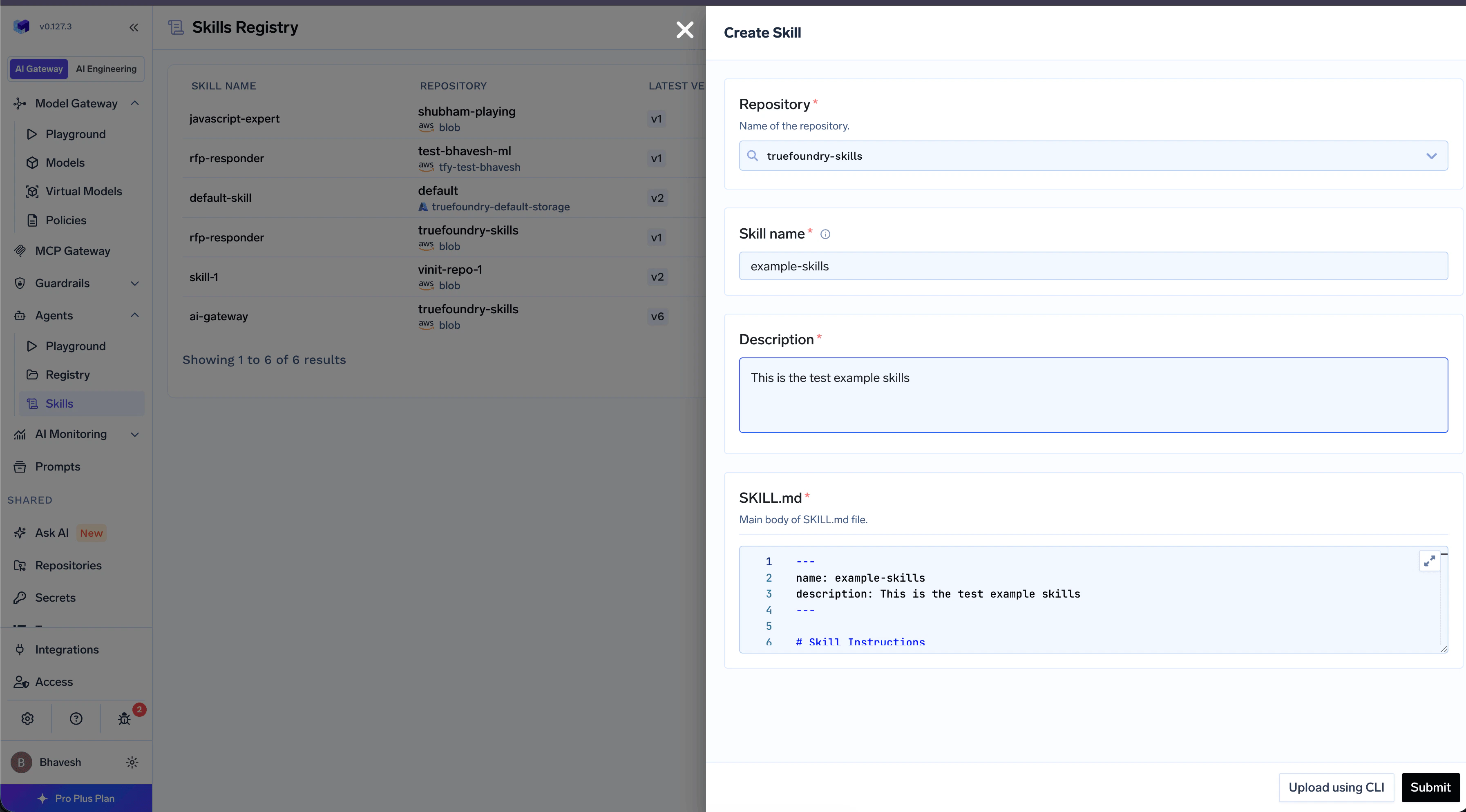 | Field | Description |
| --------------- | -------------------------------------------------------------------------------------------------------------- |
| **Name** | Lowercase letters, digits, hyphens. 1–64 chars. Cannot contain `anthropic` or `claude`. |
| **Repository** | The Repository where this skill version is stored. |
| **Description** | Short, action-oriented description. The agent uses this to decide whether the skill is relevant. 1–1024 chars. |
The editor is a Markdown editor. The Gateway automatically prepends the YAML frontmatter from the fields above, so you only write the body — the procedure the agent should follow. Click **Save** to create v1.
```markdown theme={"dark"}
# Analytics Helper Skill
## Querying Tables
To run a query against the warehouse, call …
```
To create a new version later, open the skill and click **New Version** in the version list.
Use the CLI when your skill ships supporting files. The CLI reads your local folder, validates `SKILL.md`, and registers a new version. Works equally well from a developer machine or a CI job.
```text theme={"dark"}
analytics-helper/
├── SKILL.md
├── references/
│ └── sales-tables.md
└── scripts/
└── query.py
```
`SKILL.md` must start with YAML frontmatter — see [How to Write a Skill](/docs/ai-gateway/skills/skills-registry#how-to-write-a-skill) for the rules.
From the parent directory of your skill folder:
```bash theme={"dark"}
tfy upload skill \
--repository my-skills \
--dir ./analytics-helper
```
The CLI validates the frontmatter, uploads the bundle, and registers the new version. On success:
```text theme={"dark"}
Uploaded skill version successfully.
```
The version appears in the Skills Registry, e.g. `agent-skill:my-tenant/my-skills/analytics-helper:1`. See [CLI Reference](#cli-reference) for the full flag list.
Define the skill as a YAML manifest and apply it with `tfy apply` — the same mechanism used for deployments, prompts, and other TrueFoundry resources. See [Using tfy apply](/docs/using-tfy-apply) for the general overview.
Point `source.skill_dir` at the skill folder; `tfy apply` packages and uploads it.
```yaml manifests/analytics-helper.yaml theme={"dark"}
type: agent-skill
name: analytics-helper
ml_repo: my-skills
metadata: {}
source:
type: local
skill_dir: ./skills/analytics-helper
```
See the [manifest reference](#tfy-apply-agent-skill-manifest) below for every field.
```bash theme={"dark"}
tfy apply -f manifests/analytics-helper.yaml
# Or apply an entire directory of manifests at once:
tfy apply --dir ./manifests
```
```text theme={"dark"}
my-repo/
├── .github/workflows/tfy-apply.yaml # CI: tfy apply on merge to main
├── skills/
│ ├── analytics-helper/
│ │ ├── SKILL.md
│ │ ├── references/
│ │ └── scripts/
│ └── customer-triage/
│ └── SKILL.md
├── manifests/
│ ├── analytics-helper.yaml # points to ./skills/analytics-helper
│ └── customer-triage.yaml # points to ./skills/customer-triage
└── .tfyignore # optional: skip files when packaging
```
```yaml .github/workflows/tfy-apply.yaml theme={"dark"}
name: Apply TrueFoundry manifests
on:
push:
branches: [main]
jobs:
apply:
runs-on: ubuntu-latest
steps:
- uses: actions/checkout@v4
- uses: actions/setup-python@v5
with:
python-version: "3.11"
- run: pip install -U truefoundry
- run: tfy login --host ${{ secrets.TFY_HOST }} --api-key ${{ secrets.TFY_API_KEY }}
- run: tfy apply --dir ./manifests
```
## Use the Skill
Once a skill version exists, you can use it from any of three surfaces. Open the **Usage** tab on the Skill Detail page in the UI to copy the exact command pre-filled with your skill's FQN.
| Field | Description |
| --------------- | -------------------------------------------------------------------------------------------------------------- |
| **Name** | Lowercase letters, digits, hyphens. 1–64 chars. Cannot contain `anthropic` or `claude`. |
| **Repository** | The Repository where this skill version is stored. |
| **Description** | Short, action-oriented description. The agent uses this to decide whether the skill is relevant. 1–1024 chars. |
The editor is a Markdown editor. The Gateway automatically prepends the YAML frontmatter from the fields above, so you only write the body — the procedure the agent should follow. Click **Save** to create v1.
```markdown theme={"dark"}
# Analytics Helper Skill
## Querying Tables
To run a query against the warehouse, call …
```
To create a new version later, open the skill and click **New Version** in the version list.
Use the CLI when your skill ships supporting files. The CLI reads your local folder, validates `SKILL.md`, and registers a new version. Works equally well from a developer machine or a CI job.
```text theme={"dark"}
analytics-helper/
├── SKILL.md
├── references/
│ └── sales-tables.md
└── scripts/
└── query.py
```
`SKILL.md` must start with YAML frontmatter — see [How to Write a Skill](/docs/ai-gateway/skills/skills-registry#how-to-write-a-skill) for the rules.
From the parent directory of your skill folder:
```bash theme={"dark"}
tfy upload skill \
--repository my-skills \
--dir ./analytics-helper
```
The CLI validates the frontmatter, uploads the bundle, and registers the new version. On success:
```text theme={"dark"}
Uploaded skill version successfully.
```
The version appears in the Skills Registry, e.g. `agent-skill:my-tenant/my-skills/analytics-helper:1`. See [CLI Reference](#cli-reference) for the full flag list.
Define the skill as a YAML manifest and apply it with `tfy apply` — the same mechanism used for deployments, prompts, and other TrueFoundry resources. See [Using tfy apply](/docs/using-tfy-apply) for the general overview.
Point `source.skill_dir` at the skill folder; `tfy apply` packages and uploads it.
```yaml manifests/analytics-helper.yaml theme={"dark"}
type: agent-skill
name: analytics-helper
ml_repo: my-skills
metadata: {}
source:
type: local
skill_dir: ./skills/analytics-helper
```
See the [manifest reference](#tfy-apply-agent-skill-manifest) below for every field.
```bash theme={"dark"}
tfy apply -f manifests/analytics-helper.yaml
# Or apply an entire directory of manifests at once:
tfy apply --dir ./manifests
```
```text theme={"dark"}
my-repo/
├── .github/workflows/tfy-apply.yaml # CI: tfy apply on merge to main
├── skills/
│ ├── analytics-helper/
│ │ ├── SKILL.md
│ │ ├── references/
│ │ └── scripts/
│ └── customer-triage/
│ └── SKILL.md
├── manifests/
│ ├── analytics-helper.yaml # points to ./skills/analytics-helper
│ └── customer-triage.yaml # points to ./skills/customer-triage
└── .tfyignore # optional: skip files when packaging
```
```yaml .github/workflows/tfy-apply.yaml theme={"dark"}
name: Apply TrueFoundry manifests
on:
push:
branches: [main]
jobs:
apply:
runs-on: ubuntu-latest
steps:
- uses: actions/checkout@v4
- uses: actions/setup-python@v5
with:
python-version: "3.11"
- run: pip install -U truefoundry
- run: tfy login --host ${{ secrets.TFY_HOST }} --api-key ${{ secrets.TFY_API_KEY }}
- run: tfy apply --dir ./manifests
```
## Use the Skill
Once a skill version exists, you can use it from any of three surfaces. Open the **Usage** tab on the Skill Detail page in the UI to copy the exact command pre-filled with your skill's FQN.
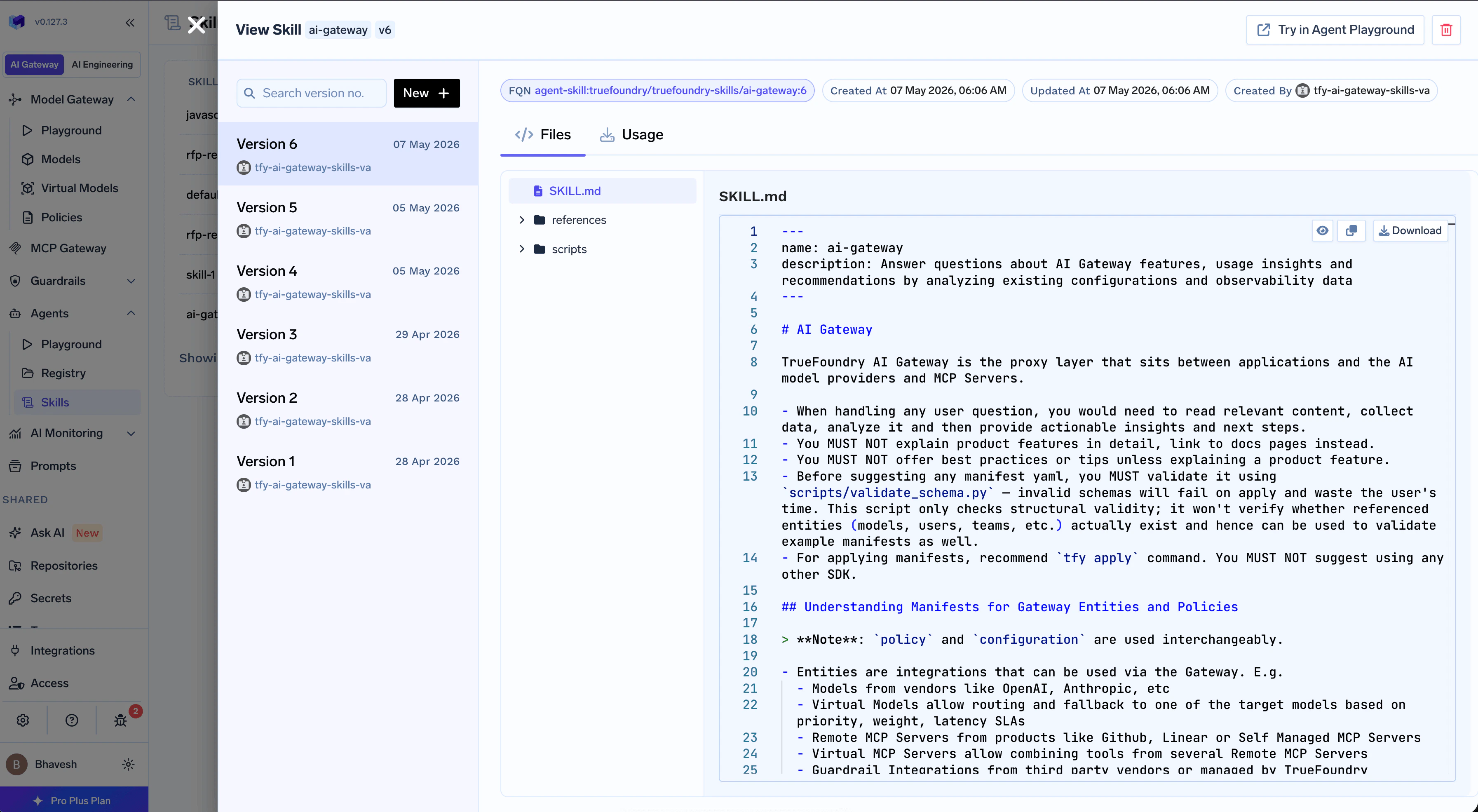 Mount the skill into a TrueFoundry Agent from the Agent Playground. The Gateway loads the skill alongside the agent's tools and runs it inside a sandbox.
See [Mounting Skills in TrueFoundry Agents](/docs/agent-platform/agent-harness/getting-started#add-skills) for the full flow — selector, version pinning, and the **Preload SKILL.md** toggle.
Sync the skill into Claude Code's local skills directory. Claude Code picks up new skills from this directory automatically.
```bash theme={"dark"}
tfy download skill \
--fqn agent-skill:my-tenant/my-skills/analytics-helper:1 \
--dir "$HOME/.claude/skills"
```
Use the **Usage → Add to Claude** tab on the Skill Detail page to grab this command pre-filled with the right FQN.
Sync the skill into Cursor's local skills directory.
```bash theme={"dark"}
tfy download skill \
--fqn agent-skill:my-tenant/my-skills/analytics-helper:1 \
--dir "$HOME/.cursor/skills"
```
Use the **Usage → Add to Cursor** tab on the Skill Detail page to grab the command pre-filled with the exact path for your install.
To pull the bundle to disk for editing, mirroring, or auditing, point `--dir` at any local path (e.g. `./skills`). Edit the files and re-publish a new version with `tfy upload skill`.
## CLI Reference
Publish a new version of an agent skill from a local directory.
```bash theme={"dark"}
tfy upload skill \
--repository \
--dir
```
| Flag | Required | Default | Description |
| -------------- | -------- | ------- | ------------------------------------------------------------------------------------- |
| `--repository` | yes | — | Name of the Repository where the skill version will be published. Must already exist. |
| `--dir` / `-d` | no | `.` | Path to the local skill root directory. Must contain `SKILL.md` at the root. |
Download a committed skill version's files to disk.
```bash theme={"dark"}
tfy download skill \
--fqn \
--dir \
[--overwrite] \
[--progress | --no-progress]
```
| Flag | Required | Default | Description |
| ------------------------------ | -------- | ------- | --------------------------------------------------------------------------------------------------------------- |
| `--fqn` | yes | — | Skill version FQN. Version must be a positive integer; `:latest` is **not supported**. |
| `--dir` / `-d` | no | `.` | Local destination directory. Created if missing. Skill files land inside a sub-directory named after the skill. |
| `--overwrite` | no | `false` | When set, existing files in the destination are overwritten. |
| `--progress` / `--no-progress` | no | auto | Show a progress bar while downloading. |
| Field | Required | Description |
| ------------------ | -------- | ------------------------------------------------------------------------------------------------------------------------------------------------------------- |
| `type` | yes | Must be `agent-skill`. |
| `name` | yes | Skill name. Must match the `name` in `SKILL.md` frontmatter. |
| `ml_repo` | yes | Name of the target Repository. (The field is named `ml_repo` for consistency with other TrueFoundry manifests.) |
| `metadata` | yes | Free-form key/value metadata. Use `{}` if you don't need any. |
| `source.type` | yes | `local` for GitOps. Other source types exist but are server-managed. |
| `source.skill_dir` | yes | Path to the local skill folder, **relative to your `tfy apply` working directory** — typically the root of your Git repo. The folder must contain `SKILL.md`. |
Mount the skill into a TrueFoundry Agent from the Agent Playground. The Gateway loads the skill alongside the agent's tools and runs it inside a sandbox.
See [Mounting Skills in TrueFoundry Agents](/docs/agent-platform/agent-harness/getting-started#add-skills) for the full flow — selector, version pinning, and the **Preload SKILL.md** toggle.
Sync the skill into Claude Code's local skills directory. Claude Code picks up new skills from this directory automatically.
```bash theme={"dark"}
tfy download skill \
--fqn agent-skill:my-tenant/my-skills/analytics-helper:1 \
--dir "$HOME/.claude/skills"
```
Use the **Usage → Add to Claude** tab on the Skill Detail page to grab this command pre-filled with the right FQN.
Sync the skill into Cursor's local skills directory.
```bash theme={"dark"}
tfy download skill \
--fqn agent-skill:my-tenant/my-skills/analytics-helper:1 \
--dir "$HOME/.cursor/skills"
```
Use the **Usage → Add to Cursor** tab on the Skill Detail page to grab the command pre-filled with the exact path for your install.
To pull the bundle to disk for editing, mirroring, or auditing, point `--dir` at any local path (e.g. `./skills`). Edit the files and re-publish a new version with `tfy upload skill`.
## CLI Reference
Publish a new version of an agent skill from a local directory.
```bash theme={"dark"}
tfy upload skill \
--repository \
--dir
```
| Flag | Required | Default | Description |
| -------------- | -------- | ------- | ------------------------------------------------------------------------------------- |
| `--repository` | yes | — | Name of the Repository where the skill version will be published. Must already exist. |
| `--dir` / `-d` | no | `.` | Path to the local skill root directory. Must contain `SKILL.md` at the root. |
Download a committed skill version's files to disk.
```bash theme={"dark"}
tfy download skill \
--fqn \
--dir \
[--overwrite] \
[--progress | --no-progress]
```
| Flag | Required | Default | Description |
| ------------------------------ | -------- | ------- | --------------------------------------------------------------------------------------------------------------- |
| `--fqn` | yes | — | Skill version FQN. Version must be a positive integer; `:latest` is **not supported**. |
| `--dir` / `-d` | no | `.` | Local destination directory. Created if missing. Skill files land inside a sub-directory named after the skill. |
| `--overwrite` | no | `false` | When set, existing files in the destination are overwritten. |
| `--progress` / `--no-progress` | no | auto | Show a progress bar while downloading. |
| Field | Required | Description |
| ------------------ | -------- | ------------------------------------------------------------------------------------------------------------------------------------------------------------- |
| `type` | yes | Must be `agent-skill`. |
| `name` | yes | Skill name. Must match the `name` in `SKILL.md` frontmatter. |
| `ml_repo` | yes | Name of the target Repository. (The field is named `ml_repo` for consistency with other TrueFoundry manifests.) |
| `metadata` | yes | Free-form key/value metadata. Use `{}` if you don't need any. |
| `source.type` | yes | `local` for GitOps. Other source types exist but are server-managed. |
| `source.skill_dir` | yes | Path to the local skill folder, **relative to your `tfy apply` working directory** — typically the root of your Git repo. The folder must contain `SKILL.md`. |