> ## Documentation Index
> Fetch the complete documentation index at: https://www.truefoundry.com/llms.txt
> Use this file to discover all available pages before exploring further.
# Resemble AI
> Add and configure Resemble AI Text-to-Speech (TTS) in TrueFoundry's AI Gateway using Custom Endpoints
### Adding models
Add Resemble AI Text-to-Speech to the AI Gateway using **Custom Endpoints**.
In the TrueFoundry dashboard, go to **AI Gateway** → **Models** → **Custom Endpoints** and click **Add Custom Endpoint**.
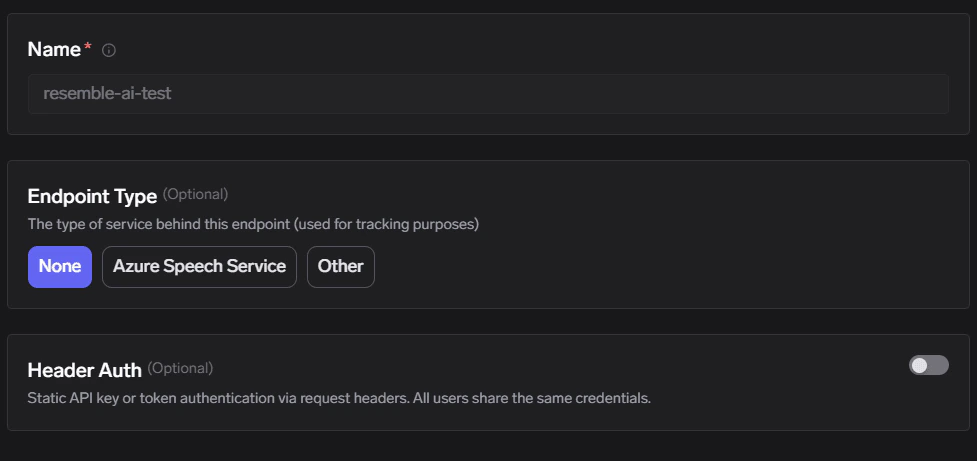
In **Configure Account**, set:
* **Name**: any unique name (this becomes `{providerAccountName}` in the URL)
* **Endpoint Type**: `None` (or any value you use for tracking)
* **Header Auth**: keep **disabled**
 Click **Add Endpoint** (or **Add Endpoint** from the list view) and configure the integration:
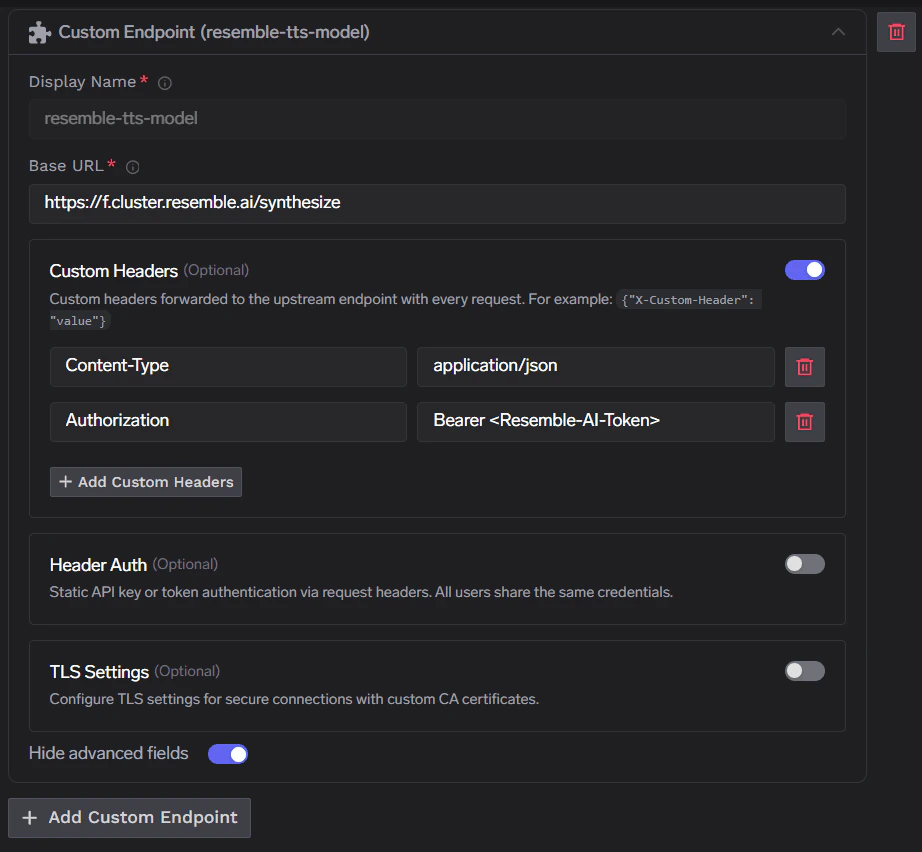
* **Display Name**: any name (this becomes `{endpointName}` in the URL)
* **Base URL**: `https://f.cluster.resemble.ai/synthesize`
Enable **Custom Headers** and add:
* `Content-Type`: `application/json`
* `Authorization`: `Bearer `
Click **Add Endpoint** (or **Add Endpoint** from the list view) and configure the integration:
* **Display Name**: any name (this becomes `{endpointName}` in the URL)
* **Base URL**: `https://f.cluster.resemble.ai/synthesize`
Enable **Custom Headers** and add:
* `Content-Type`: `application/json`
* `Authorization`: `Bearer `
 This **Authorization** header is sent **from the gateway to Resemble AI**. Your client should only send the **TrueFoundry API key** to the gateway.
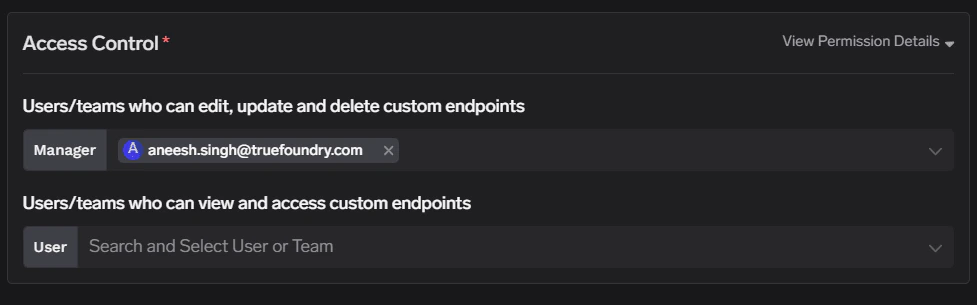
On the **Access Control** step, add the users/teams who can view/use this provider account, then **Save**.
This **Authorization** header is sent **from the gateway to Resemble AI**. Your client should only send the **TrueFoundry API key** to the gateway.
On the **Access Control** step, add the users/teams who can view/use this provider account, then **Save**.
 ### Inference
Once saved, call your endpoint through the gateway’s **proxy-api** path. URL shape and path rules are documented under [Custom Endpoints](/docs/ai-gateway/custom-endpoints#endpoint-structure).
### Supported APIs
| API | Endpoint | Tracing | Cost Tracking |
| --------------------------------- | -------------------------------------------------- | ------- | ----------------------------------------------------------- |
| [Text-to-Speech](#text-to-speech) | `/proxy-api/{providerAccountName}/{endpointName}/` | **✅** | |
**Before you start:** Replace `{GATEWAY_BASE_URL}` with your gateway base URL ([how to find it](/docs/ai-gateway/quick-start#gateway-base-url)) and set `TFY_API_KEY` to your TrueFoundry API key.
```python lines theme={"dark"}
import base64
import os
import requests
GATEWAY_BASE_URL = "{GATEWAY_BASE_URL}"
TFY_API_KEY = os.environ.get("TFY_API_KEY", "your-tfy-api-key")
# providerAccountName = Custom Endpoint account name
# endpointName = integration display name
URL = f"{GATEWAY_BASE_URL}/proxy-api/{providerAccountName}/{endpointName}/"
HEADERS = {
"Authorization": f"Bearer {TFY_API_KEY}",
"Content-Type": "application/json",
# Recommended for consistent binary/base64 handling with some proxies
"Accept-Encoding": "identity",
}
BODY = {
"voice_uuid": "55592656",
"data": "Hello from Resemble!",
}
OUTPUT_FILE = "output_audio.wav"
response = requests.post(URL, headers=HEADERS, json=BODY, timeout=120)
response.raise_for_status()
audio_b64 = response.json()["audio_content"]
with open(OUTPUT_FILE, "wb") as f:
f.write(base64.b64decode(audio_b64))
print(f"saved: {OUTPUT_FILE}")
```
**Support scope:** We do not support all APIs through this integration. Only **HTTPS** and **non-streaming** requests are supported. We will add more support over time, including additional endpoints on customer request. Send a request to [support@truefoundry.com](mailto:support@truefoundry.com).
### Inference
Once saved, call your endpoint through the gateway’s **proxy-api** path. URL shape and path rules are documented under [Custom Endpoints](/docs/ai-gateway/custom-endpoints#endpoint-structure).
### Supported APIs
| API | Endpoint | Tracing | Cost Tracking |
| --------------------------------- | -------------------------------------------------- | ------- | ----------------------------------------------------------- |
| [Text-to-Speech](#text-to-speech) | `/proxy-api/{providerAccountName}/{endpointName}/` | **✅** | |
**Before you start:** Replace `{GATEWAY_BASE_URL}` with your gateway base URL ([how to find it](/docs/ai-gateway/quick-start#gateway-base-url)) and set `TFY_API_KEY` to your TrueFoundry API key.
```python lines theme={"dark"}
import base64
import os
import requests
GATEWAY_BASE_URL = "{GATEWAY_BASE_URL}"
TFY_API_KEY = os.environ.get("TFY_API_KEY", "your-tfy-api-key")
# providerAccountName = Custom Endpoint account name
# endpointName = integration display name
URL = f"{GATEWAY_BASE_URL}/proxy-api/{providerAccountName}/{endpointName}/"
HEADERS = {
"Authorization": f"Bearer {TFY_API_KEY}",
"Content-Type": "application/json",
# Recommended for consistent binary/base64 handling with some proxies
"Accept-Encoding": "identity",
}
BODY = {
"voice_uuid": "55592656",
"data": "Hello from Resemble!",
}
OUTPUT_FILE = "output_audio.wav"
response = requests.post(URL, headers=HEADERS, json=BODY, timeout=120)
response.raise_for_status()
audio_b64 = response.json()["audio_content"]
with open(OUTPUT_FILE, "wb") as f:
f.write(base64.b64decode(audio_b64))
print(f"saved: {OUTPUT_FILE}")
```
**Support scope:** We do not support all APIs through this integration. Only **HTTPS** and **non-streaming** requests are supported. We will add more support over time, including additional endpoints on customer request. Send a request to [support@truefoundry.com](mailto:support@truefoundry.com).