> ## Documentation Index
> Fetch the complete documentation index at: https://www.truefoundry.com/llms.txt
> Use this file to discover all available pages before exploring further.
# Phidata
> Learn how to use phidata with TrueFoundry AI Gateway, including setup steps, use cases, and production-ready examples.
This guide provides instructions for integrating [Phidata](https://docs.phidata.com/introduction) with the Truefoundry AI Gateway.
## What is Phidata?
Phidata is a framework for building AI applications with memory, knowledge, and tools. It provides a comprehensive platform for creating intelligent agents that can maintain context across conversations, access external knowledge bases, and use various tools to accomplish complex tasks.
### Key Features of Phidata
* **[Memory & Context](https://docs.phidata.com/memory/introduction)**: Built-in memory capabilities that allow agents to remember previous conversations and maintain context across interactions
* **[Knowledge Integration](https://docs.phidata.com/knowledge/introduction)**: Seamless integration with vector databases and knowledge bases for RAG (Retrieval-Augmented Generation) applications
* **[Tool Integration](https://docs.phidata.com/tools/introduction)**: Extensive library of tools for web search, file operations, data analysis, and custom function calling
* **[Agent Orchestration](https://docs.phidata.com/agents/introduction)**: Framework for building and orchestrating multiple specialized agents that can work together on complex tasks
## Prerequisites
Before integrating Phidata with TrueFoundry, ensure you have:
1. **TrueFoundry Account**: Create a [Truefoundry account](https://www.truefoundry.com/register) and follow our [Gateway Quick Start](https://docs.truefoundry.com/gateway/quick-start)
2. **Phidata Installation**: Install Phidata using pip: `pip install -U phidata`
## Setup Process
### 1. Configure Phidata with TrueFoundry
You will get your 'truefoundry-api-key', 'truefoundry-gateway-url' and model name directly from the unified code snippet
 ### 2. Basic Setup with Phidata
Connect to TrueFoundry by configuring the OpenAI LLM in Phidata with your TrueFoundry gateway:
```python lines theme={"dark"}
from phi.agent import Agent
from phi.llm.openai import OpenAIChat
llm = OpenAIChat(
base_url="{GATEWAY_BASE_URL}",
api_key="your-truefoundry-api-key",
model='openai-main/gpt-4o' # Use any model from any provider
)
agent = Agent(
llm=llm,
description="You help people with their questions.",
instructions=["tell fun and amazing facts about the topic"],
)
# Print a response to the client
agent.print_response("tell something about sabertooth tiger.", markdown=True)
```
Replace:
* `your-truefoundry-api-key` with your actual TrueFoundry API key
* `{GATEWAY_BASE_URL}` with your TrueFoundry Gateway URL
* Use your desired model in the format `provider-main/model-name`
### 3. Environment Variables Configuration
For persistent configuration across your Phidata applications, set these environment variables:
```bash lines theme={"dark"}
export OPENAI_API_KEY="your-truefoundry-api-key"
export OPENAI_BASE_URL="{GATEWAY_BASE_URL}"
```
## Usage Examples
### Basic Agent Example
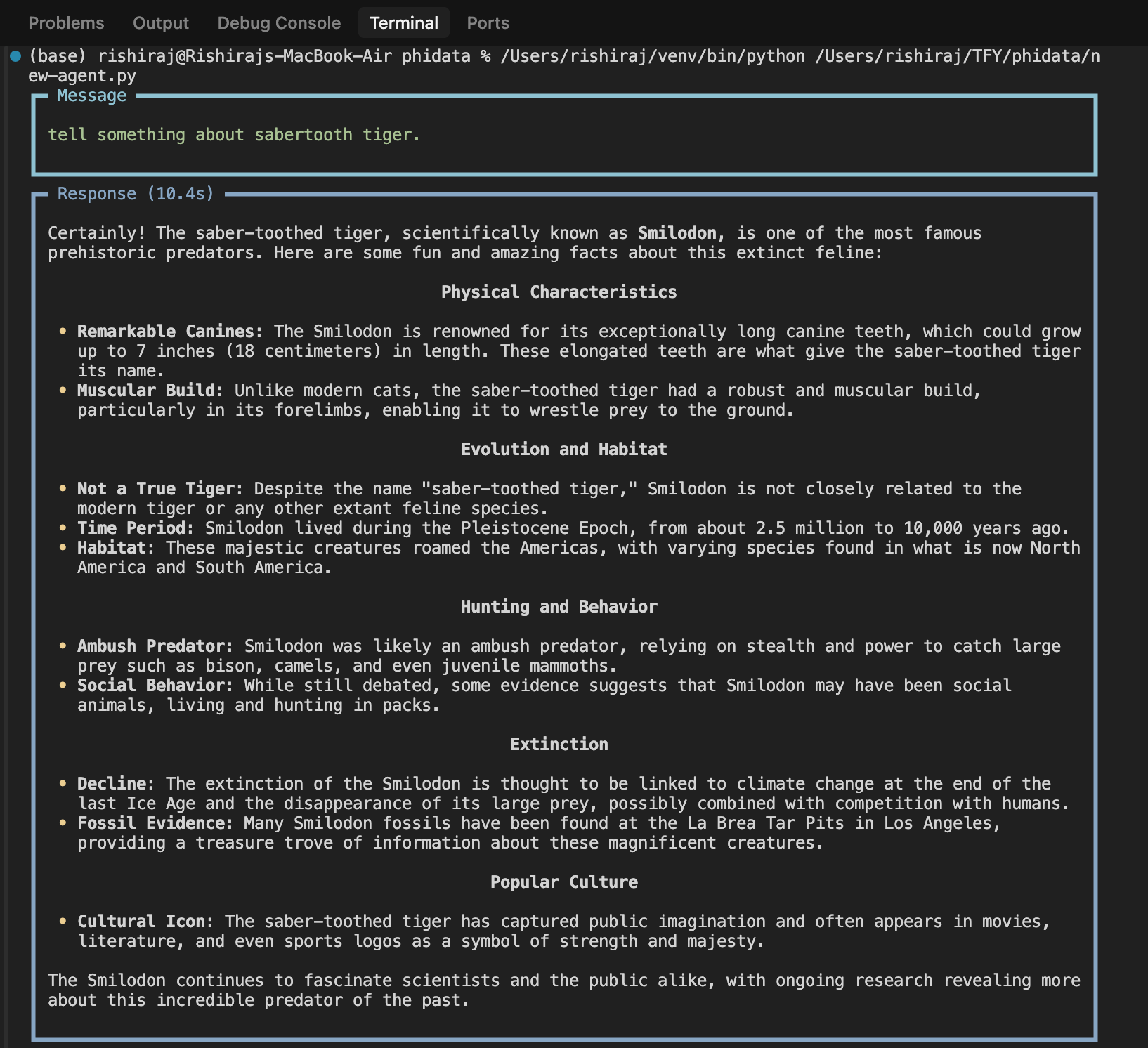
When you run the agent example above, you'll get a response like this:
### 2. Basic Setup with Phidata
Connect to TrueFoundry by configuring the OpenAI LLM in Phidata with your TrueFoundry gateway:
```python lines theme={"dark"}
from phi.agent import Agent
from phi.llm.openai import OpenAIChat
llm = OpenAIChat(
base_url="{GATEWAY_BASE_URL}",
api_key="your-truefoundry-api-key",
model='openai-main/gpt-4o' # Use any model from any provider
)
agent = Agent(
llm=llm,
description="You help people with their questions.",
instructions=["tell fun and amazing facts about the topic"],
)
# Print a response to the client
agent.print_response("tell something about sabertooth tiger.", markdown=True)
```
Replace:
* `your-truefoundry-api-key` with your actual TrueFoundry API key
* `{GATEWAY_BASE_URL}` with your TrueFoundry Gateway URL
* Use your desired model in the format `provider-main/model-name`
### 3. Environment Variables Configuration
For persistent configuration across your Phidata applications, set these environment variables:
```bash lines theme={"dark"}
export OPENAI_API_KEY="your-truefoundry-api-key"
export OPENAI_BASE_URL="{GATEWAY_BASE_URL}"
```
## Usage Examples
### Basic Agent Example
When you run the agent example above, you'll get a response like this:
 ### Observability and Governance
Monitor your Phidata applications through TrueFoundry's metrics tab:
### Observability and Governance
Monitor your Phidata applications through TrueFoundry's metrics tab:
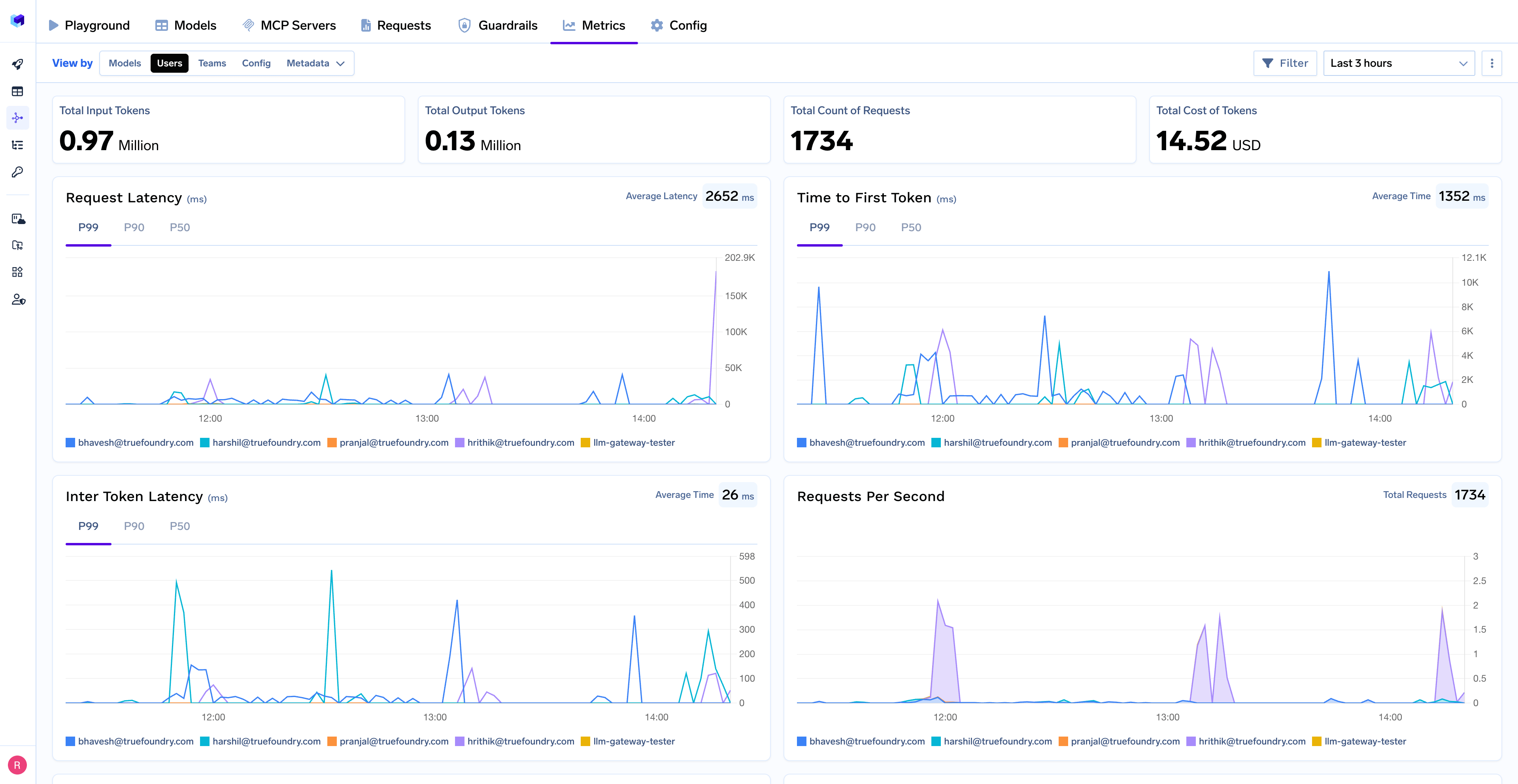 With TrueFoundry's AI gateway, you can monitor and analyze:
* **Performance Metrics**: Track key latency metrics like Request Latency, Time to First Token (TTFS), and Inter-Token Latency (ITL) with P99, P90, and P50 percentiles
* **Cost and Token Usage**: Gain visibility into your application's costs with detailed breakdowns of input/output tokens and the associated expenses for each model
* **Usage Patterns**: Understand how your application is being used with detailed analytics on user activity, model distribution, and team-based usage
* **Agent Performance**: Monitor individual agent performance and tool usage patterns
* **Rate Limiting and Virtual Models**: Set up rate limiting and configure [Virtual Models](/docs/ai-gateway/virtual-model) for intelligent routing and fallback across your models
With TrueFoundry's AI gateway, you can monitor and analyze:
* **Performance Metrics**: Track key latency metrics like Request Latency, Time to First Token (TTFS), and Inter-Token Latency (ITL) with P99, P90, and P50 percentiles
* **Cost and Token Usage**: Gain visibility into your application's costs with detailed breakdowns of input/output tokens and the associated expenses for each model
* **Usage Patterns**: Understand how your application is being used with detailed analytics on user activity, model distribution, and team-based usage
* **Agent Performance**: Monitor individual agent performance and tool usage patterns
* **Rate Limiting and Virtual Models**: Set up rate limiting and configure [Virtual Models](/docs/ai-gateway/virtual-model) for intelligent routing and fallback across your models