> ## Documentation Index
> Fetch the complete documentation index at: https://www.truefoundry.com/llms.txt
> Use this file to discover all available pages before exploring further.
# OpenLIT
> Learn how to deploy OpenLIT on TrueFoundry and export LLM Gateway traces and metrics using OpenTelemetry integration.
This guide provides instructions for deploying [OpenLIT](https://openlit.io/) on TrueFoundry and integrating it with the TrueFoundry AI Gateway to export OpenTelemetry traces and metrics.
## What is OpenLIT?
OpenLIT is an open-source, OpenTelemetry-native observability platform purpose-built for LLM applications. It provides zero-code auto-instrumentation, real-time monitoring, and cost tracking for LLM requests across all major providers.
### Key Features of OpenLIT
* **[LLM Tracing](https://docs.openlit.io/latest/openlit/observability/tracing#tracing)**: Capture detailed traces of all LLM interactions including inputs, outputs, latency, and token usage with zero-code instrumentation
* **[Cost Tracking](https://docs.openlit.io/latest/sdk/features/pricing#track-cost-for-custom-models)**: Track per-model, per-provider token usage and associated costs in real time
* **[Metrics & Dashboards](https://docs.openlit.io/latest/sdk/features/metrics)**: Visualize aggregated usage, latency, and error rates across your LLM gateway
## Prerequisites
Before integrating OpenLIT with TrueFoundry, ensure you have:
1. **TrueFoundry Account**: Create a [TrueFoundry account](https://www.truefoundry.com/register) and follow the instructions in our [Gateway Quick Start Guide](https://docs.truefoundry.com/gateway/quick-start)
2. **Helm Repository Access**: The OpenLIT Helm chart is hosted at `https://openlit.github.io/helm/` — make sure to use this exact URL when configuring the Helm deployment
## Architecture Overview
OpenLIT on TrueFoundry is deployed as a single Helm release that bundles three components:
```
[TrueFoundry AI Gateway] → [OpenLIT OTel Collector :4318]
↓
[ClickHouse DB :8123/:9000]
↑
[OpenLIT Dashboard :3000]
```
All three components run in the same namespace and communicate over internal Kubernetes DNS.
## Integration Steps
OpenLIT uses ClickHouse as its database. Store the ClickHouse password securely using TrueFoundry Secrets before deploying.
1. Go to **Secrets** in the TrueFoundry left sidebar.
2. Create a new secret group called `clickhouse`.
3. Add a key called `CLICKHOUSE_PASSWORD` with your desired password value.
4. Copy the secret reference — it will look like `tfy-secret://truefoundry:clickhouse:CLICKHOUSE_PASSWORD`.
1. Go to **Deployments** → **New** → **Helm** in the TrueFoundry dashboard.
2. Select **Public Helm Repository** and fill in:
| Field | Value |
| ----------------- | --------------------------------- |
| **Helm Repo URL** | `https://openlit.github.io/helm/` |
| **Chart Name** | `openlit` |
| **Version** | `1.19.1` |
Make sure to use the exact Helm Repo URL above. Using an incorrect URL will result in an **"Unable to query charts"** error.
3. Paste the following in the **Values** block:
```yaml theme={"dark"}
clickhouse:
enabled: true
persistence:
size: 20Gi
enabled: true
auth:
existingSecret: openlit-clickhouse-secret
existingSecretKey: clickhouse-password
openlit:
image:
tag: latest
repository: ghcr.io/openlit/openlit
env:
PORT: '3000'
INIT_DB_HOST: openlit-db.NAMESPACE.svc.cluster.local
INIT_DB_PORT: '8123'
INIT_DB_DATABASE: openlit
INIT_DB_USERNAME: default
envFrom:
- secretRef:
name: openlit-clickhouse-secret
opentelemetry-collector:
enabled: true
ports:
otlp:
enabled: true
containerPort: 4317
otlp-http:
enabled: true
containerPort: 4318
```
Replace `NAMESPACE` in `INIT_DB_HOST` with your actual TrueFoundry workspace namespace (e.g. `harsh-ws`). You can find this in your workspace settings.
4. In the **Additional Manifests** section, add the following two manifests separately by clicking **+ Add Additional Manifests** for each:
**Manifest 1 — ClickHouse Secret:**
```yaml theme={"dark"}
apiVersion: v1
kind: Secret
type: Opaque
metadata:
name: openlit-clickhouse-secret
namespace: NAMESPACE
stringData:
clickhouse-password: tfy-secret://truefoundry:clickhouse:CLICKHOUSE_PASSWORD
```
**Manifest 2 — VirtualService (to expose the dashboard):**
```yaml theme={"dark"}
apiVersion: networking.istio.io/v1beta1
kind: VirtualService
metadata:
name: openlit-dashboard-vs
namespace: NAMESPACE
spec:
gateways:
- istio-system/tfy-wildcard
hosts:
- openlit.CLUSTER_DOMAIN
http:
- route:
- destination:
host: openlit.NAMESPACE.svc.cluster.local
port:
number: 3000
weight: 100
```
Replace the placeholders:
* `NAMESPACE` → your workspace namespace (e.g. `harsh-ws`)
* `CLUSTER_DOMAIN` → your cluster's base domain (e.g. `tfy-usea1-ctl.devtest.truefoundry.tech`)
5. Click **Submit** to deploy. Once all pods are running, you should see the deployment in TrueFoundry:
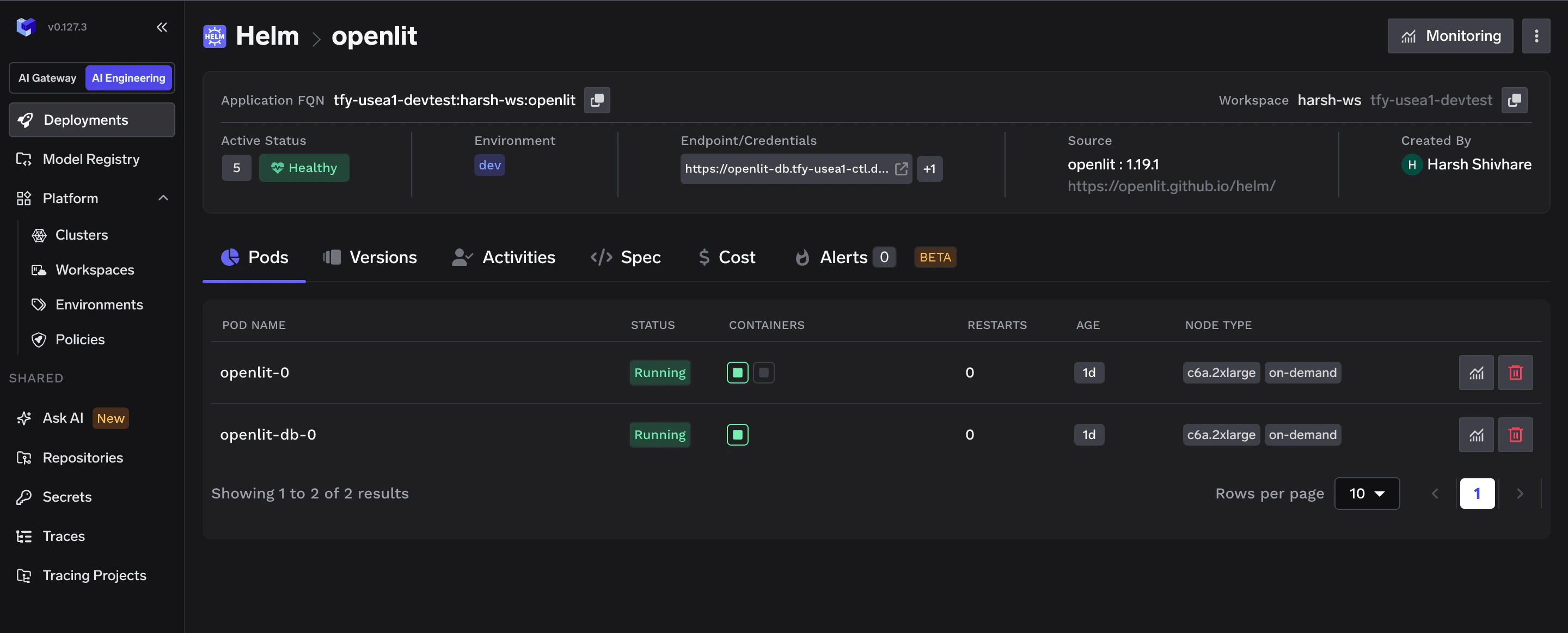 Deploy order within the Helm chart is automatic — ClickHouse starts first via an init container that waits for ClickHouse to be healthy before OpenLIT starts.
Once all pods are running, open the dashboard at:
```
https://openlit.CLUSTER_DOMAIN
```
Default login credentials:
| Field | Value |
| ------------ | ----------------- |
| **Email** | `user@openlit.io` |
| **Password** | `openlituser` |
Deploy order within the Helm chart is automatic — ClickHouse starts first via an init container that waits for ClickHouse to be healthy before OpenLIT starts.
Once all pods are running, open the dashboard at:
```
https://openlit.CLUSTER_DOMAIN
```
Default login credentials:
| Field | Value |
| ------------ | ----------------- |
| **Email** | `user@openlit.io` |
| **Password** | `openlituser` |
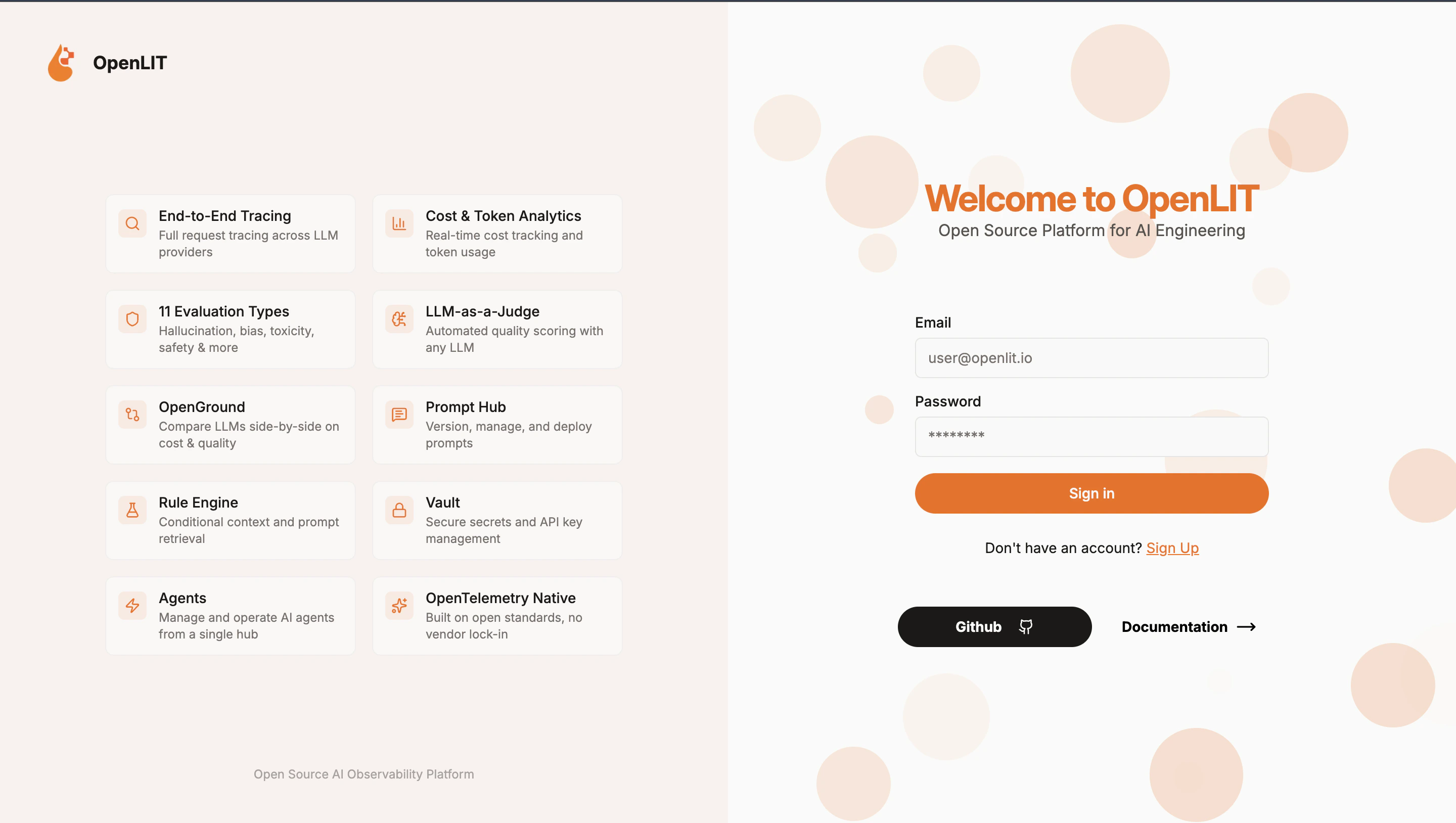 Change your password immediately after first login: **Settings → Account → Change Password**.
Now point the TrueFoundry AI Gateway to ship traces and metrics to your OpenLIT instance.
1. Go to **AI Gateway** → **Controls** → **Settings** in the TrueFoundry dashboard.
Change your password immediately after first login: **Settings → Account → Change Password**.
Now point the TrueFoundry AI Gateway to ship traces and metrics to your OpenLIT instance.
1. Go to **AI Gateway** → **Controls** → **Settings** in the TrueFoundry dashboard.
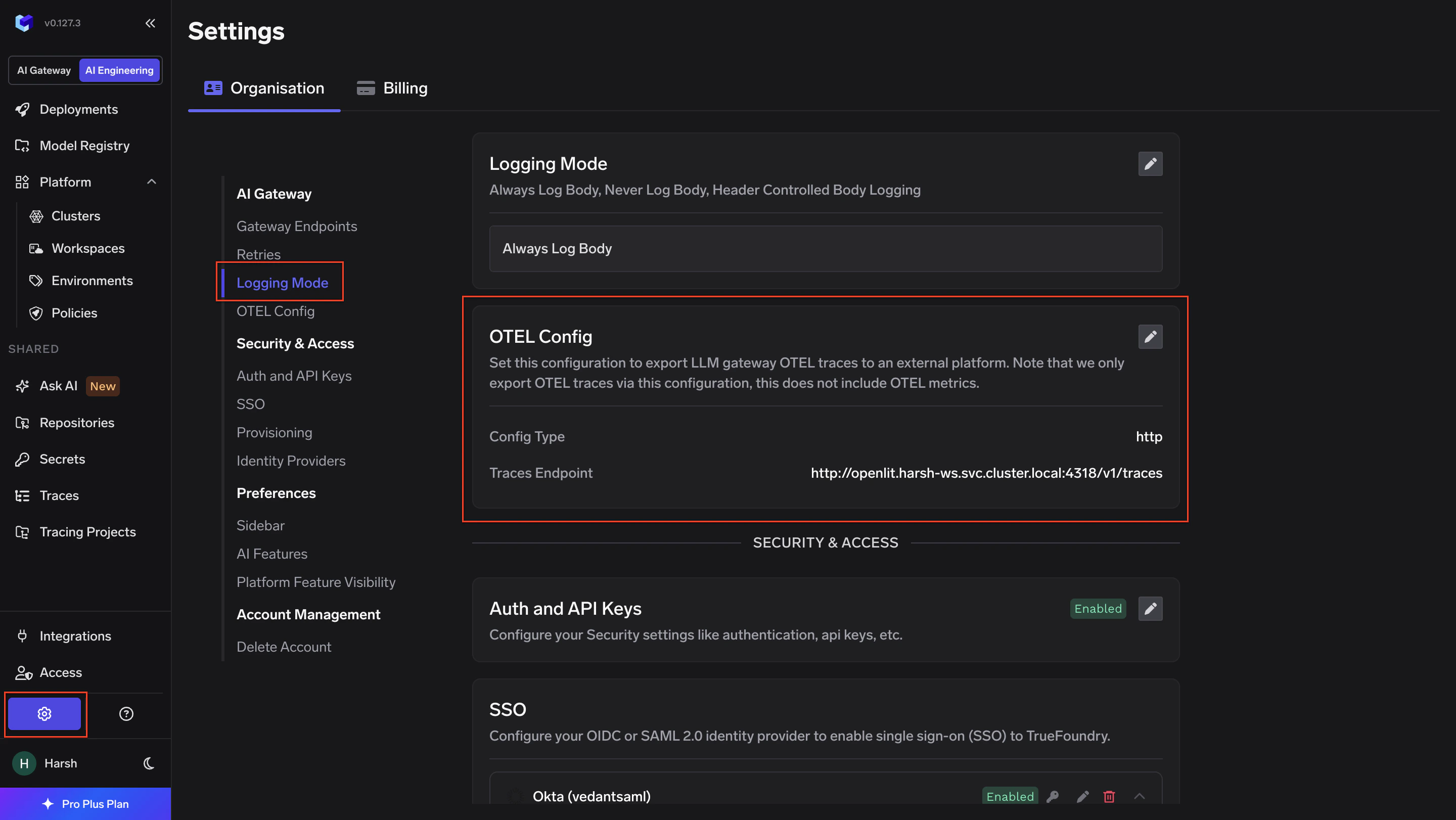 2. Scroll down to the **OTEL Config** section and click the edit (✏️) button.
**Otel Traces Exporter Configuration:**
| Field | Value |
| ------------ | ----------------------------------------------------------- |
| **Toggle** | Enabled |
| **Protocol** | HTTP Configuration |
| **Endpoint** | `http://openlit.NAMESPACE.svc.cluster.local:4318/v1/traces` |
| **Encoding** | Proto |
| **Headers** | None |
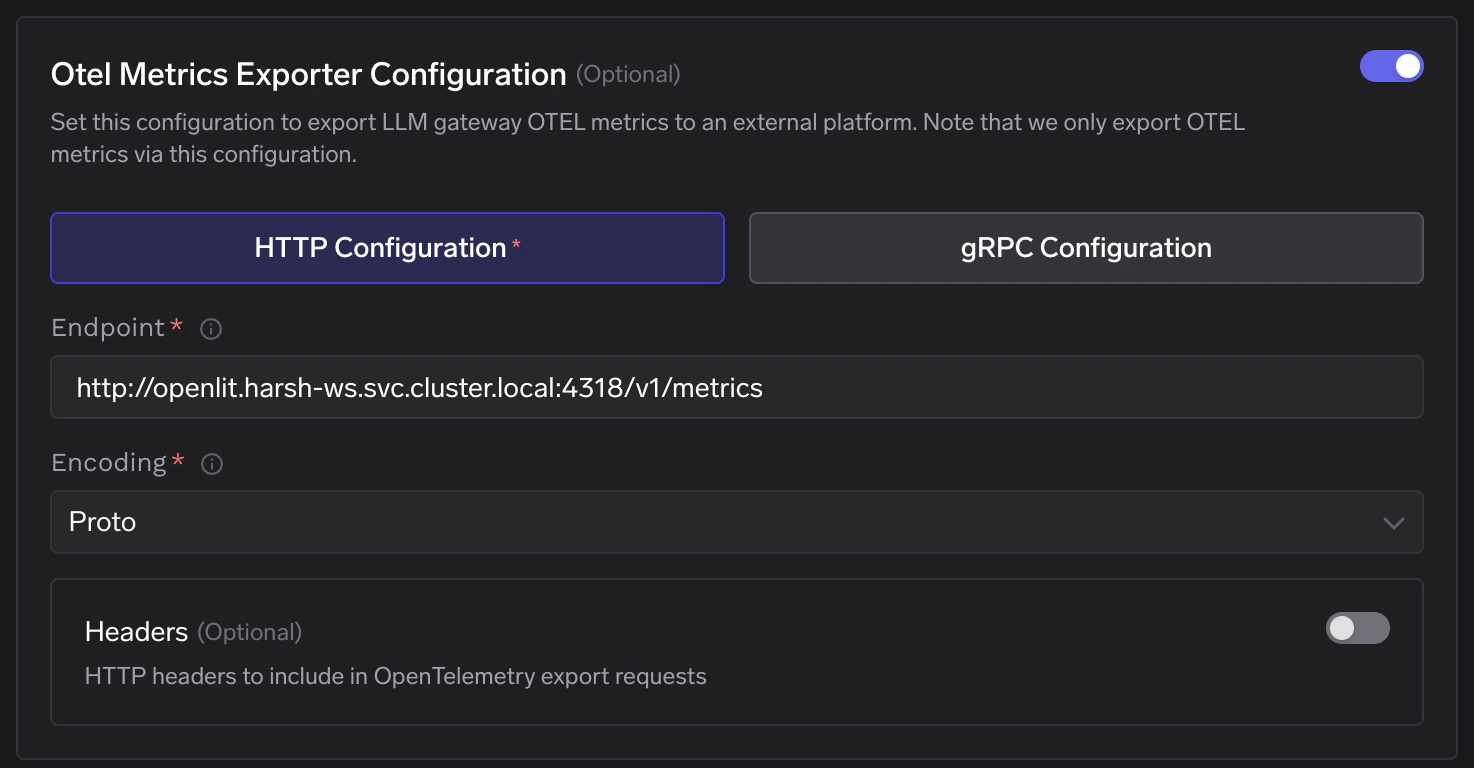
**Otel Metrics Exporter Configuration:**
| Field | Value |
| ------------ | ------------------------------------------------------------ |
| **Toggle** | Enabled |
| **Protocol** | HTTP Configuration |
| **Endpoint** | `http://openlit.NAMESPACE.svc.cluster.local:4318/v1/metrics` |
| **Encoding** | Proto |
| **Headers** | None |
Replace `NAMESPACE` with your actual workspace namespace. Click **Save** to apply.
2. Scroll down to the **OTEL Config** section and click the edit (✏️) button.
**Otel Traces Exporter Configuration:**
| Field | Value |
| ------------ | ----------------------------------------------------------- |
| **Toggle** | Enabled |
| **Protocol** | HTTP Configuration |
| **Endpoint** | `http://openlit.NAMESPACE.svc.cluster.local:4318/v1/traces` |
| **Encoding** | Proto |
| **Headers** | None |
**Otel Metrics Exporter Configuration:**
| Field | Value |
| ------------ | ------------------------------------------------------------ |
| **Toggle** | Enabled |
| **Protocol** | HTTP Configuration |
| **Endpoint** | `http://openlit.NAMESPACE.svc.cluster.local:4318/v1/metrics` |
| **Encoding** | Proto |
| **Headers** | None |
Replace `NAMESPACE` with your actual workspace namespace. Click **Save** to apply.
 1. Make a request through the TrueFoundry AI Gateway.
2. Navigate to the **Requests** tab in the OpenLIT dashboard and confirm traces are appearing.
1. Make a request through the TrueFoundry AI Gateway.
2. Navigate to the **Requests** tab in the OpenLIT dashboard and confirm traces are appearing.
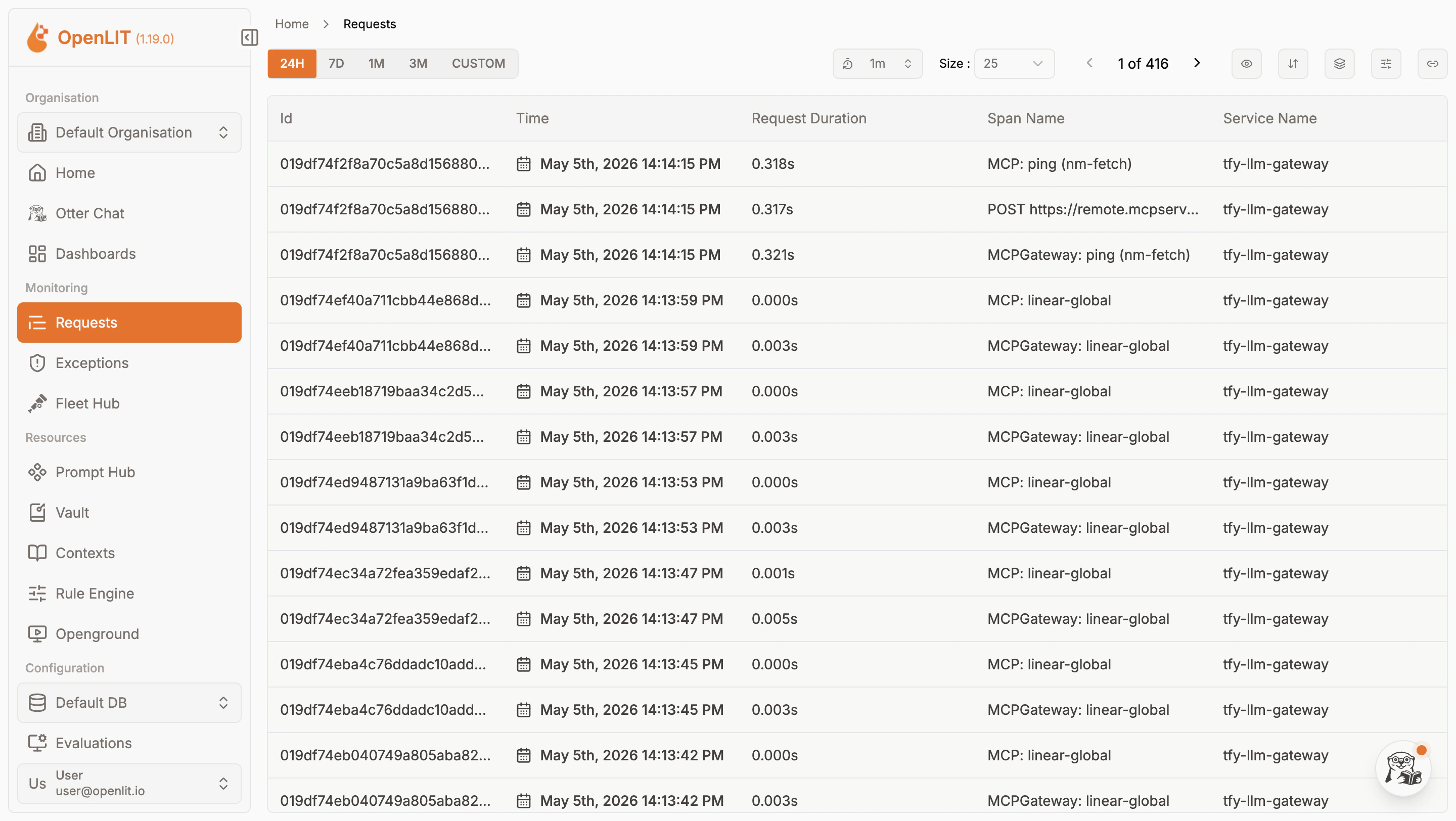 3. Navigate to the **Metrics** tab to confirm aggregated metrics are also flowing in.
 ## Internal Service DNS Reference
Once deployed, the following internal DNS names are available within the cluster:
| Service | Internal DNS | Port |
| ------------------------- | ---------------------------------------- | ------ |
| **OTel Collector (HTTP)** | `openlit.NAMESPACE.svc.cluster.local` | `4318` |
| **OTel Collector (gRPC)** | `openlit.NAMESPACE.svc.cluster.local` | `4317` |
| **ClickHouse (HTTP)** | `openlit-db.NAMESPACE.svc.cluster.local` | `8123` |
| **ClickHouse (Native)** | `openlit-db.NAMESPACE.svc.cluster.local` | `9000` |
| **Dashboard** | `openlit.NAMESPACE.svc.cluster.local` | `3000` |
Use the internal DNS for OTEL Config endpoints — external URLs are only needed for browser access to the dashboard.
## Configuration Reference
| Configuration | Value |
| -------------------- | ------------------------------------------------------------ |
| **Helm Repo** | `https://openlit.github.io/helm/` |
| **Chart Name** | `openlit` |
| **Traces Endpoint** | `http://openlit.NAMESPACE.svc.cluster.local:4318/v1/traces` |
| **Metrics Endpoint** | `http://openlit.NAMESPACE.svc.cluster.local:4318/v1/metrics` |
| **Protocol** | HTTP |
| **Encoding** | Proto |
| **Auth** | None required |
| **Dashboard Port** | `3000` |
| **Default Email** | `user@openlit.io` |
| **Default Password** | `openlituser` |
## Internal Service DNS Reference
Once deployed, the following internal DNS names are available within the cluster:
| Service | Internal DNS | Port |
| ------------------------- | ---------------------------------------- | ------ |
| **OTel Collector (HTTP)** | `openlit.NAMESPACE.svc.cluster.local` | `4318` |
| **OTel Collector (gRPC)** | `openlit.NAMESPACE.svc.cluster.local` | `4317` |
| **ClickHouse (HTTP)** | `openlit-db.NAMESPACE.svc.cluster.local` | `8123` |
| **ClickHouse (Native)** | `openlit-db.NAMESPACE.svc.cluster.local` | `9000` |
| **Dashboard** | `openlit.NAMESPACE.svc.cluster.local` | `3000` |
Use the internal DNS for OTEL Config endpoints — external URLs are only needed for browser access to the dashboard.
## Configuration Reference
| Configuration | Value |
| -------------------- | ------------------------------------------------------------ |
| **Helm Repo** | `https://openlit.github.io/helm/` |
| **Chart Name** | `openlit` |
| **Traces Endpoint** | `http://openlit.NAMESPACE.svc.cluster.local:4318/v1/traces` |
| **Metrics Endpoint** | `http://openlit.NAMESPACE.svc.cluster.local:4318/v1/metrics` |
| **Protocol** | HTTP |
| **Encoding** | Proto |
| **Auth** | None required |
| **Dashboard Port** | `3000` |
| **Default Email** | `user@openlit.io` |
| **Default Password** | `openlituser` |