> ## Documentation Index
> Fetch the complete documentation index at: https://www.truefoundry.com/llms.txt
> Use this file to discover all available pages before exploring further.
# OpenAI Agents SDK
> Learn how to use openai agents sdk with TrueFoundry AI Gateway, including setup steps, use cases, and production-ready examples.
This guide provides instructions for integrating [OpenAI Agents SDK](https://platform.openai.com/docs/guides/agents) with TrueFoundry's AI Gateway.
Official OpenAI Agents SDK for Python
Official OpenAI Agents SDK for JavaScript/TypeScript
## What is OpenAI Agents SDK?
OpenAI Agents SDK is a lightweight yet powerful framework for building multi-agent workflows. It is provider-agnostic, supporting the OpenAI Responses and Chat Completions APIs, as well as 100+ other LLMs. The SDK provides automatic tracing, session management, and support for complex agent patterns including handoffs, function calling, and human-in-the-loop workflows.
### Key Features of OpenAI Agents SDK
* **Multi-Agent Workflows**: Build teams of specialized agents that can hand off tasks to each other and collaborate on complex workflows
* **Function Tools**: Equip agents with custom functions to interact with external systems and APIs
* **Session Memory**: Built-in conversation history management across multiple agent runs
* **Automatic Tracing**: Extensible tracing support with external destinations like Logfire, AgentOps, and Braintrust
## How TrueFoundry Integrates with OpenAI Agents SDK
TrueFoundry enhances OpenAI Agents SDK with production-grade observability, cost management, and multi-provider support through its LLM Gateway.
### Installation & Setup
```bash theme={"dark"}
pip install openai-agents
```
```bash theme={"dark"}
npm install @openai/agents openai zod
```
**Why Zod?** The OpenAI Agents SDK uses [Zod](https://zod.dev/) for schema validation and type-safe parameter definitions in function tools. This provides automatic runtime validation and better TypeScript type inference.
1. Sign up for a [TrueFoundry account](https://www.truefoundry.com/register)
2. Follow the steps here in [Quick start](https://docs.truefoundry.com/gateway/quick-start)
 ```python theme={"dark"}
from agents import Agent, OpenAIChatCompletionsModel, Runner
from openai import AsyncOpenAI
import asyncio
# Configure AsyncOpenAI client with TrueFoundry
client = AsyncOpenAI(
base_url="{GATEWAY_BASE_URL}",
api_key="your_truefoundry_api_key"
)
async def main():
# Create agent with TrueFoundry client
agent = Agent(
name="Assistant",
instructions="You are a helpful assistant",
model=OpenAIChatCompletionsModel(
model="openai-main/gpt-4o",
openai_client=client
)
)
# Run the agent
result = await Runner.run(agent, "Write a haiku about recursion in programming.")
print(result.final_output)
if __name__ == "__main__":
asyncio.run(main())
```
**Why AsyncOpenAI?** The OpenAI Agents SDK is built on async/await patterns for non-blocking operations. While you can use the synchronous `OpenAI` client, `AsyncOpenAI` is recommended for production as it allows your agents to handle concurrent requests efficiently without blocking.
```typescript theme={"dark"}
import { Agent, Runner, setDefaultOpenAIClient } from '@openai/agents';
import OpenAI from 'openai';
// Configure OpenAI client with TrueFoundry
const client = new OpenAI({
baseURL: "{GATEWAY_BASE_URL}",
apiKey: "your-truefoundry-api-key"
});
// Set as default client for all agents
// @ts-ignore - Version conflict between openai packages
setDefaultOpenAIClient(client);
// Create agent
const agent = new Agent({
name: "Assistant",
instructions: "You are a helpful assistant",
model: "openai-main/gpt-4o" // Format: provider-name/model-name
});
// Run the agent
const runner = new Runner();
const result = await runner.run(agent, "Write a haiku about recursion in programming.");
console.log(result.finalOutput);
```
### Complete Example with Handoffs
```python theme={"dark"}
from agents import Agent, OpenAIChatCompletionsModel, Runner
from openai import AsyncOpenAI
import asyncio
# Configure TrueFoundry client
client = AsyncOpenAI(
base_url="{GATEWAY_BASE_URL}",
api_key="your_truefoundry_api_key"
)
# Create model instance to reuse
model = OpenAIChatCompletionsModel(
model="openai-main/gpt-4o",
openai_client=client
)
# Create specialized agents
spanish_agent = Agent(
name="Spanish agent",
instructions="You only speak Spanish.",
model=model
)
english_agent = Agent(
name="English agent",
instructions="You only speak English",
model=model
)
# Create triage agent with handoffs
triage_agent = Agent(
name="Triage agent",
instructions="Handoff to the appropriate agent based on the language of the request.",
model=model,
handoffs=[spanish_agent, english_agent]
)
async def main():
result = await Runner.run(triage_agent, input="Hola, ¿cómo estás?")
print(result.final_output)
# ¡Hola! Estoy bien, gracias por preguntar. ¿Y tú, cómo estás?
if __name__ == "__main__":
asyncio.run(main())
```
```typescript theme={"dark"}
import { Agent, Runner, setDefaultOpenAIClient } from '@openai/agents';
import OpenAI from 'openai';
// Configure OpenAI client with TrueFoundry
const client = new OpenAI({
baseURL: "{GATEWAY_BASE_URL}",
apiKey: "your-truefoundry-api-key"
});
// Set as default client for all agents
// @ts-ignore - Version conflict between openai packages
setDefaultOpenAIClient(client);
// Create specialized agents
const spanishAgent = new Agent({
name: "Spanish agent",
instructions: "You only speak Spanish.",
model: "openai-main/gpt-4o"
});
const englishAgent = new Agent({
name: "English agent",
instructions: "You only speak English",
model: "openai-main/gpt-4o"
});
// Create triage agent with handoffs
const triageAgent = new Agent({
name: "Triage agent",
instructions: "Handoff to the appropriate agent based on the language of the request.",
model: "openai-main/gpt-4o",
handoffs: [spanishAgent, englishAgent]
});
const runner = new Runner();
const result = await runner.run(triageAgent, "Hola, ¿cómo estás?");
console.log(result.finalOutput);
// ¡Hola! Estoy bien, gracias por preguntar. ¿Y tú, cómo estás?
```
### Example with Function Tools
```python theme={"dark"}
from agents import Agent, OpenAIChatCompletionsModel, Runner, function_tool
from openai import AsyncOpenAI
import asyncio
# Configure TrueFoundry client
client = AsyncOpenAI(
base_url="{GATEWAY_BASE_URL}",
api_key="your_truefoundry_api_key"
)
@function_tool
def get_weather(city: str) -> str:
"""Get the weather for a city"""
print(f"[debug] getting weather for {city}")
return f"The weather in {city} is sunny."
async def main():
agent = Agent(
name="Weather Assistant",
instructions="You are a helpful weather assistant.",
model=OpenAIChatCompletionsModel(
model="openai-main/gpt-4o",
openai_client=client
),
tools=[get_weather]
)
result = await Runner.run(agent, "What's the weather in Tokyo?")
print(result.final_output)
# The weather in Tokyo is sunny.
if __name__ == "__main__":
asyncio.run(main())
```
```typescript theme={"dark"}
import { Agent, Runner, setDefaultOpenAIClient, tool } from '@openai/agents';
import OpenAI from 'openai';
import { z } from 'zod';
// Configure OpenAI client with TrueFoundry
const client = new OpenAI({
baseURL: "{GATEWAY_BASE_URL}",
apiKey: "your-truefoundry-api-key"
});
// @ts-ignore - Version conflict between openai packages
setDefaultOpenAIClient(client);
// Define weather tool
const getWeatherTool = tool({
name: 'get_weather',
description: 'Get the current weather for a given city',
parameters: z.object({
city: z.string().describe('The name of the city'),
}),
async execute({ city }) {
console.log(`[debug] getting weather for ${city}`);
return `The weather in ${city} is sunny and 22°C`;
},
});
// Create agent with the tool
const agent = new Agent({
name: "Weather Assistant",
instructions: "You are a helpful weather assistant. Use the get_weather tool to provide accurate weather information.",
model: "openai-main/gpt-4o",
tools: [getWeatherTool]
});
// Run the agent
const runner = new Runner();
const result = await runner.run(agent, "What's the weather in Tokyo?");
console.log(result.finalOutput);
// Based on the current information, the weather in Tokyo is sunny and 22°C.
```
### Observability and Governance
Monitor your OpenAI Agents through TrueFoundry's metrics tab:
```python theme={"dark"}
from agents import Agent, OpenAIChatCompletionsModel, Runner
from openai import AsyncOpenAI
import asyncio
# Configure AsyncOpenAI client with TrueFoundry
client = AsyncOpenAI(
base_url="{GATEWAY_BASE_URL}",
api_key="your_truefoundry_api_key"
)
async def main():
# Create agent with TrueFoundry client
agent = Agent(
name="Assistant",
instructions="You are a helpful assistant",
model=OpenAIChatCompletionsModel(
model="openai-main/gpt-4o",
openai_client=client
)
)
# Run the agent
result = await Runner.run(agent, "Write a haiku about recursion in programming.")
print(result.final_output)
if __name__ == "__main__":
asyncio.run(main())
```
**Why AsyncOpenAI?** The OpenAI Agents SDK is built on async/await patterns for non-blocking operations. While you can use the synchronous `OpenAI` client, `AsyncOpenAI` is recommended for production as it allows your agents to handle concurrent requests efficiently without blocking.
```typescript theme={"dark"}
import { Agent, Runner, setDefaultOpenAIClient } from '@openai/agents';
import OpenAI from 'openai';
// Configure OpenAI client with TrueFoundry
const client = new OpenAI({
baseURL: "{GATEWAY_BASE_URL}",
apiKey: "your-truefoundry-api-key"
});
// Set as default client for all agents
// @ts-ignore - Version conflict between openai packages
setDefaultOpenAIClient(client);
// Create agent
const agent = new Agent({
name: "Assistant",
instructions: "You are a helpful assistant",
model: "openai-main/gpt-4o" // Format: provider-name/model-name
});
// Run the agent
const runner = new Runner();
const result = await runner.run(agent, "Write a haiku about recursion in programming.");
console.log(result.finalOutput);
```
### Complete Example with Handoffs
```python theme={"dark"}
from agents import Agent, OpenAIChatCompletionsModel, Runner
from openai import AsyncOpenAI
import asyncio
# Configure TrueFoundry client
client = AsyncOpenAI(
base_url="{GATEWAY_BASE_URL}",
api_key="your_truefoundry_api_key"
)
# Create model instance to reuse
model = OpenAIChatCompletionsModel(
model="openai-main/gpt-4o",
openai_client=client
)
# Create specialized agents
spanish_agent = Agent(
name="Spanish agent",
instructions="You only speak Spanish.",
model=model
)
english_agent = Agent(
name="English agent",
instructions="You only speak English",
model=model
)
# Create triage agent with handoffs
triage_agent = Agent(
name="Triage agent",
instructions="Handoff to the appropriate agent based on the language of the request.",
model=model,
handoffs=[spanish_agent, english_agent]
)
async def main():
result = await Runner.run(triage_agent, input="Hola, ¿cómo estás?")
print(result.final_output)
# ¡Hola! Estoy bien, gracias por preguntar. ¿Y tú, cómo estás?
if __name__ == "__main__":
asyncio.run(main())
```
```typescript theme={"dark"}
import { Agent, Runner, setDefaultOpenAIClient } from '@openai/agents';
import OpenAI from 'openai';
// Configure OpenAI client with TrueFoundry
const client = new OpenAI({
baseURL: "{GATEWAY_BASE_URL}",
apiKey: "your-truefoundry-api-key"
});
// Set as default client for all agents
// @ts-ignore - Version conflict between openai packages
setDefaultOpenAIClient(client);
// Create specialized agents
const spanishAgent = new Agent({
name: "Spanish agent",
instructions: "You only speak Spanish.",
model: "openai-main/gpt-4o"
});
const englishAgent = new Agent({
name: "English agent",
instructions: "You only speak English",
model: "openai-main/gpt-4o"
});
// Create triage agent with handoffs
const triageAgent = new Agent({
name: "Triage agent",
instructions: "Handoff to the appropriate agent based on the language of the request.",
model: "openai-main/gpt-4o",
handoffs: [spanishAgent, englishAgent]
});
const runner = new Runner();
const result = await runner.run(triageAgent, "Hola, ¿cómo estás?");
console.log(result.finalOutput);
// ¡Hola! Estoy bien, gracias por preguntar. ¿Y tú, cómo estás?
```
### Example with Function Tools
```python theme={"dark"}
from agents import Agent, OpenAIChatCompletionsModel, Runner, function_tool
from openai import AsyncOpenAI
import asyncio
# Configure TrueFoundry client
client = AsyncOpenAI(
base_url="{GATEWAY_BASE_URL}",
api_key="your_truefoundry_api_key"
)
@function_tool
def get_weather(city: str) -> str:
"""Get the weather for a city"""
print(f"[debug] getting weather for {city}")
return f"The weather in {city} is sunny."
async def main():
agent = Agent(
name="Weather Assistant",
instructions="You are a helpful weather assistant.",
model=OpenAIChatCompletionsModel(
model="openai-main/gpt-4o",
openai_client=client
),
tools=[get_weather]
)
result = await Runner.run(agent, "What's the weather in Tokyo?")
print(result.final_output)
# The weather in Tokyo is sunny.
if __name__ == "__main__":
asyncio.run(main())
```
```typescript theme={"dark"}
import { Agent, Runner, setDefaultOpenAIClient, tool } from '@openai/agents';
import OpenAI from 'openai';
import { z } from 'zod';
// Configure OpenAI client with TrueFoundry
const client = new OpenAI({
baseURL: "{GATEWAY_BASE_URL}",
apiKey: "your-truefoundry-api-key"
});
// @ts-ignore - Version conflict between openai packages
setDefaultOpenAIClient(client);
// Define weather tool
const getWeatherTool = tool({
name: 'get_weather',
description: 'Get the current weather for a given city',
parameters: z.object({
city: z.string().describe('The name of the city'),
}),
async execute({ city }) {
console.log(`[debug] getting weather for ${city}`);
return `The weather in ${city} is sunny and 22°C`;
},
});
// Create agent with the tool
const agent = new Agent({
name: "Weather Assistant",
instructions: "You are a helpful weather assistant. Use the get_weather tool to provide accurate weather information.",
model: "openai-main/gpt-4o",
tools: [getWeatherTool]
});
// Run the agent
const runner = new Runner();
const result = await runner.run(agent, "What's the weather in Tokyo?");
console.log(result.finalOutput);
// Based on the current information, the weather in Tokyo is sunny and 22°C.
```
### Observability and Governance
Monitor your OpenAI Agents through TrueFoundry's metrics tab:
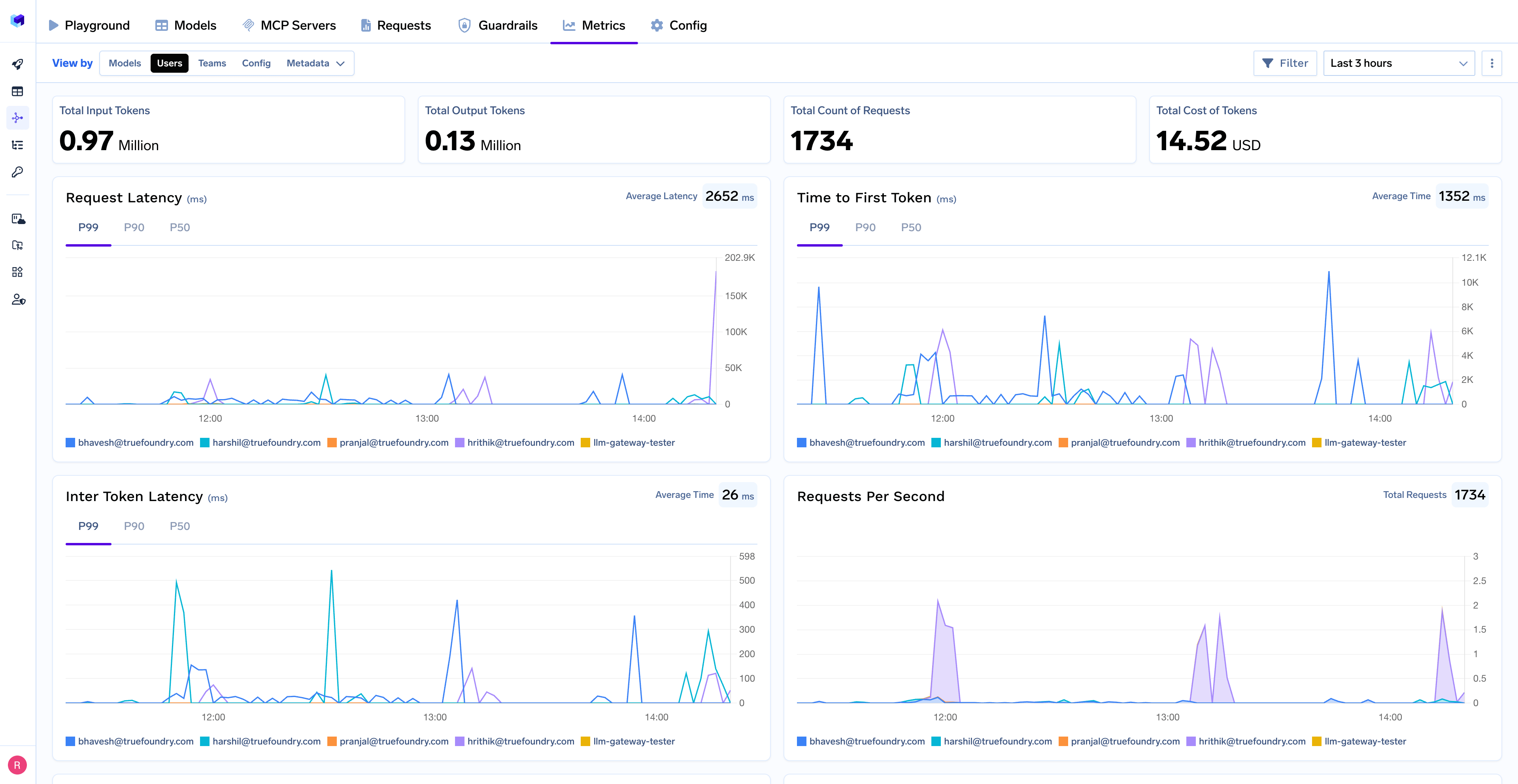 With Truefoundry's AI gateway, you can monitor and analyze:
* **Performance Metrics**: Track key latency metrics like Request Latency, Time to First Token (TTFS), and Inter-Token Latency (ITL) with P99, P90, and P50 percentiles
* **Cost and Token Usage**: Gain visibility into your application's costs with detailed breakdowns of input/output tokens and the associated expenses for each model
* **Usage Patterns**: Understand how your application is being used with detailed analytics on user activity, model distribution, and team-based usage
* **Agent Execution Traces**: Monitor individual agent runs with complete visibility into tool usage, handoffs, and state transitions
* **Rate Limiting and Virtual Models**: Set up rate limiting and configure [Virtual Models](/docs/ai-gateway/virtual-model) for intelligent routing and fallback across your models
With Truefoundry's AI gateway, you can monitor and analyze:
* **Performance Metrics**: Track key latency metrics like Request Latency, Time to First Token (TTFS), and Inter-Token Latency (ITL) with P99, P90, and P50 percentiles
* **Cost and Token Usage**: Gain visibility into your application's costs with detailed breakdowns of input/output tokens and the associated expenses for each model
* **Usage Patterns**: Understand how your application is being used with detailed analytics on user activity, model distribution, and team-based usage
* **Agent Execution Traces**: Monitor individual agent runs with complete visibility into tool usage, handoffs, and state transitions
* **Rate Limiting and Virtual Models**: Set up rate limiting and configure [Virtual Models](/docs/ai-gateway/virtual-model) for intelligent routing and fallback across your models