> ## Documentation Index
> Fetch the complete documentation index at: https://www.truefoundry.com/llms.txt
> Use this file to discover all available pages before exploring further.
# Middleware
> Learn how to export LLM Gateway traces to Middleware using OpenTelemetry integration.
This guide provides instructions for integrating [Middleware](https://middleware.io/) with the TrueFoundry AI Gateway to export OpenTelemetry traces.
## What is Middleware?
Middleware provides observability and monitoring for cloud-native workloads. Connecting the TrueFoundry AI Gateway lets you ingest LLM and gateway spans into your Middleware environment for analysis alongside the rest of your stack.
### Key Features of Middleware
* **Unified observability**: Consolidate traces, logs, and infrastructure signals in one place
* **OpenTelemetry ingestion**: Receive OTLP spans from gateways and SDKs compatible with OTLP HTTP
* **Operational visibility**: Correlate latency, errors, and usage patterns across services and AI workloads
## Prerequisites
Before integrating Middleware with TrueFoundry, ensure you have:
1. **TrueFoundry Account**: Create a [Truefoundry account](https://www.truefoundry.com/register) and follow the instructions in our [Gateway Quick Start Guide](https://docs.truefoundry.com/gateway/quick-start)
2. **Middleware access**: Log in to Middleware with your **work email** (the account your organization uses for Middleware).
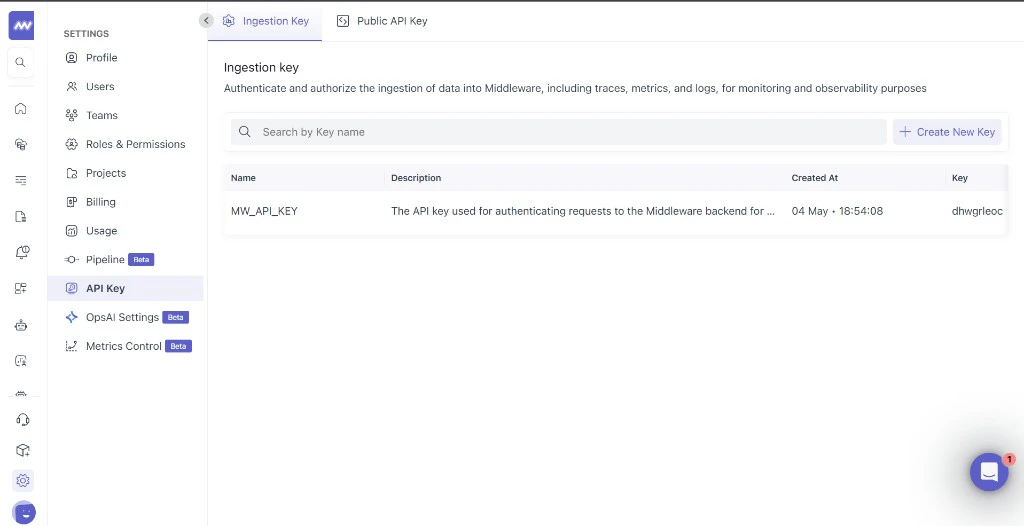
3. **Middleware API key**: Obtain the API key Middleware issued for OTLP trace ingestion (typically from Middleware project or organization settings — use the credential they designate for traces).
 ## Integration Steps
TrueFoundry AI Gateway supports exporting OpenTelemetry traces to Middleware using your tenant OTLP ingest URL.
1. Log in to Middleware with your work email and open your API key or organization settings (your admin may point you to the credential used for trace ingestion).
2. Copy the secret and store it in a credential manager until you paste it into TrueFoundry gateway settings — you typically cannot retrieve the full secret again once generated.
If you are unsure which key fits this integration, confirm with Middleware support — this flow expects the key mapped to OTLP ingestion at **`https://.middleware.io:443/v1/traces`** (replace `` with your Middleware hostname prefix).
1. In the TrueFoundry dashboard, go to **AI Engineering** → **Settings** → **OTEL Config** (under **Organisation**, in the AI Gateway section).
## Integration Steps
TrueFoundry AI Gateway supports exporting OpenTelemetry traces to Middleware using your tenant OTLP ingest URL.
1. Log in to Middleware with your work email and open your API key or organization settings (your admin may point you to the credential used for trace ingestion).
2. Copy the secret and store it in a credential manager until you paste it into TrueFoundry gateway settings — you typically cannot retrieve the full secret again once generated.
If you are unsure which key fits this integration, confirm with Middleware support — this flow expects the key mapped to OTLP ingestion at **`https://.middleware.io:443/v1/traces`** (replace `` with your Middleware hostname prefix).
1. In the TrueFoundry dashboard, go to **AI Engineering** → **Settings** → **OTEL Config** (under **Organisation**, in the AI Gateway section).
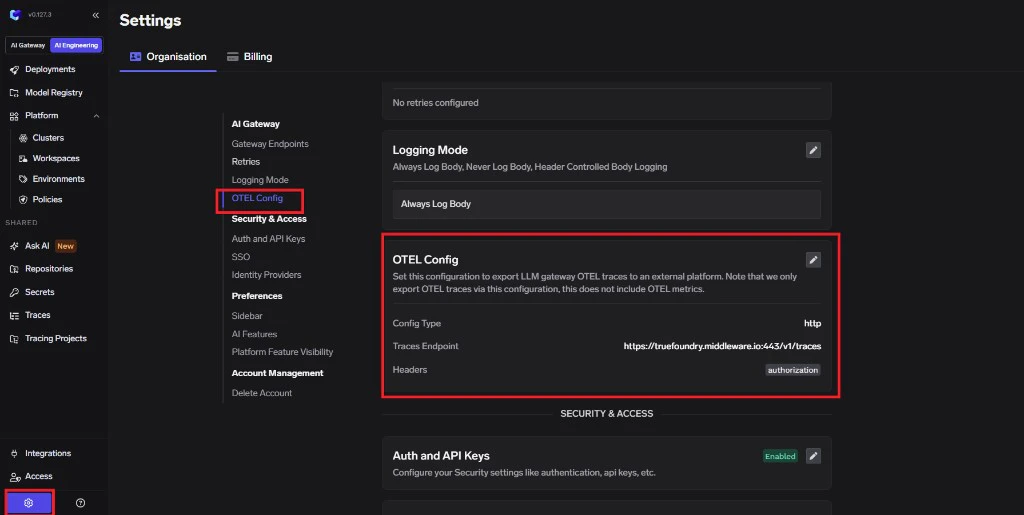 2. Click **edit** on the **OTEL Config** section to open the exporter form (if it is not already open).
3. Enable the **OTEL Traces Exporter Configuration** toggle.
4. Select **HTTP Configuration**.
5. Enter the Middleware traces endpoint: `https://.middleware.io:443/v1/traces`
6. Set **Encoding** to `Proto`.
2. Click **edit** on the **OTEL Config** section to open the exporter form (if it is not already open).
3. Enable the **OTEL Traces Exporter Configuration** toggle.
4. Select **HTTP Configuration**.
5. Enter the Middleware traces endpoint: `https://.middleware.io:443/v1/traces`
6. Set **Encoding** to `Proto`.
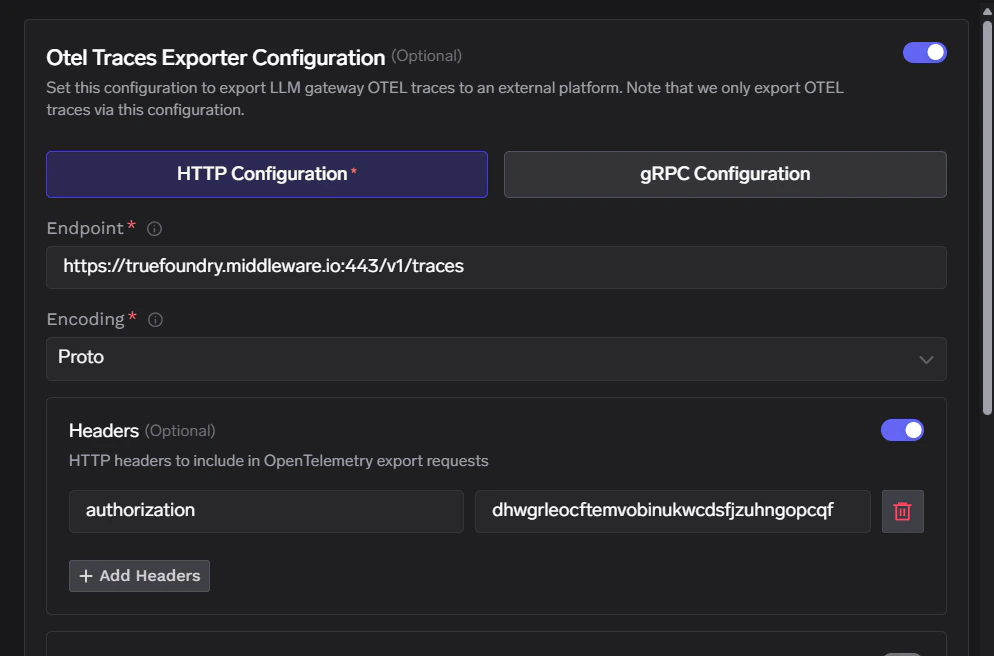 Middleware expects authentication through the `Authorization` header only. Paste the raw API key as the header value (do **not** add a `Bearer` prefix unless Middleware explicitly instructed you otherwise).
| Header | Value |
| --------------- | --------------------------- |
| `Authorization` | `` |
Click **Save** to apply your configuration.
1. Make some requests through the TrueFoundry AI Gateway.
2. Navigate to the **Monitor** section in TrueFoundry to verify traces are being generated.
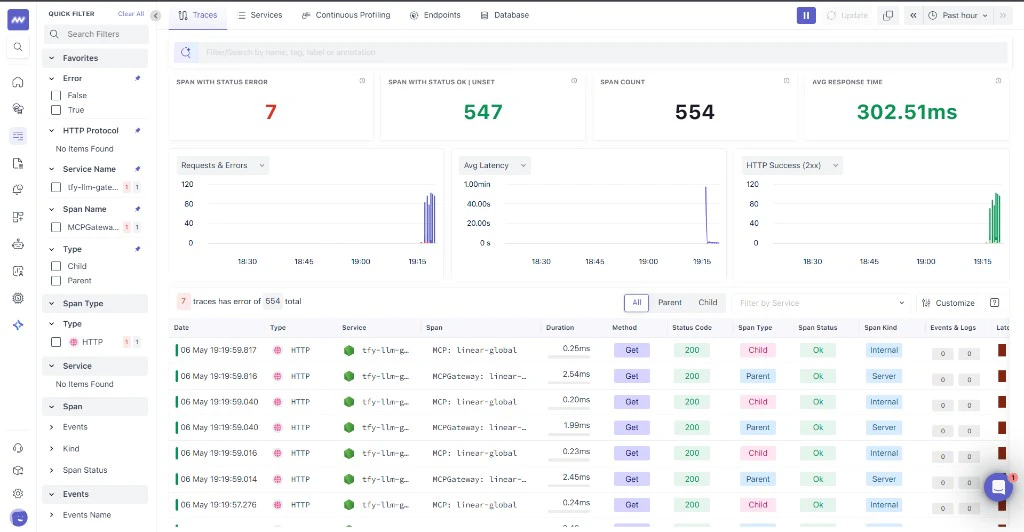
3. Open Middleware and drill into traces for your project or environment to confirm spans sourced from TrueFoundry are appearing.
Middleware expects authentication through the `Authorization` header only. Paste the raw API key as the header value (do **not** add a `Bearer` prefix unless Middleware explicitly instructed you otherwise).
| Header | Value |
| --------------- | --------------------------- |
| `Authorization` | `` |
Click **Save** to apply your configuration.
1. Make some requests through the TrueFoundry AI Gateway.
2. Navigate to the **Monitor** section in TrueFoundry to verify traces are being generated.
3. Open Middleware and drill into traces for your project or environment to confirm spans sourced from TrueFoundry are appearing.
 ## Configuration Options
### Middleware Endpoint
Middleware exposes ingest configuration similar to the following (use your tenant hostname):
| Configuration | Value |
| ------------------- | -------------------------------------------------------------------------- |
| **Traces Endpoint** | `https://.middleware.io:443/v1/traces` |
| **Protocol** | HTTP |
| **Encoding** | `Proto` |
| **Authentication** | `Authorization` set to your Middleware API key (no extra headers required) |
## Configuration Options
### Middleware Endpoint
Middleware exposes ingest configuration similar to the following (use your tenant hostname):
| Configuration | Value |
| ------------------- | -------------------------------------------------------------------------- |
| **Traces Endpoint** | `https://.middleware.io:443/v1/traces` |
| **Protocol** | HTTP |
| **Encoding** | `Proto` |
| **Authentication** | `Authorization` set to your Middleware API key (no extra headers required) |