> ## Documentation Index
> Fetch the complete documentation index at: https://www.truefoundry.com/llms.txt
> Use this file to discover all available pages before exploring further.
# Lunary
> Learn how to export LLM Gateway traces to Lunary using OpenTelemetry integration.
This guide provides instructions for integrating [Lunary](https://lunary.ai/) with the TrueFoundry AI Gateway to export OpenTelemetry traces.
## What is Lunary?
[Lunary](https://lunary.ai/) is an open source observability platform for LLM applications. It helps teams capture traces, inspect prompts and responses, monitor agent behavior, and track costs across production GenAI workloads.
### Key Features of Lunary
* **Agent and LLM tracing**: End-to-end visibility into chains, agents, tool calls, and model responses
* **OpenTelemetry ingestion**: Accepts OTLP/HTTP traces so you can send spans from gateways, SDKs, and custom instrumentation
* **Session-level monitoring**: Track conversations, users, and performance across chatbot and RAG workflows
* **Evaluation and analytics**: Analyze runs, categorize outputs, and iterate on prompts with measurable feedback loops
This guide documents **OTLP over HTTP** from the TrueFoundry AI Gateway ([Integration Steps](#integration-steps)). Lunary also supports SDK-based instrumentation and additional OTLP configuration options; see [Lunary's documentation](https://docs.lunary.ai/) for framework-specific guides.
TrueFoundry exports **OTEL traces only** through this configuration. OTEL metrics are not included. Leave the **Otel Metrics Exporter Configuration** toggle disabled unless you configure a separate metrics destination.
## Prerequisites
Before integrating Lunary with TrueFoundry, ensure you have:
1. **TrueFoundry Account**: Create a [TrueFoundry account](https://www.truefoundry.com/register) and follow the instructions in our [Gateway Quick Start Guide](https://docs.truefoundry.com/gateway/quick-start)
2. **Lunary Account**: Sign up at [lunary.ai](https://lunary.ai/)
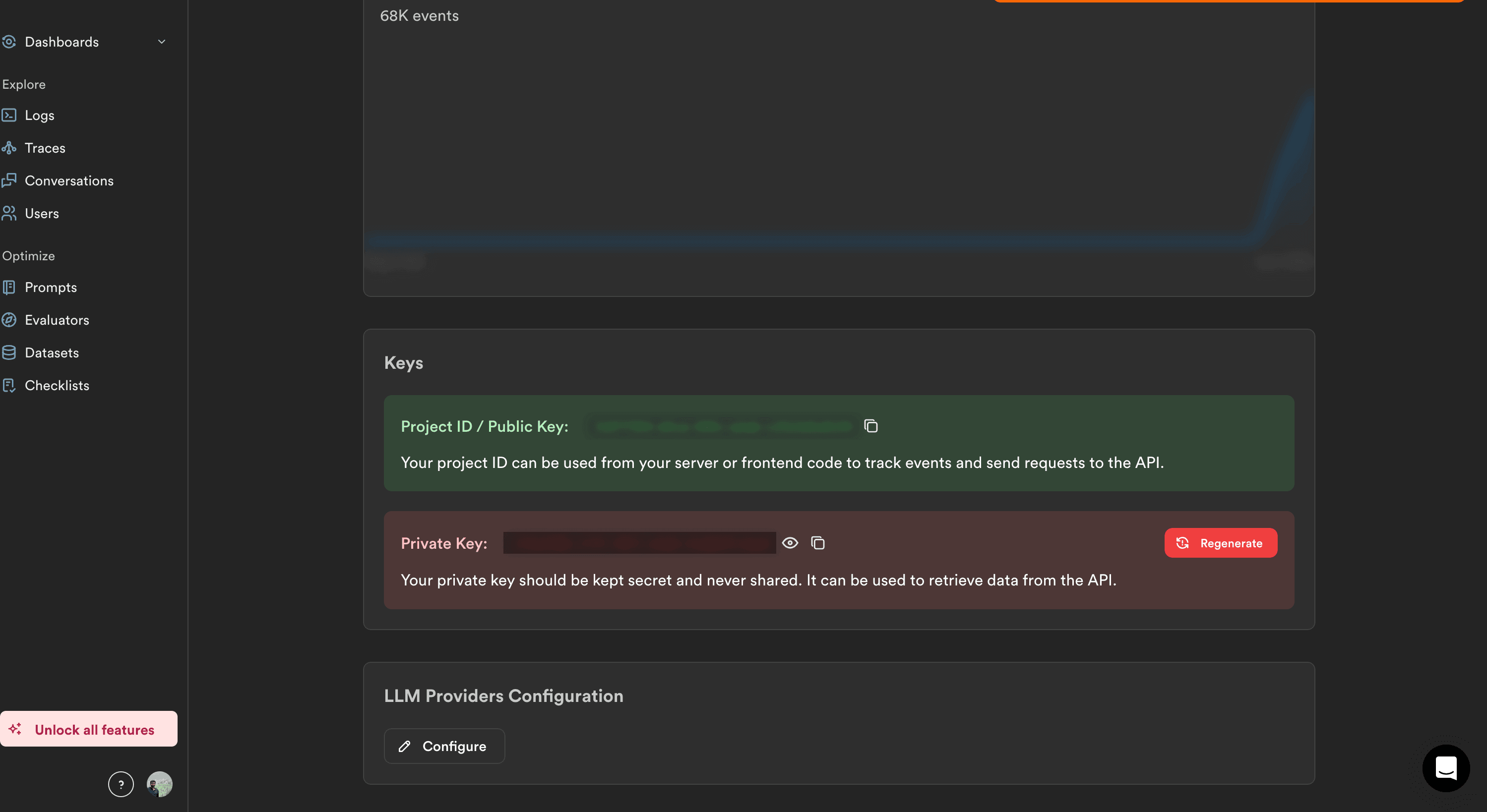
3. **Lunary project public key**: Copy the **Project ID / Public Key** from your Lunary project settings
 ## Integration Steps
TrueFoundry AI Gateway can export OpenTelemetry traces to Lunary over HTTP so you can analyze gateway traffic alongside the rest of your stack.
1. Log into the [Lunary dashboard](https://app.lunary.ai/).
2. Open your project and go to **Settings** → **API Keys** (or the project keys section).
3. Copy the **Project ID / Public Key**. Store it securely — treat it like a credential used for trace ingestion.
Lunary projects include both a public and private key. For OTLP trace export from TrueFoundry, use the **public key** in the `Authorization` header as shown below.
1. In the TrueFoundry dashboard, go to **Settings** → **Organisation** → **OTEL Config** (under **AI Gateway**).
## Integration Steps
TrueFoundry AI Gateway can export OpenTelemetry traces to Lunary over HTTP so you can analyze gateway traffic alongside the rest of your stack.
1. Log into the [Lunary dashboard](https://app.lunary.ai/).
2. Open your project and go to **Settings** → **API Keys** (or the project keys section).
3. Copy the **Project ID / Public Key**. Store it securely — treat it like a credential used for trace ingestion.
Lunary projects include both a public and private key. For OTLP trace export from TrueFoundry, use the **public key** in the `Authorization` header as shown below.
1. In the TrueFoundry dashboard, go to **Settings** → **Organisation** → **OTEL Config** (under **AI Gateway**).
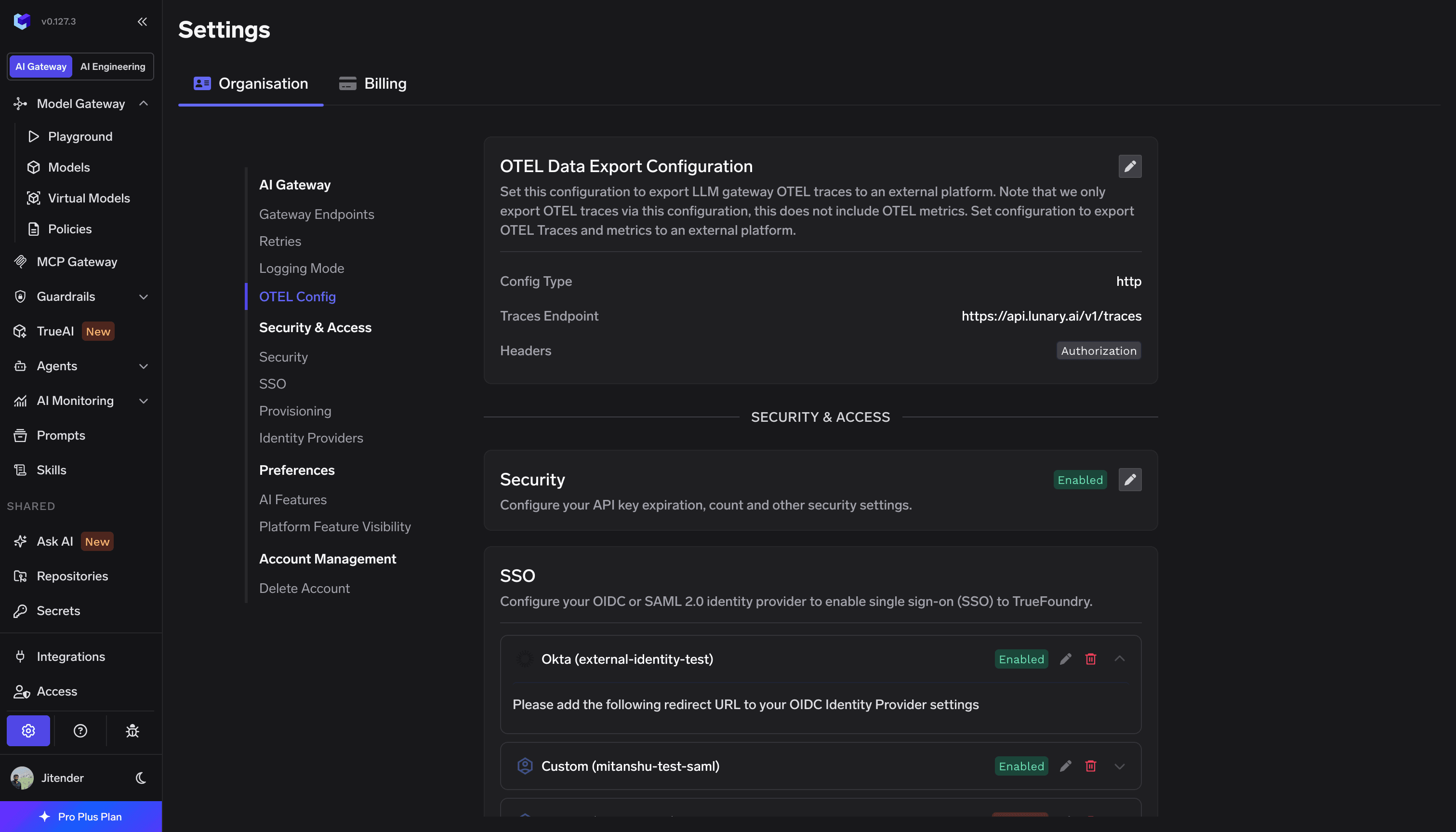 2. Click **edit** on the **OTEL Config** section to open the exporter form (if it is not already open).
3. Enable the **OTEL Traces Exporter Configuration** toggle.
4. Select **HTTP Configuration**.
5. Enter the Lunary traces endpoint: `https://api.lunary.ai/v1/traces`
6. Set **Encoding** to `Proto`.
Enable **Headers** and add Lunary authentication:
| Header | Value |
| --------------- | ---------------------------- |
| `Authorization` | `Bearer ` |
Replace `` with the public key from the first step.
2. Click **edit** on the **OTEL Config** section to open the exporter form (if it is not already open).
3. Enable the **OTEL Traces Exporter Configuration** toggle.
4. Select **HTTP Configuration**.
5. Enter the Lunary traces endpoint: `https://api.lunary.ai/v1/traces`
6. Set **Encoding** to `Proto`.
Enable **Headers** and add Lunary authentication:
| Header | Value |
| --------------- | ---------------------------- |
| `Authorization` | `Bearer ` |
Replace `` with the public key from the first step.
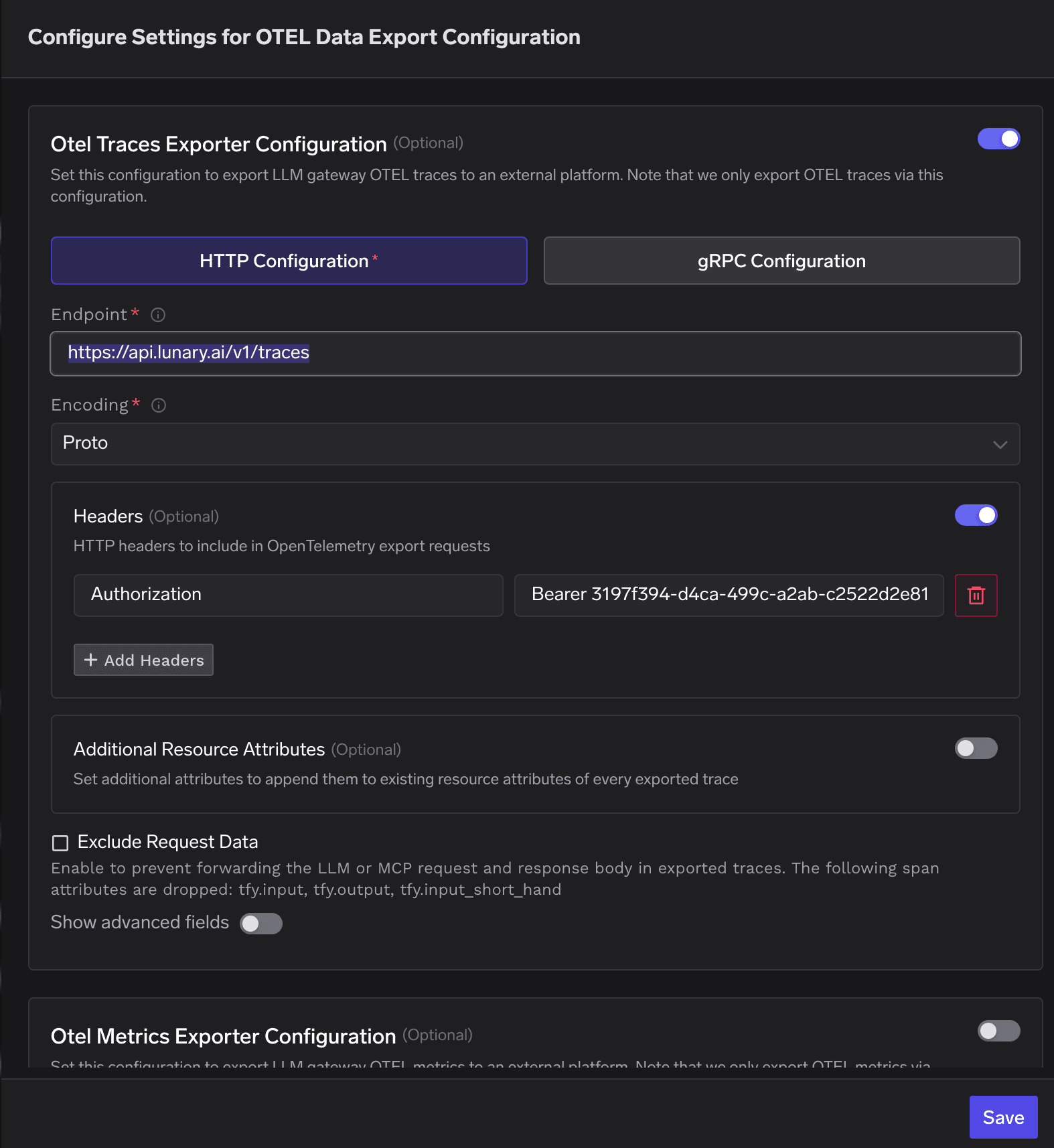 Click **Save** to apply your configuration.
1. Send a few requests through the TrueFoundry AI Gateway (via the Playground or any API call).
2. In TrueFoundry, open **Monitor** and confirm traces are being generated for those requests.
3. In Lunary, open **Explore** → **Traces** and confirm new spans appear with the expected hierarchy, token usage, and latency details.
Click **Save** to apply your configuration.
1. Send a few requests through the TrueFoundry AI Gateway (via the Playground or any API call).
2. In TrueFoundry, open **Monitor** and confirm traces are being generated for those requests.
3. In Lunary, open **Explore** → **Traces** and confirm new spans appear with the expected hierarchy, token usage, and latency details.
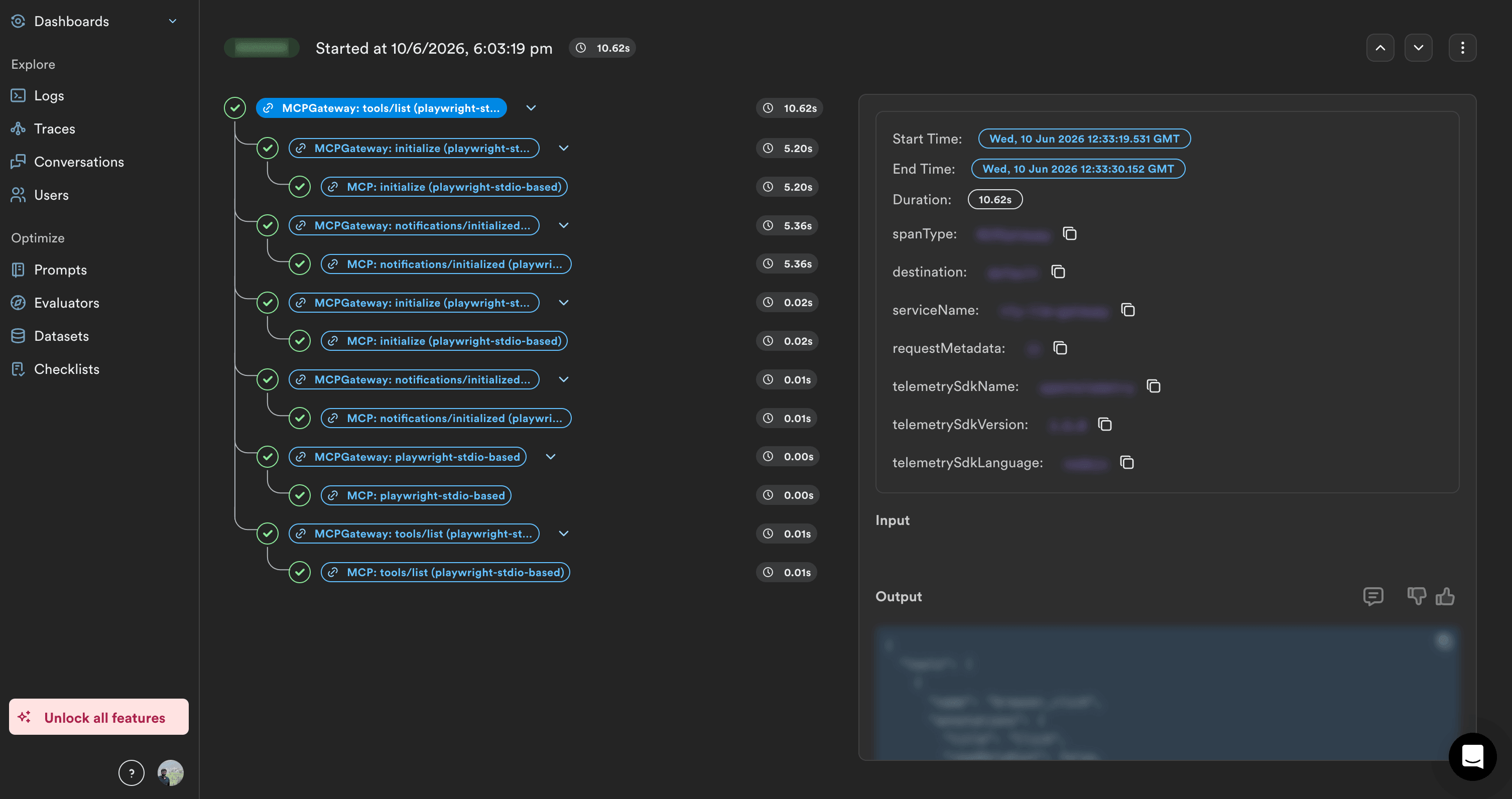 Lunary ingests OTLP spans asynchronously. Allow a short delay after your first gateway request before checking the Traces view.
## Configuration summary
| Configuration | Value |
| ------------------- | ------------------------------------------- |
| **Traces endpoint** | `https://api.lunary.ai/v1/traces` |
| **Protocol** | HTTP |
| **Encoding** | `Proto` |
| **Authentication** | `Authorization: Bearer ` |
The table above matches **HTTP** OTLP fields in TrueFoundry. For SDK-based instrumentation, self-hosted Lunary, or additional OpenTelemetry setup options, see [Lunary's documentation](https://docs.lunary.ai/).
Lunary ingests OTLP spans asynchronously. Allow a short delay after your first gateway request before checking the Traces view.
## Configuration summary
| Configuration | Value |
| ------------------- | ------------------------------------------- |
| **Traces endpoint** | `https://api.lunary.ai/v1/traces` |
| **Protocol** | HTTP |
| **Encoding** | `Proto` |
| **Authentication** | `Authorization: Bearer ` |
The table above matches **HTTP** OTLP fields in TrueFoundry. For SDK-based instrumentation, self-hosted Lunary, or additional OpenTelemetry setup options, see [Lunary's documentation](https://docs.lunary.ai/).