> ## Documentation Index
> Fetch the complete documentation index at: https://www.truefoundry.com/llms.txt
> Use this file to discover all available pages before exploring further.
# Langroid
> Learn how to use langroid with TrueFoundry AI Gateway, including setup steps, use cases, and production-ready examples.
This guide provides instructions for integrating [Langroid](https://langroid.github.io/langroid/) with the Truefoundry AI Gateway.
## What is Langroid?
Langroid is a Python framework for building LLM-powered applications with a focus on Multi-Agent Programming. It provides intuitive, flexible, and powerful tools for creating sophisticated conversational AI systems and multi-agent workflows.
### Key Features of Langroid
* **[Multi-Agent Architecture](https://langroid.github.io/langroid/)**: Build complex AI systems with multiple specialized agents that can collaborate and delegate tasks to each other in sophisticated workflows
* **[Conversation Management](https://langroid.github.io/langroid/quick-start/)**: Advanced conversation handling with context management, memory persistence, and natural dialogue flow control
## Prerequisites
Before integrating Langroid with TrueFoundry, ensure you have:
1. **TrueFoundry Account**: Create a [Truefoundry account](https://www.truefoundry.com/register) with at least one model provider. For a quick setup guide, see our [Gateway Quick Start](https://docs.truefoundry.com/gateway/quick-start)
2. **Langroid Installation**: Install Langroid using pip
## Installation & Setup
```bash lines theme={"dark"}
pip install langroid
```
 * Set the `api_base` to your "gateway base url"
* Set the `api_key` to your "truefoundry api key"
* Use TrueFoundry model names as shown in the image
## Basic Integration
Connect Langroid to TrueFoundry's unified LLM gateway:
```python lines theme={"dark"}
from langroid.language_models.openai_gpt import OpenAIGPTConfig
from langroid.agent.chat_agent import ChatAgent, ChatAgentConfig
TRUEFOUNDRY_PAT = "your-truefoundry-api-key"
TRUEFOUNDRY_BASE_URL = "{GATEWAY_BASE_URL}"
# Configure TrueFoundry connection
config = OpenAIGPTConfig(
chat_model="openai-main/gpt-4o", # Similarly you can call any model from any model provider like anthropic, gemini
api_key=TRUEFOUNDRY_PAT,
api_base=TRUEFOUNDRY_BASE_URL
)
# Create a chat agent with the configured model
agent_config = ChatAgentConfig(llm=config)
agent = ChatAgent(agent_config)
# Test the integration
response = agent.llm_response("Tell me a recipie with bread and eggs")
print(response.content)
```
The request is routed through your TrueFoundry gateway to the specified model provider. TrueFoundry automatically handles authentication, routing, and logging.
## Advanced Example with Multi-Agent System
Build sophisticated multi-agent systems with TrueFoundry's model access:
```python lines theme={"dark"}
from langroid.language_models.openai_gpt import OpenAIGPTConfig
from langroid.agent.chat_agent import ChatAgent, ChatAgentConfig
TRUEFOUNDRY_PAT = "your-truefoundry-api-key" # Your TrueFoundry Personal Access Token
TRUEFOUNDRY_BASE_URL = "{GATEWAY_BASE_URL}" # Your TrueFoundry unified endpoint
# Configure different agents with different models through TrueFoundry
researcher_config = OpenAIGPTConfig(
chat_model="anthropic-main/claude-3-5-sonnet-20241022",
api_key=TRUEFOUNDRY_PAT,
api_base=TRUEFOUNDRY_BASE_URL
)
writer_config = OpenAIGPTConfig(
chat_model="openai-main/gpt-4o",
api_key=TRUEFOUNDRY_PAT,
api_base=TRUEFOUNDRY_BASE_URL
)
# Create specialized agents
researcher = ChatAgent(ChatAgentConfig(llm=researcher_config))
writer = ChatAgent(ChatAgentConfig(llm=writer_config))
# Agents collaborate on a task
research_data = researcher.llm_response("Research the latest trends in AI for 2024")
final_report = writer.llm_response(f"Write a comprehensive summary based on: {research_data.content}")
print("Research:", research_data.content)
print("\nFinal Report:", final_report.content)
```
## Interactive Chat Application
Here's a complete example with an interactive chat interface:
```python lines theme={"dark"}
import os
from dotenv import load_dotenv
from langroid.language_models.openai_gpt import OpenAIGPTConfig
from langroid.agent.chat_agent import ChatAgent, ChatAgentConfig
load_dotenv()
def create_agent():
"""Create and configure a Langroid agent with TrueFoundry"""
config = OpenAIGPTConfig(
chat_model="openai-main/gpt-4o",
api_key=os.getenv("TRUEFOUNDRY_PAT"),
api_base=os.getenv("TRUEFOUNDRY_BASE_URL")
)
agent_config = ChatAgentConfig(llm=config)
return ChatAgent(agent_config)
def interactive_chat():
"""Interactive chat function powered by TrueFoundry"""
agent = create_agent()
print("TrueFoundry + Langroid Chat Assistant Ready!")
print("Type your questions and press Enter. Type 'quit' or 'exit' to stop.\n")
while True:
try:
question = input("You: ").strip()
if question.lower() in ['quit', 'exit', 'bye']:
print("Goodbye!")
break
if not question:
continue
print("AI:", end=" ")
response = agent.llm_response(question)
print(response.content)
print()
except KeyboardInterrupt:
print("\nGoodbye!")
break
except Exception as e:
print(f"Error: {e}")
print("Please check your TrueFoundry configuration and try again.")
if __name__ == "__main__":
interactive_chat()
```
## Observability and Governance
Monitor your Langroid agents through TrueFoundry's metrics tab:
* Set the `api_base` to your "gateway base url"
* Set the `api_key` to your "truefoundry api key"
* Use TrueFoundry model names as shown in the image
## Basic Integration
Connect Langroid to TrueFoundry's unified LLM gateway:
```python lines theme={"dark"}
from langroid.language_models.openai_gpt import OpenAIGPTConfig
from langroid.agent.chat_agent import ChatAgent, ChatAgentConfig
TRUEFOUNDRY_PAT = "your-truefoundry-api-key"
TRUEFOUNDRY_BASE_URL = "{GATEWAY_BASE_URL}"
# Configure TrueFoundry connection
config = OpenAIGPTConfig(
chat_model="openai-main/gpt-4o", # Similarly you can call any model from any model provider like anthropic, gemini
api_key=TRUEFOUNDRY_PAT,
api_base=TRUEFOUNDRY_BASE_URL
)
# Create a chat agent with the configured model
agent_config = ChatAgentConfig(llm=config)
agent = ChatAgent(agent_config)
# Test the integration
response = agent.llm_response("Tell me a recipie with bread and eggs")
print(response.content)
```
The request is routed through your TrueFoundry gateway to the specified model provider. TrueFoundry automatically handles authentication, routing, and logging.
## Advanced Example with Multi-Agent System
Build sophisticated multi-agent systems with TrueFoundry's model access:
```python lines theme={"dark"}
from langroid.language_models.openai_gpt import OpenAIGPTConfig
from langroid.agent.chat_agent import ChatAgent, ChatAgentConfig
TRUEFOUNDRY_PAT = "your-truefoundry-api-key" # Your TrueFoundry Personal Access Token
TRUEFOUNDRY_BASE_URL = "{GATEWAY_BASE_URL}" # Your TrueFoundry unified endpoint
# Configure different agents with different models through TrueFoundry
researcher_config = OpenAIGPTConfig(
chat_model="anthropic-main/claude-3-5-sonnet-20241022",
api_key=TRUEFOUNDRY_PAT,
api_base=TRUEFOUNDRY_BASE_URL
)
writer_config = OpenAIGPTConfig(
chat_model="openai-main/gpt-4o",
api_key=TRUEFOUNDRY_PAT,
api_base=TRUEFOUNDRY_BASE_URL
)
# Create specialized agents
researcher = ChatAgent(ChatAgentConfig(llm=researcher_config))
writer = ChatAgent(ChatAgentConfig(llm=writer_config))
# Agents collaborate on a task
research_data = researcher.llm_response("Research the latest trends in AI for 2024")
final_report = writer.llm_response(f"Write a comprehensive summary based on: {research_data.content}")
print("Research:", research_data.content)
print("\nFinal Report:", final_report.content)
```
## Interactive Chat Application
Here's a complete example with an interactive chat interface:
```python lines theme={"dark"}
import os
from dotenv import load_dotenv
from langroid.language_models.openai_gpt import OpenAIGPTConfig
from langroid.agent.chat_agent import ChatAgent, ChatAgentConfig
load_dotenv()
def create_agent():
"""Create and configure a Langroid agent with TrueFoundry"""
config = OpenAIGPTConfig(
chat_model="openai-main/gpt-4o",
api_key=os.getenv("TRUEFOUNDRY_PAT"),
api_base=os.getenv("TRUEFOUNDRY_BASE_URL")
)
agent_config = ChatAgentConfig(llm=config)
return ChatAgent(agent_config)
def interactive_chat():
"""Interactive chat function powered by TrueFoundry"""
agent = create_agent()
print("TrueFoundry + Langroid Chat Assistant Ready!")
print("Type your questions and press Enter. Type 'quit' or 'exit' to stop.\n")
while True:
try:
question = input("You: ").strip()
if question.lower() in ['quit', 'exit', 'bye']:
print("Goodbye!")
break
if not question:
continue
print("AI:", end=" ")
response = agent.llm_response(question)
print(response.content)
print()
except KeyboardInterrupt:
print("\nGoodbye!")
break
except Exception as e:
print(f"Error: {e}")
print("Please check your TrueFoundry configuration and try again.")
if __name__ == "__main__":
interactive_chat()
```
## Observability and Governance
Monitor your Langroid agents through TrueFoundry's metrics tab:
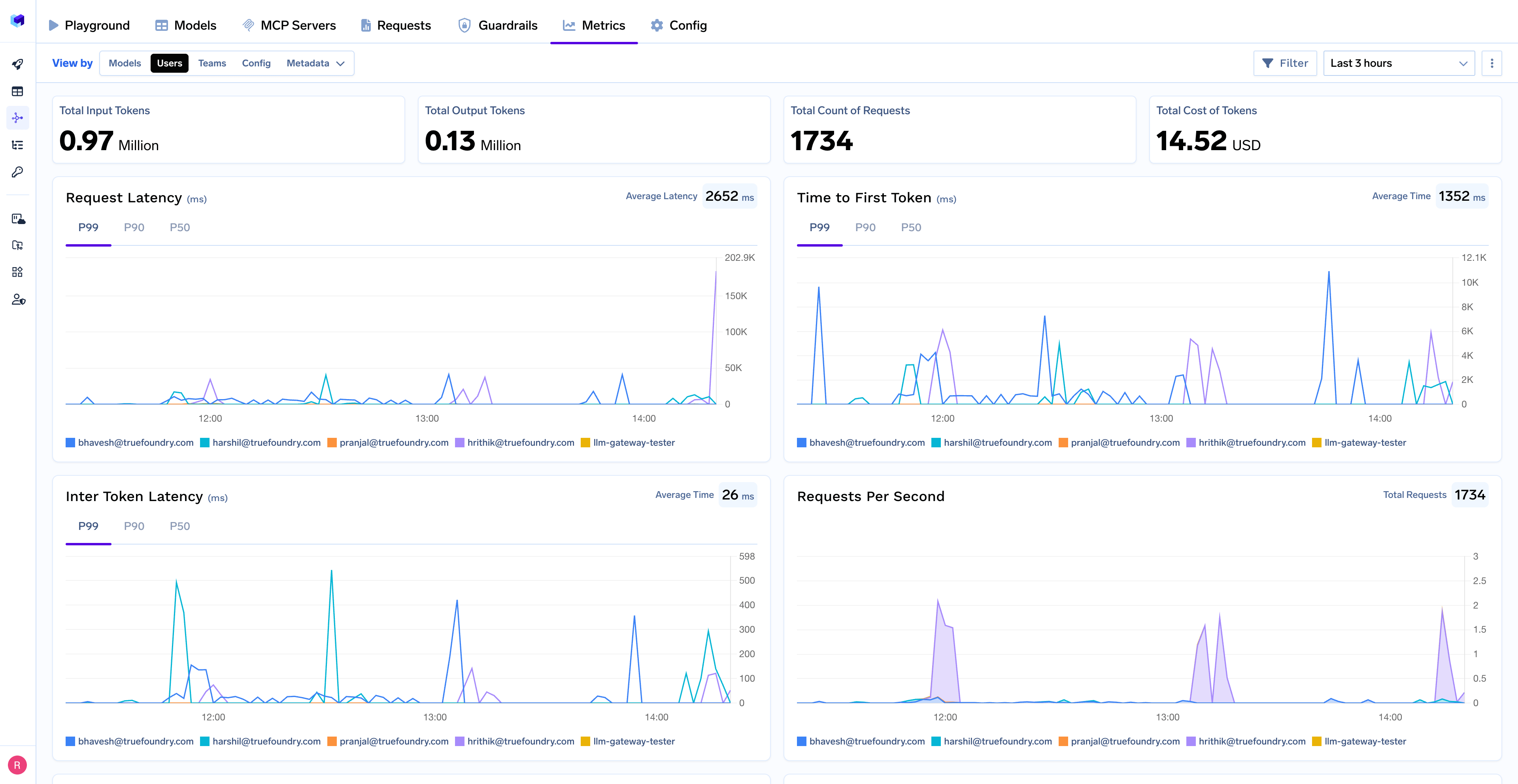 With Truefoundry's AI gateway, you can monitor and analyze:
* **Performance Metrics**: Track key latency metrics like Request Latency, Time to First Token (TTFS), and Inter-Token Latency (ITL) with P99, P90, and P50 percentiles
* **Cost and Token Usage**: Gain visibility into your application's costs with detailed breakdowns of input/output tokens and the associated expenses for each model
* **Usage Patterns**: Understand how your application is being used with detailed analytics on user activity, model distribution, and team-based usage
* **Rate Limiting and Virtual Models**: Set up rate limiting and configure [Virtual Models](/docs/ai-gateway/virtual-model) for intelligent routing and fallback across your models
With Truefoundry's AI gateway, you can monitor and analyze:
* **Performance Metrics**: Track key latency metrics like Request Latency, Time to First Token (TTFS), and Inter-Token Latency (ITL) with P99, P90, and P50 percentiles
* **Cost and Token Usage**: Gain visibility into your application's costs with detailed breakdowns of input/output tokens and the associated expenses for each model
* **Usage Patterns**: Understand how your application is being used with detailed analytics on user activity, model distribution, and team-based usage
* **Rate Limiting and Virtual Models**: Set up rate limiting and configure [Virtual Models](/docs/ai-gateway/virtual-model) for intelligent routing and fallback across your models