> ## Documentation Index
> Fetch the complete documentation index at: https://www.truefoundry.com/llms.txt
> Use this file to discover all available pages before exploring further.
# Langfuse
> Learn how to use langfuse with TrueFoundry AI Gateway, including setup steps, use cases, and production-ready examples.
This guide provides instructions for integrating [Langfuse](https://langfuse.com/) with the Truefoundry AI Gateway.
## What is Langfuse?
Langfuse is an open source LLM engineering platform that helps teams trace LLM calls, monitor performance, and debug issues in their AI applications.
### Key Features of Langfuse
1. **Comprehensive LLM Tracing**: Langfuse automatically captures detailed traces of all LLM interactions, including input prompts, outputs, token usage, latency, and costs. This provides complete visibility into your AI application's behavior and helps identify performance bottlenecks and optimization opportunities.
2. **Real-time Analytics and Monitoring**: Built-in analytics dashboard provides real-time insights into model performance, usage patterns, and costs across your entire LLM stack. Monitor metrics like response times, token consumption, error rates, and user satisfaction to make data-driven decisions.
3. **Debug and Evaluation Tools**: Advanced debugging capabilities help identify and resolve issues in LLM applications through detailed trace inspection, [prompt management](https://langfuse.com/docs/prompts), and [automated evaluation workflows](https://langfuse.com/docs/evaluation) that ensure consistent model performance and output quality.
## Prerequisites
Before integrating Langfuse with TrueFoundry, ensure you have:
1. **TrueFoundry Account**: Create a [Truefoundry account](https://www.truefoundry.com/register) and follow the instructions in our [Gateway Quick Start Guide](https://docs.truefoundry.com/gateway/quick-start)
2. **Langfuse Account**: Sign up for a free [Langfuse Cloud account](https://cloud.langfuse.com) or self-host Langfuse
## Integration Guide
### Step 1: Install Dependencies
Install the required packages for TrueFoundry and Langfuse integration:
```bash lines theme={"dark"}
pip install openai langfuse
```
### Step 2: Set Up Environment Variables
Configure your Langfuse API keys. Get these keys from your [Langfuse project settings](https://cloud.langfuse.com):
```python lines theme={"dark"}
import os
# Langfuse Configuration
os.environ["LANGFUSE_PUBLIC_KEY"] = "pk-lf-..."
os.environ["LANGFUSE_SECRET_KEY"] = "sk-lf-..."
os.environ["LANGFUSE_HOST"] = "https://cloud.langfuse.com" # 🇪🇺 EU region
# os.environ["LANGFUSE_HOST"] = "https://us.cloud.langfuse.com" # 🇺🇸 US region
# TrueFoundry Configuration
os.environ["TRUEFOUNDRY_API_KEY"] = "your-truefoundry-token"
os.environ["TRUEFOUNDRY_BASE_URL"] = "{GATEWAY_BASE_URL}"
```
Verify your Langfuse connection:
```python lines theme={"dark"}
from langfuse import get_client
# Test Langfuse authentication
get_client().auth_check()
```
### Step 3: Configure Langfuse OpenAI Drop-in Replacement
First, get the base URL and model name from your TrueFoundry AI Gateway unified code snippet:
 Use Langfuse's OpenAI-compatible client to automatically trace all requests sent through TrueFoundry's AI Gateway:
```python lines theme={"dark"}
from langfuse.openai import OpenAI
import os
# Initialize OpenAI client with TrueFoundry Gateway
client = OpenAI(
api_key=os.environ["TRUEFOUNDRY_API_KEY"],
base_url=os.environ["TRUEFOUNDRY_BASE_URL"] # Base URL from unified code snippet
)
```
### Step 4: Run an Example
Execute a sample request to test the integration:
```python lines theme={"dark"}
# Make a request through TrueFoundry Gateway with Langfuse tracing
response = client.chat.completions.create(
model="openai-main/gpt-4o", # Paste the model ID you copied from TrueFoundry Gateway
messages=[
{"role": "system", "content": "You are a helpful AI assistant specialized in explaining AI concepts."},
{"role": "user", "content": "Why does an AI gateway help enterprises?"},
],
max_tokens=500,
temperature=0.7
)
print(response.choices[0].message.content)
# Ensure all traces are sent to Langfuse
langfuse = get_client()
langfuse.flush()
```
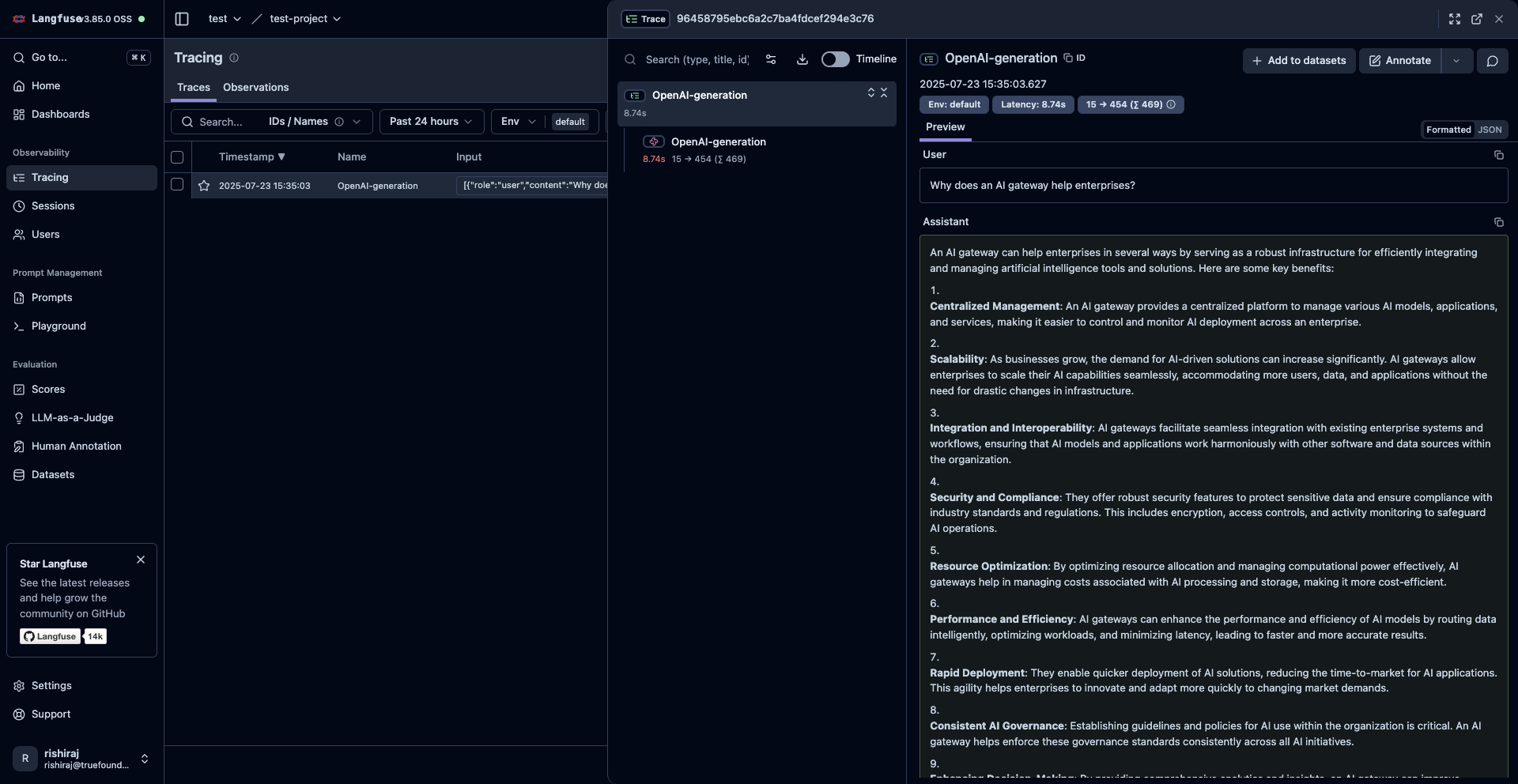
### Step 5: View Traces in Langfuse
After running your code, log in to your Langfuse dashboard to view detailed traces including:
* **Request Parameters**: Model, temperature, max tokens, and other configuration
* **Response Content**: Full response text and metadata
* **Performance Metrics**: Token usage, latency, and cost information
* **Gateway Information**: TrueFoundry-specific routing and processing details
Use Langfuse's OpenAI-compatible client to automatically trace all requests sent through TrueFoundry's AI Gateway:
```python lines theme={"dark"}
from langfuse.openai import OpenAI
import os
# Initialize OpenAI client with TrueFoundry Gateway
client = OpenAI(
api_key=os.environ["TRUEFOUNDRY_API_KEY"],
base_url=os.environ["TRUEFOUNDRY_BASE_URL"] # Base URL from unified code snippet
)
```
### Step 4: Run an Example
Execute a sample request to test the integration:
```python lines theme={"dark"}
# Make a request through TrueFoundry Gateway with Langfuse tracing
response = client.chat.completions.create(
model="openai-main/gpt-4o", # Paste the model ID you copied from TrueFoundry Gateway
messages=[
{"role": "system", "content": "You are a helpful AI assistant specialized in explaining AI concepts."},
{"role": "user", "content": "Why does an AI gateway help enterprises?"},
],
max_tokens=500,
temperature=0.7
)
print(response.choices[0].message.content)
# Ensure all traces are sent to Langfuse
langfuse = get_client()
langfuse.flush()
```
### Step 5: View Traces in Langfuse
After running your code, log in to your Langfuse dashboard to view detailed traces including:
* **Request Parameters**: Model, temperature, max tokens, and other configuration
* **Response Content**: Full response text and metadata
* **Performance Metrics**: Token usage, latency, and cost information
* **Gateway Information**: TrueFoundry-specific routing and processing details
 ## Advanced Integration with Langfuse Python SDK
Enhance your observability by combining the automatic tracing with additional Langfuse features.
### Using the @observe Decorator
The `@observe()` decorator automatically wraps your functions and adds custom attributes to traces:
```python lines theme={"dark"}
from langfuse import observe, get_client
langfuse = get_client()
@observe()
def analyze_customer_query(query, customer_id):
"""Analyze customer query using TrueFoundry Gateway with full observability"""
response = client.chat.completions.create(
model="openai-main/gpt-4o",
messages=[
{"role": "system", "content": "You are a customer service AI assistant."},
{"role": "user", "content": query},
],
temperature=0.3
)
result = response.choices[0].message.content
# Add custom metadata to the trace
langfuse.update_current_trace(
input={"query": query, "customer_id": customer_id},
output={"response": result},
user_id=customer_id,
session_id=f"session_{customer_id}",
tags=["customer-service", "truefoundry-gateway"],
metadata={
"model_used": "openai-main/gpt-4o",
"gateway": "truefoundry",
"query_type": "customer_support"
},
version="1.0.0"
)
return result
# Usage
result = analyze_customer_query("How do I reset my password?", "customer_123")
```
### Using Context Manager
For more granular control, use context managers to wrap specific code sections:
```python lines theme={"dark"}
from langfuse import get_client
langfuse = get_client()
def process_batch_requests(queries):
"""Process multiple queries with detailed tracing"""
with langfuse.start_as_current_span(name="batch-processing") as span:
results = []
for i, query in enumerate(queries):
# Process each query through TrueFoundry Gateway
response = client.chat.completions.create(
model="gpt-3.5-turbo",
messages=[{"role": "user", "content": query}],
temperature=0.5
)
results.append(response.choices[0].message.content)
# Update the span with batch processing metadata
span.update_trace(
input={"queries": queries, "batch_size": len(queries)},
output={"results": results},
tags=["batch-processing", "truefoundry"],
metadata={
"total_queries": len(queries),
"gateway": "truefoundry",
"processing_mode": "batch"
}
)
return results
# Ensure traces are sent
langfuse.flush()
```
## Troubleshooting
### Common Issues
* **Authentication Errors**: Verify your TrueFoundry API key and Langfuse credentials
* **Missing Traces**: Ensure `langfuse.flush()` is called in short-lived applications
* **Model Not Found**: Check that the model is available in your TrueFoundry Gateway
* **Network Issues**: Verify your TrueFoundry base URL is correctly formatted
### Debug Mode
Enable debug logging for troubleshooting:
```python lines theme={"dark"}
import logging
logging.basicConfig(level=logging.DEBUG)
```
## Next Steps
With Langfuse integration enabled, explore these advanced features:
* **[Prompt Management](https://langfuse.com/docs/prompts)**: Version control your prompts
* **[Evaluation Workflows](https://langfuse.com/docs/evaluation)**: Set up automated quality checks
* **[Custom Dashboards](https://langfuse.com/docs/analytics)**: Create specialized monitoring views
* **[Playground Testing](https://langfuse.com/docs/playground)**: Test prompts before deployment
Your TrueFoundry AI Gateway is now fully integrated with Langfuse for comprehensive LLM observability and optimization.
## Advanced Integration with Langfuse Python SDK
Enhance your observability by combining the automatic tracing with additional Langfuse features.
### Using the @observe Decorator
The `@observe()` decorator automatically wraps your functions and adds custom attributes to traces:
```python lines theme={"dark"}
from langfuse import observe, get_client
langfuse = get_client()
@observe()
def analyze_customer_query(query, customer_id):
"""Analyze customer query using TrueFoundry Gateway with full observability"""
response = client.chat.completions.create(
model="openai-main/gpt-4o",
messages=[
{"role": "system", "content": "You are a customer service AI assistant."},
{"role": "user", "content": query},
],
temperature=0.3
)
result = response.choices[0].message.content
# Add custom metadata to the trace
langfuse.update_current_trace(
input={"query": query, "customer_id": customer_id},
output={"response": result},
user_id=customer_id,
session_id=f"session_{customer_id}",
tags=["customer-service", "truefoundry-gateway"],
metadata={
"model_used": "openai-main/gpt-4o",
"gateway": "truefoundry",
"query_type": "customer_support"
},
version="1.0.0"
)
return result
# Usage
result = analyze_customer_query("How do I reset my password?", "customer_123")
```
### Using Context Manager
For more granular control, use context managers to wrap specific code sections:
```python lines theme={"dark"}
from langfuse import get_client
langfuse = get_client()
def process_batch_requests(queries):
"""Process multiple queries with detailed tracing"""
with langfuse.start_as_current_span(name="batch-processing") as span:
results = []
for i, query in enumerate(queries):
# Process each query through TrueFoundry Gateway
response = client.chat.completions.create(
model="gpt-3.5-turbo",
messages=[{"role": "user", "content": query}],
temperature=0.5
)
results.append(response.choices[0].message.content)
# Update the span with batch processing metadata
span.update_trace(
input={"queries": queries, "batch_size": len(queries)},
output={"results": results},
tags=["batch-processing", "truefoundry"],
metadata={
"total_queries": len(queries),
"gateway": "truefoundry",
"processing_mode": "batch"
}
)
return results
# Ensure traces are sent
langfuse.flush()
```
## Troubleshooting
### Common Issues
* **Authentication Errors**: Verify your TrueFoundry API key and Langfuse credentials
* **Missing Traces**: Ensure `langfuse.flush()` is called in short-lived applications
* **Model Not Found**: Check that the model is available in your TrueFoundry Gateway
* **Network Issues**: Verify your TrueFoundry base URL is correctly formatted
### Debug Mode
Enable debug logging for troubleshooting:
```python lines theme={"dark"}
import logging
logging.basicConfig(level=logging.DEBUG)
```
## Next Steps
With Langfuse integration enabled, explore these advanced features:
* **[Prompt Management](https://langfuse.com/docs/prompts)**: Version control your prompts
* **[Evaluation Workflows](https://langfuse.com/docs/evaluation)**: Set up automated quality checks
* **[Custom Dashboards](https://langfuse.com/docs/analytics)**: Create specialized monitoring views
* **[Playground Testing](https://langfuse.com/docs/playground)**: Test prompts before deployment
Your TrueFoundry AI Gateway is now fully integrated with Langfuse for comprehensive LLM observability and optimization.