> ## Documentation Index
> Fetch the complete documentation index at: https://www.truefoundry.com/llms.txt
> Use this file to discover all available pages before exploring further.
# Laminar
> Learn how to export LLM Gateway traces to Laminar using OpenTelemetry integration.
This guide provides instructions for integrating [Laminar](https://www.lmnr.ai/) with the TrueFoundry AI Gateway to export OpenTelemetry traces.
## What is Laminar?
[Laminar](https://www.lmnr.ai/) is an observability platform for LLM applications. It helps teams capture traces, inspect requests and spans, and monitor behavior across prompts, tools, and model calls.
### Key Features of Laminar
* **LLM and agent tracing**: End-to-end visibility into chains, agents, tool calls, and model responses
* **OpenTelemetry ingestion**: Compatible with OTLP so you can send traces from gateways, SDKs, and custom instrumentation
* **Evaluation and experimentation**: Analyze runs and iterate on prompts and pipelines with measurable feedback loops
This guide documents **OTLP over HTTP** from the TrueFoundry AI Gateway ([Integration Steps](#integration-steps)). Laminar also supports **OTLP/gRPC** (often preferred for performance); for gRPC endpoints, ports (for example `8443` on Laminar Cloud), metadata, and SDK examples, see Laminar’s [OpenTelemetry tracing documentation](https://docs.lmnr.ai/tracing/otel).
If you use a gRPC exporter or need help diagnosing OTLP connection or auth issues with Laminar, read the **gRPC** and **Getting started** sections on that page, and use Laminar’s dedicated guide for problems with OpenTelemetry ingestion: [Troubleshooting OpenTelemetry](https://docs.lmnr.ai/tracing/troubleshooting-opentelemetry).
## Prerequisites
Before integrating Laminar with TrueFoundry, ensure you have:
1. **TrueFoundry Account**: Create a [Truefoundry account](https://www.truefoundry.com/register) and follow the instructions in our [Gateway Quick Start Guide](https://docs.truefoundry.com/gateway/quick-start)
2. **Laminar Account**: Sign up at [lmnr.ai](https://www.lmnr.ai/)
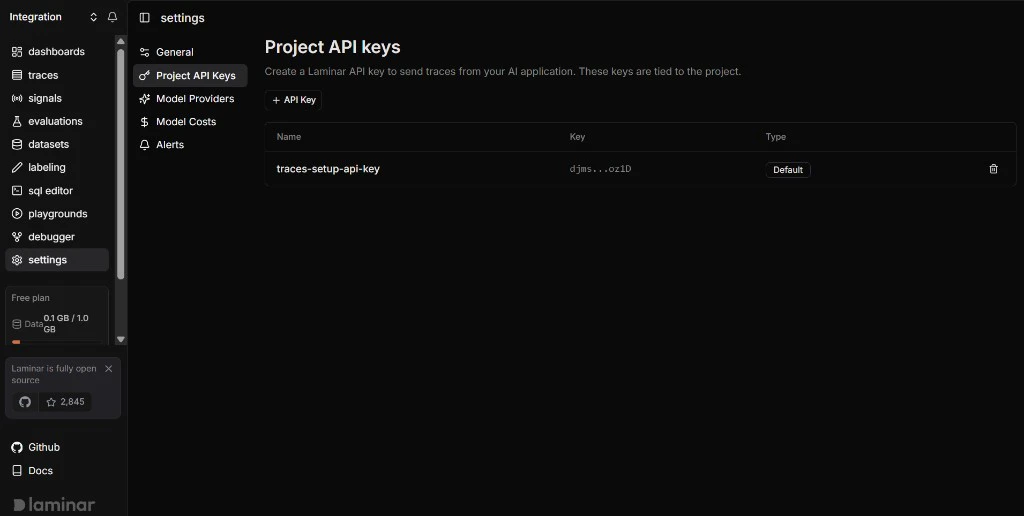
3. **Laminar project API key**: Create or copy an API key for the project where traces should appear (your Laminar workspace / project settings)
 ## Integration Steps
TrueFoundry AI Gateway can export OpenTelemetry traces to Laminar over HTTP so you can analyze gateway traffic alongside the rest of your stack.
1. Log into the [Laminar app](https://www.lmnr.ai/).
2. Open your project and go to the API key or project settings area (wording may vary by UI version).
3. Create or copy a **project API key** used for trace ingestion. Store it securely — treat it like a secret.
If you are unsure where the key lives, check [Laminar’s documentation](https://docs.lmnr.ai/) for the latest steps to create a project API key.
1. In the TrueFoundry dashboard, go to **AI Engineering** → **Settings** → **OTEL Config** (under **Organisation**, in the AI Gateway section).
## Integration Steps
TrueFoundry AI Gateway can export OpenTelemetry traces to Laminar over HTTP so you can analyze gateway traffic alongside the rest of your stack.
1. Log into the [Laminar app](https://www.lmnr.ai/).
2. Open your project and go to the API key or project settings area (wording may vary by UI version).
3. Create or copy a **project API key** used for trace ingestion. Store it securely — treat it like a secret.
If you are unsure where the key lives, check [Laminar’s documentation](https://docs.lmnr.ai/) for the latest steps to create a project API key.
1. In the TrueFoundry dashboard, go to **AI Engineering** → **Settings** → **OTEL Config** (under **Organisation**, in the AI Gateway section).
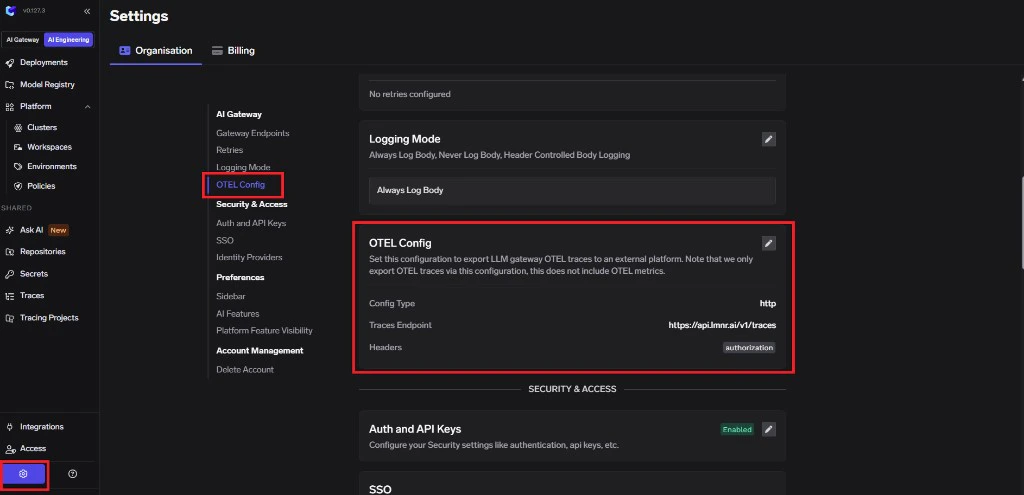 2. Click **edit** on the **OTEL Config** section to open the exporter form (if it is not already open).
3. Enable the **OTEL Traces Exporter Configuration** toggle.
4. Select **HTTP Configuration**.
5. Enter the Laminar traces endpoint: `https://api.lmnr.ai/v1/traces`
6. Set **Encoding** to `Proto`.
2. Click **edit** on the **OTEL Config** section to open the exporter form (if it is not already open).
3. Enable the **OTEL Traces Exporter Configuration** toggle.
4. Select **HTTP Configuration**.
5. Enter the Laminar traces endpoint: `https://api.lmnr.ai/v1/traces`
6. Set **Encoding** to `Proto`.
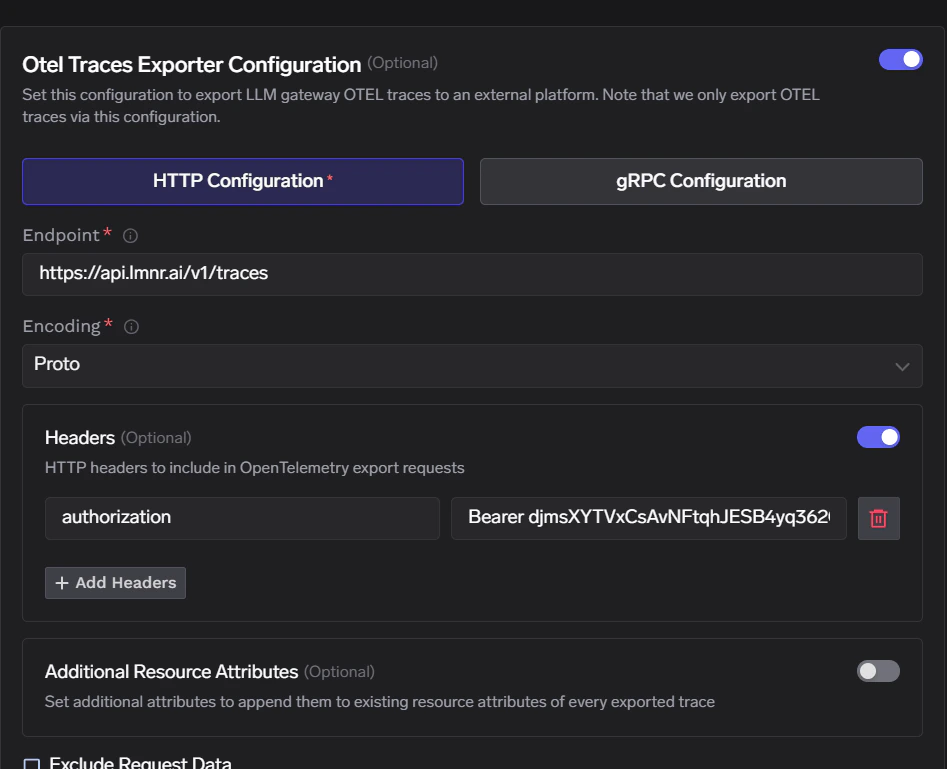 Laminar expects a single authentication header. No additional custom headers are required for basic ingestion.
| Header | Value |
| --------------- | --------------------------------------- |
| `Authorization` | `Bearer ` |
Replace `` with the key from the first step. Click **Save** to apply your configuration.
1. Send a few requests through the TrueFoundry AI Gateway.
2. In TrueFoundry, open **Monitor** and confirm traces are being generated for those requests.
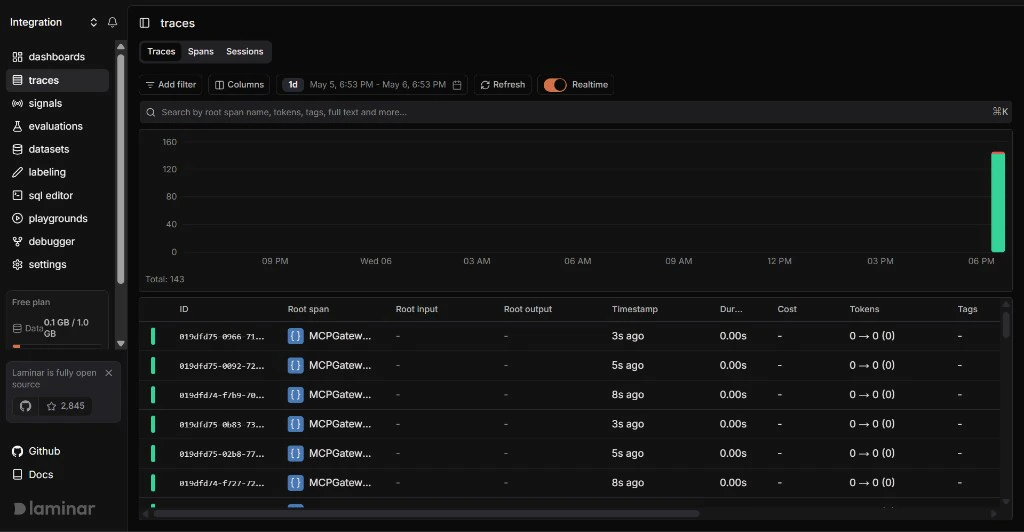
3. In Laminar, open the project tied to that API key and confirm new traces appear with the expected spans and attributes.
Laminar expects a single authentication header. No additional custom headers are required for basic ingestion.
| Header | Value |
| --------------- | --------------------------------------- |
| `Authorization` | `Bearer ` |
Replace `` with the key from the first step. Click **Save** to apply your configuration.
1. Send a few requests through the TrueFoundry AI Gateway.
2. In TrueFoundry, open **Monitor** and confirm traces are being generated for those requests.
3. In Laminar, open the project tied to that API key and confirm new traces appear with the expected spans and attributes.
 ## Configuration summary
| Configuration | Value |
| ------------------- | ------------------------------------------------ |
| **Traces endpoint** | `https://api.lmnr.ai/v1/traces` |
| **Protocol** | HTTP |
| **Encoding** | `Proto` (recommended for OTLP/HTTP with Laminar) |
| **Authentication** | `Authorization: Bearer ` |
The table above matches **HTTP** OTLP fields in TrueFoundry. For gRPC endpoints and SDK-specific setup, use [Laminar’s OTLP documentation](https://docs.lmnr.ai/tracing/otel); for ingestion issues, see [Troubleshooting OpenTelemetry](https://docs.lmnr.ai/tracing/troubleshooting-opentelemetry).
## Configuration summary
| Configuration | Value |
| ------------------- | ------------------------------------------------ |
| **Traces endpoint** | `https://api.lmnr.ai/v1/traces` |
| **Protocol** | HTTP |
| **Encoding** | `Proto` (recommended for OTLP/HTTP with Laminar) |
| **Authentication** | `Authorization: Bearer ` |
The table above matches **HTTP** OTLP fields in TrueFoundry. For gRPC endpoints and SDK-specific setup, use [Laminar’s OTLP documentation](https://docs.lmnr.ai/tracing/otel); for ingestion issues, see [Troubleshooting OpenTelemetry](https://docs.lmnr.ai/tracing/troubleshooting-opentelemetry).