> ## Documentation Index
> Fetch the complete documentation index at: https://www.truefoundry.com/llms.txt
> Use this file to discover all available pages before exploring further.
# io.net
> Add and configure io.net Intelligence models in TrueFoundry's AI Gateway using Custom Endpoints
[io.net Intelligence](https://io.net/intelligence) exposes an **OpenAI-compatible** chat completions API for open-source models such as `meta-llama/Llama-3.3-70B-Instruct`. Use **Custom Endpoints** in the AI Gateway to register io.net once, keep the io.net API key on the gateway, and let your applications call models through a single TrueFoundry API key with access control and tracing.
### Prerequisites
Sign up at [ai.io.net](https://ai.io.net) if you do not already have an account.
In the io.net dashboard, open **API Keys and Secrets** and create a new API key. See the [io.net API keys guide](https://io.net/docs/guides/intelligence/api-keys-and-secrets) for details.
Store the key securely. You will paste it into the gateway's **Custom Headers** configuration — not in client application code.
You need a **TrueFoundry API key** (`TFY_API_KEY`) and your **gateway base URL** to call models through the gateway. See [Gateway base URL](/docs/ai-gateway/quick-start#gateway-base-url) and [Authentication](/docs/ai-gateway/authentication).
### Adding models
Add io.net to the AI Gateway using **Custom Endpoints**.
In the TrueFoundry dashboard, go to **AI Gateway** → **Models** → **Custom Endpoints** and click **Add Custom Endpoint**.
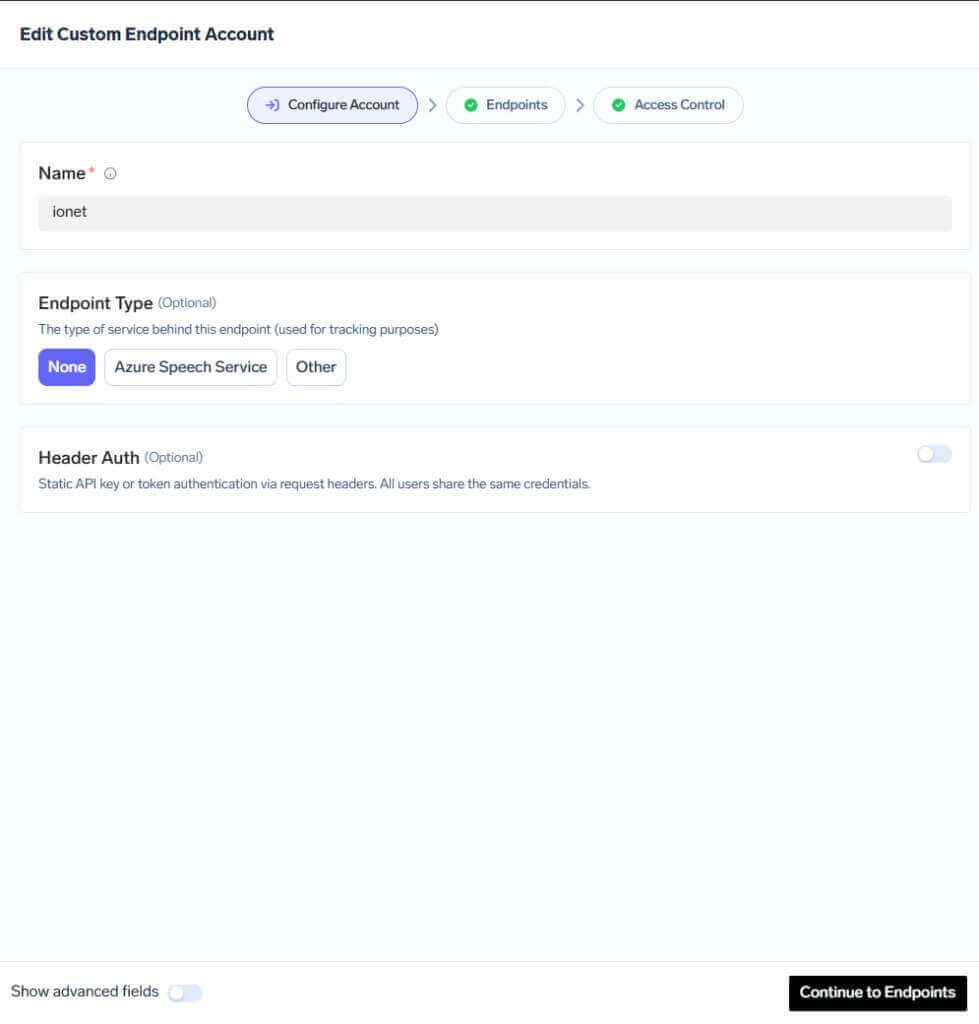
In **Configure Account**, set:
* **Name** (Account Name): `ionet` — this is your **provider account name** and appears as the first path segment in every request URL (`{providerAccountName}`)
* **Endpoint Type**: `None`
* **Header Auth**: keep **disabled**
 On the **Endpoints** step, add an integration and configure:
* **Display Name**: `model` — this is your **custom endpoint display name** and appears as the second path segment in every request URL (`{endpointName}`)
* **Base URL**: `https://api.intelligence.io.solutions/api`
Enable **Custom Headers** and add:
* `Authorization`: `Bearer `
* `Content-Type`: `application/json`
On the **Endpoints** step, add an integration and configure:
* **Display Name**: `model` — this is your **custom endpoint display name** and appears as the second path segment in every request URL (`{endpointName}`)
* **Base URL**: `https://api.intelligence.io.solutions/api`
Enable **Custom Headers** and add:
* `Authorization`: `Bearer `
* `Content-Type`: `application/json`
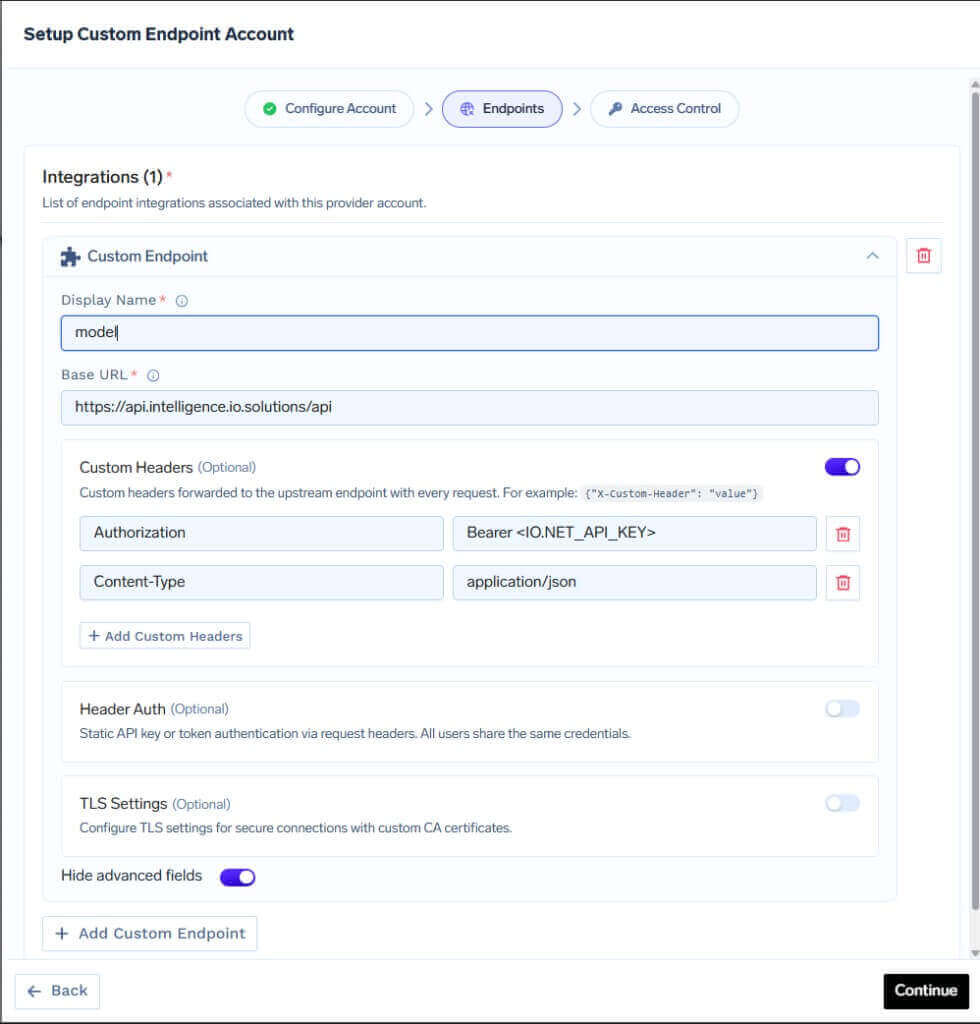 The **Authorization** header here is sent **from the gateway to io.net**. Your application should only send the **TrueFoundry API key** to the gateway.
You can click **+ Add Custom Endpoint** to register **multiple endpoints** under the same account (for example, `model`, `vision`, or `fast-inference`). Each gets its own **Display Name** in the URL, but they can all point to the same io.net **Base URL** and headers. Which io.net model runs is chosen in the request body `model` field — not by the display name.
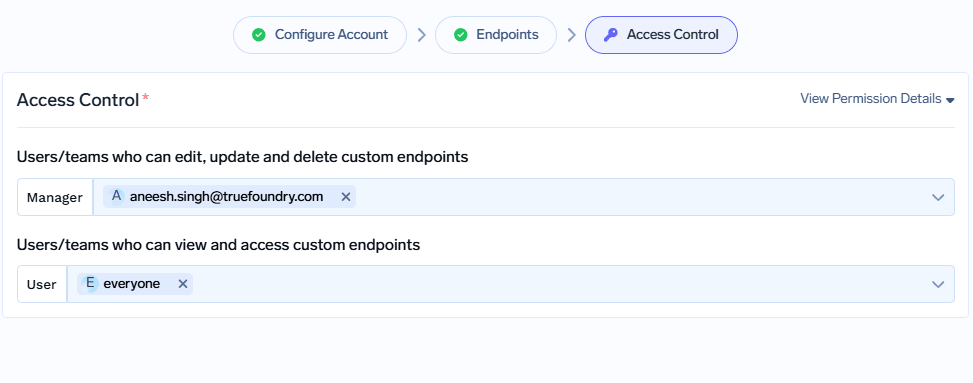
On the **Access Control** step, choose who can manage and use this provider account, then **Save**.
* **Manager**: users/teams who can edit or delete the custom endpoint
* **User**: users/teams who can call the endpoint (for example, `everyone`)
The **Authorization** header here is sent **from the gateway to io.net**. Your application should only send the **TrueFoundry API key** to the gateway.
You can click **+ Add Custom Endpoint** to register **multiple endpoints** under the same account (for example, `model`, `vision`, or `fast-inference`). Each gets its own **Display Name** in the URL, but they can all point to the same io.net **Base URL** and headers. Which io.net model runs is chosen in the request body `model` field — not by the display name.
On the **Access Control** step, choose who can manage and use this provider account, then **Save**.
* **Manager**: users/teams who can edit or delete the custom endpoint
* **User**: users/teams who can call the endpoint (for example, `everyone`)
 ### Inference
Once saved, call io.net through the gateway's **proxy-api** path. URL shape and path rules are documented under [Custom Endpoints](/docs/ai-gateway/custom-endpoints#endpoint-structure).
#### How the request URL is built
The gateway URL has two values **you configure in the dashboard** — they are not io.net model IDs:
| URL segment | Dashboard field | Example in this guide |
| ----------------------- | ------------------------------------------------- | --------------------- |
| `{providerAccountName}` | **Account Name** (Configure Account → **Name**) | `ionet` |
| `{endpointName}` | **Custom endpoint Display Name** (Endpoints step) | `model` |
Full URL pattern:
```
{GATEWAY_BASE_URL}/proxy-api/{providerAccountName}/{endpointName}/v1/chat/completions
```
With the example configuration above:
```
{GATEWAY_BASE_URL}/proxy-api/ionet/model/v1/chat/completions
```
| Segment | Example value | Meaning |
| --------------------- | --------------------------------------------------- | ---------------------------------------- |
| `{GATEWAY_BASE_URL}` | `https://internal.devtest.truefoundry.tech/api/llm` | Your AI Gateway base URL |
| `ionet` | Account Name you set in **Configure Account** | `{providerAccountName}` |
| `model` | Display Name you set for the custom endpoint | `{endpointName}` |
| `v1/chat/completions` | Upstream path | Appended to the integration **Base URL** |
The gateway forwards the request to:
```
https://api.intelligence.io.solutions/api/v1/chat/completions
```
#### Choosing an io.net model
io.net hosts **many models** (for example `meta-llama/Llama-3.3-70B-Instruct`, `meta-llama/Llama-3.2-90B-Vision-Instruct`, and others listed in the [io.net docs](https://io.net/docs/reference/ai-models/get-started-with-io-intelligence-api)). You do **not** need a separate custom endpoint per model — set the `model` field in the JSON request body to the io.net model ID you want.
If you add multiple custom endpoints under the same account (different **Display Name** values), use the matching `{endpointName}` in the URL; each endpoint can still call any io.net model via the request body.
Replace `ionet` and `model` in the URL with your own **Account Name** and **Display Name** if you used different values during setup.
### Supported APIs
| API | Endpoint | Tracing | Cost Tracking |
| ------------------------------------- | --------------------------------------------------------------------- | ------- | ----------------------------------------------------------- |
| [Chat Completions](#chat-completions) | `/proxy-api/{providerAccountName}/{endpointName}/v1/chat/completions` | **✅** | |
**Before you start:** Replace `{GATEWAY_BASE_URL}` with your gateway base URL ([how to find it](/docs/ai-gateway/quick-start#gateway-base-url)) and set `TFY_API_KEY` to your TrueFoundry API key.
#### Request headers (client → gateway)
| Header | Value |
| ----------------- | ---------------------- |
| `Authorization` | `Bearer ` |
| `Content-Type` | `application/json` |
| `Accept-Encoding` | `identity` |
#### Python (`requests`)
```python lines theme={"dark"}
import os
import requests
GATEWAY_BASE_URL = "{GATEWAY_BASE_URL}" # e.g. https://internal.devtest.truefoundry.tech/api/llm
TFY_API_KEY = os.environ.get("TFY_API_KEY", "your-tfy-api-key")
# providerAccountName = Account Name from Configure Account (e.g. ionet)
# endpointName = Custom endpoint Display Name (e.g. model)
# model in BODY = io.net model ID (e.g. meta-llama/Llama-3.3-70B-Instruct)
PROVIDER_ACCOUNT_NAME = "ionet"
ENDPOINT_NAME = "model"
URL = f"{GATEWAY_BASE_URL}/proxy-api/{PROVIDER_ACCOUNT_NAME}/{ENDPOINT_NAME}/v1/chat/completions"
HEADERS = {
"Authorization": f"Bearer {TFY_API_KEY}",
"Content-Type": "application/json",
"Accept-Encoding": "identity",
}
BODY = {
"model": "meta-llama/Llama-3.3-70B-Instruct",
"messages": [
{"role": "system", "content": "You are a helpful assistant."},
{"role": "user", "content": "Tell me about Truefoundry AI Gateway"},
],
"temperature": 0.7,
"stream": False,
}
response = requests.post(URL, headers=HEADERS, json=BODY, timeout=120)
response.raise_for_status()
print(response.json())
```
#### cURL
```bash theme={"dark"}
curl -X POST "{GATEWAY_BASE_URL}/proxy-api/ionet/model/v1/chat/completions" \
-H "Authorization: Bearer $TFY_API_KEY" \
-H "Content-Type: application/json" \
-H "Accept-Encoding: identity" \
-d '{
"model": "meta-llama/Llama-3.3-70B-Instruct",
"messages": [
{"role": "system", "content": "You are a helpful assistant."},
{"role": "user", "content": "Tell me about Truefoundry AI Gateway"}
],
"temperature": 0.7,
"stream": false
}'
```
#### OpenAI Python SDK
Because io.net is OpenAI-compatible, you can point the OpenAI SDK at the gateway proxy path instead of io.net directly:
```python lines theme={"dark"}
import os
from openai import OpenAI
GATEWAY_BASE_URL = "{GATEWAY_BASE_URL}" # e.g. https://internal.devtest.truefoundry.tech/api/llm
TFY_API_KEY = os.environ.get("TFY_API_KEY", "your-tfy-api-key")
PROVIDER_ACCOUNT_NAME = "ionet" # Account Name
ENDPOINT_NAME = "model" # Custom endpoint Display Name
client = OpenAI(
api_key=TFY_API_KEY,
base_url=f"{GATEWAY_BASE_URL}/proxy-api/{PROVIDER_ACCOUNT_NAME}/{ENDPOINT_NAME}/v1",
)
response = client.chat.completions.create(
model="meta-llama/Llama-3.3-70B-Instruct",
messages=[
{"role": "system", "content": "You are a helpful assistant."},
{"role": "user", "content": "Tell me about Truefoundry AI Gateway"},
],
temperature=0.7,
stream=False,
)
print(response.choices[0].message.content)
```
**Support scope:** Custom Endpoints proxy requests transparently to io.net. See [io.net chat completions reference](https://io.net/docs/reference/ai-models/create-chat-completion) for supported request fields and models. For gateway limitations on Custom Endpoints (HTTPS, streaming, and so on), see [Custom Endpoints](/docs/ai-gateway/custom-endpoints).
### Inference
Once saved, call io.net through the gateway's **proxy-api** path. URL shape and path rules are documented under [Custom Endpoints](/docs/ai-gateway/custom-endpoints#endpoint-structure).
#### How the request URL is built
The gateway URL has two values **you configure in the dashboard** — they are not io.net model IDs:
| URL segment | Dashboard field | Example in this guide |
| ----------------------- | ------------------------------------------------- | --------------------- |
| `{providerAccountName}` | **Account Name** (Configure Account → **Name**) | `ionet` |
| `{endpointName}` | **Custom endpoint Display Name** (Endpoints step) | `model` |
Full URL pattern:
```
{GATEWAY_BASE_URL}/proxy-api/{providerAccountName}/{endpointName}/v1/chat/completions
```
With the example configuration above:
```
{GATEWAY_BASE_URL}/proxy-api/ionet/model/v1/chat/completions
```
| Segment | Example value | Meaning |
| --------------------- | --------------------------------------------------- | ---------------------------------------- |
| `{GATEWAY_BASE_URL}` | `https://internal.devtest.truefoundry.tech/api/llm` | Your AI Gateway base URL |
| `ionet` | Account Name you set in **Configure Account** | `{providerAccountName}` |
| `model` | Display Name you set for the custom endpoint | `{endpointName}` |
| `v1/chat/completions` | Upstream path | Appended to the integration **Base URL** |
The gateway forwards the request to:
```
https://api.intelligence.io.solutions/api/v1/chat/completions
```
#### Choosing an io.net model
io.net hosts **many models** (for example `meta-llama/Llama-3.3-70B-Instruct`, `meta-llama/Llama-3.2-90B-Vision-Instruct`, and others listed in the [io.net docs](https://io.net/docs/reference/ai-models/get-started-with-io-intelligence-api)). You do **not** need a separate custom endpoint per model — set the `model` field in the JSON request body to the io.net model ID you want.
If you add multiple custom endpoints under the same account (different **Display Name** values), use the matching `{endpointName}` in the URL; each endpoint can still call any io.net model via the request body.
Replace `ionet` and `model` in the URL with your own **Account Name** and **Display Name** if you used different values during setup.
### Supported APIs
| API | Endpoint | Tracing | Cost Tracking |
| ------------------------------------- | --------------------------------------------------------------------- | ------- | ----------------------------------------------------------- |
| [Chat Completions](#chat-completions) | `/proxy-api/{providerAccountName}/{endpointName}/v1/chat/completions` | **✅** | |
**Before you start:** Replace `{GATEWAY_BASE_URL}` with your gateway base URL ([how to find it](/docs/ai-gateway/quick-start#gateway-base-url)) and set `TFY_API_KEY` to your TrueFoundry API key.
#### Request headers (client → gateway)
| Header | Value |
| ----------------- | ---------------------- |
| `Authorization` | `Bearer ` |
| `Content-Type` | `application/json` |
| `Accept-Encoding` | `identity` |
#### Python (`requests`)
```python lines theme={"dark"}
import os
import requests
GATEWAY_BASE_URL = "{GATEWAY_BASE_URL}" # e.g. https://internal.devtest.truefoundry.tech/api/llm
TFY_API_KEY = os.environ.get("TFY_API_KEY", "your-tfy-api-key")
# providerAccountName = Account Name from Configure Account (e.g. ionet)
# endpointName = Custom endpoint Display Name (e.g. model)
# model in BODY = io.net model ID (e.g. meta-llama/Llama-3.3-70B-Instruct)
PROVIDER_ACCOUNT_NAME = "ionet"
ENDPOINT_NAME = "model"
URL = f"{GATEWAY_BASE_URL}/proxy-api/{PROVIDER_ACCOUNT_NAME}/{ENDPOINT_NAME}/v1/chat/completions"
HEADERS = {
"Authorization": f"Bearer {TFY_API_KEY}",
"Content-Type": "application/json",
"Accept-Encoding": "identity",
}
BODY = {
"model": "meta-llama/Llama-3.3-70B-Instruct",
"messages": [
{"role": "system", "content": "You are a helpful assistant."},
{"role": "user", "content": "Tell me about Truefoundry AI Gateway"},
],
"temperature": 0.7,
"stream": False,
}
response = requests.post(URL, headers=HEADERS, json=BODY, timeout=120)
response.raise_for_status()
print(response.json())
```
#### cURL
```bash theme={"dark"}
curl -X POST "{GATEWAY_BASE_URL}/proxy-api/ionet/model/v1/chat/completions" \
-H "Authorization: Bearer $TFY_API_KEY" \
-H "Content-Type: application/json" \
-H "Accept-Encoding: identity" \
-d '{
"model": "meta-llama/Llama-3.3-70B-Instruct",
"messages": [
{"role": "system", "content": "You are a helpful assistant."},
{"role": "user", "content": "Tell me about Truefoundry AI Gateway"}
],
"temperature": 0.7,
"stream": false
}'
```
#### OpenAI Python SDK
Because io.net is OpenAI-compatible, you can point the OpenAI SDK at the gateway proxy path instead of io.net directly:
```python lines theme={"dark"}
import os
from openai import OpenAI
GATEWAY_BASE_URL = "{GATEWAY_BASE_URL}" # e.g. https://internal.devtest.truefoundry.tech/api/llm
TFY_API_KEY = os.environ.get("TFY_API_KEY", "your-tfy-api-key")
PROVIDER_ACCOUNT_NAME = "ionet" # Account Name
ENDPOINT_NAME = "model" # Custom endpoint Display Name
client = OpenAI(
api_key=TFY_API_KEY,
base_url=f"{GATEWAY_BASE_URL}/proxy-api/{PROVIDER_ACCOUNT_NAME}/{ENDPOINT_NAME}/v1",
)
response = client.chat.completions.create(
model="meta-llama/Llama-3.3-70B-Instruct",
messages=[
{"role": "system", "content": "You are a helpful assistant."},
{"role": "user", "content": "Tell me about Truefoundry AI Gateway"},
],
temperature=0.7,
stream=False,
)
print(response.choices[0].message.content)
```
**Support scope:** Custom Endpoints proxy requests transparently to io.net. See [io.net chat completions reference](https://io.net/docs/reference/ai-models/create-chat-completion) for supported request fields and models. For gateway limitations on Custom Endpoints (HTTPS, streaming, and so on), see [Custom Endpoints](/docs/ai-gateway/custom-endpoints).