> ## Documentation Index
> Fetch the complete documentation index at: https://www.truefoundry.com/llms.txt
> Use this file to discover all available pages before exploring further.
# Configure Guardrails
> Learn how to create and configure guardrail rules to enforce security and compliance policies for LLM interactions and MCP tool invocations
## Guardrail Rules UI
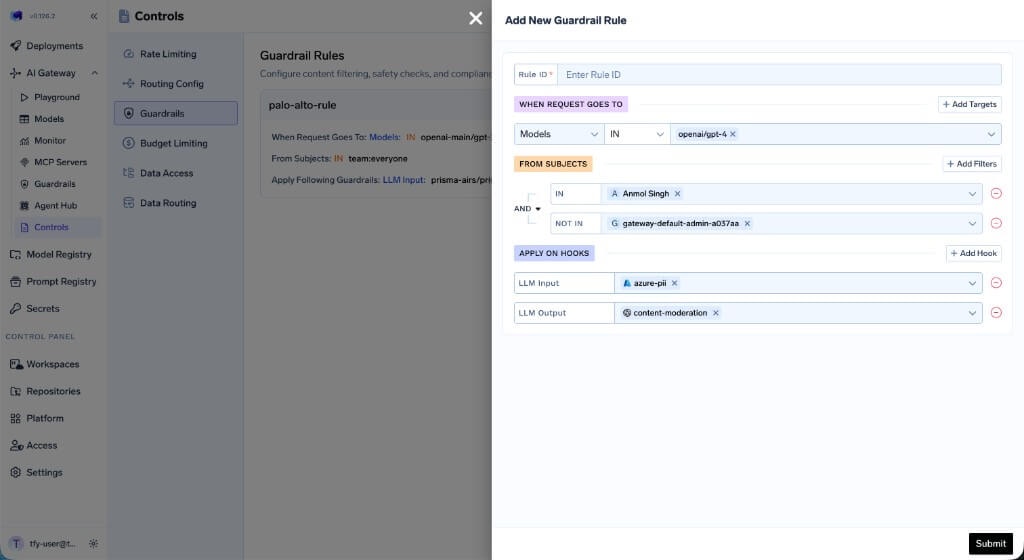
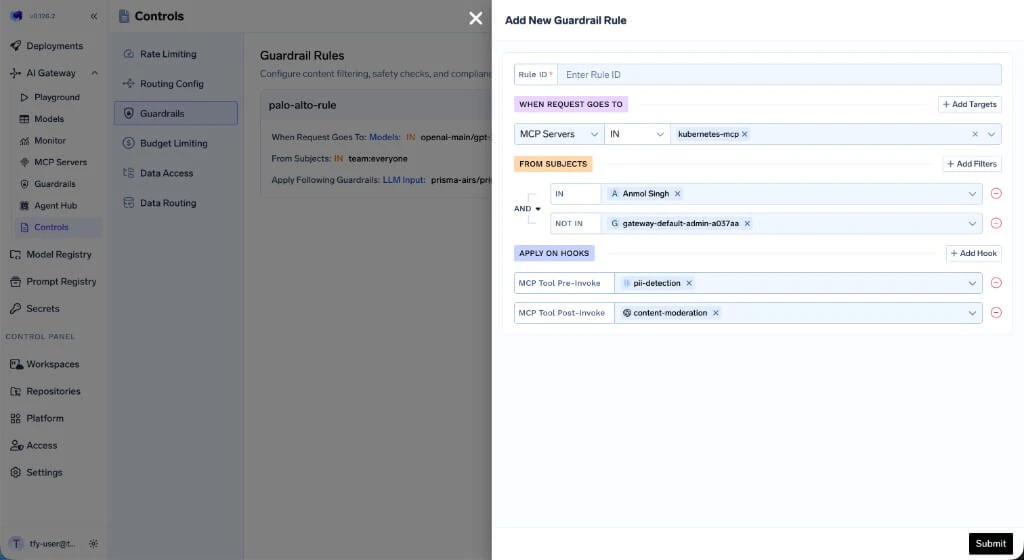
Navigate to **AI Gateway → Controls → Guardrails** to view and manage guardrail rules. Click **Add Rule** to create a new rule.
Each rule has three sections:
* **WHEN REQUEST GOES TO** — Define which models or MCP servers this rule applies to.
* **FROM SUBJECTS** — Specify which users or teams the rule targets, with `IN` and `NOT IN` conditions.
* **APPLY ON HOOKS** — Select which hooks to apply guardrails on and choose the guardrail integration for each hook.
 ## Configuration Structure
The guardrails configuration contains an array of rules that are evaluated for each request. **All matching rules are evaluated, and the union of their guardrails is applied to the request.** This means if multiple rules match, the guardrails from every matching rule are combined together. Each rule can specify guardrails for any of the four hooks.
### Example Configuration
```yaml theme={"dark"}
name: guardrails-control
type: gateway-guardrails-config
rules:
- id: palo-alto-rule
when:
target:
operator: or
conditions:
model:
values:
- openai-main/gpt-3-5-turbo-16k
condition: in
subjects:
operator: and
conditions:
in:
- team:everyone
llm_input_guardrails:
- prisma-airs/prisma-airs-dev-profile
llm_output_guardrails:
- prisma-airs/prisma-airs-dev-profile
mcp_tool_pre_invoke_guardrails: []
mcp_tool_post_invoke_guardrails: []
- id: mcp-test-rule
when:
target:
operator: or
conditions:
mcpServers:
values:
- kubernetes-mcp
condition: in
subjects:
operator: and
conditions:
in:
- team:test-team
not_in:
- user:akash@truefoundry.com
llm_input_guardrails: []
llm_output_guardrails: []
mcp_tool_pre_invoke_guardrails:
- pii/pii-detection
mcp_tool_post_invoke_guardrails:
- prisma-airs/prisma-airs-dev-profile
```
This configuration defines two rules:
1. **palo-alto-rule** — Targets requests to `openai-main/gpt-3-5-turbo-16k` from `team:everyone`, applying Prisma AIRS guardrails on both LLM input and output.
2. **mcp-test-rule** — Targets requests to the `kubernetes-mcp` MCP server from `team:test-team` (excluding a specific user), applying PII detection before tool invocation and Prisma AIRS after.
If a request matches both rules, the guardrails from both are combined — the request would get Prisma AIRS on LLM input/output *and* PII detection on MCP Pre Tool / Prisma AIRS on MCP Post Tool.
## Configuration Reference
### Rule Structure
| Field | Required | Description |
| --------------------------------- | -------- | -------------------------------------------------------------------------------------------------------------------------------------------------------------------------------- |
| `id` | Yes | Unique identifier for the rule |
| `when` | Yes | Matching criteria with `target` and `subjects` blocks |
| `llm_input_guardrails` | Yes | Guardrails applied before LLM request (use `[]` if none) |
| `llm_output_guardrails` | Yes | Guardrails applied after LLM response (use `[]` if none) |
| `mcp_tool_pre_invoke_guardrails` | Yes | Guardrails applied before MCP tool invocation (use `[]` if none) |
| `mcp_tool_post_invoke_guardrails` | Yes | Guardrails applied after MCP tool returns (use `[]` if none) |
| `custom_error_message` | No | Custom message returned to the client when a guardrail in this rule blocks a request. Supports the `{{guardrail_message}}` and `{{failed_guardrails}}` placeholders (see below). |
#### `custom_error_message` placeholders
When a request is blocked, you can template the message with these placeholders:
| Placeholder | Renders |
| ----------------------- | ---------------------------------------------------------------------------------------------- |
| `{{guardrail_message}}` | The default guardrail failure detail (provider-specific violation summary). |
| `{{failed_guardrails}}` | A comma-separated list of the guardrails in this rule that failed (as `group/name` selectors). |
Example:
```yaml theme={"dark"}
custom_error_message: "Your request was blocked by {{failed_guardrails}}: {{guardrail_message}}"
```
Placeholders that aren't used are left as-is, and existing messages that use only `{{guardrail_message}}` are unaffected.
### The `when` Block
The `when` block contains two main sections: `target` (what the request targets) and `subjects` (who is making the request):
| Section | Description |
| ---------- | ---------------------------------------------------------------------------- |
| `target` | Defines conditions based on `model`, `mcpServers`, `mcpTools`, or `metadata` |
| `subjects` | Defines conditions based on users, teams, or virtual accounts |
If `when` is empty (`{}`), the rule matches **all requests**. Use this for baseline guardrails that should apply universally alongside any other matching rules.
### The `when` Block Structure
```yaml theme={"dark"}
when:
target:
operator: or
conditions:
mcpServers:
values:
- database-tools
- code-executor
condition: in
```
```yaml theme={"dark"}
when:
target:
operator: or
conditions:
model:
values:
- openai-main/gpt-4o
- anthropic/claude-3-5-sonnet
condition: in
```
```yaml theme={"dark"}
when:
target:
operator: or
conditions:
metadata:
environment: production
tier: enterprise
```
Requires header: `X-TFY-METADATA: {"environment": "production", "tier": "enterprise"}`
```yaml theme={"dark"}
when:
target:
operator: or
conditions:
mcpServers:
values:
- database-tools
condition: in
mcpTools:
values:
- execute_query
condition: in
```
```yaml theme={"dark"}
when:
subjects:
operator: and
conditions:
in:
- user:alice@company.com
- user:bob@company.com
- team:data-science
not_in:
- user:guest@company.com
```
```yaml theme={"dark"}
when:
target:
operator: or
conditions:
mcpServers:
values:
- database-tools
condition: in
metadata:
environment: production
subjects:
operator: and
conditions:
in:
- team:engineering
not_in:
- user:external@partner.com
```
Both `target` and `subjects` conditions must match for the rule to apply.
**How it works:**
* All rules are evaluated for every request. The guardrails from **all matching rules are combined (union)** and applied together.
* Each rule can target specific users, teams, models, metadata, or MCP servers, and can enforce different guardrails on any combination of hooks.
* If multiple rules match, their guardrails are merged per hook — for example, if Rule A applies PII detection on LLM input and Rule B applies prompt injection detection on LLM input, both guardrails will run.
* Omitted fields are not used for filtering (e.g., if `model` is not specified, the rule matches any model).
## How to Get the Guardrail Selector
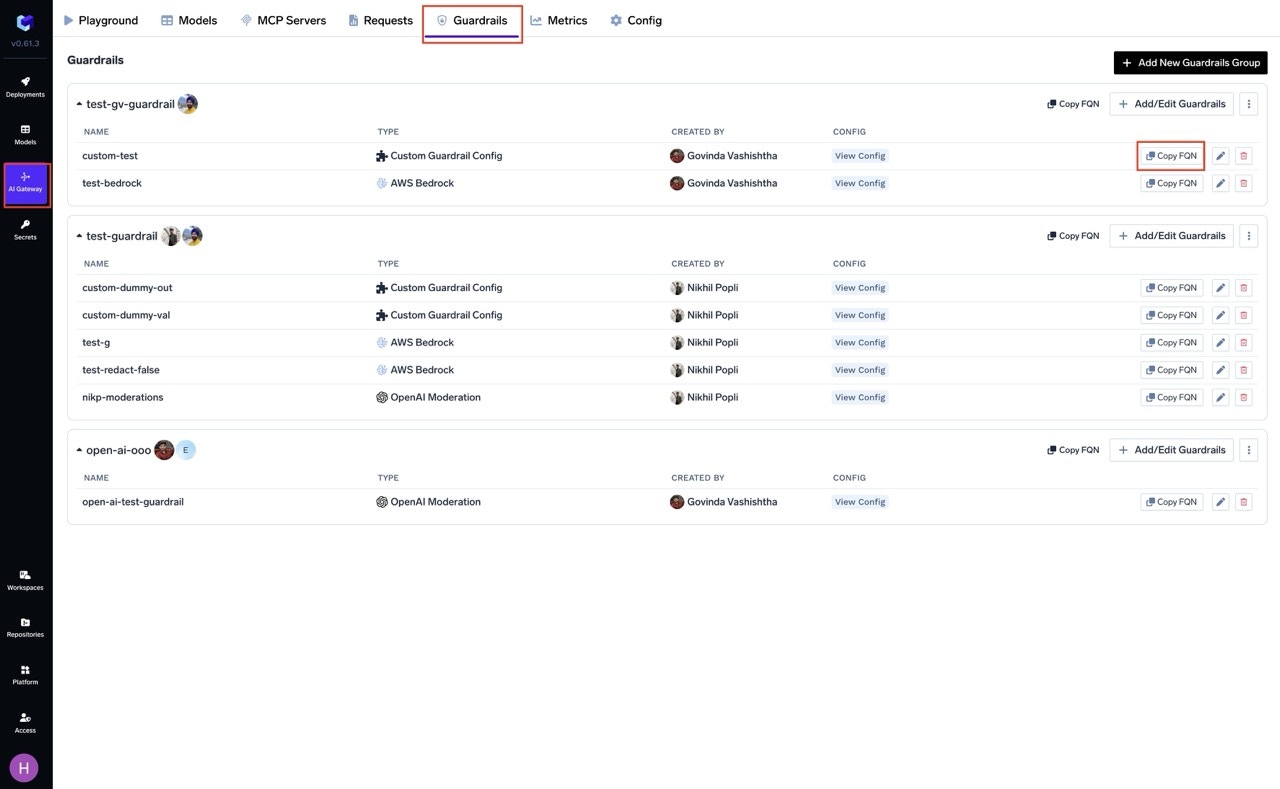
You can get the selector (FQN) of guardrail integrations by navigating to the Guardrail tab on AI Gateway and clicking on the "Copy FQN" button next to the guardrail integration.
## Configuration Structure
The guardrails configuration contains an array of rules that are evaluated for each request. **All matching rules are evaluated, and the union of their guardrails is applied to the request.** This means if multiple rules match, the guardrails from every matching rule are combined together. Each rule can specify guardrails for any of the four hooks.
### Example Configuration
```yaml theme={"dark"}
name: guardrails-control
type: gateway-guardrails-config
rules:
- id: palo-alto-rule
when:
target:
operator: or
conditions:
model:
values:
- openai-main/gpt-3-5-turbo-16k
condition: in
subjects:
operator: and
conditions:
in:
- team:everyone
llm_input_guardrails:
- prisma-airs/prisma-airs-dev-profile
llm_output_guardrails:
- prisma-airs/prisma-airs-dev-profile
mcp_tool_pre_invoke_guardrails: []
mcp_tool_post_invoke_guardrails: []
- id: mcp-test-rule
when:
target:
operator: or
conditions:
mcpServers:
values:
- kubernetes-mcp
condition: in
subjects:
operator: and
conditions:
in:
- team:test-team
not_in:
- user:akash@truefoundry.com
llm_input_guardrails: []
llm_output_guardrails: []
mcp_tool_pre_invoke_guardrails:
- pii/pii-detection
mcp_tool_post_invoke_guardrails:
- prisma-airs/prisma-airs-dev-profile
```
This configuration defines two rules:
1. **palo-alto-rule** — Targets requests to `openai-main/gpt-3-5-turbo-16k` from `team:everyone`, applying Prisma AIRS guardrails on both LLM input and output.
2. **mcp-test-rule** — Targets requests to the `kubernetes-mcp` MCP server from `team:test-team` (excluding a specific user), applying PII detection before tool invocation and Prisma AIRS after.
If a request matches both rules, the guardrails from both are combined — the request would get Prisma AIRS on LLM input/output *and* PII detection on MCP Pre Tool / Prisma AIRS on MCP Post Tool.
## Configuration Reference
### Rule Structure
| Field | Required | Description |
| --------------------------------- | -------- | -------------------------------------------------------------------------------------------------------------------------------------------------------------------------------- |
| `id` | Yes | Unique identifier for the rule |
| `when` | Yes | Matching criteria with `target` and `subjects` blocks |
| `llm_input_guardrails` | Yes | Guardrails applied before LLM request (use `[]` if none) |
| `llm_output_guardrails` | Yes | Guardrails applied after LLM response (use `[]` if none) |
| `mcp_tool_pre_invoke_guardrails` | Yes | Guardrails applied before MCP tool invocation (use `[]` if none) |
| `mcp_tool_post_invoke_guardrails` | Yes | Guardrails applied after MCP tool returns (use `[]` if none) |
| `custom_error_message` | No | Custom message returned to the client when a guardrail in this rule blocks a request. Supports the `{{guardrail_message}}` and `{{failed_guardrails}}` placeholders (see below). |
#### `custom_error_message` placeholders
When a request is blocked, you can template the message with these placeholders:
| Placeholder | Renders |
| ----------------------- | ---------------------------------------------------------------------------------------------- |
| `{{guardrail_message}}` | The default guardrail failure detail (provider-specific violation summary). |
| `{{failed_guardrails}}` | A comma-separated list of the guardrails in this rule that failed (as `group/name` selectors). |
Example:
```yaml theme={"dark"}
custom_error_message: "Your request was blocked by {{failed_guardrails}}: {{guardrail_message}}"
```
Placeholders that aren't used are left as-is, and existing messages that use only `{{guardrail_message}}` are unaffected.
### The `when` Block
The `when` block contains two main sections: `target` (what the request targets) and `subjects` (who is making the request):
| Section | Description |
| ---------- | ---------------------------------------------------------------------------- |
| `target` | Defines conditions based on `model`, `mcpServers`, `mcpTools`, or `metadata` |
| `subjects` | Defines conditions based on users, teams, or virtual accounts |
If `when` is empty (`{}`), the rule matches **all requests**. Use this for baseline guardrails that should apply universally alongside any other matching rules.
### The `when` Block Structure
```yaml theme={"dark"}
when:
target:
operator: or
conditions:
mcpServers:
values:
- database-tools
- code-executor
condition: in
```
```yaml theme={"dark"}
when:
target:
operator: or
conditions:
model:
values:
- openai-main/gpt-4o
- anthropic/claude-3-5-sonnet
condition: in
```
```yaml theme={"dark"}
when:
target:
operator: or
conditions:
metadata:
environment: production
tier: enterprise
```
Requires header: `X-TFY-METADATA: {"environment": "production", "tier": "enterprise"}`
```yaml theme={"dark"}
when:
target:
operator: or
conditions:
mcpServers:
values:
- database-tools
condition: in
mcpTools:
values:
- execute_query
condition: in
```
```yaml theme={"dark"}
when:
subjects:
operator: and
conditions:
in:
- user:alice@company.com
- user:bob@company.com
- team:data-science
not_in:
- user:guest@company.com
```
```yaml theme={"dark"}
when:
target:
operator: or
conditions:
mcpServers:
values:
- database-tools
condition: in
metadata:
environment: production
subjects:
operator: and
conditions:
in:
- team:engineering
not_in:
- user:external@partner.com
```
Both `target` and `subjects` conditions must match for the rule to apply.
**How it works:**
* All rules are evaluated for every request. The guardrails from **all matching rules are combined (union)** and applied together.
* Each rule can target specific users, teams, models, metadata, or MCP servers, and can enforce different guardrails on any combination of hooks.
* If multiple rules match, their guardrails are merged per hook — for example, if Rule A applies PII detection on LLM input and Rule B applies prompt injection detection on LLM input, both guardrails will run.
* Omitted fields are not used for filtering (e.g., if `model` is not specified, the rule matches any model).
## How to Get the Guardrail Selector
You can get the selector (FQN) of guardrail integrations by navigating to the Guardrail tab on AI Gateway and clicking on the "Copy FQN" button next to the guardrail integration.
 Once you submit the config, guardrails will be automatically applied when requests match your rules. This includes:
* LLM chat/completion requests (LLM Input/Output hooks)
* MCP tool invocations (MCP Pre/Post Tool hooks)
MCP tool guardrails are critical for agentic safety. Without them, AI agents may execute dangerous operations or leak sensitive data through tool outputs.
Once you submit the config, guardrails will be automatically applied when requests match your rules. This includes:
* LLM chat/completion requests (LLM Input/Output hooks)
* MCP tool invocations (MCP Pre/Post Tool hooks)
MCP tool guardrails are critical for agentic safety. Without them, AI agents may execute dangerous operations or leak sensitive data through tool outputs.