> ## Documentation Index
> Fetch the complete documentation index at: https://www.truefoundry.com/llms.txt
> Use this file to discover all available pages before exploring further.
# Globally Distributed SAAS Gateway
> Learn about Truefoundry's globally distributed AI Gateway infrastructure deployed across multiple regions and cloud providers
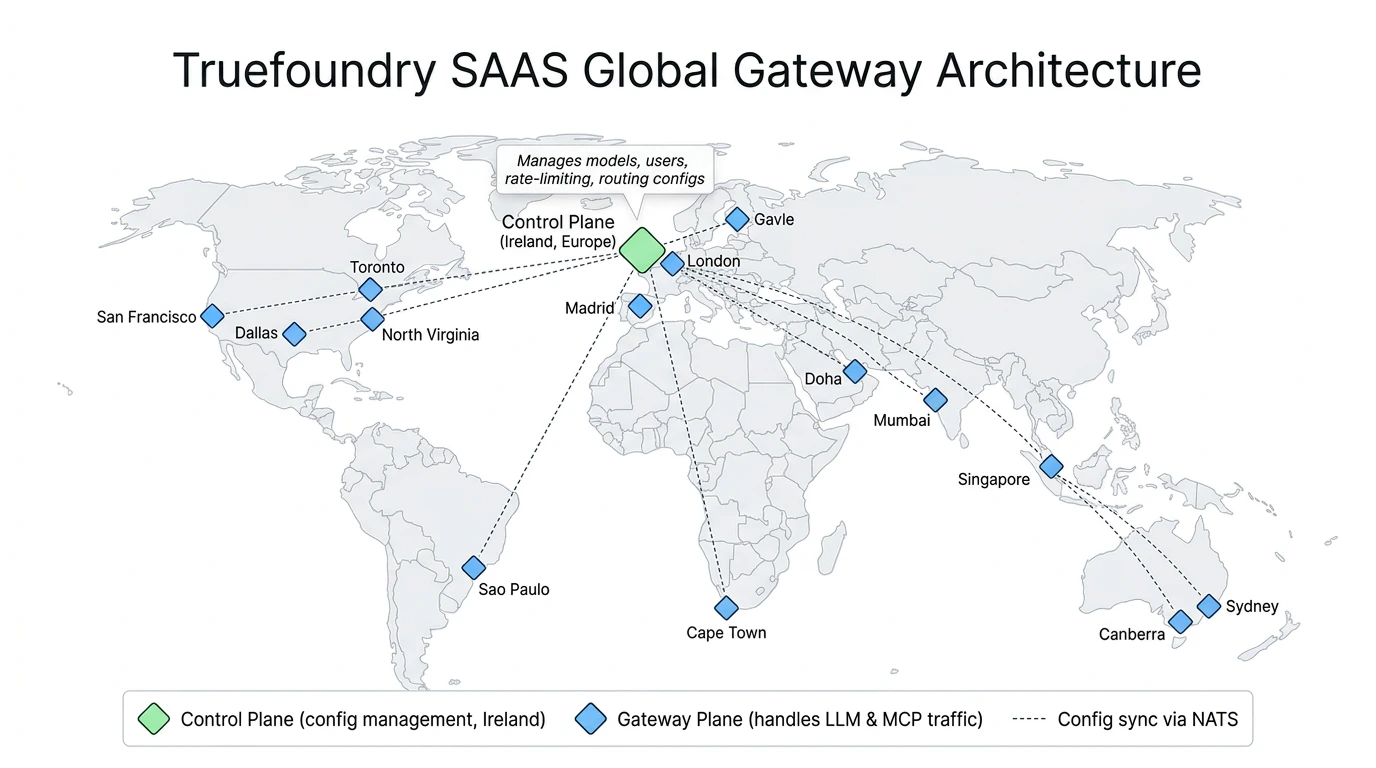
Truefoundry's globally distributed gateway is deployed across multiple regions and cloud providers to ensure high availability, low latency, and resilience against regional or cloud provider disruptions. The global gateway URL is `https://gateway.truefoundry.ai`.
**`gateway.truefoundry.ai` is the unified endpoint for both the AI Model Gateway and the MCP Gateway.**
Whether you are routing LLM inference requests (OpenAI-compatible API, etc.) or connecting to MCP (Model Context Protocol) servers, all traffic goes through the same globally distributed infrastructure. This means MCP Gateway deployments benefit from the same multi-region, multi-cloud availability described on this page.
 ## Features
1. **Globally Distributed**: Deployed across more than 12 regions around the globe and across 3 multiple cloud providers for maximum availability while minimizing latency.
2. **Automated Failover**: All traffic is routed to the nearest gateway for minimum latency. In case of regional downtime, traffic is automatically routed to closest healthy regions ensuring uninterrupted service.
3. **Multi-Cloud Deployment**: Distributed across multiple cloud providers to be tolerant to cloud provider-specific disruptions.
4. **Data Encryption**: Data is encrypted at rest and in transit.
5. **Compliance**: Truefoundry Infrastructure is SOC2, ISO27001, GDPR, and HIPAA compliant
## Architecture
The SAAS global deployment follows the same [Gateway Plane Architecture](/docs/platform/gateway-plane-architecture) used across all Truefoundry deployments. It consists of two key components:
* **Control Plane** — Manages all gateway configuration including models, users, teams, virtual accounts, rate-limiting, and routing configs. The SAAS control plane is hosted in **Ireland (Europe)**.
* **Gateway Planes** — Stateless, horizontally scalable gateway instances that handle all production traffic (LLM requests, MCP requests, etc.). These are deployed across the regions listed in the [Regional Deployments](#regional-deployments) section below.
The gateway planes subscribe to the control plane for configuration updates via NATS and perform all authentication, authorization, rate-limiting, and load-balancing checks in-memory with no external calls in the request path. For a detailed breakdown of the request flow, performance benchmarks, and FAQs, see the [Gateway Plane Architecture](/docs/platform/gateway-plane-architecture) page.
The specific regions and locations where gateway planes are deployed are subject to change based on Truefoundry's internal infrastructure needs. Regions may be added, removed, or relocated without prior notice.
## Global Deployment
For most use cases, we recommend using the global endpoint which automatically routes to the nearest healthy gateway:
| Deployment | Global Endpoint |
| -------------------- | -------------------------------- |
| Global (Auto-routed) | `https://gateway.truefoundry.ai` |
Using the global URL (`https://gateway.truefoundry.ai`) is recommended as it automatically routes your requests to the nearest healthy gateway instance based on your geographic location to give you the minimum possible latency.
## Regional Deployments
Each gateway region has its own URL and associated metadata. Every request routed through the SaaS gateway is automatically enriched with the `tfy_gateway_region` and `tfy_gateway_zone` metadata keys that identify which gateway region and zone handled the request. The **Region** and **Zone** columns in the table below show the values these keys will contain.
**Please do not use the regional endpoints in production since they are subject to change at any point without notice.**
We recommend using the global endpoint (`https://gateway.truefoundry.ai`) for production use, or the region-specific endpoint described in the [Multi-regional Deployments](#multi-regional-deployments) section.
| Physical Location | Cloud Provider | Region | Zone | Regional Endpoint |
| ----------------------------------- | -------------- | ------ | ----- | ------------------------------------ |
| North Virginia, United States (ORF) | AWS | `US` | `ORF` | `https://orf.gateway.truefoundry.ai` |
| San Francisco, United States (SFO) | Azure | `US` | `SFO` | `https://sfo.gateway.truefoundry.ai` |
| Dallas, Texas, United States (DFW) | GCP | `US` | `DFW` | `https://dfw.gateway.truefoundry.ai` |
| Toronto, Canada (YYZ) | GCP | `CA` | `YYZ` | `https://yyz.gateway.truefoundry.ai` |
| Sao Paulo, Brazil (GRU) | GCP | `SA` | `GRU` | `https://gru.gateway.truefoundry.ai` |
| London, United Kingdom (LHR) | AWS | `EU` | `LHR` | `https://lhr.gateway.truefoundry.ai` |
| Madrid, Spain (MAD) | GCP | `EU` | `MAD` | `https://mad.gateway.truefoundry.ai` |
| Gavle, Sweden (GVX) | Azure | `EU` | `GVX` | `https://gvx.gateway.truefoundry.ai` |
| Cape Town, South Africa (CPT) | AWS | `AF` | `CPT` | `https://cpt.gateway.truefoundry.ai` |
| Doha, Qatar (DIA) | GCP | `US` | `DIA` | `https://dia.gateway.truefoundry.ai` |
| Mumbai, India (BOM) | AWS | `IN` | `BOM` | `https://bom.gateway.truefoundry.ai` |
| Singapore, Singapore (SIN) | AWS | `AP` | `SIN` | `https://sin.gateway.truefoundry.ai` |
| Melbourne, Australia (MEL) | AWS | `AU` | `MEL` | `https://mel.gateway.truefoundry.ai` |
| Sydney, Australia (SYD) | AWS | `AU` | `SYD` | `https://syd.gateway.truefoundry.ai` |
The `tfy_gateway_region` and `tfy_gateway_zone` keys are set automatically — you do not need to send them. They are part of the resolved metadata on every request and can be used for:
* **[Virtual model routing](/docs/ai-gateway/virtual-model#metadata-based-target-filtering)** — Route to region-specific model deployments using `metadata_match`
* **[Data routing](/docs/ai-gateway/data-routing)** — Send logs to region-specific destinations based on gateway location
* **[Data access filters](/docs/ai-gateway/data-access)** — Scope log visibility by gateway region
* **[Request filtering](/docs/ai-gateway/log-custom-metadata)** — Filter request logs by region in the dashboard
For example, you can route US gateway traffic to Azure US-deployed models and EU gateway traffic to Azure EU-deployed models. See [region-based routing with virtual models](/docs/ai-gateway/virtual-model#metadata-based-target-filtering) for a worked example.
## Multi-regional Deployments
Multi-regional endpoints automatically route your requests to the closest healthy gateway within a specific geographic region. If all regional locations are unavailable, traffic is routed to the designated fallback regions.
| Region | Multi-regional Endpoint | Primary Locations | Fallback Locations |
| ------------- | ----------------------------------- | ------------------------------------------------------- | --------------------- |
| United States | `https://us.gateway.truefoundry.ai` | North Virginia (ORF), San Francisco (SFO), Dallas (DFW) | Toronto, Canada (YYZ) |
| Europe | `https://eu.gateway.truefoundry.ai` | London (LHR), Madrid (MAD), Gavle (GVX) | Doha, Qatar (DIA) |
| Australia | `https://au.gateway.truefoundry.ai` | Sydney (SYD), Melbourne (MEL) | Singapore (SIN) |
## Gateway Status Monitoring
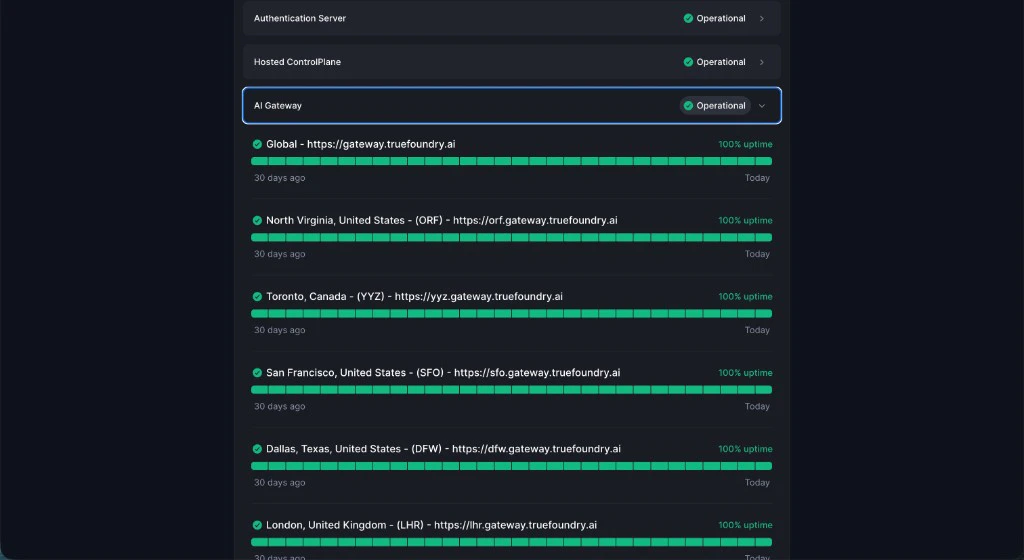
To track the status of each gateway deployment and receive real-time updates on service availability, visit our status page:
**Gateway Status Page**: [status.truefoundry.com](https://status.truefoundry.com)
You can expand the **AI Gateway** section to see per-region uptime:
## Features
1. **Globally Distributed**: Deployed across more than 12 regions around the globe and across 3 multiple cloud providers for maximum availability while minimizing latency.
2. **Automated Failover**: All traffic is routed to the nearest gateway for minimum latency. In case of regional downtime, traffic is automatically routed to closest healthy regions ensuring uninterrupted service.
3. **Multi-Cloud Deployment**: Distributed across multiple cloud providers to be tolerant to cloud provider-specific disruptions.
4. **Data Encryption**: Data is encrypted at rest and in transit.
5. **Compliance**: Truefoundry Infrastructure is SOC2, ISO27001, GDPR, and HIPAA compliant
## Architecture
The SAAS global deployment follows the same [Gateway Plane Architecture](/docs/platform/gateway-plane-architecture) used across all Truefoundry deployments. It consists of two key components:
* **Control Plane** — Manages all gateway configuration including models, users, teams, virtual accounts, rate-limiting, and routing configs. The SAAS control plane is hosted in **Ireland (Europe)**.
* **Gateway Planes** — Stateless, horizontally scalable gateway instances that handle all production traffic (LLM requests, MCP requests, etc.). These are deployed across the regions listed in the [Regional Deployments](#regional-deployments) section below.
The gateway planes subscribe to the control plane for configuration updates via NATS and perform all authentication, authorization, rate-limiting, and load-balancing checks in-memory with no external calls in the request path. For a detailed breakdown of the request flow, performance benchmarks, and FAQs, see the [Gateway Plane Architecture](/docs/platform/gateway-plane-architecture) page.
The specific regions and locations where gateway planes are deployed are subject to change based on Truefoundry's internal infrastructure needs. Regions may be added, removed, or relocated without prior notice.
## Global Deployment
For most use cases, we recommend using the global endpoint which automatically routes to the nearest healthy gateway:
| Deployment | Global Endpoint |
| -------------------- | -------------------------------- |
| Global (Auto-routed) | `https://gateway.truefoundry.ai` |
Using the global URL (`https://gateway.truefoundry.ai`) is recommended as it automatically routes your requests to the nearest healthy gateway instance based on your geographic location to give you the minimum possible latency.
## Regional Deployments
Each gateway region has its own URL and associated metadata. Every request routed through the SaaS gateway is automatically enriched with the `tfy_gateway_region` and `tfy_gateway_zone` metadata keys that identify which gateway region and zone handled the request. The **Region** and **Zone** columns in the table below show the values these keys will contain.
**Please do not use the regional endpoints in production since they are subject to change at any point without notice.**
We recommend using the global endpoint (`https://gateway.truefoundry.ai`) for production use, or the region-specific endpoint described in the [Multi-regional Deployments](#multi-regional-deployments) section.
| Physical Location | Cloud Provider | Region | Zone | Regional Endpoint |
| ----------------------------------- | -------------- | ------ | ----- | ------------------------------------ |
| North Virginia, United States (ORF) | AWS | `US` | `ORF` | `https://orf.gateway.truefoundry.ai` |
| San Francisco, United States (SFO) | Azure | `US` | `SFO` | `https://sfo.gateway.truefoundry.ai` |
| Dallas, Texas, United States (DFW) | GCP | `US` | `DFW` | `https://dfw.gateway.truefoundry.ai` |
| Toronto, Canada (YYZ) | GCP | `CA` | `YYZ` | `https://yyz.gateway.truefoundry.ai` |
| Sao Paulo, Brazil (GRU) | GCP | `SA` | `GRU` | `https://gru.gateway.truefoundry.ai` |
| London, United Kingdom (LHR) | AWS | `EU` | `LHR` | `https://lhr.gateway.truefoundry.ai` |
| Madrid, Spain (MAD) | GCP | `EU` | `MAD` | `https://mad.gateway.truefoundry.ai` |
| Gavle, Sweden (GVX) | Azure | `EU` | `GVX` | `https://gvx.gateway.truefoundry.ai` |
| Cape Town, South Africa (CPT) | AWS | `AF` | `CPT` | `https://cpt.gateway.truefoundry.ai` |
| Doha, Qatar (DIA) | GCP | `US` | `DIA` | `https://dia.gateway.truefoundry.ai` |
| Mumbai, India (BOM) | AWS | `IN` | `BOM` | `https://bom.gateway.truefoundry.ai` |
| Singapore, Singapore (SIN) | AWS | `AP` | `SIN` | `https://sin.gateway.truefoundry.ai` |
| Melbourne, Australia (MEL) | AWS | `AU` | `MEL` | `https://mel.gateway.truefoundry.ai` |
| Sydney, Australia (SYD) | AWS | `AU` | `SYD` | `https://syd.gateway.truefoundry.ai` |
The `tfy_gateway_region` and `tfy_gateway_zone` keys are set automatically — you do not need to send them. They are part of the resolved metadata on every request and can be used for:
* **[Virtual model routing](/docs/ai-gateway/virtual-model#metadata-based-target-filtering)** — Route to region-specific model deployments using `metadata_match`
* **[Data routing](/docs/ai-gateway/data-routing)** — Send logs to region-specific destinations based on gateway location
* **[Data access filters](/docs/ai-gateway/data-access)** — Scope log visibility by gateway region
* **[Request filtering](/docs/ai-gateway/log-custom-metadata)** — Filter request logs by region in the dashboard
For example, you can route US gateway traffic to Azure US-deployed models and EU gateway traffic to Azure EU-deployed models. See [region-based routing with virtual models](/docs/ai-gateway/virtual-model#metadata-based-target-filtering) for a worked example.
## Multi-regional Deployments
Multi-regional endpoints automatically route your requests to the closest healthy gateway within a specific geographic region. If all regional locations are unavailable, traffic is routed to the designated fallback regions.
| Region | Multi-regional Endpoint | Primary Locations | Fallback Locations |
| ------------- | ----------------------------------- | ------------------------------------------------------- | --------------------- |
| United States | `https://us.gateway.truefoundry.ai` | North Virginia (ORF), San Francisco (SFO), Dallas (DFW) | Toronto, Canada (YYZ) |
| Europe | `https://eu.gateway.truefoundry.ai` | London (LHR), Madrid (MAD), Gavle (GVX) | Doha, Qatar (DIA) |
| Australia | `https://au.gateway.truefoundry.ai` | Sydney (SYD), Melbourne (MEL) | Singapore (SIN) |
## Gateway Status Monitoring
To track the status of each gateway deployment and receive real-time updates on service availability, visit our status page:
**Gateway Status Page**: [status.truefoundry.com](https://status.truefoundry.com)
You can expand the **AI Gateway** section to see per-region uptime:
 ### Subscribe to Status Updates
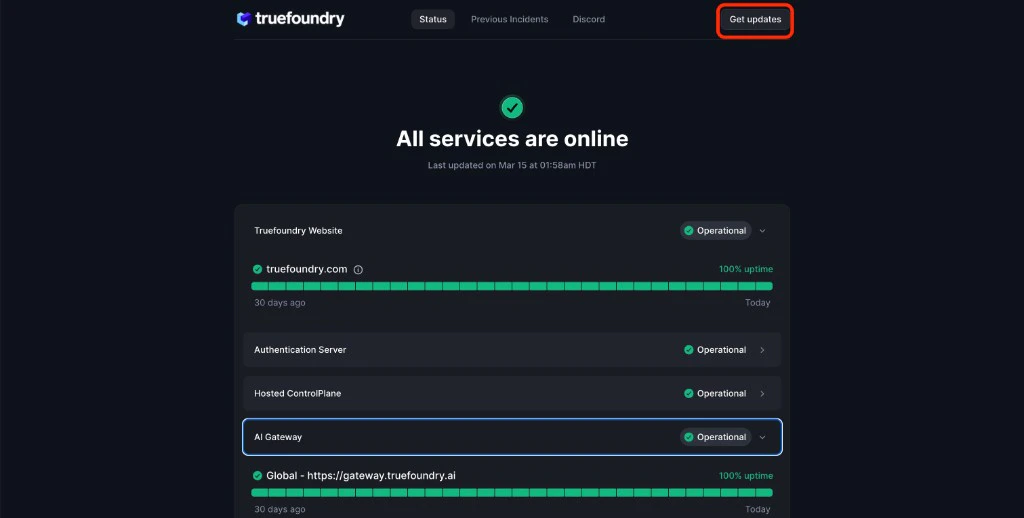
Stay informed about gateway availability by subscribing to status notifications:
1. Visit the [Gateway Status Page](https://status.truefoundry.com)
2. Click the **Get Updates** button in the top right
3. Choose your preferred notification method:
* Email notifications
* RSS Feed
* On a custom webhook
### Subscribe to Status Updates
Stay informed about gateway availability by subscribing to status notifications:
1. Visit the [Gateway Status Page](https://status.truefoundry.com)
2. Click the **Get Updates** button in the top right
3. Choose your preferred notification method:
* Email notifications
* RSS Feed
* On a custom webhook
 ## Connecting Your Private Models or MCP Servers to the Gateway
If your models or MCP servers run inside a private network (a VPC, on-prem cluster, etc.), the SAAS gateway needs a network path to reach them without exposing them to the public internet. See [Connect Private Models and MCP Servers](/docs/ai-gateway/connect-private-models-mcp-servers) for the supported approaches.
## FAQ
Your client is automatically routed to the closest gateway region, so the round trip time (RTT) from your application to the gateway typically ranges from **20–50ms**.
If you are seeing higher latencies, please let us know and we will be happy to add another region closer to your use case.
If you are **self-hosting the gateway** within your own infrastructure, the RTT from your application to the gateway will be on the order of **\~1ms** when both are running in the same cluster.
## Connecting Your Private Models or MCP Servers to the Gateway
If your models or MCP servers run inside a private network (a VPC, on-prem cluster, etc.), the SAAS gateway needs a network path to reach them without exposing them to the public internet. See [Connect Private Models and MCP Servers](/docs/ai-gateway/connect-private-models-mcp-servers) for the supported approaches.
## FAQ
Your client is automatically routed to the closest gateway region, so the round trip time (RTT) from your application to the gateway typically ranges from **20–50ms**.
If you are seeing higher latencies, please let us know and we will be happy to add another region closer to your use case.
If you are **self-hosting the gateway** within your own infrastructure, the RTT from your application to the gateway will be on the order of **\~1ms** when both are running in the same cluster.