> ## Documentation Index
> Fetch the complete documentation index at: https://www.truefoundry.com/llms.txt
> Use this file to discover all available pages before exploring further.
# Fiddler Integration
> Learn how to use fiddler with TrueFoundry AI Gateway, including setup steps, use cases, and production-ready examples.
This guide explains how to integrate Fiddler with TrueFoundry to enhance the evaluation and testing of your LLM applications.
## What is Fiddler?
[Fiddler](https://www.fiddler.ai/) Guardrails delivers enterprise-grade protection for LLM applications by moderating prompts and responses in real time. It mitigates risks such as hallucinations, toxicity, safety violations, prompt injections, and jailbreaks using proprietary task-optimized Trust Models.
### Key Features of Fiddler
1. **Ultra-Low Latency**: Delivers moderation in under 100 ms for seamless real-time user experiences
2. **Built for Scale**: Reliably processes over 5 million requests per day with enterprise-grade performance.
3. **Optimized Efficiency**: Task-specific Trust Models ensure high accuracy while minimizing compute costs.
### Adding Fiddler Integration
To add Fiddler to your TrueFoundry setup, follow these steps:
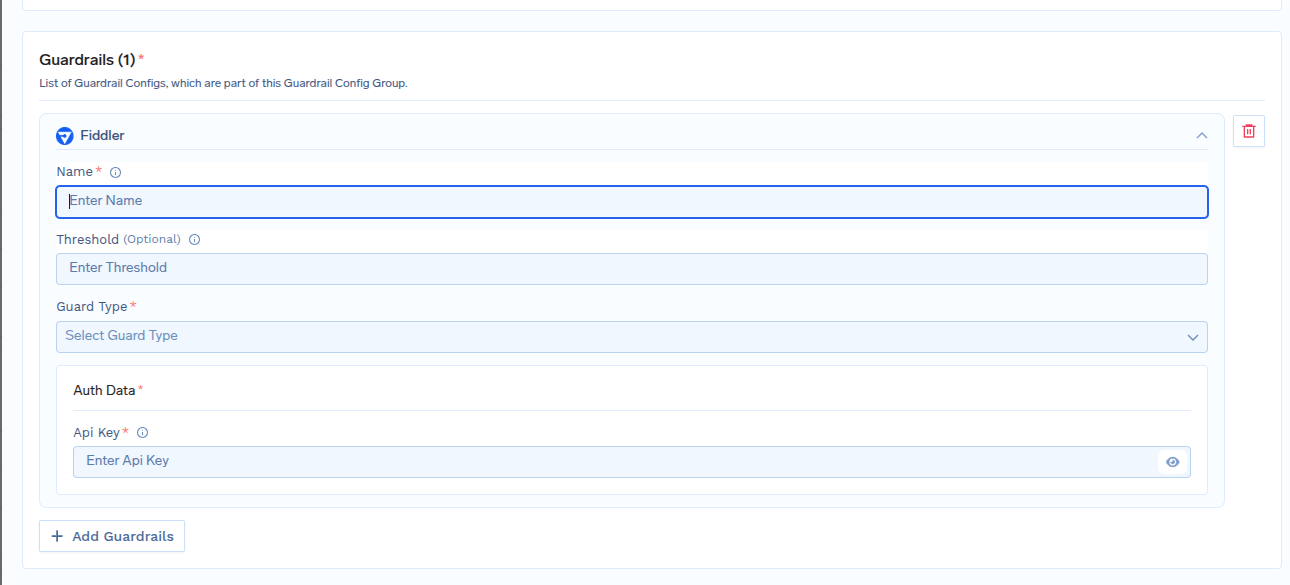
**Fill in the Guardrails Group Form**
* **Name**: Enter a name for your guardrails group.
* **Collaborators**: Add collaborators who will have access to this group.
* **Fiddler Config**:
* **Name**: Enter a name for the Fiddler configuration.
* **Threshold (Optional)**: Enter a threshold value.
* **Guard Type**: Select the type of guard from the available options:
* **Fiddler-Safety**: Identifies harmful, sensitive, or jailbreaking content in the inputs of your generative application.
* **Fiddler-Response-Faithfulness**: Detects hallucination by evaluating responses of your generative application for their factual consistency with source context.
* **Auth Data**
* **API Key**: Enter your Fiddler API key in this field. You can get one from [here](https://guardrails.cloud.fiddler.ai/guardrails-get-started).
 #### Response Structure
The Fiddler API returns a response with the following structure:
This is an example response from fiddler, showing Fiddler-Safety results with category flagging and scores.
```json lines theme={"dark"}
{
"data": {
"fdl_jailbreaking": 0.002,
"fdl_illegal": 0.003,
"fdl_hateful": 0.001,
"fdl_harassing": 0.001,
"fdl_racist": 0.001,
"fdl_sexist": 0.001,
"fdl_violent": 0.001,
"fdl_sexual": 0.002,
"fdl_harmful": 0.004,
"fdl_unethical": 0.004
}
}
```
This is an example response from fiddler, showing Fiddler-Response-Faithfulness results with scores.
```json lines theme={"dark"}
{
"data": {
"fdl_faithful_score:": 0.002,
}
}
```
#### Validation Logic
TrueFoundry uses the Fiddler response to determine content safety and compliance:
* For `Fiddler-Safety` if any category scores is above threshold it means content violates the configured guardrails and request will be rejected.
* Category scores are evaluated against configured thresholds, with scores of 1 indicating policy violations in `Fiddler-Safety`.
* For `Fiddler-Response-Faithfulness` 1 means the response is faithful according to the context provided.
* Default threshold for `"Fiddler-Safety"` is `0.7` and `"Fiddler-Response-Faithfulness"` is `0.5`.
#### Response Structure
The Fiddler API returns a response with the following structure:
This is an example response from fiddler, showing Fiddler-Safety results with category flagging and scores.
```json lines theme={"dark"}
{
"data": {
"fdl_jailbreaking": 0.002,
"fdl_illegal": 0.003,
"fdl_hateful": 0.001,
"fdl_harassing": 0.001,
"fdl_racist": 0.001,
"fdl_sexist": 0.001,
"fdl_violent": 0.001,
"fdl_sexual": 0.002,
"fdl_harmful": 0.004,
"fdl_unethical": 0.004
}
}
```
This is an example response from fiddler, showing Fiddler-Response-Faithfulness results with scores.
```json lines theme={"dark"}
{
"data": {
"fdl_faithful_score:": 0.002,
}
}
```
#### Validation Logic
TrueFoundry uses the Fiddler response to determine content safety and compliance:
* For `Fiddler-Safety` if any category scores is above threshold it means content violates the configured guardrails and request will be rejected.
* Category scores are evaluated against configured thresholds, with scores of 1 indicating policy violations in `Fiddler-Safety`.
* For `Fiddler-Response-Faithfulness` 1 means the response is faithful according to the context provided.
* Default threshold for `"Fiddler-Safety"` is `0.7` and `"Fiddler-Response-Faithfulness"` is `0.5`.