> ## Documentation Index
> Fetch the complete documentation index at: https://www.truefoundry.com/llms.txt
> Use this file to discover all available pages before exploring further.
# Dify
> Guide to integrating Dify with the TrueFoundry AI Gateway.
This guide provides instructions for integrating [Dify](https://dify.ai/) with the Truefoundry AI Gateway.
## What is Dify?
Dify is an open-source platform for building AI applications with built-in LLMOps, workflow automation, and agent capabilities. It provides a comprehensive suite of tools for creating, managing, and deploying AI-powered applications through an intuitive visual interface.
### Key Features of Dify
* **[Workflow Studio](https://docs.dify.ai/guides/workflow)**: Create complex AI workflows using visual drag-and-drop interface with support for conditional logic, loops, and multi-step reasoning processes
* **[Agent Builder](https://docs.dify.ai/guides/agent)**: Build intelligent agents with tool integration, conversation memory, and the ability to plan and execute multi-step tasks autonomously
* **[Knowledge Management](https://docs.dify.ai/guides/knowledge-base)**: Upload documents, websites, and structured data to create searchable knowledge bases for RAG (Retrieval-Augmented Generation) applications
## Prerequisites
Before integrating Dify with TrueFoundry, ensure you have:
1. **TrueFoundry Account**: Create a [Truefoundry account](https://www.truefoundry.com/register) and follow the instructions in our [Gateway Quick Start Guide](https://docs.truefoundry.com/gateway/quick-start)
2. **Dify Installation**: Set up Dify using either the [cloud version](https://dify.ai/) or [self-hosted deployment](https://github.com/langgenius/dify) with Docker
## Integration Steps
This guide assumes you have Dify installed and running, and have obtained your TrueFoundry AI Gateway base URL.
### Step 1: Access Dify Model Provider Settings
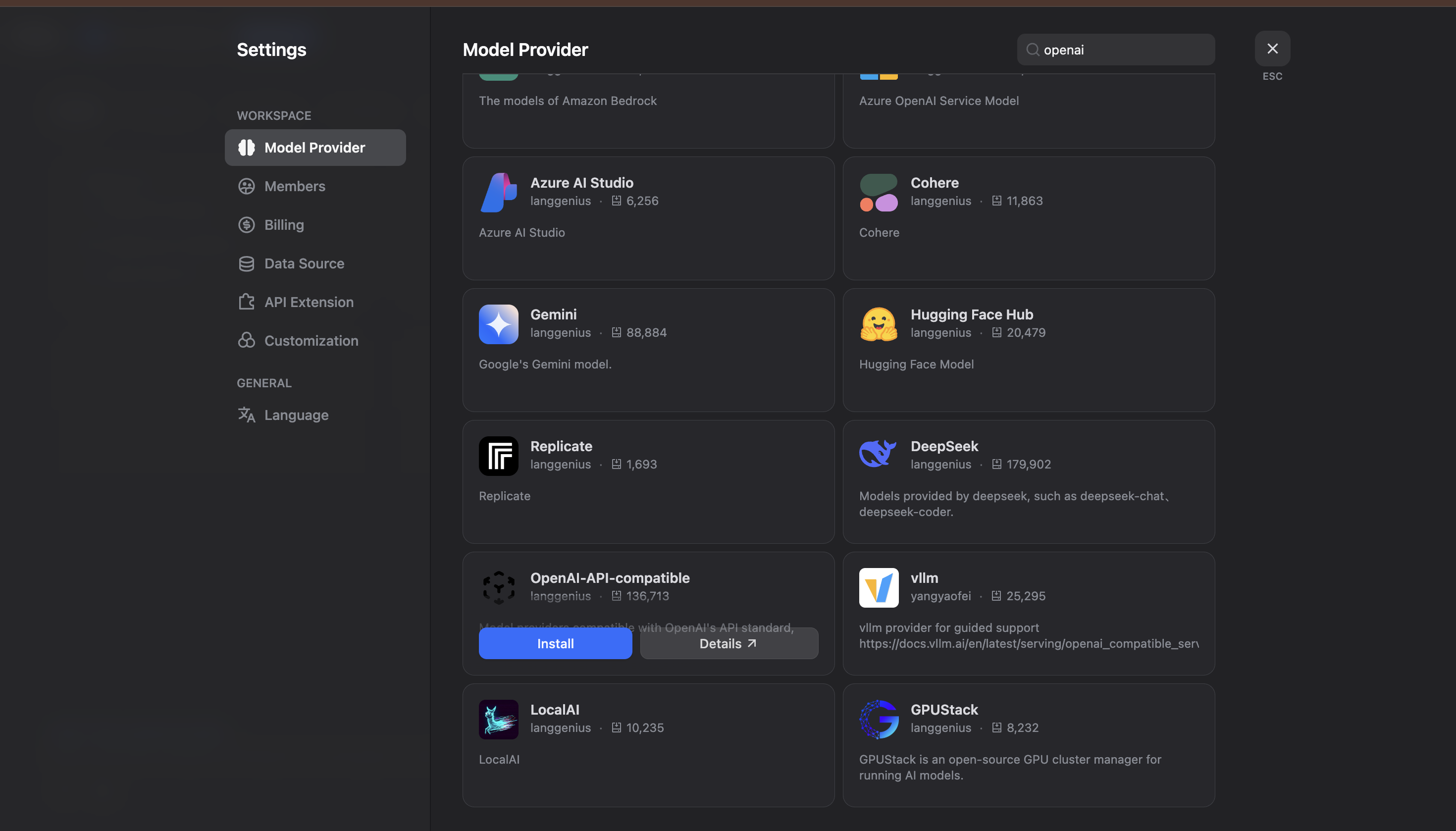
1. Log into your Dify workspace (cloud or self-hosted).
2. Navigate to **Settings** and go to **Model Provider**:
 ### Step 2: Install OpenAI-API-Compatible Provider
1. In the Model Provider section, look for **OpenAI-API-compatible** and click **Install**.
2. Configure the OpenAI-API-compatible provider with your TrueFoundry details:
### Step 2: Install OpenAI-API-Compatible Provider
1. In the Model Provider section, look for **OpenAI-API-compatible** and click **Install**.
2. Configure the OpenAI-API-compatible provider with your TrueFoundry details:
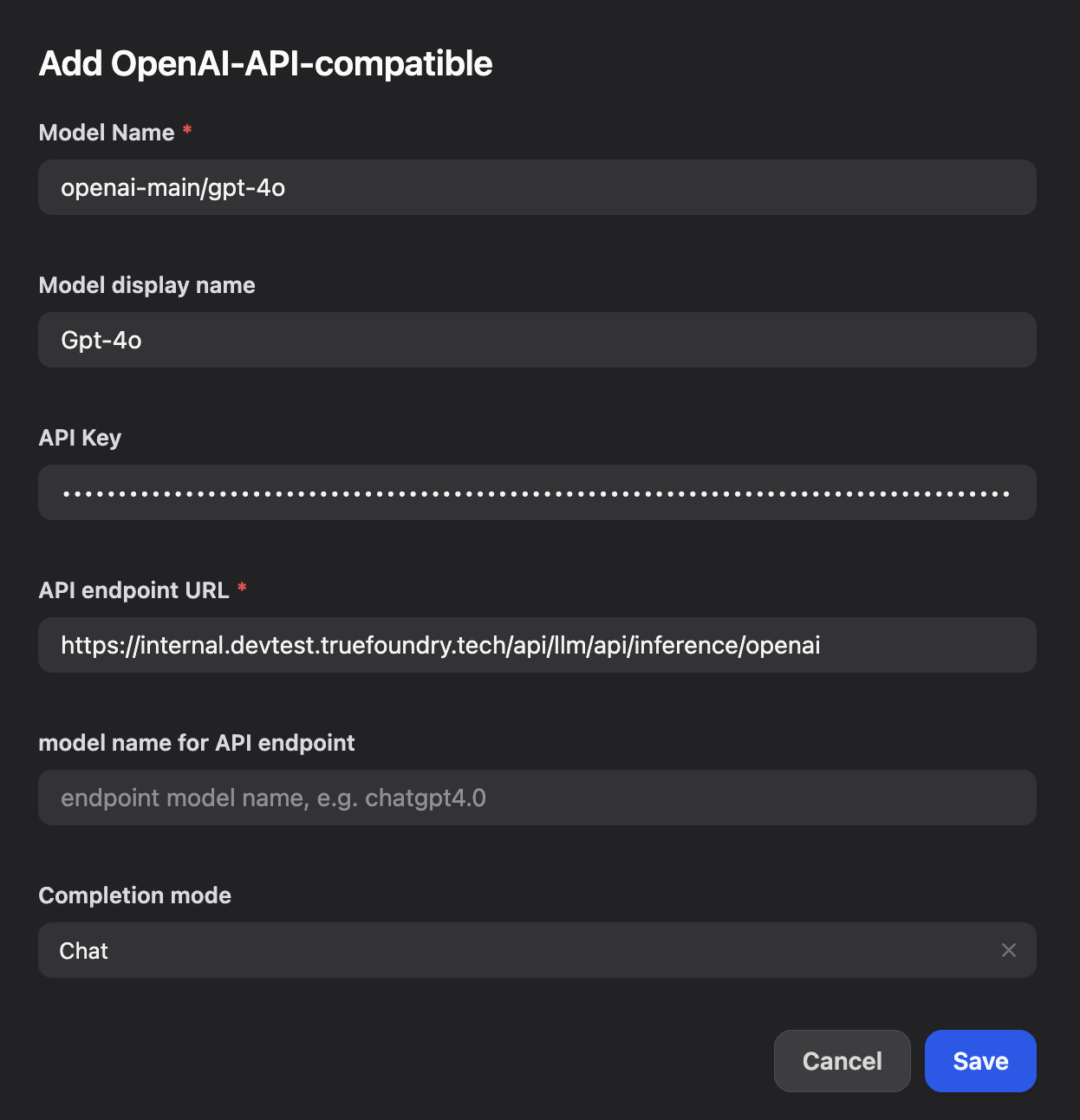 You will get your base URL and model name directly from the unified code snippet:
 Fill in the following configuration:
* **Model Name**: Enter your TrueFoundry model ID (e.g., `openai-main/gpt-4o`)
* **Model display name**: Enter a display name (e.g., `Gpt-4o`)
* **API endpoint URL**: Enter your TrueFoundry Gateway base URL
* **model name for API endpoint**: Enter the endpoint model name (e.g., `openai-main/gpt-4o`)
Copy the base URL and model ID and paste them into Dify's configuration fields.
### Step 3: Save and Test Your Configuration
1. Click **Save** to apply your configuration in Dify.
2. Create a new application or workflow to test the integration:
3. Test the integration by creating a simple LLM workflow to verify that Dify is successfully communicating with TrueFoundry's AI Gateway.
Fill in the following configuration:
* **Model Name**: Enter your TrueFoundry model ID (e.g., `openai-main/gpt-4o`)
* **Model display name**: Enter a display name (e.g., `Gpt-4o`)
* **API endpoint URL**: Enter your TrueFoundry Gateway base URL
* **model name for API endpoint**: Enter the endpoint model name (e.g., `openai-main/gpt-4o`)
Copy the base URL and model ID and paste them into Dify's configuration fields.
### Step 3: Save and Test Your Configuration
1. Click **Save** to apply your configuration in Dify.
2. Create a new application or workflow to test the integration:
3. Test the integration by creating a simple LLM workflow to verify that Dify is successfully communicating with TrueFoundry's AI Gateway.
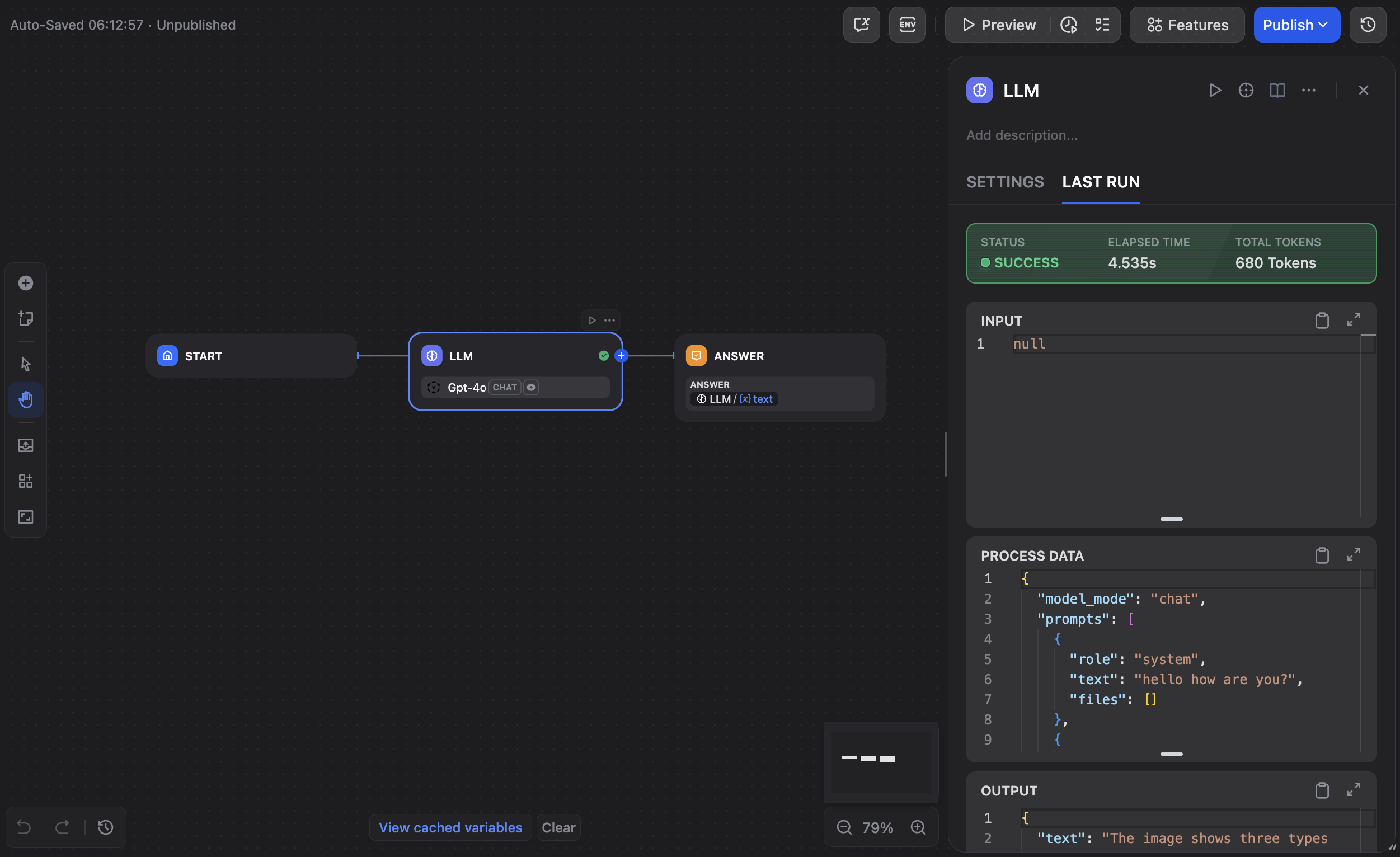 Your Dify workspace is now integrated with TrueFoundry's AI Gateway and ready for building AI applications, workflows, and agents.