> ## Documentation Index
> Fetch the complete documentation index at: https://www.truefoundry.com/llms.txt
> Use this file to discover all available pages before exploring further.
# Configure Data Routing
> Configure storage destinations for AI Gateway request logs and metrics. Route traces to custom object stores based on Enterprise plan.
TrueFoundry AI Gateway allows you to configure where your request logs (traces) and metrics are stored. You can choose between control plane managed storage or bring your own customer-managed storage.
Storage configuration can only be managed by tenant administrators.
## Overview
The AI Gateway supports two types of data routing destinations:
* **Default destination**: Always enabled and available to all tenants regardless of plan. All metrics are always routed to the default destination.
* **Custom destinations** (Enterprise plan): Route traces to different object stores based on conditions. Metrics cannot be routed to custom destinations—they always go to the default.
For each destination, you can configure:
* **Storage type**: Control plane managed storage or customer-managed storage
* **Region selection**: For control plane managed storage (SaaS only)
* **Trace retention**: Configure how long trace data is retained
> Metrics data is kept forever and always routed to the default destination
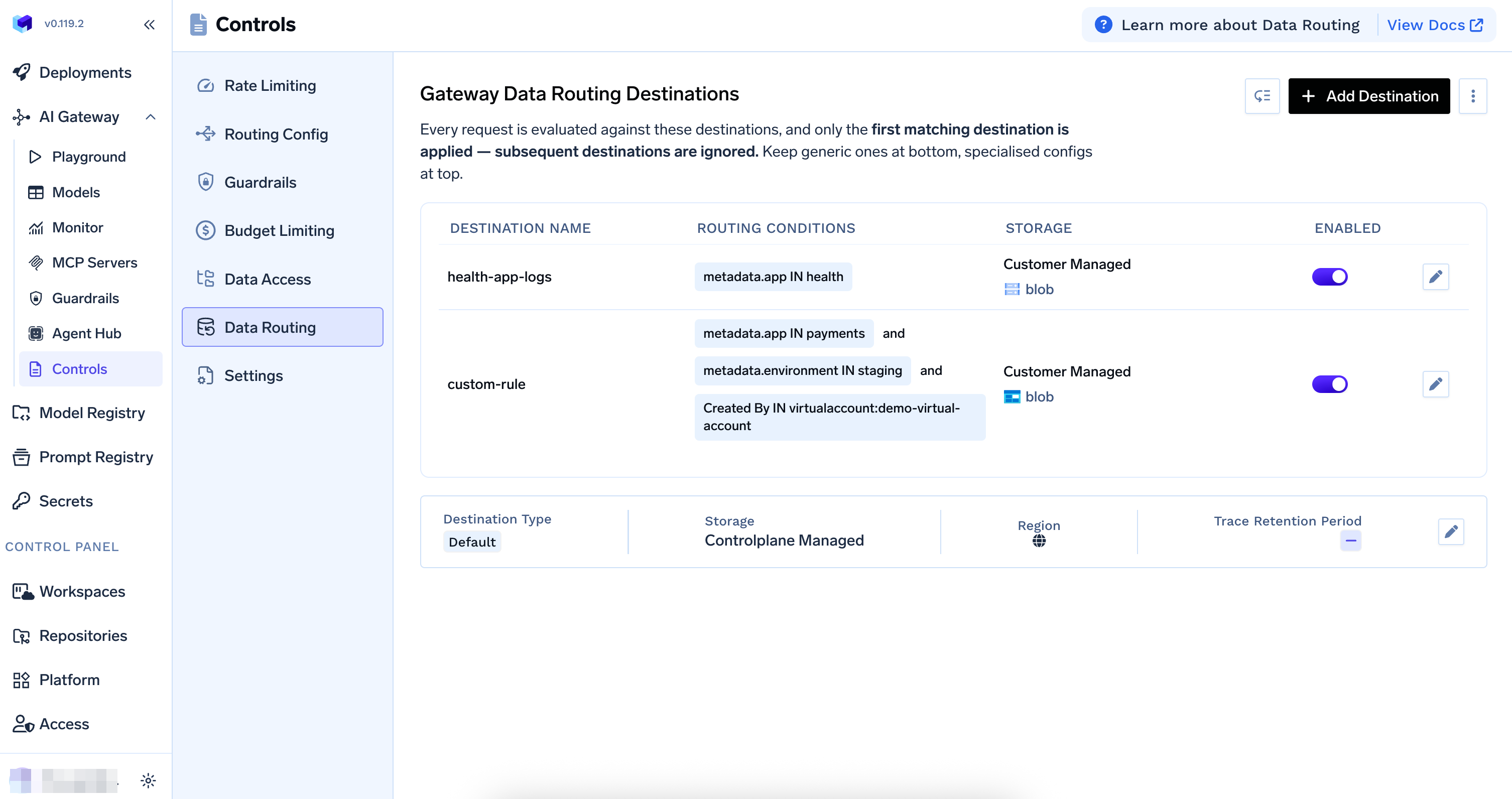
Navigate to `AI Gateway` > `Controls` > `Data Routing` to view and configure your data routing destinations.
 ## Custom Destinations (Enterprise Plan)
Custom destinations are available on the Enterprise plan only.
Custom destinations let you route traces to different object stores based on routing conditions. Requests are evaluated **from top to bottom**—the **first matching destination** is applied, and subsequent destinations are ignored. If no custom destination matches, the request is routed to the default destination.
You can **disable** individual rules (using the toggle) and **re-order** destinations to control evaluation order. Keep generic destinations at the bottom and specialized configurations at the top.
### Routing Conditions
You can define conditions based on:
* **User-defined metadata**: Route based on metadata sent in the request (e.g., `metadata.app`, `metadata.environment`)
* **Created by**: Route based on who created the request—users, teams, or virtual accounts
For SaaS gateway location metadata available on every request (such as `tfy_gateway_region` and `tfy_gateway_zone`) that you can use in routing conditions, see [Metadata Keys](/docs/ai-gateway/globally-distributed-saas#metadata-keys).
## Custom Destinations (Enterprise Plan)
Custom destinations are available on the Enterprise plan only.
Custom destinations let you route traces to different object stores based on routing conditions. Requests are evaluated **from top to bottom**—the **first matching destination** is applied, and subsequent destinations are ignored. If no custom destination matches, the request is routed to the default destination.
You can **disable** individual rules (using the toggle) and **re-order** destinations to control evaluation order. Keep generic destinations at the bottom and specialized configurations at the top.
### Routing Conditions
You can define conditions based on:
* **User-defined metadata**: Route based on metadata sent in the request (e.g., `metadata.app`, `metadata.environment`)
* **Created by**: Route based on who created the request—users, teams, or virtual accounts
For SaaS gateway location metadata available on every request (such as `tfy_gateway_region` and `tfy_gateway_zone`) that you can use in routing conditions, see [Metadata Keys](/docs/ai-gateway/globally-distributed-saas#metadata-keys).
 ### Adding a Custom Destination
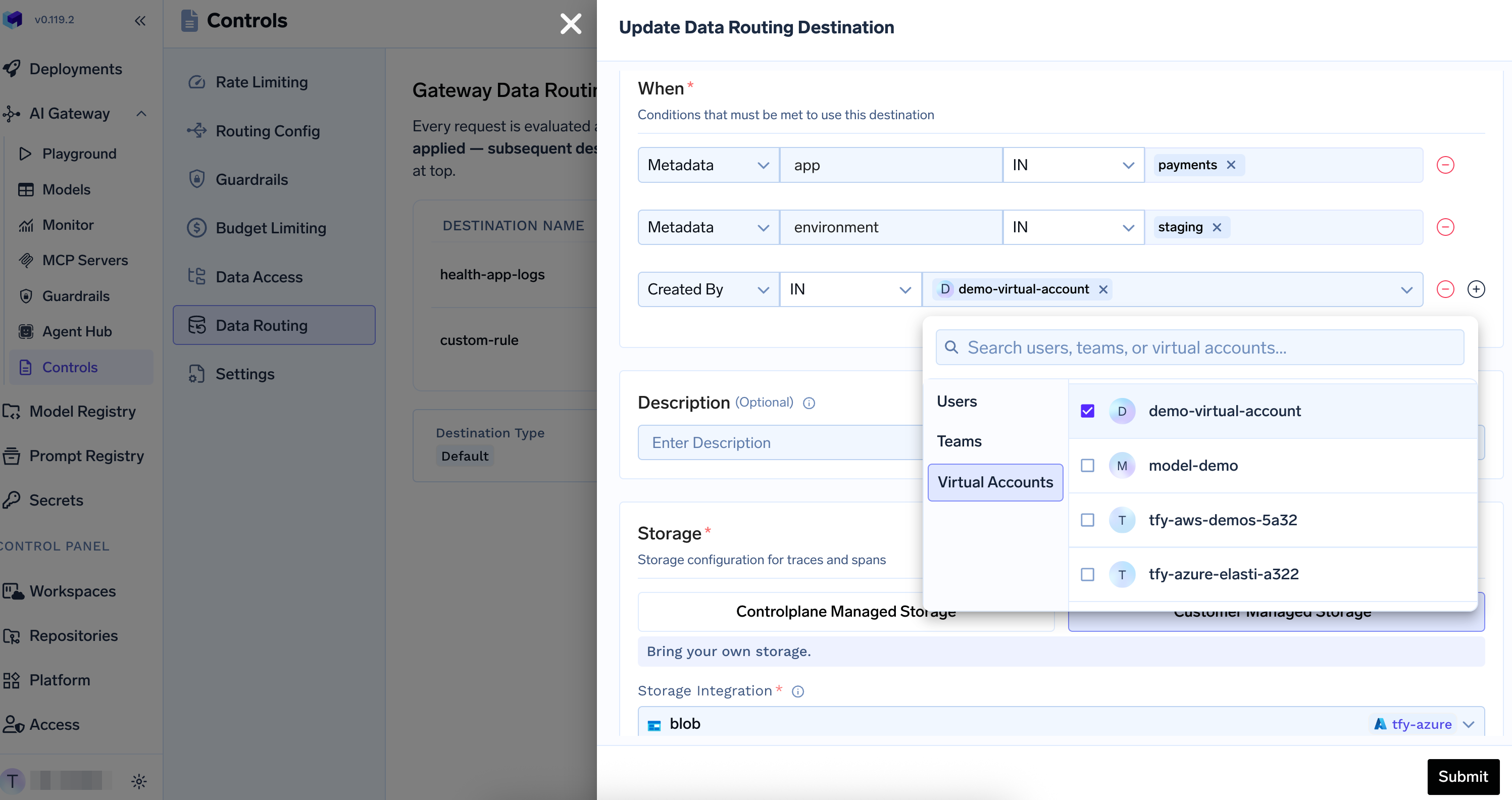
Go to `AI Gateway` > `Controls` > `Data Routing`
Click **+ Add Destination**
In the "When" section, add conditions that must be met for this destination:
* **Metadata**: Add key-value conditions (e.g., `metadata.app IN payments`, `metadata.environment IN staging`)
* **Created By**: Add conditions for users, teams, or virtual accounts
Select **Controlplane Managed Storage** or **Customer Managed Storage** and configure the storage details
Click **Submit** to save the custom destination
## Storage Options
### Control Plane Managed Storage
Control plane managed storage is blob storage configured when setting up the AI Gateway control plane. When using TrueFoundry's SaaS offering, you can select a region for the control plane managed storage.
**Features:**
* Fully managed by Control Plane
* No additional setup required
* Region selection available for data residency requirements (SaaS only)
### Adding a Custom Destination
Go to `AI Gateway` > `Controls` > `Data Routing`
Click **+ Add Destination**
In the "When" section, add conditions that must be met for this destination:
* **Metadata**: Add key-value conditions (e.g., `metadata.app IN payments`, `metadata.environment IN staging`)
* **Created By**: Add conditions for users, teams, or virtual accounts
Select **Controlplane Managed Storage** or **Customer Managed Storage** and configure the storage details
Click **Submit** to save the custom destination
## Storage Options
### Control Plane Managed Storage
Control plane managed storage is blob storage configured when setting up the AI Gateway control plane. When using TrueFoundry's SaaS offering, you can select a region for the control plane managed storage.
**Features:**
* Fully managed by Control Plane
* No additional setup required
* Region selection available for data residency requirements (SaaS only)
 ### Customer Managed Storage
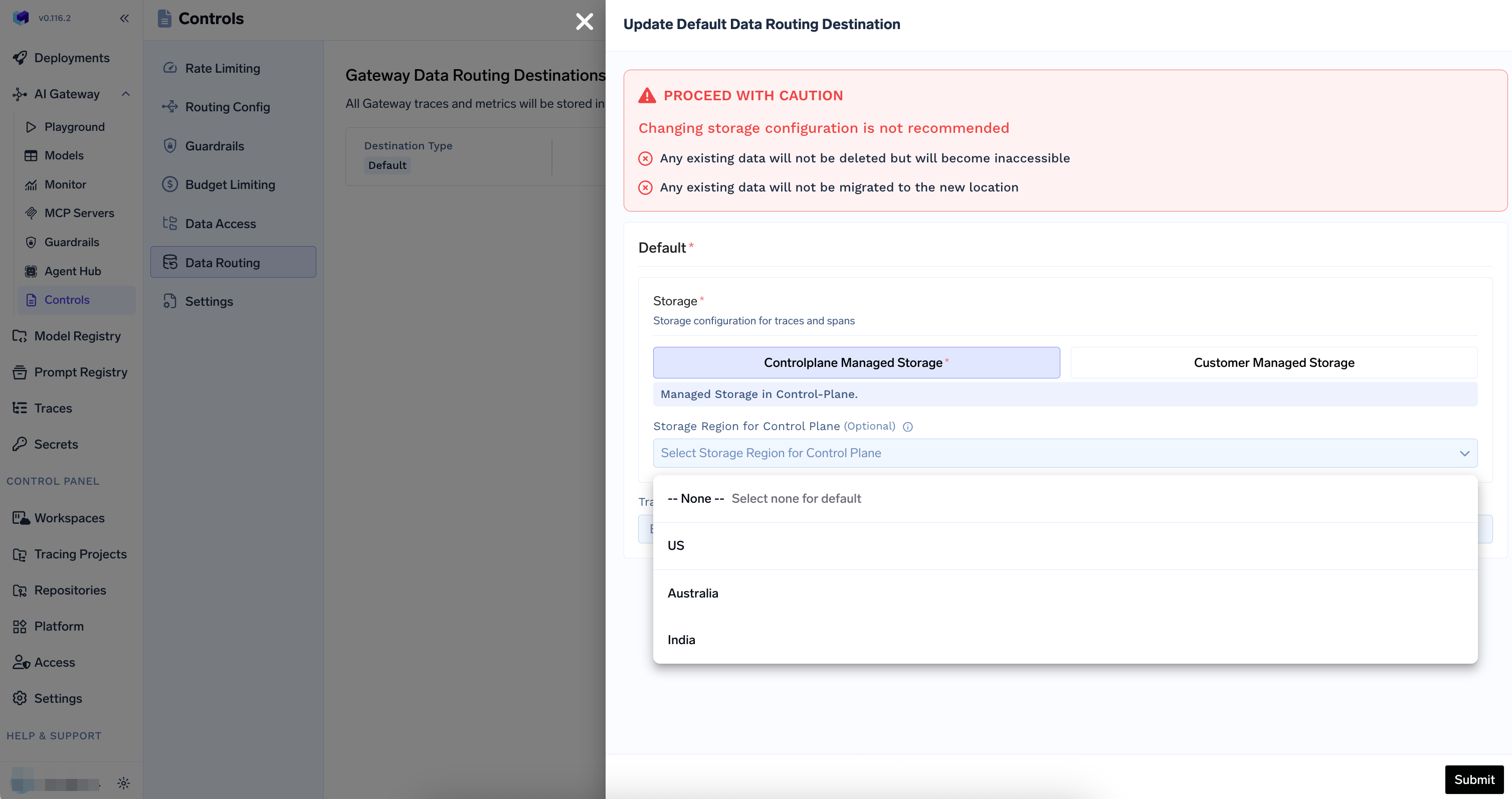
Customer managed storage allows you to bring your own storage buckets. You can configure storage integrations (such as AWS S3 or Azure Blob Storage) and select them as your data routing destination.
**Features:**
* Use your own blob storage
* Full control over data location and compliance
* Support for multiple cloud providers (AWS S3, GCS, Azure Blob Storage, etc.)
* Configure storage integrations via Platform > Integrations
### Customer Managed Storage
Customer managed storage allows you to bring your own storage buckets. You can configure storage integrations (such as AWS S3 or Azure Blob Storage) and select them as your data routing destination.
**Features:**
* Use your own blob storage
* Full control over data location and compliance
* Support for multiple cloud providers (AWS S3, GCS, Azure Blob Storage, etc.)
* Configure storage integrations via Platform > Integrations
 ## Configuring the Default Destination
The default destination is always enabled and applies to all requests that do not match a custom destination. It also receives all metrics.
Go to `AI Gateway` > `Controls` > `Data Routing`
Click the edit icon (pencil) next to the default destination in the destinations table
Select your preferred storage option:
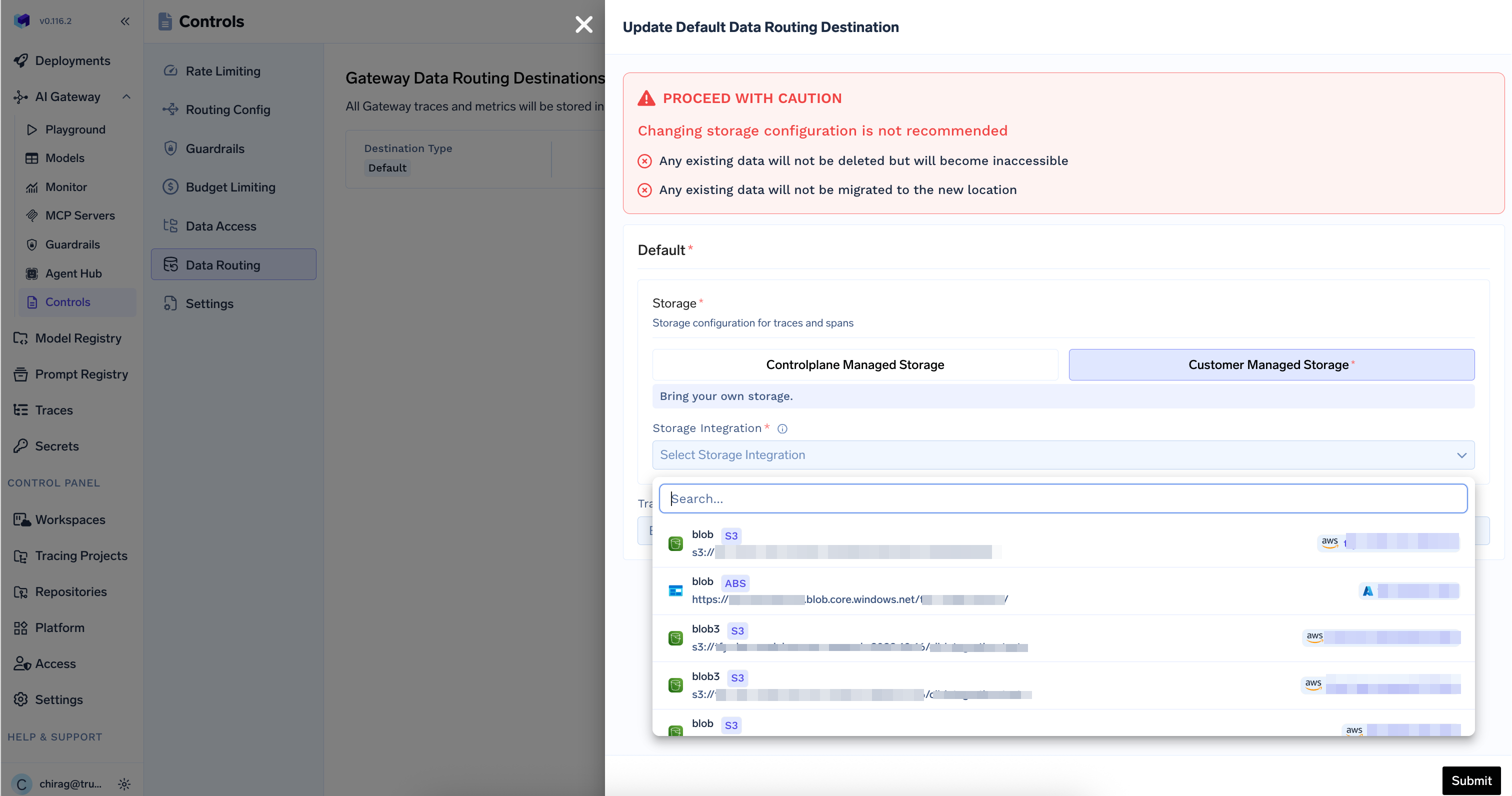
* **Controlplane Managed Storage**: For TrueFoundry-managed storage
* **Customer Managed Storage**: To use your own storage buckets
**For Control Plane Managed Storage:**
* If using TrueFoundry SaaS, optionally select a storage region (e.g., US, Australia, India)
* Leave region as "None" to use the default region
**For Customer Managed Storage:**
* Ensure you have configured a storage integration in `Platform` > `Integrations`
* Select your storage integration from the dropdown
* The integration must be configured with appropriate permissions for the AI Gateway to write data
Set the retention period for trace data. If not configured, traces will be retained according to the default policy.
Metrics are always routed to the default destination and kept forever. Retention cannot be configured for metrics.
Review your settings and click **Submit** to save the configuration
## Setting Up Customer Managed Storage
Before you can use customer-managed storage, you need to configure a storage integration:
Go to `Platform` > `Integrations`
Add a new storage integration for your blob storage
Ensure the storage integration has write permissions for the AI Gateway to store traces and metrics
Return to `AI Gateway` > `Controls` > `Data Routing` and select your configured storage integration
## Important Considerations
**Changing Storage Configuration**
Changing your storage configuration has important implications:
* Any existing data will not be deleted but will become inaccessible
* Existing data will not be migrated to the new storage location
* New data will be stored in the newly configured destination
* Consider data retention and compliance requirements before making changes
### Region Selection (SaaS Only)
When using TrueFoundry's SaaS offering, you can select a storage region for the control plane managed storage. This allows you to store data in a specific geographic region for compliance requirements.
## Configuring the Default Destination
The default destination is always enabled and applies to all requests that do not match a custom destination. It also receives all metrics.
Go to `AI Gateway` > `Controls` > `Data Routing`
Click the edit icon (pencil) next to the default destination in the destinations table
Select your preferred storage option:
* **Controlplane Managed Storage**: For TrueFoundry-managed storage
* **Customer Managed Storage**: To use your own storage buckets
**For Control Plane Managed Storage:**
* If using TrueFoundry SaaS, optionally select a storage region (e.g., US, Australia, India)
* Leave region as "None" to use the default region
**For Customer Managed Storage:**
* Ensure you have configured a storage integration in `Platform` > `Integrations`
* Select your storage integration from the dropdown
* The integration must be configured with appropriate permissions for the AI Gateway to write data
Set the retention period for trace data. If not configured, traces will be retained according to the default policy.
Metrics are always routed to the default destination and kept forever. Retention cannot be configured for metrics.
Review your settings and click **Submit** to save the configuration
## Setting Up Customer Managed Storage
Before you can use customer-managed storage, you need to configure a storage integration:
Go to `Platform` > `Integrations`
Add a new storage integration for your blob storage
Ensure the storage integration has write permissions for the AI Gateway to store traces and metrics
Return to `AI Gateway` > `Controls` > `Data Routing` and select your configured storage integration
## Important Considerations
**Changing Storage Configuration**
Changing your storage configuration has important implications:
* Any existing data will not be deleted but will become inaccessible
* Existing data will not be migrated to the new storage location
* New data will be stored in the newly configured destination
* Consider data retention and compliance requirements before making changes
### Region Selection (SaaS Only)
When using TrueFoundry's SaaS offering, you can select a storage region for the control plane managed storage. This allows you to store data in a specific geographic region for compliance requirements.