> ## Documentation Index
> Fetch the complete documentation index at: https://www.truefoundry.com/llms.txt
> Use this file to discover all available pages before exploring further.

# Custom Guardrail/Plugins Configuration

> Configure custom guardrails for validation and security.

Custom Guardrails/Plugins are a way to introduce custom "validation" or "mutations" to the request and response of the LLM. You can implement custom security policies, PII detection, content moderation specific to your use case.

## Reference integrations (deployable wrappers)

Before building from the template below, you can deploy **production-ready FastAPI wrappers** from the [`integrations-custom-guardrails`](https://github.com/truefoundry/integrations-custom-guardrails) monorepo. Each wrapper implements the [custom guardrail response contract](#custom-guardrail-response-contract); you deploy the service (TrueFoundry, Docker, Render, or any host with a public HTTPS URL), then register **Custom Guardrail** configs in **AI Gateway → Guardrails** pointing at the wrapper endpoints.

<Note>
  These appear on the [Integrations → Guardrails](/docs/ai-gateway/ecosystem#guardrails) page alongside native provider integrations. They use the same Custom Guardrail dashboard flow as the [template repository](#template-repository-overview).
</Note>

## Template Repository Overview

The [custom guardrails template repository](https://github.com/truefoundry/custom-guardrails-template) provides a comprehensive FastAPI application with multiple guardrail implementations. It serves as a starting point for building your own custom guardrail server with best practices and example implementations.

### Architecture

The template follows a modular architecture:

* **`main.py`**: FastAPI application with route definitions
* **`guardrail/`**: Directory containing all guardrail implementations
* **`entities.py`**: Pydantic models for request/response validation
* **`requirements.txt`**: Dependencies and libraries

## Custom guardrail response contract

The AI Gateway treats your guardrail **HTTP status** and **JSON body** as follows:

* **HTTP 2xx** — The guardrail **ran to completion**. Policy outcome and mutations are expressed **only** in the JSON body (see fields below). Use **2xx for both allow and deny** so the gateway can tell policy failure apart from infrastructure failure.

* **HTTP non-2xx** (4xx/5xx) or network failure — The guardrail **did not complete successfully** (misconfiguration, auth failure, timeout, crash). Depending on [enforcing strategy](/docs/ai-gateway/guardrails-overview#enforcing-strategy), the gateway may **block** or **continue** the request; this path does not mean “content not allowed.”

**JSON body (2xx completion):**

| Field         | Meaning                                                                                                                                                                                            |
| ------------- | -------------------------------------------------------------------------------------------------------------------------------------------------------------------------------------------------- |
| `verdict`     | Optional. `true` = allow, `false` = deny. Preferred explicit signal on 2xx.                                                                                                                        |
| `result`      | For **mutate**: full OpenAI-shaped **`requestBody`** or **`responseBody`** to apply when `transformed` is `true`. For **validate**: if `verdict` is omitted, boolean **`false`** still means deny. |
| `transformed` | For **mutate** only. `true` = replace request/response with `result`; `false` = do not replace (even if `result` is present).                                                                      |
| `message`     | Optional human-readable text for logs/UI; **not** used for allow/deny decisions.                                                                                                                   |

**Why this matters:** With `enforce_but_ignore_on_error`, only **non-2xx / runtime errors** are candidates to ignore. If the signal is “blocked” with **HTTP 400**, the gateway may treat that as a **runtime error** and allow the request—use **2xx + `verdict: false`** instead.

## Entities and Data Models

The template defines several Pydantic models that structure the data flow between TrueFoundry AI Gateway and your custom guardrail server.

### RequestContext

```python lines theme={"dark"}
class SubjectType(str, Enum):
    user = 'user'
    team = 'team'
    serviceaccount = 'serviceaccount'

class Subject(BaseModel):
    subjectId: str
    subjectType: SubjectType
    subjectSlug: Optional[str] = None
    subjectDisplayName: Optional[str] = None

class RequestContext(BaseModel):
    user: Subject
    metadata: Optional[dict[str, str]] = None
```

`RequestContext` is a Pydantic model that provides structured contextual information for each request processed by your custom guardrail server. It includes details about the user (as a `Subject` object) and optional metadata relevant to the request lifecycle. This context is automatically populated by the TrueFoundry AI Gateway and can be leveraged for access control, auditing, or custom logic within your guardrail implementations.

### InputGuardrailRequest

```python lines theme={"dark"}
class InputGuardrailRequest(BaseModel):
    requestBody: CompletionCreateParams
    context: RequestContext
    config: Optional[dict] = None
```

InputGuardrailRequest represents the schema for requests sent to the input guardrail endpoint.
It encapsulates the original model input (requestBody), which is OpenAI-compatible and follows the schema from the official OpenAI repository, along with configuration options (config) and contextual information (context) about the request.

### OutputGuardrailRequest

```python lines theme={"dark"}
class OutputGuardrailRequest(BaseModel):
    requestBody: CompletionCreateParams
    responseBody: ChatCompletion
    config: Optional[dict] = None
    context: RequestContext
```

OutputGuardrailRequest represents the schema for requests sent to the output guardrail endpoint.
It encapsulates the original model input (requestBody), the model's output (responseBody),
configuration options (config), and contextual information (context) about the request.
Both requestBody and responseBody are OpenAI-compatible and follow the schemas from the official OpenAI repository.

### Guardrail response models

```python lines theme={"dark"}
from typing import Any, Optional

class ValidateGuardrailResponse(BaseModel):
    verdict: bool
    message: Optional[str] = None

class MutateGuardrailResponse(BaseModel):
    verdict: bool
    transformed: bool
    result: dict[str, Any]
```

## Available Guardrails

The template repository includes five pre-implemented guardrails that demonstrate different validation and transformation techniques.

<AccordionGroup>
  <Accordion title="1. PII Redaction (Presidio)">
    <AccordionGroup>
      <Accordion title="Info">
        <div>
          **Endpoint**: `POST /pii-redaction`\
          **Type**: Input Guardrail (Mutate)\
          **Technology**: Microsoft Presidio

          Detects and redacts Personally Identifiable Information (PII) from incoming requests using Microsoft's Presidio library.
        </div>
      </Accordion>

      <Accordion title="Code Snippet">
        <div>
          ```python lines theme={"dark"}
          import copy
          from entities import InputGuardrailRequest, MutateGuardrailResponse
          from presidio_analyzer import AnalyzerEngine
          from presidio_anonymizer import AnonymizerEngine

          analyzer = AnalyzerEngine()
          anonymizer = AnonymizerEngine()

          def process_input_guardrail(request: InputGuardrailRequest) -> MutateGuardrailResponse:
              # Work on a full copy so `result` is always a complete OpenAI-shaped requestBody
              body = copy.deepcopy(request.requestBody)
              messages = body.get("messages", [])
              transformed_any = False

              for i, message in enumerate(messages):
                  content = message.get("content")
                  if not isinstance(content, str):
                      continue
                  results = analyzer.analyze(text=content, entities=[], language="en")
                  if not results:
                      continue
                  anonymized = anonymizer.anonymize(text=content, analyzer_results=results)
                  new_text = anonymized.text
                  if new_text != content:
                      messages[i]["content"] = new_text
                      transformed_any = True

              return MutateGuardrailResponse(
                  verdict=True,
                  transformed=transformed_any,
                  result=body,
              )
          ```
        </div>
      </Accordion>

      <Accordion title="Response Behavior">
        <div>
          **Response Behavior** (HTTP **2xx**; see [Custom guardrail response contract](#custom-guardrail-response-contract)):

          * **`transformed`: `false`** — No PII redaction applied; gateway keeps the original `requestBody` (you may still return e.g. `{ "verdict": true, "transformed": false, "result": <unchanged body> }` for clarity).
          * **`transformed`: `true`** — PII was redacted; **`result`** must be the full OpenAI-shaped **`requestBody`** to replace the incoming request.
          * **HTTP 4xx/5xx** — Processing or dependency failure only; not used for “PII found” policy outcomes.
        </div>
      </Accordion>
    </AccordionGroup>
  </Accordion>

  <Accordion title="2. NSFW Filtering (Local Model)">
    <AccordionGroup>
      <Accordion title="Info">
        <div>
          **Endpoint**: `POST /nsfw-filtering`\
          **Type**: Output Guardrail (Validate)\
          **Technology**: Hugging Face Transformers (Unitary toxic classification model)

          Filters out Not Safe For Work (NSFW) content from model responses using a local toxic classification model.
        </div>
      </Accordion>

      <Accordion title="Code Snippet">
        <div>
          ```python lines theme={"dark"}
          from entities import OutputGuardrailRequest, ValidateGuardrailResponse
          from transformers import pipeline

          classifier = pipeline("text-classification", model="unitary/unbiased-toxic-roberta")

          def nsfw_filtering(request: OutputGuardrailRequest) -> ValidateGuardrailResponse:
              for choice in request.responseBody.get("choices", []):
                  classification_results = classifier(choice["message"]["content"])
                  for result in classification_results:
                      if (
                          (result['label'] == 'toxicity' and result['score'] > 0.2) or
                          (result['label'] == 'sexual_explicit' and result['score'] > 0.2) or
                          (result['label'] == 'obscene' and result['score'] > 0.2)
                      ):
                          return ValidateGuardrailResponse(
                              verdict=False,
                              message="This message is not allowed as it is NSFW",
                          )
              return ValidateGuardrailResponse(verdict=True)

          ```
        </div>
      </Accordion>

      <Accordion title="Response Behavior">
        <div>
          **Response Behavior** (HTTP status):

          * **HTTP 2xx** — Outcome in the JSON body (see [Custom guardrail response contract](#custom-guardrail-response-contract)).
            * Allow: e.g. `{ "verdict": true }`.
            * Deny: e.g. `{ "verdict": false, "message": "…" }` — blocked by policy.
          * **HTTP 4xx/5xx** or timeout — Guardrail or dependency failed to run; **not** “content denied.”
        </div>
      </Accordion>
    </AccordionGroup>
  </Accordion>

  <Accordion title="3. Drug Mention Detection (Guardrails AI)">
    <AccordionGroup>
      <Accordion title="Info">
        <div>
          **Endpoint**: `POST /drug-mention`\
          **Type**: Output Guardrail (Validate)\
          **Technology**: Guardrails AI

          Detects and rejects responses that mention drugs using Guardrails AI's drug detection capabilities.
        </div>
      </Accordion>

      <Accordion title="Code Snippet">
        <div>
          ```python lines theme={"dark"}
          from entities import OutputGuardrailRequest, ValidateGuardrailResponse
          from guardrails import Guard
          from guardrails.hub import MentionsDrugs

          guard = Guard().use(MentionsDrugs, on_fail="exception")

          def drug_mention(request: OutputGuardrailRequest) -> ValidateGuardrailResponse:
              try:
                  for choice in request.responseBody.get("choices", []):
                      guard.validate(choice["message"]["content"])
              except Exception as e:
                  return ValidateGuardrailResponse(verdict=False, message=str(e))
              return ValidateGuardrailResponse(verdict=True)
          ```
        </div>
      </Accordion>

      <Accordion title="Response Behavior">
        <div>
          **Response Behavior** (HTTP status):

          * **HTTP 2xx** — Outcome in the JSON body (see [Custom guardrail response contract](#custom-guardrail-response-contract)).
            * Allow: `{ "verdict": true }`.
            * Deny: `{ "verdict": false, "message": "…" }` — blocked by policy.
          * **HTTP 4xx/5xx** or timeout — Guardrail or dependency failed to run; **not** “content denied.”
        </div>
      </Accordion>
    </AccordionGroup>
  </Accordion>

  <Accordion title="4. Web Sanitization (Guardrails AI)">
    <AccordionGroup>
      <Accordion title="Info">
        <div>
          **Endpoint**: `POST /web-sanitization`\
          **Type**: Input Guardrail (Validate)\
          **Technology**: Guardrails AI

          Detects and rejects requests that contain malicious web content using Guardrails AI's web sanitization capabilities.
        </div>
      </Accordion>

      <Accordion title="Code Snippet">
        <div>
          ```python lines theme={"dark"}
          from entities import InputGuardrailRequest, ValidateGuardrailResponse
          from guardrails import Guard
          from guardrails_grhub_web_sanitization import WebSanitization

          guard = Guard().use(WebSanitization, on_fail="exception")

          def web_sanitization(request: InputGuardrailRequest) -> ValidateGuardrailResponse:
              try:
                  messages = request.requestBody.get("messages", [])
                  for message in messages:
                      guard.validate(message["content"])
              except Exception as e:
                  return ValidateGuardrailResponse(verdict=False, message=str(e))
              return ValidateGuardrailResponse(verdict=True)
          ```
        </div>
      </Accordion>

      <Accordion title="Response Behavior">
        <div>
          **Response Behavior** (HTTP status):

          * **HTTP 2xx** — Outcome in the JSON body (see [Custom guardrail response contract](#custom-guardrail-response-contract)).
            * Allow: `{ "verdict": true }`.
            * Deny: `{ "verdict": false, "message": "…" }` — blocked by policy.
          * **HTTP 4xx/5xx** or timeout — Guardrail or dependency failed to run; **not** “content denied.”
        </div>
      </Accordion>
    </AccordionGroup>
  </Accordion>

  <Accordion title="5. PII Detection (Guardrails AI)">
    <AccordionGroup>
      <Accordion title="Info">
        <div>
          **Endpoint**: `POST /pii-detection`\
          **Type**: Input Guardrail (Validate)\
          **Technology**: Guardrails AI

          Detects the presence of Personally Identifiable Information (PII) in incoming requests using Guardrails AI. Unlike the Presidio implementation, this only detects and reports PII without redacting it.
        </div>
      </Accordion>

      <Accordion title="Code Snippet">
        <div>
          ```python lines theme={"dark"}
          from entities import InputGuardrailRequest, ValidateGuardrailResponse
          from guardrails import Guard
          from guardrails.hub import DetectPII

          guard = Guard().use(DetectPII, on_fail="exception")

          def pii_detection_guardrails_ai(request: InputGuardrailRequest) -> ValidateGuardrailResponse:
              try:
                  messages = request.requestBody.get("messages", [])
                  for message in messages:
                      guard.validate(message["content"])
              except Exception as e:
                  return ValidateGuardrailResponse(verdict=False, message=str(e))
              return ValidateGuardrailResponse(verdict=True)
          ```
        </div>
      </Accordion>

      <Accordion title="Response Behavior">
        <div>
          **Response Behavior** (HTTP status):

          * **HTTP 2xx** — Outcome in the JSON body (see [Custom guardrail response contract](#custom-guardrail-response-contract)).
            * Allow: `{ "verdict": true }`.
            * Deny: `{ "verdict": false, "message": "…" }` — blocked by policy.
          * **HTTP 4xx/5xx** or timeout — Guardrail or dependency failed to run; **not** “content denied.”
        </div>
      </Accordion>
    </AccordionGroup>
  </Accordion>
</AccordionGroup>

## Request Examples

<AccordionGroup>
  <Accordion title="Input Guardrail Request">
    ```json lines theme={"dark"}
    {
      "requestBody": {
        "messages": [
          {
            "role": "user",
            "content": "Hello, my name is John Doe and my email is john.doe@example.com"
          }
        ],
        "model": "gpt-3.5-turbo",
        "temperature": 0.7
      },
      "config": {
        "check_content": true,
        "transform_input": true
      },
      "context": {
        "user": {
          "subjectId": "123",
          "subjectType": "user",
          "subjectSlug": "john_doe@truefoundry.com",
          "subjectDisplayName": "John Doe"
        },
        "metadata": {
          "ip_address": "192.168.1.1",
          "session_id": "abc123"
        }
      }
    }
    ```
  </Accordion>

  <Accordion title="Output Guardrail Request">
    ```json lines theme={"dark"}
    {
      "requestBody": {
        "messages": [
          {
            "role": "user",
            "content": "Hello"
          }
        ],
        "model": "gpt-3.5-turbo"
      },
      "responseBody": {
        "id": "chatcmpl-123",
        "object": "chat.completion",
        "created": 1677652288,
        "model": "gpt-3.5-turbo",
        "choices": [
          {
            "index": 0,
            "message": {
              "role": "assistant",
              "content": "Hello! How can I help you today?"
            },
            "finish_reason": "stop"
          }
        ]
      },
      "config": {
        "check_content": true
      },
      "context": {
        "user": {
          "subjectId": "123",
          "subjectType": "user",
          "subjectSlug": "john_doe@truefoundry.com",
          "subjectDisplayName": "John Doe"
        },
        "metadata": {
          "ip_address": "192.168.1.1",
          "session_id": "abc123"
        }
      }
    }
    ```
  </Accordion>
</AccordionGroup>

### Running Locally

```bash lines theme={"dark"}
# Install dependencies
pip install -r requirements.txt

# Run the server
python main.py

# Or using uvicorn directly
uvicorn main:app --host 0.0.0.0 --port 8000 --reload
```

### Adding Custom Guardrail Integration

To add Custom Guardrail to your TrueFoundry setup, follow these steps:

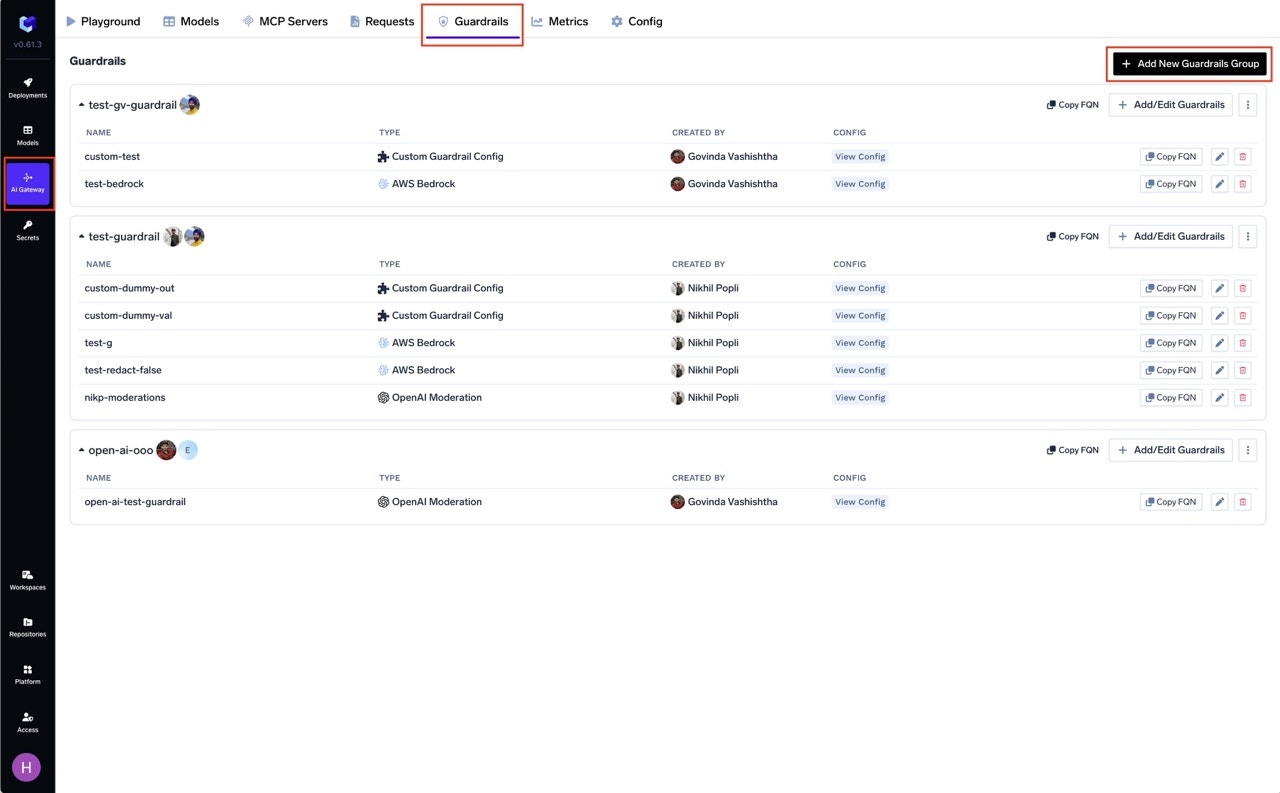
1. **Navigate to AI Gateway**
   * Go to **AI Gateway** in your TrueFoundry dashboard.

2. **Access Guardrails**
   * Click on **Guardrails**.

3. **Add New Guardrails Group**
   * Click on **Add New Guardrails Group**.

<Frame caption="Navigate to Guardrails">
  <img src="https://mintcdn.com/truefoundry/yRoKH_fkKi2nPtuV/images/guardrail-1.jpeg?fit=max&auto=format&n=yRoKH_fkKi2nPtuV&q=85&s=9ff04ad219001f1bfc31959b9ac261da" alt="Navigate to Guardrails section in dashboard" width="1280" height="793" data-path="images/guardrail-1.jpeg" />
</Frame>

Guardrails groups help manage access control and security policies for your LLM applications. Configure rules to prevent harmful content, ensure compliance, and maintain data privacy. For more details, refer to the [Collaborator Section](/docs/ai-gateway/gateway-access-control).

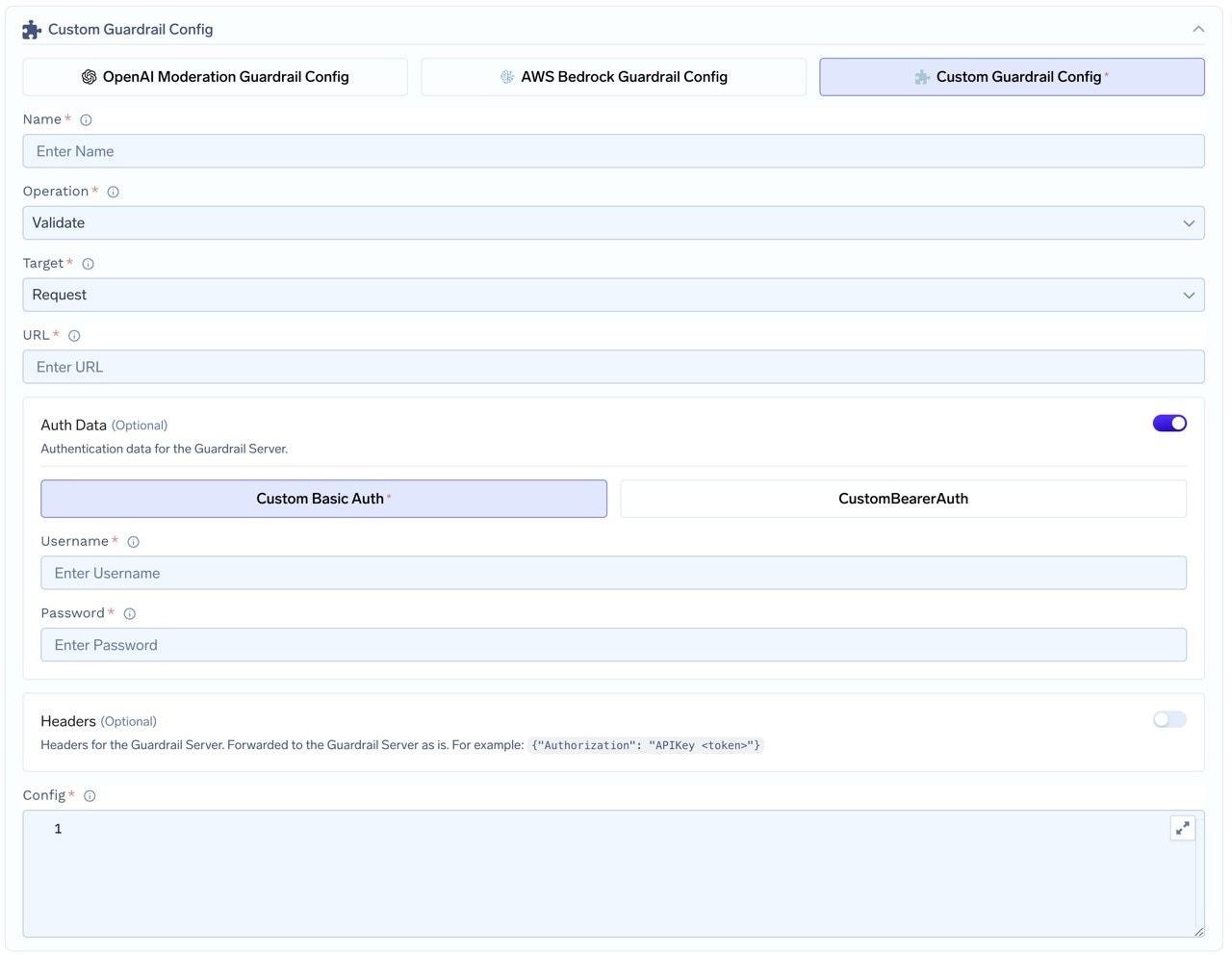
4. **Fill in the Guardrails Group Form**
   * **Name**: Enter a name for your guardrails group.
   * **Collaborators**: Add collaborators who will have access to this group.
   * **Custom Guardrail Config**:
     * **Name**: Enter a name for the Custom Guardrail configuration.
     * **Operation**: The operation type to use for the guardrail.
       * **Validate**: Guardrails that inspect and can block without mutating content. On **LLM input validation**, the gateway may run these alongside the in-flight model request when applicable; on **LLM output** and **MCP** hooks, validation runs **synchronously** before the response or tool result is released. See [Guardrails Overview — Operation Mode](/docs/ai-gateway/guardrails-overview#operation-mode).
       * **Mutate**: Guardrails with this operation can both validate and mutate requests. Mutate guardrails are run sequentially.
     * **URL**: Enter the URL for the Guardrail Server.
     * **Auth Data**: Provide authentication data for the Guardrail Server. This data will be sent to the Guardrail Server for authorization.
       * Choose between **Custom Basic Auth** or **Custom Bearer Auth**.
     * **Headers (Optional)**: Add any headers required for the Guardrail Server. These will be forwarded as is.
     * **Config**: Enter the configuration for the Guardrail Server. This is a JSON object that will be sent along with the request.
<Frame caption="Fill in the Custom Guardrail Form">
  <img src="https://mintcdn.com/truefoundry/OHzlp6GY5G-JfKle/images/custom-guardrail.jpeg?fit=max&auto=format&n=OHzlp6GY5G-JfKle&q=85&s=638227faa6070b78f1f4b6b6872c3bed" alt="Custom Guardrail configuration form in dashboard" width="1280" height="993" data-path="images/custom-guardrail.jpeg" />
</Frame>

### How Custom Guardrail Config Relates to Guardrail Requests

When you configure a Custom Guardrail in the TrueFoundry guardrails integration creation form (as described above), the settings you provide—such as the operation type, URL, authentication data, headers, and config—directly influence how the AI Gateway interacts with your guardrail server at runtime.

**How it works:**

* **Config Propagation:**\
  The `Config` field you specify in the integration creation form is sent as the `config` attribute in every guardrail request payload. This allows you to parameterize your guardrail logic (e.g., set thresholds, enable/disable features, or pass secrets) without changing your server code.

* **Request Structure:**\
  When a request is routed through a guardrail, the AI Gateway constructs a request object (such as `InputGuardrailRequest` or `OutputGuardrailRequest`) and sends it to your server. This object includes:
  * The original model input (`requestBody`)
  * (For output guardrails) The model's response (`responseBody`)
  * The `config` object (from your integration creation form)
  * The `context` (user, metadata, etc.)

* **Example Payload:**
  ```json lines theme={"dark"}
  {
    "requestBody": { /* original model input */ },
    "responseBody": { /* model output, for output guardrails */ },
    "config": { /* your custom config from the integration creation form */ },
    "context": { /* user and request metadata */ }
  }
  ```

* **Dynamic Behavior:**\
  By updating the Custom Guardrail Config in the integration creation form, you can change the behavior of your guardrail server in real time—no code redeploy required. For example, you might adjust PII detection sensitivity, toggle logging, or update allowed user lists.

**Summary Table**

| Integration Creation Form Field | Sent in Guardrail Request as                                                                                                  |
| ------------------------------- | ----------------------------------------------------------------------------------------------------------------------------- |
| Config                          | `config`                                                                                                                      |
| Auth Data, Headers              | HTTP headers `customHeaders`                                                                                                  |
| Operation                       | `validate` or `mutate` (how the gateway interprets the response); combine with **URL** for the HTTP route your server exposes |
| URL                             | Guardrail server endpoint                                                                                                     |

This tight integration ensures that your guardrail logic remains flexible, maintainable, and easy to update as your requirements evolve.

### Example: Sending a Request to Your Guardrail Server

### Sample Input Guardrail Request Payload & cURL Example

<AccordionGroup>
  <Accordion title="Integration Form Example Values">
    <table>
      <thead>
        <tr>
          <th>Field</th>
          <th>Example Value</th>
        </tr>
      </thead>

      <tbody>
        <tr>
          <td><strong>Operation</strong></td>
          <td><code>mutate</code> (guardrail operation); URL path is <code>/pii-redaction</code></td>
        </tr>

        <tr>
          <td><strong>URL</strong></td>
          <td><code>[https://my-guardrail-server.example.com/pii-redaction](https://my-guardrail-server.example.com/pii-redaction)</code></td>
        </tr>

        <tr>
          <td><strong>Auth Data</strong></td>
          <td><code>Bearer \<token></code></td>
        </tr>

        <tr>
          <td><strong>Headers</strong></td>

          <td>
            <code>
              {`{ "X-Api-Key": "my-api-key" }`}
            </code>
          </td>
        </tr>

        <tr>
          <td><strong>Config</strong></td>

          <td>
            <pre>
              {`{"redact_types": ["EMAIL_ADDRESS", "PHONE_NUMBER"],"min_confidence": 0.7}`}
            </pre>
          </td>
        </tr>
      </tbody>
    </table>
  </Accordion>

  <Accordion title="Example cURL Request">
    <pre>
      {`curl -X POST https://my-guardrail-server.example.com/pii-redaction \\
            -H "Authorization: Bearer <token>" \\
            -H "X-Api-Key: my-api-key" \\
            -H "Content-Type: application/json" \\
            -d '{
              "requestBody": {
                "model": "gpt-3.5-turbo",
                "messages": [
                  {"role": "user", "content": "My email is alice@example.com"}
                ]
              },
              "config": {
                "redact_types": ["EMAIL_ADDRESS", "PHONE_NUMBER"],
                "min_confidence": 0.7
              },
              "context": {
                "user": {
                  "subjectId": "user-123",
                  "subjectType": "user",
                  "subjectSlug": "alice",
                  "subjectDisplayName": "Alice"
                },
                "metadata": {
                  "request_id": "req-456"
                }
              }
            }'
            `}
    </pre>
  </Accordion>
</AccordionGroup>

### Sample Output Guardrail Request Payload & cURL Example

<AccordionGroup>
  <Accordion title="Integration Form Example Values">
    <table>
      <thead>
        <tr>
          <th>Field</th>
          <th>Example Value</th>
        </tr>
      </thead>

      <tbody>
        <tr>
          <td><strong>Operation</strong></td>
          <td><code>validate</code> (guardrail operation); URL path is <code>/nsfw-filtering</code></td>
        </tr>

        <tr>
          <td><strong>URL</strong></td>
          <td><code>[https://my-guardrail-server.example.com/nsfw-filtering](https://my-guardrail-server.example.com/nsfw-filtering)</code></td>
        </tr>

        <tr>
          <td><strong>Auth Data</strong></td>
          <td><code>Bearer \<token></code></td>
        </tr>

        <tr>
          <td><strong>Headers</strong></td>

          <td>
            <code>
              {`{ "X-Api-Key": "my-api-key" }`}
            </code>
          </td>
        </tr>

        <tr>
          <td><strong>Config</strong></td>

          <td>
            <pre>
              {`{"toxicity_threshold": 0.8}`}
            </pre>
          </td>
        </tr>
      </tbody>
    </table>
  </Accordion>

  <Accordion title="Example cURL Request">
    <pre>
      {`curl -X POST https://my-guardrail-server.example.com/nsfw-filtering \\
            -H "Authorization: Bearer <token>" \\
            -H "X-Api-Key: my-api-key" \\
            -H "Content-Type: application/json" \\
            -d '{
              "requestBody": {
                "model": "gpt-3.5-turbo",
                "messages": [
                  {"role": "user", "content": "Tell me a joke."}
                ]
              },
              "responseBody": {
                "id": "chatcmpl-abc123",
                "object": "chat.completion",
                "created": 1710000000,
                "model": "gpt-3.5-turbo",
                "choices": [
                  {
                    "index": 0,
                    "message": {
                      "role": "assistant",
                      "content": "Why did the chicken cross the road? To get to the other side!"
                    },
                    "finish_reason": "stop"
                  }
                ],
                "usage": {
                  "prompt_tokens": 10,
                  "completion_tokens": 15,
                  "total_tokens": 25
                }
              },
              "config": {
                "toxicity_threshold": 0.8
              },
              "context": {
                "user": {
                  "subjectId": "user-456",
                  "subjectType": "user",
                  "subjectSlug": "bob",
                  "subjectDisplayName": "Bob"
                },
                "metadata": {
                  "request_id": "req-789"
                }
              }
            }'
            `}
    </pre>
  </Accordion>
</AccordionGroup>
